Build a Scheduled Daily AI Digest in n8n (Auto-Summarized)
Four nodes. One morning brief. About $1 a month.
AI-drafted, reviewed by Muhammad Qasim Hammad on June 20, 2026. See our AI disclosure.
Table of contents
- What is a scheduled AI digest, and what can it brief you on?
- How does the digest workflow fit together in n8n?
- How much does a daily AI digest cost?
- How do you schedule it to run every morning?
- How do you build the digest in n8n, step by step?
- Step 1: Add the Schedule Trigger
- Step 2: Fetch your sources
- Step 3: Summarize with the Summarization Chain
- Step 4: Format and deliver
- Step 5: Activate and verify
- How should you fetch each source?
- Where can this go wrong?
- What should you set up this weekend?
You open your laptop every morning to a browser full of tabs: competitor blogs, newsletters, a subreddit you're tracking, and an overnight support queue. An n8n daily digest fetches all of it on a schedule, summarizes it with Claude, and drops one short brief in your Slack or inbox before you sit down.
That tab-switching ritual costs about an hour of reactive reading before you've done a single real thing. It compounds: skip one day and you're two hours behind. Set it up once as an automated workflow and you get the same brief every morning for a cost that rounds down to a dollar.
What is a scheduled AI digest, and what can it brief you on?#
A scheduled AI digest is a workflow that fires automatically at a set time, pulls fresh content from one or more sources, condenses it with an AI model, and pushes a single readable brief to wherever you check first each morning. The four stages are: trigger on a schedule, fetch the sources, summarize the items, deliver the output.
Common source types include industry RSS feeds, competitor blog feeds, a subreddit's RSS URL, a newsletter scraped via API, and an overnight support queue exported from your helpdesk. Each source produces a list of items. The Summarization Chain in n8n collapses those items into one short document. You read one thing instead of twelve.
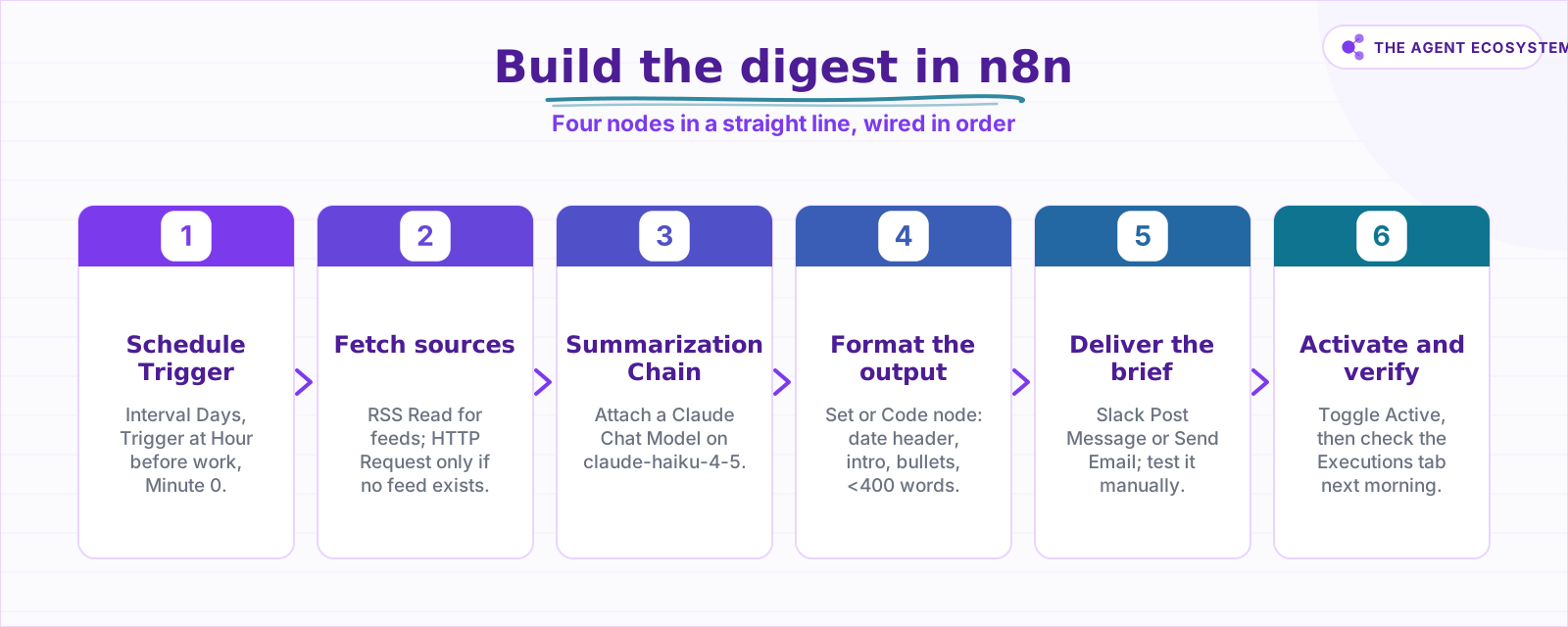 Wire the nodes in order; activate only after a clean test run.
How does the digest workflow fit together in n8n?#
The workflow is four nodes in a straight line: Schedule Trigger fires it, RSS Read (or HTTP Request) fetches the content, Summarization Chain with an attached Chat Model condenses it, and a Slack or Send Email node delivers it. Nothing outside the summarization step costs anything, which keeps the monthly bill near a dollar.
The Summarization Chain node requires a Chat Model sub-node. Attach Claude by adding a Claude Chat Model sub-node and pasting your Anthropic API key. The chain handles chunking and combining automatically, so you don't need to write a reduce loop. For a full walkthrough of the Summarization Chain, see the n8n AI summarization guide.
If you want to filter the feed before it reaches the summarizer, add a Text Classifier node upstream to drop irrelevant items. Fewer tokens in means a lower bill and a tighter brief.
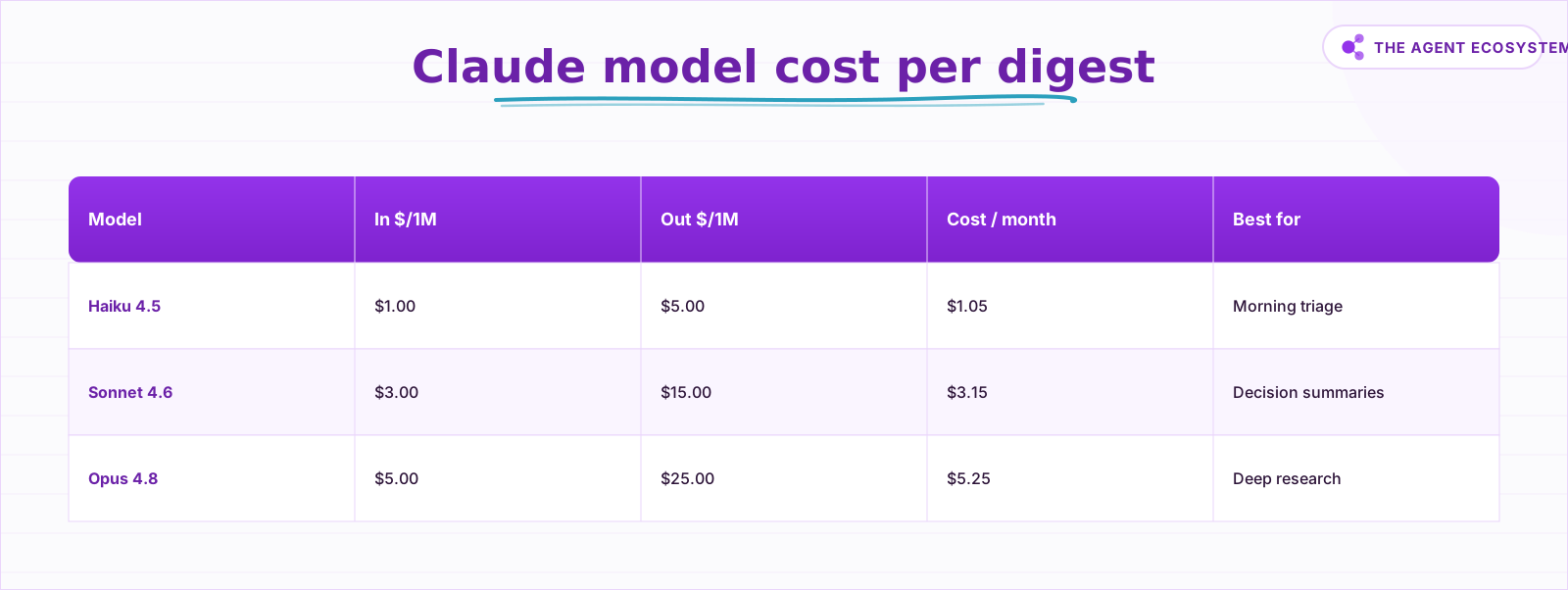 Mid-2026 Claude list prices; the summarize step is the whole bill.
How much does a daily AI digest cost?#
A daily digest pulling roughly 20 items generates about 25,000 input tokens and 2,000 output tokens per run, based on typical RSS item lengths plus prompt overhead. Over 30 days that is 0.75 million input tokens and 0.06 million output tokens per month. On Claude Haiku 4.5 that works out to $1.05 per month (as of mid-2026).
The entire bill is the summarization step. The Schedule Trigger, the RSS fetch, and the delivery node are all free in both self-hosted n8n (licensed under the fair-code sustainable-use license at $0) and n8n Cloud. Double your source count and you roughly double the token spend. If the digest feeds a real business decision, upgrade to Sonnet 4.6 for $3.15/month.
| Model | Input $/1M | Output $/1M | Cost per month (daily digest) | Best for |
|---|---|---|---|---|
| Claude Haiku 4.5 | $1.00 | $5.00 | $1.05 | Morning triage brief |
| Claude Sonnet 4.6 | $3.00 | $15.00 | $3.15 | Decision-grade summaries |
| Claude Opus 4.8 | $5.00 | $25.00 | $5.25 | Deep research digests |
Prices from Anthropic's pricing page as of mid-2026 (June 2026). All arithmetic is checkable: 0.75 x $1 + 0.06 x $5 = $1.05. If you want guardrails as your source list grows, the Claude API cost control guide shows how to add a token budget node.
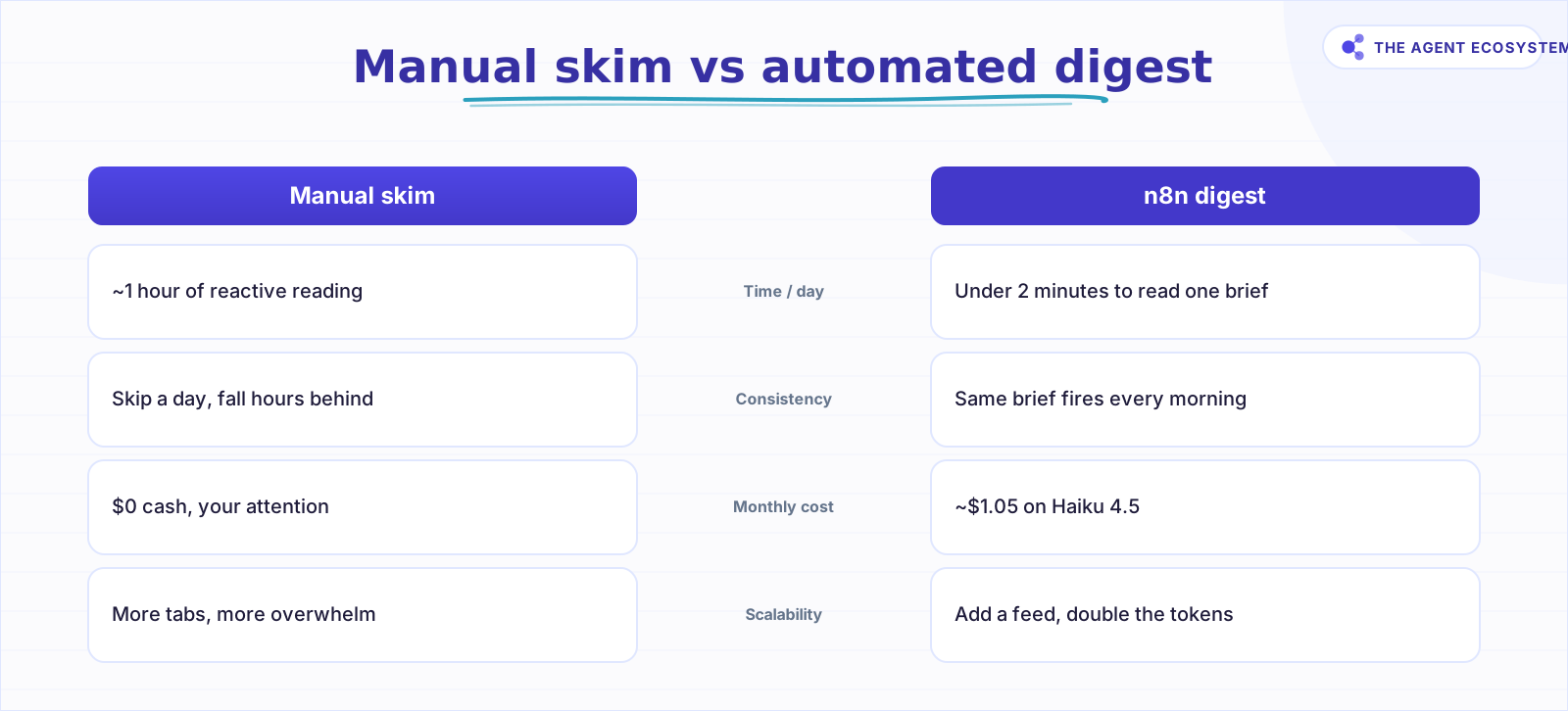 The digest swaps reactive tab-switching for one triage document.
How do you schedule it to run every morning?#
Set the Schedule Trigger node's Trigger Interval to Days, then fill in Trigger at Hour and Trigger at Minute for the exact time you want. For weekdays only, switch to Custom (Cron) and enter a standard cron expression. The Schedule Trigger docs list every interval option: Seconds, Minutes, Hours, Days, Weeks, Months, and Custom (Cron).
The critical constraint: the n8n instance must be running when the trigger fires. On a self-hosted setup, that means a VPS that never sleeps, not your development laptop. If you want the schedule to run regardless of your machine's state, n8n Cloud Starter at EUR 20/month handles that for you. See the self-hosted n8n VPS setup guide if you want the free path.
How do you build the digest in n8n, step by step?#
Building the workflow takes about 20 minutes if you have already connected your Claude API key. The chain runs in order: wire the trigger before the fetch, the fetch before the summarizer, and the summarizer before delivery. Activate the workflow last, only after a successful manual test run.
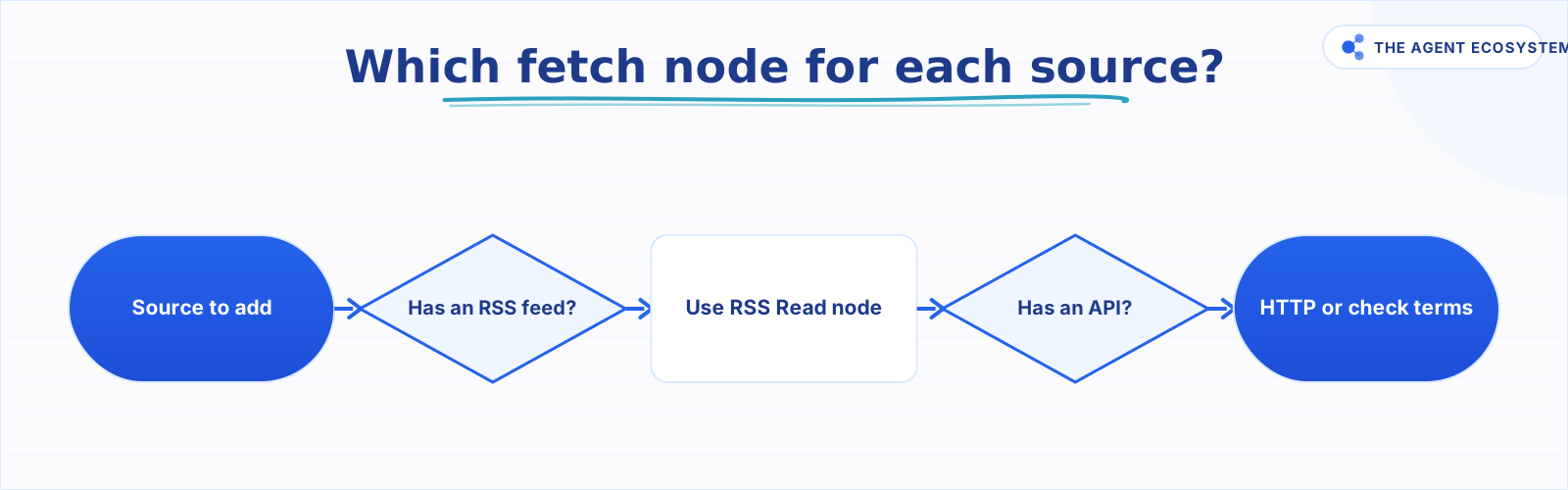 Prefer RSS; fall back to HTTP Request and verify the source's terms.
Step 1: Add the Schedule Trigger#
Add a Schedule Trigger node. Set Trigger Interval to Days. Set Trigger at Hour to your target hour and Trigger at Minute to 0. Save the node.
Step 2: Fetch your sources#
Add an RSS Read node. Paste your first feed URL into the URL field. Connect it to the Schedule Trigger output. Run the node manually to confirm items are returning with title, link, and content fields.
For sources without a feed, add an HTTP Request node instead. Point it at the API endpoint, set the method to GET, and confirm the source's terms of service allow automated access before activating.
Step 3: Summarize with the Summarization Chain#
Add a Summarization Chain node. Click Add sub-node and select a Chat Model. Choose Claude as the provider, paste your API key, and set the model name to claude-haiku-4-5. Set the Summarization Method to Map Reduce so long feeds are chunked before the final combine step.
Summarize the following news items for a solo operator.
For each item write one sentence covering: what happened, why it matters.
Output a bulleted list. Keep the full digest under 300 words.
Paste a prompt like this into the System Message field. Adjust the word cap to match how much you actually read each morning.
Step 4: Format and deliver#
Add a Set node to wrap the Summarization Chain output in a clean message structure: a date header plus the summary body. Connect a Slack node (action: Post Message) or a Send Email node and map the formatted body into the message field.
Step 5: Activate and verify#
Toggle the workflow to Active. Check the Executions tab the next morning. A green row confirms the run succeeded. A red row shows the error message. The most common first failure is a missing API key on the Chat Model sub-node.
How should you fetch each source?#
The right fetch node depends on what each source publishes. If it offers an RSS or Atom feed, the RSS Read node is always the first choice because the feed is meant to be read this way. If there is no feed but an API exists, use the HTTP Request node instead. The flowchart below decides it.
flowchart TD
    classDef terminal fill:#22c55e,color:#fff,stroke:none
    classDef decision fill:#f97316,color:#fff,stroke:none
    classDef action fill:#3b82f6,color:#fff,stroke:none

    A([Source to add]):::terminal --> B{Has an RSS feed?}:::decision
    B -- Yes --> C[Use RSS Read node]:::action --> E([Done]):::terminal
    B -- No --> D{Has an API?}:::decision
    D -- Yes --> F[Use HTTP Request]:::action --> E
    D -- No --> G[Check the terms first]:::action --> E
Where can this go wrong?#
Most digest failures trace back to one of four predictable issues, and none of them are bugs in n8n. They come down to where you host it, how you fetch, how lossy the summary is, and how many sources you point at it. For self-hosted setups, the instance being asleep at trigger time is the most common.
Instance not running at trigger time. A Schedule Trigger on a sleeping laptop fires nothing. The job needs an always-on host. Self-host on a VPS that stays up, or use n8n Cloud.
Source terms of service. The RSS Read node reads feeds the publisher explicitly provides for automated consumption. Scraping a page via HTTP Request may violate the site's terms or robots rules. Prefer RSS wherever it exists.
Summaries are lossy. The Summarization Chain condenses, which means it drops detail. A brief that says "Company X announced a product update" may omit the part that actually matters. Open the source before acting. This is covered in depth in the n8n AI summarization post.
Too many sources. Twenty feeds produce noise, not clarity. Start with three or four, read the digest for a week, then add more only if there is a clear gap. If volume still feels high after curating, add a Text Classifier node upstream to filter items before they reach the summarizer. You can also add sentiment tagging to flag negative news automatically.
What should you set up this weekend?#
Pick one feed you check manually every morning and wire it through this four-node workflow. A single RSS feed, the Summarization Chain on Haiku 4.5, and a Slack message. Run it manually first to confirm the output is readable, then activate it, set the trigger for 30 minutes before your first coffee, and let it run for five weekdays.
After five days you'll know whether the summary quality is good enough and whether the source list needs trimming. From there, add a second feed or upgrade to Sonnet if the brief is feeding real decisions. See the Claude vs GPT vs Gemini model comparison for a practical guide on when the upgrade is worth it.
The infrastructure cost is $0 on a self-hosted instance and about $1 in Claude tokens. That math doesn't get better by waiting.
Frequently asked questions
What is an n8n daily digest?
How much does a daily AI digest cost to run?
How do I schedule an n8n workflow to run every day?
Can the digest pull from sources without an RSS feed?
Which Claude model should I use for the digest?
Will the digest run if my computer is off?
Sources
Primary references and vendor documentation used while drafting and reviewing this article.
Written by

Muhammad Qasim Hammad is an AI agent and automation expert and the founder of Cart Gaze LLC (cartgaze.com). He builds product for the love of it: when an idea lands, a working prototype is usually running within hours, built with the same AI agents and automations he sells. He puts his own output at roughly 20× what it was before agents, and the Agentic OS behind this site is the working proof, documented in public with the tools he actually ran and what they really cost.
AI & Automation Services
Want a pipeline like this running in your business?
I'm Qasim — I design and ship AI agents and n8n automations for solo operators and small teams. Tell me what's eating your team's week, and I'll scope a fix.
Related reading
Summarize Long Documents in n8n with the AI Summarization Chain
Use the n8n Summarization Chain node to automatically condense transcripts, PDFs, and long articles into one-paragraph summaries. Costs $0.85 per 100 documents on Claude Haiku 4.5, with three method options for any document length.

n8n AI Automation Ideas: 8 Agent Workflows Worth Building (2026)
Finished the n8n AI tutorial and wondering what to actually build? These 8 n8n AI automation ideas come with the exact nodes, the honest Chain-vs-Agent call, and the right Claude model for each job.
How to Use the Basic LLM Chain in n8n (Your First AI Step)
The n8n Basic LLM Chain is the simplest AI building block: one prompt in, one model response out, no tools, no memory, no loops. Wire it up in minutes and keep your token bill predictable at about $1.40 per 1,000 calls on Claude Haiku 4.5.
Build an AI Customer-Support Bot in n8n (RAG, With Real Monthly Cost)
Build an n8n AI customer support bot that answers repeat questions from your own docs using RAG. Two workflows, about $4.50 per 1,000 answers on Claude Haiku 4.5, and $0 platform cost if you self-host.
Run AI Sentiment Analysis in n8n (Reviews, Feedback & Support)
Set up n8n sentiment analysis to classify every review, survey reply, or support message automatically. Route negatives to an instant alert and positives to a testimonial ask, for about $0.45 per 1,000 items.
Add an AI Chatbot to Your Website With n8n (Chat Trigger)
Add a working AI chat widget to any website using n8n's Chat Trigger node and the @n8n/chat embed snippet. No React, no SaaS widget, about $7.25 per 1,000 conversations on Claude Haiku 4.5.