n8n Redis Chat Memory: Persistent Memory for Your AI Agent
Store agent history in Redis so it survives restarts and queue mode.
AI-drafted, reviewed by Muhammad Qasim Hammad on July 11, 2026. See our AI disclosure.
Table of contents
You wired a chat agent in n8n, restarted the instance, and the conversation started over from nothing. Or you switched on queue mode and every worker remembered a different history. Both problems are the same missing piece: memory that lives outside the workflow process. Redis Chat Memory is n8n's answer, a fast external store for an agent's conversation history that survives restarts and is shared across workers.
This is a setup guide and a decision guide. It covers the exact node fields, how the session key isolates one conversation from another, what Session Time To Live does, and when Redis is the right backend instead of the in-process Simple Memory node.
What is Redis Chat Memory in n8n, and when do you need it?#
Redis Chat Memory is a sub-node that stores an AI agent's conversation history in a Redis database instead of the workflow process. You reach for it when a chat has to survive an n8n restart, when several queue-mode workers must share one history, or when you want old sessions to expire on their own without a cleanup job.
The default memory node, Simple Memory, keeps the last few turns in the workflow process itself. That is perfect for a quick prototype and it needs zero setup, but the history is gone the moment the process restarts, and in queue mode a different worker can pick up the next message with no idea what was said. Redis moves that same window into an external store every worker can read, so the conversation stays durable and consistent no matter which process handles the next turn.
Think of it as two independent decisions. One is how much history you carry, which the Context Window Length controls. The other is where that history lives, which the backend controls. Redis changes only the second decision. A common mistake is to assume that moving memory to Redis makes the agent remember more; it does not. It makes the same window durable and shareable, and that is usually exactly what a real chatbot needs once it leaves your laptop.
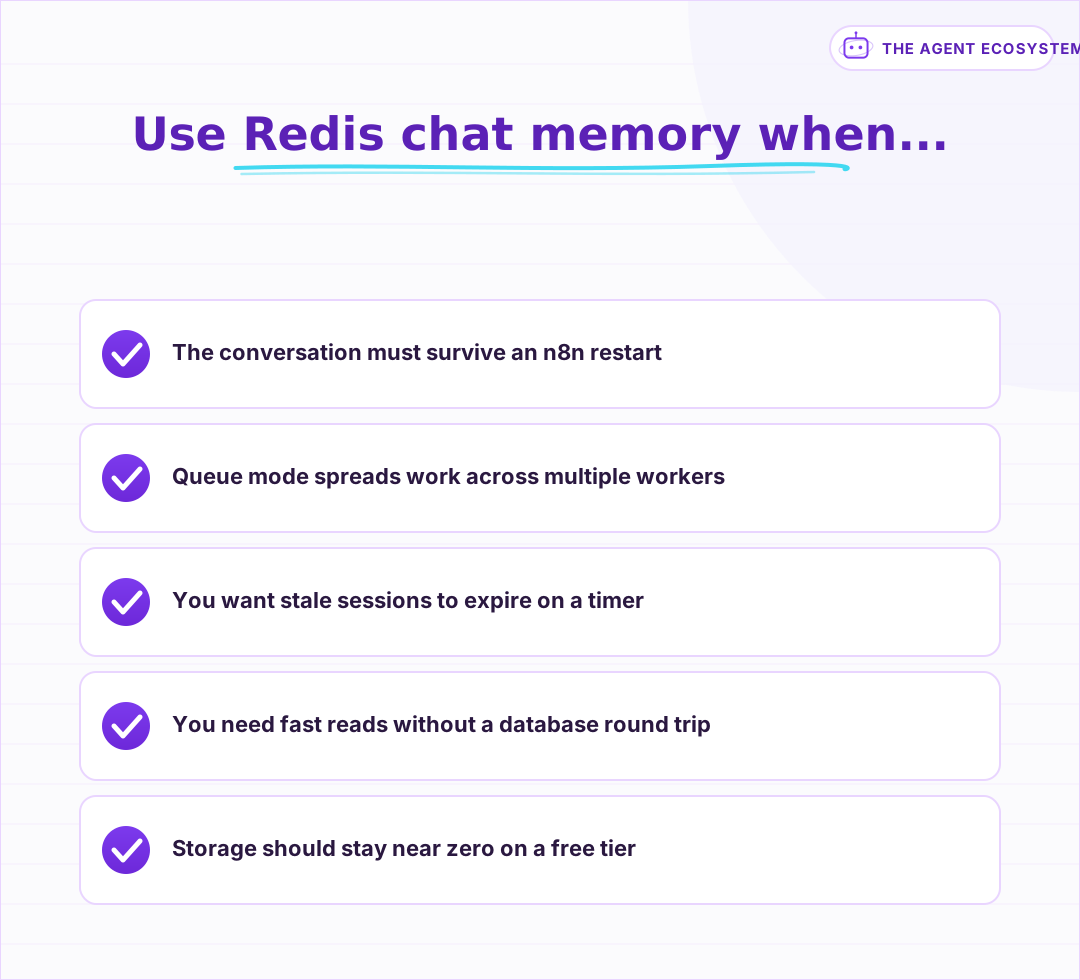 If any of these are true, the in-process window is not enough and an external store earns its keep.
How do you configure the Redis Chat Memory node?#
Add the Redis Chat Memory sub-node to your AI Agent, attach a Redis credential, then set three fields. Session Key names the memory bucket, Context Window Length caps how many past turns are re-sent, and Session Time To Live sets how many seconds a conversation survives before Redis expires it. Bind the session key to a per-user value.
The single most important field is the Session Key. It decides which conversation a stored history belongs to, so if every user shares one static key their chats bleed into each other. Bind it to an expression that is unique per user or per chat, for example {{ $json.sessionId }} or the chat ID from your trigger, and each person gets a private thread inside the same Redis database. Multiple Redis Chat Memory nodes in one workflow read the same instance by default, so the key is the only thing keeping threads apart.
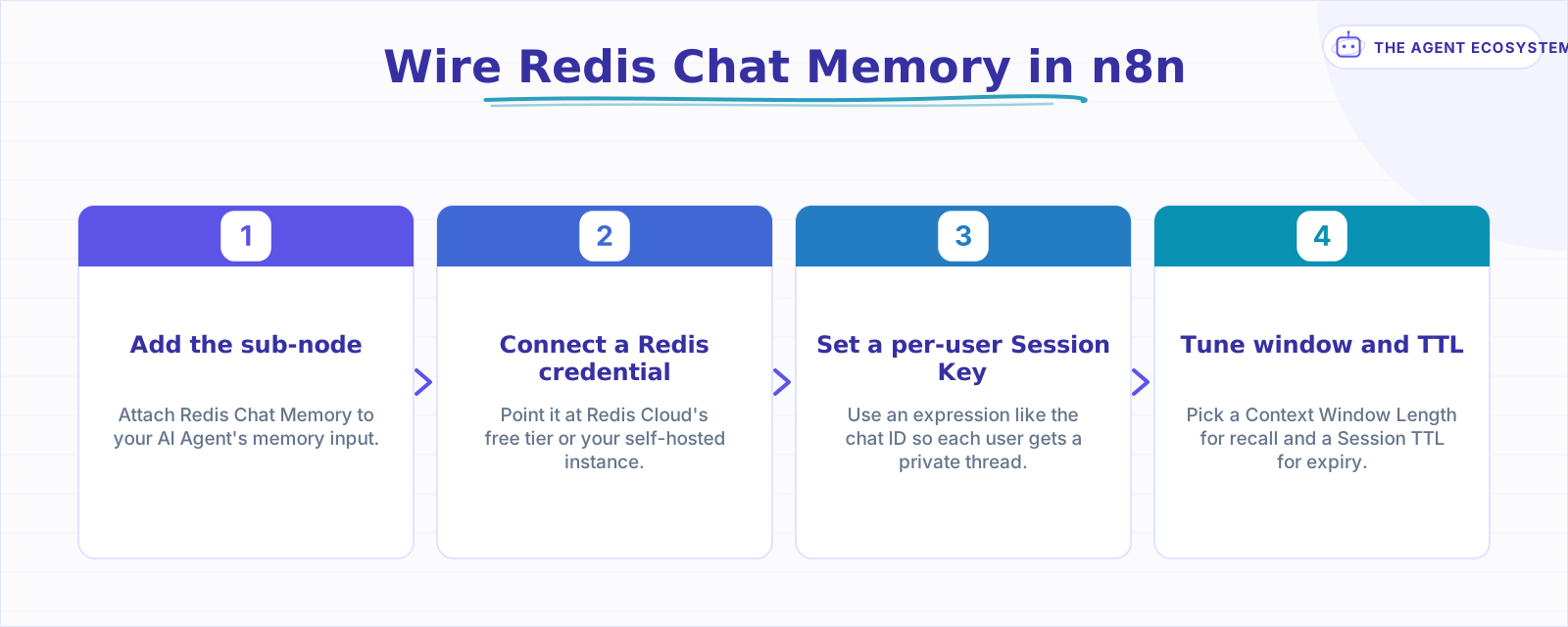 Four steps from a bare agent to a durable, per-user conversation memory.
Context Window Length works exactly as it does on Simple Memory: a value of 10 keeps the last 10 user-and-assistant exchanges, counted as turns rather than individual messages. Raising it improves recall of recent context and increases the input tokens you pay for on every call. The memory-types breakdown shows why that window, not the storage backend, is the real driver of your token bill.
Session Time To Live is the field Redis gives you that Postgres does not. Set it to 3600 and a conversation that goes quiet for an hour is deleted automatically, which is ideal for support chats or anonymous widgets where old sessions have no lasting value. Leave it empty and the history persists until you remove it yourself. The general memory guide covers the shared node wiring; TTL is the Redis-specific lever on top of it.
Why choose Redis over Simple Memory or Postgres?#
Pick Redis when you need durability, speed, and automatic expiry together. Simple Memory is in-process and vanishes on restart. Postgres Chat Memory is durable too, but it keeps rows until you delete them. Redis holds the window in memory, returns it in well under a millisecond, and can expire a stale session by itself.
The honest framing is that Redis and Postgres solve the same problem, durability, with different trade-offs. Postgres is the right call when the conversation is business data you want to keep, query, and back up alongside the rest of your app. Redis wins when the history is transient session state that should be fast and self-cleaning, which is what most chat agents actually want. Here is the three-way choice as a reference:
| Backend | Survives restart | Queue-mode safe | Auto-expiry | Best for |
|---|---|---|---|---|
| Simple Memory | No | No | No | Prototypes, single-process chats |
| Redis Chat Memory | Yes | Yes | Yes, via TTL | Fast, transient session memory |
| Postgres Chat Memory | Yes | Yes | No, manual delete | History you want to keep and query |
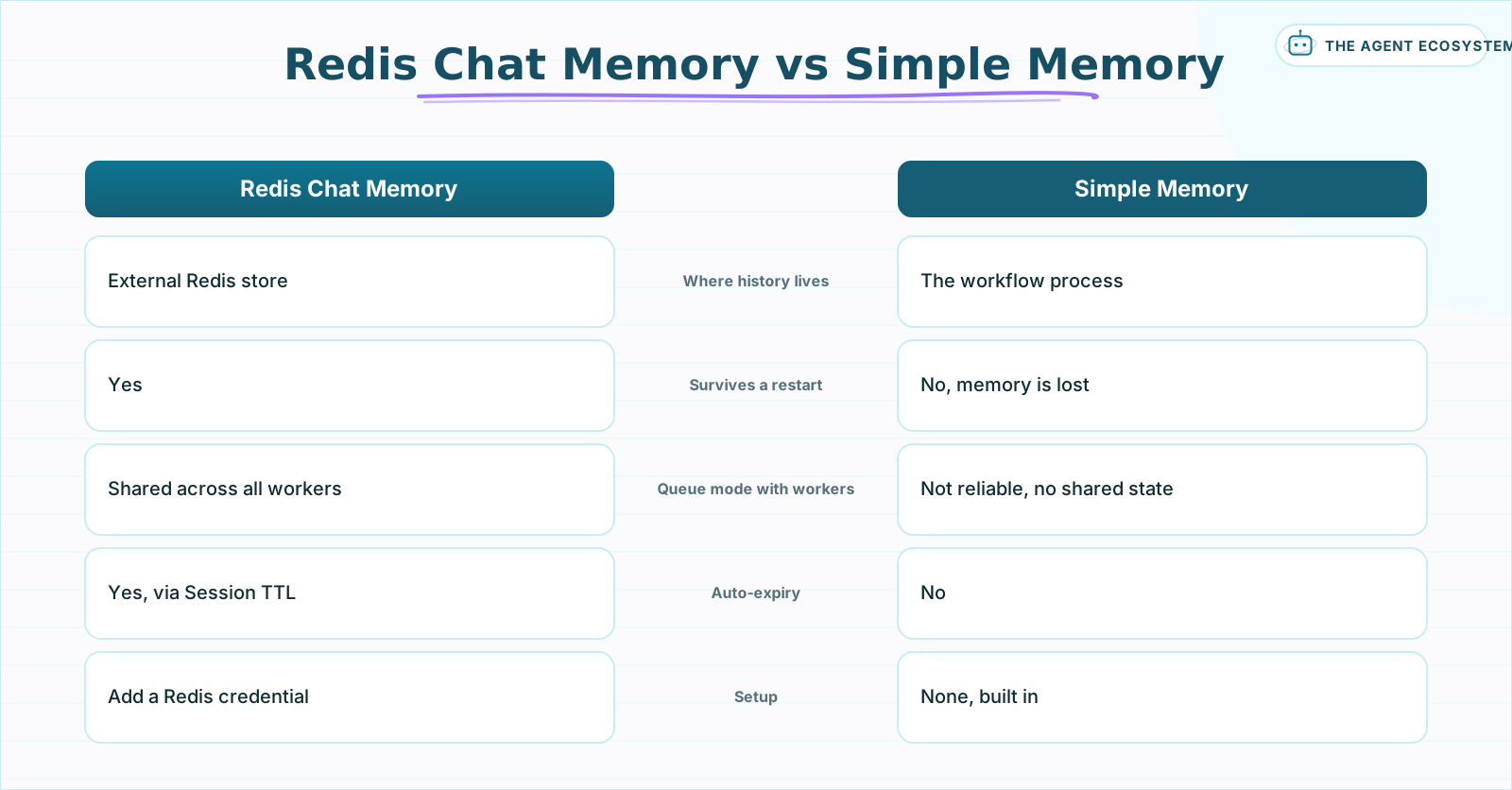 Same window of turns, different home. Redis moves it out of the process so it survives and scales.
If your workflow already runs in queue mode across multiple workers, an external backend is not optional. In-process memory cannot follow a conversation that lands on a different worker each turn, so Redis or Postgres becomes the only way the agent stays coherent under load. Between the two, Redis tends to win for chat because its speed and TTL match the shape of a conversation, while Postgres suits records you plan to keep.
What does Redis chat memory cost to run?#
Almost nothing. Redis Cloud's free Essentials tier gives you 30 MB, 30 connections, and 100 operations per second, enough for thousands of short chat windows since you store only the last N turns per session. Self-hosting Redis on a small VM you already run costs $0 extra. The bill is still LLM tokens.
A worked example makes the scale clear. A single stored turn is roughly 200 tokens of text, so a 10-turn window for one user is about 2 KB in Redis. At 30 MB free you can hold on the order of 15,000 such windows before running out of room, and TTL quietly reclaims space as old sessions expire, so you rarely approach the ceiling in practice. All of that is modeled from published limits, not a measured benchmark, but the arithmetic is easy to check yourself.
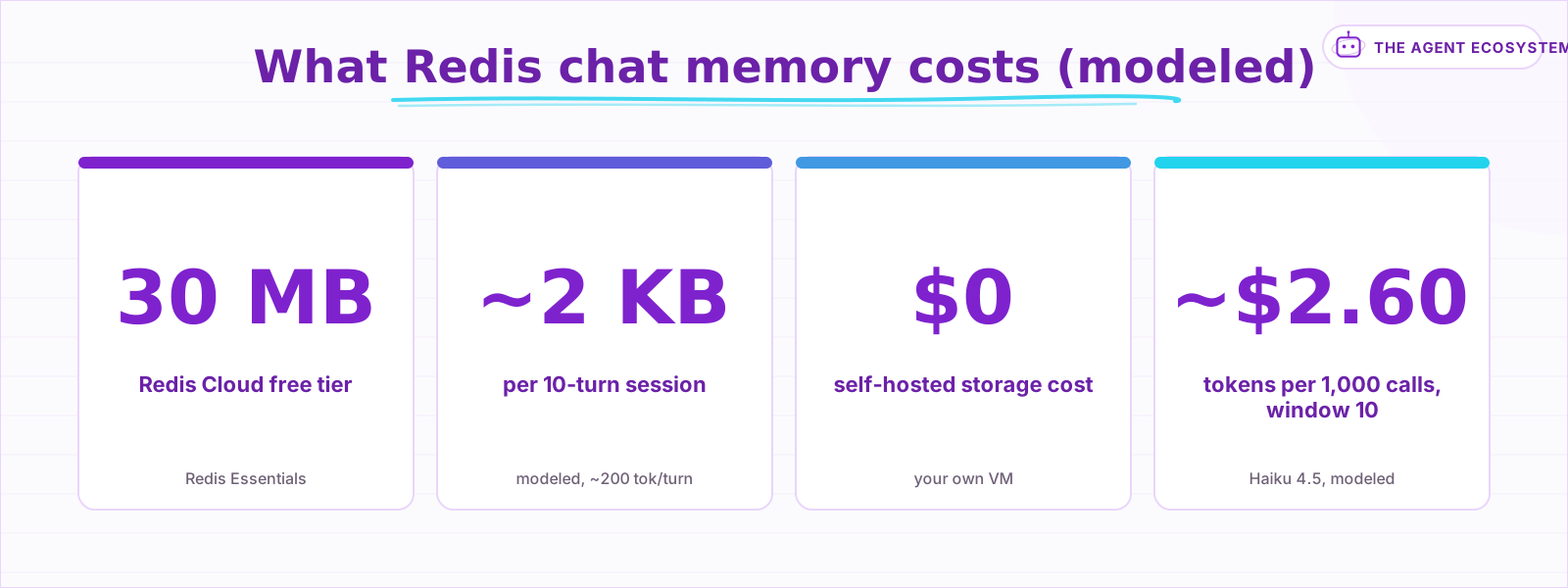 Storage is near-free at any realistic chat volume; the recurring cost is tokens, not Redis.
Compare that to the token side and the storage cost stops mattering. Re-sending a 10-turn window of about 2,600 input tokens on Claude Haiku 4.5 at $1 per million input tokens is roughly 0.0026 dollars per call. Run a thousand of those calls and you have spent about 2.60 dollars on tokens against 0 dollars on Redis. Whenever you tune for cost, tune the Context Window Length, not the backend.
Which memory setup should you actually use?#
Start with Simple Memory, then move to Redis the moment persistence or scale matters. If you are prototyping a single-process chat, the built-in window is enough and needs no credential. Switch to Redis Chat Memory when the conversation must survive restarts, when queue mode spreads work across workers, or when sessions should expire on a timer.
The mistake to avoid is starting with the heaviest option. You do not need Redis to demo an agent, and you do not need a vector store for conversation memory at all, since vector-backed memory solves recall-by-topic, a different problem. Wire Simple Memory first, confirm the agent behaves, then swap in Redis Chat Memory with the same Context Window Length once durability or queue mode forces your hand. The swap is a node change, not a rewrite, because the agent contract stays identical.
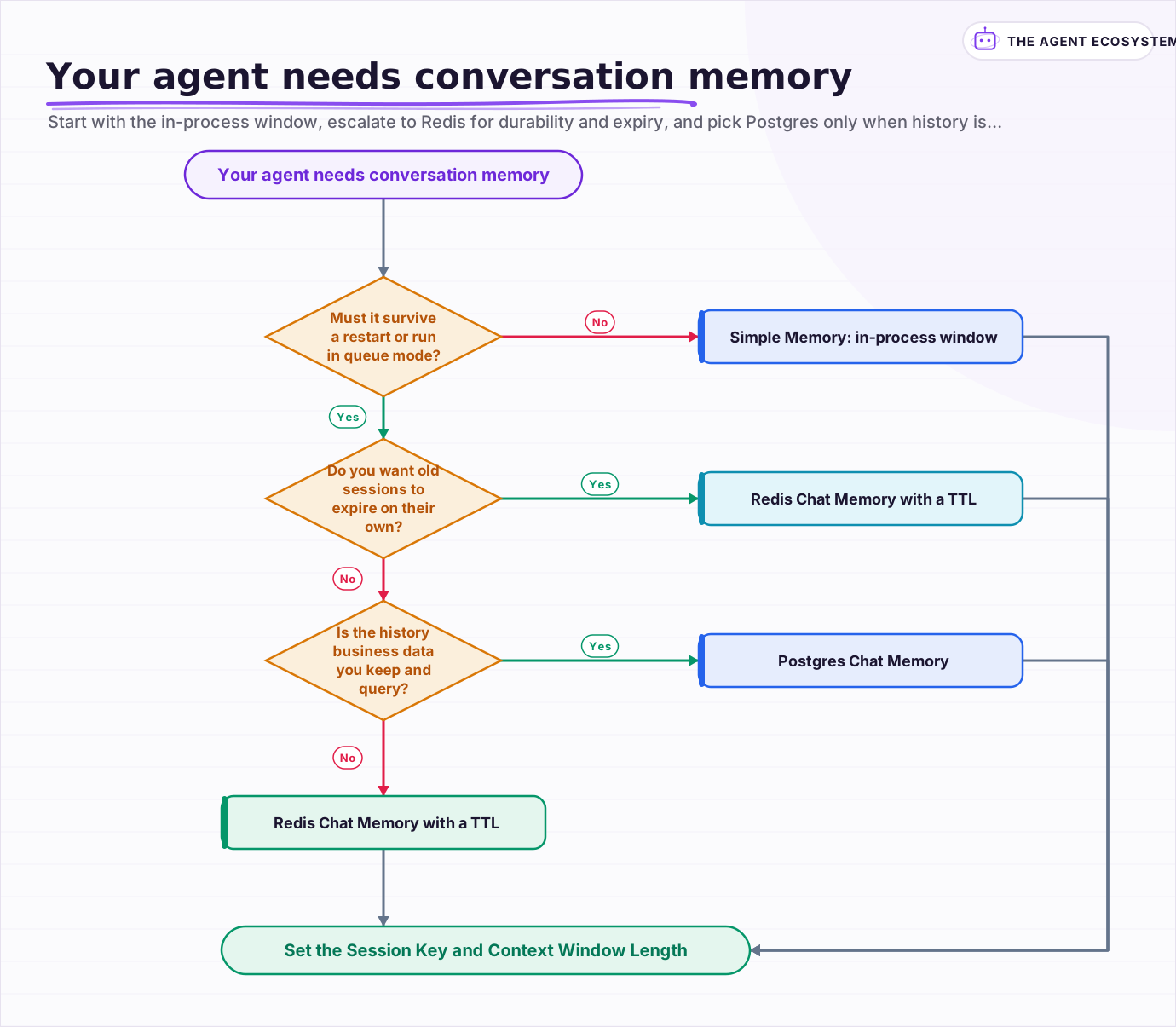 Start with the in-process window, escalate to Redis for durability and expiry, and pick Postgres only when history is data you keep.
Frequently asked questions
Does n8n have a Redis Chat Memory node?
How is Redis Chat Memory different from Simple Memory?
What does Session Time To Live do?
Is Redis chat memory free?
Does Redis memory work in n8n queue mode?
Sources
Primary references and vendor documentation used while drafting and reviewing this article.
Written by

Muhammad Qasim Hammad is an AI agent and automation expert and the founder of Cart Gaze LLC (cartgaze.com). He builds product for the love of it: when an idea lands, a working prototype is usually running within hours, built with the same AI agents and automations he sells. He puts his own output at roughly 20× what it was before agents, and the Agentic OS behind this site is the working proof, documented in public with the tools he actually ran and what they really cost.
AI & Automation Services
Want a pipeline like this running in your business?
I'm Qasim — I design and ship AI agents and n8n automations for solo operators and small teams. Tell me what's eating your team's week, and I'll scope a fix.
Related reading
Give Your n8n AI Agent Memory (Postgres Chat Memory, Step by Step)
Your n8n agent forgets every message because the model is stateless. Add Postgres Chat Memory, set a per-user Session Key, and tune Context Window Length to keep conversations coherent without blowing your token budget.

AI Agent Memory Types: Buffer vs Window vs Summary vs Vector
Agent memory is not something the model has; it is which past turns your framework re-sends each call. This compares the four ai agent memory types, full buffer, window, summary, and vector-backed, what each costs in tokens, and which map to real n8n nodes or patterns you wire.
n8n Queue Mode: Scale AI Workflows with Workers and Redis
One busy hour and your single n8n instance starts queueing executions behind a slow workflow. Queue mode is the fix: set EXECUTIONS_MODE=queue, add Redis and a shared Postgres, and run separate worker processes that scale out. Here is when you need it and the exact setup.
n8n AI Agent Pricing: What It Really Costs to Run
An n8n AI agent has two bills that behave nothing alike: a flat n8n platform fee and a per-run LLM token cost. Here is what each one comes to, with modeled per-run math across Claude, GPT, and Gemini, and the levers that actually lower the total.
Why Your n8n AI Agent Isn't Working: 6 Failure Modes and Fixes
An n8n AI Agent that finishes without an error but ignores its tools, loops until it quits, or returns the wrong shape is almost always a configuration problem. Here are the 6 failure modes that cover most of them, and the specific node setting behind each fix.
Build an AI Telegram Bot With n8n (No Code, No Fees)
Build an AI-powered n8n Telegram bot in under an hour using three nodes and zero platform fees. Get a shareable t.me link, no business verification required, and a bot that replies around the clock.