n8n Queue Mode: Scale AI Workflows with Workers and Redis
When you actually need queue mode, and the exact EXECUTIONS_MODE, Redis, and worker setup to turn it on.
AI-drafted, reviewed by Muhammad Qasim Hammad on July 16, 2026. See our AI disclosure.
Table of contents
Your n8n instance runs fine until one busy hour, when a queue of executions stacks up behind a single slow workflow and everything else waits. The usual reflex is a bigger server, but vertical scaling stops paying off fast. n8n queue mode is the switch that lets many worker processes pull and run executions in parallel, so you scale out instead of up.
What is n8n queue mode and when do you need it?#
n8n queue mode is a scaling setup where you set EXECUTIONS_MODE=queue so the main process enqueues jobs into Redis and dedicated worker processes execute them. You need it once regular mode saturates: a single instance runs everything in one process, and past roughly 1 concurrent bottleneck, executions pile up and latency climbs.
Regular mode (the default, also called main mode) is fine for most setups. One n8n process receives triggers, runs the workflow, and writes results. It is simple and needs no Redis. The ceiling is that all of that shares one process on one machine, so a few heavy or long-running workflows can starve everything else.
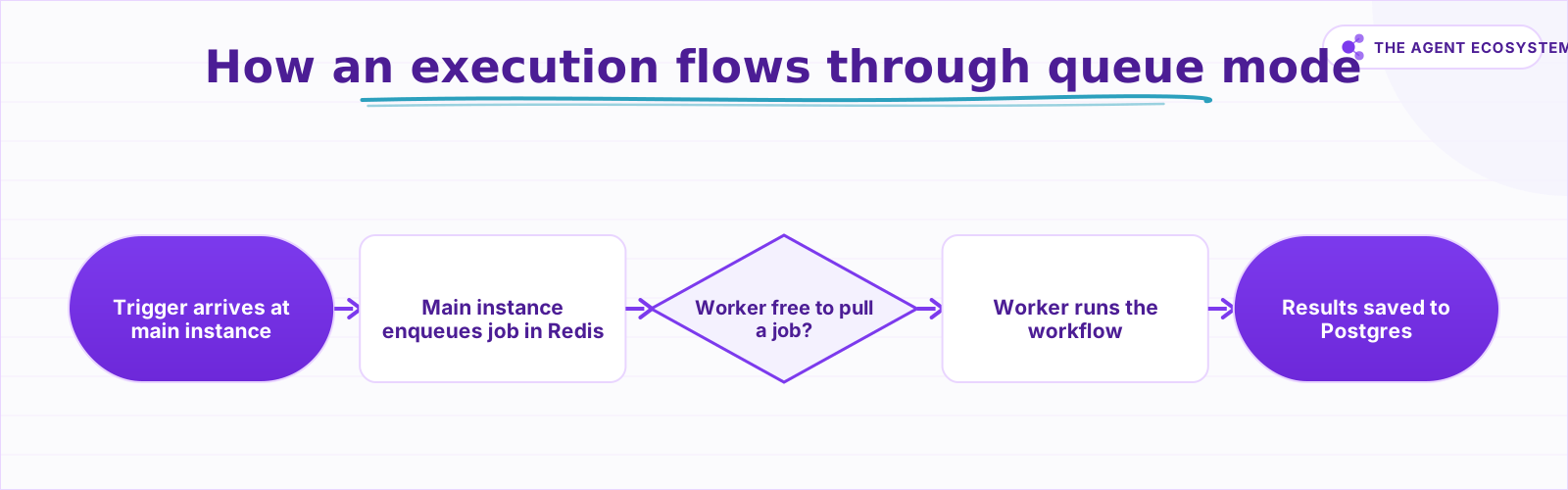 The main instance only enqueues; a worker pulls the job from Redis, runs it, and results land in the shared Postgres.
Queue mode splits those responsibilities. The main instance keeps handling the UI, triggers, and enqueuing, while the actual execution work moves to workers you can add or remove independently. The tradeoff is real: you take on Redis, a shared database, and more moving parts, in exchange for horizontal headroom you do not get from a bigger box.
This only matters once you self-host, because n8n Cloud handles scaling for you. If you are running your own instance, get the base setup solid first: our self-hosted n8n VPS setup guide covers the single-instance foundation that queue mode builds on. Trying to jump straight to workers on an unstable host just multiplies the number of things that can break.
Regular mode vs queue mode: what actually changes?#
The core change is where executions run and what infrastructure that requires. In regular mode, 1 process does everything with an optional SQLite file. In queue mode, the main instance only enqueues, workers run the jobs, and every component must share the same external Postgres database and the same Redis broker. That shared state is mandatory, not optional.
| Aspect | Regular mode | Queue mode |
|---|---|---|
EXECUTIONS_MODE | regular (default) | queue |
| Where executions run | Main process | Separate worker processes |
| Database | SQLite ok | Shared Postgres required |
| Redis broker | Not used | Required (Bull/BullMQ) |
| Horizontal scaling | No | Add more workers |
| Manual (UI) executions | Main process | Still the main process |
Two rows on that table trip people up most. First, you cannot run queue mode on SQLite: workers and the main instance need one shared database they all read and write, so Postgres is the supported choice. Second, manual executions you trigger from the editor still run on the main instance, not on a worker, so a heavy manual test can still load the main process.
The Redis broker sits between the two halves. n8n uses Bull/BullMQ on top of Redis to hold the queue of pending executions, so the main instance writes a job in and a free worker claims it. That is why every process must reach the exact same Redis: if the main instance enqueues to one Redis and a worker watches another, the job simply never gets picked up. The same identical-configuration rule applies to the Postgres connection.
How do you set up n8n queue mode step by step?#
Setup is five moves: switch the mode, point every component at one Redis, point them all at one Postgres, start 1 or more workers, and optionally add a webhook process. The main instance and every worker must share identical database and Redis settings, or jobs get enqueued that no worker can see or claim.
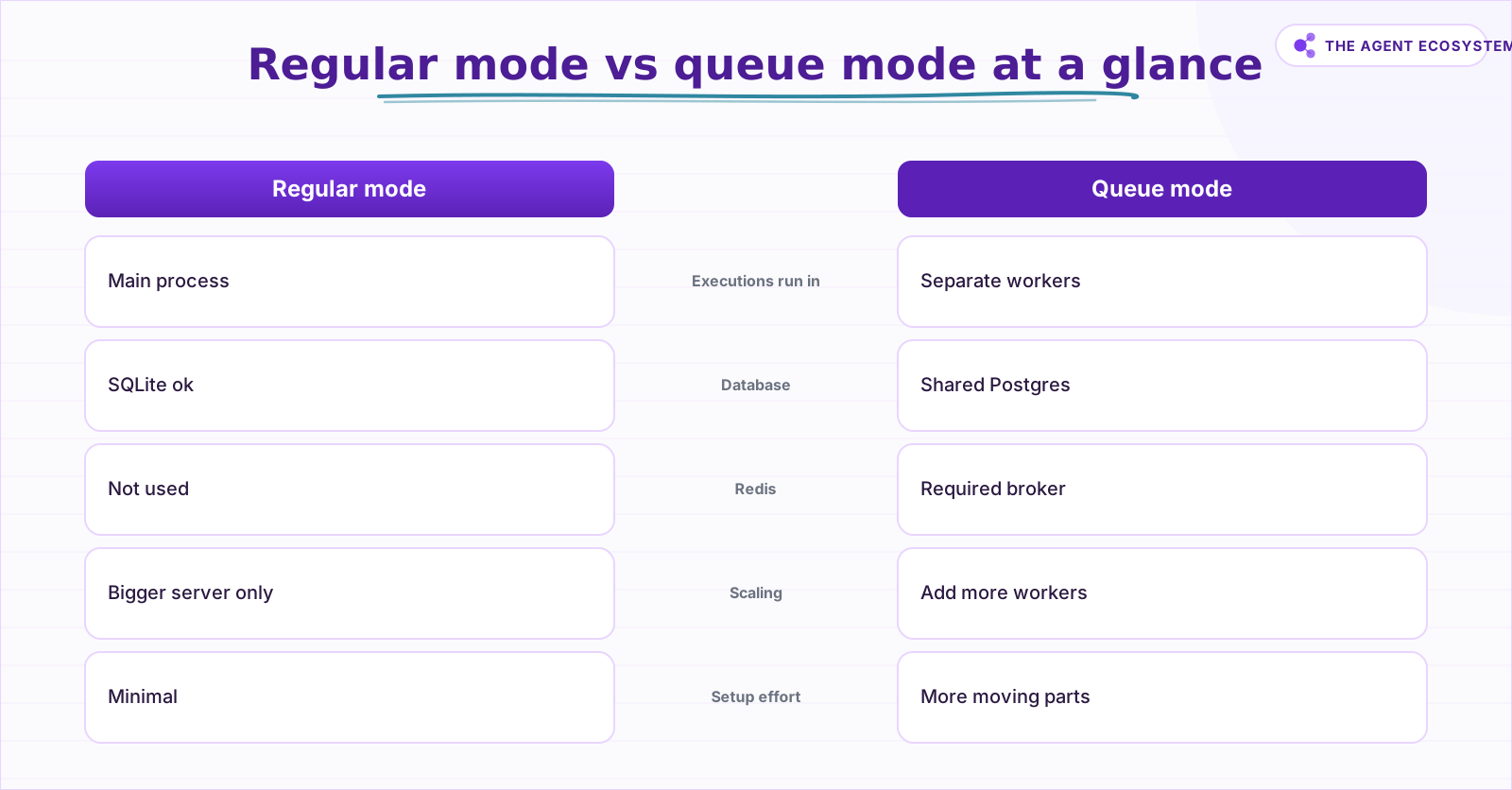 Regular mode runs everything in one process; queue mode splits enqueuing from execution and needs shared Postgres and Redis.
Start by setting EXECUTIONS_MODE=queue on the main instance. Then give every process the same Redis connection using QUEUE_BULL_REDIS_HOST and QUEUE_BULL_REDIS_PORT (add QUEUE_BULL_REDIS_PASSWORD if your Redis needs auth). Next, set the DB variables (DB_TYPE=postgresdb and the DB_POSTGRESDB_* host, database, user, and password) to the same Postgres for all of them.
With shared state in place, start a worker with the command n8n worker. Each worker runs up to 10 executions at once by default; you raise or lower that with the --concurrency flag, for example n8n worker --concurrency=5. To scale, run more worker processes, on the same host or across several machines, all pointed at the same Redis and Postgres.
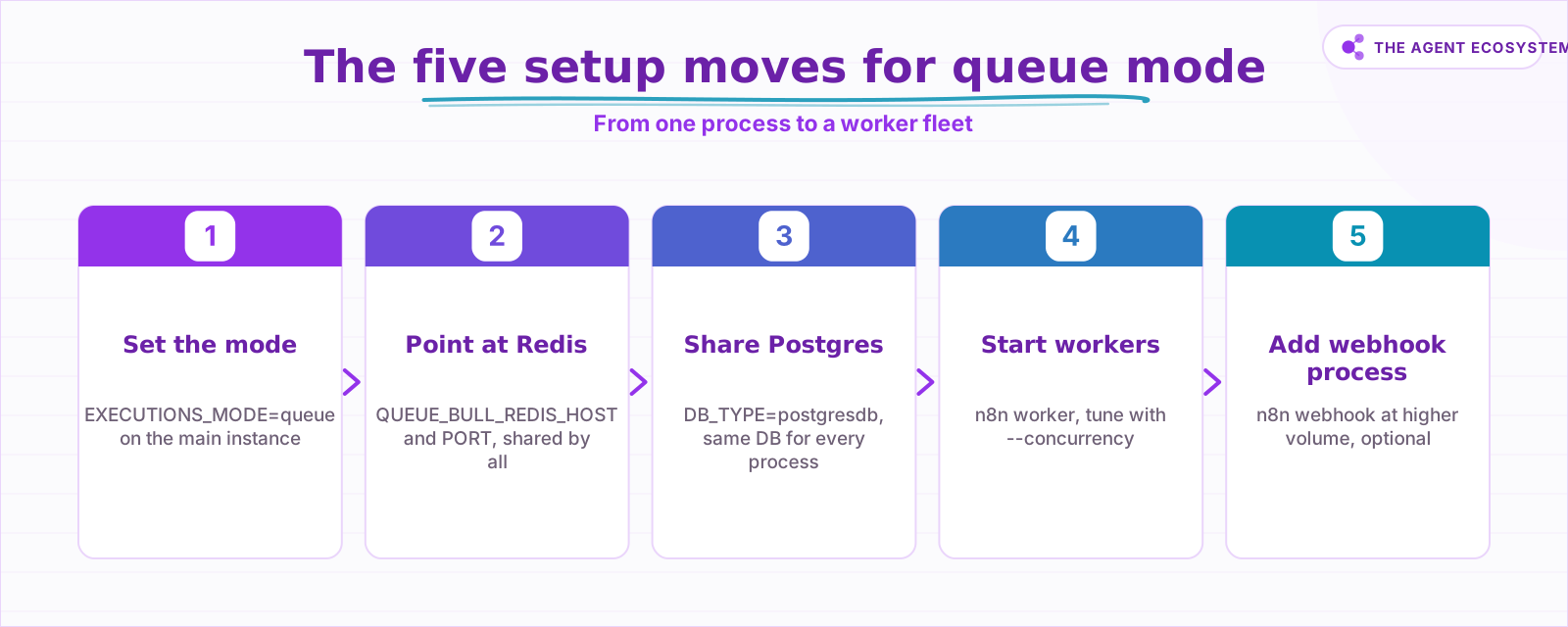 Switch the mode, share one Redis and one Postgres, start workers, then add a webhook process at higher volume.
At higher volume, add a dedicated webhook process with n8n webhook so incoming webhook requests are not handled by the main instance. That keeps webhook ingestion responsive when workers are busy. Everything still shares the one Redis and one Postgres, which is what lets the pieces coordinate.
One number worth knowing before you tune anything: worker concurrency and the production concurrency limit are separate knobs. The --concurrency flag caps how many executions a single worker runs at once (default 10), while a separate production limit can cap active production executions across the instance. If you set the second limit too low, adding workers will not help, because the instance throttles before your extra workers ever get busy. Check both against the concurrency-control docs.
Do you actually need queue mode, or is a bigger server enough?#
Reach for queue mode only when one instance genuinely cannot keep up or you need resilience, not just because the word "scale" sounds right. If a single server handles your load and a brief restart is acceptable, regular mode is simpler and cheaper. Queue mode earns its complexity when concurrency, spiky load, or worker redundancy become real requirements.
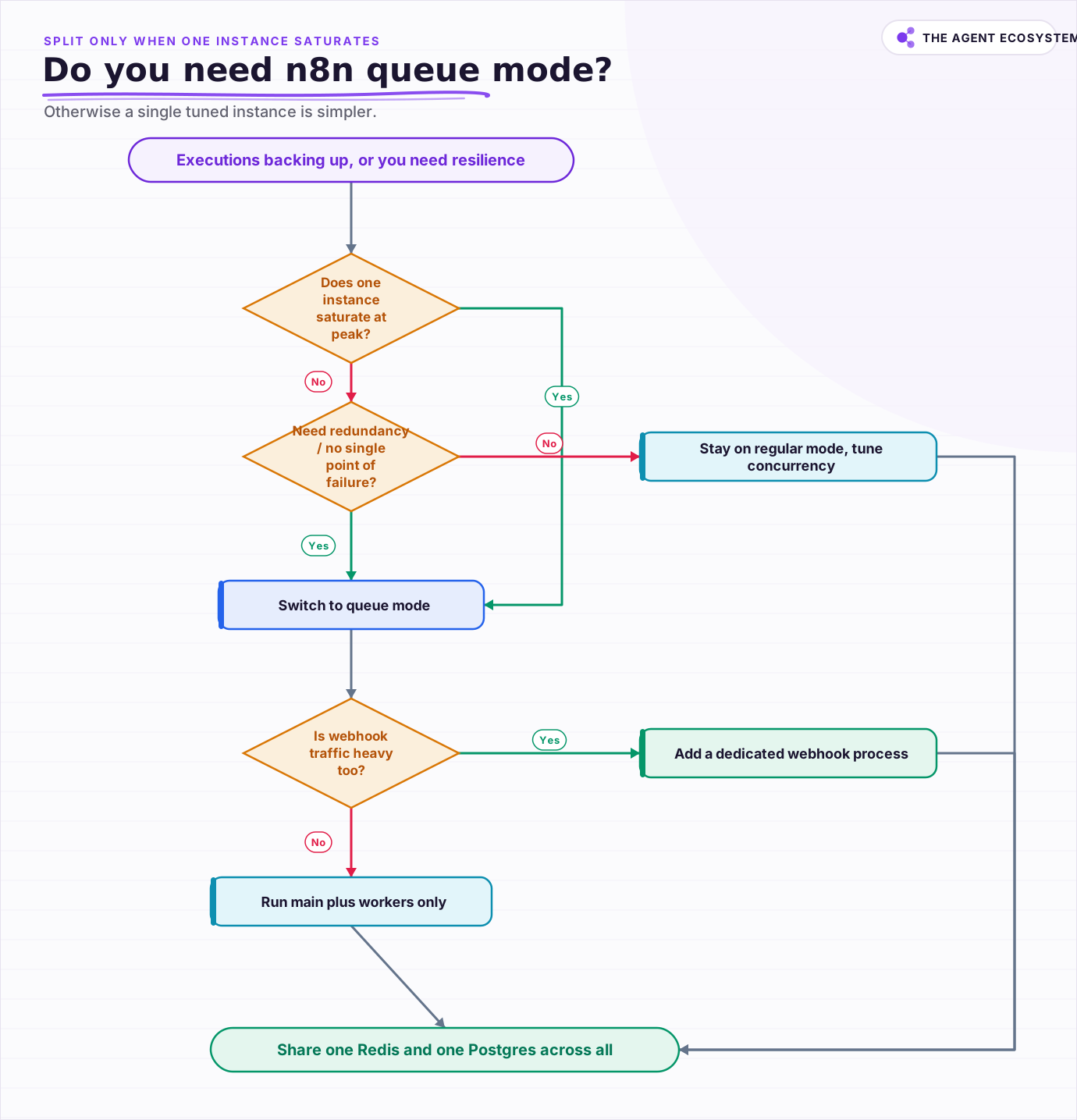 Only split into workers when one instance saturates or you need redundancy; otherwise a single tuned instance is simpler.
The honest signals that you have outgrown regular mode: executions routinely queue behind each other during peaks, a single long workflow blocks unrelated ones, or you cannot tolerate the main process being a single point of failure. If none of those bite yet, adding Redis and Postgres just buys you operational overhead you are not using.
Count the cost honestly before you commit. Queue mode turns 1 process into at least 3 or 4 you now run and monitor: the main instance, 1 or more workers, a Redis server, and a Postgres database. Each is another thing to back up, patch, and watch. That overhead is well worth it when load is real and downtime is expensive, and pure friction when you are still serving a handful of workflows a day for yourself.
There is also a middle path. Regular mode still lets you tune concurrency on one instance before you split anything out, and solid error handling matters more than raw throughput for most solo builders. If you are earlier in the journey, our guide to n8n workflows that save time for solopreneurs covers the value you can get long before scaling becomes the problem.
How does queue mode change how you run n8n day to day?#
Queue mode makes n8n a small distributed system, so your mental model shifts from one process to a fleet. You now watch Redis depth, worker count, and Postgres health instead of a single box. Scaling becomes a config change (more workers), and a single worker crashing no longer takes the whole instance down with it.
Operationally, plan for the extras: back up Postgres, monitor the Redis queue so a backlog is visible, and keep worker environments identical to the main instance for nodes and credentials. Start with 1 or 2 workers, measure real queueing under your own load, and add capacity from there. Reliability work still matters as much as scale, so pair this with the practices in our n8n error handling guide before you trust a fleet in production.
Deployment shape changes too. Because workers are just the same n8n image started with a different command, most teams run queue mode with containers: 1 main service, a worker service you scale to 2, 3, or more replicas, plus Redis and Postgres. That is where the horizontal story pays off, since bumping worker count is a single number in your orchestration config rather than a migration. Keep every replica on the same n8n version, because a worker running older code can misread jobs the newer main instance enqueues.
Finally, resist over-provisioning on day one. It is tempting to launch 5 workers because the queue felt scary during one incident, but idle workers still consume memory and database connections against your shared Postgres. Add workers in response to a measured backlog, not a hypothetical one, and remove them when peaks pass. Queue mode gives you that dial precisely so you can match capacity to real demand instead of guessing.
Frequently asked questions
What does EXECUTIONS_MODE=queue actually do in n8n?
Does n8n queue mode require Postgres, or can I use SQLite?
How do I add more n8n workers to handle load?
Do I need a separate webhook process in queue mode?
When should I not bother with queue mode?
Sources
Primary references and vendor documentation used while drafting and reviewing this article.
Written by

Muhammad Qasim Hammad is an AI agent and automation expert and the founder of Cart Gaze LLC (cartgaze.com). He builds product for the love of it: when an idea lands, a working prototype is usually running within hours, built with the same AI agents and automations he sells. He puts his own output at roughly 20× what it was before agents, and the Agentic OS behind this site is the working proof, documented in public with the tools he actually ran and what they really cost.
AI & Automation Services
Want a pipeline like this running in your business?
I'm Qasim — I design and ship AI agents and n8n automations for solo operators and small teams. Tell me what's eating your team's week, and I'll scope a fix.
Related reading
n8n Redis Chat Memory: Persistent Memory for Your AI Agent
Redis Chat Memory gives an n8n AI agent conversation history that survives restarts and is shared across queue-mode workers. Here is how the Session Key, Context Window Length, and TTL fields work, what it costs, and when to pick Redis over Simple Memory or Postgres.

How to Self-Host n8n on a VPS in 2026 (Full Setup Guide)
Self-hosting n8n on a VPS gives solopreneurs unlimited workflows, full data ownership, and a monthly bill under $10. This guide walks you through the exact 7-step setup.
Self-Hosted n8n RAG Pipeline: The Private Stack
A fully self-hosted RAG pipeline keeps your documents and compute in-house: n8n orchestrates, Ollama serves a local model, and pgvector stores embeddings in Postgres. Here is the end-to-end node graph, the modeled cost, and when self-hosting beats a managed stack.
n8n Pinecone vs Supabase Vector Store: Which to Pick
The n8n Pinecone Vector Store and Supabase Vector Store nodes wire into an agent the same way, but one is a managed service and one is Postgres you run. Here is how their free tiers, cost at scale, latency, and node wiring compare, and when to pick each for RAG.
n8n Webhooks vs Polling: Which Trigger to Use, and Why
Should an n8n workflow fire the instant an event happens (a webhook, push) or check on a timer (polling, pull)? The wrong pick means missed events or wasted executions. Here is the decision framework plus how to wire each trigger.
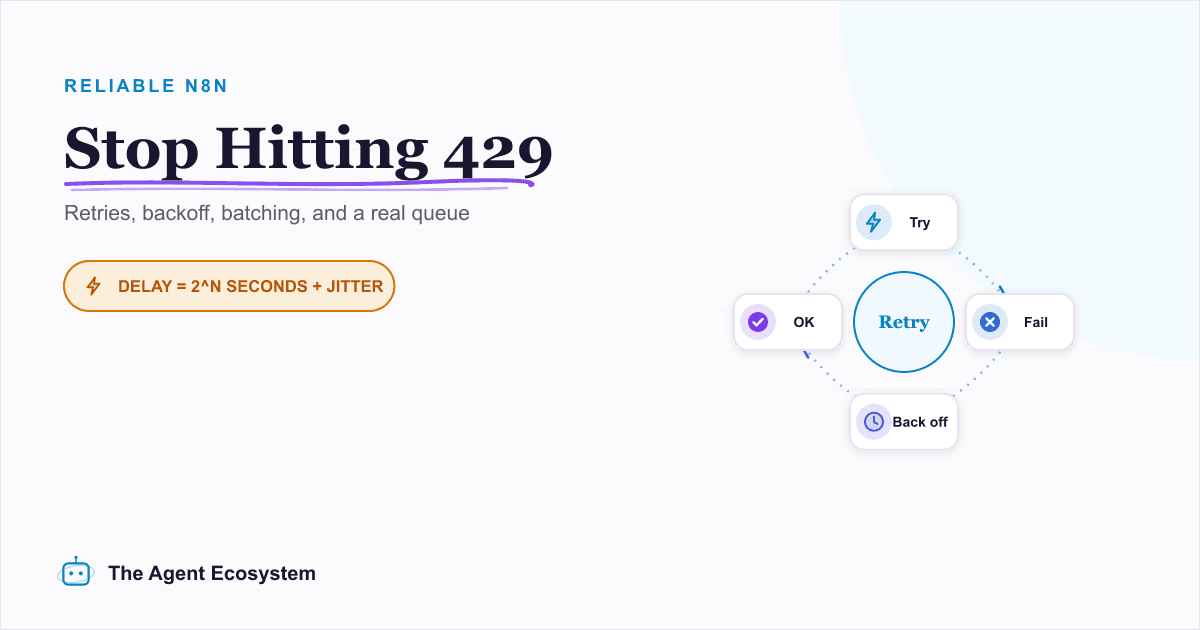
Rate-Limit-Proof n8n AI Workflows: Queues, Retries, Backoff
A Loop Over Items node fanning rows into an LLM keeps hitting 429 Too Many Requests, and every guide fixes it differently. Here is the full ladder: node retry, batching, Wait, hand-rolled backoff, and a real queue, with the built-in caps most posts bury.