Best Free AI IDEs in 2026: Truly Free vs Free-Trial
The honest breakdown of four very different kinds of "free", so you stop wasting weekends on tools that bill you by Monday.
AI-drafted, reviewed by Muhammad Qasim Hammad on June 6, 2026. See our AI disclosure.
Table of contents
- What does "free" actually mean for a free AI IDE?
- Which AI IDEs are genuinely free?
- Free but bring-your-own-key: how does that work (and when is it really $0)?
- Which "free" tiers run out fastest?
- Which tools are free-trial traps?
- One tool you should remove right now: Roo Code
- How solopreneurs pick the wrong free AI IDE
- What to do next
You spent a Saturday setting up what three different blog posts called a "free AI IDE," only to hit a paywall by Sunday evening. The fix is simple: sort every tool into one of four buckets before you install anything, and only then decide which fits your workflow.
The symptom looks like this: you clone a repo, configure an extension, write your first prompt, and 48 hours later a modal tells you to upgrade. You've lost a weekend and learned nothing about the tool's actual value. That is the cost of blurry "free" labeling, and nearly every round-up list perpetuates it.
This guide covers 11 tools as of mid-2026. Every pricing figure below maps to a source URL. Where numbers are community-reported rather than officially published (looking at you, Cursor), I say so explicitly.
 Four very different 'free' tiers, knowing which door you're opening changes everything.
What does "free" actually mean for a free AI IDE?#
A free AI IDE can mean four different things, and choosing the wrong bucket is what wastes the weekend. Separate tools into permanent free tiers, bring-your-own-key editors, thin freemium plans, and short trials before installing anything. The right bucket matters more than the logo.
Here is the full comparison table. Use it as a cheat sheet before you read the sections below.
| Tool | Bucket | What "free" really means | Free-tier limit | Cheapest paid | Best solopreneur use case |
|---|---|---|---|---|---|
| Gemini CLI | Truly free | Permanent, no card | 1,000 req/day, 60/min | $19.99/mo (AI Pro) | Terminal AI agent, zero setup cost |
| Qodo | Truly free | Permanent, no card | 250 credits/mo, 30 PR reviews/mo | $30/user/mo (Teams, annual) | Automated PR code review |
| Continue.dev | BYOK (OSS) | Free forever; model cost is yours | No caps on the extension | $20/seat/mo (Team) | VS Code/JetBrains + Ollama stack |
| Zed | BYOK (OSS) | Free forever; 2,000 autocomplete/mo from Zed | 2,000 Zeta predictions/mo free | $10/mo (Pro) | Fast editor, unlimited agent via own key |
| Cline | BYOK (OSS) | Free forever; you pay model inference only | No caps | Enterprise only (custom) | Autonomous coding agent, Claude or DeepSeek |
| Aider | BYOK (OSS) | 100% free, no account | No caps | None | Terminal pair-programmer, git-native |
| Cursor | Freemium | Permanent but thin (limits unpublished) | Community-reported ~2k completions | $20/mo (Pro) | Evaluation / occasional tasks |
| Windsurf | Freemium | Permanent; agent quota lasts ~2-3 days of real work | "Light quota" (no official number) | $20/mo (Pro) | Evaluation only |
| GitHub Copilot | Freemium | Permanent, personal use only | 2,000 completions/mo + AI credits | $10/mo (Pro) | Light autocomplete, VS Code users |
| Kiro | Freemium | Permanent | 50 credits/mo (no rollover) | $20/mo (Pro) | Spec-driven small projects |
| Trae | Freemium | Permanent | $3 basic credits/mo + 5,000 autocomplete | $10/mo (Pro) | Budget-conscious, frontier model access |
| Tabnine | Trial only | Time-limited trial, then paid | No permanent free tier | $39/user/mo | On-prem/IP-protection needs only |
Which AI IDEs are genuinely free?#
The genuinely free options are the ones with a permanent $0 tier, no credit card requirement, and enough quota for real solo work. Gemini CLI and Qodo pass that test today: one is best for terminal generation, the other for code review.
Gemini CLI is an open-source (Apache-2.0) terminal agent from Google. Sign in with a personal Google account and you get 1,000 model requests per day and 60 per minute with roughly 1 million tokens of context. The honest caveat: the top-Pro model slice is much smaller. Community reports put it around 100 Gemini Pro requests/day, so Flash is your real free workhorse. When I set this up for a small n8n workflow generator, I burned through maybe 80 requests in a full afternoon of back-and-forth. The 1,000/day cap is practically invisible for solo work.
Qodo (formerly Codium) is the better pick if you care about code review rather than raw generation. The permanent $0 Developer plan includes 250 LLM-request credits per month plus up to 30 automated PR reviews per month. Premium models like Claude Opus cost 5 credits per request, so 250 credits gets you 50 Claude Opus calls, enough for a solo project with modest PR volume.
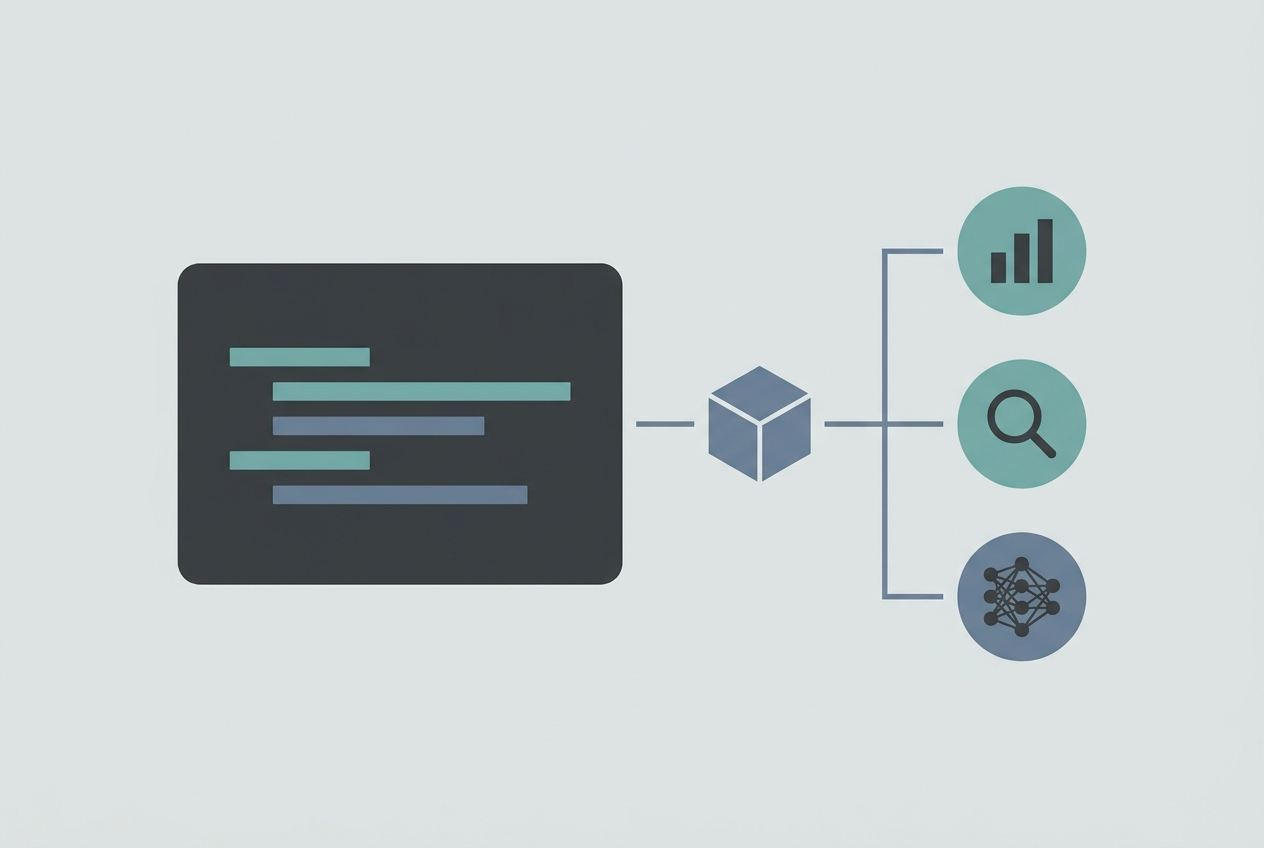 The BYOK + Ollama stack: the IDE is free, the model runs locally, the API bill is $0.
Free but bring-your-own-key: how does that work (and when is it really $0)?#
BYOK tools, Continue.dev, Zed, Cline, and Aider, are free and open-source forever. The software costs nothing. What you pay is model inference, and that bill goes to Anthropic, OpenAI, or Google, not the tool vendor. Run a local model via Ollama and that bill drops to $0.
This distinction is the one nearly every competing list gets wrong. They list Cline as "free" without explaining that typing your first prompt without an API key does nothing. Here is what the BYOK stack actually looks like for a solopreneur:
- Install Continue.dev or Cline in VS Code (free, always).
- Pull a model with Ollama,
ollama pull llama3.1orollama pull deepseek-coder-v2, runs on your machine, $0/token. - Point the extension at
http://localhost:11434in settings. - Code. Forever. No subscription, no usage cap, no quota emails.
The trade-off is model quality. A local 8B model is weaker than Claude Sonnet. If you need frontier-model power, you pay API rates, roughly $3, $15/month at moderate use with DeepSeek, or $20, $50/month with heavy Claude usage, according to Cline's own pricing page. That is still cheaper than most subscriptions, and you pay for actual use rather than a flat seat fee.
Continue.dev is the most flexible: an Apache-2.0 VS Code and JetBrains extension with no request caps, plus a one-time hosted trial (50 chat + 2,000 autocomplete completions) to test frontier models before you commit a key.
Zed gives you a free Personal plan with 2,000 Zeta edit-prediction completions per month plus unlimited AI agent and chat sessions via your own API key or Ollama. Zed removed hosted LLM prompts from the free tier in October 2025, so the 2,000 Zeta completions are the only included quota, everything else requires your own model.
Aider is a terminal pair-programmer with no account, no caps, and no vendor lock-in. It is 100% free. The catch: it is CLI-only and git-native, so it belongs in your stack only if you are comfortable in a terminal.
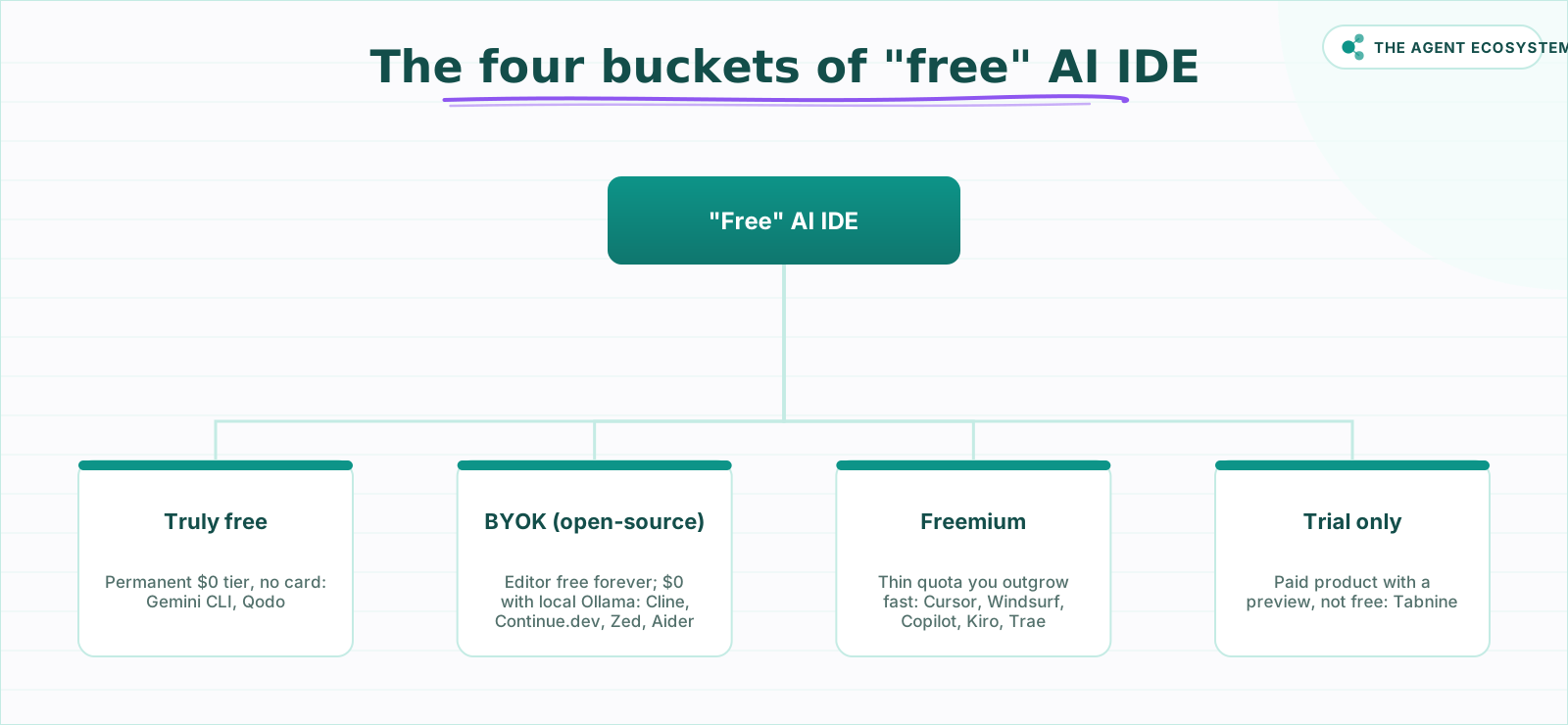 Sort every tool into one of four buckets before you install anything.
Which "free" tiers run out fastest?#
Freemium AI IDEs run out fastest when their included agent quota is vague or deliberately small. Treat Cursor, Windsurf, GitHub Copilot Free, Kiro, and Trae as evaluation lanes, not permanent foundations, unless your usage is light enough to fit their limits.
Cursor is the most commonly cited example of a thin freemium tier. The free Hobby plan is permanent, but Cursor publishes no official usage limits. Community-reported figures of roughly 2,000 completions and 50 agent requests are stale and unconfirmed by Cursor itself, treat them as rough orientation, not specs. In practice, most solo builders hit the wall within their first real project session. New users also get a 1-2 week Pro trial that reverts to Hobby, which makes the drop feel steeper. Cursor's own pricing page says "limited usage" with no numbers.
Windsurf (now operating under Cognition as "Devin Desktop") gives unlimited Tab autocomplete on the free tier, which is genuinely useful. The Cascade agent quota, however, refreshes daily or weekly, and independent reviewers report it lasting about 2-3 days of real agentic work before running dry. Devin.ai/pricing lists the free tier as a "light quota" without specifics.
GitHub Copilot Free is the most transparent of the three: 2,000 code completions per month plus a modest AI credits allowance for chat and agent tasks. GitHub moved all plans to usage-based AI Credits on 1 June 2026, so the old "50 premium requests" framing is now legacy. Completions don't consume credits. For a solopreneur doing occasional autocomplete work, 2,000/month is workable.
Kiro from AWS gives 50 credits per month with no rollover. Credits don't accumulate, so there's no "bank up for a big session" strategy.
Trae from ByteDance is the most unusual freemium: $3 of Basic Usage credits per month plus 5,000 autocompletions, with access to premium models including Claude, GPT-4o, and Gemini in a standard queue. ByteDance is subsidizing usage aggressively to grab market share. That $3 credit floor is modest but real.
Which tools are free-trial traps?#
Trial-only tools are not free tools; they are paid products with a temporary preview. Tabnine is the clearest example here because its old free tier is gone, and the remaining plans make sense only when enterprise privacy or IP protection justifies the price.
Tabnine discontinued its free Basic tier on 2 April 2025. What remains is a time-limited trial, reported as 14 to 30 days depending on the plan, after which you must pay. The cheapest plan is $39/user/month, steep by any measure. Tabnine's real value proposition is its privacy story: on-premises deployment, no code leaving your machine, IP indemnification for enterprise teams. If that matters to you, the price may be justified. If free is your filter, Tabnine fails it.
 Freemium caps hit faster than the onboarding flow suggests, plan for it.
One tool you should remove right now: Roo Code#
If Roo Code is in your VS Code extensions, uninstall it. The Roo Code team shut down the project on 15 May 2026, the GitHub repository is archived at v3.54.0 and the cloud service is offline. The frozen extension will still install from the marketplace, but it receives no security patches, no bug fixes, and no model updates.
Most "free AI IDE" lists published before June 2026 still recommend it. A list that warns you off a dead tool is more useful than one that doesn't.
The natural successor is Cline, same BYOK architecture, active development, identical VS Code install flow. Kilo Code is another fork worth watching.
How solopreneurs pick the wrong free AI IDE#
Solopreneurs pick the wrong AI IDE when they choose the most famous name instead of matching the tool to cost model, workflow, and local-model comfort. The safest path is to choose your free bucket first, then compare editors inside that bucket.
The second mistake is treating BYOK tools as "not free" because they require a key. They are the most sustainably free option for anyone willing to run Ollama. After two weeks of running Continue.dev with a local Llama 3.1 model for a small Supabase schema assistant, my API bill was exactly $0. The quality was lower than Claude Sonnet, but for boilerplate generation and SQL scaffolding it was plenty.
The third mistake is ignoring workflow fit. Aider is excellent, but only if you live in a terminal. Gemini CLI is excellent, but only if you don't need a full editor GUI. Qodo is excellent, but only if PR code review is actually part of your solo workflow.
Pick the bucket first. Then pick the tool.
What to do next#
Start with Gemini CLI if you want the fastest no-cost test, or pair Continue.dev with Ollama if you want durable free usage. If you are unsure about local runners, compare Ollama, LM Studio, and Jan before wiring your IDE to a model.
The market moves fast. Check each tool's pricing page directly before committing, the URLs referenced above are the canonical sources as of mid-2026.
Frequently asked questions
Is Cursor free?
What is the most generous free AI IDE?
Can I use AI coding tools for free without an API key?
Is GitHub Copilot still free?
Is Tabnine free?
What does BYOK mean for a free AI IDE?
Is Roo Code still usable in 2026?
Sources
Primary references and vendor documentation used while drafting and reviewing this article.
Written by

Muhammad Qasim Hammad is an AI agent and automation expert and the founder of Cart Gaze LLC (cartgaze.com). He builds product for the love of it: when an idea lands, a working prototype is usually running within hours, built with the same AI agents and automations he sells. He puts his own output at roughly 20× what it was before agents, and the Agentic OS behind this site is the working proof, documented in public with the tools he actually ran and what they really cost.
AI & Automation Services
Want a pipeline like this running in your business?
I'm Qasim — I design and ship AI agents and n8n automations for solo operators and small teams. Tell me what's eating your team's week, and I'll scope a fix.
Related reading
Best AI Coding Tool 2026: Cursor vs Windsurf vs Copilot
Cursor, Windsurf, and GitHub Copilot are the three names most teams weigh in 2026, but two changes broke the old rankings: Windsurf is now Devin Desktop, and Copilot moved to usage-based billing. Here is the honest price-and-fit comparison.

Claude Code vs Codex vs Gemini CLI: Terminal AI Agents Compared
Three terminal AI coding agents compete in 2026: Claude Code, OpenAI's Codex CLI, and Google's new Antigravity CLI after Gemini CLI retired on 18 June. This honest comparison covers the model behind each, MCP and sandbox support, and what the usable tier really costs.
Fable 5 vs GLM 5.2 vs GPT-5.6: The 2026 Frontier Landscape
Three frontier models landed in June 2026: Claude Fable 5, Z.ai's open-weight GLM-5.2, and OpenAI's limited-preview GPT-5.6. The numbers do not all measure the same thing, so here is an honest, dated comparison on coding score, price, and openness.
The Exact AI Automation Stack I Use as a Solopreneur in 2026 (With Real Monthly Costs)
Most "AI stack" posts hide the bill. Mine runs under $10/month. Here is every tool, the exact tier, the real cost, and the job each layer does for my one-person content business.
Cheapest AI API in 2026: DeepSeek vs Claude vs GPT vs Gemini
The cheapest AI API by published token rate in June 2026 is DeepSeek V4 Flash, but the lowest sticker rate is rarely the lowest bill. Here is a dated, source-linked price table for DeepSeek, Gemini, GPT, and Claude, the cost-per-task math that output tokens dominate, and the
Open-Weight vs Closed LLMs in 2026: Cost, Quality, Control
Should you call a closed API like Claude or GPT, or self-host an open-weight model like DeepSeek or Qwen? Skip the hot takes. This is a four-axis framework (cost, quality, control, privacy) plus a decision flowchart, using dated June 2026 facts.