Best AI Coding Tool 2026: Cursor vs Windsurf vs Copilot
The honest 2026 pricing-and-fit comparison, including Windsurf's rebrand to Devin Desktop.
AI-drafted, reviewed by Muhammad Qasim Hammad on July 9, 2026. See our AI disclosure.
Table of contents
You have narrowed your AI coding setup to three names (Cursor, Windsurf, and GitHub Copilot), and every "best of 2025" list you open seems to contradict the last one. Many are now simply wrong. The best AI coding tool in 2026 is not a single winner; it is the one whose price, editor, and agent autonomy match how you work, and two 2026 changes just broke most stale rankings.
What makes an AI coding tool the best in 2026?#
The best AI coding tool is not one product; it is the fit between your budget, your editor, and how much agent autonomy you want. The 2026 answer differs from 2025 for a concrete reason: Windsurf became Devin Desktop under Cognition, and GitHub Copilot moved every plan to usage-based billing on 1 June 2026.
| Tool | Paid entry | Free tier | Billing model | Best fit |
|---|---|---|---|---|
| Cursor | $20/mo Pro | Hobby (limited) | Plan + usage | Deep agentic multi-file work |
| Windsurf (Devin Desktop) | $20/mo Pro | Yes | Quotas (since Mar 2026) | Unified local and cloud agents |
| GitHub Copilot | $10/mo Pro | Yes (2,000 completions) | Usage-based credits (Jun 2026) | Cheapest entry, broad IDE reach |
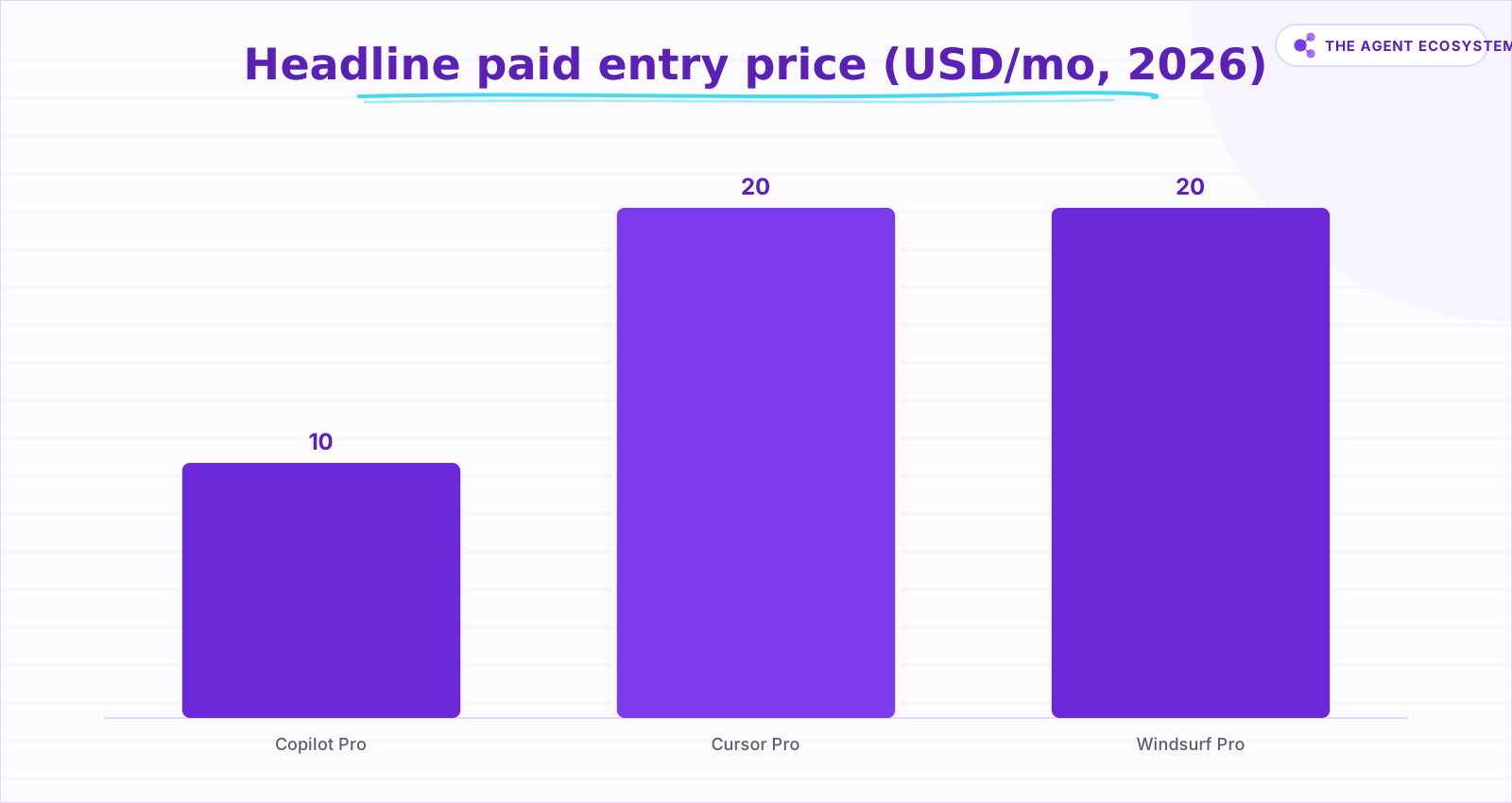 Copilot Pro is the cheapest entry at $10; Cursor and Windsurf both sit at $20. Power tiers up to $200 exist for all three.
The three tools are not even the same shape. Cursor and Windsurf are standalone editors you switch to, while Copilot is an assistant layer that lives inside the editor you already use. That difference matters as much as price, because it decides whether you adopt a new home or add a helper to your current one. Keep both axes in view: what it costs, and what form it takes.
Cursor: the agentic editor, and what does it cost?#
Cursor is a standalone, AI-first editor built around agentic multi-file editing, and Pro costs 20 dollars a month in 2026. It is the pick when you want the deepest agent and will pay for capability, with Pro+ at 60 dollars and Ultra at 200 dollars for heavy daily agent use on top.
Under the hood, Cursor leans on Composer for multi-file edits, plus cloud agents, parallel subagents, and automations, and it added JetBrains support in 2026. Team seats run roughly 32 to 40 dollars for standard and closer to 96 to 120 dollars for premium, with usage billed on top of the plan. The honest caveat is that heavy agent use can push your real monthly cost well above the 20 dollar headline. This is the strongest agent in the group, not the cheapest seat.
Windsurf is now Devin Desktop: what changed?#
Windsurf no longer exists under that name. Cognition, the team behind the Devin agent, shipped Devin Desktop as an over-the-air update on 2 June 2026, and the Cascade agent reaches end-of-life on 1 July 2026. Your plans, settings, extensions, and MCP connections carry over, but the product is mid-transition.
Devin Local replaces Cascade as the default local agent, and an Agent Command Center now unifies local and cloud agents in a Kanban-style view. Pricing moved too: Free, Pro at 20 dollars a month (raised from 15), Max at 200 dollars, and Teams around 80 dollars a month plus per-seat, having switched from credits to quotas in March 2026.
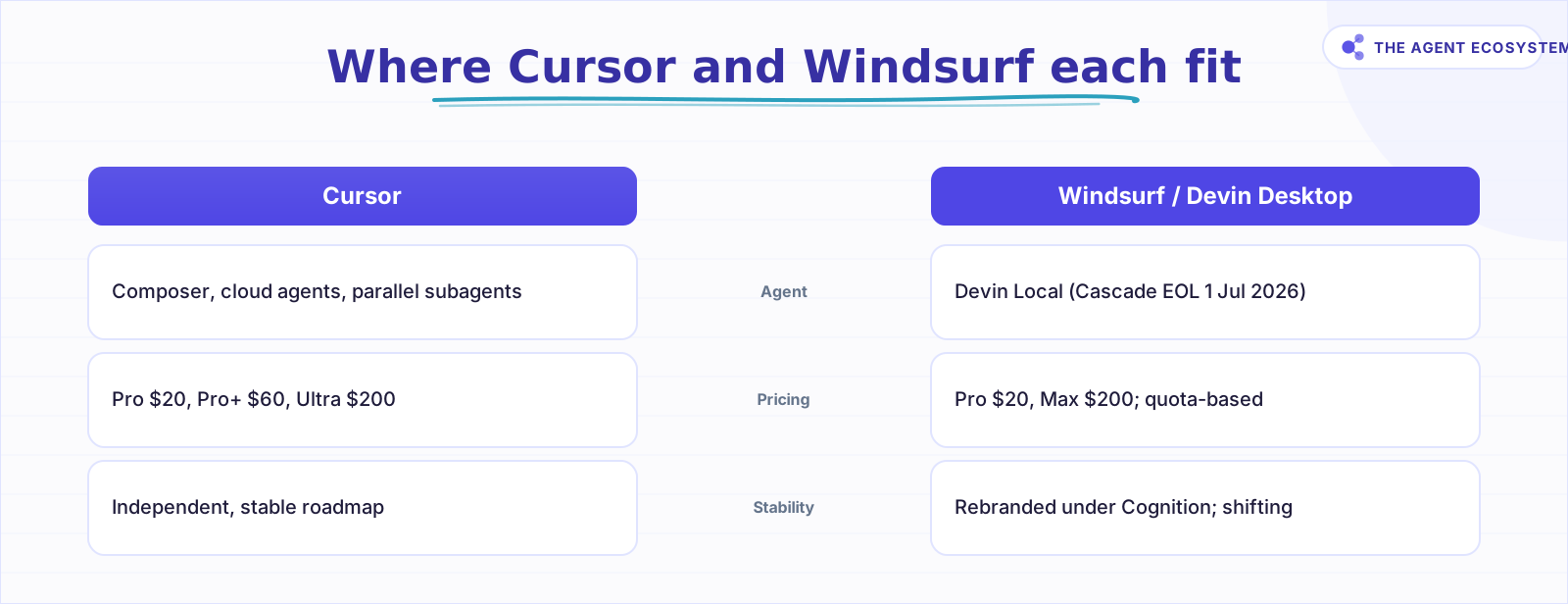 Cursor leads on agentic depth; Windsurf/Devin Desktop leans on unified local and cloud agents amid an ownership change.
The appeal is still the flow-state file awareness that made Windsurf popular, where the agent reads files, runs commands, and watches the output. The risk is equally real: two ownership and brand changes inside twelve months is a genuine roadmap signal, and it is fair to weigh that before you commit a team to it.
GitHub Copilot: is the cheapest entry still cheap?#
GitHub Copilot is the most widely deployed assistant and still the cheapest credible door in at 10 dollars a month for Pro. The catch is new: on 1 June 2026 every plan moved to usage-based billing through GitHub AI Credits, where one credit equals one cent, so chat and agent mode now draw from a metered pool.
Code completions and next-edit suggestions stay free on paid tiers, but chat, agent mode, code review, and the Copilot CLI consume credits. The tiers, dated to late June 2026, are Free at 0 dollars (2,000 completions and 50 chat or agent requests a month), Pro at 10 dollars, Pro+ at 39 dollars (which adds premium models including Opus), and Max at 100 dollars, with Business at 19 dollars per seat and Enterprise at 39. Annual Pro subscribers stay on the older premium-request pricing until renewal. Copilot reaches the most editors too, shipping as an extension for VS Code, JetBrains, Visual Studio, Xcode, Neovim, and Eclipse, and its Coding Agent can take a GitHub issue to a pull request.
How do you actually choose between them?#
Choose by your single binding constraint, not by a hype ranking. If budget rules, Copilot Pro at 10 dollars is the cheapest real entry. If you want the strongest standalone agent, Cursor earns its 20 dollars. If you want unified local and cloud agents, Windsurf, now Devin Desktop, fits, provided you accept the ownership churn.
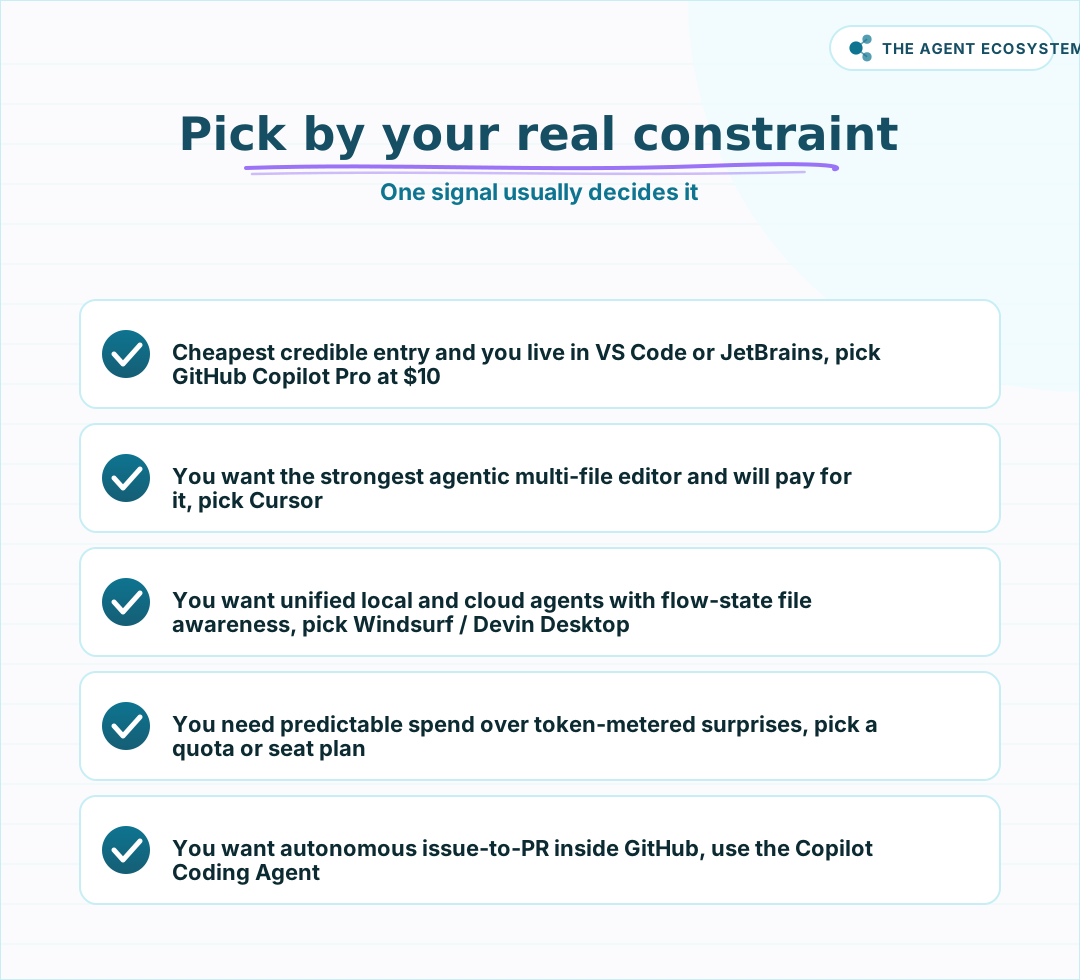 Decide your binding constraint (budget, IDE lock-in, or agent autonomy) and the pick follows.
Two more constraints often decide it. The first is editor lock-in: if you must stay in your current IDE, Copilot is the only one of the three that meets you there instead of asking you to move. The second is spend predictability, and it cuts against pure token metering. If a surprise bill is unacceptable, a quota or seat plan is safer than usage billing, which is exactly why Copilot's June move and Cursor's plan-plus-usage model deserve a second look before you standardize. If cost is the whole question, our guide to the cheapest AI API in 2026 applies the same dated-pricing discipline to model calls.
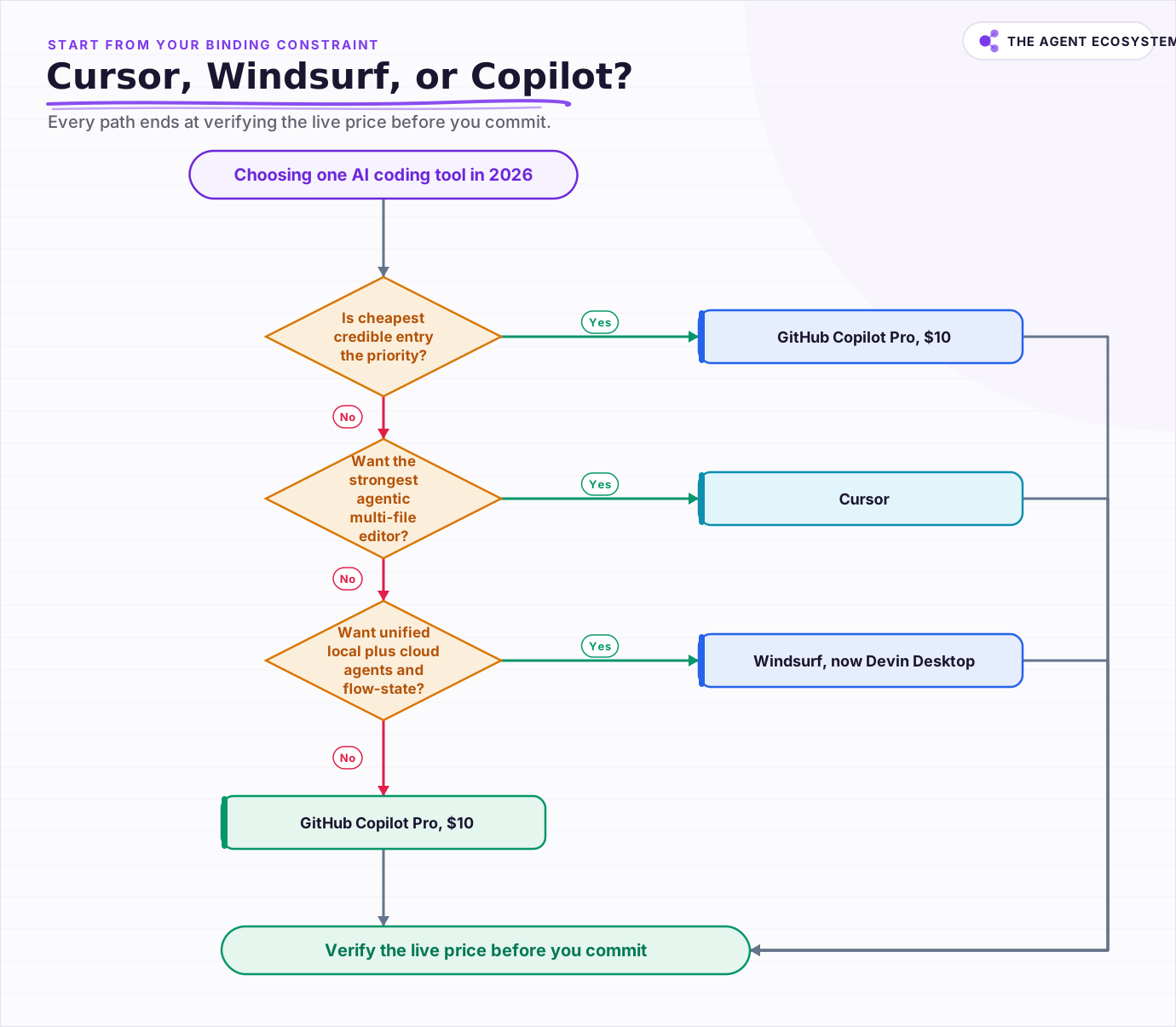 Start from your binding constraint; every path ends at verify the live price before you commit.
Which AI coding tool should you standardize on?#
Standardize on the tool that matches your constraint today, then re-check the price before you commit a team. Copilot wins on cost and IDE reach, Cursor on agent depth, Windsurf on unified local and cloud agents. Whichever you pick, this category re-prices often, so verify the live number this week.
A sensible next step is a two-week trial of your top two on a real branch, not a toy repo, so you feel the agent quality and the billing on your own workload. If you are still weighing whether a paid editor beats a free setup, our roundup of the best free AI IDE for 2026 is the honest baseline to measure the paid tiers against.
Frequently asked questions
Is Windsurf still called Windsurf in 2026?
Which AI coding tool is cheapest in 2026?
What changed with GitHub Copilot's pricing?
Cursor vs Windsurf: which has the stronger agent?
Should I switch editors or just add an assistant?
Sources
Primary references and vendor documentation used while drafting and reviewing this article.
Written by

Muhammad Qasim Hammad is an AI agent and automation expert and the founder of Cart Gaze LLC (cartgaze.com). He builds product for the love of it: when an idea lands, a working prototype is usually running within hours, built with the same AI agents and automations he sells. He puts his own output at roughly 20× what it was before agents, and the Agentic OS behind this site is the working proof, documented in public with the tools he actually ran and what they really cost.
AI & Automation Services
Want a pipeline like this running in your business?
I'm Qasim — I design and ship AI agents and n8n automations for solo operators and small teams. Tell me what's eating your team's week, and I'll scope a fix.
Related reading
Best Free AI IDEs in 2026: Truly Free vs Free-Trial
Most "free AI IDE" lists mix up four completely different things. This guide splits 11 tools into truly free, BYOK, freemium, and trial-only, so you know exactly what you're getting before you build.

Claude Code vs Codex vs Gemini CLI: Terminal AI Agents Compared
Three terminal AI coding agents compete in 2026: Claude Code, OpenAI's Codex CLI, and Google's new Antigravity CLI after Gemini CLI retired on 18 June. This honest comparison covers the model behind each, MCP and sandbox support, and what the usable tier really costs.
Fable 5 vs GLM 5.2 vs GPT-5.6: The 2026 Frontier Landscape
Three frontier models landed in June 2026: Claude Fable 5, Z.ai's open-weight GLM-5.2, and OpenAI's limited-preview GPT-5.6. The numbers do not all measure the same thing, so here is an honest, dated comparison on coding score, price, and openness.
I Built the Same AI Agent in n8n, Make and LangChain: The Honest Difference
I built the exact same order-status AI agent in n8n, Make.com, and LangChain, then compared setup effort, cost model, portability, and who each platform actually suits.
Build an App With No Code: v0 vs Bolt vs Lovable
v0, Bolt.new, and Lovable all promise an app from a prompt, but they build very different things: v0 is frontend only, Bolt runs a full project where the database is your job, and Lovable wires a full stack. Here is the honest, dated comparison for 2026.
n8n vs Make vs Zapier in 2026: The Real Cost Math for Solopreneurs
Zapier, Make, and n8n meter completely different units. The same 6-step workflow at 1,000 runs/month can cost 5x more on one platform than another. Here is the exact math for solopreneurs in 2026.