AI Content Repurposing in n8n: One Post into a Week of Social
Turn one long piece into platform-native posts with an n8n workflow, and stay honest about where it goes wrong.
AI-drafted, reviewed by Muhammad Qasim Hammad on July 22, 2026. See our AI disclosure.
Table of contents
You spent 6 hours on one blog post, and it went out once. Meanwhile the same idea could feed a week of LinkedIn, X, and Instagram captions if you had the time to rewrite it for each place. An n8n workflow does that rewrite for you, and this guide is honest about where it quietly goes wrong.
What is AI content repurposing in n8n?#
AI content repurposing in n8n is a workflow that takes one long piece and generates platform-native social posts from it automatically. A trigger pulls the source, a cleaning step strips the markup, an LLM node rewrites it per platform with structured output, and the drafts land in a review store like Google Sheets or Notion before anyone posts.
The whole point is that 1 source becomes 5 or 6 outputs without you rewriting each one by hand. n8n is a good fit because it already has the trigger nodes (RSS Read, Webhook, manual), an HTTP Request node for fetching, and dedicated LLM nodes that can enforce a JSON schema. You wire those into a line, and the model does the tedious re-angling.
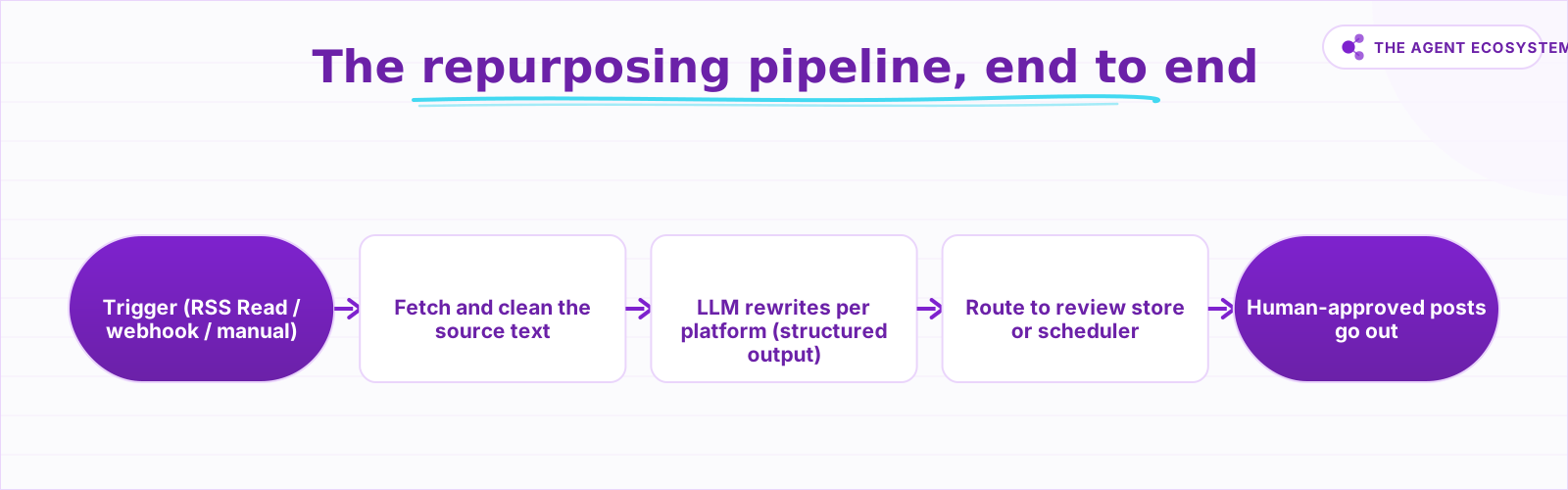 Source in via the trigger, clean prose from the fetch step, typed per-platform drafts from the LLM, then a fan-out to review or scheduling.
The trap most people fall into is treating this as a broadcast machine that fires the moment content is published. It is not. The model can misread a nuance, invent a statistic that was never in your post, or write a caption that reads fine on X and lands badly on LinkedIn. Build the pipeline, but keep a person at the gate.
How does the repurposing pipeline work end to end?#
The pipeline has 4 stages. A trigger fires when new content appears or when you run it manually, an HTTP or extract step fetches and cleans the source text, an LLM node rewrites it into a per-platform array, and a routing step drops each draft into a review store or scheduler. Data flows one direction, cleanly, from source to draft.
Each stage hands typed data to the next. The trigger gives you a URL or raw text. The fetch-and-clean step strips HTML, boilerplate, and navigation so the model reads prose, not markup. The LLM step returns a structured array of {platform, text} objects, which is the key move: without a schema you get one blob of prose that no downstream node can split reliably. The router then loops that array into rows.
 Each node hands clean data to the next: a source URL, then clean prose, then a typed drafts array, then approved rows.
Keeping the fetch and the generation as separate nodes matters more than it looks. If the model ever returns junk, you want to see whether the source text was clean before you blame the prompt. Splitting the 2 steps also lets you cache the cleaned source and re-run only the generation while you tune each platform prompt, which saves tokens on every retry.
How do you build it in n8n step by step?#
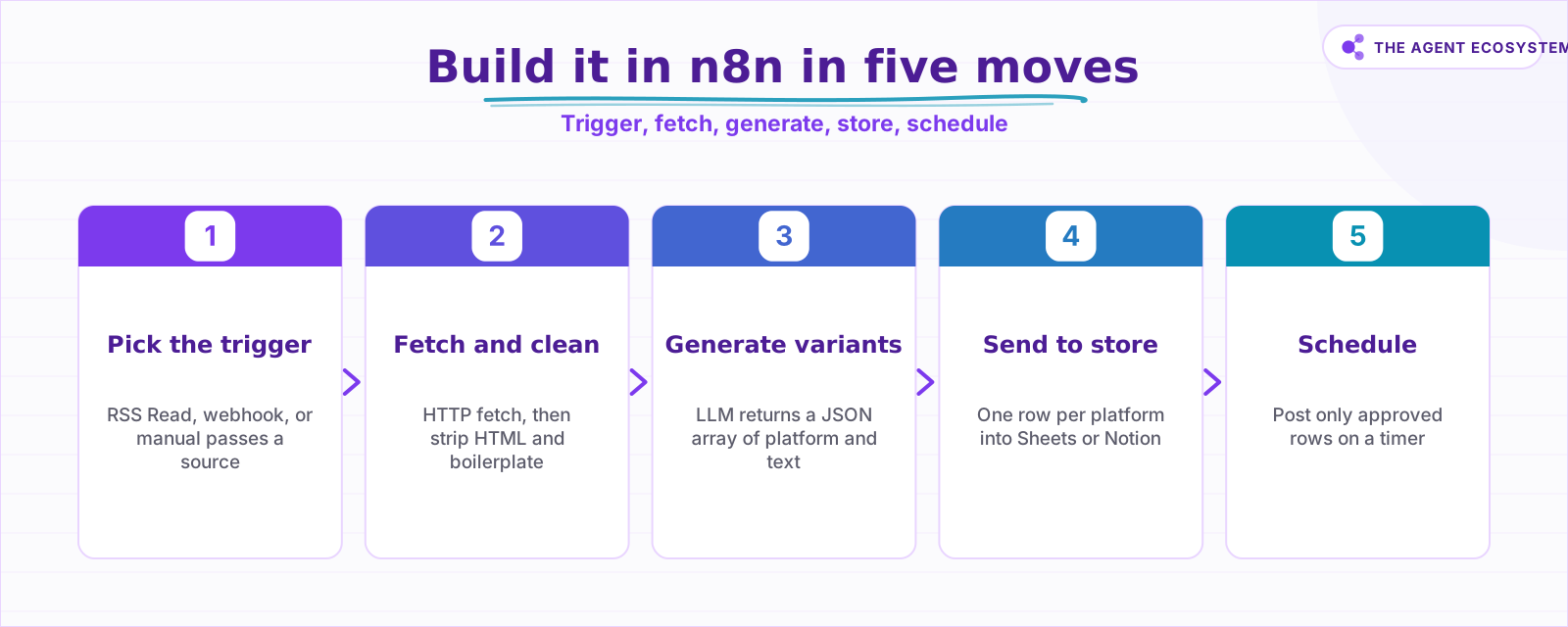
Build it in 5 moves. Pick your source trigger, add a fetch-and-clean step, add an LLM node with a per-platform prompt and structured output, send the parsed drafts to a review store, then optionally add a scheduler. Test each node with pinned data before you chain them, because a bad clean step poisons everything after it.
The order is deliberate. You get the trigger firing first, then confirm the fetch returns readable text, then shape the LLM prompt against that real text, then wire the store. Trying to build all 5 at once means you cannot tell which node broke when the output looks wrong. n8n lets you pin sample data on any node, so run the child steps in isolation.
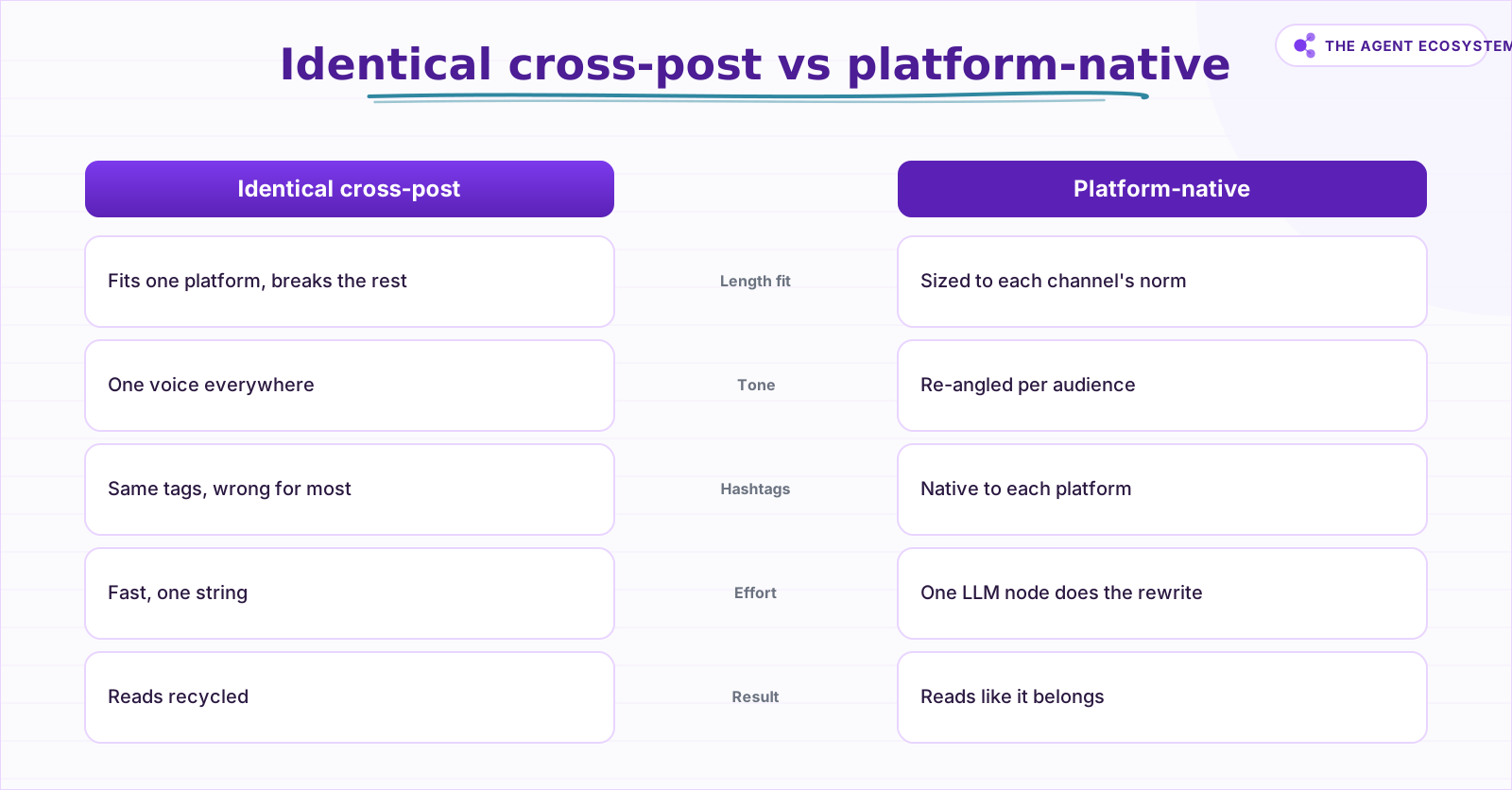 Native rewriting respects each channel's length and tone; identical text only fits the platform you wrote it for.
For the LLM node, write one prompt that names every target platform and demands a JSON array back. Tell it the length norm and tone for each channel, and tell it plainly to summarize only what is in the source and never invent numbers. That last instruction is not optional. The model will happily fabricate a "37% lift" statistic if your prompt leaves room for it.
Why not just cross-post identical text everywhere?#
Because identical text underperforms on every platform except the one you wrote it for. A 280-character X post looks starved on LinkedIn, and a 3-paragraph LinkedIn post gets truncated on X. Instagram wants a hook plus 5 to 10 hashtags, which reads as spam on LinkedIn. Platform-native rewriting is the entire reason to run an LLM here at all.
Here is the same source mapped to what each channel actually expects, so you can see why one string cannot serve all of them:
| Platform | Native format | Length norm |
|---|---|---|
| Hook line, 2 to 4 short paragraphs, 3 hashtags | ~1,300 characters | |
| X | Single punchy post or a short thread | 280 characters per post |
| Caption with a hook and 5 to 10 hashtags | ~2,200 character cap | |
| Newsletter blurb | 1 sentence teaser plus a link | ~50 words |
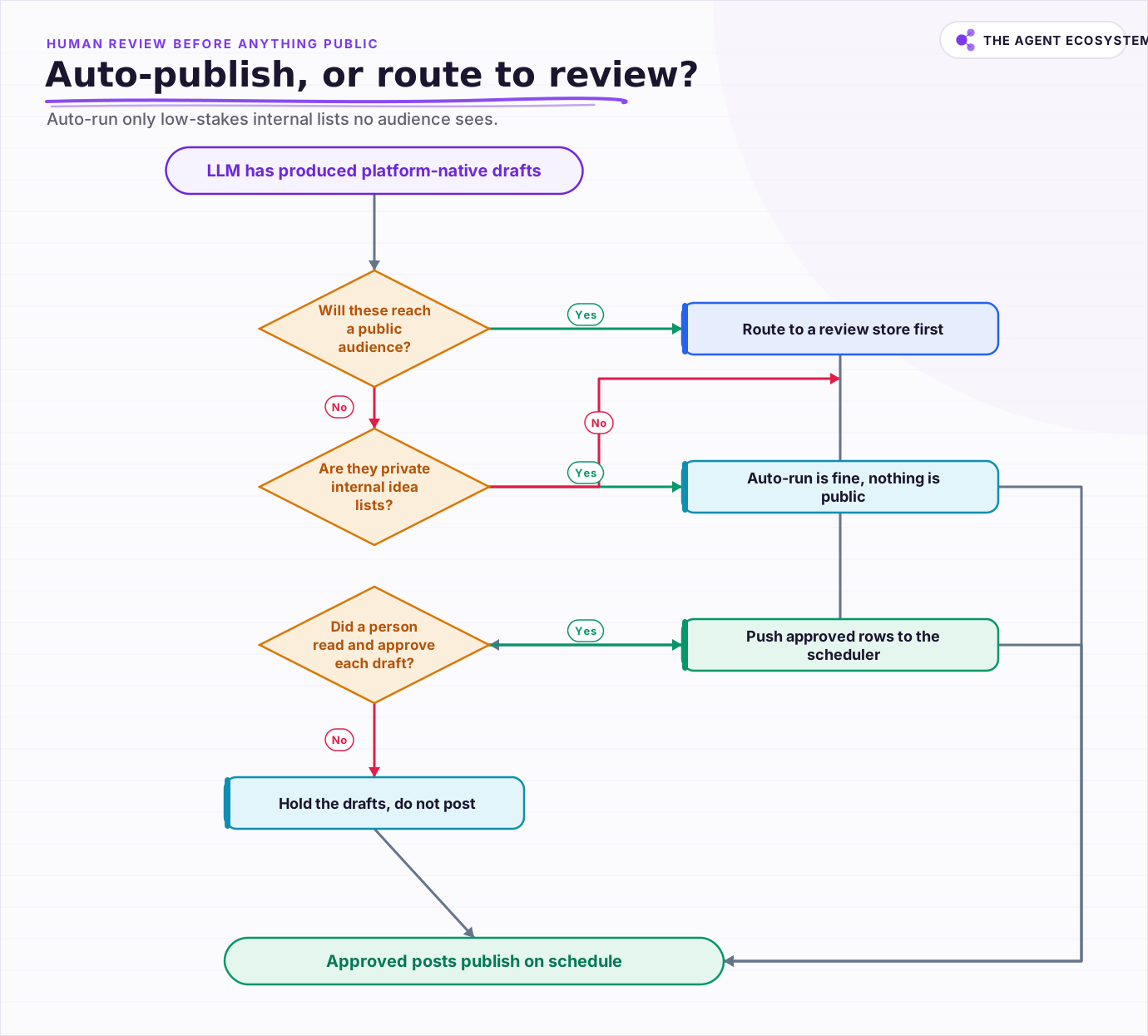 Route to human review before anything public; auto-publish only low-stakes internal idea lists that no audience sees.
The gain from going native is real but qualitative, so resist the urge to promise a number. Platform-native copy reads like it belongs, so it earns more attention than recycled text. That is the honest claim. Anyone selling you a precise "3x reach" figure from repurposing alone is guessing, because reach depends on your audience, timing, and the platform's algorithm far more than on the rewrite.
Should the workflow auto-publish or route to a human?#
Route to a human, in almost every case worth doing. Auto-publishing an LLM draft straight to a public account is how a fabricated stat or an off-tone caption becomes a screenshot. Add a review store where a person approves each draft, and only push approved rows to a scheduler. The 30 seconds of review is cheap insurance.
There is a narrow exception. If the outputs are low-stakes and internal, like draft ideas dropped into a private Notion database for you to pick from later, a fully automatic run is fine because nothing is public yet. The line is publication: anything that reaches an audience without a human read is a reputation risk the automation does not justify.
What should you build first?#
Start with 1 source, 2 platforms, and a Google Sheet as the review store, then expand. Get a manual trigger, a clean fetch, an LLM node returning 2 drafts, and a row written to the sheet. Once that round-trips reliably, add platforms and swap the manual trigger for RSS Read. Small and working beats broad and broken.
Repurposing is one of the highest-leverage automations a solo creator can run, because it multiplies work you already did instead of creating new work. If you want more patterns in this vein, see our roundup of n8n workflows that save a solopreneur real time. Build the narrow version, keep the human in the loop, and let the model handle the tedious rewrite.
Frequently asked questions
What does an AI content repurposing workflow do in n8n?
Why should the LLM node return structured output?
Can I just cross-post the same text to every platform?
Should the workflow publish automatically?
How do I stop the model from inventing facts?
Sources
Primary references and vendor documentation used while drafting and reviewing this article.
Written by

Muhammad Qasim Hammad is an AI agent and automation expert and the founder of Cart Gaze LLC (cartgaze.com). He builds product for the love of it: when an idea lands, a working prototype is usually running within hours, built with the same AI agents and automations he sells. He puts his own output at roughly 20× what it was before agents, and the Agentic OS behind this site is the working proof, documented in public with the tools he actually ran and what they really cost.
AI & Automation Services
Want a pipeline like this running in your business?
I'm Qasim — I design and ship AI agents and n8n automations for solo operators and small teams. Tell me what's eating your team's week, and I'll scope a fix.
Related reading
5 n8n Workflows That Can Save You ~12 Hours a Week
Five n8n workflows that replace source scanning, topic sorting, first-draft writing, pin prep, and changelog monitoring with a review-gated queue. Nothing autopublishes. You stay in control.

n8n AI Automation Ideas: 8 Agent Workflows Worth Building (2026)
Finished the n8n AI tutorial and wondering what to actually build? These 8 n8n AI automation ideas come with the exact nodes, the honest Chain-vs-Agent call, and the right Claude model for each job.
n8n Code Node in AI Workflows: When the Built-In Nodes Are Not Enough
The built-in AI nodes cover the common cases. But batching rows, reshaping API responses, and building scoring functions hit a wall fast. The Code node fills the gap with JavaScript wherever the visual nodes cannot reach.
Build an AI Research Assistant in n8n: Search, Read, Cite
You want a short answer with real, clickable links, not a confident paragraph the model invented. This is how to build an ai research assistant in n8n: capture a question, search the web, fetch and clean the top pages, and summarize with citations grounded only in that fetched
Translate Content at Scale in n8n With Claude
Build a repeatable n8n AI translation pipeline using the Basic LLM Chain node and Claude. Translate blog posts, support replies, and product copy in bulk for about $0.83 per 100,000 words.
Build a Scheduled Daily AI Digest in n8n (Auto-Summarized)
An n8n daily digest wires a Schedule Trigger, an RSS fetch, a Claude Summarization Chain, and a delivery node into one unattended workflow that drops a short brief in your inbox every morning for about $1/month.