Build an AI Research Assistant in n8n: Search, Read, Cite
A grounded n8n workflow that searches the web, reads the top sources, and returns a cited summary, not a hallucination.
AI-drafted, reviewed by Muhammad Qasim Hammad on July 24, 2026. See our AI disclosure.
Table of contents
You paste a question into a form, and thirty seconds later you want a short answer with real links you can click, not a confident paragraph the model invented. That is the whole promise of a research assistant, and it is very buildable in n8n. The trick is grounding: the model must summarize only what it actually read.
What is an AI research assistant in n8n?#
An ai research assistant n8n workflow chains five moving parts: a trigger that captures the question, a search API call, a fetch step that pulls the top pages, a cleanup step that strips each page to plain text, and a language model that summarizes only that text and cites it. Grounding is the point, so nothing gets invented.
The reason this pattern matters is that a bare chat model answers from training data that is frozen and often stale. By searching first and reading real pages, you give the model fresh, checkable source text. You are not asking it what it knows; you are asking it to compress 3 or 4 documents you just handed it, and to say which one each claim came from.
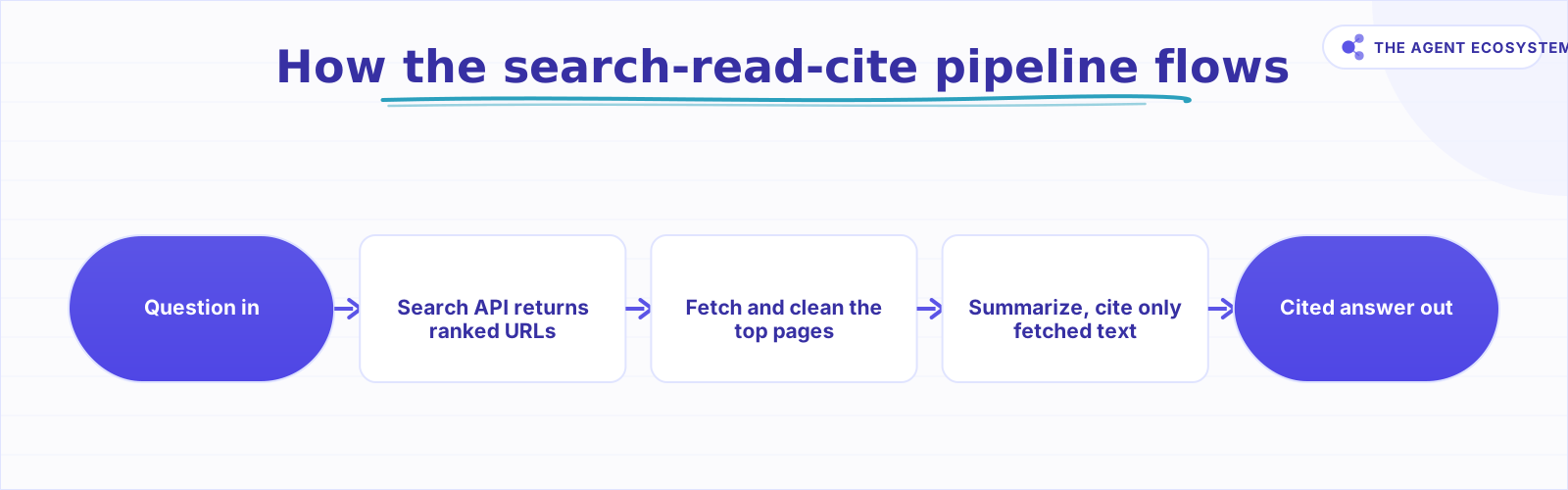 One direction: a question goes in, a cited answer comes out, with the fetched text as the only ground truth.
Think of it as a tiny retrieval pipeline with no vector database. The web search is your retriever, the fetched pages are your context, and the citation rule is your guardrail. If you have built a website chatbot on your own content, this is the same shape pointed at the open web instead of one site.
How does the search-read-cite pipeline work?#
The pipeline runs in one direction: a question goes in, a cited answer comes out. The trigger passes the raw question to a search API over an HTTP Request node, which returns ranked URLs. You keep the top few, fetch each page, clean the HTML to readable text, and pass that text plus the question to the model.
Each stage has a job and a failure mode, so it helps to see them as a table before you wire a single node. The search step decides quality; if the top results are junk, no amount of clever prompting saves the answer. The fetch step is where most breakage happens, because pages block bots, time out, or return 403 responses. The summarize step is where hallucinated citations creep in if you let the model wander off the fetched text.
| Stage | n8n node | Watch out for |
|---|---|---|
| Capture question | Form Trigger or Chat Trigger | Empty or vague input, no length cap |
| Web search | HTTP Request to a search API | Per-call cost, rate limits, thin results |
| Fetch top pages | HTTP Request or a scraper node | 403 blocks, timeouts, paywalls, huge HTML |
| Clean and extract | HTML or Code node | Boilerplate, navigation, scripts left in |
| Summarize and cite | LLM (Chat model) node | Citing from memory, exceeding the token budget |
How do you build it step by step?#
You build it in five moves, each node handing clean data to the next. Start with a trigger that captures one question, call a search API for ranked URLs, fetch and clean the top few pages, then send that text to the model with a strict citation rule. The last node returns the answer plus source links.
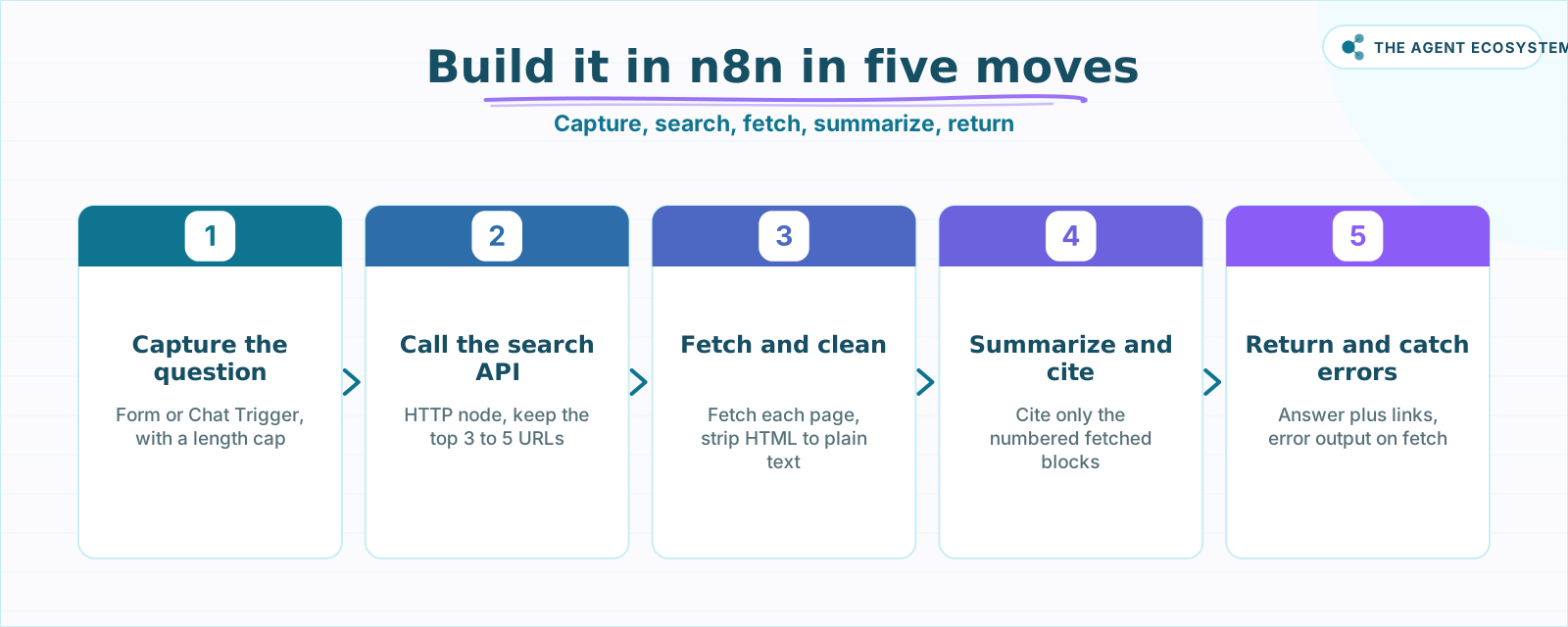 Each node hands clean data to the next: one question, then ranked URLs, then plain text, then a grounded answer.
The order is deliberate. Capture forces a single, bounded question so you are not summarizing an essay. The search call is a plain HTTP request; most search APIs take a query string and return JSON with titles, URLs, and snippets. You cap the results to something small like 3 to 5 URLs to control both cost and token count. Fetching and cleaning is where you convert messy HTML into the plain text the model can actually read. Only then do you summarize.
Here is the build sequence in plain terms:
- Capture the question with a Form Trigger, and cap its length so one runaway paragraph cannot blow your token budget.
- Call the search API with an HTTP Request node, then keep only the top 3 to 5 result URLs.
- Loop over those URLs, fetch each page, and set a short timeout so one slow host cannot stall the run.
- Clean each page to plain text, then trim it to a fixed character budget per source.
- Send the question plus all fetched text to the model and require inline citations that map to the source URLs.
How do you stop the model from hallucinating citations?#
You stop invented citations by grounding the model in the fetched text and refusing anything outside it. In the prompt, pass the cleaned source text as numbered blocks, tell the model to cite only those numbers, and instruct it to answer "not found in the sources" when the text falls short. Never let it cite from memory.
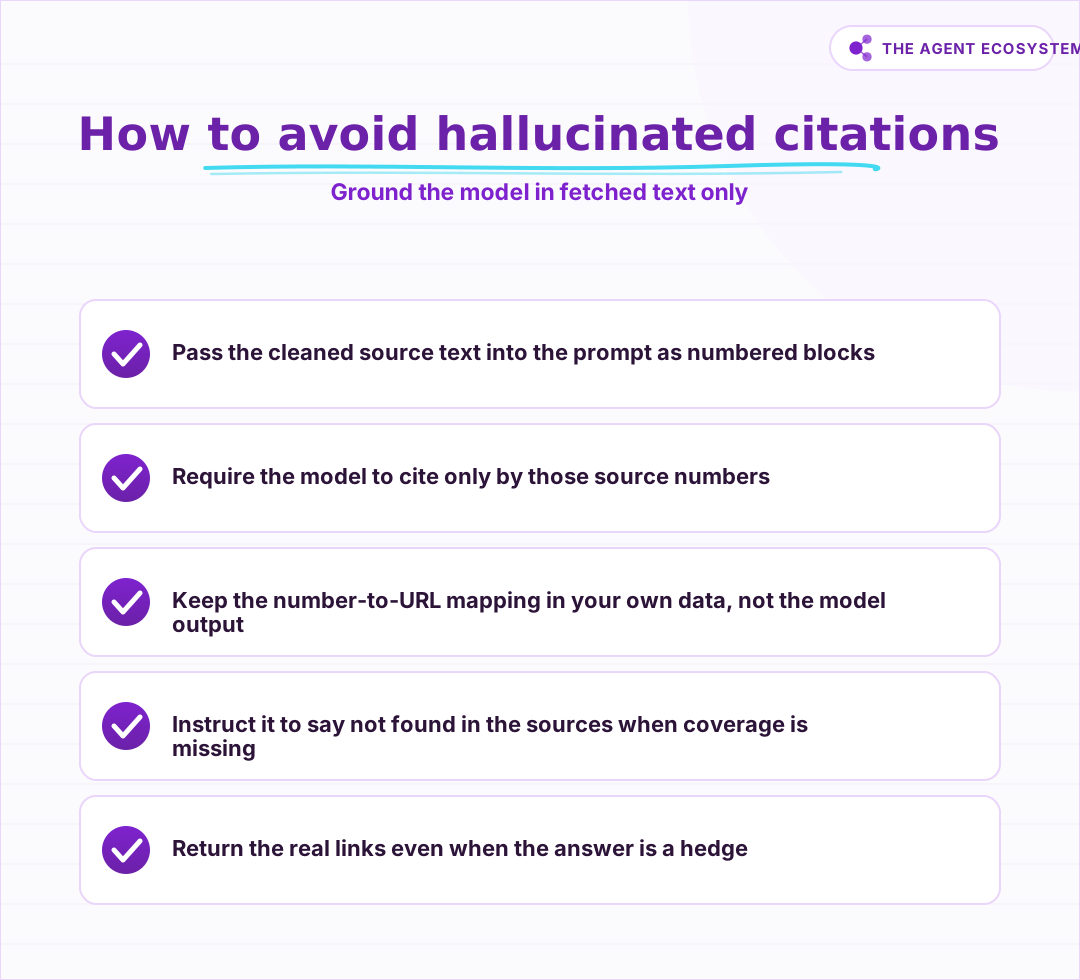 Fence the model into the fetched text: number the sources, force citations to those numbers, and allow a not-found answer.
This is the single most important rule in the whole build, so it earns its own checklist. A model asked to "summarize with sources" will happily fabricate a plausible URL if you do not fence it in. The fix is structural, not hopeful: you number each fetched document, you say the citations must be those exact numbers, and you keep a mapping from number to real URL in your own data so you attach the true link on output, not whatever string the model typed.
The other half of grounding is honesty about coverage. If none of your 4 fetched pages answer the question, the correct output is to say so and hand back the links anyway, so the reader can judge. That single instruction turns a confident-but-wrong assistant into a useful one, because a hedge with real links beats a fabricated fact every time.
How do you handle scrape failures and control cost?#
You handle failures and cost by treating both fetch and search as flaky, paid calls. Give every HTTP node an error output so one blocked page does not kill the run, cap the pages you fetch, cap the characters per page, and remember that both search and scraping bill per call. A trimmed run stays cheaper.
Blocks and timeouts are normal, not exceptional. Sites return 403 for bot-like traffic, some hide content behind JavaScript, and a few will just hang. In n8n you enable the error output on the HTTP Request node so a failed fetch routes to a skip branch instead of aborting; you then summarize from whatever pages did come back. The n8n HTTP Request node docs cover the retry and error settings you will lean on here.
Cost is the other constraint, and it has three dials. Search APIs charge per query, scraper APIs or proxies charge per fetched page, and the model charges per token. Capping results to 3 to 5 URLs, trimming each page to a fixed character budget, and choosing a smaller summarizing model keeps a single run predictable. If you want the deeper token math, our guide to AI summarization in n8n walks through trimming input before the model call.
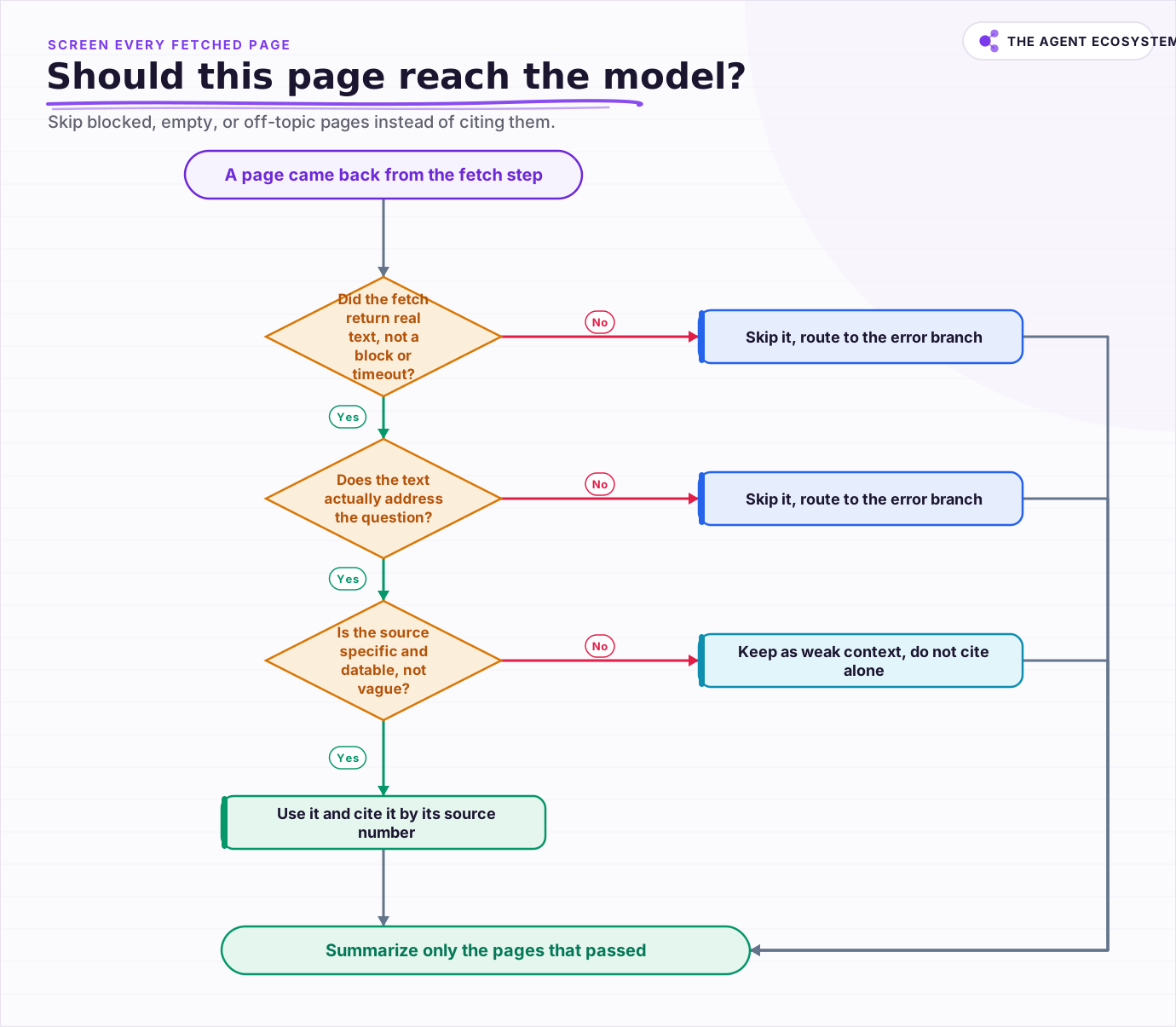 Screen each fetched page before it reaches the model: skip blocked, empty, or off-topic pages instead of citing them.
When is this worth building over a hosted tool?#
It is worth building when you need control the hosted answer boxes do not give you: your own source whitelist, your own citation format, and the ability to drop the cited answer straight into a sheet, a ticket, or a Slack message. If you just want a one-off answer, a hosted search assistant is faster and free.
The honest trade is maintenance. You own the search key, the scraper budget, and the prompt, and you will re-verify all three as APIs change and sites add blocks. In exchange you get a repeatable, auditable pipeline that runs on your schedule and feeds your own systems. For a first version, wire the 5 stages, hard-cap the pages, and ground the citations strictly, then expand only once the basic loop returns trustworthy answers.
Frequently asked questions
How does an n8n research assistant search the web?
How do I stop the model from inventing citations?
How do I handle pages that block scraping?
How much does this workflow cost to run?
Should I build this or use a hosted search assistant?
Sources
Primary references and vendor documentation used while drafting and reviewing this article.
Written by

Muhammad Qasim Hammad is an AI agent and automation expert and the founder of Cart Gaze LLC (cartgaze.com). He builds product for the love of it: when an idea lands, a working prototype is usually running within hours, built with the same AI agents and automations he sells. He puts his own output at roughly 20× what it was before agents, and the Agentic OS behind this site is the working proof, documented in public with the tools he actually ran and what they really cost.
AI & Automation Services
Want a pipeline like this running in your business?
I'm Qasim — I design and ship AI agents and n8n automations for solo operators and small teams. Tell me what's eating your team's week, and I'll scope a fix.
Related reading
Giving AI Agents Web Access: Search Tools, Grounding, and Cost
A search tool turns post-cutoff questions from hallucination bait into retrievable facts, and it brings 3 problems with it: choosing sources, paying for pages that become tokens, and reading text that may be aimed at the model rather than the user. This is the wiring guide: the

A Real Citation Quotes the Source. Most AI Agents Just Name It.
Naming a document is not the same as quoting it. This is the mechanism behind a real inline citation, the specific difference between a citation that is correct and one that is faithful, and why a confidently-wrong citation does more damage than an honest gap. Citations reduce
Build a Scheduled Daily AI Digest in n8n (Auto-Summarized)
An n8n daily digest wires a Schedule Trigger, an RSS fetch, a Claude Summarization Chain, and a delivery node into one unattended workflow that drops a short brief in your inbox every morning for about $1/month.
Summarize Long Documents in n8n with the AI Summarization Chain
Use the n8n Summarization Chain node to automatically condense transcripts, PDFs, and long articles into one-paragraph summaries. Costs $0.85 per 100 documents on Claude Haiku 4.5, with three method options for any document length.
Build an AI Customer-Support Bot in n8n (RAG, With Real Monthly Cost)
Build an n8n AI customer support bot that answers repeat questions from your own docs using RAG. Two workflows, about $4.50 per 1,000 answers on Claude Haiku 4.5, and $0 platform cost if you self-host.
n8n AI Automation Ideas: 8 Agent Workflows Worth Building (2026)
Finished the n8n AI tutorial and wondering what to actually build? These 8 n8n AI automation ideas come with the exact nodes, the honest Chain-vs-Agent call, and the right Claude model for each job.