How to Build an n8n AI Agent That Preps You Before Every Calendly Call
Wire n8n's Calendly Trigger to an AI Agent that researches the invitee across your CRM and inbox and delivers a short briefing before the call.
AI-drafted, reviewed by Muhammad Qasim Hammad on August 13, 2026. See our AI disclosure.
Table of contents
- What can an n8n AI agent actually do with a Calendly booking?
- What data does the Calendly Trigger actually give you?
- How do you give the agent tools to build a real briefing?
- What does a real meeting-prep briefing look like?
- Should the briefing send automatically, or wait for you to review?
- What breaks, and how do you debug it?
- Can you also manage Calendly events from n8n?
A prospect books a call through your Calendly link, and by the time the meeting starts you are opening their LinkedIn, searching your CRM, and scrolling old emails trying to remember who they are and why they booked. Wire n8n's Calendly Trigger into an AI Agent, and the agent can do that digging the moment the booking happens, so a short briefing is waiting in your inbox before the call instead of a scramble 5 minutes beforehand.
What can an n8n AI agent actually do with a Calendly booking?#
The honest scope here is narrower than the other integrations in this series: Calendly gives you a trigger, not a tool the agent calls, and that shapes the whole workflow you are about to build differently from the rest of this series.
The agent's job is not to act inside Calendly; it is to act on the information a booking hands you, pulling context from the systems you actually use, a CRM, your inbox, a notes app, before the meeting happens.
That reframes the whole workflow. Instead of "give the agent a Calendly tool," think "use Calendly's webhook as the moment to run an agent with other tools." The Calendly Trigger starts the workflow; the AI Agent node's real tools are whatever CRM, search, or notes integration you connect next.
This is actually the more common shape for a useful agent workflow than a full CRUD integration, even though it looks less impressive on paper. Plenty of valuable automations are triggered by one event and act through entirely different systems; Calendly booking a meeting and a sales agent researching the invitee before it starts is a clean, narrow example of that pattern.
 Enough to start researching, rarely enough to brief on alone.
What data does the Calendly Trigger actually give you?#
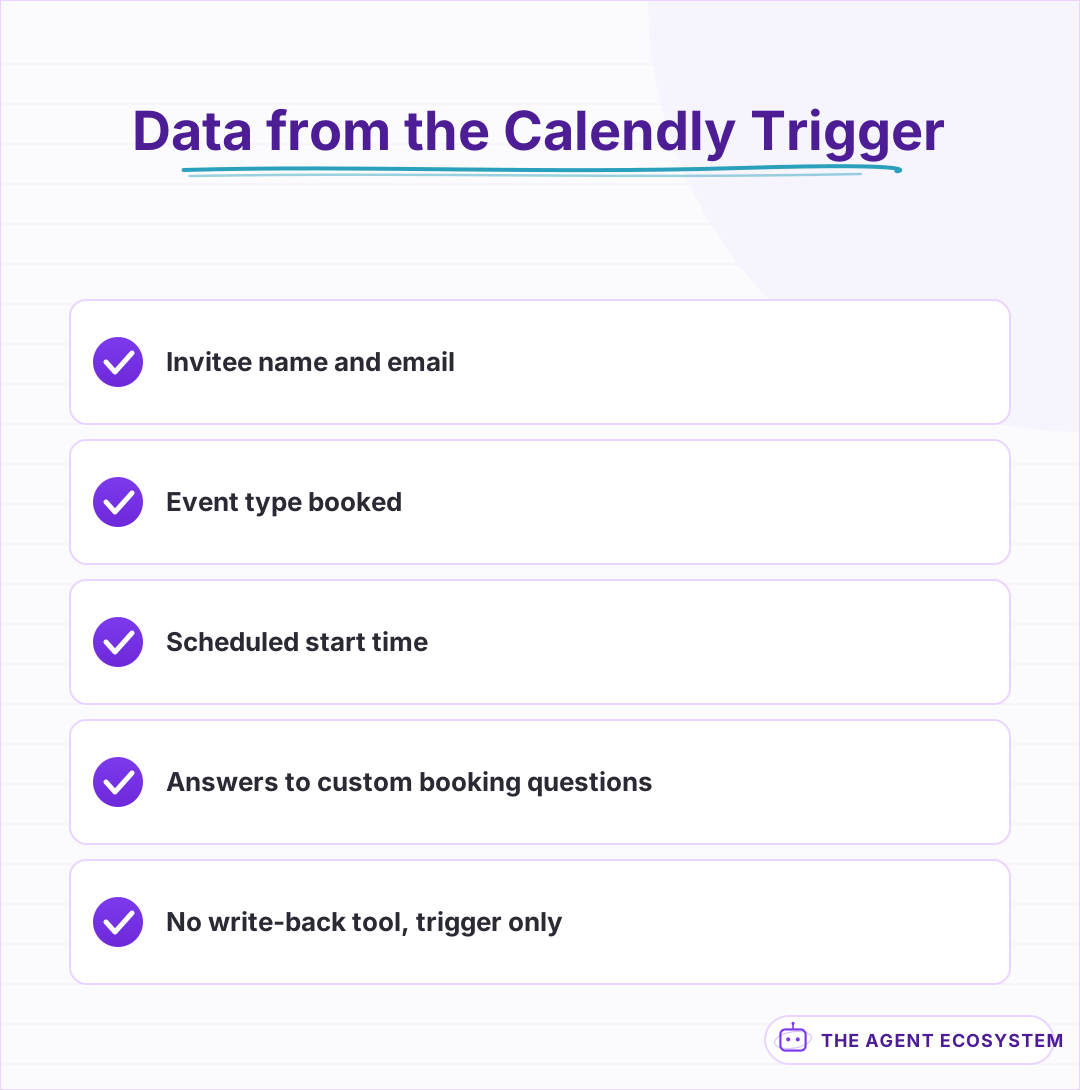
A booking event includes the invitee's name and email, the event type booked, the scheduled start time, and any answers to custom questions you added to the booking form. That is enough to search for the person elsewhere, but it is rarely enough on its own to write a useful briefing.
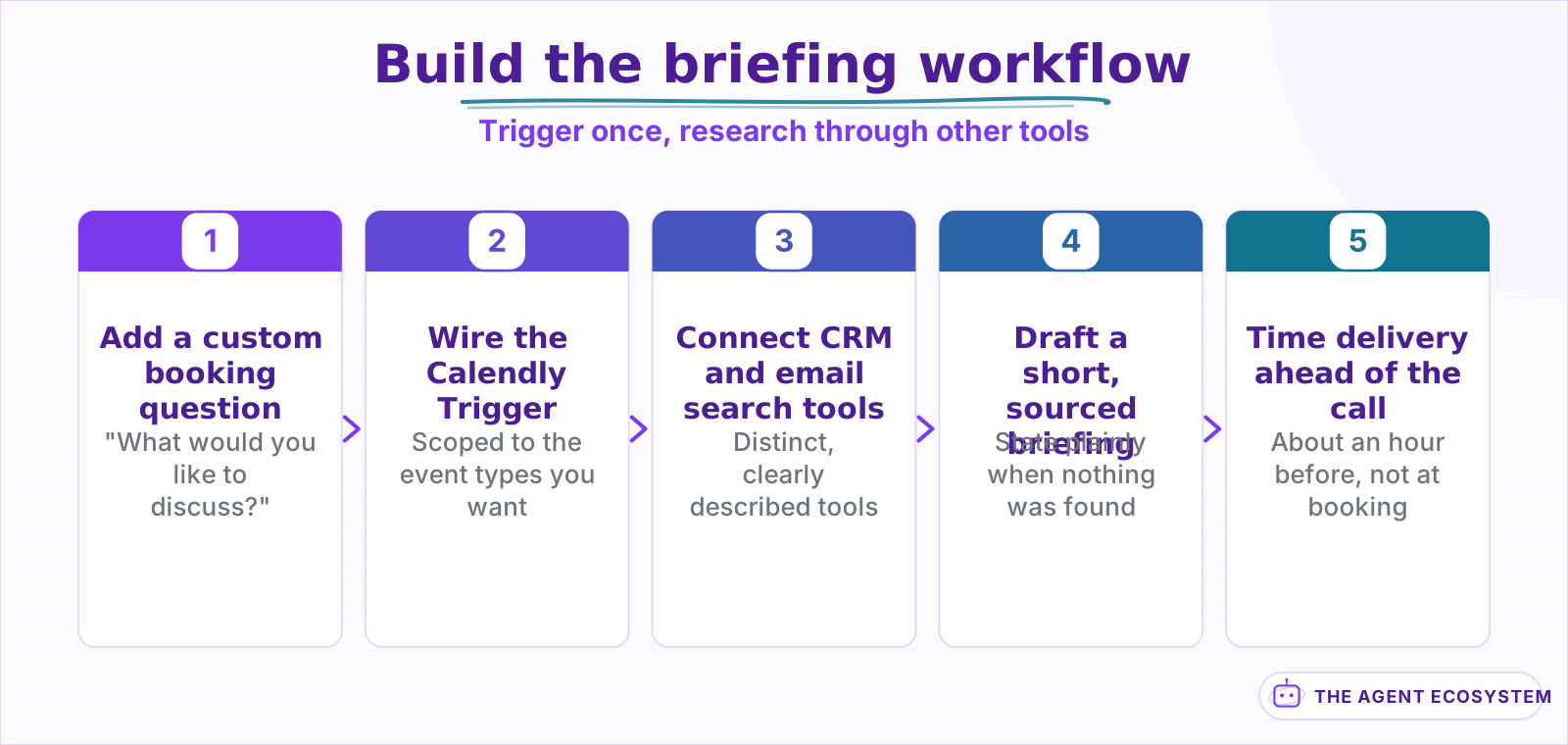
Custom questions are worth using deliberately here, since they are the one piece of context Calendly hands you directly rather than something the agent has to go find. A single question like "what would you like to discuss?" on the booking form gives the agent a real anchor for its research instead of starting from just a name and an email address.
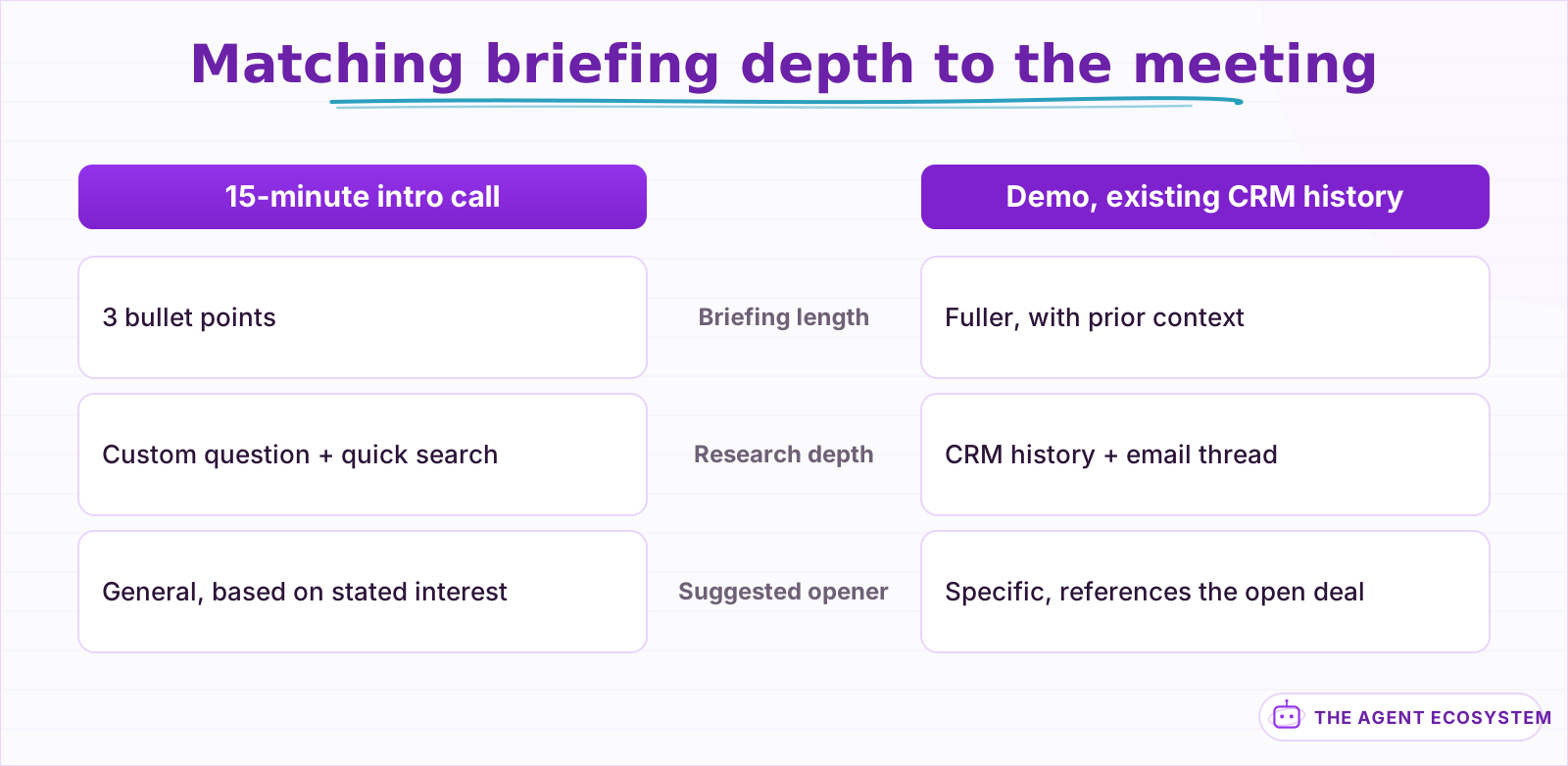
Keep the payload's other fields in mind too: the event type name tells the agent which kind of meeting this is, a 15-minute intro call versus a 45-minute demo, which should shape how deep the briefing goes. A quick intro call needs 3 bullet points; a demo booked by someone with an open deal in your CRM earns a fuller briefing.
 The custom question step is the one that makes the research specific instead of generic.
How do you give the agent tools to build a real briefing?#
Wire the tools the briefing actually needs: a CRM search by email to check for existing deal or ticket history, an email search to pull the most recent thread with that address, and optionally a web search for the person's current role if your CRM has nothing on file yet.
Tool descriptions the model can actually use matter here because each tool returns a different shape of information, and the agent needs to know what each one is actually for: the CRM tool answers "have we talked to this person before," the email search answers "what did we last discuss," and a web search fills the gap only when the others come up empty. The core mechanics of giving an n8n agent tools carry over the same way they do on a Salesforce or HubSpot agent.
Order matters more than it might seem. Have the agent check the CRM before searching email, since a CRM record often includes the account owner and deal context that makes an email search more targeted, the account's domain instead of just the one address on the booking. Running the tools in a sensible order, not just giving the agent all of them at once, produces a tighter briefing with fewer redundant searches.
 Event type and CRM history decide how deep the briefing goes.
What does a real meeting-prep briefing look like?#
Short and skimmable beats thorough and long here, since the point is reading it in the 2 minutes before a call starts. A useful briefing states who is meeting, what they said they want to discuss, whether your CRM shows any prior history, and one or 2 open questions worth asking.
| Briefing section | Source | Why it is there |
|---|---|---|
| Who and why | Calendly custom question | The one thing they told you directly |
| Prior history | CRM search by email | Are they a lead, a customer, or new |
| Last conversation | Email search | Do not repeat a question already answered |
| Suggested opener | Agent's synthesis | A concrete first question, not small talk |
If the agent finds nothing in the CRM or email history, say so plainly, "no prior record found," rather than padding the briefing with generic advice to make it look more complete than the research actually was.
Timing the delivery matters as much as the content. Send the briefing far enough ahead that there is time to actually read it, an hour before the call rather than the moment it is booked, which might be days out, or 2 minutes before, which does not leave room to act on anything surprising it found. A scheduled check a set interval before each meeting's start time, not just a reaction to the booking event itself, gets the timing right.
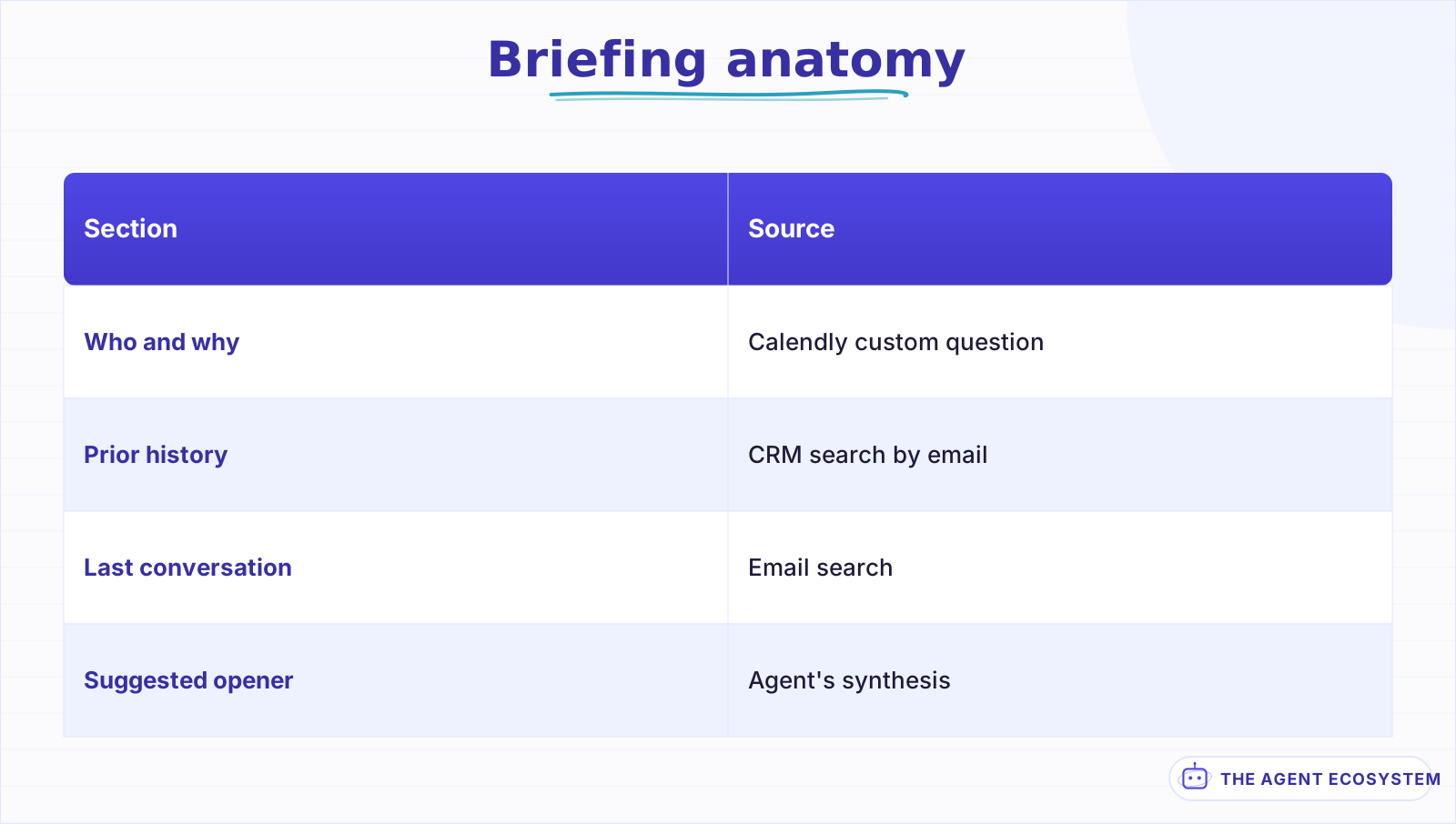 Every line traces to a specific tool result, not a generic template.
Should the briefing send automatically, or wait for you to review?#
A briefing is low-risk in a way most of the other integrations in this series are not: it goes to you, not to the customer, and a wrong or thin briefing costs you a slightly less prepared 2 minutes, not a public mistake. Sending it automatically to your own Slack or email is reasonable from the start.
The one thing worth a light review is what the agent found in a CRM or email search when the results look surprising, such as an existing open deal the salesperson booking the call did not know about. A quick human check on genuinely unexpected findings catches a stale or misattributed CRM record before it shapes how you walk into the meeting.
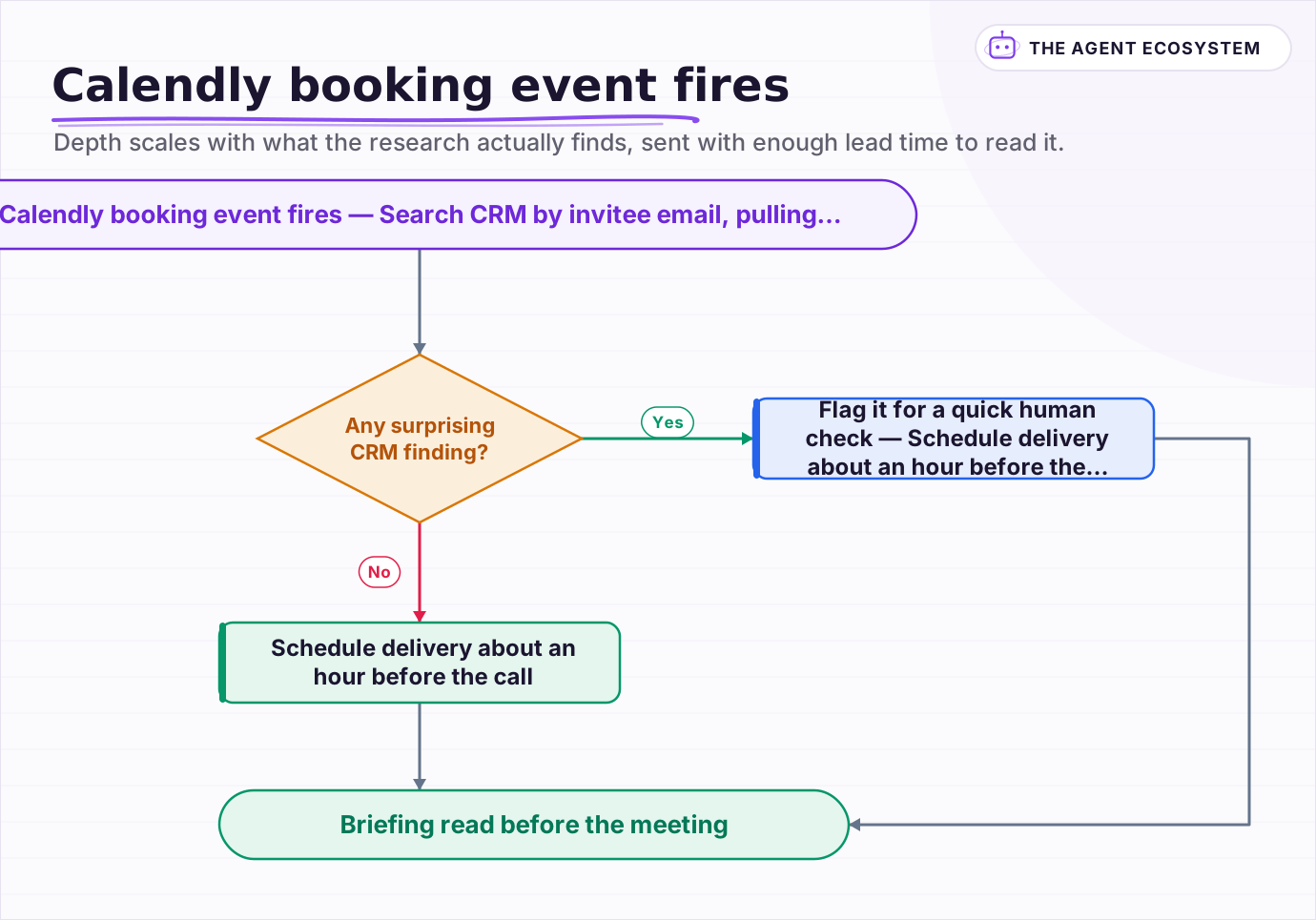 Depth scales with what the research actually finds, sent with enough lead time to read it.
What breaks, and how do you debug it?#
Most failures are not the agent's research, they are the trigger never firing or firing with less data than expected, which is easy to misdiagnose as a bad or lazy briefing when the real problem actually happened a step earlier, before the agent ever ran.
Confirm the Calendly webhook subscription is active for the specific event type you are testing, since Calendly scopes webhooks per event type or organization-wide depending on how the trigger was set up, and a subscription created for one event type will not fire for another.
Turn on Return Intermediate Steps on the AI Agent node and check what each search tool actually returned before assuming the briefing itself is wrong. An empty CRM result for someone who is genuinely a known contact is usually a lookup key mismatch, searching by a different email than the one on file, rather than a missing record; the general agent-not-working checklist covers the broader credential issues that show up the same way across connected apps.
Can you also manage Calendly events from n8n?#
Not through a dedicated node, but yes through Calendly's own REST API. If you need to cancel an event or update its details programmatically, an HTTP Request node authenticated with a Calendly personal access token can call those endpoints directly, the same escape hatch the n8n community uses today for anything the built-in node does not cover.
Treat that path as a manual integration you maintain yourself, not a supported tool with the guardrails this guide describes elsewhere. If you build a cancel-event action this way, apply the same discipline as any other write action in this series: the agent proposes the cancellation, a human confirms it, and only then does the HTTP Request node run.
Frequently asked questions
Does n8n have a Calendly node that can create or update events?
What can an n8n AI agent do with a Calendly booking?
What should a good meeting-prep briefing include?
Should a Calendly meeting-prep briefing be sent automatically?
Why isn't my n8n Calendly agent getting invitee data?
Sources
Primary references and vendor documentation used while drafting and reviewing this article.
Written by

Muhammad Qasim Hammad is an AI agent and automation expert and the founder of Cart Gaze LLC (cartgaze.com). He builds product for the love of it: when an idea lands, a working prototype is usually running within hours, built with the same AI agents and automations he sells. He puts his own output at roughly 20× what it was before agents, and the Agentic OS behind this site is the working proof, documented in public with the tools he actually ran and what they really cost.
AI & Automation Services
Want a pipeline like this running in your business?
I'm Qasim — I design and ship AI agents and n8n automations for solo operators and small teams. Tell me what's eating your team's week, and I'll scope a fix.
Related reading
n8n AI Automation Ideas: 8 Agent Workflows Worth Building (2026)
Finished the n8n AI tutorial and wondering what to actually build? These 8 n8n AI automation ideas come with the exact nodes, the honest Chain-vs-Agent call, and the right Claude model for each job.

Automate Client Onboarding With n8n: Welcome Email, Notion, and More
Build an n8n client onboarding automation that sends a Claude-written welcome email, creates a Notion project page, and logs the client in a CRM sheet, all in under 30 seconds after a new client signs.
n8n Form Trigger + AI Agent: Build a Smart Intake Form
A contact form that sits in an inbox helps nobody. Wire n8n's Form Trigger to an AI agent and every submission gets classified, answered, and routed the moment it arrives.
How to Use n8n with MCP: Client, Server, and AI Agent Setup
Your n8n AI agent can chat, but it cannot act beyond the nodes you hard-wired. The MCP Client Tool and MCP Server Trigger change that: one gives your agent a server's worth of tools, the other turns your workflows into tools Claude can call.
How to Build an n8n AI Agent That Manages Your Notion Workspace
An n8n AI Agent can create Notion pages, update database properties, and search your workspace from a single chat message. Here is how to wire the Notion node in as a tool, design a schema the agent can map to reliably, and gate every write behind a human check.
Add an AI Chatbot to Your Website With n8n (Chat Trigger)
Add a working AI chat widget to any website using n8n's Chat Trigger node and the @n8n/chat embed snippet. No React, no SaaS widget, about $7.25 per 1,000 conversations on Claude Haiku 4.5.