Build a Discord AI Agent in n8n
There is no Discord Trigger node, so you assemble the bot from a Webhook, the AI Agent, and the Discord node. Here is the wiring, end to end.
AI-drafted, reviewed by Muhammad Qasim Hammad on July 27, 2026. See our AI disclosure.
Table of contents
n8n already has guides for Telegram and WhatsApp AI agents, but Discord is the gap. n8n has a Discord node for sending, and it has an AI Agent node, but there is no Discord Trigger node, so the piece people get stuck on is receiving. You build a Discord AI agent in n8n from 3 parts: a Webhook trigger, the AI Agent, and the Discord node to reply.
This guide covers how to wire those 3 parts, the 2 ways to receive Discord messages, and when you need a bot token versus a webhook. It assumes you have built a basic n8n AI Agent before and want to put one in a Discord server.
Can you build a Discord AI agent in n8n?#
Yes, but you assemble it from parts rather than dropping in one node. n8n has no Discord Trigger, so incoming messages arrive through a Webhook node. The AI Agent node does the thinking in the middle, and the Discord node sends the reply back to the channel. The tricky part is the receiving end, not the agent.
The whole build is 3 nodes in a row, plus the model, memory, and tools hanging off the agent.
| Part | n8n node | Job |
|---|---|---|
| Receive | Webhook | Catch the Discord message or command |
| Think | AI Agent | Model, tools, and channel-keyed memory |
| Reply | Discord | Send the answer back to the channel |
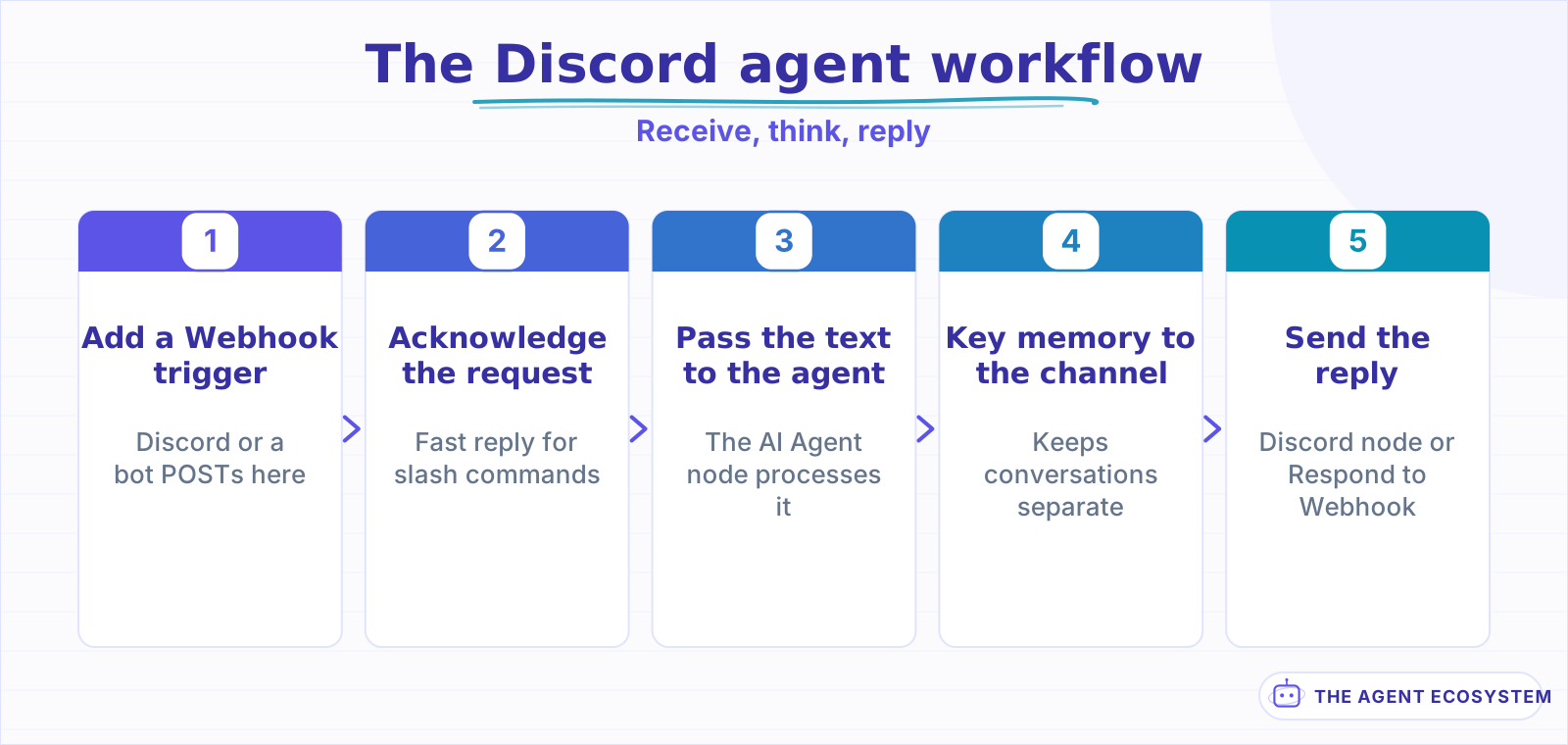 Three nodes in a row: a Webhook to receive, the AI Agent to think, the Discord node to reply, with memory keyed to the channel.
How does the agent receive Discord messages?#
Through the Webhook node, in one of 2 ways. Discord can POST slash-command interactions to your Webhook URL, which is the native path but requires signature verification and a fast acknowledgment. Or a small bot process listens to a channel and forwards each message to the same Webhook, which is simpler when you want the agent to read every message.
The choice comes down to how the agent should be triggered. Slash commands are clean and Discord-native, but the interactions endpoint expects you to verify the request signature and reply within about 3 seconds, so a long agent run has to acknowledge first and follow up after. A forwarder bot is more work to host but lets the agent see ordinary chat, not just commands. Either way, the Webhook node is the trigger, the same as any other inbound integration.
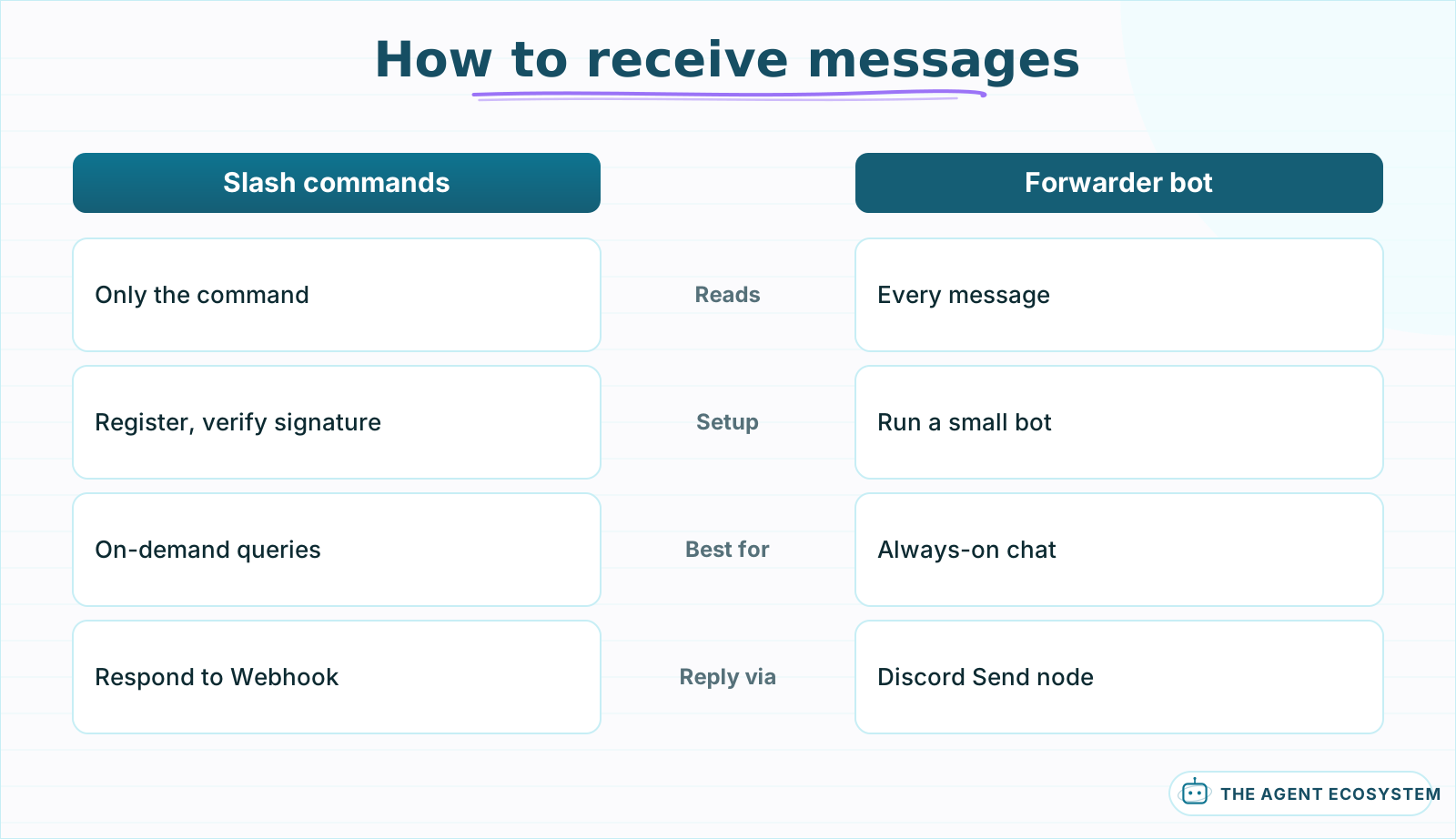 Slash commands are Discord-native but only see the command. A forwarder bot is more to host but lets the agent read every message.
How do you wire the AI Agent in the middle?#
The middle is a standard n8n AI Agent, with one Discord-specific detail: set the memory Session Key to the Discord channel or user id from the incoming payload, so each conversation stays separate. Attach your model and tools as usual, and pass the message text from the Webhook into the agent as the prompt.
Getting the Session Key right is what stops the bot mixing up conversations. If you hard-code it, every channel shares one memory and the agent answers with the wrong context, which is the most common agent memory bug. Bind it to the channel id for a shared-channel assistant, or the user id for private threads. The tools you attach work exactly as they would anywhere else, and if the agent misbehaves, the debugging guide applies unchanged.
How does the agent reply to Discord?#
Two options, depending on how you received the message. If a forwarder bot triggered the workflow, use the Discord node's Send operation with a bot token to post the reply to the channel. If a slash-command interaction triggered it, reply through the Respond to Webhook node so Discord shows the answer in the same interaction the user started.
The Discord node also has a Send and Wait for Response operation, which is useful when the agent needs a human to confirm something before it continues. For most bots, a plain Send back to the channel is all you need. Keep the reply short, since Discord caps a message at 2,000 characters, and split a long answer across messages if the agent tends to write essays.
Do you need a bot token or just a webhook?#
A Discord webhook only sends messages to one channel, with no bot user and no way to read or respond to what users say. That is fine for an alerts bot, but an AI agent that answers people needs a bot token, because reading messages and replying interactively is bot-only. For a real conversational agent, set up the bot token.
Think of it as send-only versus interactive. A webhook is the right tool when a workflow just needs to drop a notification into a channel, the Discord equivalent of any outbound alert. The moment the agent has to read messages, keep memory per user, or use commands, you are in bot-token territory. There is no halfway option, so decide based on whether the agent talks back.
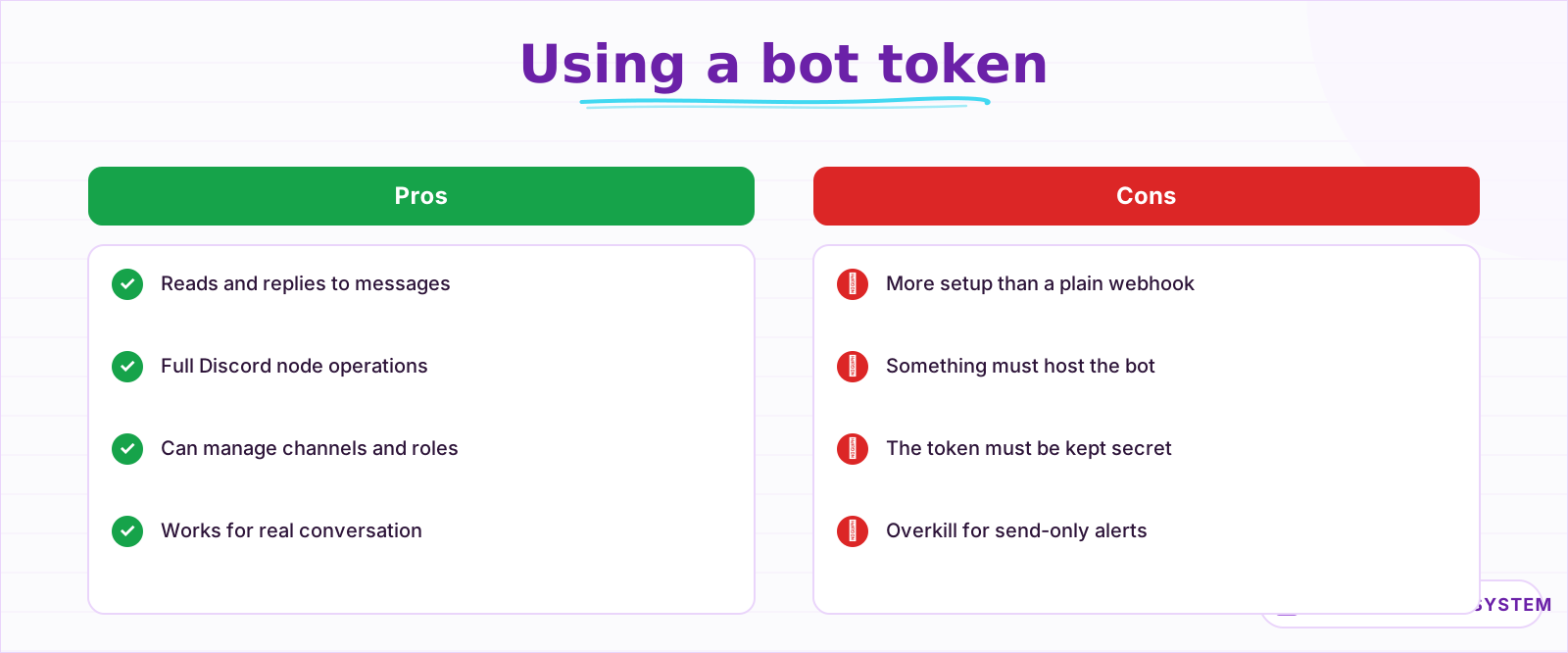 A bot token is what makes the agent conversational. A webhook only sends, so it fits alerts, not a bot that reads and replies.
Putting the Discord AI agent together#
The full flow is short: a Webhook trigger catches the Discord message, the AI Agent processes it with channel-keyed memory, and the Discord node or Respond to Webhook sends the answer back. Start with a forwarder bot and the Discord Send node for the simplest working version, then add slash commands once it runs.
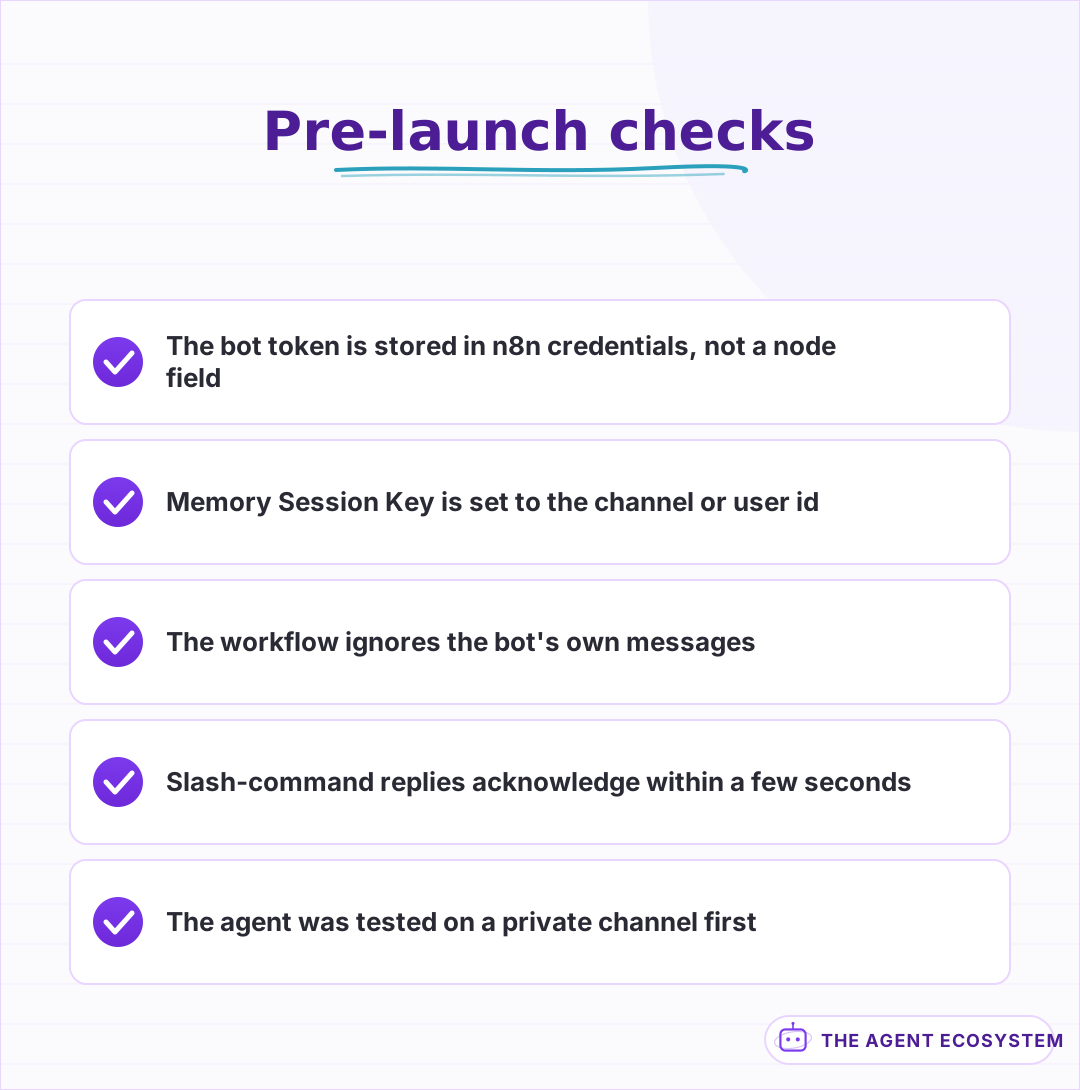 The two that bite most: memory keyed to the channel, and filtering the bot's own messages so it does not answer itself.
The path below picks the right setup based on what your bot needs to do.
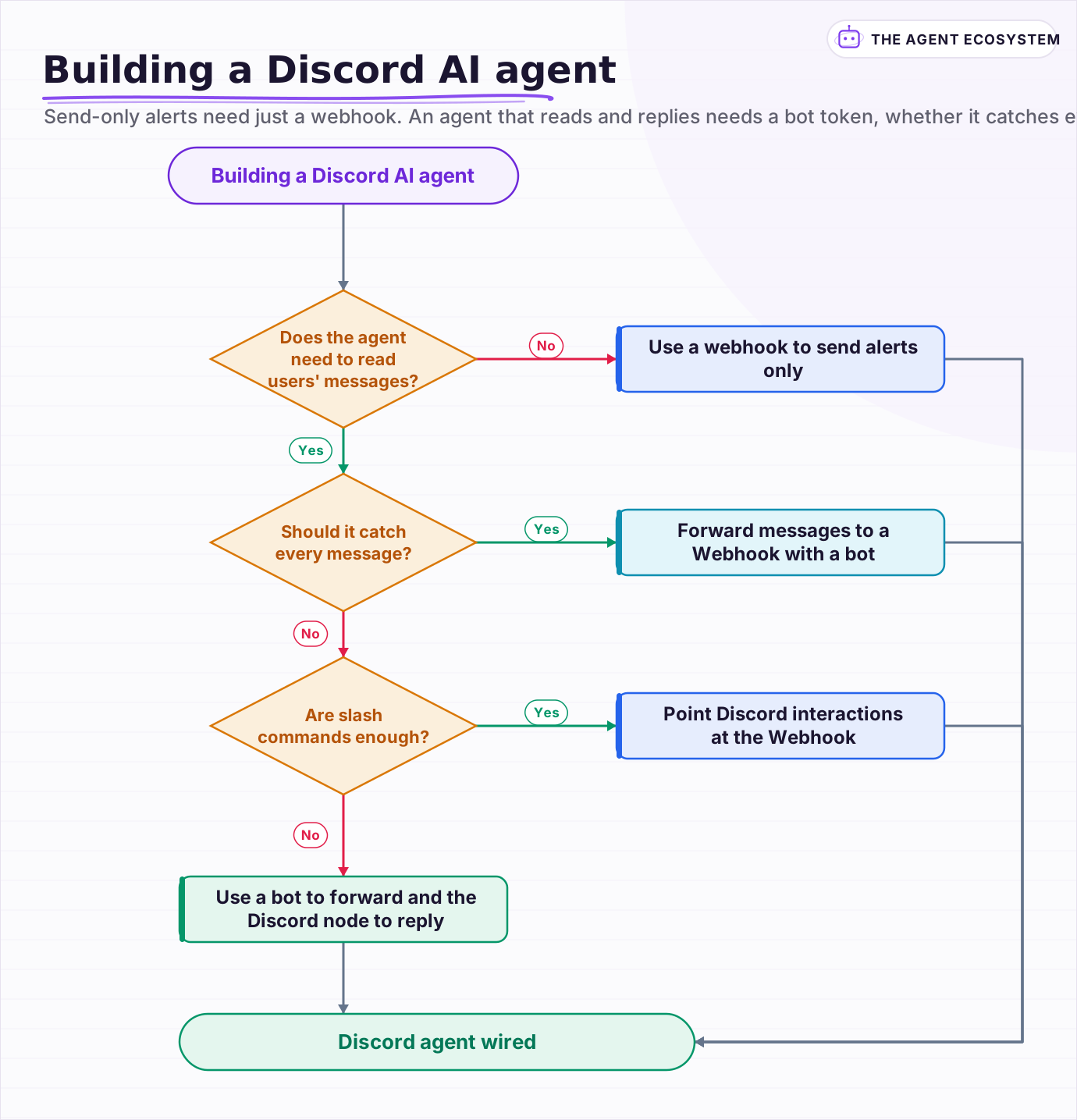 Send-only alerts need just a webhook. An agent that reads and replies needs a bot token, whether it catches every message or only slash commands.
Frequently asked questions
Does n8n have a Discord Trigger node?
Do I need a bot token to build a Discord AI agent in n8n?
How does an n8n Discord agent keep separate conversations?
How does the agent reply back to Discord?
Should I use slash commands or a forwarder bot?
Sources
Primary references and vendor documentation used while drafting and reviewing this article.
Written by

Muhammad Qasim Hammad is an AI agent and automation expert and the founder of Cart Gaze LLC (cartgaze.com). He builds product for the love of it: when an idea lands, a working prototype is usually running within hours, built with the same AI agents and automations he sells. He puts his own output at roughly 20× what it was before agents, and the Agentic OS behind this site is the working proof, documented in public with the tools he actually ran and what they really cost.
AI & Automation Services
Want a pipeline like this running in your business?
I'm Qasim — I design and ship AI agents and n8n automations for solo operators and small teams. Tell me what's eating your team's week, and I'll scope a fix.
Related reading
Build an AI Telegram Bot With n8n (No Code, No Fees)
Build an AI-powered n8n Telegram bot in under an hour using three nodes and zero platform fees. Get a shareable t.me link, no business verification required, and a bot that replies around the clock.

n8n Slack Bot + AI Agent: Answer Team Questions from Your Docs
Your team asks the same question in Slack every week. Wire a Slack Trigger to an n8n AI agent with a vector store and the bot answers from your own documents, in the thread, in seconds.
Give Your n8n AI Agent Memory (Postgres Chat Memory, Step by Step)
Your n8n agent forgets every message because the model is stateless. Add Postgres Chat Memory, set a per-user Session Key, and tune Context Window Length to keep conversations coherent without blowing your token budget.
Add an AI Chatbot to Your Website With n8n (Chat Trigger)
Add a working AI chat widget to any website using n8n's Chat Trigger node and the @n8n/chat embed snippet. No React, no SaaS widget, about $7.25 per 1,000 conversations on Claude Haiku 4.5.
AI Agent Memory Types: Buffer vs Window vs Summary vs Vector
Agent memory is not something the model has; it is which past turns your framework re-sends each call. This compares the four ai agent memory types, full buffer, window, summary, and vector-backed, what each costs in tokens, and which map to real n8n nodes or patterns you wire.
How to Build an n8n AI Agent That Manages Your Notion Workspace
An n8n AI Agent can create Notion pages, update database properties, and search your workspace from a single chat message. Here is how to wire the Notion node in as a tool, design a schema the agent can map to reliably, and gate every write behind a human check.