Field guide · AI Agents
AI Agent Tool Design: What to Expose and How to Shape It
Eleven lessons on the surface you actually control: permission-first scoping, one job per tool, schemas that make bad calls hard, and errors an agent can act on.
- Lessons
- 11
- Read
- 23 min
- Figures
- 8
AI-drafted, reviewed by Muhammad Qasim Hammad on November 17, 2026. See our AI disclosure.
Table of contents
- What you will end up with
- 1. Decide what the agent is allowed to do at all
- 2. Make each tool one job with an obvious name
- 3. Write the description for a reader who cannot ask questions
- 4. Design the schema so bad calls are hard to express
- 5. Return errors the agent can act on
- 6. Make every tool safe to call twice
- 7. Give the agent less data, not more
- 8. Separate reads from writes, and gate the writes
- 9. Test the tools without the agent, then with it
- 10. Watch which tools actually get used
- 11. Remove the tools the agent never picks
- What I would do differently
- Where to go next
When an agent picks the wrong tool, calls it with a malformed argument, or loops on the same lookup four times, the instinct is to change the model or rewrite the system prompt. The cause is almost always the tools themselves: what they are called, what they promise, what they accept, and what they say when they fail. This guide is about designing that surface, because it is the part of an agent you actually control.
A model reads your tool set the way a new contractor reads a job sheet on their first morning. They cannot ask you what you meant. Everything they know about the work is in the wording.
What you will end up with#
A tool set scoped to what the agent is genuinely allowed to do, each tool doing one job with a name and description a stranger could act on, schemas that make bad calls hard to express, errors the agent can recover from, and a read on which tools actually get used. Eleven lessons.
What this does not cover: building an MCP server, or the protocol-level plumbing of function calling. This is the design layer that sits above whichever mechanism you use to deliver the tools.
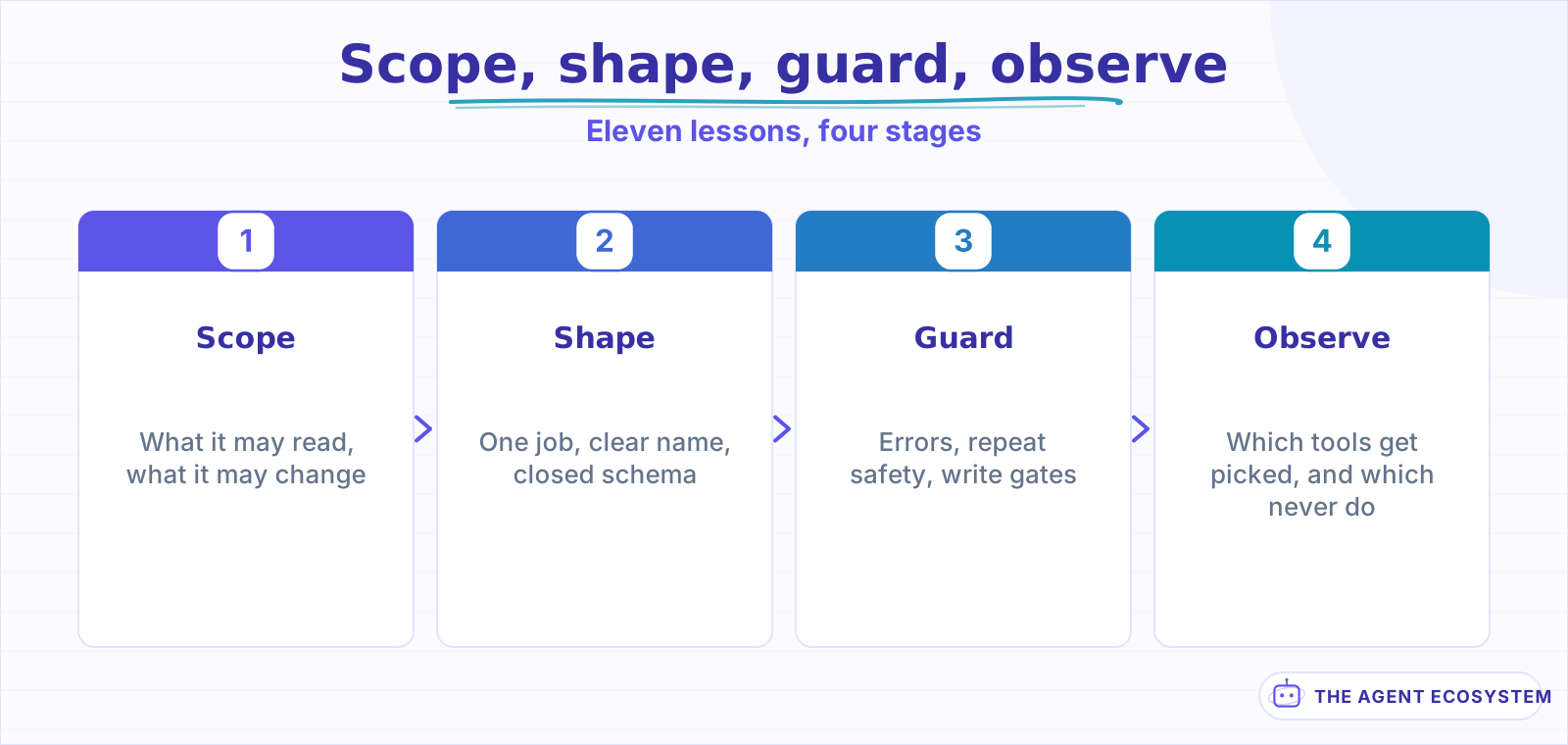 Tools scoped after they are built inherit whatever permissions were convenient at the time.
The reframe worth carrying: you are not teaching a model to use tools. You are writing an interface for a capable reader who will never ask a clarifying question and will always guess when unsure.
| Lessons | What you get | Roughly |
|---|---|---|
| 1 to 3 | Scope, boundaries, and descriptions that work | 20 min |
| 4 to 6 | Schemas, errors, and calls that are safe to repeat | 25 min |
| 7 to 9 | Data volume, write gates, and testing | 20 min |
| 10 to 11 | What production tells you, and what to remove | 15 min |
Lesson 1Decide what the agent is allowed to do at all#
Start from permissions, not capabilities. The question is not "what could this agent usefully do" but "what am I willing for it to do at three in the morning with an input I have not seen". Those produce very different tool sets, and only the second one is safe to ship.
Write two lists before you write any code. What the agent may read, and what it may change. The reading list can be generous. The changing list should be short enough that you could read it aloud in a meeting without anyone objecting.
Three questions settle most of it:
- What is the worst single call? Not the worst sequence. If one call to any tool, with the worst plausible argument, would be unrecoverable, that tool needs a gate or should not exist.
- Who is the agent acting as? An agent holding a shared admin credential can do everything that credential can, regardless of what its tools suggest. Scope the credential, not just the tool list.
- What happens when the input is hostile? Assume some input eventually contains instructions aimed at your agent, because prompt injection reaches agents through data, not just through chat.
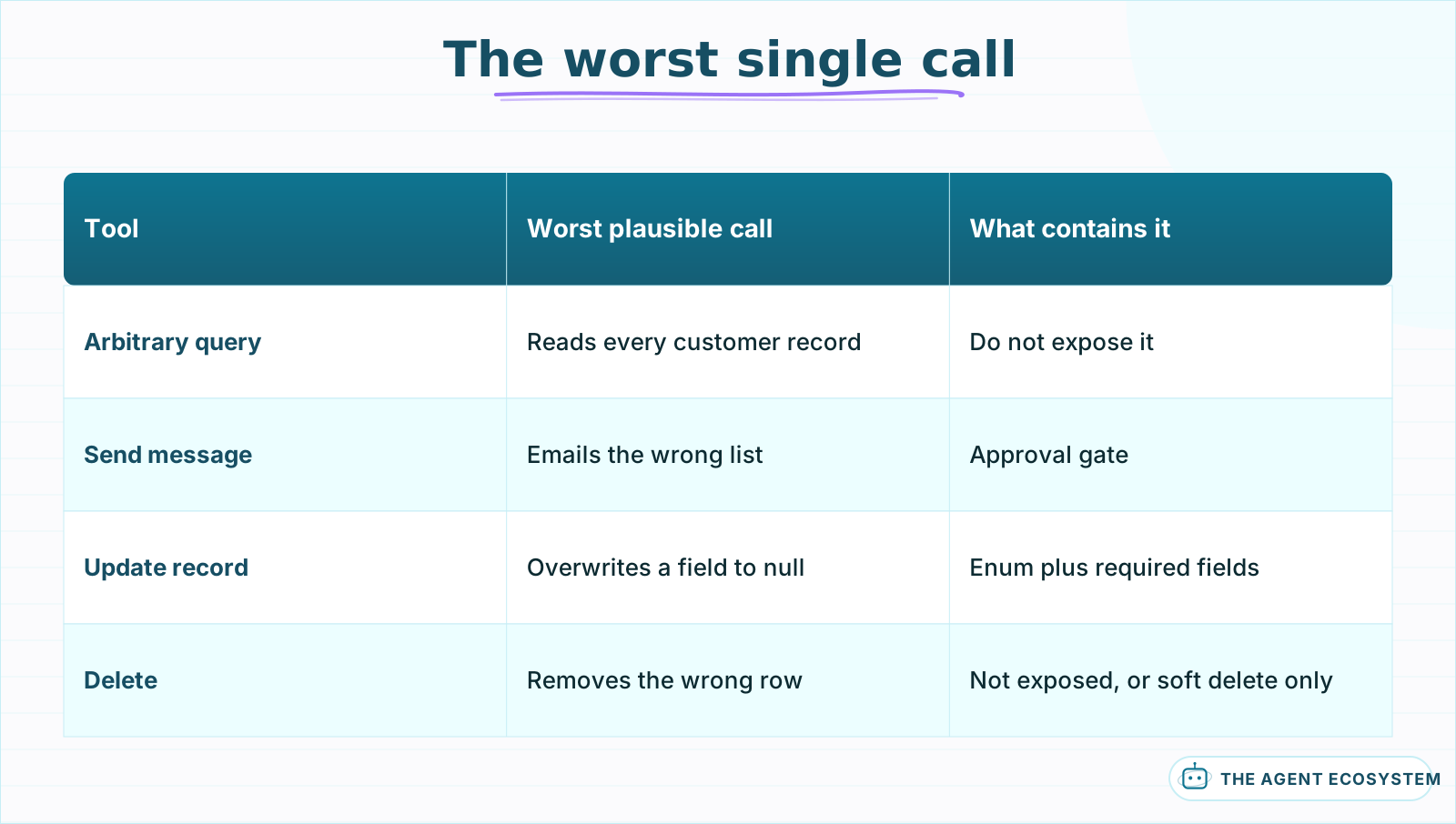 Judge each tool by one bad call, not by a bad sequence. Sequences are easier to interrupt.
Credential scope is the part most teams get wrong, because it is invisible from the tool list. If every tool authenticates with one service account that can read the whole database, then the agent's real permissions are that account's, and your careful tool boundaries are documentation rather than enforcement. Give the agent its own identity with its own grants, so that a tool doing something it should not is stopped by the system underneath rather than by the wording above it. That separation is the whole point of delegated agent identity.
The common mistake is exposing a general-purpose tool because it is less work than exposing five specific ones. A single run_query tool that accepts arbitrary SQL is one prompt injection away from being a data exfiltration tool, and no description you write around it changes that. The narrower tool is more work once and safer forever.
Lesson 2Make each tool one job with an obvious name#
A tool should do a single thing that a person could describe in a short sentence without using the word "and". lookup_order is one job. lookup_or_create_order is two, and the agent will pick it in situations where you only wanted the lookup.
Name tools the way you would name a function that a colleague has to call without reading its body: verb first, object second, no abbreviations, no internal system names. get_customer_balance beats crm_bal_v2 by more than it looks, because the model is matching intent to words and your internal naming means nothing to it.
Getting the boundary right is mostly about resisting two pulls:
- Too wide. One tool that takes a
modeoractionparameter is several tools wearing a coat. The model has to get both the tool and the mode right, and the description has to cover every branch. - Too narrow. Fifteen tools that differ only in which field they fetch flood the selection step, and the model starts guessing between near-identical options.
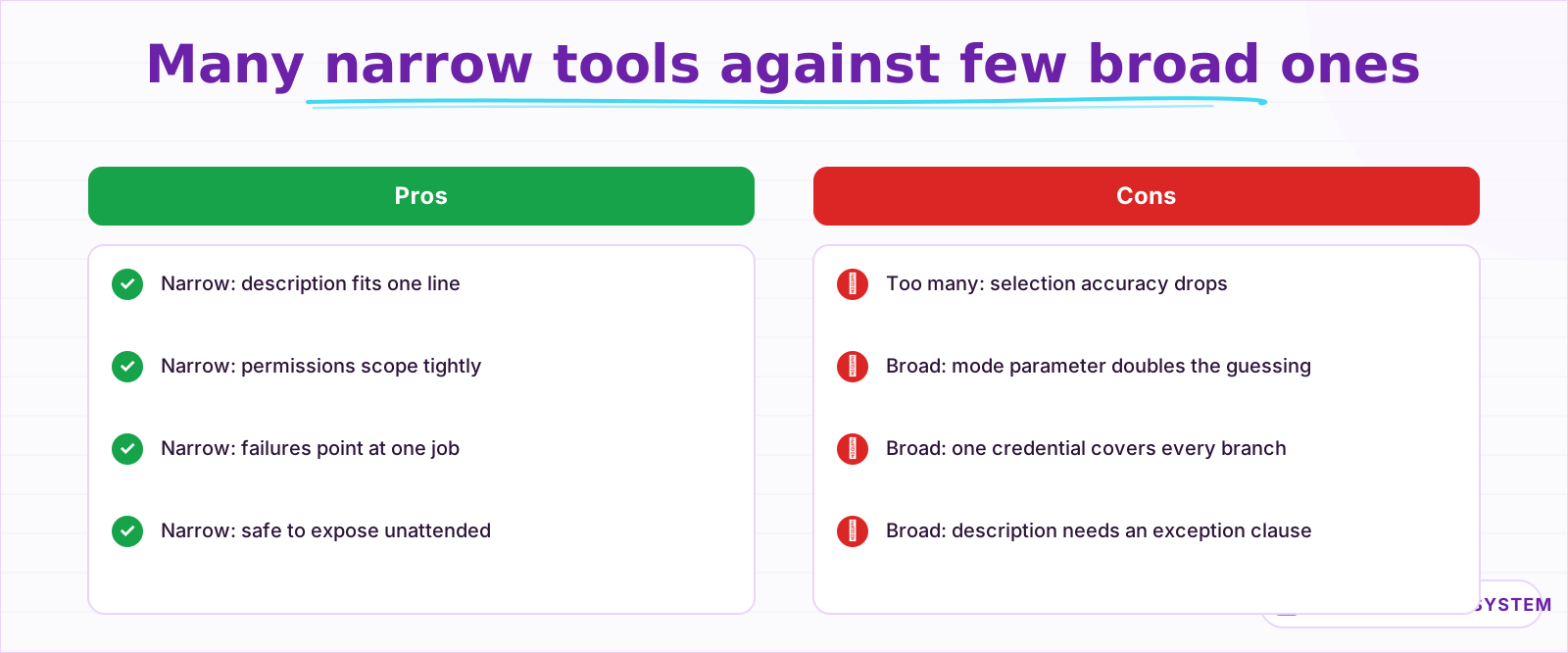 Both directions fail. The middle is a tool you can describe in one line without an exception.
The practical test is whether you can write a one-line description that fully covers the tool. If the description needs a "unless" or a "except when", the boundary is wrong and you are about to push that complexity onto the model at selection time.
Names carry more weight than they appear to. The model is matching a user's phrasing against your vocabulary, so a tool named in the words your users actually use will be selected more reliably than one named after the system behind it. If customers say "refund" and your internal term is "credit reversal", the tool is called issue_refund and the mapping happens in your code, not in the model's head.
Avoid names that describe implementation. call_billing_api tells the model nothing about when to reach for it, and a tool named after a vendor will be avoided in situations where it was exactly right because the model has no reason to connect the vendor to the task.
Somewhere between eight and fifteen tools is where most single agents stop improving. Past that, selection accuracy falls faster than added capability helps, and the fix is not a better model. It is splitting the work across agents so each sees a smaller set, which is the structural argument for sub-workflows and modular design.
Lesson 3Write the description for a reader who cannot ask questions#
The description is not documentation. It is the only thing standing between an ambiguous request and a wrong tool call, and it gets read fresh on every single turn by something that will never say "I am not sure which of these you meant".
Four things belong in every description, in this order: what it does, when to use it, when not to, and what it returns. The third is the one everyone omits and the one that prevents the most errors, because tools are usually confused with their neighbours rather than misunderstood on their own.
name: lookup_order
description: >
  Fetch one order by its ID. Use when the customer names or implies a specific
  order. Do NOT use to search by customer name or date; use search_orders for
  that. Returns status, items, totals and the return window, or NOT_FOUND.
The "do NOT use" line is doing the real work. Without it, lookup_order and search_orders overlap in the model's reading and it will pick whichever sounds slightly closer, inconsistently, in a way that looks like randomness.
Two more habits pay off immediately:
- Name the sibling tool explicitly. Pointing at the alternative resolves the ambiguity far better than describing your own tool more carefully.
- State the units and the format. A date parameter with no stated format will arrive in four different shapes across a week of traffic.
Keep descriptions short. A description that runs to a paragraph is usually compensating for a boundary problem, and its length costs you on every turn because the whole tool set is in the prompt each time. Two or three sentences that resolve the ambiguity beat a paragraph that explains the domain.
What does not belong: implementation notes, rate limits the model cannot act on, the history of why the tool exists, and anything the agent has no decision to make about. Those belong in your own documentation, where a person will read them once.
If tool selection is your main failure mode, the description is almost always where the fix lives rather than the model, and the fuller treatment of that is in writing tool descriptions the model actually uses.
Lesson 4Design the schema so bad calls are hard to express#
Every argument you accept as free text is a decision you have delegated to the model. Replace as many as you can with enumerations, and the class of malformed calls disappears rather than being caught later by validation you have to write anyway.
A status field typed as a string will eventually receive "shipped", "Shipped", "in transit" and "SHIPPED_OK". The same field typed as an enum of four values receives one of four values, and the model can see the options while it is choosing.
Four schema habits, in order of how much they buy you:
- Enumerate everything enumerable. Statuses, categories, sort orders, currencies, regions. If the set is closed, close it in the schema.
- Make required fields required. An optional field the model omits produces a silent default, and a silent default is a wrong answer nobody notices.
- Constrain ranges. A
limitwith a stated maximum prevents the agent from asking for fifty thousand rows to answer a question about one. - Reject rather than coerce. Accepting a date in whatever shape it arrives hides a problem you would rather see on day one.
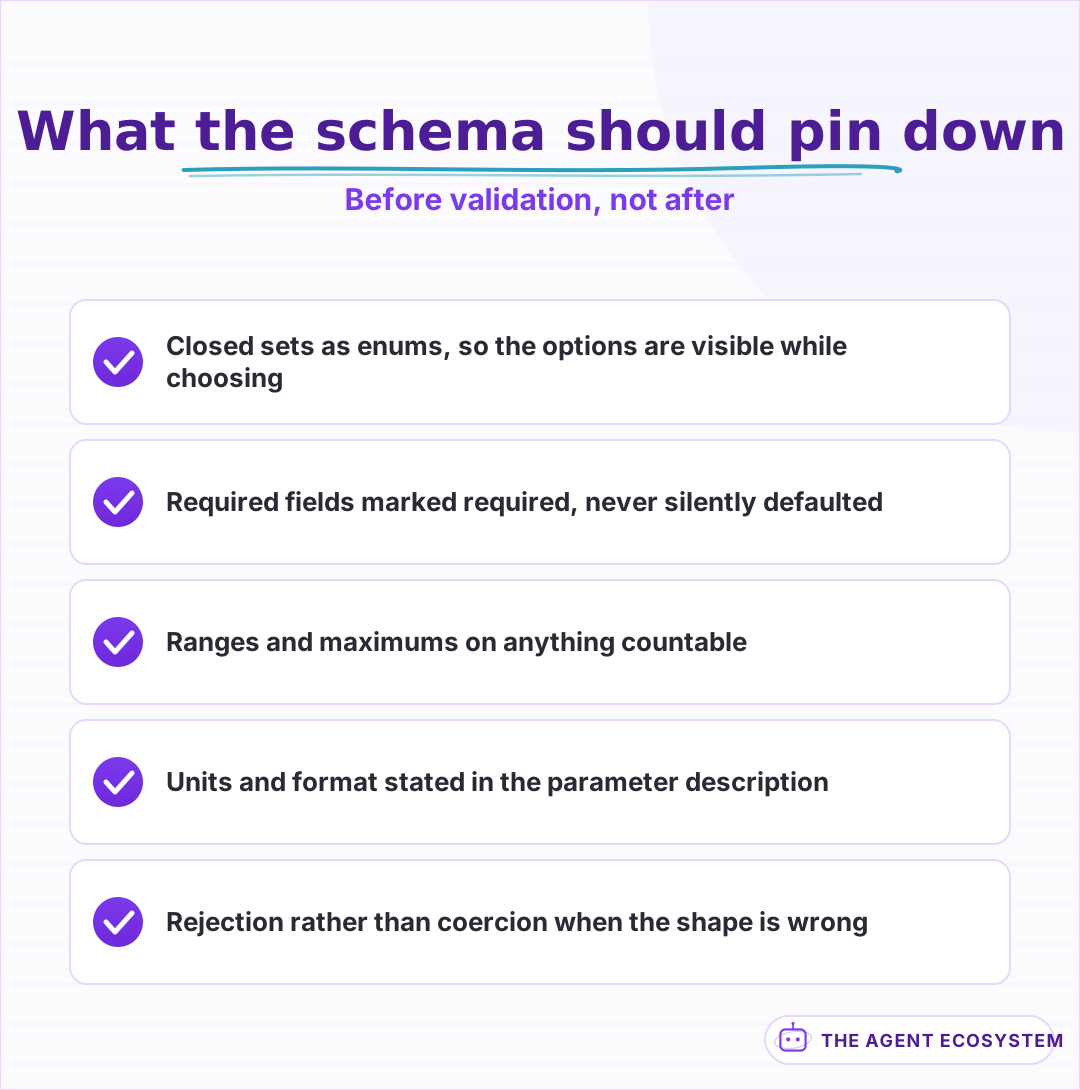 Every free-text argument is a decision handed to the model. Close the ones that can be closed.
Descriptions belong on parameters too, not just tools. A field called since is ambiguous in a way that since: "ISO 8601 date. Orders placed on or after this date, inclusive." is not, and the second version costs one line.
The reliability of the whole arrangement rests on the model returning well-formed arguments in the first place, which is a solved problem in the providers that support it and an unsolved one where you are parsing JSON out of prose. If you have the option, take the structured path; the difference is stark, and structured outputs and tool calling reliability covers where it still leaks.
Lesson 5Return errors the agent can act on#
Most tools return errors written for a developer reading a log. An agent cannot open the log, cannot see your stack trace, and will respond to an opaque failure by either apologising to the user or trying the same call again. Both are avoidable with better return values.
An error return should say what went wrong, whether retrying could help, and what to do instead. That is three short fields, and it converts a dead end into a decision the agent can make correctly.
| Return | What the agent does with it | Better shape |
|---|---|---|
500 Internal Error | Retries blindly, or gives up | RETRYABLE: upstream timeout, try once more |
null | Reports success with empty data | NOT_FOUND: no order with that ID |
Invalid input | Guesses at a different argument | INVALID: date must be ISO 8601, got "last tuesday" |
| A stack trace | Pastes it to the user | FAILED: cannot recover, tell the user to contact support |
The NOT_FOUND row is the expensive one. A tool that returns an empty result for both "this does not exist" and "your query was wrong" teaches the agent that absence is normal, and it will confidently report that a customer has no orders when it actually asked the wrong question.
Four categories cover nearly everything, and naming them consistently across every tool matters more than the specific words. INVALID means the call was wrong and the same call will never work. NOT_FOUND means the call was well-formed and the thing does not exist. RETRYABLE means try again, possibly after a wait. FAILED means stop and tell the user. An agent that sees the same four tokens from every tool learns the pattern once; one that sees a different error vocabulary per tool has to reason about each from scratch, every time.
Say plainly whether a retry is worth it. Without that signal an agent will retry things that can never succeed and give up on things that would have worked on the second attempt, and both look like unreliability from the outside.
Write the error text for the agent, not for a log aggregator. The difference is concrete: "constraint violation on fk_customer_id" tells a developer where to look and tells an agent nothing it can use, while "INVALID: no customer with that ID, check the ID before retrying" produces the correct next action without any reasoning about database internals.
One caution on how much to say. An error that echoes internal structure, table names or query fragments is handing information to whatever produced the input, and some of that input eventually comes from users. Say what the agent needs to decide and no more.
Lesson 6Make every tool safe to call twice#
Agents repeat calls. They retry after a timeout that already succeeded, they lose track mid-sequence, and they re-run a step after a clarification. Design for that rather than trying to prevent it, because prevention fails at exactly the moments that matter.
Any tool that changes something should accept an idempotency key and return the same result for a repeat rather than doing the work again. This is standard practice for payment APIs for the same reason it matters here: the caller cannot always tell whether the first attempt landed.
Three protections, cheapest first:
- Idempotency keys on writes. The agent supplies one per logical action; a repeat returns the original result rather than creating a second record.
- A hard call ceiling per run. Cap total tool calls and calls per tool. An agent stuck in a loop is a cost incident before it is a quality one, which is why hard spend caps belong at this layer rather than on the invoice.
- A cheap read before an expensive write. Check whether the thing already exists. This costs one call and prevents the duplicate that generates a support ticket.
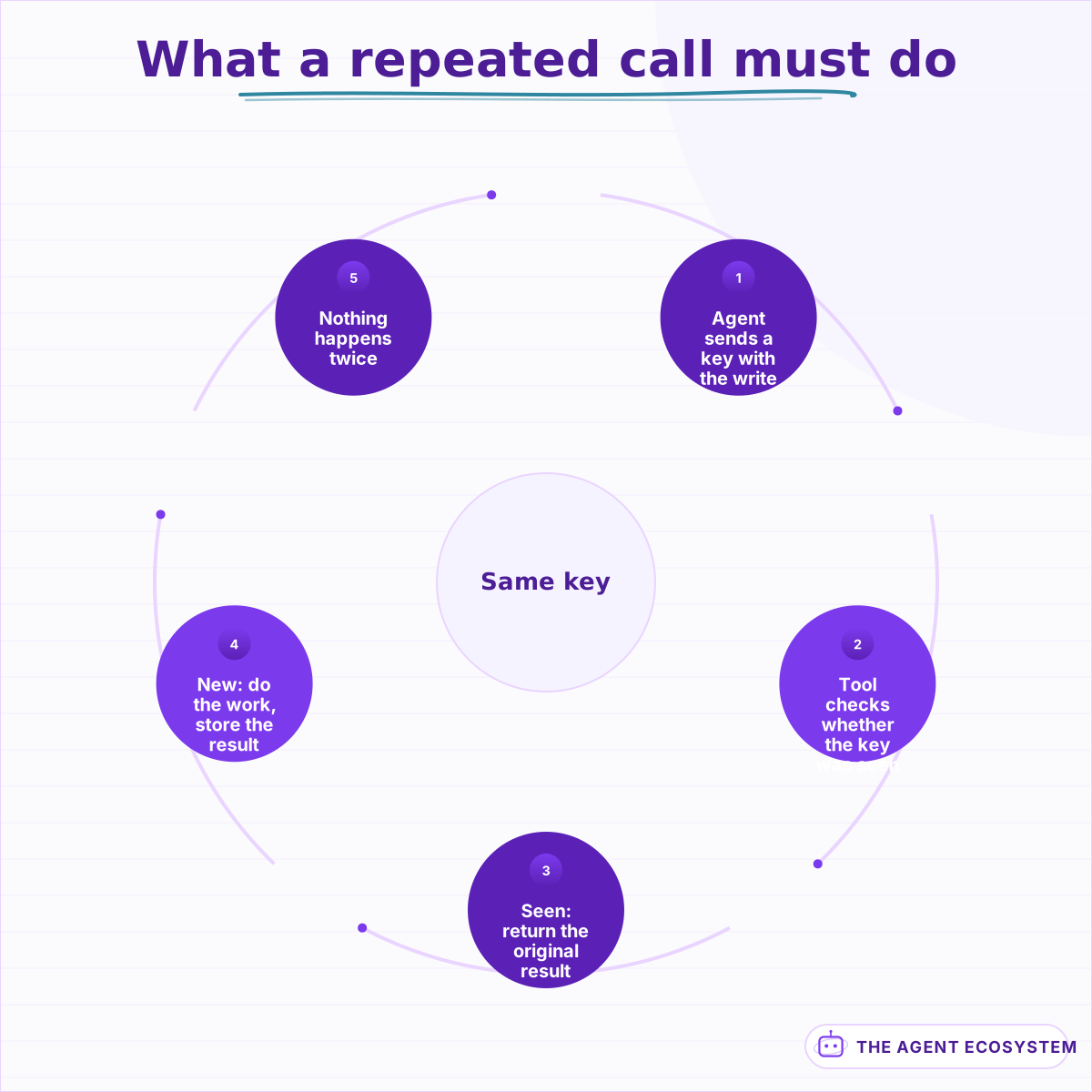 Agents retry after timeouts that already succeeded. Design for the repeat rather than trying to prevent it.
Read tools deserve less ceremony but not none. A read that is slow or expensive still wants a cap, because an agent that calls it eleven times in a run is telling you something is wrong upstream, and the ceiling is what turns that into a visible failure rather than a quiet bill.
Lesson 7Give the agent less data, not more#
The instinct when a tool returns something is to return everything, on the grounds that the model can pick what it needs. It can, at a cost you pay on every subsequent turn, because whatever comes back sits in the context window for the rest of the conversation.
A tool returning a full customer object with sixty fields spends thousands of tokens per call to deliver the four fields that mattered. Multiply by a few tool calls per turn and the context is mostly payload, which is slow, expensive, and measurably worse at reasoning.
Trim at the tool, not in the prompt:
- Return the fields the tool's own description promised. If the description says it returns status, items and totals, return exactly those three.
- Summarise long text before it leaves the tool. A tool that fetches a document should usually return the relevant passage, not the document.
- Paginate and say so. Return ten rows plus a count and a note that more exist, rather than four hundred rows.
- Strip anything the agent must never repeat. A tool that returns personal data the agent has no reason to see has created an exposure that no prompt instruction reliably contains, and redacting at the boundary is the only version that holds.
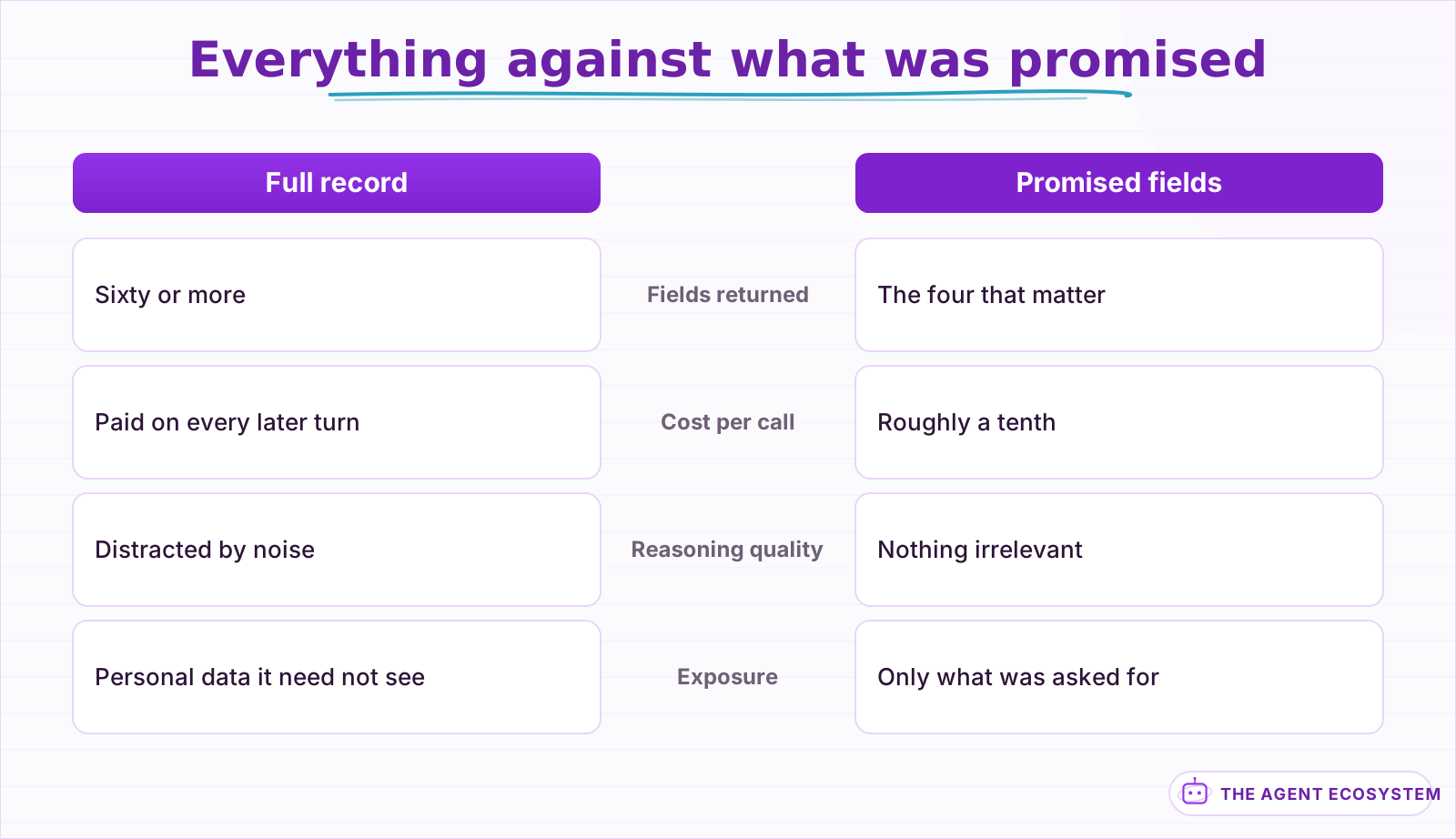 Whatever a tool returns stays in context for the rest of the conversation, and gets paid for on every turn.
A worked version makes the size difference concrete:
// before: whole record, ~1,400 tokens
{ "id": "ORD-1001", "customer": { 22 fields }, "items": [ 12 fields each ],
  "audit": [ 30 events ], "internal_flags": { ... }, "shipping": { 18 fields } }

// after: what the description promised, ~120 tokens
{ "id": "ORD-1001", "status": "delivered", "delivered_on": "2026-08-14",
  "items": [ { "sku": "A-22", "qty": 1 } ], "total": "48.00",
  "return_window_ends": "2026-09-13" }
Same question answered, roughly a tenth of the context, and the trimmed version is also easier for the model to read correctly because nothing in it is a distraction.
There is a real trade here. Trim too aggressively and the agent makes a second call for the field you removed, which costs more than including it would have. The signal to watch is repeat calls to the same tool with the same arguments in one run: that is the agent telling you the first response was incomplete.
Lesson 8Separate reads from writes, and gate the writes#
Reads and writes need different rules, and blending them into one tool set is how agents end up doing something irreversible during what should have been a lookup. Split them explicitly, in the naming and in the permissions behind them.
Reads can be broad, fast and unattended. Writes should be few, narrow, logged, and in some cases stopped for a human. Which writes get a gate is a business decision rather than a technical one, and it is worth writing down rather than inferring from whoever built the tool.
Three tiers work for most systems:
- Unattended writes. Low blast radius, easily reversed, high volume. Adding a note, setting a tag, updating a status within a normal range.
- Gated writes. Money, external communication, deletion, anything a customer sees. These wait for approval, and the approval step is part of the tool rather than a promise in the prompt. The mechanics of that pause are in human approval steps.
- Forbidden. Not exposed at all. If it should never happen unattended, the protection is absence, not instruction.
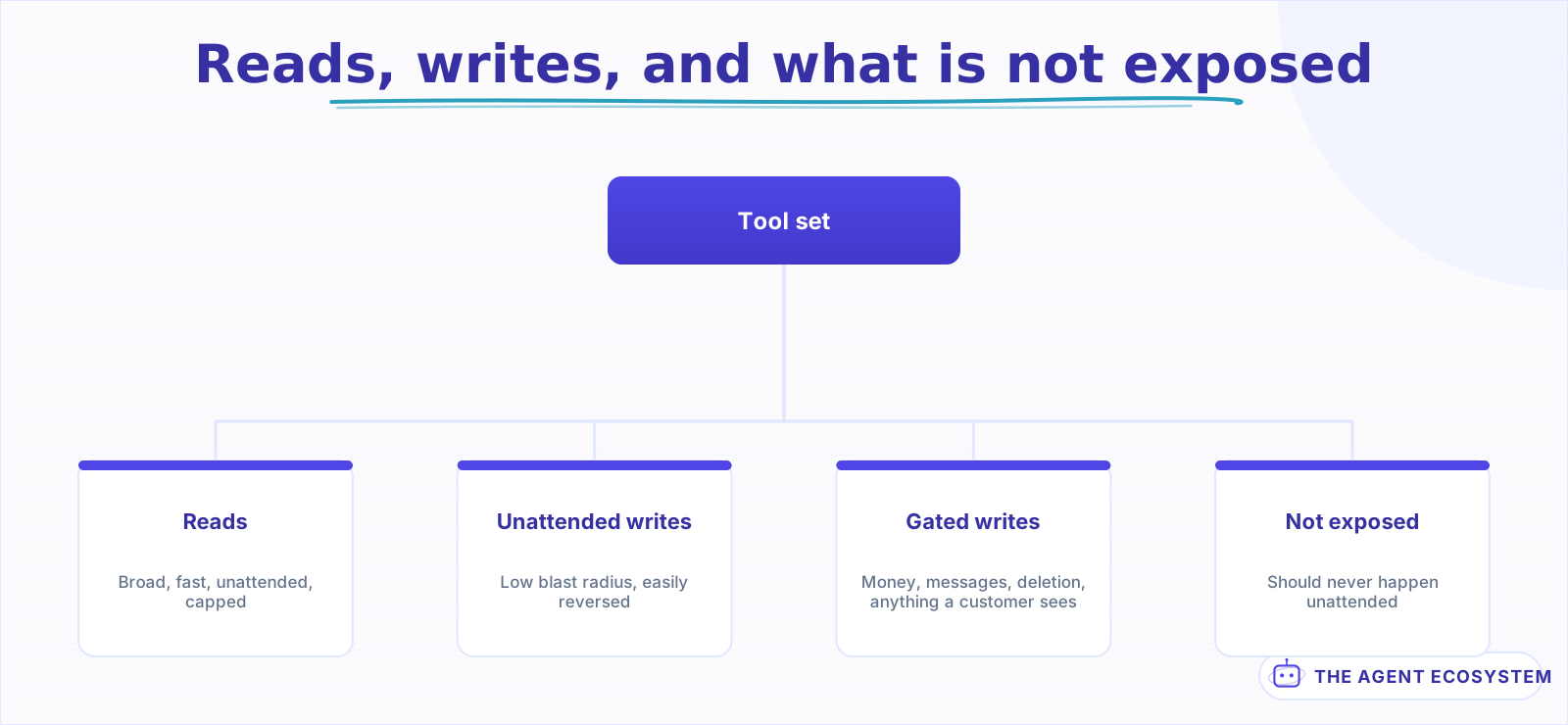 The bottom branch is the strongest control, because absence cannot be talked out of.
The distinction that matters is that a gate lives in the tool, not in the system prompt. An instruction saying "always ask before issuing a refund" is a suggestion that survives until an unusual input persuades the model otherwise. A tool that returns PENDING_APPROVAL and does nothing else cannot be talked out of it, which is the same reasoning behind sandboxing and permission scoping.
Lesson 9Test the tools without the agent, then with it#
Two failure modes look identical from the outside and have nothing in common: the tool is broken, and the agent is choosing badly. Test them separately or you will spend days tuning prompts against a schema bug.
Start with the tools alone. Call each one directly with a good argument, a missing argument, a malformed argument, and an argument that finds nothing. Four calls per tool, and they catch most of what would otherwise show up as mysterious agent behaviour.
lookup_order(id="ORD-1001")     -> full record
lookup_order(id="")             -> INVALID, not a 500
lookup_order(id="nope")         -> NOT_FOUND, distinct from empty
lookup_order()                  -> rejected by the schema, never reaches the handler
Those four calls are worth writing as a permanent test rather than running by hand once. They take minutes to write, they run without a model, and they catch the schema change that would otherwise show up a week later as an agent behaving oddly for reasons nobody can reproduce.
Add a fifth call for anything with a write: call it twice with the same idempotency key and confirm the second one changed nothing. That single test is the difference between discovering the duplicate in a test run and discovering it in a customer's inbox.
Then test selection, which is a different question: given a realistic request, does the agent reach for the right tool? Write a handful of cases whose expectation is the tool call rather than the answer, and score the call. This is where a tool set with two overlapping descriptions shows up immediately, and it slots into the eval suite from how to evaluate AI agents as a step check rather than an output check.
Mock the tools when testing selection. You are asking whether the agent picked correctly, not whether your database is up, and a mocked tool makes the test fast enough to run on every prompt change. The workflow-level mechanics of mocking and regression runs are covered in testing and evaluating n8n AI agents.
Lesson 10Watch which tools actually get used#
A tool set is a hypothesis about what the agent needs. Production is the test, and the results are usually surprising: two tools carry most of the traffic, several are never selected, and one gets called in situations you did not design it for.
Log every call with the tool name, the arguments, the outcome and the duration. That is one line per call and it turns tool design from guesswork into reading, which is the practical argument for tracing agent runs even when nothing is failing.
Four numbers per tool tell you nearly everything:
| Signal | What it usually means |
|---|---|
| Never selected | Description overlaps a neighbour, or the need was imagined |
| Selected then abandoned | The return shape is not what the agent expected |
| Called repeatedly in one run | Response incomplete, or no clear failure signal |
| High error rate on arguments | Schema too loose, or the parameter description is vague |
The second row is the most informative and the easiest to miss. An agent that calls a tool, ignores the result, and answers from its own knowledge has told you the tool is not delivering what its description promised, and no error was raised anywhere.
Two of these have fixes that do not involve the model at all. A tool selected then abandoned is a return-shape problem: read one real response and compare it to what the description claims. A tool called repeatedly with identical arguments is either returning partial data or failing without saying so, and both are fixed in the return value rather than the prompt.
The third pattern worth watching is a tool that gets selected in the right situation but with an argument the user never supplied. That is the agent filling a required field by inference, which is sometimes exactly what you want and is sometimes an invented order number. If a field must come from the user rather than from the model, say so in the parameter description and return INVALID when it looks fabricated.
Lesson 11Remove the tools the agent never picks#
Every tool in the set costs something on every turn: tokens in the prompt, and a slightly harder selection problem. A tool that has not been chosen in a month is charging that rent for nothing, and it is actively making the others harder to pick between.
Review the set on a schedule rather than when something breaks. Once a quarter, look at the call counts and make three decisions.
- Delete the unused. If it was never selected in a quarter of real traffic, the need was hypothetical. Deleting is reversible; the code stays in version control.
- Merge the near-identical. Two tools that differ by one field are one tool with a parameter, and the model was guessing between them anyway.
- Split the overloaded. A tool called in three distinct situations is three jobs, and its description is carrying an "unless" you have stopped noticing.
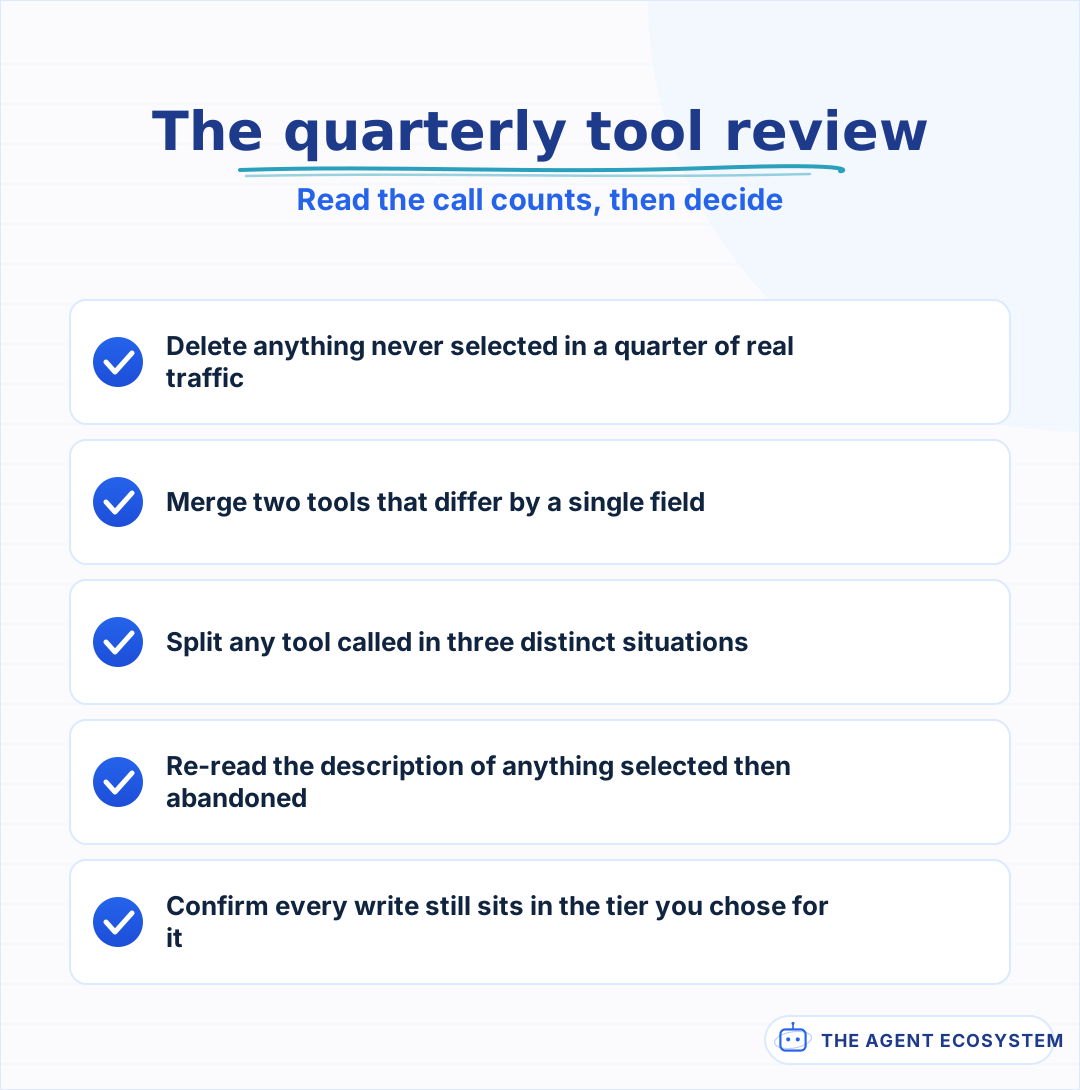 Deleting is reversible. The code stays in version control, and selection accuracy improves immediately.
Removing a tool is the single most reliable way to improve selection accuracy, and it is the change teams reach for last because it feels like losing capability. It is not. An agent with nine well-bounded tools outperforms the same agent with twenty on nearly every task the nine cover.
What I would do differently#
I would write the descriptions before the implementations. Written first, the description forces the boundary to be clear; written afterwards, it describes whatever the function grew into, including the parts that should have been a second tool.
I would also have logged tool calls from the first day rather than adding it after the first confusing week. Without the log, every question about agent behaviour is a reconstruction. With it, most are a query, and the tools that need attention identify themselves.
Where to go next#
If you are deciding how to deliver tools rather than how to shape them, the mechanism comparison is in function calling, MCP and tools, and the practical n8n version is giving an agent tools.
If you are packaging tools for others to use, the security surface changes shape and is worth reading first: MCP server hardening covers what an exposed server has to defend, and building an MCP server covers the build itself.
For the specific tool types with their own design problems, start with web search tools and text to SQL agents, both of which fail in ways that generic tool advice does not predict.
Frequently asked questions
How many tools should an AI agent have?
Why does my agent keep calling the wrong tool?
Should AI agent tools be idempotent?
Should a human approve an AI agent's write actions?
Sources
Primary references and vendor documentation used while drafting and reviewing this article.
Written by

Muhammad Qasim Hammad is an AI agent and automation expert and the founder of Cart Gaze LLC (cartgaze.com). He builds product for the love of it: when an idea lands, a working prototype is usually running within hours, built with the same AI agents and automations he sells. He puts his own output at roughly 20× what it was before agents, and the Agentic OS behind this site is the working proof, documented in public with the tools he actually ran and what they really cost.
AI & Automation Services
Want a pipeline like this running in your business?
I'm Qasim — I design and ship AI agents and n8n automations for solo operators and small teams. Tell me what's eating your team's week, and I'll scope a fix.
Related reading
Writing AI Agent Tool Descriptions the Model Actually Uses
Your agent keeps calling the wrong tool or passing bad arguments, and you blame the model. The real lever is the tool description and its JSON schema: the model picks and fills every tool from that alone. Here is how to write ai agent tool descriptions like onboarding docs for a

How to Build an AI Agent: The 80% That Survives Week Two
Most tutorials get you a working agent in ten minutes and skip what breaks it in week two. Sixteen lessons covering the loop, tool descriptions, memory, fallbacks, guardrails, evaluation, and the cost levers that decide your bill.
Give Your n8n AI Agent Tools (Calculator, HTTP, Workflows)
Your n8n AI Agent answers from stale training data until you attach real tools. This guide shows you exactly how to wire HTTP Request, Calculator, and Workflow tools so your agent acts on live data.
What Is an AI Agent? A Plain-English Guide for Builders
An AI agent is a language model running in a loop that decides its own next action, not a chatbot and not a chain. Here is how the perceive-decide-act-observe loop works, how an agent differs from a chatbot, chain, and workflow, and a checklist for when you actually need one.
How to Evaluate AI Agents: Building a Test Set You Can Trust
Most teams learn their agent got worse from a customer, not a test. Eleven lessons on building the small suite that would have caught it: real cases, per-case scoring, step checks, and the four ways an eval set starts lying to you.
Text-to-SQL AI Agents: Plain-English Database Queries You Can Trust
A text-to-SQL agent turns 'how many customers churned?' into a real query against a real database. The models are good enough to try this in 2026, but accuracy is mostly a schema problem and safety is entirely a database problem. This is the loop that makes generation reliable,