Field guide · Models & Cost
Local LLMs for Business: When Running Your Own Is Worth It
Eleven lessons on the analysis that follows 'local is free': the three real reasons, the costs with no invoice, and the hybrid split most working setups actually use.
- Lessons
- 11
- Read
- 22 min
- Figures
- 7
AI-drafted, reviewed by Muhammad Qasim Hammad on October 13, 2026. See our AI disclosure.
Table of contents
- What you will end up with
- 1. Have a real reason, and name it
- 2. Run the cost comparison honestly
- 3. Check whether the volume is really there
- 4. Size the hardware to the model, not the ambition
- 5. Pick the runner, then stop shopping
- 6. Keep the interface swappable
- 7. Evaluate the local model on your own task
- 8. Split the work instead of choosing a side
- 9. If privacy is the reason, prove it
- 10. Own the maintenance you signed up for
- 11. Know when to give it back
- What I would do differently
- Where to go next
"Local is free" is the sentence that starts most bad local-LLM projects. The inference has no per-token price, which is true, and the reason people stop the analysis there. This guide is the rest of the analysis: when running your own model is genuinely the right call for a small business, and the four ways it goes wrong.
The symptom is a machine humming under a desk, a model that was impressive in October, and a quiet drift back to the API for anything that matters, because nobody wanted to own the upgrade.
What you will end up with#
A clear answer on whether local is right for your workload, and if it is, a working setup with a model chosen on your own evaluation, a cost you can defend, and an honest view of what you have taken on. Eleven lessons.
A word on who this is for. If you are a solo operator or a small team without a dedicated platform person, everything here assumes the maintenance lands on someone who has other work. That constraint is why the guide keeps pushing toward renting, splitting and keeping an exit rather than toward the technically optimal setup. The optimal setup for a team with an infrastructure engineer is a different guide.
What this does not cover: training or fine-tuning a model, multi-GPU clusters, or serving other people's traffic.
One framing worth carrying through: the interesting question is never local against hosted, it is which requests belong where. Almost every setup that works in practice runs both, and almost every setup that disappoints tried to pick a side and defend it.
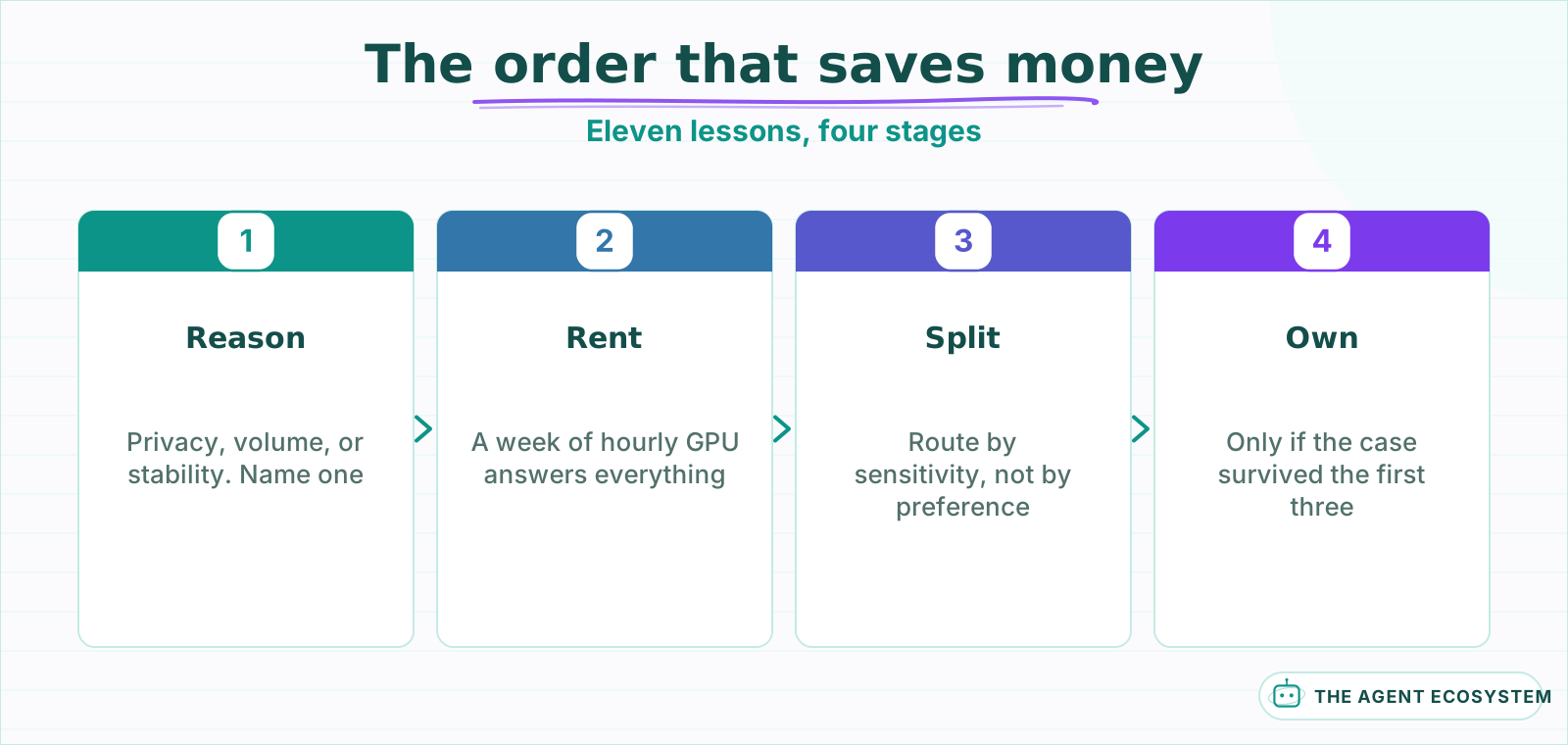 Every step can invalidate the next, and only the last one is irreversible.
| Lessons | What you get | Roughly |
|---|---|---|
| 1 to 3 | An honest reason, and the real cost | 15 min |
| 4 to 7 | Hardware, model, and a working setup | 20 min |
| 8 to 11 | Privacy done properly, and when to stop | 20 min |
Lesson 1Have a real reason, and name it#
There are exactly three good reasons to run a model yourself, and "it is free" is not one of them. Naming which one applies changes every decision that follows, because the three want different setups.
| Reason | What it demands | What it does not need |
|---|---|---|
| Data cannot leave your boundary | Verified isolation, an audit story | The best possible model |
| Volume makes per-token pricing hurt | Throughput and uptime | Perfect privacy |
| You need a model that cannot change | A pinned version you control | Frontier capability |
Most people building a local setup are quietly motivated by a fourth reason, which is that it is interesting. That is a legitimate motivation for a weekend and a poor one for a business dependency, and it is worth being honest about which you are acting on before you buy hardware.
There is a fourth reason people give that deserves separating out, because it sounds like the first one and is not: "our clients would prefer it". That is a sales position rather than a requirement, and it can usually be satisfied by a data-processing agreement and a redaction layer at a fraction of the cost. Worth checking whether the requirement is contractual or merely assumed before you buy anything.
- Write down which of the three applies to you.
- If none does, you want the API, and you have saved yourself a project.
- If one does, that reason is now the thing you optimise for, not raw quality.
One more thing the reason determines, which is easy to miss: how much quality you are allowed to give up. If the reason is privacy, you have to accept whatever the best model you can run locally does, because the alternative is not running it at all. If the reason is cost, you can walk away the moment quality drops below your bar, because the API is still there. Those are very different negotiating positions with yourself, and knowing which one you are in prevents a lot of rationalising later.
Lesson 2Run the cost comparison honestly#
The per-token price is zero. The cost is not, and the comparison has to include the parts that do not appear on any invoice.
| Cost | API | Local |
|---|---|---|
| Per request | Per token, forever | Zero |
| Hardware | None | Upfront, or rented hourly |
| Electricity | None | Real, and continuous if always on |
| Your setup time | Near zero | Hours to days |
| Your maintenance | Near zero | Ongoing, forever |
| Idle capacity | You pay nothing | You pay whether it runs or not |
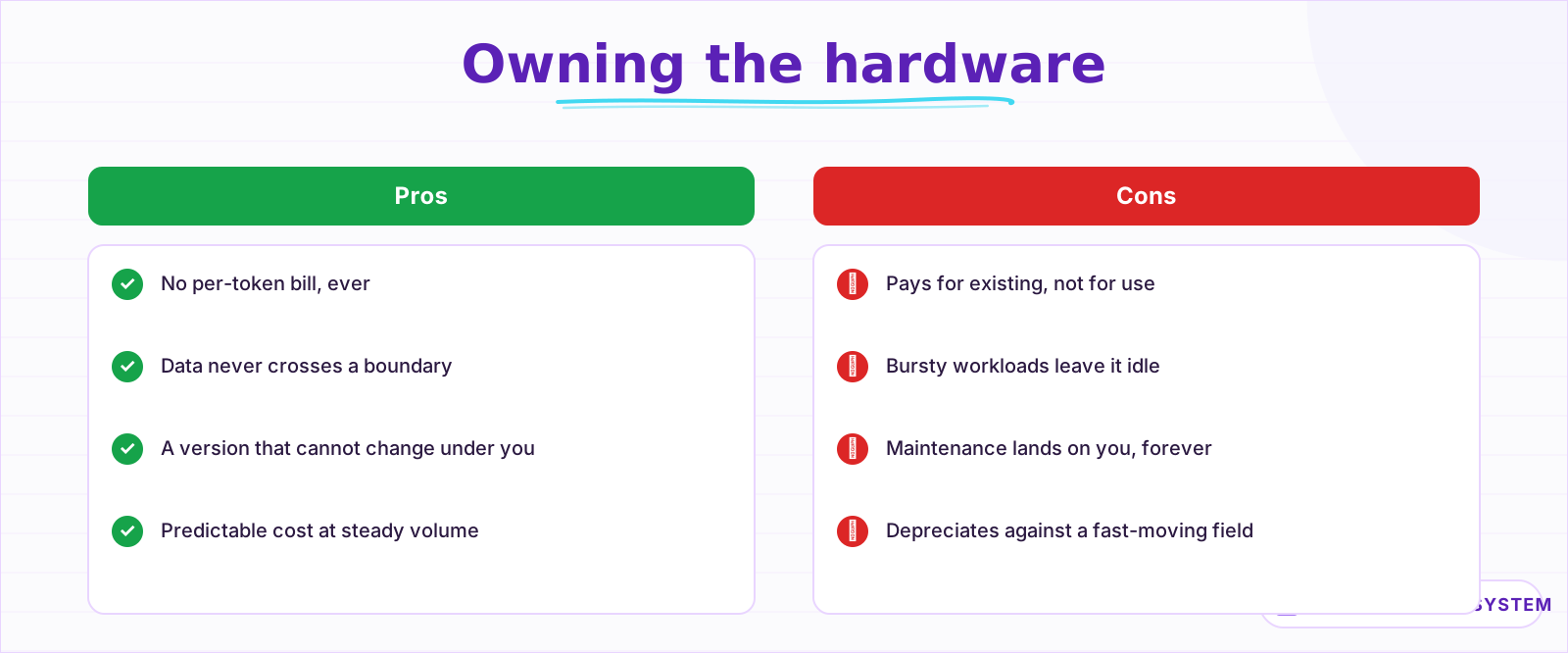 The bottom-right entry is the one that decides most small-business cases.
The last row decides more of these cases than any other. An API bills you for what you use; a machine bills you for existing. A workload that runs in bursts and sits idle the rest of the week is the worst possible fit for owned hardware and the best possible fit for per-token pricing.
Two costs on the local side deserve naming because they are invisible until they arrive. The first is the hour you spend when a model update changes output subtly and you have to work out whether it was the model or your prompt. The second is the decision fatigue of a field that ships something notable every few weeks, which is a real tax on attention even when you do nothing.
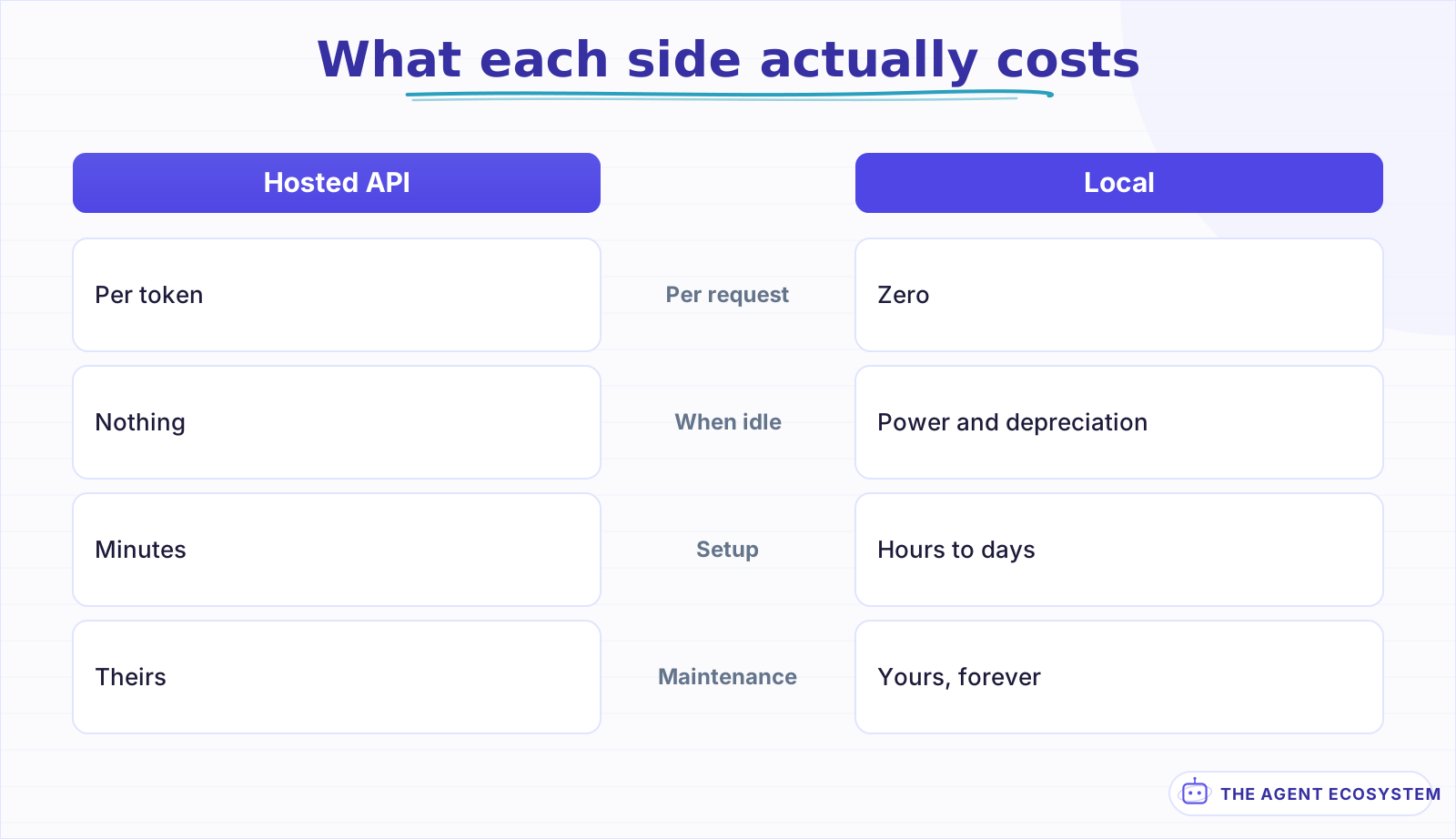 An API bills for what you use. A machine bills for existing.
The break-even arithmetic in full, including where the lines actually cross, is in Is a Local LLM Actually Cheaper?.
Lesson 3Check whether the volume is really there#
Break-even for owned hardware arrives at a volume most small businesses never reach, and the honest check takes five minutes.
Take your current or projected monthly API spend. If it is small, the local case cannot be about cost, whatever the hardware costs, because you cannot save more than you are spending. That sounds obvious written down and it is routinely skipped.
There is a second volume question underneath the first, and it is the one that actually decides throughput: how concentrated the volume is. Ten thousand requests spread evenly across a month is a small machine running comfortably. The same ten thousand arriving in two hours on a Monday is a queue, and you either buy for the peak and idle the rest of the week, or you accept the latency. Per-token pricing absorbs bursts for free, which is the thing it is genuinely good at.
monthly API spend            -> if low, cost is NOT your reason
hardware + power + your time -> the real local cost
months to break even         -> if over ~18, the hardware is obsolete first
That third line is the one that catches people. Hardware depreciates against a fast-moving field, so a break-even measured in years is really a bet that nothing better arrives, and something better keeps arriving.
›Renting before buying, and why it settles most of this
An hourly GPU answers every question a purchase would answer, for a fraction of the commitment:
| Question | Rent a week | Buy |
|---|---|---|
| Does the model pass my eval? | Yes | Yes |
| How much headroom do I have? | Yes | Only after months |
| Is the latency acceptable? | Yes | Yes |
| What does it cost to be wrong? | A week of rental | The machine |
The only thing renting does not test is the always-on cost profile, and you can model that from the rental's utilisation figures. If the case survives a week of rental, buy with confidence. If it does not, you learned that for the price of a dinner.
If cost is not your reason, go back to lesson 1. Privacy and stability are both excellent reasons to run a model locally, and neither of them needs the cost case to work.
Lesson 4Size the hardware to the model, not the ambition#
Model size determines memory, and memory is the constraint that decides everything else. Work backwards from the model you need rather than forwards from the machine you want.
The rough arithmetic, which is close enough to plan with:
memory needed ~= parameters x bytes-per-parameter + overhead

  7B model at 4-bit   ~= 4-5 GB
  7B model at 16-bit  ~= 15 GB
  70B model at 4-bit  ~= 40 GB
Context length costs memory too, and it is the part people forget when sizing. A model that fits comfortably at a 4,000-token context can run out of room at 32,000, because the key-value cache grows with every token in the window. If your workload involves long documents, size for the context you actually use rather than the model alone.
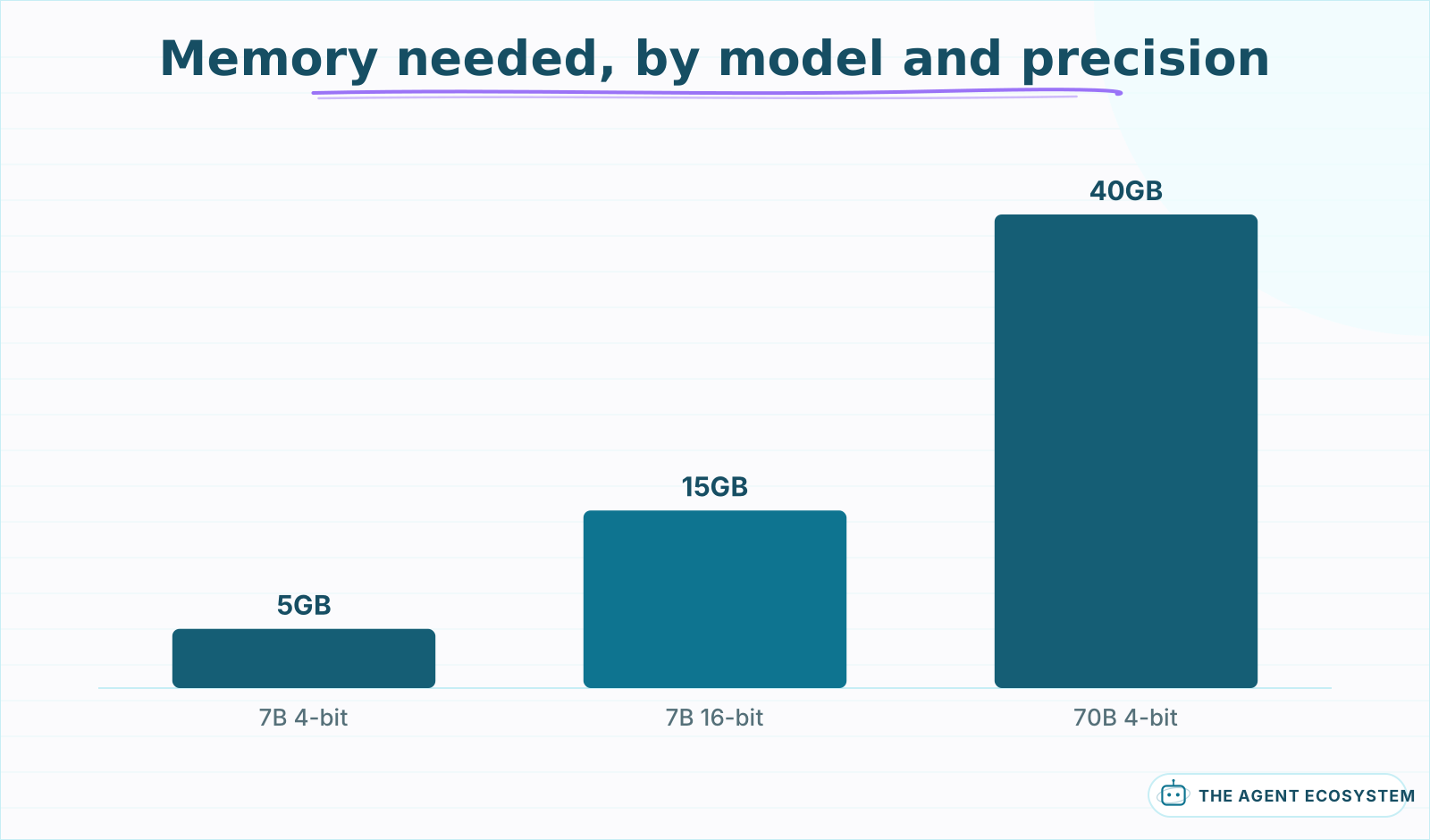 Approximate, before context. The key-value cache grows with every token in the window.
Quantisation is the lever that makes local practical. Dropping from 16-bit to 4-bit cuts memory by roughly three quarters for a quality loss that is small on most business tasks: classification, extraction, summarising. It is larger on hard reasoning, which is one more reason lesson 1 matters.
- Pick the smallest model that passes your evaluation.
- Quantise it, then re-run the evaluation rather than assuming parity.
- Size the machine to that, with headroom for context.
A practical note on where the memory actually goes, since the arithmetic above is only the model weights. Budget roughly 20% on top for the runtime, then add the context cache, which for a long document workload can rival the model itself. A 7B model that "fits in 8GB" on paper can be uncomfortable on an 8GB machine doing real work.
The distillation route, where a smaller model is trained to imitate a larger one on your specific task, is covered in Model Distillation and Small Language Models.
Lesson 5Pick the runner, then stop shopping#
Three tools cover almost every small-business case and the differences are operational rather than about quality.
One property to check before committing to any of them: whether it exposes an OpenAI-compatible endpoint. All three do today, and it is the single feature that keeps the rest of your stack portable, which lesson 6 is entirely about.
Start with Ollama unless you already know why not. One thing worth checking before you settle: how each handles model updates. Pulling a newer version of the same model can change output subtly, and a runner that makes it easy to pin and to keep two versions side by side saves you the "was it the model or my prompt" afternoon that lesson 10 warns about.
The comparison across all three is in Ollama vs LM Studio vs Jan.
Lesson 6Keep the interface swappable#
The single most useful property of a local setup is that it should not lock you in, and that costs nothing if you decide it on day one.
Every mainstream runner exposes an OpenAI-compatible endpoint. Point your application at a base URL and a model name, and swapping between local and hosted becomes a config change rather than a migration.
local  : base_url http://localhost:11434/v1   model llama3.1:8b
hosted : base_url https://api.provider.com/v1 model fast-tier| Job | Runs well locally | Notes |
|---|---|---|
| Classify a message into categories | Yes | Narrow, high volume, small gap |
| Extract fields from a document | Yes | Structure does the work |
| Summarise a page of text | Yes | Quality gap is small at this length |
| Draft a customer-facing reply | Usually | A human reviews it anyway |
| Multi-step reasoning in a loop | No | Errors compound across iterations |
| Answer over a 100-page document | No | Context memory cost is punishing |
| Write code of any complexity | Depends | Open-weight coding models have closed much of this |
That matters more than it looks. It means you can start on the API, move to local when the case is proven, and fall back to the API on a day your machine is down, without rewriting anything.
The mechanics and the caveats are in OpenAI-Compatible API Model Swap.
Lesson 7Evaluate the local model on your own task#
Local models are behind the frontier, and the only question that matters is whether they are behind on YOUR task. For classification, extraction and routing the gap is often small enough to be invisible; for multi-step reasoning it is not.
Run the same evaluation you would run for any model choice:
Quantisation deserves its own evaluation pass rather than a shared one. The quality loss is not uniform across tasks: it is close to invisible on classification and extraction, noticeable on long-form generation, and largest on multi-step reasoning. Evaluating the full-precision model and assuming the quantised one behaves the same is the most common way a local setup underperforms without anyone knowing why.
- Thirty real inputs with expected outcomes.
- Include cases that should refuse or escalate.
- Compare against whatever API model you would otherwise use.
- Compare the worst of three runs, not the average.
Include latency in the comparison, not just quality. A local model on modest hardware can be several times slower than a hosted fast tier, and for anything a person waits on that difference matters more than a couple of evaluation points. For background jobs it does not matter at all, which is another argument for the split in lesson 8.
If the local model passes, you have a defensible answer. If it fails, you now know exactly which cases it fails on, and the honest options are a bigger local model, a hybrid split, or the API.
The full method is in Choosing an LLM for Production.
Lesson 8Split the work instead of choosing a side#
The framing of local against hosted is usually false. Most real setups do better splitting the work by sensitivity and difficulty, which gets the privacy benefit where it matters without giving up capability everywhere else.
The split also changes what you need to buy. A machine that only handles classification and extraction can be much smaller than one expected to do everything, because you have moved the memory-hungry reasoning work off it. Deciding the split before the hardware is how you avoid buying for a workload you were never going to run locally.
| Job | Where | Why |
|---|---|---|
| Classify, extract, route | Local | High volume, narrow, no capability gap |
| Anything touching customer records | Local | The data is the reason |
| Hard multi-step reasoning | Hosted | The gap is real here |
| Overflow when the machine is busy | Hosted | Capacity you do not have to own |
Routing between them is not complicated. A field on the request, set where your workflow already knows what kind of job it is, is enough. Anything cleverer, like predicting difficulty per request and choosing dynamically, is a real technique and almost never where the value is at this scale.
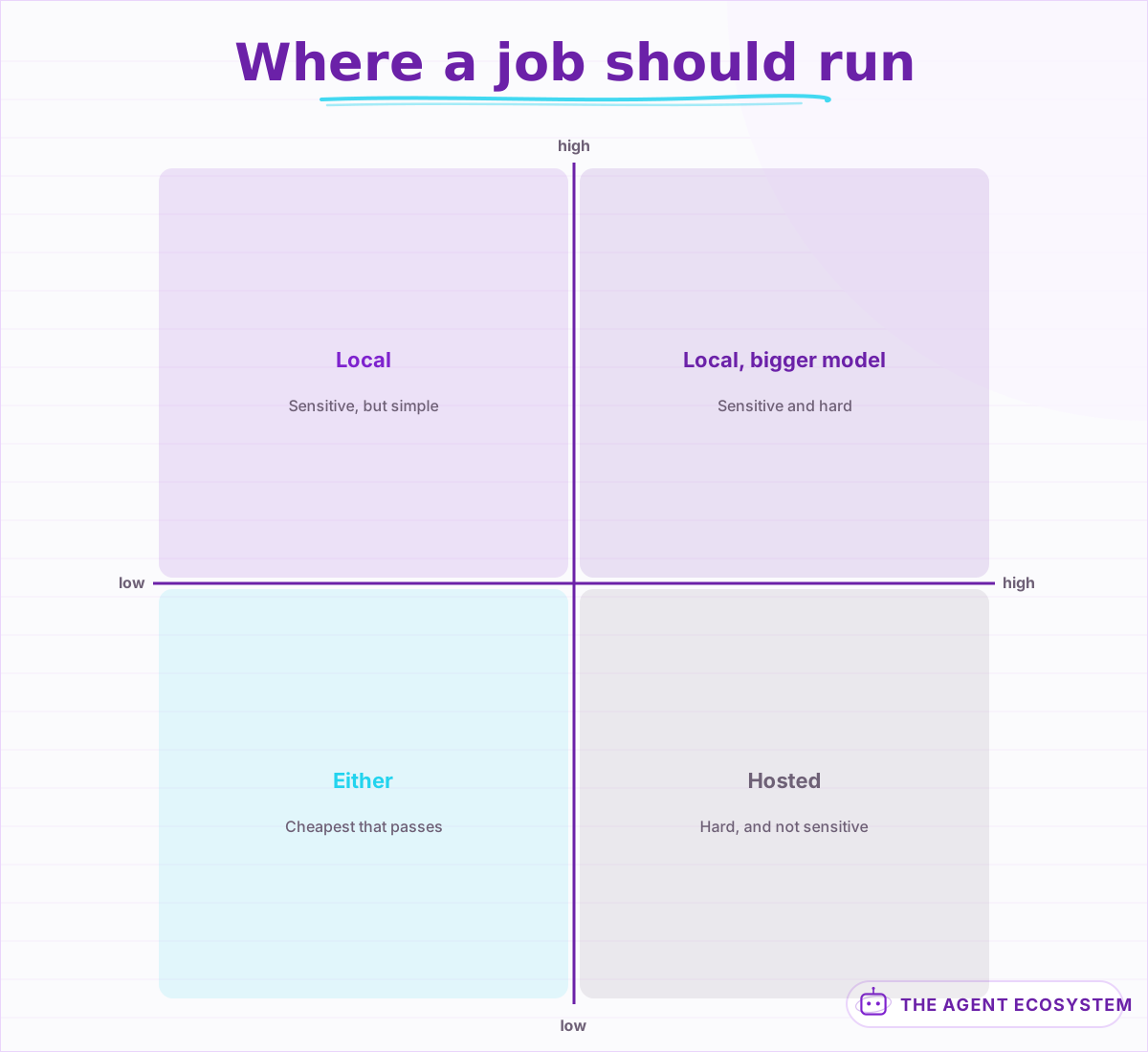 Most working setups run both. Picking a side is what disappoints.
The hybrid gives you the honest version of the privacy claim too. "Customer data never leaves our infrastructure, and we use a hosted model for general drafting that never sees it" is precise, defensible and true. "We run everything locally" usually is not, once someone checks.
Lesson 9If privacy is the reason, prove it#
A local model is not automatically private. It is private if you can demonstrate that no request leaves your boundary, and demonstrating that takes deliberate work.
It is worth being precise about what "private" is being claimed, because the word covers several different promises. That no third party sees the data is one claim. That no data is retained for training is another, and most hosted providers now offer it contractually. That the data never crosses a network boundary is a third and the strictest. Local gets you the third; a data-processing agreement and a redaction layer get you the first two at far lower cost.
- Confirm the runner is not sending telemetry. Check its settings, then confirm at the network layer.
- Bind the server to localhost, not to every interface. A local model listening on 0.0.0.0 is not local to anyone on the same network.
- Check what your surrounding application logs. A prompt written to a log shipped to a hosted service has left the boundary.
- Redact identifiers before they reach the model, so the trace and the cache are clean too.
There is a fifth check worth doing once: watch the machine's outbound traffic for an hour while the model runs. Not because you distrust the runner, but because the surrounding stack, the editor, the extension, the error reporter, is where surprises live. An hour of observation is a better privacy claim than any amount of configuration review.
Point 3 is the one that breaks otherwise-careful setups. The model stayed put and the prompt went to a logging provider, which is exactly the thing you were avoiding.
The redaction layer is worth building even on a fully local setup, for a reason that is not about privacy at all: it makes your prompts portable. A pipeline that has already stripped identifiers can be pointed at a hosted model during an outage without a compliance conversation, which is exactly the fallback lesson 10 asks for.
The redaction layer is in PII Redaction in LLM Pipelines.
Lesson 10Own the maintenance you signed up for#
Running your own model is an operations commitment, and it is the part nobody budgets. Four jobs arrive whether you plan for them or not.
Budget the time honestly before you start. An hour a month is a realistic floor for a single-model setup that you actually keep current, and that hour is not optional in the way it feels optional: skipping it for two quarters is how you end up in signal 2 of lesson 11 without noticing.
| Job | Cadence | If you skip it |
|---|---|---|
| Update the runner | Occasional | Miss fixes, drift from the ecosystem |
| Re-evaluate newer models | Quarterly | Run something two generations old |
| Watch disk and memory | Ongoing | Models are large, disks fill quietly |
| Have a fallback path | Always | An outage becomes a work stoppage |
There is a fifth job that only appears once you have been running a while: capacity planning. A single machine serving one person is fine. The same machine when three colleagues start using the tool, or when a workflow starts sending batches, becomes a queue, and queueing shows up as latency rather than as an error. Watch time-to-first-token as the early warning.
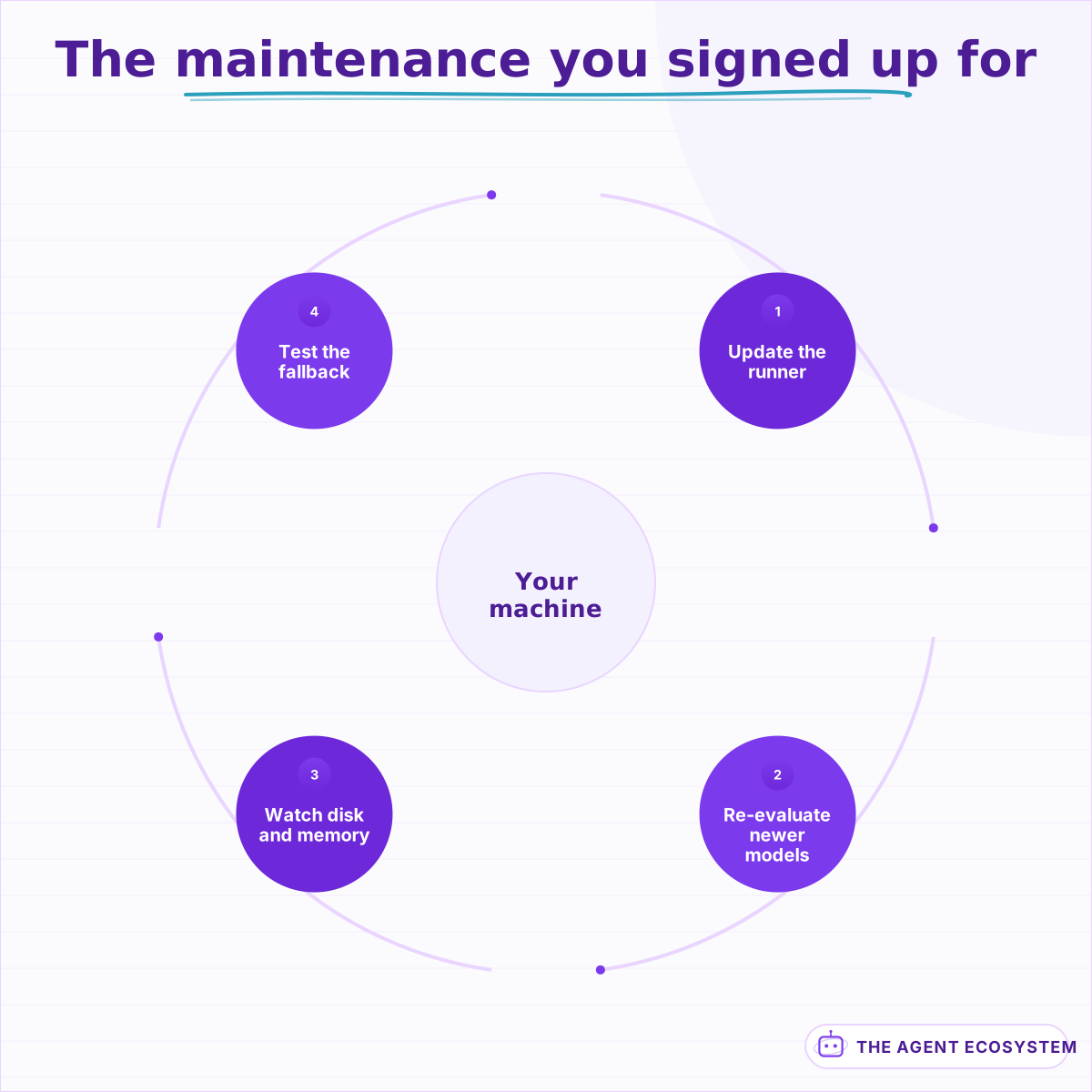 About an hour a month to keep current. Skipping two quarters is how you fall behind.
The fourth row is the one that turns a local setup from a liability into an asset. If your OpenAI-compatible interface can point at a hosted provider, a dead machine costs you money for a day rather than costing you the day.
Lesson 11Know when to give it back#
There is a point where a local setup should be retired, and it is worth writing down while you are still enthusiastic about it.
Write these down somewhere you will see them, next to the machine or in the runbook. The failure mode is not that a local setup becomes wrong; it is that it becomes wrong slowly, and nothing prompts a review because it is still technically working.
Three signals, any one of which is enough:
- The API caught up on price. Fast-tier pricing has fallen repeatedly, and a cost case that worked last year may simply not any more.
- You are two model generations behind. If re-evaluating keeps getting deferred, you are already running something outdated and the quality gap is compounding quietly.
- The privacy reason went away. Contracts change, workloads change. If the reason from lesson 1 no longer applies, the machine is a hobby again.
A fourth signal, softer than the others but worth watching: you have stopped using it for anything that matters. If every important request quietly goes to the API and the local model handles a side workflow nobody depends on, the decision has already been made and only the electricity bill has not caught up.
Retiring it is not a failure. The setup did its job for as long as its reason held, and the OpenAI-compatible interface from lesson 6 means switching back is an afternoon.
What I would do differently#
Run the evaluation before buying anything. Hardware bought on the assumption that a particular model will work leaves you with no idea how much headroom you have, and the discovery months later that a smaller quantised model passed everything is a discovery that would have changed the purchase.
The specific error is reasoning from the model you want to run rather than the model the work needs. Those are frequently two different sizes. Rent an hourly GPU for a week: it costs a rounding error against a workstation and answers every question the workstation would have answered.
The second thing is framing it as local against hosted at all, which is a question that does not need an answer. The hybrid split in lesson 8 is what most working setups actually run, and it gets the privacy benefit exactly where it matters without giving up capability on the reasoning-heavy work.
Third, and this is the one that quietly undoes a "fully local" claim: the model is not the only thing that sees the prompt. A setup where the model never sends a byte anywhere while the application logs ship everything to a hosted service is common, and nothing alerts on it. It gets found by drawing the data-flow diagram, not by monitoring.
Write down which of the three reasons applies, too. Six months later, "was this built for privacy or for cost" is a question with different answers and different decisions attached, and without the note both get defended at once.
One note on sequencing, because this order saves the most money. Rent, evaluate, split, then buy. Each step can invalidate the next, and only the last is irreversible. Disappointing local setups almost always ran that sequence backwards, starting with the purchase and working out the reason afterwards.
What I am still unsure about is the re-evaluation cadence. Quarterly is what I do. The open-weight field moves fast enough that the right answer might be monthly, and the honest reason it is not is that re-running the evaluation is mildly tedious and nothing forces it.
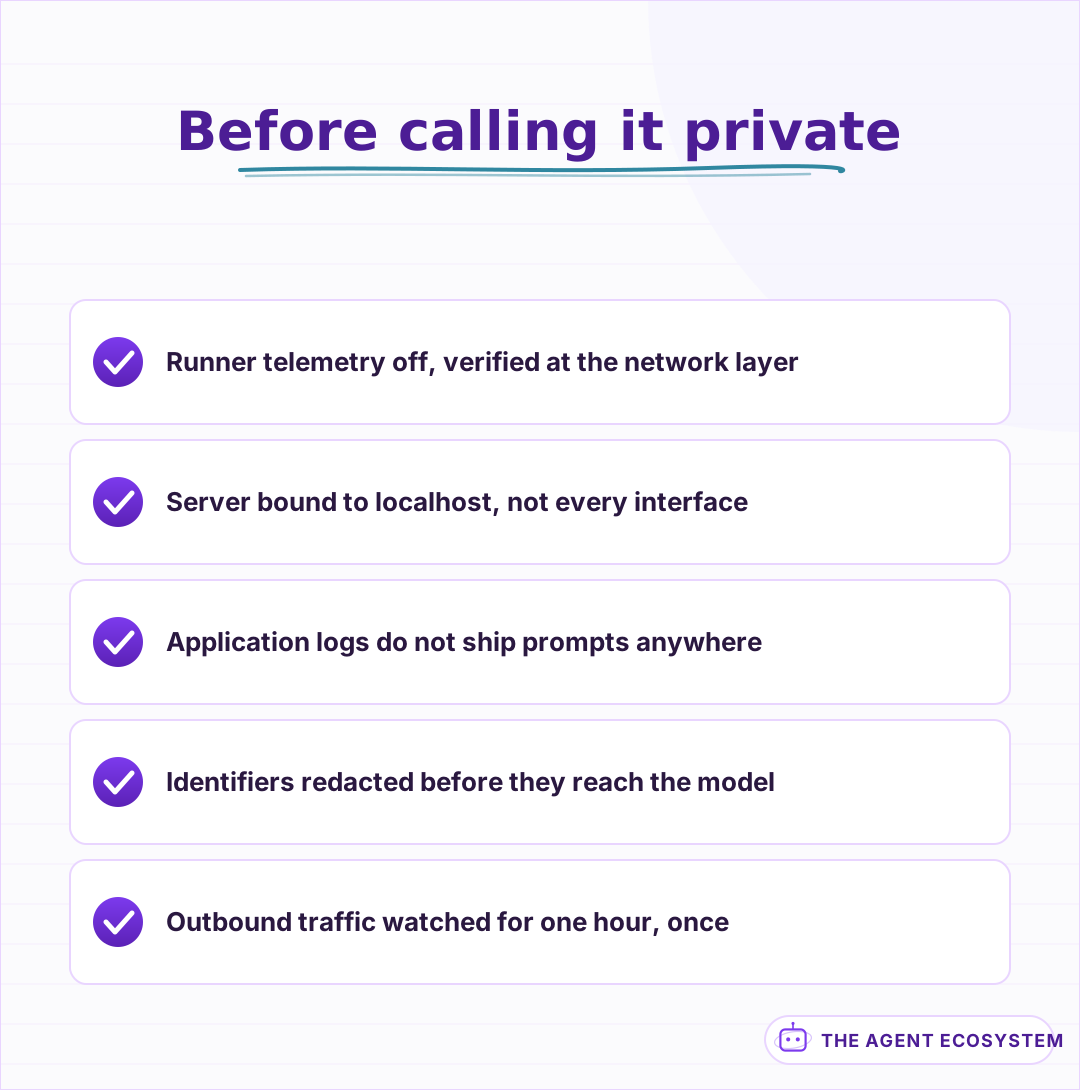 The model staying put is not the claim. The prompt staying put is.
One last note on sequencing, because the order here saves the most money. Rent, evaluate, split, then buy. Every one of those steps can invalidate the next, and the only irreversible one is last. Almost every disappointing local setup I have seen ran that sequence backwards, starting with the purchase and working out the reason afterwards.
Where to go next#
If you have not written down which of the three reasons applies, lesson 1 is the whole decision. Most people who work through it honestly discover they want the API and a redaction layer.
If cost is your reason, Is a Local LLM Actually Cheaper? has the break-even math. If privacy is your reason, PII Redaction in LLM Pipelines is the layer that matters more than location. For a fully private retrieval setup, Fully Local RAG in n8n, and for wiring a local model into workflows, Connect Ollama to n8n.
Frequently asked questions
Is running a local LLM cheaper than using an API?
What hardware do I need to run a local LLM?
Are local LLMs good enough for business use?
Does running a model locally make it private?
Should I choose local or a hosted API?
When should I stop running a local model?
Sources
Primary references and vendor documentation used while drafting and reviewing this article.
Written by

Muhammad Qasim Hammad is an AI agent and automation expert and the founder of Cart Gaze LLC (cartgaze.com). He builds product for the love of it: when an idea lands, a working prototype is usually running within hours, built with the same AI agents and automations he sells. He puts his own output at roughly 20× what it was before agents, and the Agentic OS behind this site is the working proof, documented in public with the tools he actually ran and what they really cost.
AI & Automation Services
Want a pipeline like this running in your business?
I'm Qasim — I design and ship AI agents and n8n automations for solo operators and small teams. Tell me what's eating your team's week, and I'll scope a fix.
Related reading
Is a Local LLM Actually Cheaper Than the API? The Break-Even Math
A local LLM is not free; it trades a per-token API bill for a mostly fixed monthly cost. This reproducible break-even model loads both columns (hardware, electricity, and token volume) and shows exactly where local stops costing more than the API.

Ollama vs LM Studio vs Jan: Best Local LLM Tool for 2026
Running a local LLM cuts your AI API bill to $0 and keeps client data off third-party servers. This breakdown of Ollama, LM Studio, and Jan tells you exactly which tool fits a solo operator's workflow.
Open-Weight vs Closed LLMs in 2026: Cost, Quality, Control
Should you call a closed API like Claude or GPT, or self-host an open-weight model like DeepSeek or Qwen? Skip the hot takes. This is a four-axis framework (cost, quality, control, privacy) plus a decision flowchart, using dated June 2026 facts.
Choosing an LLM for Production: The Decisions That Stick
Every model comparison you read was written against someone else's task. Twelve lessons on building the evaluation that produces your answer, pricing the choice properly, and making it reversible before the model changes underneath you.
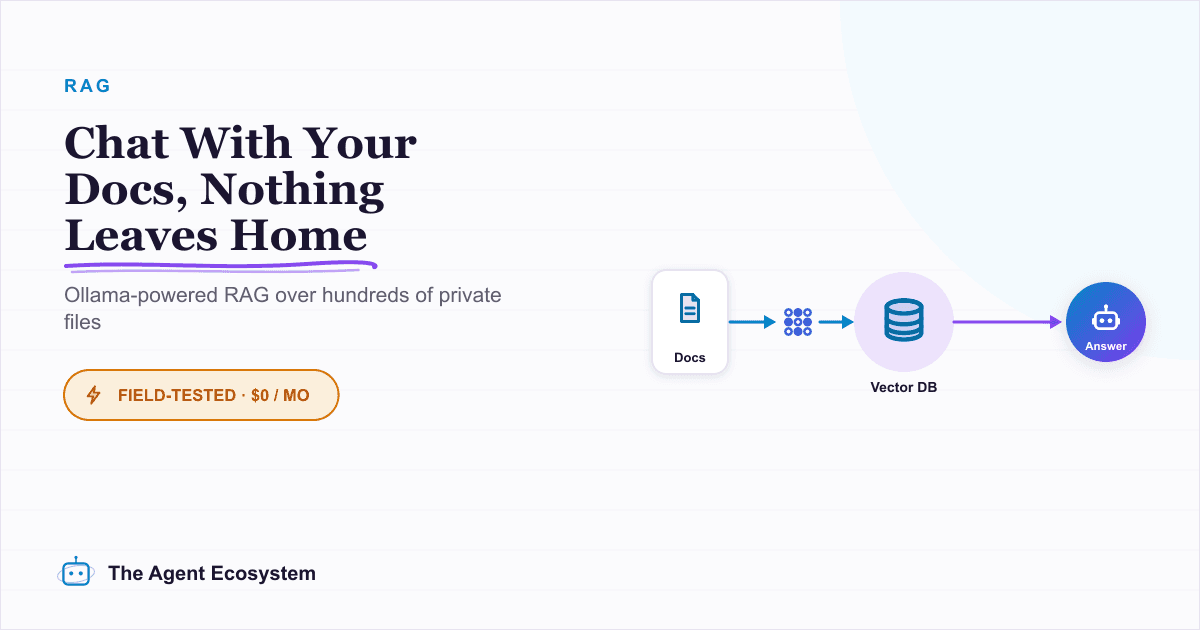
Local RAG With Ollama: Chat With Your Business Docs Privately
Local RAG with Ollama lets you ask questions across hundreds of private documents without uploading a single file to the cloud. This guide covers three paths from 20-minute desktop setup to n8n pipelines, all at $0 running cost.
How to Choose an LLM for Your n8n AI Agent (2026)
Kimi K3, GLM-5.2, DeepSeek V4, Claude, and GPT all plug into an n8n AI Agent, and they are not interchangeable. Here are the 5 questions that decide the pick for your agent, and why the honest answer for most workflows is to route by task, not standardize on one.