Field guide · Automation
Human in the Loop AI Automation: What to Gate and What to Let Run
Eleven lessons on placing oversight deliberately: sort by what you would have to undo, match approval, review and audit to the damage, and measure whether the gate catches anything.
- Lessons
- 11
- Read
- 23 min
- Figures
- 8
AI-drafted, reviewed by Muhammad Qasim Hammad on November 21, 2026. See our AI disclosure.
Table of contents
- What you will end up with
- 1. Start from what you would have to undo
- 2. Three kinds of oversight, and they are not interchangeable
- 3. Gate the action, not the intention
- 4. Put the decision where the reviewer already is
- 5. Give the reviewer enough to decide in ten seconds
- 6. Budget the delay a human adds
- 7. Decide what happens when nobody answers
- 8. Record what was approved, not just that it was
- 9. Measure whether the gate is doing anything
- 10. Remove the gates that always say yes
- 11. Keep the human responsible, not just present
- What I would do differently
- Where to go next
Every team automating with AI eventually reaches the same question, usually the week before going live: where does a person still have to say yes? Answer it too broadly and you have rebuilt the manual process with extra latency. Answer it too narrowly and you find out what the agent did from a customer. This guide is how to place those gates deliberately rather than by nerve.
The usual approach is to gate whatever felt scary during the demo, then quietly remove gates as they become annoying. That produces a system whose oversight reflects last quarter's anxieties rather than this quarter's actual risk.
What you will end up with#
A short list of actions that genuinely need a person, each with the right kind of oversight rather than the strictest available, reviewers who can decide quickly, a rule for what happens when nobody answers, and a way to tell whether any of it is working. Eleven lessons.
What this does not cover: the workflow mechanics of any one platform, or legal advice about who is accountable. This is the design layer: which decisions stay human, and how to make that practical enough to survive contact with a busy week.
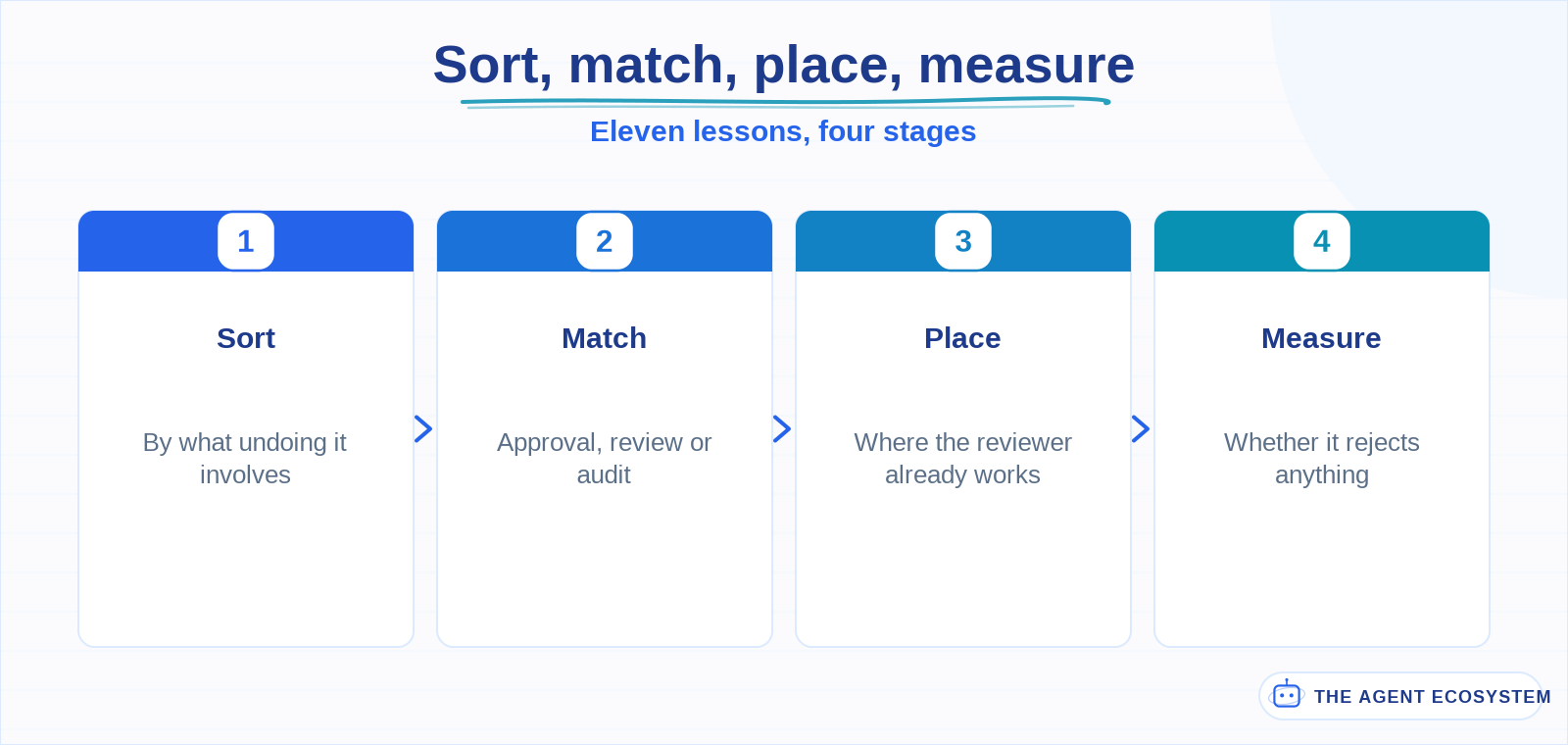 Gates placed by nerve rather than by reversibility protect the loud actions and miss the quiet ones.
The idea underneath all of it: oversight is not a safety feature you add, it is a cost you spend. Spend it where the damage is real and unrecoverable, and stop spending it everywhere else.
| Lessons | What you get | Roughly |
|---|---|---|
| 1 to 3 | What to gate, and which kind of oversight it needs | 20 min |
| 4 to 6 | Making the decision fast enough to actually happen | 25 min |
| 7 to 9 | Timeouts, records, and whether the gate does anything | 20 min |
| 10 to 11 | Removing dead gates, and keeping responsibility real | 15 min |
Lesson 1Start from what you would have to undo#
The useful question is not "is this important" but "if this goes wrong at 2am, what does fixing it involve". Almost everything sorts itself once you ask that, because importance is a feeling and reversibility is a fact you can check.
Take every action your automation can perform and put it in one of three buckets. Reversible by the system, reversible by a person with effort, and not reversible at all. Most teams find the third bucket is smaller than feared and the second is much larger than expected.
The three buckets, with the treatment each earns:
- Reversible by the system. Setting a status, adding a tag, drafting something nobody has seen. Let it run. A gate here buys nothing and costs a person's attention.
- Reversible with effort. Creating a record, updating a customer field, posting internally. Let it run, but log it well enough that undoing is possible without archaeology.
- Not reversible. Money moving, an email reaching a customer, a deletion, anything a third party now knows. This is where gates belong, and it is a shorter list than the instinct suggests.
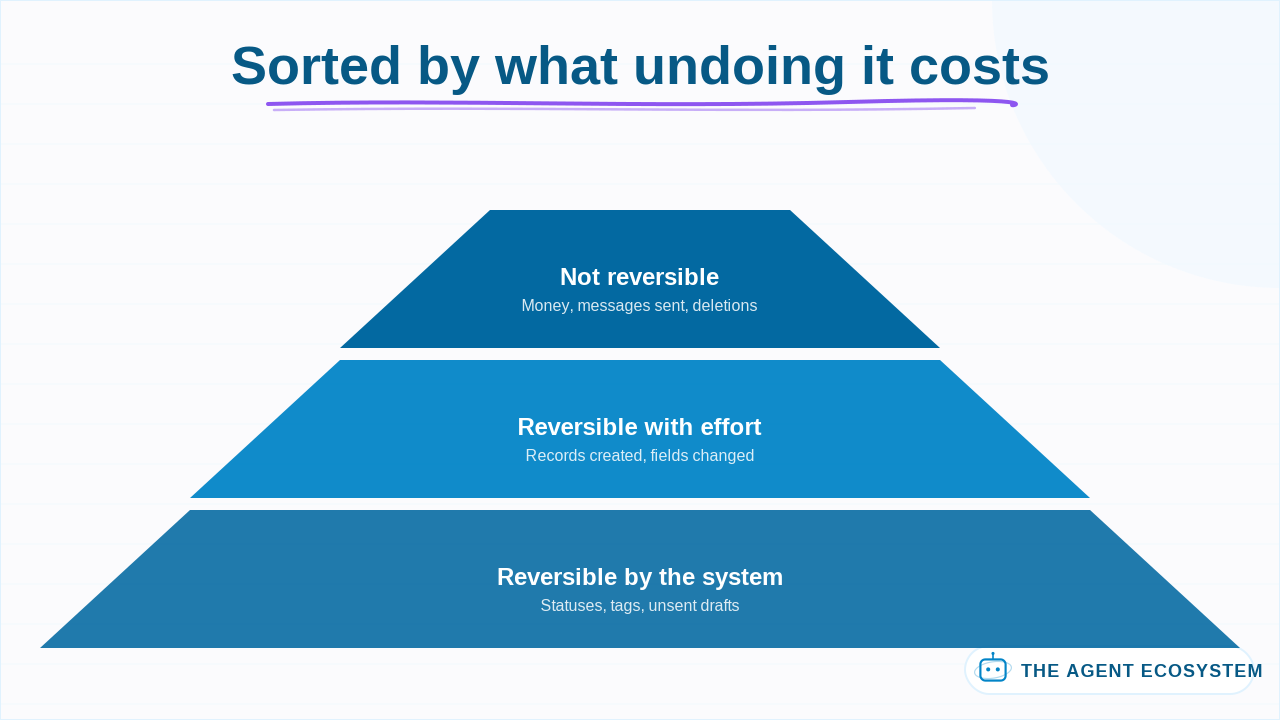 The top band is smaller than teams expect. The middle band is much larger.
Two things routinely get miscategorised. Sending a message feels reversible because you can send a correction, but the original was read, so it belongs in bucket three. And deleting a record feels irreversible when it is often a soft delete you can restore in a minute, which makes it bucket one.
A fourth question sharpens the sort further: who notices? An action nobody would spot for a week is more dangerous than a louder one that someone catches in an hour, even when the louder one sounds worse. Quiet, slow-to-surface actions deserve oversight out of proportion to their size, because the window in which they are cheap to fix closes without anyone knowing it opened.
Do this exercise as a list, written down, with someone else in the room. The disagreements are the valuable part: they are where two people had different mental models of what the automation could do, and that gap would otherwise have surfaced during an incident.
Lesson 2Three kinds of oversight, and they are not interchangeable#
Teams talk about "having a human in the loop" as though it were one thing. It is three, they cost wildly different amounts, and picking the expensive one by default is how oversight becomes theatre that everyone clicks through.
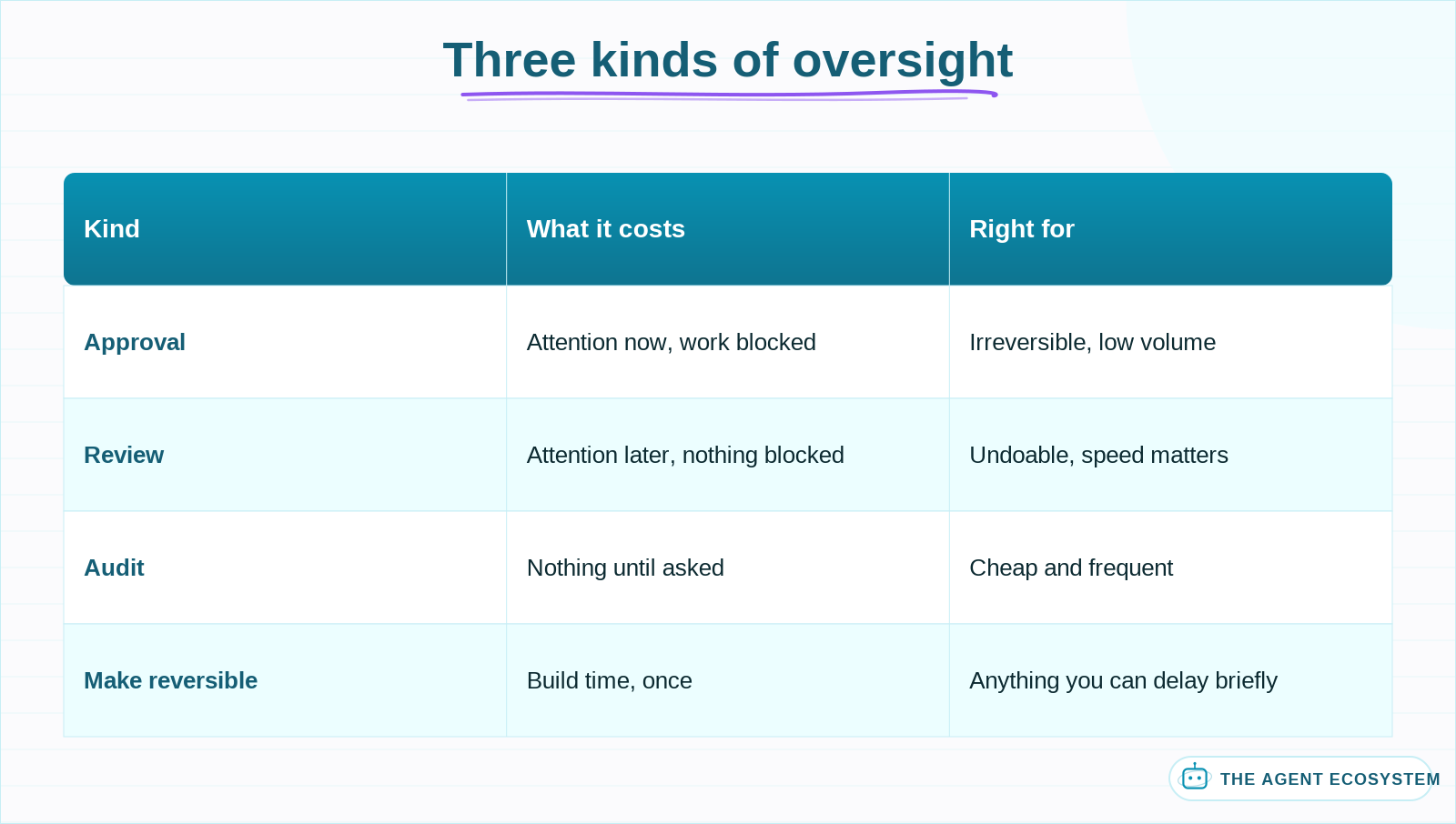 Picking the expensive one by default is how oversight becomes something people click through.
The three, from most to least expensive:
- Approval. The action waits. A person decides yes or no before anything happens. Maximum protection, maximum latency, and it only works if the volume is low enough that someone actually reads them.
- Review. The action happens and a person looks shortly after, with the ability to reverse. Good for bucket two, where speed matters and undo exists.
- Audit. Nothing waits and nobody looks unless there is a reason. The record exists, which is what makes an investigation possible later.
Audit is the one people undervalue, because it feels like doing nothing. It is not: an audit trail is what makes every other decision revisable, and it is the only form of oversight whose cost does not scale with volume. A system with no gates and a complete record is in a far better position than one with gates and no record, because the first can answer questions and the second can only assert that someone was watching.
Match these to the buckets rather than to how nervous the action makes you: irreversible gets approval, effortful-to-reverse gets review, cheap gets audit. The mismatch that hurts most is putting approval on a high-volume reversible action, because within two weeks the approver is batch-clicking without reading and you have the latency of a gate with the protection of none.
The costs are not close. An approval spends someone's attention now and blocks the work until they give it. A review spends attention later and blocks nothing. An audit spends nothing until there is a reason to look. Teams reach for approval because it feels responsible, then discover they have built a system whose throughput is capped by one person's inbox.
There is a fourth option people forget: make the action reversible so it no longer needs a gate. A message that sends after a two-minute cancellable delay converts an approval into a review, and that is usually a better trade than either a gate or nothing.
Lesson 3Gate the action, not the intention#
A rule in a prompt saying the agent should ask before refunding anyone is a suggestion. It survives ordinary inputs and fails on the unusual one, which is exactly the input you built the rule for. The gate has to live in the machinery, where no amount of persuasion reaches it.
Structurally this means the tool or step that performs the action is the thing that pauses, not a branch the agent chooses to take. If the agent can route around the gate by deciding it does not apply, you do not have a gate.
// a suggestion the model can be talked out of
system: "Always ask the user before issuing a refund."

// a gate that does not negotiate
issue_refund() -> { status: "PENDING_APPROVAL", id: "req_1841" }
                  // no money moves until a person resolves req_1841
The same reasoning applies to limits. An instruction to keep spending reasonable is not a limit; a hard ceiling that fails the call is, which is why spend caps belong in the machinery rather than the prompt. Guardrails work the same way, and the practical shapes are covered in stopping an agent going off the rails.
One more structural point. If an action must never happen unattended, the strongest control is not a gate but absence: do not expose the capability at all. A gate is for things that should sometimes happen, and treating it as a substitute for scoping is how permissions end up wider than intended.
Lesson 4Put the decision where the reviewer already is#
A gate that sends someone to a dashboard they do not have open is a gate that waits hours. The approval has to arrive where the person already works, and it has to be actionable from there without a login, a context switch, or a second device.
For most small teams that means chat or email, with the decision as buttons rather than a link to somewhere else. The difference between approving from a message and approving from a portal is roughly the difference between four minutes and four hours, and the four hours is what makes people start removing gates.
The channel choice is also a retention choice, which is easy to miss. Approval requests carry the customer context that made the decision reviewable, so routing them through a chat tool means that context now lives in that tool for however long its retention allows. If the request contains anything you would not paste into a public thread, the channel needs the same treatment as the rest of your data rather than being chosen for convenience.
Three placement rules that hold up:
- One channel per urgency, not per system. Everything time-sensitive in one place. Reviewers should not be checking four inboxes to find out whether anything is waiting.
- Name a person, not a group. An approval addressed to a team is addressed to nobody, and it sits until someone feels responsible enough to claim it.
- Make the request self-contained. If deciding requires opening the source system, the reviewer will defer it, and deferral is the whole failure mode.
The platform mechanics of pausing a workflow and resuming it on a response are covered in adding a human approval step; the design question here is only where that request lands and who owns it.
Lesson 5Give the reviewer enough to decide in ten seconds#
Most approval requests are unanswerable as written. "The agent wants to send this email, approve?" gives no basis for a decision, so the reviewer either approves everything, which is no gate, or opens the source system, which is the delay you were avoiding.
A good request contains what the agent decided, why, and what happens next. Three lines. If it takes more than that, the action is probably too big to be one gate and should be split.
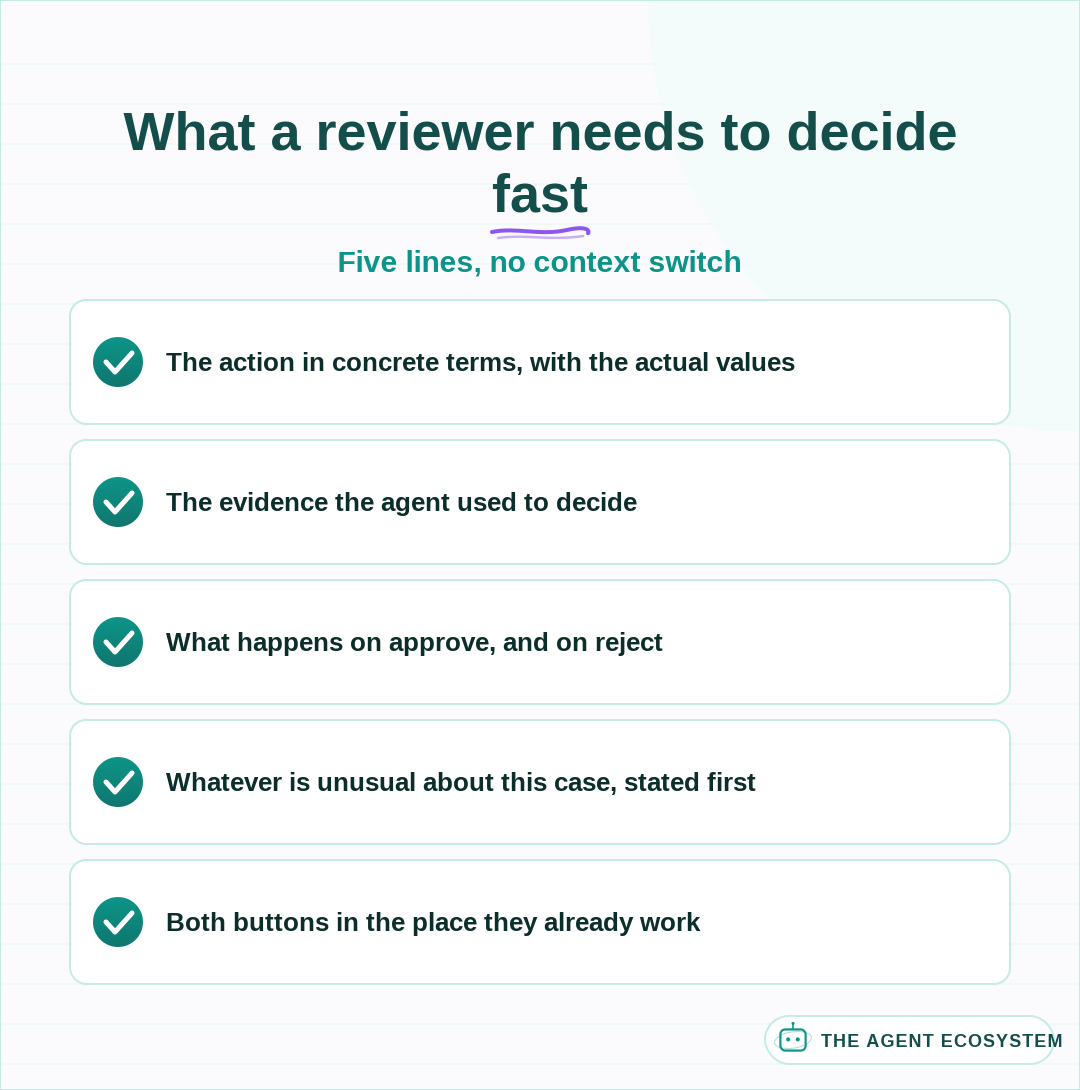 If deciding requires opening the source system, the request gets deferred, and deferral is the failure mode.
Write requests so that both answers are informed:
- State the action in concrete terms. "Refund 48.00 to order ORD-1001" rather than "process a refund".
- Show the evidence the agent used. The customer's message, the policy line, the record it read. This is what makes a "no" possible.
- Say what happens on each answer. Approving sends now; rejecting cancels and tells the customer a person will follow up.
- Include the unusual part. If anything about this case is out of pattern, lead with it. The reviewer is scanning, and the anomaly is the reason they are being asked.
A request that meets the bar reads roughly like this:
Refund 48.00 to ORD-1001?          [ Approve ]  [ Reject ]
Why: customer says item arrived damaged, photo attached.
Policy: returns-v3 allows full refund within 30 days. Ordered 41 days ago.
Unusual: outside the window. Agent flagged it rather than declining.
On approve: refund sends now. On reject: customer told a person will follow up.
Five lines, decidable without opening anything. The "unusual" line is what turns this from a rubber stamp into a decision, because it tells the reviewer exactly which judgement is being asked of them.
The evidence line matters more than it looks. A reviewer who can see what the agent read can catch the case where the agent read the right document and drew the wrong conclusion, which is the failure a yes-or-no summary hides completely.
Keep the request stable in shape. Reviewers get fast at a format they recognise, and a request that looks different every time is read slowly every time, which pushes people back toward reflexive approval.
Lesson 6Budget the delay a human adds#
A gate converts an automated action into a queued one, and queues have properties nobody plans for. The average wait is not the number that matters; the worst case is, because that is what a customer experiences on a Friday evening.
Work out three numbers before you add the gate. How many requests per day, how long until someone typically responds, and what the longest plausible wait is. If the third number is longer than the promise you have made to the customer, the gate is not viable as designed.
| Volume per day | What it feels like | What actually happens |
|---|---|---|
| Under 5 | Sustainable indefinitely | Read properly, decided on merit |
| 5 to 20 | Manageable with an owner | Read quickly, mostly on merit |
| 20 to 50 | A part-time job | Skimmed, pattern-matched |
| Over 50 | Nobody is reading | Batch-approved, gate is decorative |
The bottom row is worth taking seriously because it arrives gradually. A gate that was reasonable at launch becomes decorative as volume grows, and nothing in the system announces the transition. That is the argument for measuring approval rates rather than assuming the gate still works, which is lesson 9.
Latency is not the only cost worth budgeting. A gate also changes what the automation is for: a workflow that resolves a request end to end is a different product from one that prepares a request for a person, and the second is worth much less if the preparation is thin. Before adding a gate to a customer-facing flow, check what it does to the number you are actually trying to move, which for support work is usually the share of requests closed without a person, measured the way deflection rate defines it.
When volume outgrows attention, the fix is not a bigger team. It is narrowing what gets gated: sample rather than gate everything, gate only the cases outside a known-safe envelope, or make the action reversible and demote it to review. All three keep oversight real; adding reviewers just distributes the skimming.
Lesson 7Decide what happens when nobody answers#
Every gate needs a timeout policy, and the default one is always wrong. Systems that wait forever accumulate silent backlogs; systems that proceed after an hour have a gate that any busy afternoon can bypass. Neither is a decision, and both are what you get by not making one.
Pick the failure direction deliberately, per action, and write it next to the gate. There are only three options and the right one depends entirely on what the action does.
- Fail closed. After the timeout, cancel and tell someone. Correct for anything irreversible: an unanswered refund should not become an automatic refund.
- Fail open. After the timeout, proceed. Defensible only when the action is reversible and the cost of not acting is higher than the cost of acting wrongly.
- Escalate. After the timeout, ask someone else, then fail closed. More work to build and the right answer for anything genuinely time-sensitive.
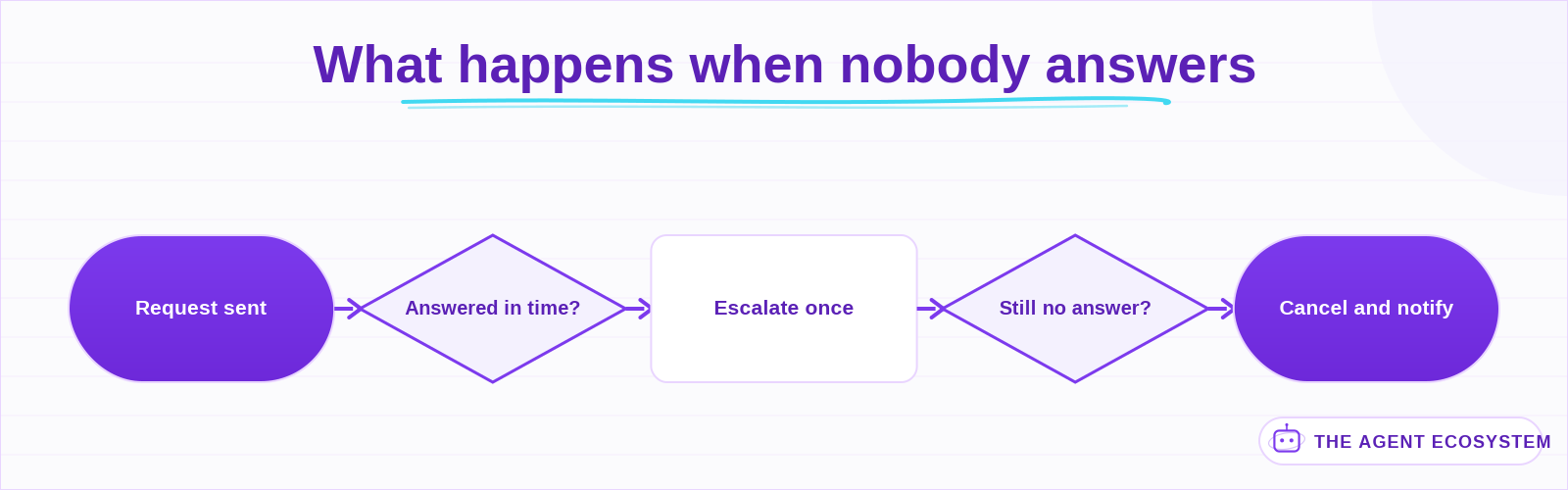 Irreversible actions fail closed. An unanswered refund request must never become an automatic refund.
Timeouts also need a distinct outcome from rejections in the record. "Nobody answered" and "a person decided no" are different events with different follow-ups, and collapsing them into a single cancelled state destroys the signal in lesson 9: a rising timeout rate means ownership is unclear, while a rising rejection rate means the agent is getting worse. Stored as one status, neither is visible.
The timeout itself should match the promise, not the convenience. If customers are told they get an answer within an hour, a four-hour approval window has already broken the promise before anyone looks at it.
Weekends and nights are where timeout policy earns its keep. A gate designed around weekday response times behaves completely differently at 6pm on a Friday, and the honest options are to widen the window, route to someone who is actually on, or stop the automation running outside hours. Pretending the queue drains at the same rate all week is how a two-hour promise becomes a Monday morning apology.
Say something to the waiting party. An automation that goes quiet while a request sits in someone's queue produces a second contact from the customer, which produces a second workflow run, which sometimes produces a duplicate action. A short "a colleague is checking this" costs nothing and prevents the whole chain.
Lesson 8Record what was approved, not just that it was#
An approval log that says "approved by Sam at 14:02" is nearly useless three months later. What you need is what Sam saw, because the question that eventually gets asked is not whether someone approved but whether the approval was reasonable given what was known.
Store the request and the decision together, as one record: the proposed action with its arguments, the evidence shown, who decided, when, and any note they left. That record is the difference between explaining an incident and speculating about it.
request_id:   req_1841
proposed:     issue_refund(order="ORD-1001", amount="48.00")
evidence:     ["customer message #8821", "policy: returns-v3 §2"]
shown_to:     sam@
decided:      APPROVED, 2026-11-13T14:02Z
note:         "outside window but goodwill, repeat customer"
That note field earns its place. Most approvals that later look wrong were reasonable decisions made on context the record did not capture, and one sentence at decision time prevents a long reconstruction later.
Retention is a real decision rather than a default. These records contain customer data and decision rationale, so they belong under whatever rule covers the rest of your data rather than living forever in a chat history. What regulators expect from agent records specifically is covered in audit log requirements, and the accountability question behind it in who is liable when an agent makes a mistake.
Lesson 9Measure whether the gate is doing anything#
A gate nobody has rejected in three months is not evidence that the agent is good. It is evidence that nobody knows, because a gate with a 100 percent approval rate produces exactly the same output as no gate while costing a person's attention every day.
Track four numbers per gate. They take an afternoon to instrument and they turn every future argument about oversight into a short conversation about data.
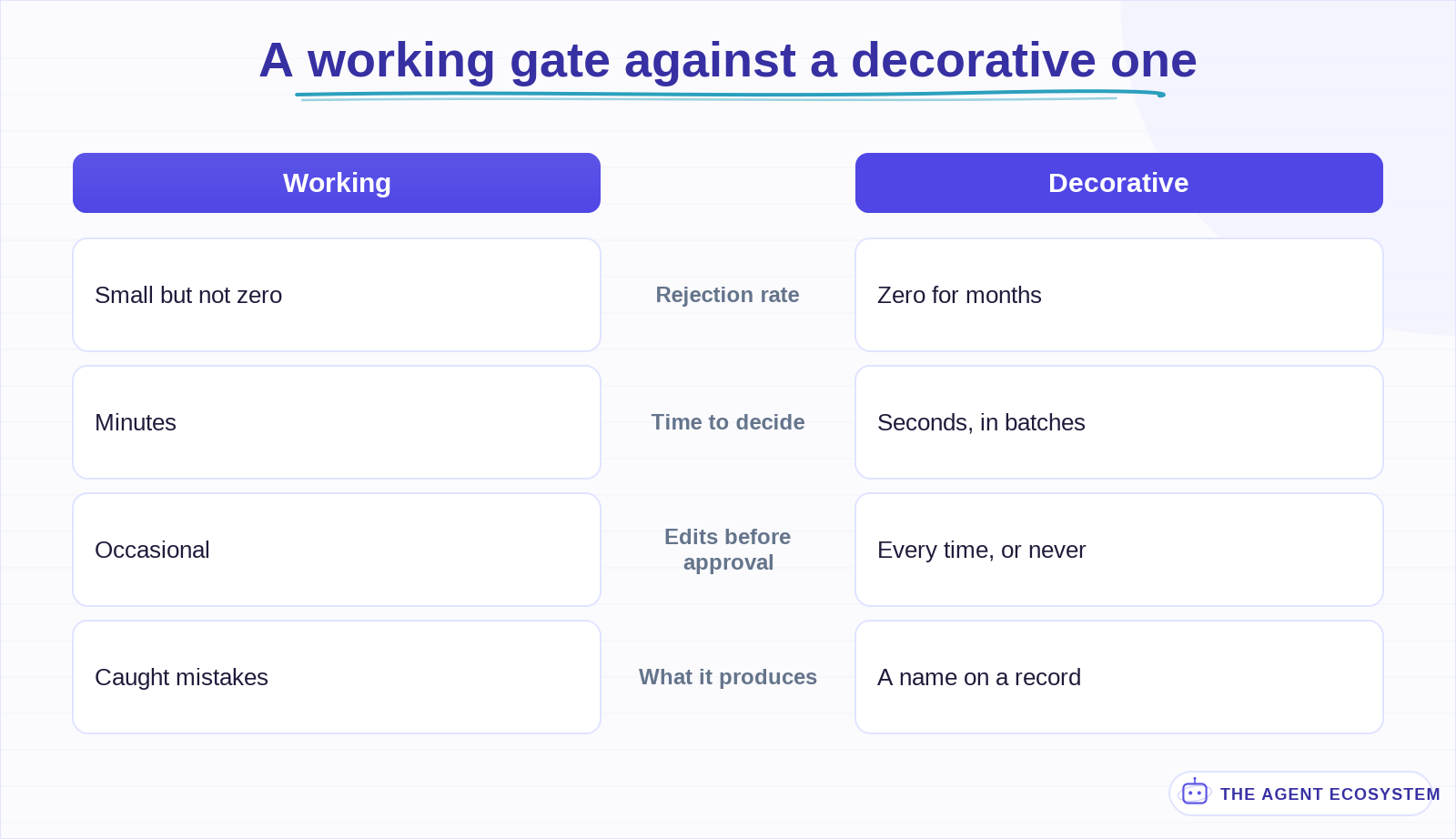 The decorative version produces the same output as no gate, and costs a person's attention daily.
| Number | What it tells you | Acting on it |
|---|---|---|
| Rejection rate | Whether the gate catches anything | Near zero for months, consider removing |
| Time to decision | Whether it is viable | Rising, the gate is outgrowing attention |
| Timeout rate | Whether anyone is answering | Above a few percent, ownership is unclear |
| Edits before approval | Whether the agent is nearly right | High, fix the agent rather than the gate |
The last row is the most useful and the least tracked. A reviewer who approves after changing the draft every time is doing the agent's job manually, and the gate has become a correction step. That is a prompt or tool problem showing up as an oversight cost, and it should be fed back as cases into the suite described in how to evaluate AI agents.
Track these per gate rather than in aggregate. A blended number across five gates hides the one that stopped working, because a healthy rejection rate on a busy gate masks a zero on a quiet one, and the quiet one is usually the one protecting the irreversible action.
Rejections are the most valuable data the system produces, so capture the reason. A one-line reason on every rejection gives you, within a month, a ranked list of exactly what the agent gets wrong, which is better material than any amount of speculation about prompts.
Lesson 10Remove the gates that always say yes#
Oversight accumulates. Gates get added after incidents and almost never removed, so a system that has been running two years has a layer of checks reflecting every past scare, most of which no longer describe the risk. Reviewing them is not a loosening of standards, it is what keeps the remaining ones meaningful.
Once a quarter, take the rejection rates and make an explicit decision on each gate. There are only three outcomes.
- Keep it. It rejects sometimes, decisions happen promptly, and the action is still irreversible.
- Demote it. Rejections are rare but the action still matters. Move approval to review: let it run, look after, keep the ability to reverse.
- Remove it. Nothing has been rejected, and the action turns out to be reversible anyway. Delete the gate and keep the audit record.
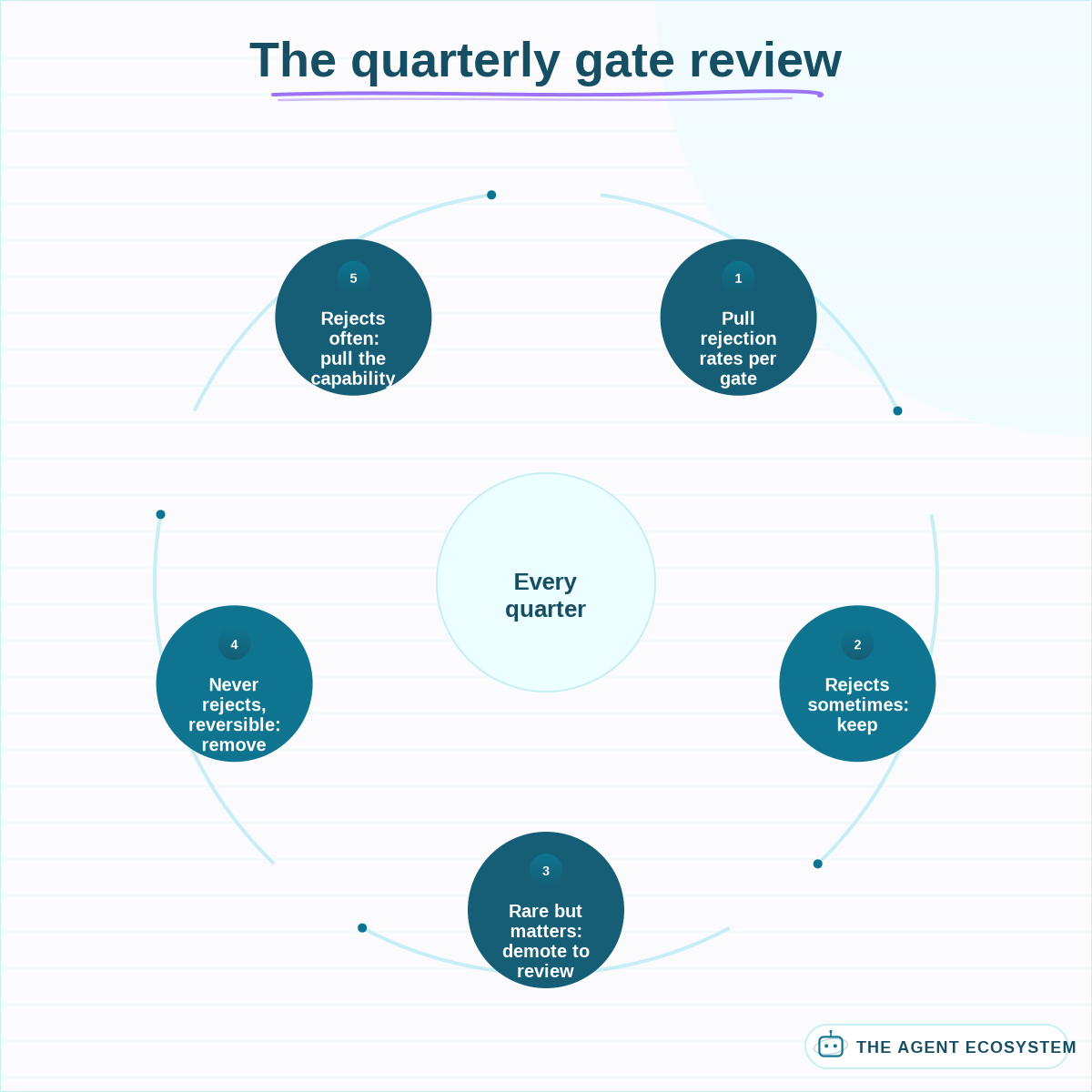 Gates are added after incidents and almost never retired, so the review has to be scheduled.
Demotion is the underused option. Most gates that feel necessary are protecting against a failure the agent stopped making months ago, and converting them to review keeps the visibility while returning the latency.
Write down why each gate exists when you add it, in one line, next to the gate. Without it, the quarterly review turns into an argument nobody can win: somebody remembers an incident, nobody remembers the details, and the safe-feeling answer is always to keep the check. A dated line saying what the gate was added to prevent lets you ask the only question that matters, which is whether that thing can still happen.
The reverse decision is worth naming too. When a gate rejects frequently, the answer is rarely more oversight; it is that the agent should not be attempting that action yet. Pull the capability, fix the underlying problem, and reintroduce it, rather than running a system whose safety depends on a person catching it several times a week.
One category resists removal and should: gates protecting against a failure that would be catastrophic but has never occurred. Rejection rate is the wrong test there, because the whole point is that the event is rare. Judge those on whether the damage is still possible and still unrecoverable, and keep them regardless of how quiet they are. The distinction is between a gate that has proven unnecessary and one that has simply not been needed yet, and conflating the two is how teams remove the check that mattered.
That is also the honest limit of measuring gates. Numbers tell you which oversight is theatre; they cannot tell you which rare event is worth continuing to guard against. That judgement stays with whoever carries the consequence, which is the practical reason to write down an explicit tolerance for failure rather than discovering it during one, as setting an error budget argues.
Lesson 11Keep the human responsible, not just present#
The failure mode nobody plans for is a person who is technically in the loop and functionally a rubber stamp. It happens gradually, it is invisible in the logs, and it produces the worst of both arrangements: the latency of oversight, the risk of none, and a record implying someone checked.
Three conditions have to hold for a reviewer to be genuinely responsible rather than decorative:
- They can say no without friction. If rejecting means a difficult conversation or extra work with no path back, they will approve. Make the rejection path as easy as the approval path.
- They have the context to be right. Someone approving an action in a domain they do not know is providing a signature, not judgement.
- The volume fits the attention. Past roughly twenty decisions a day, people pattern-match. That is not a discipline problem, it is how attention works.
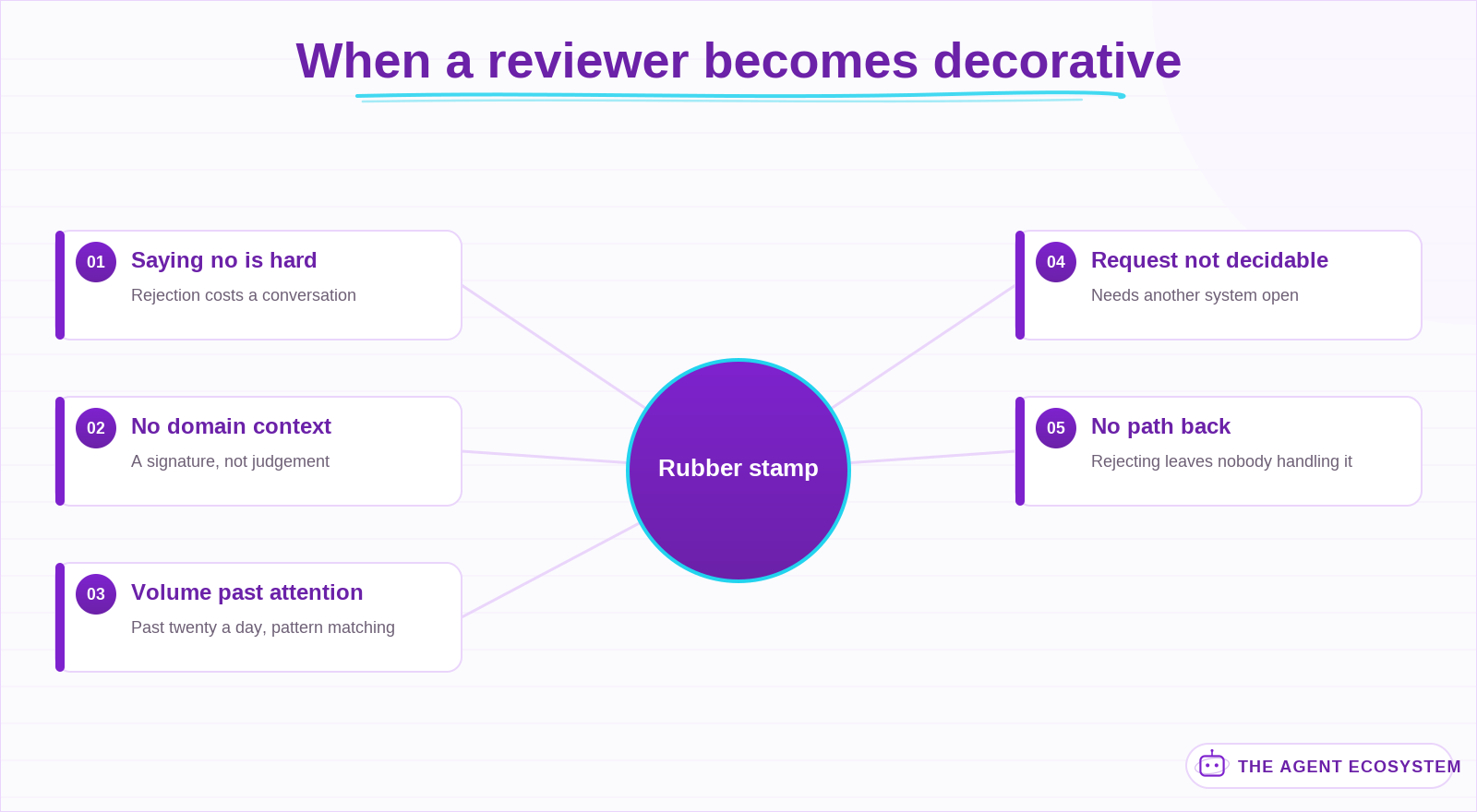 Any one of these and the record implies someone checked when nobody did.
The tell for a decorative reviewer is decision time collapsing. When the median time from request to answer drops to a few seconds and the rejection rate is flat at zero, nobody is reading; they are clearing a queue. That pattern is visible in the numbers from lesson 9 long before it is visible in an incident.
If any of the three fails, the honest move is to say the process is unsupervised and manage the risk another way, rather than keeping a gate whose main output is a name on a record. That distinction matters beyond your own team: where oversight is a regulatory expectation rather than a preference, a nominal reviewer is unlikely to satisfy it, and the shape of that expectation is covered in the EU AI Act for builders.
What I would do differently#
I would sort actions by reversibility before deciding anything, rather than gating what felt risky during the demo. The demo makes you nervous about the wrong things: it surfaces the visible actions and hides the quiet ones, and the quiet ones are where the irreversible work usually lives.
I would also have measured rejection rates from the first week. Without them, every conversation about removing a gate is an argument about instinct, and instinct always favours keeping the check, so the system slowly fills with oversight that protects nothing.
Where to go next#
If you are still deciding how much autonomy to grant at all, the ladder in coding agent autonomy levels transfers well beyond coding: most teams sit two rungs lower than they think, and naming the rung makes the next step concrete.
If the gates are in place and the question is what the agent is allowed to reach for, that is a tool-surface problem rather than an oversight one, and AI agent tool design covers the read and write split that makes gating tractable.
For the moderation-shaped version of this, where the volume is high and the judgement is repetitive, content moderation workflows covers the sampling approach that keeps oversight real at volume. And if your agent talks to customers directly, check the disclosure question early: whether a chatbot has to say it is AI has a clearer answer than most teams expect.
Frequently asked questions
Which AI automation actions actually need human approval?
What is the difference between human approval, review and audit?
How many approvals per day can one person actually handle?
Should you ever remove a human approval step?
Sources
Primary references and vendor documentation used while drafting and reviewing this article.
Written by

Muhammad Qasim Hammad is an AI agent and automation expert and the founder of Cart Gaze LLC (cartgaze.com). He builds product for the love of it: when an idea lands, a working prototype is usually running within hours, built with the same AI agents and automations he sells. He puts his own output at roughly 20× what it was before agents, and the Agentic OS behind this site is the working proof, documented in public with the tools he actually ran and what they really cost.
AI & Automation Services
Want a pipeline like this running in your business?
I'm Qasim — I design and ship AI agents and n8n automations for solo operators and small teams. Tell me what's eating your team's week, and I'll scope a fix.
Related reading
Add Human Approval to an n8n AI Agent (Send and Wait)
Your n8n AI agent can send emails, issue refunds, and delete records. Gate the irreversible ones with Send and Wait for Response. Here is the exact build, the decision table, and what can go wrong.

How to Automate Customer Support with AI Without Losing People
The fastest way to damage a small business with AI is to put a bot in front of customers before it knows when to stop. Twelve lessons on triage before answers, grounding in your own documentation, escalation that carries context, and why deflection rate flatters you.
AI Agent Error Budget: Pick a Failure Rate You Can Ship
Nobody ships an agent that is right every time, so the only honest question is how often it may be wrong. The version borrowed straight from web reliability breaks on the first day.
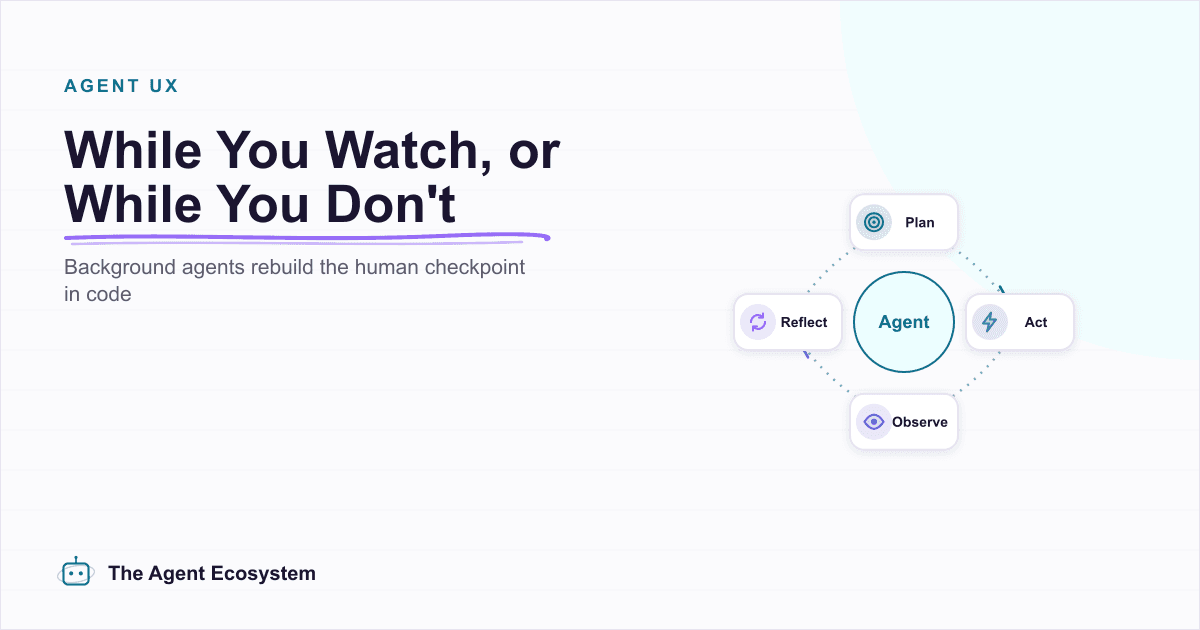
Background Agents vs Chat Copilots: Picking the Right Agent UX
Same model, same tools, same prompt, 2 different machines: one answers when you type, the other triages your inbox at 6am and escalates what it couldn't handle. The difference is supervision, and removing it changes everything: latency stops mattering, durable state starts, and
Coding Agents Have 4 Autonomy Levels. Most Teams Never Leave Level 2.
The tool you pick is not what decides the risk, the autonomy level is. This is a tool-agnostic, 4-level framework for how much a coding agent should actually be allowed to do, from a diff that waits for your approval to a merge and deploy with no human step at all, grounded in
The EU AI Act Reaches Agents on August 2: A Builder Primer
EU AI Act transparency duties and enforcement started on 2 August 2026, while high-risk rules moved to December 2027 and August 2028. This is a dated, non-legal primer on what that means for a small team shipping agents.