Background Agents vs Chat Copilots: Picking the Right Agent UX
Supervision, not intelligence, separates the 2 product shapes. What changes in the engineering when the human stops watching.
AI-drafted, reviewed by Muhammad Qasim Hammad on September 3, 2026. See our AI disclosure.
Table of contents
Two products can use the same model, the same tools, and the same prompt, and still be entirely different machines. One answers when you type; the other triages your inbox at 6am, files what it can, and leaves 3 items with a note saying why it stopped. A chat copilot works while you watch; a background agent works while you do not. That single difference changes the latency budget, the error handling, the approval design, and what "done" even means.
What separates a background agent from a chat copilot?#
A copilot runs inside a conversation: the human triggers each step, sees each result, and corrects course turn by turn. A background agent runs on a trigger, works through a job without an audience, and surfaces only the outcome, plus the cases it could not handle alone.
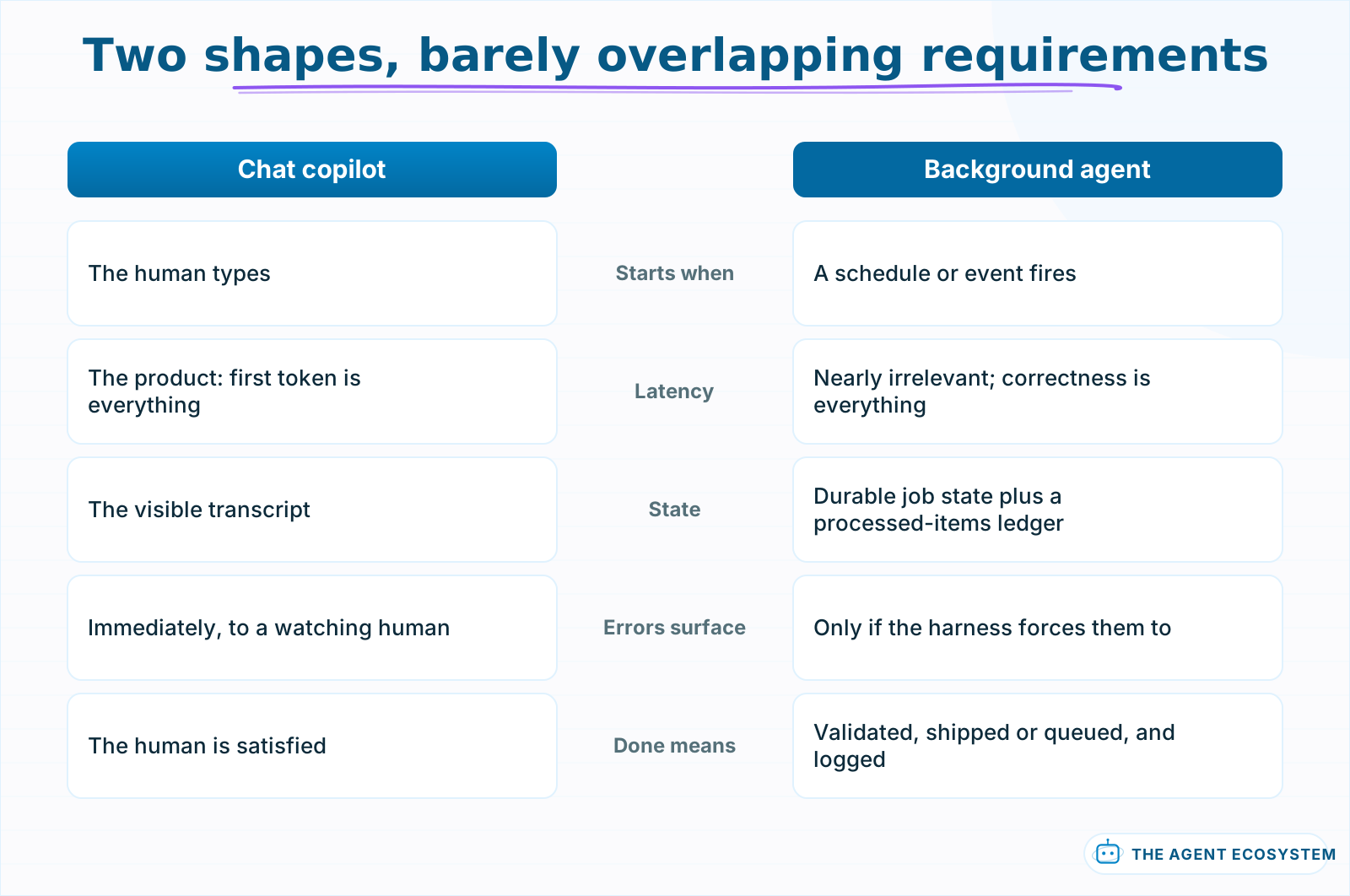 One optimizes for feel, the other for trust. Designing either with the other's priorities produces a bad version of both.
The engineering profiles barely overlap. A copilot lives and dies on latency: the human is sitting there, so time to first token is the product. A background agent's user never sees it start; whether the run takes 40 seconds or 4 minutes is irrelevant next to whether the result is correct and the failure cases got flagged. One optimizes for feel, the other for trust.
State differs the same way. A conversation is its own memory: everything relevant is in the visible transcript. A background job needs durable state that survives restarts, a ledger of what it already processed so a rerun does not double-handle Tuesday's items, and an idempotent design for anything with side effects.
Why does removing the human change the engineering?#
Every chat turn is a checkpoint: the human catches drift before it compounds. Take the human away and the checkpoints have to be rebuilt in code as validation gates, retries, budgets, and escalation rules. The agent does not get smarter; the harness around it gets stricter.
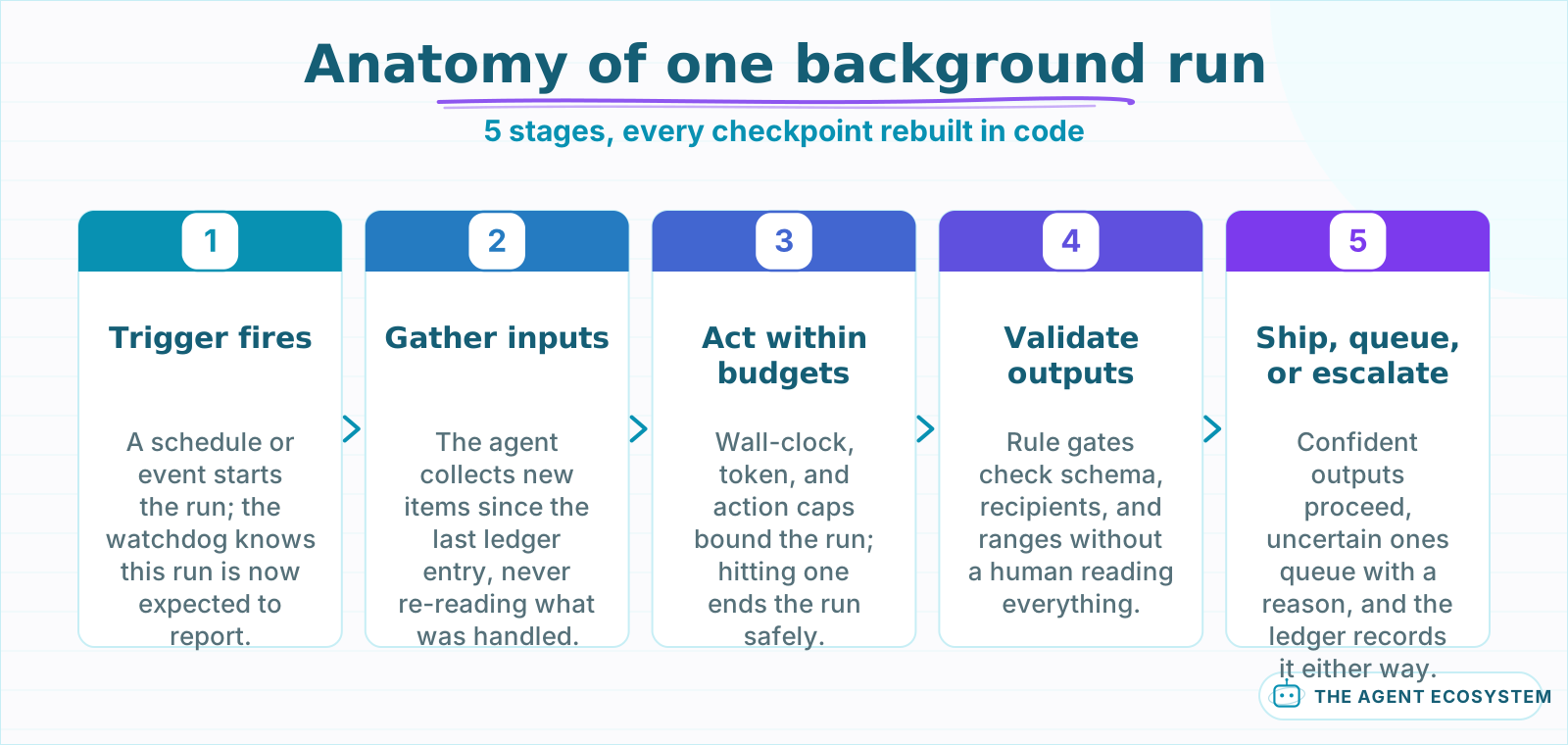 Every human checkpoint from chat reappears here as a mechanical stage.
In chat, a mildly wrong answer costs 1 turn: the user squints, rephrases, and moves on. In the background, the same mild wrongness compounds, because step 7 builds on step 6. This is why background agents lean toward plan-and-execute structures over free-running loops: a plan is checkable before execution spends money or touches anything.
The harness has a standard anatomy. A trigger starts the run, on a schedule or an event. The agent gathers inputs and works inside 3 hard budgets: wall-clock time, tokens, and actions taken. Outputs pass validation gates, rules that do not require reading everything, like schema checks, allowlisted recipients, and value ranges. Whatever passes ships or queues for approval; whatever fails or looks uncertain escalates with context. The run writes a ledger entry either way, because tomorrow's run needs to know what today's run did.
Where does each shape actually win?#
Copilots win where judgment lives mid-task: writing, coding, analysis, anything where the human's next instruction depends on the last output. Background agents win on volume and repetition: triage, monitoring, enrichment, and report generation, where the task repeats daily and the judgment fits into rules.
| Task | Right shape | Why |
|---|---|---|
| Drafting a proposal | Copilot | Direction changes every few paragraphs |
| Inbox triage every morning | Background | Repetitive, rule-checkable, volume beats patience |
| Debugging a workflow | Copilot | Each finding redirects the search |
| Lead enrichment on signup | Background | Event-triggered, same steps per record |
| Weekly metrics report | Background | Scheduled, template-shaped, reviewable |
| Exploring a new dataset | Copilot | The questions do not exist yet |
The pattern behind the table: copilots suit tasks where the path is discovered, background agents suit tasks where the path is known and the inputs change. A morning email triage agent is the canonical graduate: the rules are stable, the volume is daily, and a missed edge case escalates instead of guessing. Note the split is per task, not per product; mature products run both shapes side by side, chat for the novel work and background lanes for the repeatable slice of it.
How do you keep a background agent trustworthy?#
Trust is built in 3 layers: hard budgets on time, tokens, and actions per run, validation gates that check outputs against rules before anything ships, and an escalation path that turns uncertainty into a queued question instead of a guess. Silence is never evidence of success.
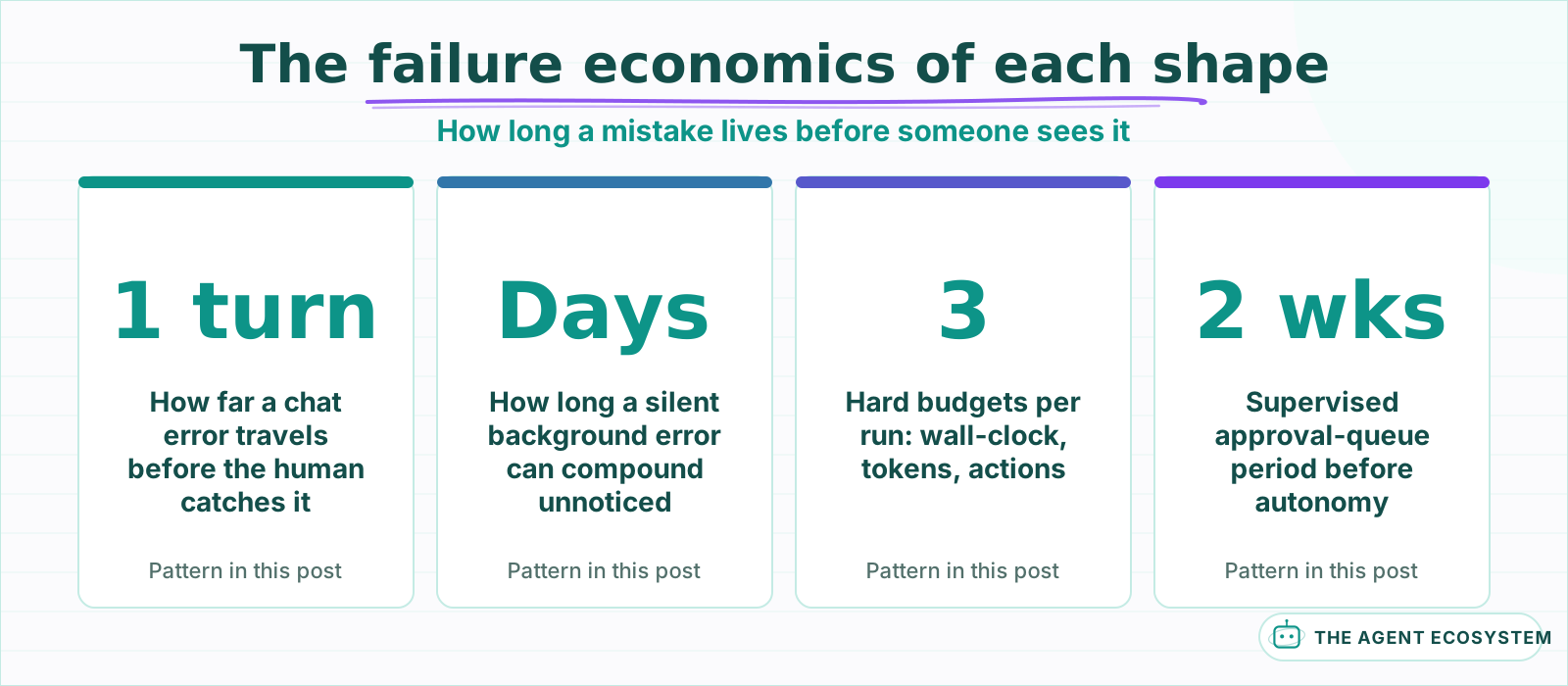 These describe the design in this post, not a benchmark: the point is how long an error survives in each shape.
The last sentence is the operating principle. A background agent that reports nothing might be healthy, crashed, or quietly wrong for 9 days; nothing in the silence distinguishes those. So the harness makes silence impossible: every run writes a ledger entry, a watchdog alerts when expected runs do not happen, and the trace of each run is inspectable after the fact. You are not monitoring the model; you are monitoring the job, exactly like any other production cron, plus budgets the model can burn.
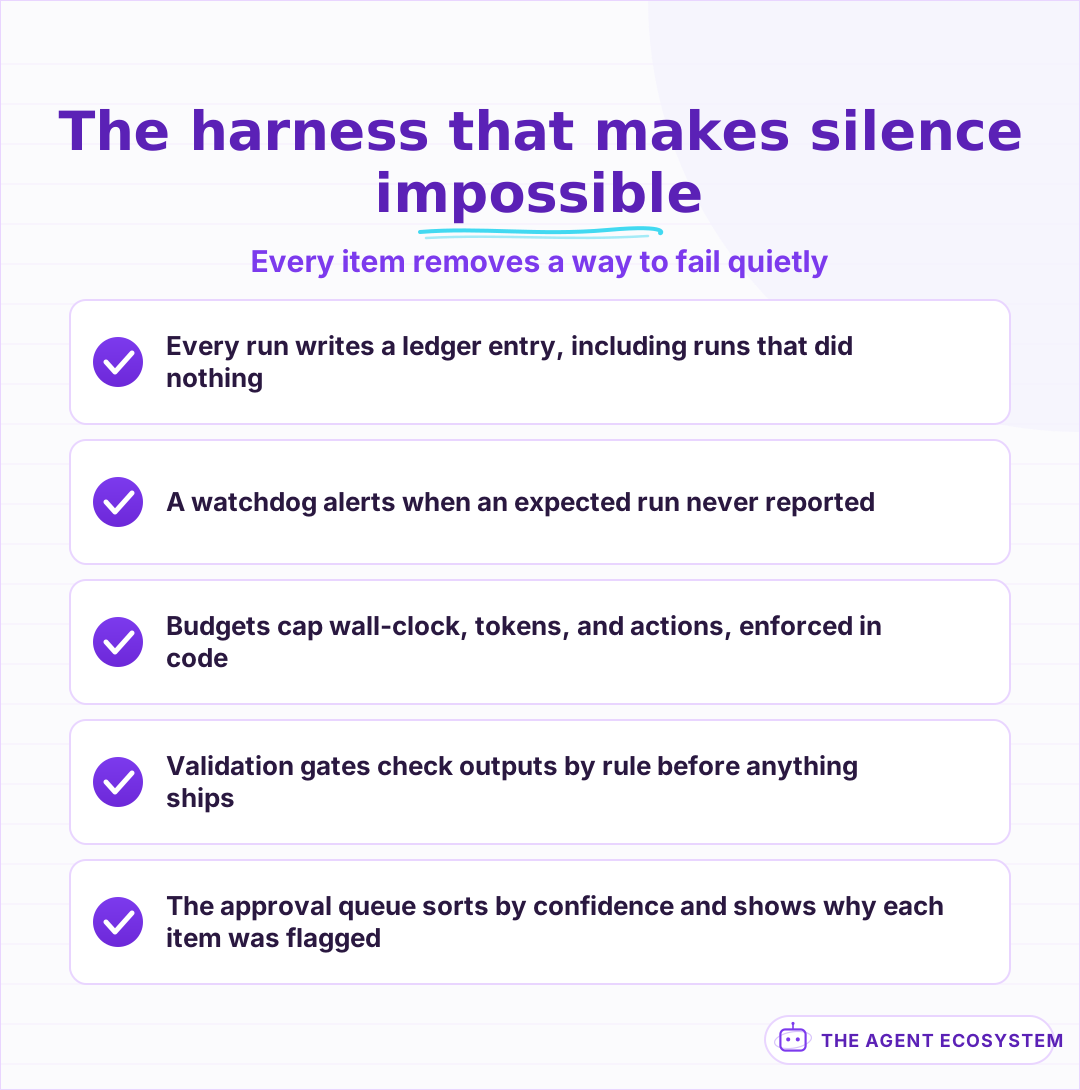 You are monitoring the job, not the model, exactly like any production cron, plus budgets the model can burn.
Approvals deserve their own design pass rather than a bolted-on yes button. A queue of 30 items with identical "approve?" prompts trains the reviewer to click through, which converts your safety gate into a rubber stamp. Better queues sort by confidence, surface the 1-line reason an item was flagged, and batch the routine so attention lands on the exceptions, the same principle behind a well-built human approval step in a workflow.
How should a background agent communicate?#
Report on a cadence the reader chose, not whenever the agent finishes something. The working pattern is a digest for routine outcomes, an immediate ping only for failures and blocked items, and a reviewable queue for anything awaiting approval. Interruptions are spent like a budget.
An agent that pings on every completion is a notification firehose wearing an agent costume, and it gets muted within a week, taking the genuinely urgent alerts down with it. The digest-plus-exceptions split keeps the signal channel quiet enough to stay believed. The digest also carries a quiet trust function: a daily "handled 34, escalated 2, skipped 1 with reason" line is how the human learns, over weeks, whether the agent's judgment deserves more rope.
How do you choose the shape for a task?#
Three checks settle it: whether the task repeats on a schedule or trigger, whether success is checkable by rules without reading everything, and whether a mistake is reversible or gated behind an approval. Tasks that fail those checks stay conversational until the checks change.
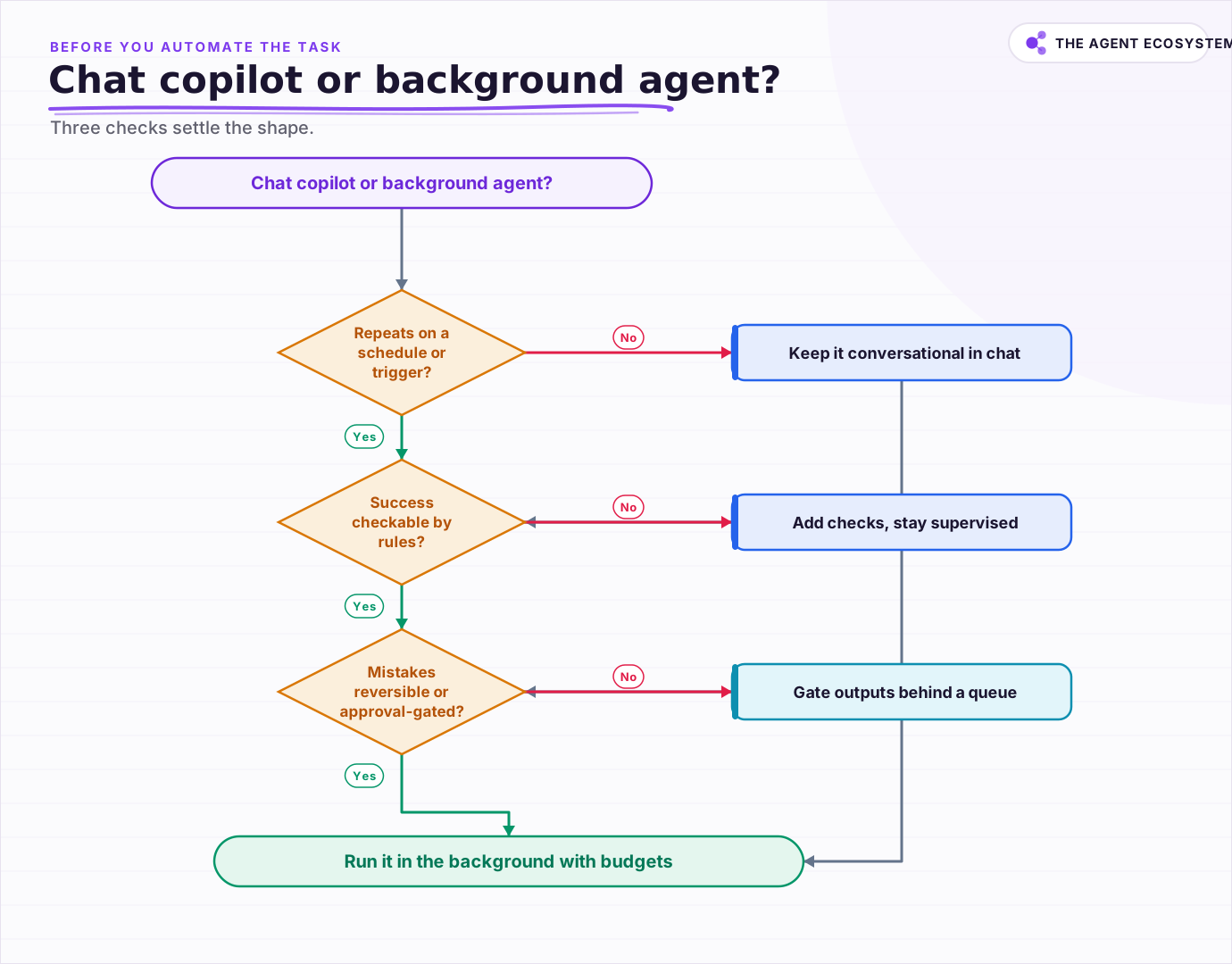 Three checks settle the shape, and a task that fails them today can pass next quarter as the product stabilizes.
The checks are also a maturity path, not just a filter. A task that fails today can pass next quarter: repetition emerges as the product stabilizes, checkability improves as you learn what mistakes look like, and reversibility is often 1 engineering decision away, like drafting instead of sending. The schedule trigger is the easy part; earning the right to sit behind it is the work.
What should you build first?#
Promote a task you already do well in chat, not a new one. Wrap the same prompt in a trigger, add budgets and a validation gate, queue outputs for approval for 2 weeks, and graduate it to autonomous only after the queue shows you what its mistakes look like.
The chat-first path is underrated because it feels slow, and it is the fastest route that survives contact with reality. Chat sessions are where you discover the edge cases, the ambiguous inputs, and the phrasing that makes the model reliable, all with a human catching every miss for free. By the time the task graduates to a background lane, the prompt has been debugged by weeks of supervised use, and the approval queue exists to catch the residue. Autonomy is not a feature you build. It is a privilege the agent earns, 1 boring, well-logged run at a time.
Frequently asked questions
What is a background agent?
Are background agents more advanced than chat copilots?
Which tasks should stay in chat?
How do I stop a background agent from failing silently?
When can a background agent act without approval?
Sources
Primary references and vendor documentation used while drafting and reviewing this article.
Written by

Muhammad Qasim Hammad is an AI agent and automation expert and the founder of Cart Gaze LLC (cartgaze.com). He builds product for the love of it: when an idea lands, a working prototype is usually running within hours, built with the same AI agents and automations he sells. He puts his own output at roughly 20× what it was before agents, and the Agentic OS behind this site is the working proof, documented in public with the tools he actually ran and what they really cost.
AI & Automation Services
Want a pipeline like this running in your business?
I'm Qasim — I design and ship AI agents and n8n automations for solo operators and small teams. Tell me what's eating your team's week, and I'll scope a fix.
Related reading
How to Build an AI Agent: The 80% That Survives Week Two
Most tutorials get you a working agent in ten minutes and skip what breaks it in week two. Sixteen lessons covering the loop, tool descriptions, memory, fallbacks, guardrails, evaluation, and the cost levers that decide your bill.

What Is an AI Agent? A Plain-English Guide for Builders
An AI agent is a language model running in a loop that decides its own next action, not a chatbot and not a chain. Here is how the perceive-decide-act-observe loop works, how an agent differs from a chatbot, chain, and workflow, and a checklist for when you actually need one.
AI Automation for Solopreneurs: What to Build First
You do not have an automation problem, you have a which-of-these-forty-things problem. Thirteen lessons on picking the first job, counting the baseline, building three automations that survive, and knowing when to stop.
n8n AI Automation Ideas: 8 Agent Workflows Worth Building (2026)
Finished the n8n AI tutorial and wondering what to actually build? These 8 n8n AI automation ideas come with the exact nodes, the honest Chain-vs-Agent call, and the right Claude model for each job.
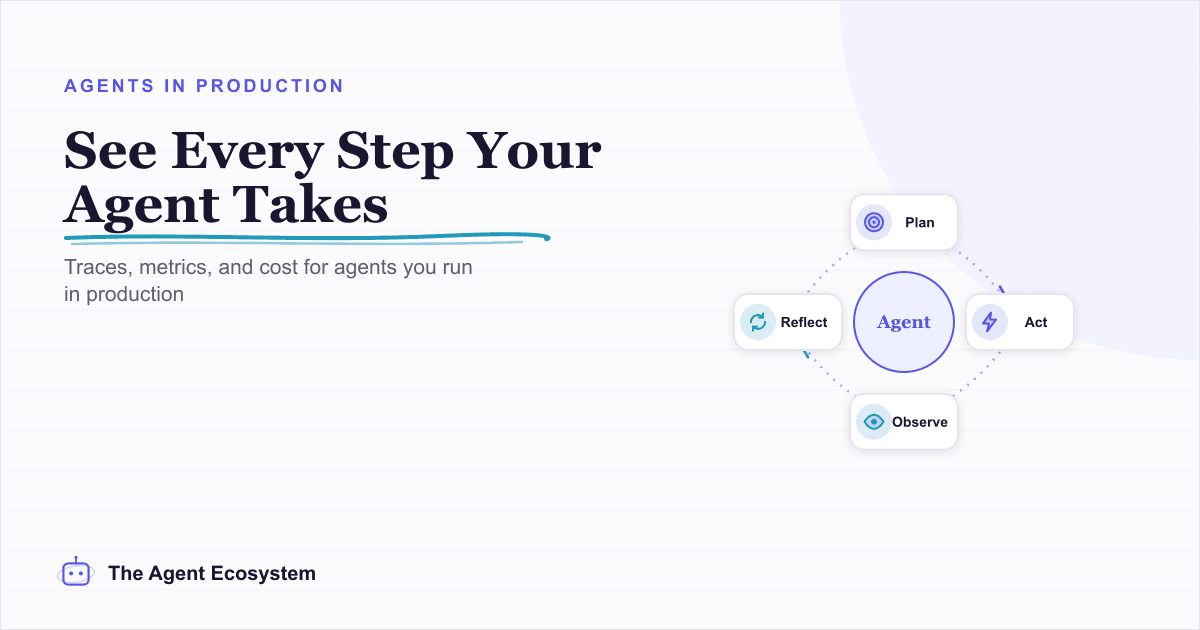
AI Agent Observability: Tracing, Metrics, and Cost in Production
Your agent gave a wrong answer and you have no idea where it broke. Observability captures the run (every LLM call, tool call, prompt, and cost) so you can replay it and point at the exact failing step. Here are the three pillars, what to log per step, and when a dedicated tool
I Built the Same AI Agent in n8n, Make and LangChain: The Honest Difference
I built the exact same order-status AI agent in n8n, Make.com, and LangChain, then compared setup effort, cost model, portability, and who each platform actually suits.