Prompt Versioning and Management: Treat Prompts Like the Code They Are
Version the bundle, run the regression set on every change, and make production name the version it runs.
AI-drafted, reviewed by Muhammad Qasim Hammad on October 17, 2026. See our AI disclosure.
Table of contents
- Why do prompts need version control at all?
- What exactly should a prompt version contain?
- Where should prompts live: git or a registry?
- How do you catch a prompt regression before users do?
- How do model upgrades fit into prompt versioning?
- Which anti-patterns cause the most damage?
- How do you decide whether a prompt change can ship?
Somebody improved a prompt on Tuesday. By Thursday, the extraction pipeline was silently mislabeling a tenth of its documents, and nobody connected the 2 events until the following week, because the edit happened in a dashboard, left no diff, and ran against no tests. Every team building on LLMs eventually collects a version of this story. Prompt management means 3 disciplines applied to text: every prompt lives in version control with a history, every change runs against a regression set before it ships, and production always knows exactly which version it is running.
Why do prompts need version control at all?#
Because prompt edits are code changes with none of the ceremony: a 1-word tweak can flip output formats, break downstream parsers, or resurface a failure someone fixed in March. Without history, nobody can answer the 2 debugging questions that matter: what changed, and when.
Prompts concentrate an unusual amount of behavior into an artifact most teams treat as copy. The system prompt decides what the product does; the examples decide its edge-case behavior; a tone instruction added for one customer complaint can quietly change how refusals work everywhere. Meanwhile the edit experience is a text box, which invites exactly the casualness that code review exists to prevent. The correction is not bureaucracy, it is symmetry: artifacts with production consequences get production discipline, the same argument that puts workflow definitions in git instead of living only inside the tool that runs them.
What exactly should a prompt version contain?#
Version the bundle, not the string: the prompt template, its variables, the few-shot examples, the tool descriptions, the model ID, the sampling parameters, and the expected output schema. Any of those changing changes behavior, so any of those changing bumps the version.
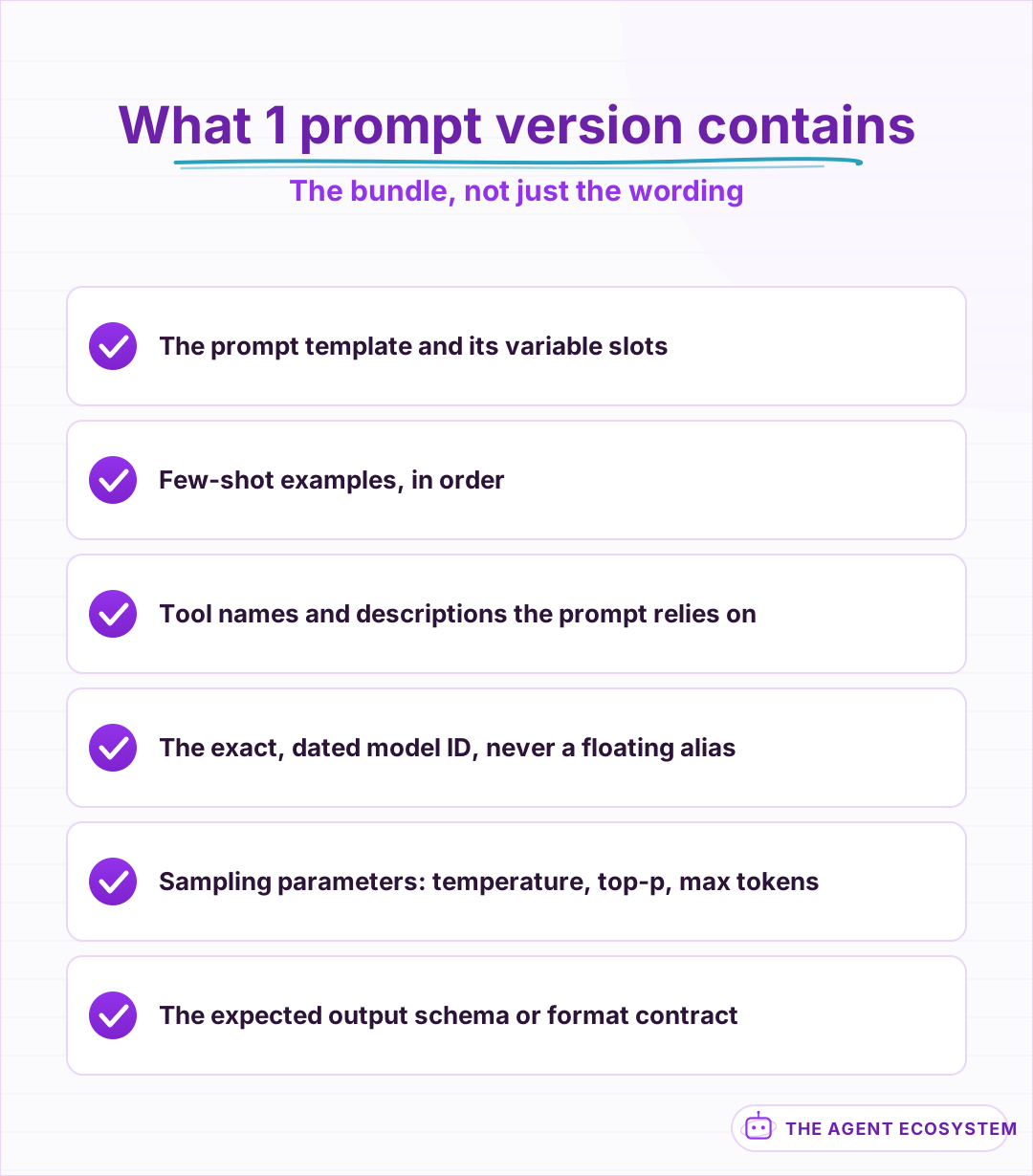 If changing it changes behavior, it lives inside the version. The 2 most-forgotten members are tool descriptions and sampling parameters.
Two bundle members get forgotten most often. Tool descriptions steer an agent's choices as strongly as the system prompt, yet they frequently live in a different file owned by a different person, so they drift unversioned. And sampling parameters change outputs at constant wording: the same template at a different temperature is a different program. Bundling forces the honest accounting: when behavior shifts, the version history contains the cause, whichever member moved.
Where should prompts live: git or a registry?#
Git wins as the source of truth for small teams: prompts deploy with the code that depends on them, reviews happen in pull requests, and rollback is a revert. Registries earn their place when non-engineers edit prompts weekly, and even then the registry needs git-grade history.
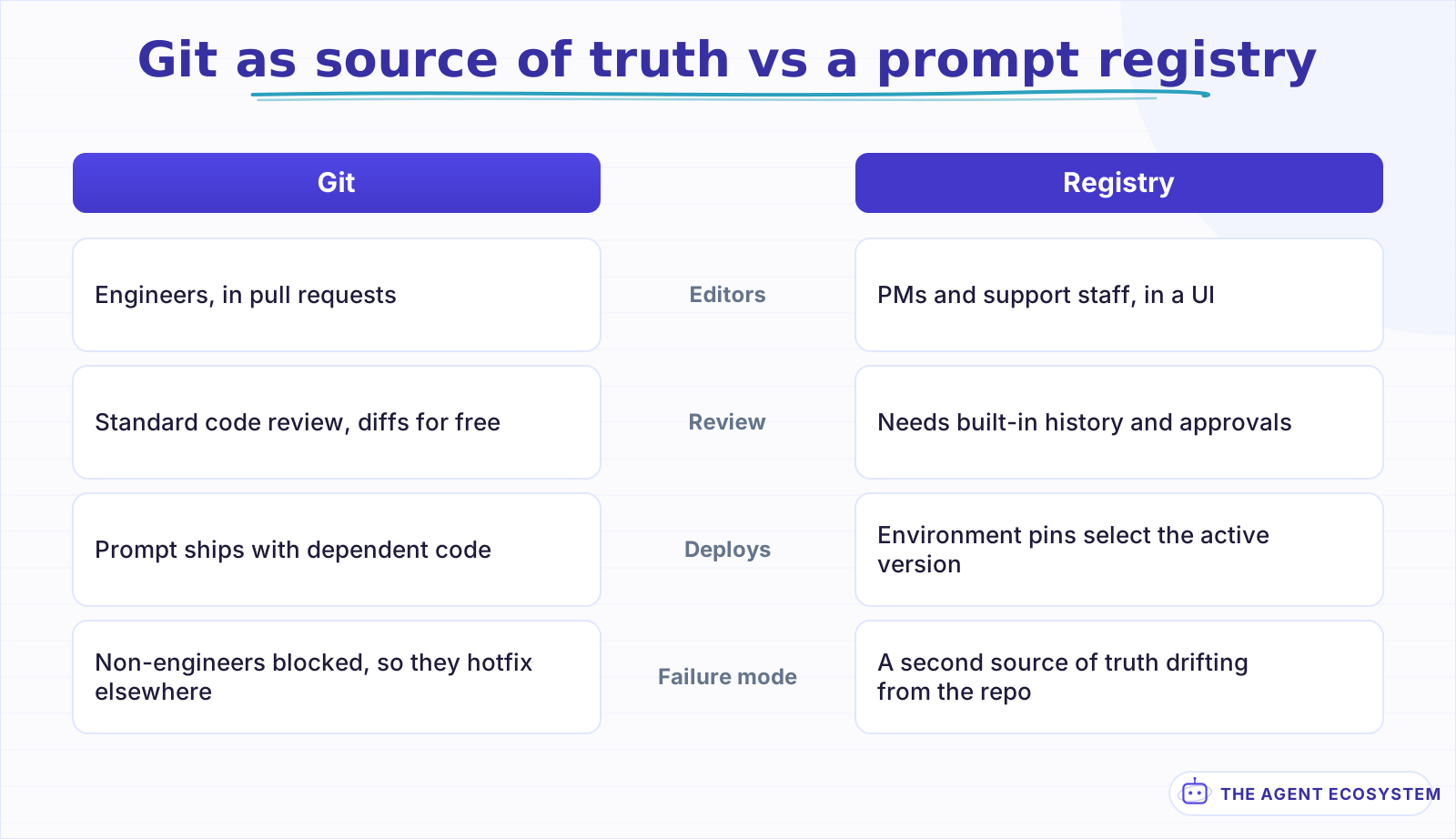 The deciding question is who edits prompts and how often, not which tool has more features.
The real question underneath the tooling choice is who edits prompts and how often. When the editors are the same engineers shipping the code, a separate prompt platform adds a second source of truth and a synchronization problem, and buys little. When product or support staff genuinely iterate on wording weekly, a registry with an edit UI, history, and per-environment pinning stops the dashboard-hotfix pattern from routing around your process entirely. The failure mode either way is the same: 2 places both claiming to be current. Pick 1 canonical home, make every other copy generated from it, and let the config principle from 12-factor apply: what varies by environment is which pinned version is active, never the content itself. Source
How do you catch a prompt regression before users do?#
Keep a regression set per prompt: 20 to 50 real inputs with expected outputs or scoring rules, run automatically on every change. Grade with exact checks where outputs are structured and a rubric where they are prose, and block the change when scores drop below the last version.
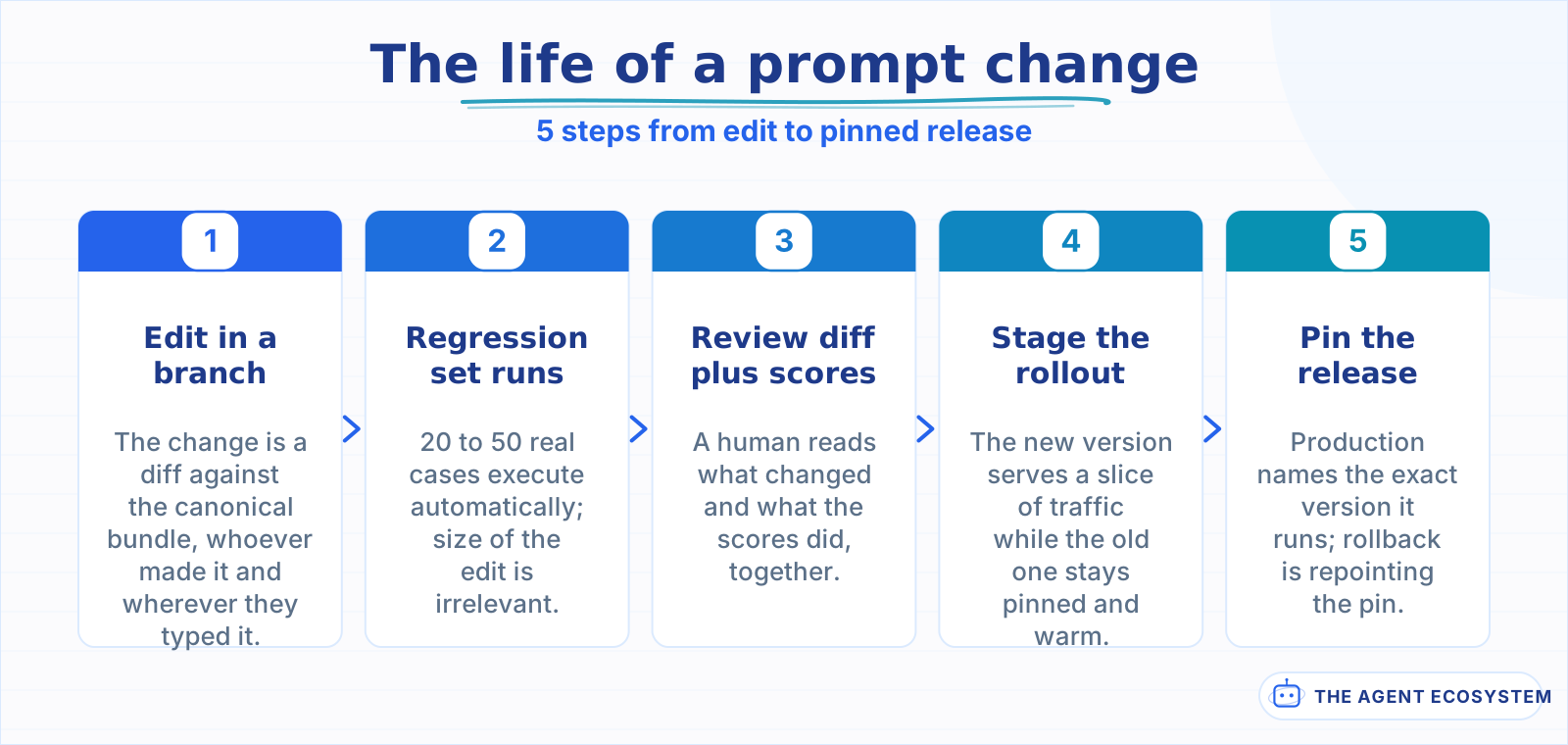 Every step exists because skipping it has a named incident attached somewhere.
The regression set is the piece that converts versioning from paperwork into protection. Build it from production reality, not imagination: the inputs that broke last quarter, the edge cases support escalated, a spread of routine cases. Structured outputs grade themselves with schema checks and field comparisons; prose outputs need either a rubric scored by a second model or spot rules like "must mention the deadline" and "must not promise a refund." Open-source harnesses like promptfoo exist for exactly this loop, diffing 2 prompt versions across a case file in 1 command. Source The habit matters more than the tool, and it is the same habit as testing agents before trusting them: the eval set is the contract, and the prompt is just the current implementation.
How do model upgrades fit into prompt versioning?#
A prompt is written against a model, so the model ID belongs inside the version, pinned exactly. Provider upgrades are real changes: run the same regression set against the new model before switching, and treat "same prompt, new model" as a release, not a config toggle.
Pinning means the dated, exact identifier, never a floating alias that a provider can repoint under you. A floating alias converts someone else's release schedule into your production incident calendar. When you do migrate, the regression set is what makes the move boring: run it against the candidate model, read the diffs, adjust the template where behavior shifted, and ship the new bundle as its own version with its own rollback point. The mechanics of swapping providers are often trivial thanks to compatible API surfaces; the discipline is in refusing to call the swap done until the scores say so.
Which anti-patterns cause the most damage?#
Three habits account for most prompt incidents: sprawl, where near-copies of a prompt drift apart across workflows, dashboard hotfixes that never make it back to the repo, and wording-only edits shipped without a regression run because the change felt too small to test.
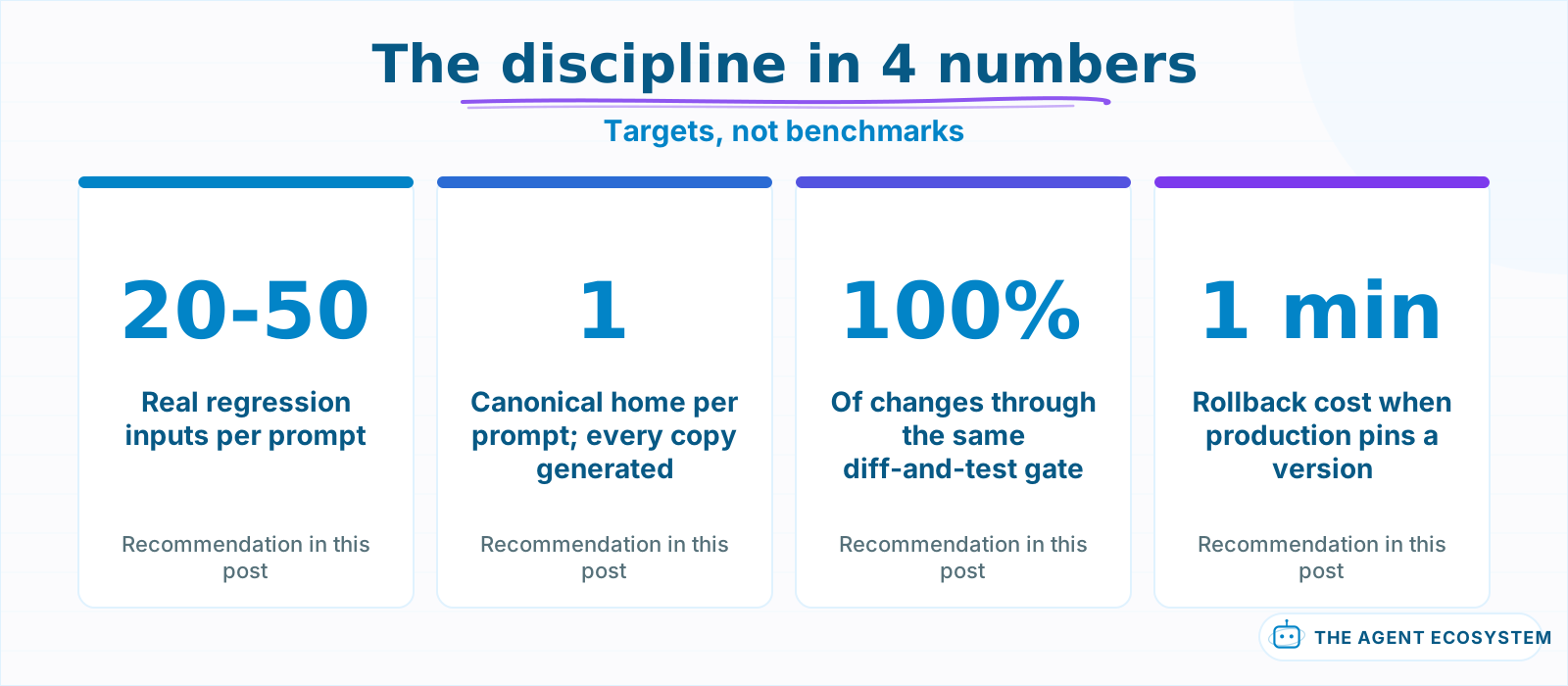 These are the recommendations this post argues for, stated as targets rather than measurements.
| Anti-pattern | The symptom | The correction |
|---|---|---|
| Prompt sprawl | 5 near-copies behaving 4 different ways | 1 canonical template, copies generated from it |
| Dashboard hotfix | Prod differs from the repo, silently | Registry edits sync back or block the deploy |
| "Too small to test" | Regressions from 1-word changes | The regression run is automatic, so size stops mattering |
| Floating model alias | Behavior shifts with no diff anywhere | Pin exact model IDs inside the bundle |
Sprawl deserves the loudest warning because it grows silently. A prompt gets copied into a second workflow, then a third, each copy gets 1 local tweak, and 6 months later the same task has 4 behaviors and nobody knows which is intended. The moment 2 workflows share a prompt, promote it to a named, versioned artifact both of them reference. Your traces should record the version each request used, which is what makes "when did this start" answerable in minutes.
How do you decide whether a prompt change can ship?#
Three gates: the change lives in the repo with a diff someone reviewed, the regression set ran and held or improved, and production can name the version it runs so rollback is a pin change. Start by collecting 20 real inputs today; the rest builds on that.
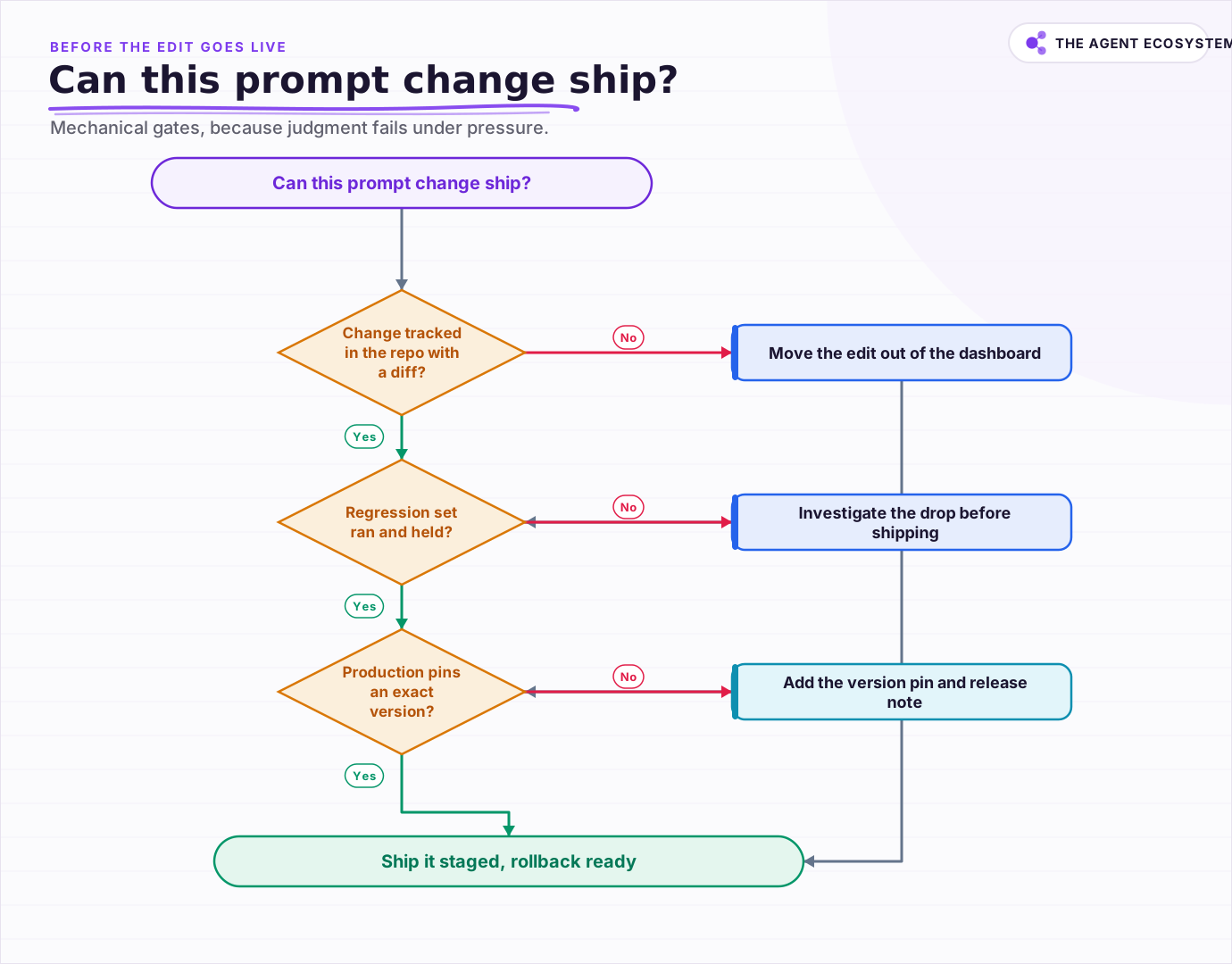 The gates are mechanical on purpose, because judgment is what fails under deadline pressure.
The gates are deliberately mechanical, because judgment is exactly what fails under deadline pressure. A reviewed diff catches the accidental deletion of a guardrail sentence; the regression run catches the consequence the reviewer missed; the version pin makes the inevitable surprise a 1-minute rollback instead of an archaeology project.
The starting point costs an afternoon: put the prompts in the repo, collect 20 real inputs into a case file, wire the runner to execute on every change, and stamp the version into your logs. None of it is clever, all of it compounds, and the Tuesday-edit story stops being about your team.
Frequently asked questions
Why should prompts be version controlled?
What should a prompt version include?
Should I use a prompt management tool or just git?
How do I test a prompt change before shipping it?
Do model upgrades require prompt changes?
Sources
Primary references and vendor documentation used while drafting and reviewing this article.
Written by

Muhammad Qasim Hammad is an AI agent and automation expert and the founder of Cart Gaze LLC (cartgaze.com). He builds product for the love of it: when an idea lands, a working prototype is usually running within hours, built with the same AI agents and automations he sells. He puts his own output at roughly 20× what it was before agents, and the Agentic OS behind this site is the working proof, documented in public with the tools he actually ran and what they really cost.
AI & Automation Services
Want a pipeline like this running in your business?
I'm Qasim — I design and ship AI agents and n8n automations for solo operators and small teams. Tell me what's eating your team's week, and I'll scope a fix.
Related reading
Stop Prompt Injection in n8n AI Agents: Practical Defenses
Your n8n agent reads emails, scraped pages, and RAG chunks nobody on your side wrote, and a planted instruction can hijack it. Here is the layered prompt injection defense, mapped to OWASP LLM01 and to nodes you can actually toggle.

Choosing an LLM for Production: The Decisions That Stick
Every model comparison you read was written against someone else's task. Twelve lessons on building the evaluation that produces your answer, pricing the choice properly, and making it reversible before the model changes underneath you.
Writing AI Agent Tool Descriptions the Model Actually Uses
Your agent keeps calling the wrong tool or passing bad arguments, and you blame the model. The real lever is the tool description and its JSON schema: the model picks and fills every tool from that alone. Here is how to write ai agent tool descriptions like onboarding docs for a
How to Test and Evaluate n8n AI Agents: Accuracy, Mocks and Regression
An AI agent is non-deterministic, so 'it worked when I tried it' is not testing. Use n8n's built-in Evaluation feature, a golden test set, and the right scoring metrics to test n8n AI agents and prove a change made it better, not worse.
Why AI Pilots Fail to Reach Production, and What Works
A pilot that answered 40 questions correctly in a demo is not evidence of anything yet. It is a controlled test on data somebody picked, and production asks a different question entirely.
AI Agent Observability: Tracing, Metrics, and Cost in Production
Your agent gave a wrong answer and you have no idea where it broke. Observability captures the run (every LLM call, tool call, prompt, and cost) so you can replay it and point at the exact failing step. Here are the three pillars, what to log per step, and when a dedicated tool