LLM Temperature and Top-P: What the Sampling Settings Do
Temperature and top-p tune sampling randomness, not intelligence. Here is what each knob does and when to touch it.
AI-drafted, reviewed by Muhammad Qasim Hammad on July 17, 2026. See our AI disclosure.
Table of contents
You turned the temperature up and the model got "more creative." You turned it down and it got "smarter." Both stories are wrong. These settings do exactly one thing: they reshape how the next token is picked from a list of candidates. They change the randomness of the draw, not the intelligence behind it.
What does LLM temperature actually do?#
LLM temperature scales the logits before the softmax step that turns them into probabilities. Near 0, the model behaves almost greedily and picks the top token, so output is more deterministic. Above 1, the distribution flattens and long-shot tokens win more often. It changes the odds of the draw, never the model's knowledge.
 Starting points, not laws. Lower for repeatable jobs, higher when you genuinely want variety.
Think of the model as producing a ranked list of candidate tokens at every step, each with a score. Softmax turns those scores into a probability distribution. Temperature is the dial that stretches or squashes that distribution before the draw. The mechanic is small: the model divides every logit by the temperature value before softmax runs. Divide by a number below 1 and the gaps between scores grow, so the leader pulls further ahead. Divide by a number above 1 and the gaps shrink, so the field bunches up and trailing tokens gain share.
A quick worked picture helps. Say the model is choosing between 3 tokens with raw scores of 2.0, 1.0, and 0.5. At temperature 1.0 the top token might carry roughly 60% of the probability. Drop to 0.2 and that same token can jump past 95%, because dividing by 0.2 multiplies every gap by 5. Raise to 1.5 and it falls back toward 45%, handing real weight to the other 2. Nothing about the model changed; only the shape of the draw did.
A common API default sits around 1.0, and the usable range is roughly 0 to 2 depending on the provider. Set it to 0.2 and the top candidate dominates almost every time. Push it to 1.5 and the tail of unlikely words fattens up, so you see more surprises and more mistakes. The OpenAI API reference documents temperature as a 0 to 2 sampling control, and Anthropic's Messages API exposes it as a 0 to 1 control. Same idea, different scale, so a value is only meaningful next to its provider. A temperature of 0.7 is fairly conservative on OpenAI's 0 to 2 scale but sits near the middle of Anthropic's 0 to 1 scale, and treating them as identical is a common mistake when you port a prompt.
Top-p vs top-k: how do they differ?#
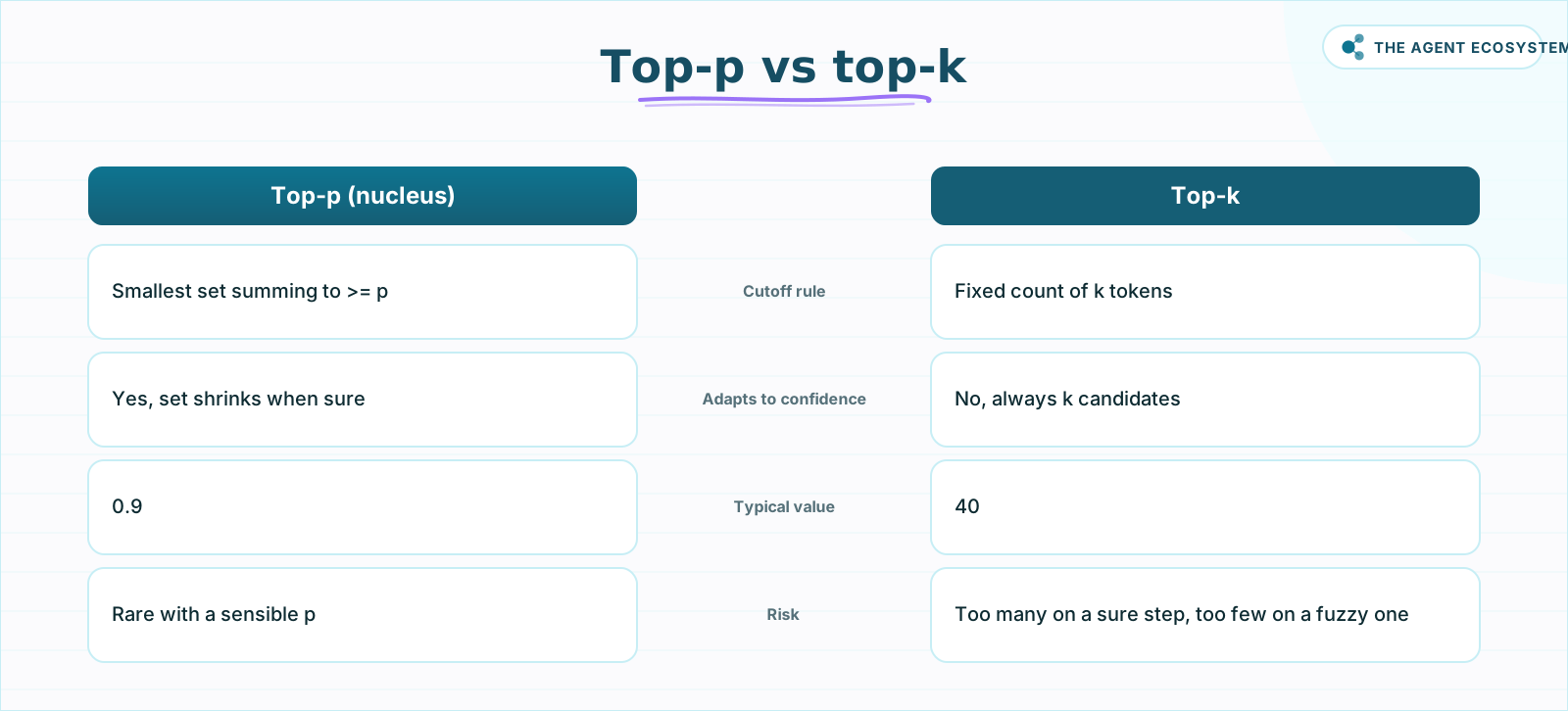
Top-p and top-k both trim the candidate list before sampling, but by different rules. Top-p (nucleus sampling) keeps the smallest set of tokens whose probabilities add up to at least p, so the cutoff adapts to how confident the model is. Top-k keeps a fixed count of the k most likely tokens, no matter the shape.
 Top-p adapts the cutoff to the model's confidence; top-k keeps a fixed count no matter the shape.
The adaptive part is what makes top-p popular. When the model is sure, only a couple of tokens clear a p of 0.9, so the sample stays tight. When the model is unsure, dozens of tokens share the mass and more get considered. Top-k with a value of 40 always keeps 40 candidates, which can be too many on a confident step and too few on a fuzzy one. Both settings are filters that run before the final draw, and neither invents a token that was not already in the list.
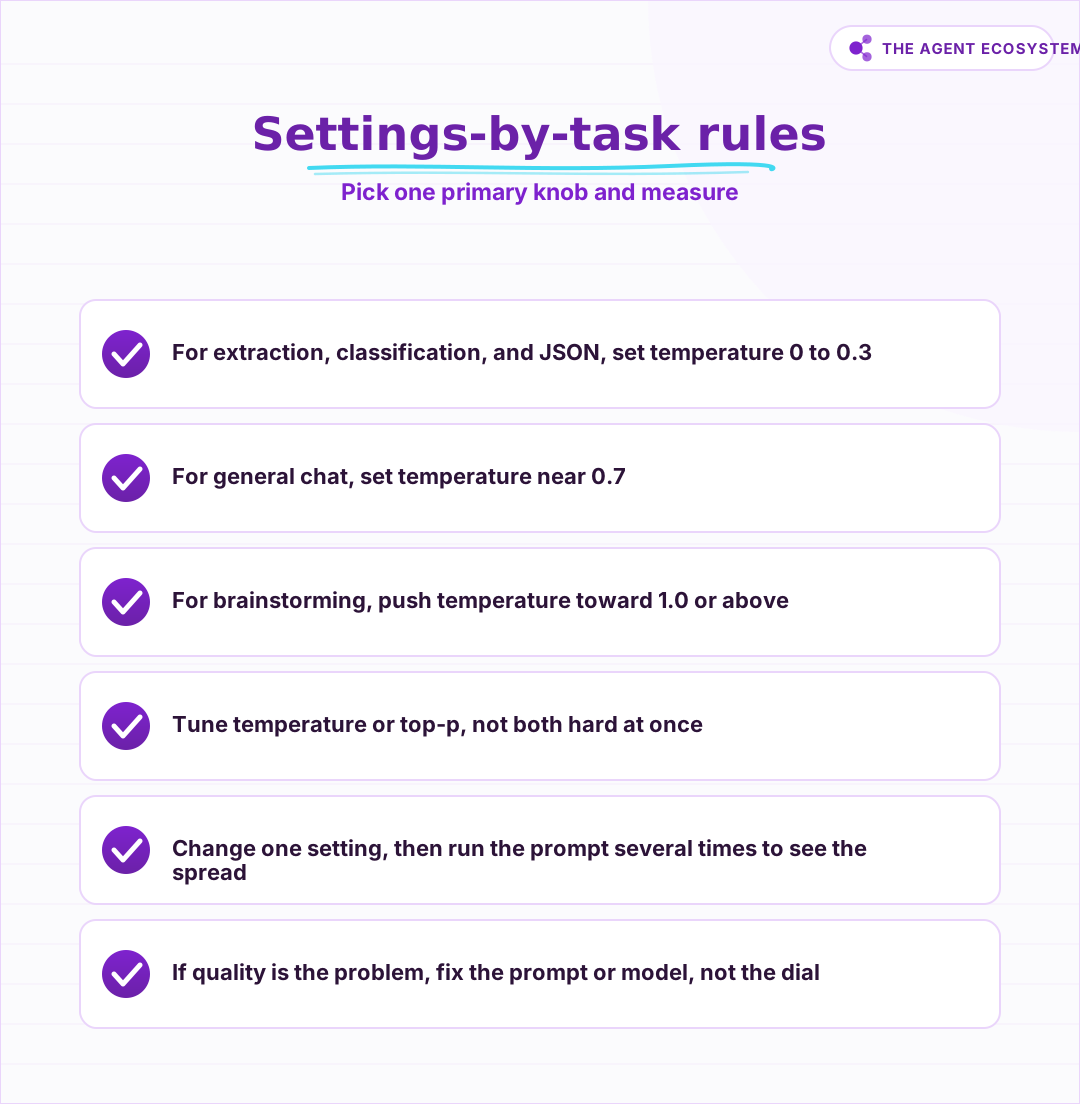
Order matters here too. Providers typically apply the top-k and top-p cutoffs first, then draw from what survives at the chosen temperature. So a top-p of 0.9 caps how far into the tail you can wander, and temperature then decides how evenly you spread across the tokens that made the cut. That is exactly why stacking a low top-p with a high temperature sends mixed signals: one setting is trying to widen the draw while the other has already narrowed the pool it draws from. The practical guidance from most providers is to tune temperature or top-p, not both hard at once, because they interact in ways that get hard to reason about. Pick one primary knob, usually temperature, and leave the other near its default of 1.0.
What settings should you use per task?#
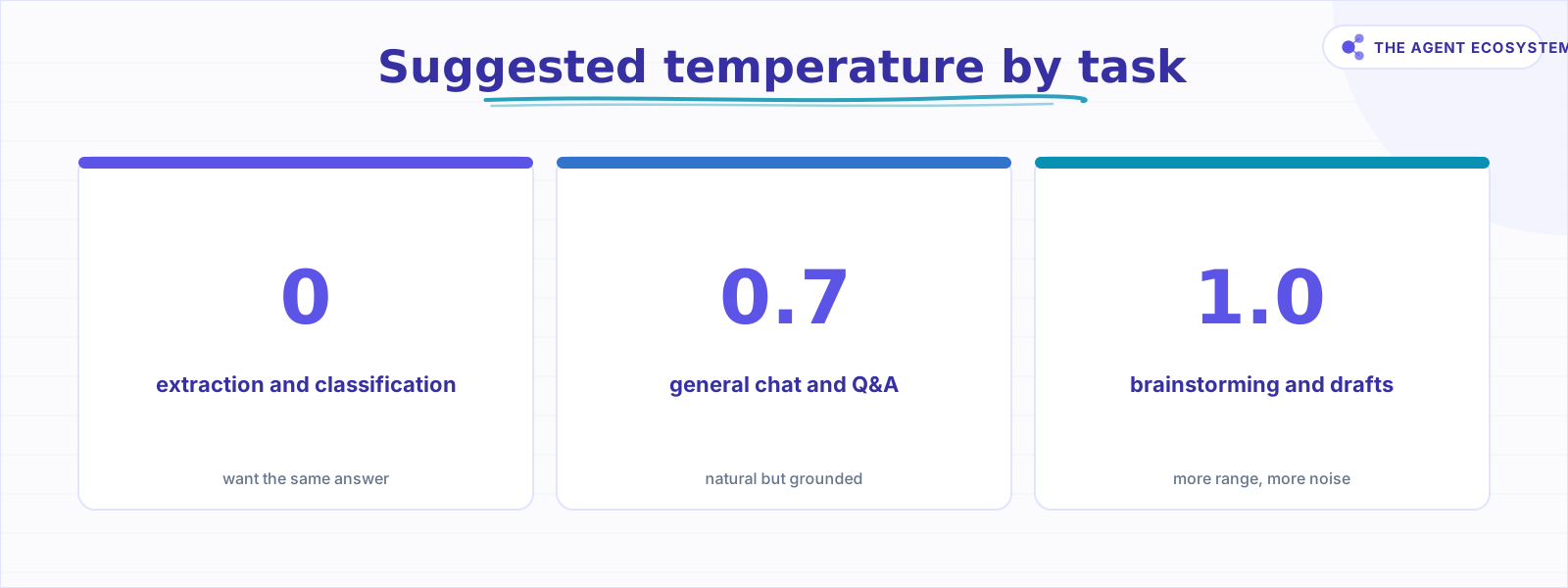
Match the setting to the job, not to a vibe. For extraction, classification, and structured output, use a low temperature between 0 and 0.3 so the answer stays stable and repeatable. For general chat, a medium value near 0.7 reads naturally without going off the rails. For brainstorming and drafts, push toward 1.0 and accept more noise.
| Task | Temperature | Top-p | Why |
|---|---|---|---|
| Extraction / classification | 0 to 0.2 | 1.0 | You want the same answer every time |
| Structured output (JSON) | 0 to 0.3 | 1.0 | Fewer stray tokens that break the schema |
| General chat / Q&A | 0.5 to 0.7 | 0.9 to 1.0 | Natural but still grounded |
| Brainstorming / drafts | 0.8 to 1.2 | 0.9 to 1.0 | More range, more surprises |
 Match the setting to the job, tune one knob, and read the spread before you trust a value.
These are starting points, not laws. If your structured output still drifts, the setting is rarely the whole fix. Tightening the schema and validating the response matters more, which is why our guide to structured output in n8n leans on a parser and a retry rather than temperature alone. Sampling settings shave off some randomness at the edges; they do not enforce a contract.
The task ranges above are wider than they look for a reason. A classification prompt with 4 tightly worded labels can sit happily at temperature 0, because there is one right answer and you want it every time. A support reply that should sound human, not robotic, does better near 0.7, where small word choices vary but the meaning holds. Naming a product or drafting 10 subject lines wants 1.0 or higher, because the whole point is spread. Read the range as a hint about how much variety the task can tolerate, then pick a value inside it and stick with it long enough to judge the output fairly.
Do these settings make the model smarter?#
No. This is the myth worth killing. Temperature and top-p only reshape the probability distribution the model already produced. They cannot add a fact the model does not have, fix flawed reasoning, or raise the ceiling on quality. A wrong answer at temperature 0 is still wrong; you have just made it repeat the same wrong answer more reliably.
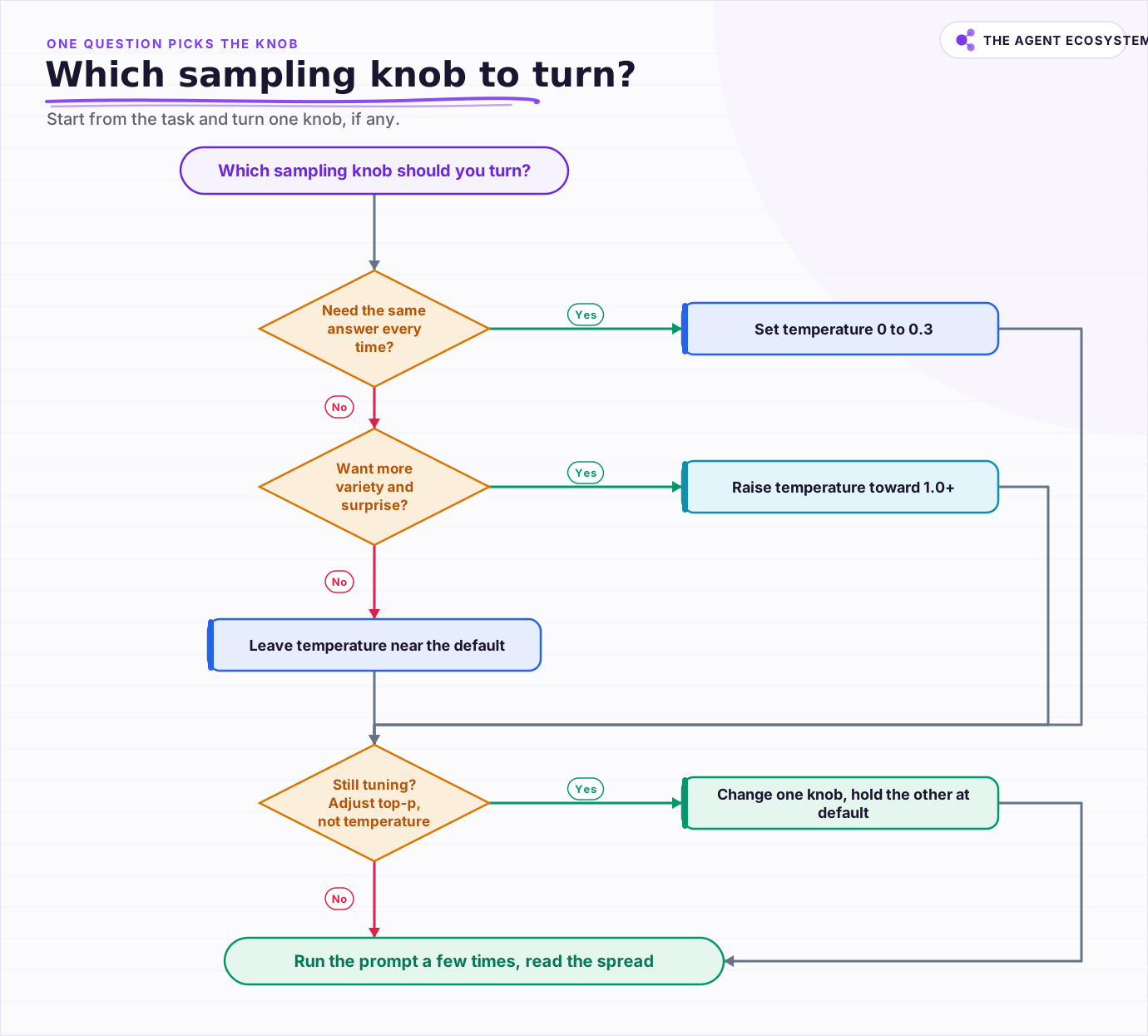 Start from the task and let one question decide which knob, if any, you actually turn.
There are honest caveats worth flagging. Even at temperature 0, output is not guaranteed to be identical across runs, because floating-point math, batching, and infrastructure introduce small nondeterminism. Some newer reasoning models restrict or ignore temperature entirely and expose their own controls instead, so a value you set may be silently dropped. And low temperature reduces variety, which can hurt tasks like naming or ideation where you actually want spread. The dial has two edges.
It is also worth separating cost from quality, because they get muddled here too. Temperature and top-p do not change how many tokens you are billed for; the price of a call tracks input and output length, not the sampling values, so if a bill is the worry, the fix lives in prompt size and model choice rather than the dial. Our breakdown of the cheapest AI API in 2026 walks that math. The one indirect link is that a very high temperature can produce rambling or off-track output that you then have to re-run, and re-runs cost real tokens. So a sane temperature helps your budget by wasting fewer calls, not by being cheaper per token.
How should you tune in practice?#
Start from the task, set one knob, and measure. Drop temperature toward 0 for anything you need repeatable, and reach higher only when you genuinely want variety. Change one setting at a time, run the prompt several times, and read the spread. If output quality is the problem, fix the prompt or the model, not the dial.
The workflow is boring on purpose. Pick a sensible default for your task from the table above, wire the call, and only touch sampling once you have seen real output. If you are building this into an automation, our walkthrough of a basic LLM chain in n8n shows where the temperature field lives and how to keep it out of the way until you need it. Treat these settings as fine tuning at the very end, not as the first place you look when results disappoint.
A short mental checklist keeps you honest. First, decide whether the task tolerates variety at all; if not, temperature 0 to 0.3 and you are done. Second, if it does, set 1 knob and leave the other at 1.0. Third, run the same prompt at least 3 times and compare, because a single sample can flatter or slander a setting by luck. Fourth, if the output is wrong rather than merely samey, stop turning dials and look at the prompt, the context, or the model. Ninety percent of the time the fix is not sampling at all. The 2 settings are real and useful, but they live at the edge of the pipeline, and knowing that saves you hours of chasing the wrong lever.
Frequently asked questions
Does higher temperature make an LLM more creative?
What is the difference between top-p and top-k?
What temperature should I use for structured output?
Should I set both temperature and top-p?
Is temperature 0 fully deterministic?
Sources
Primary references and vendor documentation used while drafting and reviewing this article.
Written by

Muhammad Qasim Hammad is an AI agent and automation expert and the founder of Cart Gaze LLC (cartgaze.com). He builds product for the love of it: when an idea lands, a working prototype is usually running within hours, built with the same AI agents and automations he sells. He puts his own output at roughly 20× what it was before agents, and the Agentic OS behind this site is the working proof, documented in public with the tools he actually ran and what they really cost.
AI & Automation Services
Want a pipeline like this running in your business?
I'm Qasim — I design and ship AI agents and n8n automations for solo operators and small teams. Tell me what's eating your team's week, and I'll scope a fix.
Related reading
Choosing an LLM for Production: The Decisions That Stick
Every model comparison you read was written against someone else's task. Twelve lessons on building the evaluation that produces your answer, pricing the choice properly, and making it reversible before the model changes underneath you.

LLM API Rate Limits: Which One You Are Actually Hitting
The first 429 usually gets blamed on request volume, and the real cause is usually a token ceiling nobody tracked. Which dimensions providers enforce, why token-bucket replenishment rejects bursts that look well under the limit, and why your output ceiling quietly spends quota.
Estimate Any LLM Bill Before You Build: Token Math for n8n Builders
A single LLM call costs a fraction of a cent, until you multiply by 10,000 runs a month. Here is the reproducible token math: chars over 4 for tokens, the input and output rates, and the per-run times volume multiply, with one support-reply run priced across five models.
Claude vs GPT vs Gemini in n8n: Tested Cost and Speed
There is a 25x cost spread between the cheapest and priciest LLM tier for the exact same n8n AI Agent workflow. This post prices all three providers across 11 model tiers so you can pick the right Chat Model sub-node and stop overpaying.
Cut Your AI API Bill: 7 Levers That Actually Work
To reduce AI API costs you need levers that change the bill by a verifiable mechanism, not vague advice. This hub names all seven, right-size the model, prompt caching, the Batch API, routing and fallback, local versus API, token discipline, and RAG over long-context, with a
LLM Batch API: When 50% Off Is Worth the Wait
The batch API is the same model and the same output at half the token price, as long as nobody is waiting on the response. Here is which jobs belong on batch, the reproducible cost math, how Anthropic and OpenAI differ, and the exact n8n submit-and-poll pattern.