GPU Sizing for a Self-Hosted LLM: How Much VRAM?
The arithmetic behind the answer, so it still works on models that do not exist yet.
AI-drafted, reviewed by Muhammad Qasim Hammad on November 9, 2026. See our AI disclosure.
Table of contents
You have done the break-even math and self-hosting looks worth it. Now you have to buy or rent something, and every guide answers with a table of model names against card names that was already out of date when it was published. GPU sizing for a self-hosted LLM comes down to one piece of arithmetic you can apply to any model, including ones that do not exist yet.
How much VRAM does a self-hosted LLM need?#
Weights first: parameters times bytes per parameter. Precision sets the bytes, so FP16 costs 2 per parameter, INT8 costs 1, and INT4 about 0.5. A 7B model is therefore roughly 14GB at full precision and roughly 3.5GB quantized to four bits. That single relationship answers most of the question.
The reason this beats a lookup table is that it keeps working. New models arrive constantly, cards get replaced, and the arithmetic does not care. If you know the parameter count and the precision, you know the resting size.
Two conventions are worth knowing so the numbers stop looking arbitrary. Parameter counts are quoted in billions, so a 7B model is seven billion parameters, and the memory figure lands in gigabytes because a billion parameters at two bytes each is two gigabytes. And precision names describe bits per number: FP16 is sixteen bits, which is two bytes. Once those two click, you can do this in your head.
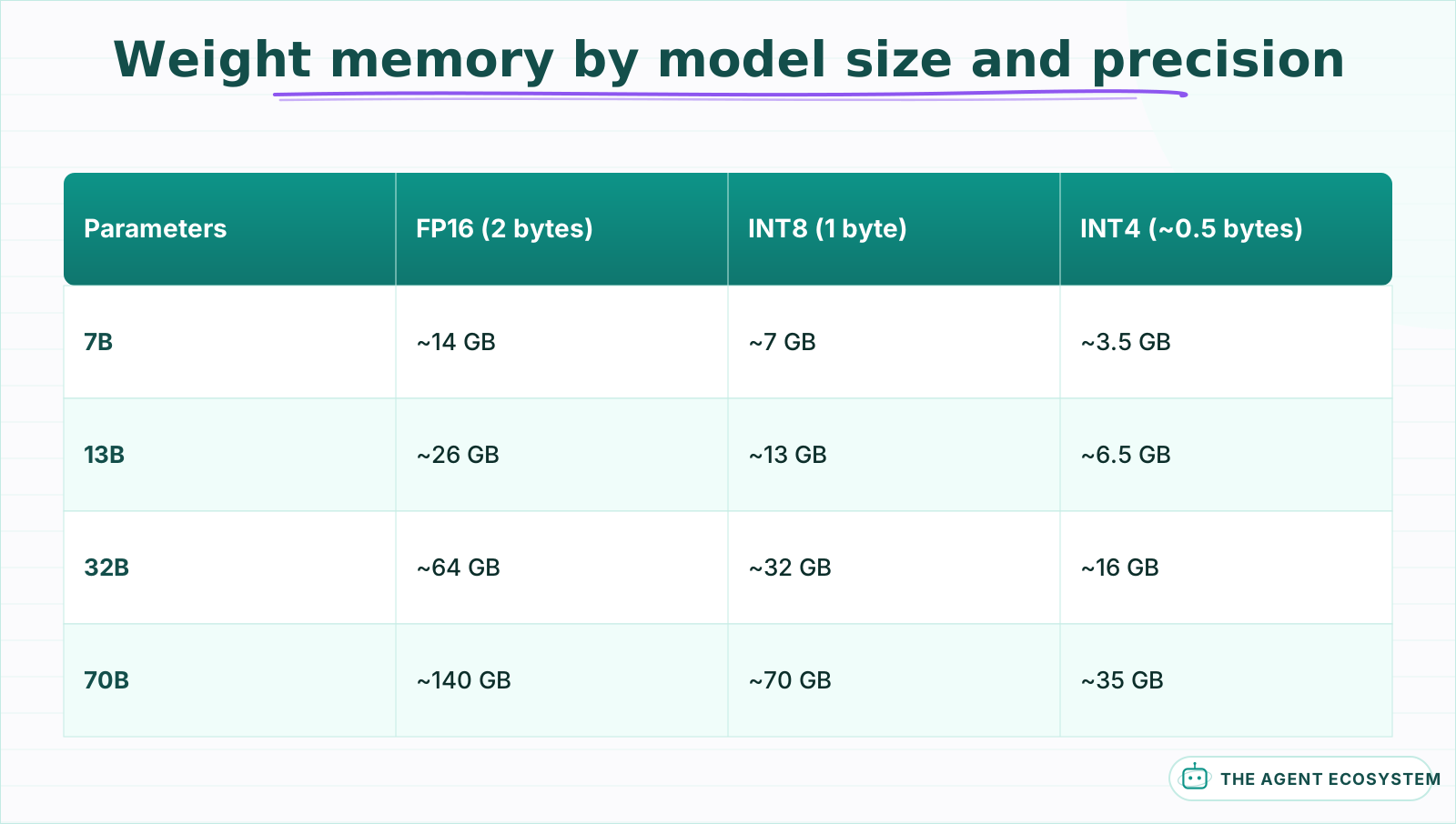 Weights only. The KV cache is extra and grows with context length, so treat every figure here as a floor rather than a budget.
One family of models breaks this arithmetic, and it is increasingly common. A mixture-of-experts model activates only a fraction of its parameters per token, so it computes like a small model while still needing the whole thing resident in memory. A model advertised as fast because only a few billion parameters are active still occupies memory for its full parameter count. Size against the total, never the active count, or you will buy a card that cannot load the model at all.
What the table above does not include is the part that actually decides whether your setup survives a real conversation.
Why does a model that fits still run out of memory?#
Because weights are only the resting size. Every token in the context window keeps a key and value entry in memory, and that KV cache grows with conversation length. A model that loads comfortably at 4k context can exhaust the same card at 32k, which looks like a crash rather than a sizing mistake.
This is the single most common reason a self-hosted setup fails in week two rather than on day one. The model loaded, the first few requests worked, and then somebody had a long conversation.
The cache scales with context length, layer count, and how the model handles attention heads. Modern architectures using grouped-query attention are dramatically cheaper here than older ones, which is why a blanket formula is worth less than a measurement on the model you actually chose. What holds regardless is the shape of the growth:
| Context length | Relative KV cache size (modeled) |
|---|---|
| 4k tokens | 1x baseline |
| 8k tokens | 2x |
| 32k tokens | 8x |
| 128k tokens | 32x |
Linear, in other words, and unbounded until you bound it. A 20GB budget with 4GB of headroom at 4k has no headroom at all at 32k.
The practical move is to cap context deliberately rather than discover the ceiling in production. Most runtimes let you set a maximum context at load time, and setting it to what you actually need converts an unpredictable crash into a predictable, bounded reservation. It is the difference between a system that fails at the worst moment and one that refuses politely.
What happens when it almost fits?#
It runs, slowly. Most runtimes will offload the layers that do not fit to system RAM and keep going, which is why a setup can look successful and feel unusable. Throughput falls sharply once any meaningful share of the model lives off the card, and the drop is not gradual.
This is worth understanding because it changes how you read a successful install. The model loaded and answered, so nothing reported an error, and the only symptom is that responses take many times longer than the benchmarks you read. People often conclude the hardware is simply slow and stop there.
Check where the layers actually went. Every serious runtime reports how many were placed on the GPU versus offloaded, and that number tells you immediately whether you are running on the card or beside it. If a meaningful share is off-card, dropping one precision level usually buys more speed than any other single change, because it moves the whole model back onto the GPU.
How do you size it in five steps?#
Pick the model, pick the precision, multiply for the weights, add the KV cache at the context length you actually use, then leave headroom. Headroom is not optional: the loading spike, the operating system, and anything else on the card all take a share before your first request arrives.
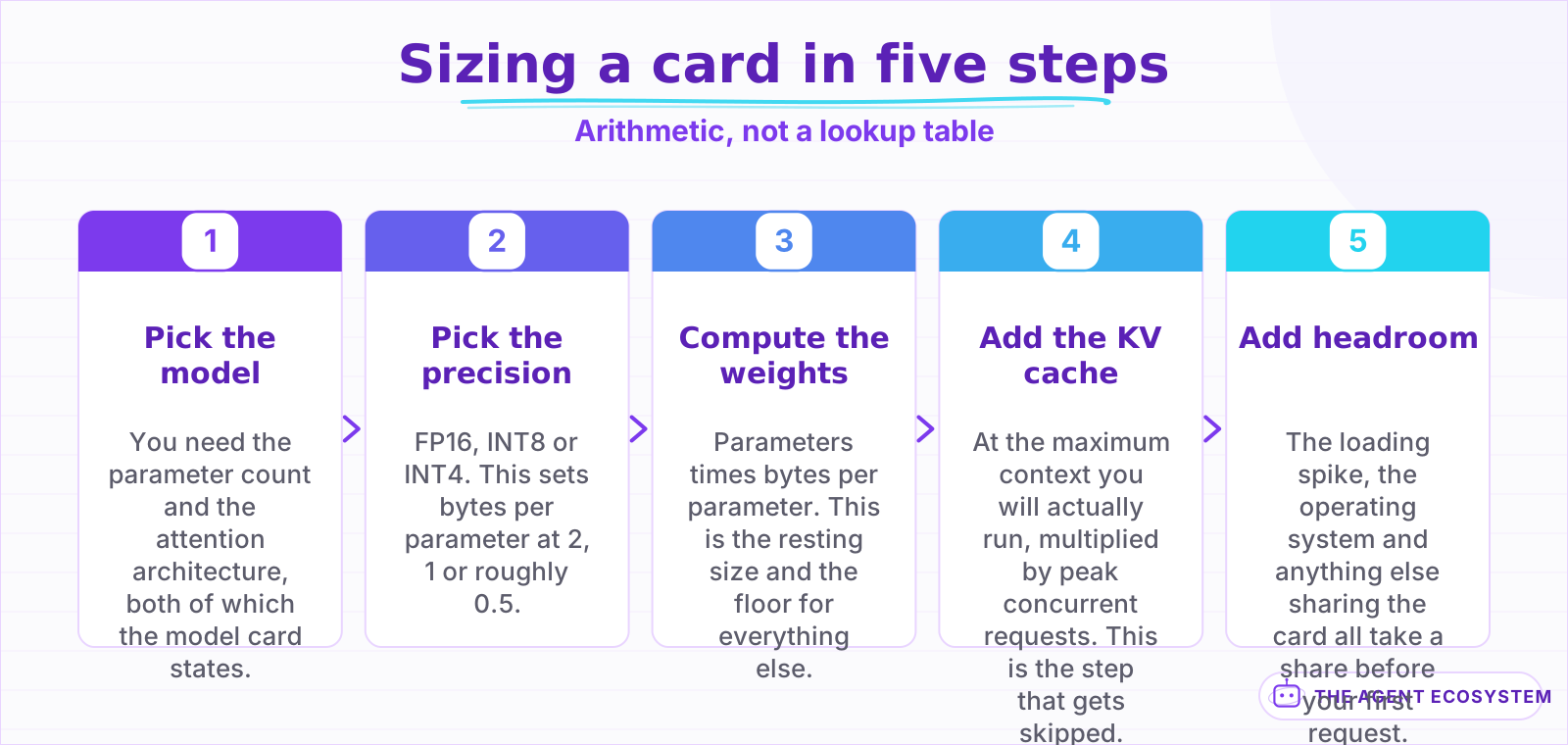 Step four is the one people skip, because the context length they test with is not the one they ship with.
The step people skip is the fourth one, and they skip it because the context length they test with is not the context length they ship with. Size against your real ceiling, not your demo.
What does quantization actually cost you?#
Quality, and not uniformly. Four-bit quantization roughly quarters the memory and does degrade output, but it shows up far more on reasoning and code generation than on summarisation or classification. Test your own task at both precisions before deciding, because the answer differs by workload more than any general rule admits.
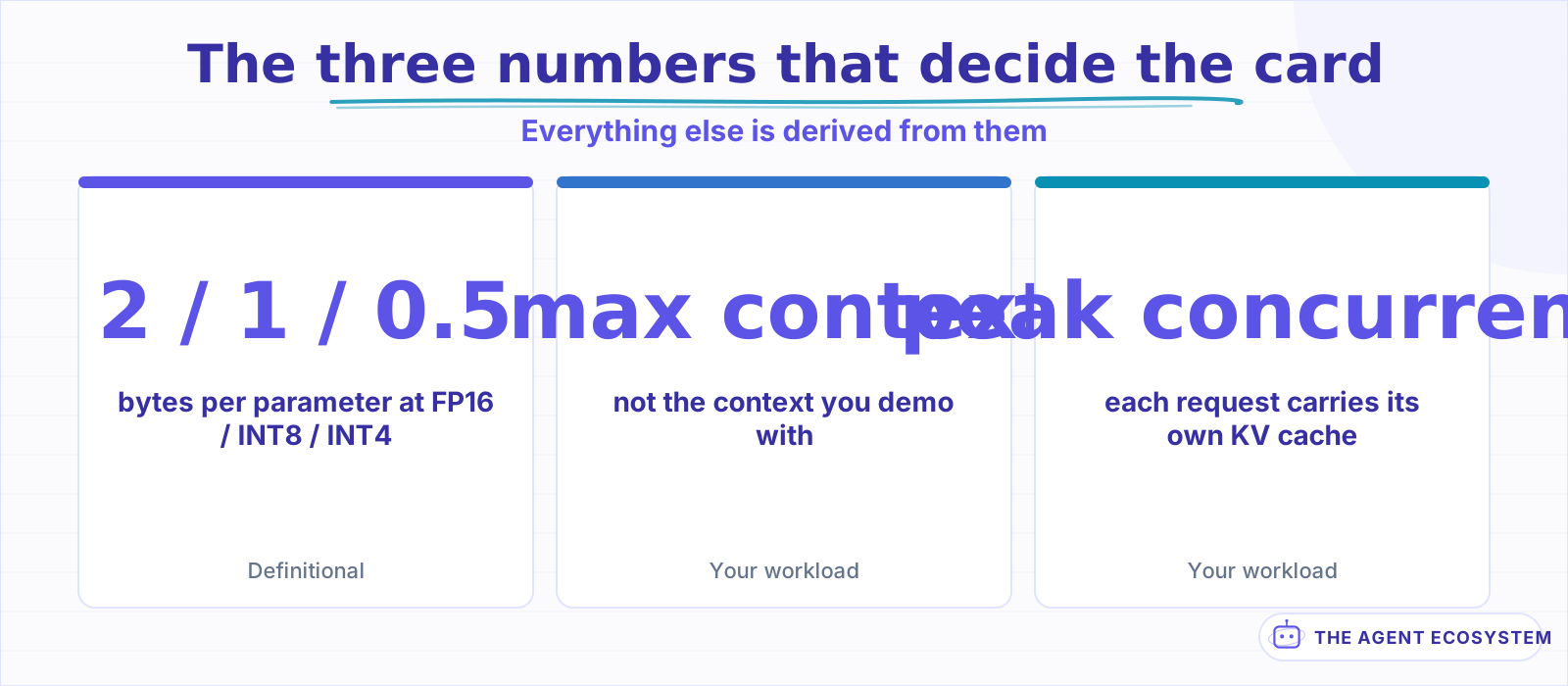 Everything else is derived. Get these three wrong and no amount of benchmarking rescues the estimate.
It is worth saying plainly because most coverage presents low precision as a free win. It is not free. It is a trade that is usually worth making, which is a different claim. If your workload is classification or extraction, you will likely never notice. If it is multi-step reasoning inside an agent, you might notice a lot, and the failure will look like the model getting worse at its job rather than anything to do with memory.
A practical route: run your real prompts at INT8 and INT4, compare the outputs yourself, and only then decide how much memory you are buying. This is the same discipline as choosing between local and API in the first place, where the honest answer also depends on your specific numbers rather than a general rule.
What breaks the calculation?#
Five things, and concurrency is the one people miss. Each simultaneous request carries its own KV cache, so serving four users at once multiplies that part of the budget by four. Add the loading spike, other processes on the card, and the quality cost you accepted at low precision.
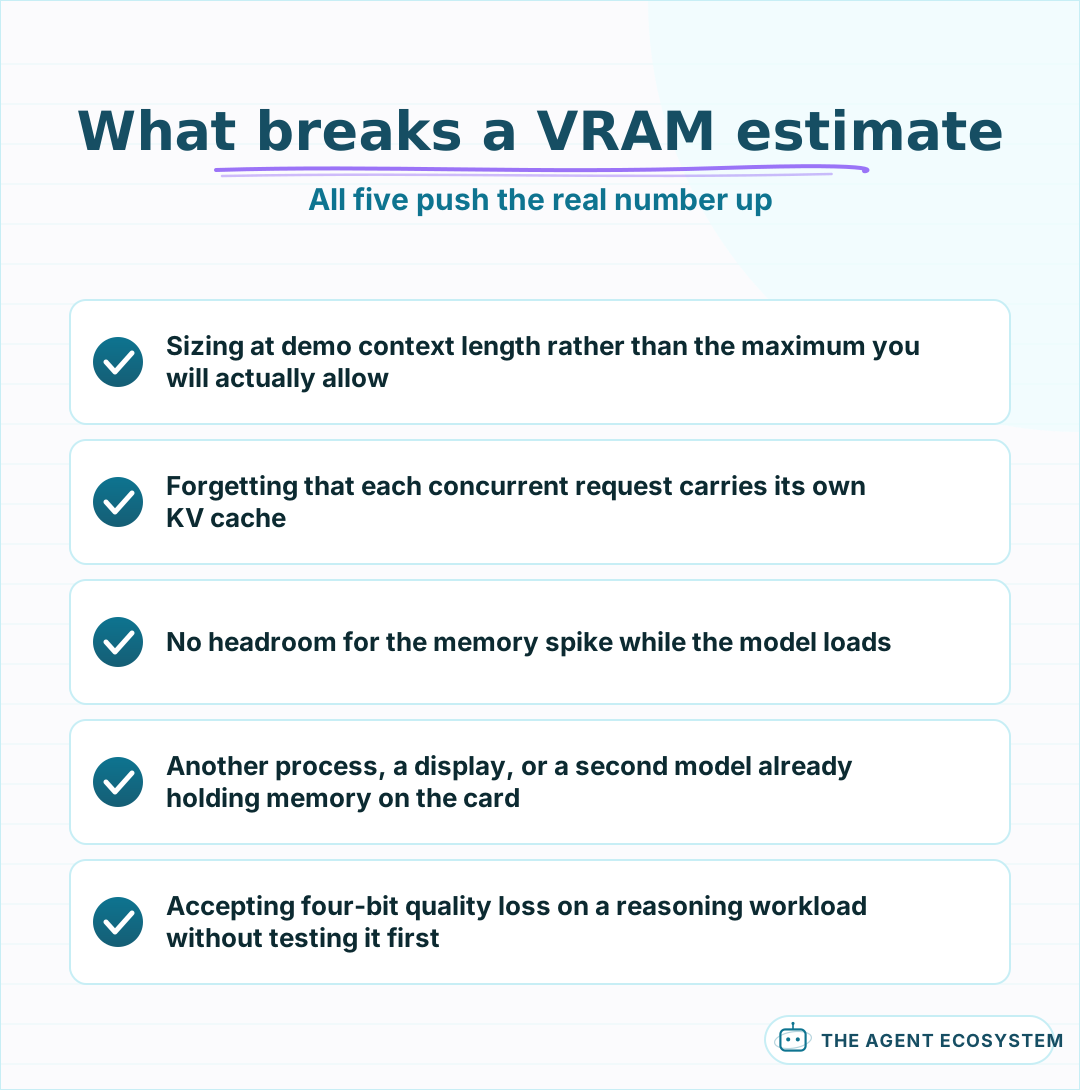 Each one makes the real requirement larger than the number you calculated, which is the direction that hurts.
Concurrency deserves the emphasis because it converts a personal setup into a shared one. A card that comfortably serves you at your desk can fall over the moment three colleagues start using the same endpoint, and nothing about the model changed. If you plan to share it, size for peak concurrent requests rather than average ones.
There is a cheaper answer than a bigger card, and it is worth trying first. Serving stacks can queue requests rather than run them all at once, which trades a little latency for a fixed memory ceiling. Two requests served back to back need one KV cache; two served simultaneously need two. If your traffic is bursty rather than genuinely parallel, a queue is the difference between the card you have and the card you were about to buy.
Should you rent or buy?#
Rent first, almost always. A card is a capital purchase against a workload nobody has measured yet, and hourly rental answers the question for the price of an afternoon. Buy once you know the model, the precision, the context length and the concurrency, and the machine will stay busy.
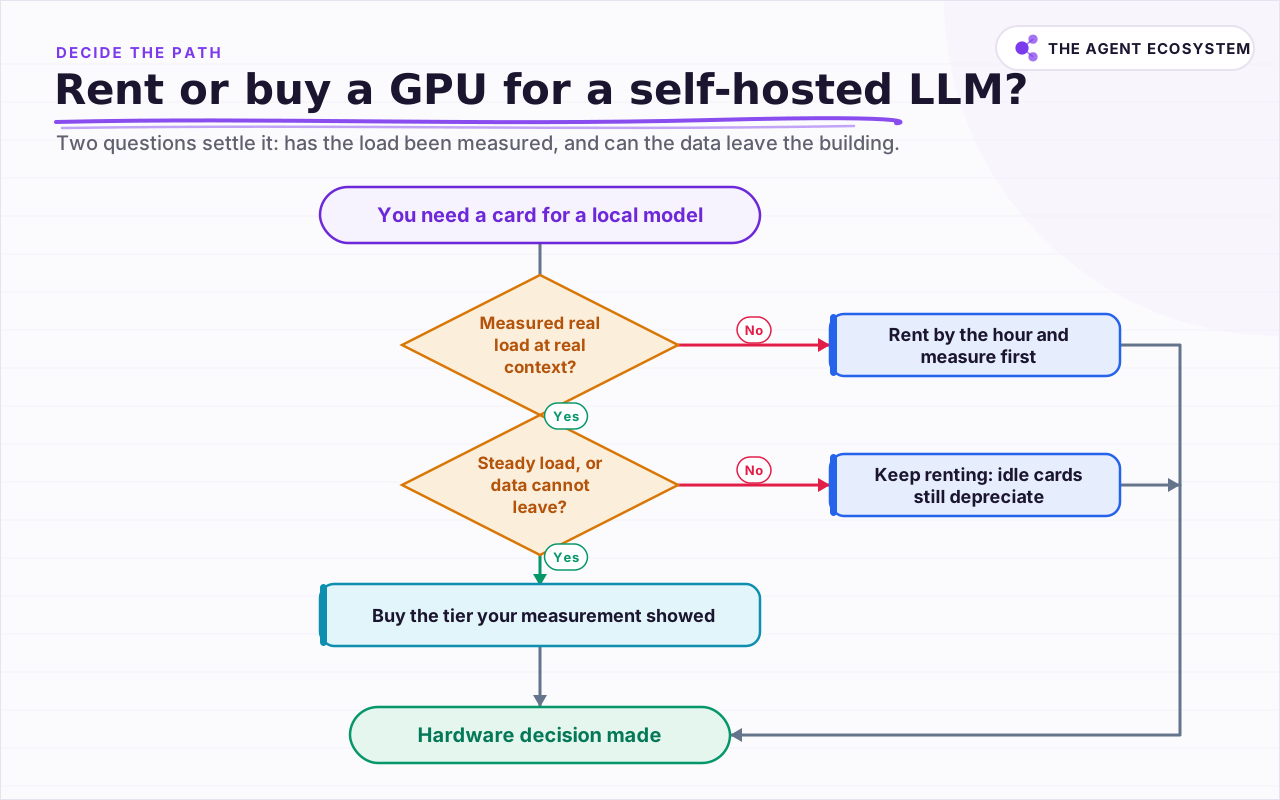 Two questions settle it: whether the workload has been measured at all, and whether the data is allowed to leave the building.
The case for buying is real but narrower than enthusiasm suggests: steady, predictable load, data that cannot leave your building, or a rental bill that has clearly overtaken the hardware. The case against is that utilisation is usually far lower than expected, and an idle card depreciates just as fast as a busy one.
Data residency is the one argument that survives every spreadsheet. If the material genuinely cannot leave your premises, rental economics stop being the question and the only decision left is which tier. Everything else is arithmetic you can redo when the numbers change.
A reasonable sequence: rent the tier your calculation suggests, run a real week of traffic through it, and look at two numbers afterwards. Peak memory tells you whether the tier was right. Utilisation tells you whether owning it would have been idle capital. Most people who run that week end up renting a smaller tier than they were about to buy.
If you are still setting the stack up, the local runner comparison covers what to run the model with, and wiring it into n8n covers what to do with it once it answers. For a private document setup specifically, local RAG with Ollama is the worked version, and the VPS setup guide covers the host around it. If the bill is what brought you here, the token math and the cost levers are the two to read next.
Frequently asked questions
How much VRAM do I need for a 7B model?
What is the KV cache and why does it matter for VRAM?
Does quantization hurt model quality?
Should I buy a GPU or rent one?
Why do VRAM guides disagree with each other?
Written by

Muhammad Qasim Hammad is an AI agent and automation expert and the founder of Cart Gaze LLC (cartgaze.com). He builds product for the love of it: when an idea lands, a working prototype is usually running within hours, built with the same AI agents and automations he sells. He puts his own output at roughly 20× what it was before agents, and the Agentic OS behind this site is the working proof, documented in public with the tools he actually ran and what they really cost.
AI & Automation Services
Want a pipeline like this running in your business?
I'm Qasim — I design and ship AI agents and n8n automations for solo operators and small teams. Tell me what's eating your team's week, and I'll scope a fix.
Related reading
Local LLMs for Business: When Running Your Own Is Worth It
Local is free is the sentence that starts most bad local-LLM projects. Eleven lessons on naming a real reason, the costs that never appear on an invoice, sizing hardware to the model, proving privacy properly, and knowing when to give it back.

LLM Quantization Explained: GGUF vs GPTQ vs AWQ
Q4_K_M, GPTQ-4bit, AWQ: the names encode 2 separate choices, and the format matters more than the bit count. Measured quality by level on Llama-3.1-8B, the memory math including the KV cache, and which formats your hardware can actually run.
Is a Local LLM Actually Cheaper Than the API? The Break-Even Math
A local LLM is not free; it trades a per-token API bill for a mostly fixed monthly cost. This reproducible break-even model loads both columns (hardware, electricity, and token volume) and shows exactly where local stops costing more than the API.
Self-Hosted n8n RAG Pipeline: The Private Stack
A fully self-hosted RAG pipeline keeps your documents and compute in-house: n8n orchestrates, Ollama serves a local model, and pgvector stores embeddings in Postgres. Here is the end-to-end node graph, the modeled cost, and when self-hosting beats a managed stack.
n8n AI Agent Pricing: What It Really Costs to Run
An n8n AI agent has two bills that behave nothing alike: a flat n8n platform fee and a per-run LLM token cost. Here is what each one comes to, with modeled per-run math across Claude, GPT, and Gemini, and the levers that actually lower the total.
Serverless vs Dedicated GPU: The Inference Cost Breakeven
The choice is arithmetic with one unknown, and the unknown is your duty cycle. Almost nobody measures it before signing for a month of reserved capacity.