LLM Quantization Explained: GGUF vs GPTQ vs AWQ
What each format actually does to your weights, how much quality you lose at 4 bits, and which one your hardware can run.
AI-drafted, reviewed by Muhammad Qasim Hammad on October 18, 2026. See our AI disclosure.
Table of contents
Every guide to running a model locally eventually hands you a list like Q4_K_M, Q5_0, GPTQ-4bit, AWQ, and expects you to know which one to download. The names encode 2 different things at once: how many bits each weight gets, and which algorithm decided what to do with the rounding error. Those are separate choices, and the second one matters more than the first: a badly-designed 3-bit format loses far more accuracy than a well-designed one at the same nominal bit width.
What does quantization actually change inside the model?#
It changes how each weight is stored, not what the model knows. A 16-bit weight becomes a 4-bit or 5-bit integer plus a small shared scaling factor, so the file shrinks by roughly the ratio of the bit widths. The architecture, the parameter count, and the training are all untouched.
The mechanism is bucketing. Take a block of weights, find the range they span, and divide that range into however many steps your bit budget allows. At 4 bits you get 16 steps. Each original weight snaps to the nearest step, and you store the step index plus the block's scale. Reconstruction at inference time multiplies back out.
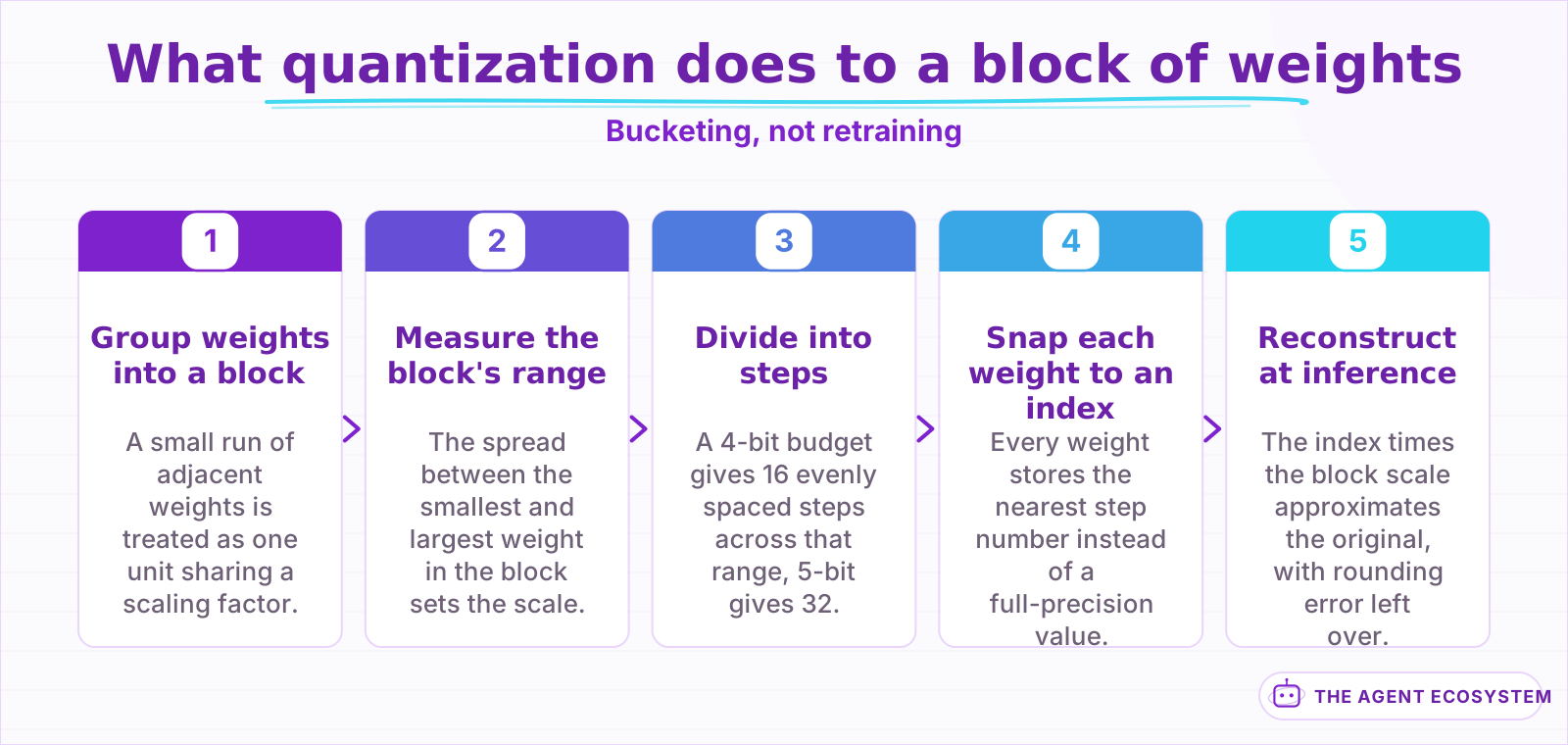 The model's knowledge is untouched. Only the storage precision of each weight changes.
That is why quantization is lossy in a specific way: it introduces rounding error, and the error is worst where weights inside a block are spread far apart. Everything clever in the modern formats is an attempt to manage that spread, either by using smaller blocks, by giving sensitive layers more bits than insensitive ones, or by choosing which weights to protect based on how much the model actually depends on them.
The naming conventions encode those choices, once you know how to read them. In llama.cpp's scheme, the digit is the nominal bit width and the letters after it describe the strategy: _K marks a k-quant that varies precision across tensors, and the trailing _S, _M, or _L picks how generous that variation is. So Q4_K_M is a 4-bit k-quant of medium generosity, and its real footprint lands above 4 bits per weight once the scales and the higher-precision layers are counted. Q4_0 is the older flat scheme with no per-layer variation, which is exactly why the 2 can score differently while both claiming 4 bits.
How much quality do you actually lose?#
Less than the folklore suggests down to about 4 bits, then sharply more below it. On Llama-3.1-8B-Instruct, 8-bit is indistinguishable from the 16-bit baseline, 5-bit and 4-bit sit within a point of it on downstream tasks, and 3-bit is where measurable damage begins.
The numbers below come from a single evaluation that ran all 13 configurations under the same conditions, which is what makes them comparable. The baseline is FP16 at 15,317 MiB, perplexity 7.32 on WikiText-2, and a 69.47% average across GSM8K, HellaSwag, IFEval, MMLU, and TruthfulQA. Source
| Format | File size | Size cut | Perplexity | 5-task average |
|---|---|---|---|---|
| FP16 baseline | 15,317 MiB | 0% | 7.32 | 69.47% |
| Q8_0 | 8,138 MiB | 46.87% | 7.33 | near baseline |
| Q5_0 | 5,332 MiB | 65.19% | 7.43 | 69.92% |
| Q4_K_S | 4,468 MiB | 70.83% | near baseline | 69.17% |
| Q3_K_S | 3,487 MiB | 77.23% | 8.96 | 65.49% |
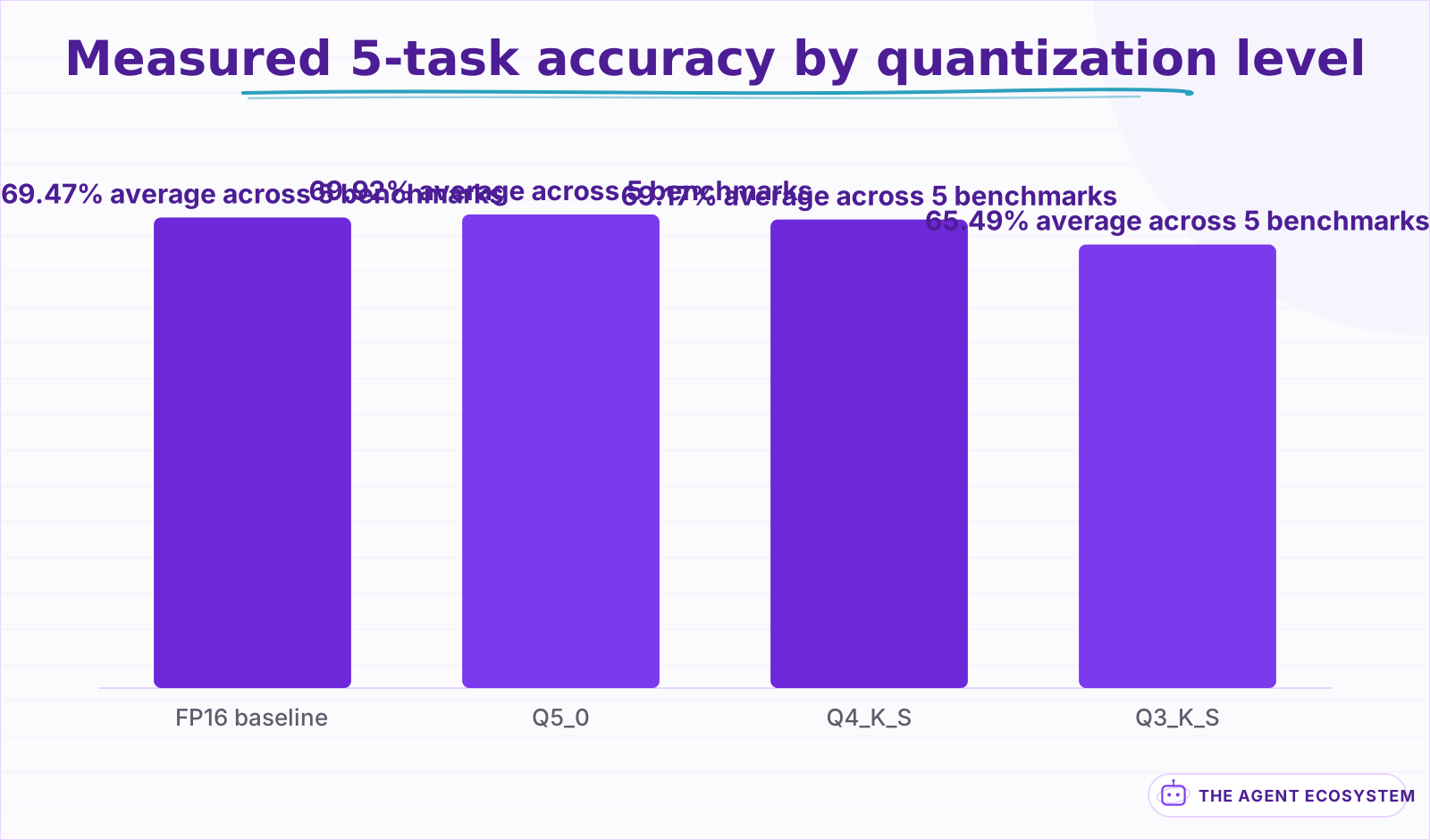 Average of GSM8K, HellaSwag, IFEval, MMLU and TruthfulQA. Q5_0 above baseline is noise, not a gain.
Two honest readings of that table. First, Q5_0 scoring 69.92% against a 69.47% baseline is not quantization improving the model. It is measurement noise on a 5-task average, and reading it as a gain would be a mistake. Second, the damage at 3 bits is not evenly spread: mathematical reasoning took the worst of it, with GSM8K falling 9.3 points from 77.63% to 68.31%, while commonsense reasoning stayed essentially flat across every level. If your workload is arithmetic or multi-step logic, you have less headroom than a benchmark average implies.
What is the difference between GGUF, GPTQ, and AWQ?#
GGUF is a file format; GPTQ and AWQ are algorithms that decide how to round. GGUF packages llama.cpp's k-quant schemes, which vary bit depth by layer sensitivity. GPTQ uses approximate second-order information to compensate for error as it quantizes. AWQ protects the small fraction of weights the activations show to be salient.
That distinction confuses people because the 3 names appear side by side in download lists as though they were alternatives at the same level. In practice they cluster by runtime. GGUF is what you use with llama.cpp and everything built on it, which is why it is the format behind the local runners covered in Ollama, LM Studio and Jan. GPTQ and AWQ produce GPU-resident models you serve from Python.
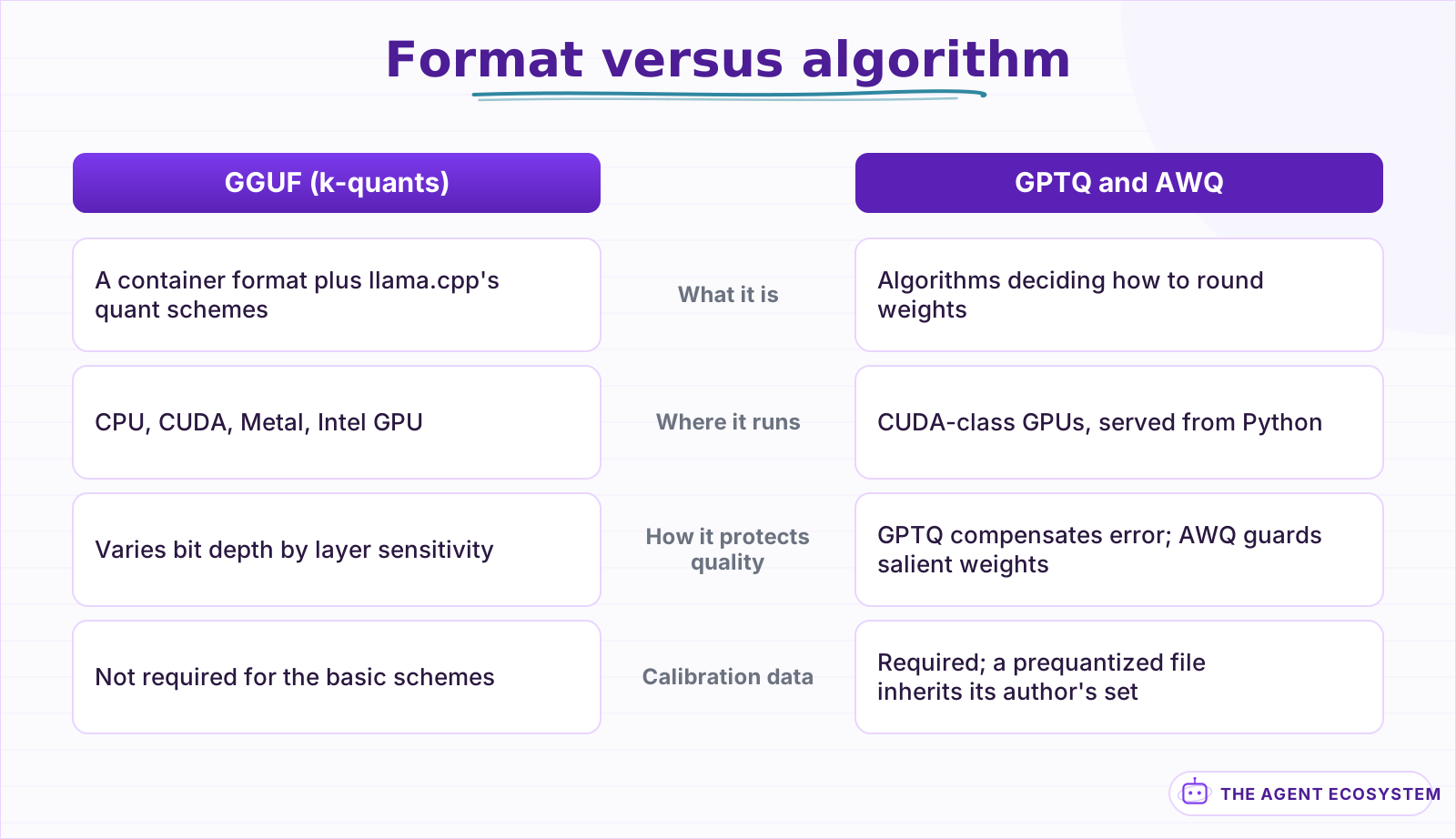 They sit at different levels of the stack, which is why they appear side by side in download lists.
The algorithms are worth understanding because their assumptions differ. GPTQ quantizes weights one at a time using approximate second-order information, adjusting the remaining unquantized weights to compensate for the error just introduced. Its paper reports quantizing a 175B-parameter model in roughly 4 GPU hours at 3 to 4 bits with negligible accuracy degradation, and inference speedups near 3.25 times on an A100 and 4.5 times on an A6000 against FP16. Source
AWQ starts from a different observation: not all weights matter equally, and protecting roughly 1% of them substantially reduces quantization error. Its insight is that you should identify those salient channels from the activation distribution rather than from weight magnitude, since what matters is which weights the model actually leans on. The paper targets 4-bit weight-only quantization and reports its TinyChat runtime delivering more than 3 times the speed of a Hugging Face FP16 implementation. Source
How much memory does a quantized model actually need?#
Start with parameters times bits divided by 8 for the weights, then add the KV cache, which grows with context length and is usually stored at higher precision. An 8B model at 4 bits needs roughly 4.5 GB for weights, but a long-context session can add several more gigabytes on top of that.
The weight math is the easy half and the part every VRAM calculator shows you. The measured file sizes above track it closely: 8B parameters at roughly 4.5 effective bits per weight lands near 4.5 GB, and Q8_0 at 8 bits lands near 8.1 GB. Effective bits per weight is not exactly the nominal number, because k-quant formats spend extra bits on scales and on layers they judge sensitive.
The KV cache is the half that surprises people. It scales with context length, batch size, and layer count, and it is live memory rather than a fixed file, so a model that loads comfortably can still fail partway through a long conversation. If you are sizing hardware for concurrent users rather than a single chat, that cache is usually the binding constraint, and it is one reason the economics of running your own hardware turn on utilisation rather than on the model you picked, which is the arithmetic in local against API cost breakeven.
There is also a third claim on memory that no calculator shows: the runtime's own overhead, plus whatever the operating system and display stack already hold. On a 16 GB card the practical ceiling for weights plus cache is closer to 14 GB than 16, and on a shared machine it can be lower still. Planning to fill the card exactly is how you end up with a model that loads on a clean boot and fails after a browser has been open for an hour.
Quantizing the KV cache itself is the lever most people miss. Both llama.cpp and the GPU serving stacks can store cache entries at 8 bits instead of 16, which roughly halves the fastest-growing part of your memory budget and costs noticeably less quality than taking the weights down another level. If you are choosing between a smaller weight format and a smaller cache format to fit a long context, the cache is usually the better thing to compress.
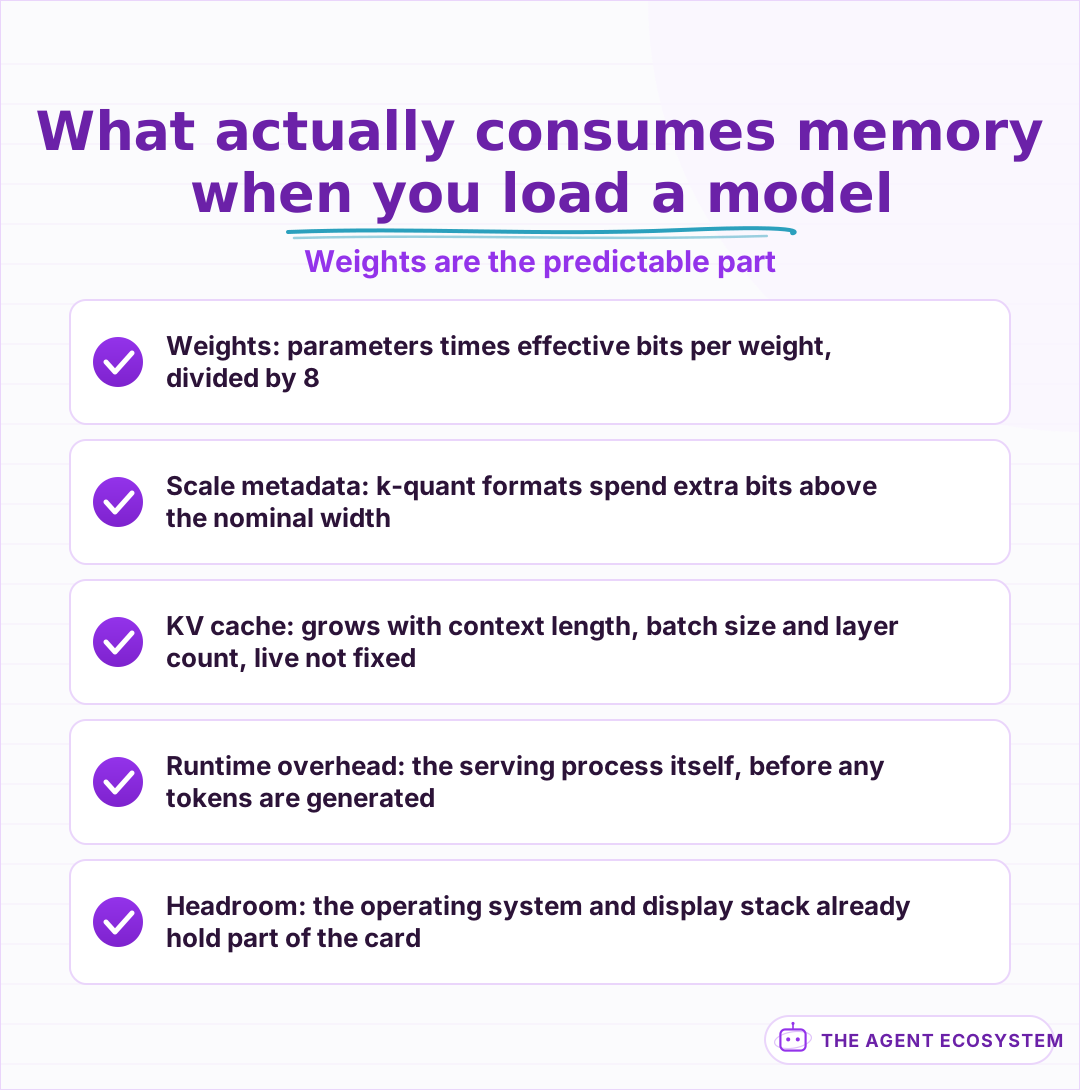 Only the first line is what a VRAM calculator shows you.
Which format fits your hardware?#
Hardware decides more than preference does. GGUF runs on CPU, CUDA, Metal, and Intel GPUs, which makes it the only realistic option on Apple Silicon or a CPU-only box. AWQ targets CUDA, ROCm, and Intel GPUs with no Metal support. GPTQ covers a similarly GPU-centric range.
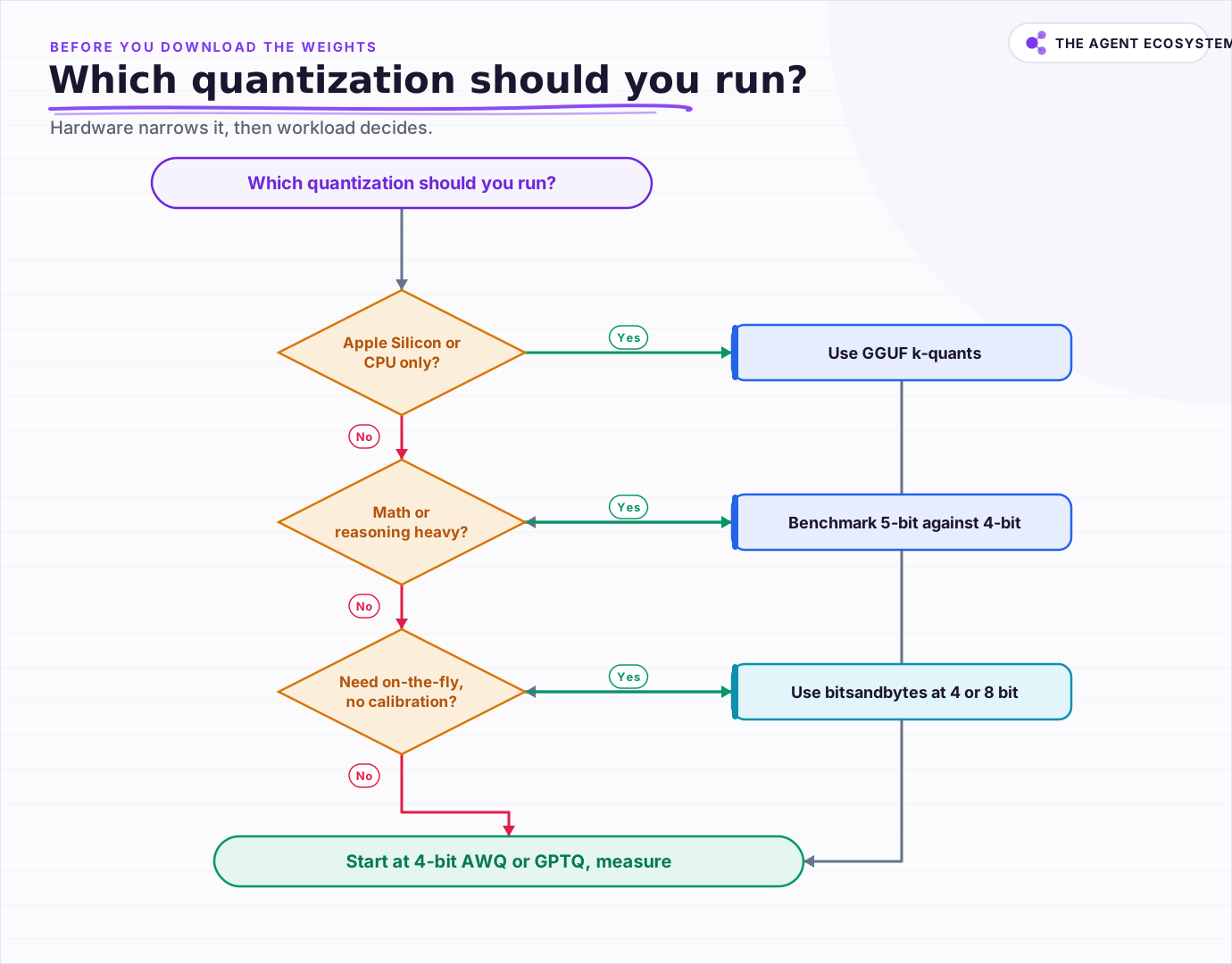 Hardware narrows the field first, then workload decides how many bits you can afford to give up.
Hugging Face publishes a support matrix for exactly this decision, listing each method against CPU, CUDA, ROCm, Metal, and Intel GPU alongside its available bit widths and whether it quantizes on the fly. Source The practical shortcuts fall out quickly. On a Mac, GGUF. On a single consumer NVIDIA card with a Python serving stack, AWQ or GPTQ at 4 bits. If you need to load an unquantized checkpoint and compress it on the fly without a calibration pass, bitsandbytes does that at 4 and 8 bits where the other 2 do not.
Calibration is the hidden cost worth naming. GPTQ and AWQ both need a representative data sample to decide how to round, so downloading a prequantized checkpoint means inheriting whatever calibration set its author used. That is usually fine for general use and occasionally wrong for a narrow domain, which is one more reason to measure on your own prompts rather than trusting a leaderboard, the same way you would evaluate a smaller model against a larger one.
What should you run first?#
Start at 4-bit in a format your hardware supports natively, measure on your own prompts, and only move up if you can show a specific failure. The measured evidence puts 4-bit and 5-bit within about a point of full precision on general tasks, so starting higher usually spends memory you could have given to context instead.
The one place to override that default is reasoning-heavy work. If your prompts involve arithmetic, code with tight logic, or multi-step planning, benchmark 5-bit against 4-bit before deciding, because that is where the measured gap between levels actually opens up. Everything else is a matter of fitting the model into the memory you have while leaving room for the cache.
It is also worth checking whether quantization is the right lever at all. Squeezing a large model onto small hardware competes directly with picking a smaller model that fits comfortably, and a well-chosen 8B at 5 bits often beats a heavily-compressed 30B on both speed and reliability. That tradeoff, plus the economics of running any of it locally instead of calling an API, is the local-versus-API breakeven calculation worth doing before you optimize the format at all.
Frequently asked questions
Is GGUF better than GPTQ or AWQ?
How much quality does 4-bit quantization lose?
What does the K in Q4_K_M mean?
Should I quantize the KV cache too?
Do GPTQ and AWQ need calibration data?
Sources
Primary references and vendor documentation used while drafting and reviewing this article.
- Which Quantization Should I Use? A Unified Evaluation of llama.cpp Quantization on Llama-3.1-8B-Instruct (2026)
- Frantar et al.: GPTQ, Accurate Post-Training Quantization for Generative Pre-trained Transformers
- Lin et al.: AWQ, Activation-aware Weight Quantization for LLM Compression and Acceleration
- Hugging Face: Quantization method overview and hardware support matrix
Written by

Muhammad Qasim Hammad is an AI agent and automation expert and the founder of Cart Gaze LLC (cartgaze.com). He builds product for the love of it: when an idea lands, a working prototype is usually running within hours, built with the same AI agents and automations he sells. He puts his own output at roughly 20× what it was before agents, and the Agentic OS behind this site is the working proof, documented in public with the tools he actually ran and what they really cost.
AI & Automation Services
Want a pipeline like this running in your business?
I'm Qasim — I design and ship AI agents and n8n automations for solo operators and small teams. Tell me what's eating your team's week, and I'll scope a fix.
Related reading
Local LLMs for Business: When Running Your Own Is Worth It
Local is free is the sentence that starts most bad local-LLM projects. Eleven lessons on naming a real reason, the costs that never appear on an invoice, sizing hardware to the model, proving privacy properly, and knowing when to give it back.

Ollama vs LM Studio vs Jan: Best Local LLM Tool for 2026
Running a local LLM cuts your AI API bill to $0 and keeps client data off third-party servers. This breakdown of Ollama, LM Studio, and Jan tells you exactly which tool fits a solo operator's workflow.
Open-Weight vs Closed LLMs in 2026: Cost, Quality, Control
Should you call a closed API like Claude or GPT, or self-host an open-weight model like DeepSeek or Qwen? Skip the hot takes. This is a four-axis framework (cost, quality, control, privacy) plus a decision flowchart, using dated June 2026 facts.
Speculative Decoding: Faster Inference Without Changing the Output
Decoding is bound by memory bandwidth, not arithmetic, which is the gap speculative decoding exploits. How draft-and-verify keeps the output distribution intact, why acceptance rate collapses as you speculate further ahead, and what recent measurement says about heavy load.
Is a Local LLM Actually Cheaper Than the API? The Break-Even Math
A local LLM is not free; it trades a per-token API bill for a mostly fixed monthly cost. This reproducible break-even model loads both columns (hardware, electricity, and token volume) and shows exactly where local stops costing more than the API.
Choosing an LLM for Production: The Decisions That Stick
Every model comparison you read was written against someone else's task. Twelve lessons on building the evaluation that produces your answer, pricing the choice properly, and making it reversible before the model changes underneath you.