Why Your n8n RAG Chatbot Gives Wrong Answers (Fix Retrieval) (2026)
The problem is almost never the model. It is the chunks the model was handed.
AI-drafted, reviewed by Muhammad Qasim Hammad on June 27, 2026. See our AI disclosure.
Table of contents
- Why does my n8n RAG chatbot give wrong answers?
- How does retrieval actually work in n8n?
- Is my chunk size or overlap wrong?
- Am I retrieving too few or too many chunks?
- Why does a reranker fix wrong answers?
- What about metadata filtering and the embedding model?
- How do you debug a wrong RAG answer in n8n this week?
- How solopreneurs get this wrong
- Where to go from here
Your n8n RAG chatbot returns an answer, the answer is wrong, and switching to a bigger model does not help. When your n8n RAG chatbot gives wrong answers, the cause is almost always retrieval handing the model the wrong chunks, not the model itself.
That distinction matters because it changes where you spend your time. The model is almost certainly doing its job. It answers faithfully from whatever text it was given. That text was just wrong.
Why does my n8n RAG chatbot give wrong answers?#
Wrong answers come from retrieval, not the model. Vector search picks a handful of text chunks from your store and passes them to the LLM. If those chunks carry the wrong content, are too noisy, or are missing the key sentence, the model answers from that bad input. No amount of prompt engineering or model upgrading fixes a retrieval problem.
The six causes are all fixable, and every one maps to a specific node or parameter in n8n. The table below is your first stop when an answer goes wrong.
| Symptom | Likely cause | n8n node / parameter to change |
|---|---|---|
| Answer mixes unrelated facts | Chunk too large | Recursive Character Text Splitter, lower Chunk Size |
| Answer cut off or misses context | Chunk too small or no overlap | Raise Chunk Size or set Chunk Overlap |
| Right info exists but not returned | Top-k too low | Raise the vector store limit |
| Prompt full of irrelevant text | Top-k too high | Lower the vector store limit |
| Confident answer from the wrong document | No metadata filter | Add metadata at ingestion + filter at query |
| Best chunk ranked too low | No reranking | Add the Reranker Cohere node |
Work through that table from top to bottom. The fix is almost always one row.
How does retrieval actually work in n8n?#
A RAG pipeline in n8n runs through five connected stages: a Default Data Loader prepares your documents, a Recursive Character Text Splitter breaks them into chunks, an Embeddings sub-node turns chunks into vectors, a Vector Store node holds them, and a retriever fetches the closest chunks when a question arrives.
In node terms: the Default Data Loader, the Recursive Character Text Splitter, an Embeddings sub-node like Embeddings OpenAI, a Vector Store node (Simple Vector Store, Qdrant, or PGVector), and the Vector Store Retriever or Vector Store Question Answer Tool. Every wrong answer traces back to one of those five stages, most often the splitter or the retriever.
If you built the end-to-end pipeline first, the companion post on building an n8n RAG customer support bot covers the initial wiring. This post is about what happens after it ships and starts getting things wrong.
Is my chunk size or overlap wrong?#
Chunk size and overlap are the most common root cause of wrong answers. n8n's Default Data Loader uses a documented default of 1000-character chunks with 200-character overlap in Simple text-splitting mode. That is a reasonable starting point, not a universal optimum.
The Recursive Character Text Splitter splits on paragraph boundaries first, then sentence boundaries, then smaller units, until each piece fits the target size. Two parameters control the output: Chunk Size (characters per chunk) and Chunk Overlap (characters shared between consecutive chunks).
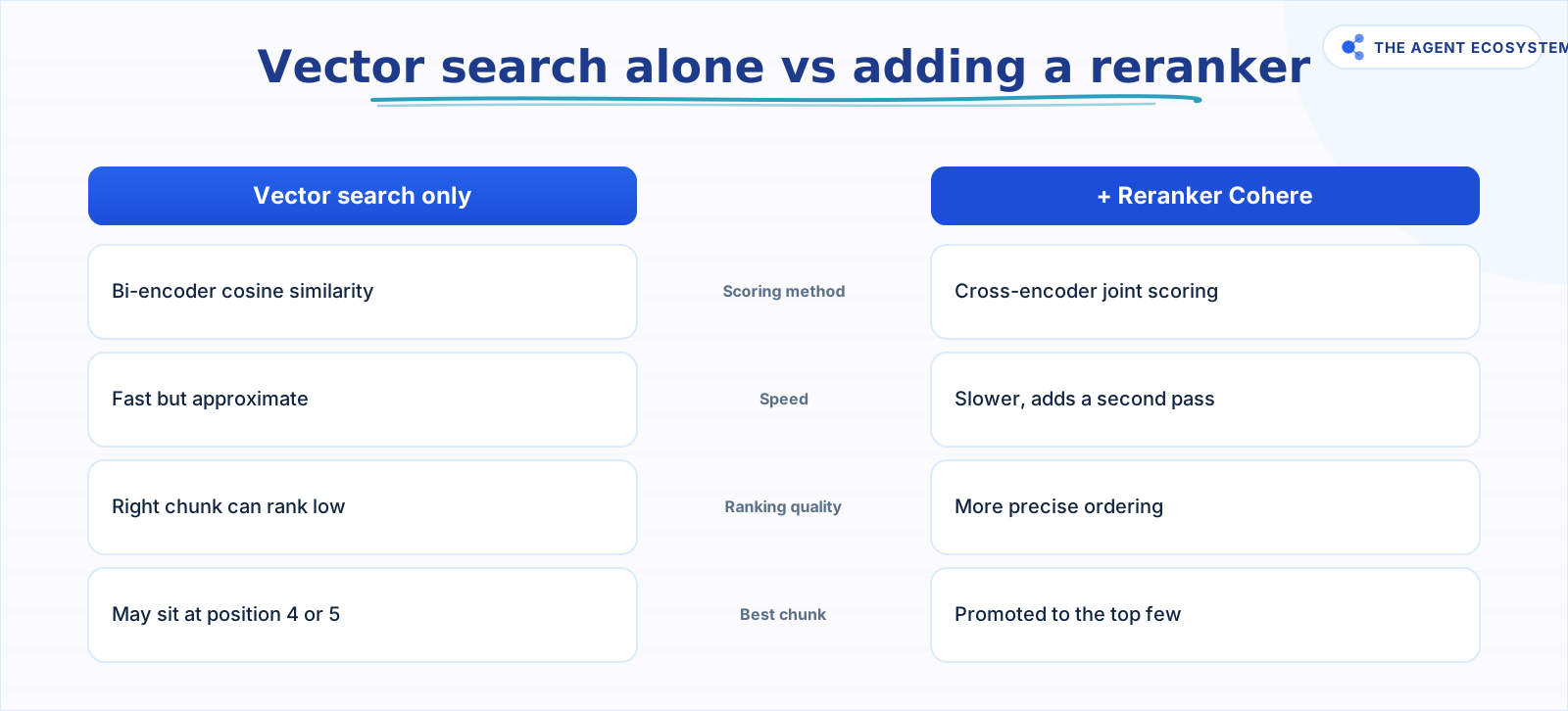 A reranker adds a second pass but produces more precise ranking.
When I first set up a RAG bot for a dense product FAQ, answers were a muddle of three unrelated topics. The chunks were 1000 characters each, and each one straddled two or three questions. Dropping Chunk Size to 400 characters sharpened the embeddings and made answers specific.
Three failure modes to know:
- Too large: the embedding averages across several topics. Vector search finds a chunk that vaguely matches but buries the relevant sentence in noise.
- Too small: the relevant sentence is isolated from the surrounding context the model needs to interpret it correctly.
- No overlap: a fact that straddles a chunk boundary gets split. Neither chunk alone contains the complete answer. The default 200-character overlap exists to prevent this.
Start from n8n's 1000/200 default. Run your failing questions. Tune one parameter at a time. Do not copy a chunk size from a blog post (including this one) as though it applies to your documents.
Am I retrieving too few or too many chunks?#
The vector store limit parameter is n8n's version of top-k: it controls how many chunks the search returns to the model. Set it too low and the right chunk exists in your store but never reaches the model. Set it too high and the prompt fills with weakly relevant chunks that confuse the model and inflate token costs.
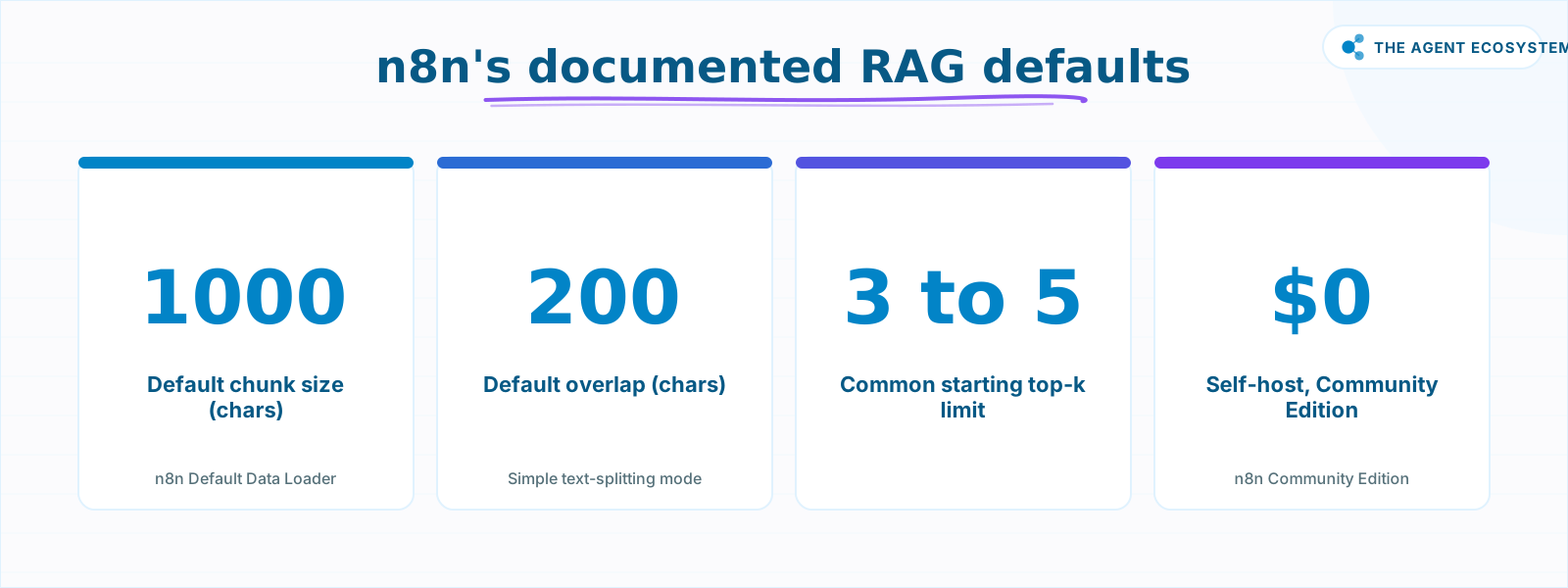 n8n's documented defaults for Simple text-splitting mode, as of mid-2026.
A limit of 3 to 5 is a common starting point. If correct answers are being missed and your chunk size is already well-tuned, raise the limit before adding a reranker. If you are adding a reranker (covered next), you can afford a higher retrieval limit because the reranker trims the list before the model sees it.
For a deeper look at how the vector store indexes and matches chunks, the post on n8n vector store embeddings walks through the mechanics.
Why does a reranker fix wrong answers?#
A reranker fixes a specific ranking problem: the right chunk was retrieved but landed at position four or five, buried by weaker chunks above it. Vector search uses a bi-encoder that embeds the query and each chunk separately and compares them by cosine similarity, which is fast but approximate, never scoring the pair together.
A cross-encoder (what the Reranker Cohere node implements) takes the query and each candidate chunk as a pair and scores how well that chunk actually answers the query. According to Cohere's documentation on Rerank 3.5, this joint scoring produces more precise ordering than the bi-encoder similarity used in the initial search. The pattern: retrieve a wider set with vector search, rerank, keep the best few for the model.
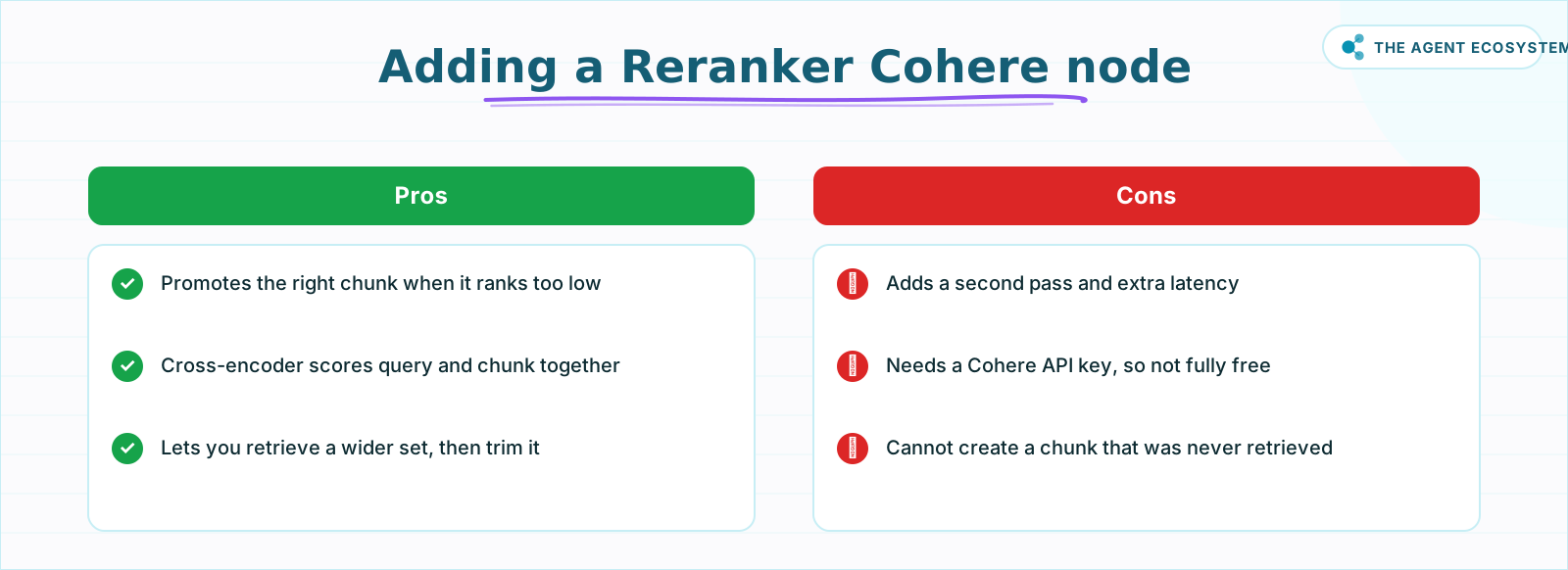 Add a reranker after fixing chunking and top-k, not before.
Wire the Reranker Cohere node between the vector store retriever and the model input. You will need a Cohere API key. Set a higher retrieval limit to give the reranker more candidates to sort.
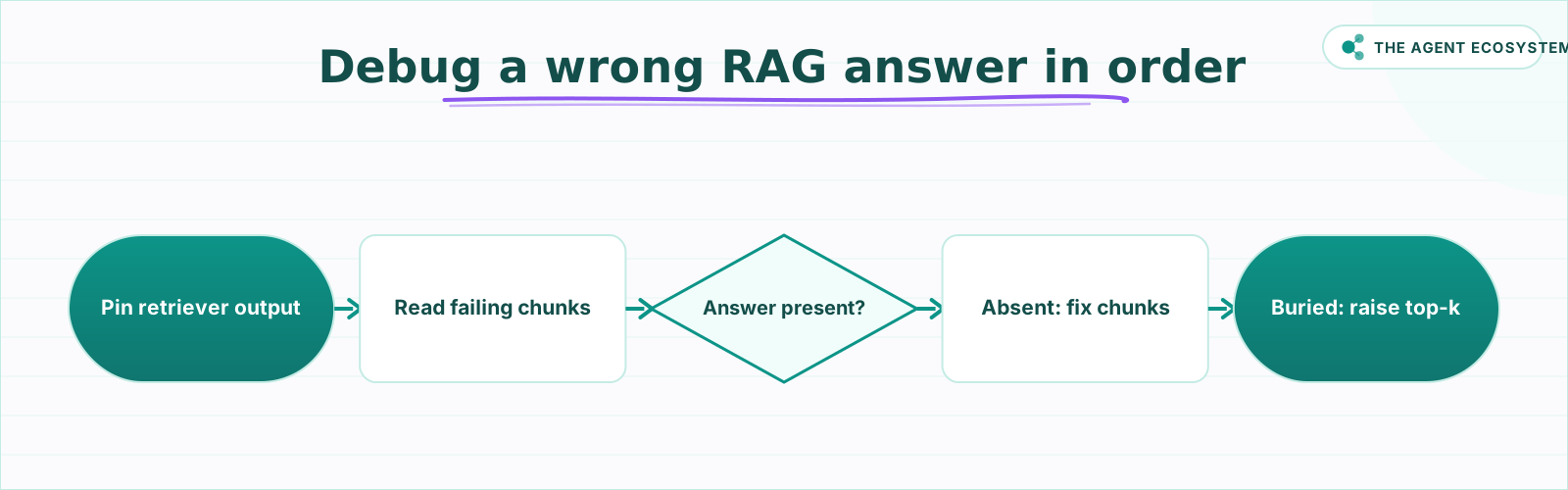 Follow this order before reaching for a bigger model.
What about metadata filtering and the embedding model?#
Metadata filtering and embedding consistency are two separate issues that produce the same symptom: the chatbot returns a confident, fluent answer pulled from the wrong document entirely. One is a missing query filter; the other is a mismatch between how your documents and your questions were embedded. Both quietly send the search to the wrong place.
Metadata filtering scopes the vector search to the correct slice of your store. If you have indexed documents for multiple customers, products, or languages, a search without a filter ranges over all of them. The model finds a plausible-sounding chunk from a different customer's document and answers from that. Add metadata fields (source filename, customer ID, document date) during ingestion and apply a filter at query time on the vector store node. If you did not store metadata at ingestion, this fix requires re-indexing.
Embedding consistency is simpler to miss. Documents and queries must be embedded with the same model and the same approach. If you indexed your documents with one Embeddings sub-node configuration and then changed the model or chunking strategy without re-indexing, the vectors in your store no longer match what the query encoder produces, and similarity scores become meaningless. Re-index any time you change the embedding model.
For context on choosing between vector store backends, the post comparing pgvector vs Chroma vs Qdrant for RAG covers the trade-offs. If you are running a fully private stack, local RAG with Ollama applies the same retrieval rules without sending data to any external API.
n8n Community Edition is $0 to self-host, so none of these retrieval fixes require a paid tier. Check the n8n pricing page for current Cloud plan costs if you are on a managed instance.
How do you debug a wrong RAG answer in n8n this week?#
The fastest debugging path is to read the actual chunks before changing anything. Open the n8n canvas, pin the output of your Vector Store Retriever or Question Answer Tool node, and run the failing question. Is the correct answer even present? If not, the problem is chunking or ingestion. If it is present but buried, the problem is ranking.
Work in this order:
- Inspect the retrieved chunks for a failing question.
- If the answer is absent, fix Chunk Size and Chunk Overlap on the Recursive Character Text Splitter and re-index.
- If the answer is present but ranked low, raise the vector store limit.
- Add a Reranker Cohere node to re-order the wider result set.
- Add metadata filtering if chunks from the wrong document keep appearing.
- Only after those fixes, consider a larger model.
The n8n question-answer chain post goes deeper on the Q&A retrieval pattern once your chunks are clean.
How solopreneurs get this wrong#
The most common mistake is skipping step one: reading the chunks. Every builder I have talked to who spent days tweaking prompts and upgrading models had not once looked at what the retriever was actually returning. The fix was visible in the node output the entire time.
Second most common: changing two parameters at once. Lowering chunk size and raising top-k simultaneously means you cannot tell which change helped. Tune one knob, test, then move to the next.
Third: treating n8n's 1000/200 default as the answer. It is a starting point. A short product FAQ needs smaller chunks. A long contract may need larger ones with more overlap. Measure against real questions from real users, not synthetic test prompts.
Where to go from here#
Start with the diagnostic table above and one failing question. Pin the retriever output, read the chunks, and the right row in that table will usually be obvious. From there, the fixes are mechanical: adjust a number, re-index, test. A bigger model is the last lever to pull, not the first.
Frequently asked questions
Why does my n8n RAG chatbot give wrong answers?
What chunk size and overlap should I use in n8n?
What is top-k, or the limit parameter, in an n8n vector store?
Does n8n have a reranker node?
Will a bigger LLM fix my RAG accuracy?
How do I see which chunks my n8n RAG retrieved?
Sources
Primary references and vendor documentation used while drafting and reviewing this article.
- n8n Recursive Character Text Splitter docs
- n8n Default Data Loader docs
- n8n Embeddings OpenAI sub-node docs
- n8n Simple Vector Store node docs
- n8n PGVector node docs
- n8n Qdrant vector store node docs
- n8n Vector Store Retriever docs
- n8n Vector Store Question Answer Tool docs
- n8n Reranker Cohere node docs
- Cohere Rerank 3.5 blog post
- n8n Community Edition features
- n8n pricing
Written by

Muhammad Qasim Hammad is an AI agent and automation expert and the founder of Cart Gaze LLC (cartgaze.com). He builds product for the love of it: when an idea lands, a working prototype is usually running within hours, built with the same AI agents and automations he sells. He puts his own output at roughly 20× what it was before agents, and the Agentic OS behind this site is the working proof, documented in public with the tools he actually ran and what they really cost.
AI & Automation Services
Want a pipeline like this running in your business?
I'm Qasim — I design and ship AI agents and n8n automations for solo operators and small teams. Tell me what's eating your team's week, and I'll scope a fix.
Related reading
Reranking for RAG: When a Reranker Is Worth It (and When It Isn't)
RAG reranking re-sorts the chunks you already retrieved so the best one rises to the top, but it cannot recover a chunk you never retrieved. Here is what a cross-encoder reranker actually does, when it is worth the latency and cost, the real 2026 options (Cohere, Voyage, BGE),

How to Build a RAG System That Retrieves the Right Thing
Most RAG systems fail at retrieval, not at the model. Twelve lessons on chunking for the question, hybrid search for exact strings, re-ranking, making it refuse, and measuring retrieval separately from generation.
RAG Chunking Strategies: Fixed vs Recursive vs Semantic (and What to Pick)
RAG chunking strategies decide whether the right passage is whole, findable, and small enough to rank before your model sees it. Here is how fixed, recursive, and semantic splitting differ, what chunk size and overlap to start with, why the public benchmarks disagree, and a
Build a Question and Answer Chain in n8n (Answer From Your Docs)
The n8n Question and Answer Chain retrieves passages from your own vector store and answers from them, not from the model's memory. Index once for about $0.01, then answer 1,000 questions for about $2.50 on Claude Haiku 4.5.
Build an AI Customer-Support Bot in n8n (RAG, With Real Monthly Cost)
Build an n8n AI customer support bot that answers repeat questions from your own docs using RAG. Two workflows, about $4.50 per 1,000 answers on Claude Haiku 4.5, and $0 platform cost if you self-host.
Metadata Filtering in n8n RAG: Cut Wrong-Doc Retrieval
Your n8n RAG bot keeps answering with the wrong client's file. That is not a weak model, it is a missing filter. Here is the two-step metadata plumbing (Default Data Loader on insert, Metadata Filter on retrieval) for PGVector, Qdrant, and Supabase.