n8n Environments: Dev, Staging, and Production Without Chaos
How to set up separate n8n instances for dev, staging, and production, parameterize what differs, and promote a workflow deliberately instead of by accident.
AI-drafted, reviewed by Muhammad Qasim Hammad on August 21, 2026. See our AI disclosure.
Table of contents
- What does an n8n environment actually consist of?
- How do you keep the same workflow logic working across environments?
- How do you actually move a workflow from dev to production?
- What should never be promoted automatically?
- What breaks, and how do you debug it?
- Is this worth the setup for a solo builder?
Testing a workflow change against the same n8n instance that runs your live automations means one bad expression away from a broken production run. Set up separate dev, staging, and production environments instead, and a change gets tested against fake data and a sandbox API key before it ever touches anything real.
What does an n8n environment actually consist of?#
An environment is a separate n8n instance, its own install or its own Cloud project, with its own database, its own credentials, and its own .env file. Dev points at sandbox APIs and test data; staging mirrors production as closely as practical; production runs on real credentials against real systems.
n8n's Community edition has no built-in environment-promotion feature; that lives behind the Enterprise tier's Source Control, which adds branch-based environment management on top of Git. Community edition users build this with separate instances and a manual or scripted promotion step, which is what the rest of this guide covers.
Two instances, dev and production, cover most solo builders; add a third staging instance once a mistake reaching production would genuinely hurt, a client-facing workflow or anything that moves money. Running 3 full n8n instances for a single low-stakes personal automation is more overhead than the risk actually justifies.
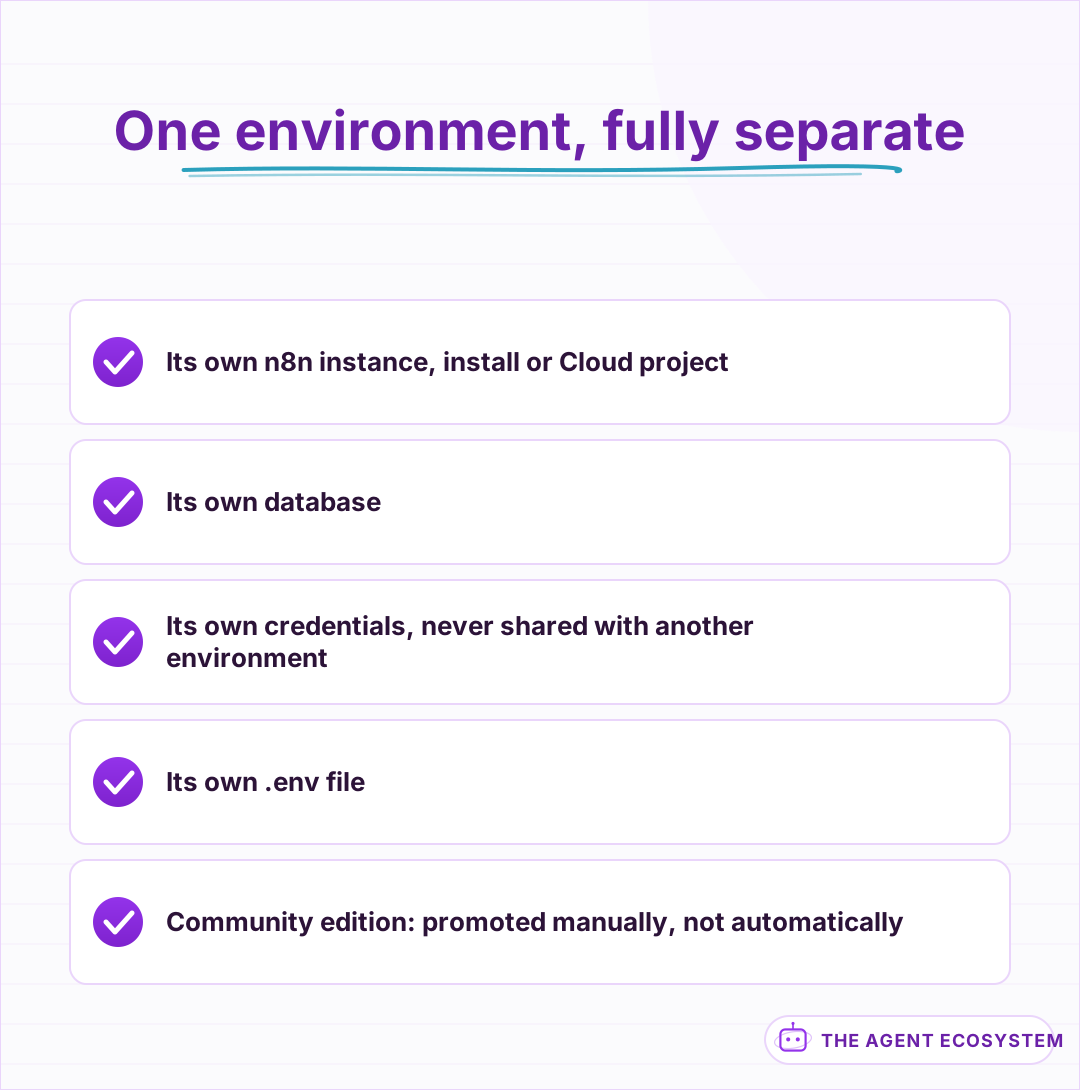 A full separate instance, not a toggle inside one.
How do you keep the same workflow logic working across environments?#
Parameterize anything that differs between environments as an environment variable rather than hardcoding it into the workflow, an API base URL, a Slack channel ID, a flag for whether a node actually sends a message or just logs what it would have sent.
Reference it in an expression as {{$env["MY_API_BASE_URL"]}}, and the same workflow JSON behaves correctly whether it is running in dev or production, because the difference lives in each instance's own .env file, not in the workflow itself.
| What differs by environment | How to handle it |
|---|---|
| API base URL or endpoint | Environment variable, referenced in expressions |
| Credentials | Separate credential entries per instance, never shared |
| Whether a node actually sends | An environment variable acting as a feature flag |
| Slack channel or notification target | Environment variable, not hardcoded |
Credentials specifically should never be shared across environments, even by accident. A dev credential pointed at a sandbox account and a production credential pointed at the real one keep a workflow that misbehaves in testing from being able to touch anything real at all.
Name credentials by environment explicitly, "Stripe - Dev" and "Stripe - Production" rather than 2 entries both just called "Stripe," so it is obvious at a glance which one a node is actually wired to before you run it.
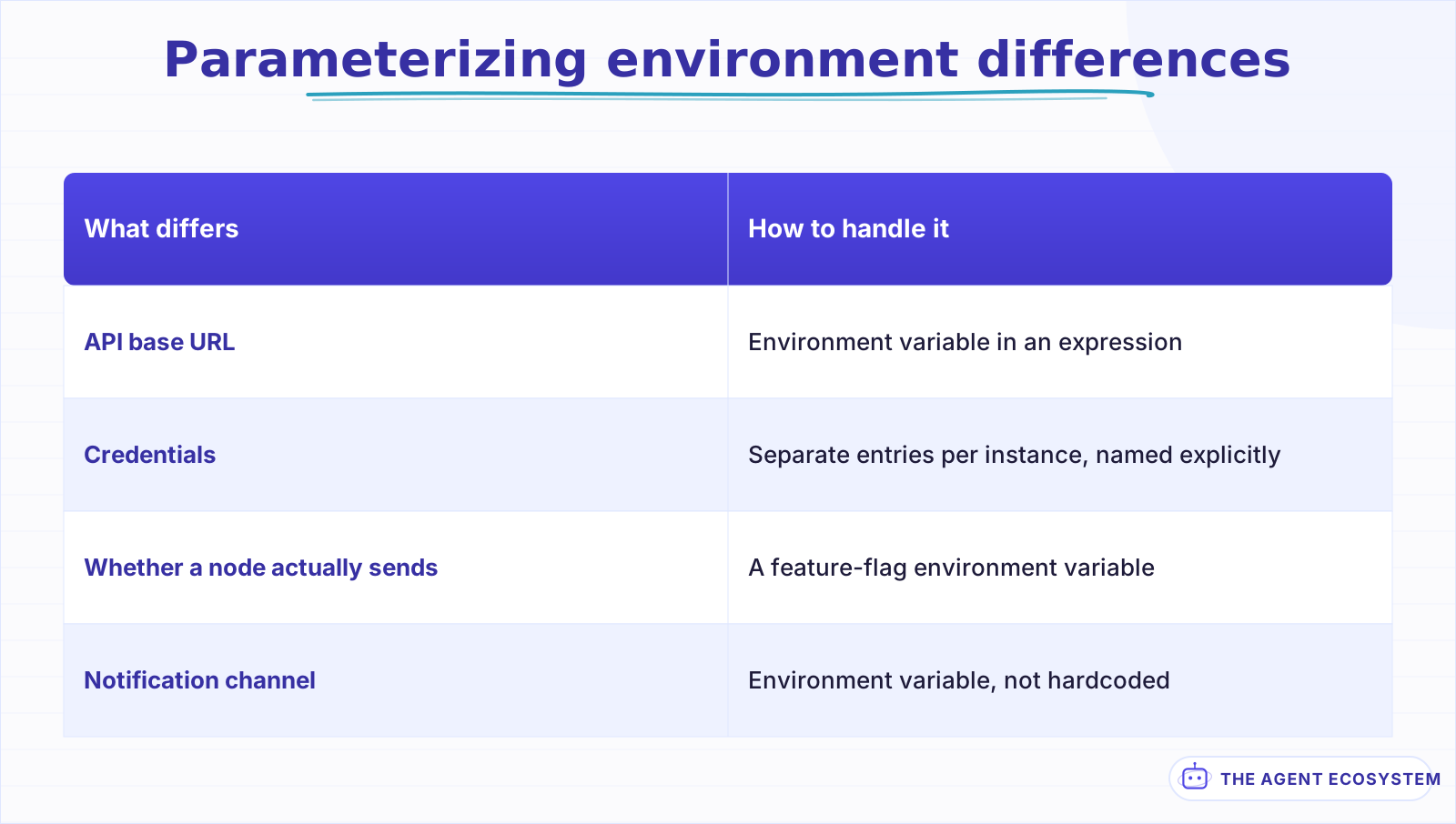 Parameterized, never hardcoded into the workflow itself.
How do you actually move a workflow from dev to production?#
Export the workflow as JSON from dev, either through the UI or the CLI, and import it into staging, then production, using the same export-and-import pattern covered for backups, applied here as a promotion step instead of a disaster-recovery one.
The n8n REST API supports the same export-import operation programmatically, worth scripting once you are promoting the same workflows repeatedly rather than doing it by hand each time.
Test in staging with production-like data before promoting further, not just a single happy-path run in dev. Dev is where you confirm the logic works at all; staging is where you confirm it holds up against something closer to the volume and shape of real data, which is where a surprising number of workflows reveal an edge case dev never exercised.
Seed staging with data that looks like production in shape, not just volume: real-looking names and edge-case values like an empty field or an unusually long one, since dev data is often too clean to catch what a messy real input will actually do to a workflow.
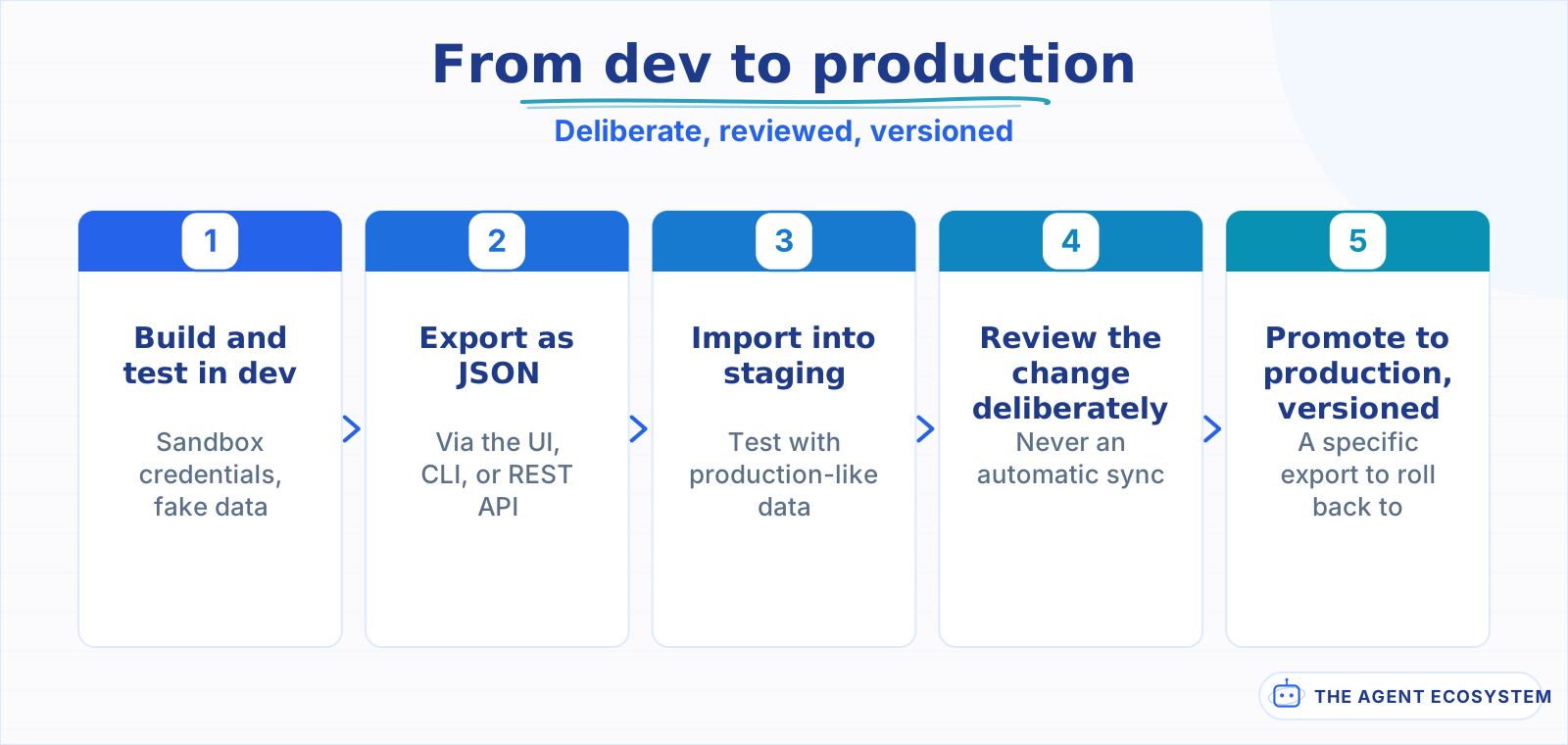 Staging with realistic data is what catches what dev alone misses.
What should never be promoted automatically?#
Treat the promotion to production as a deliberate, reviewed step every single time, not an automatic sync that fires the moment something changes in dev, no matter how small the change looked or how many times it worked cleanly before, without anyone actually looking at what changed first.
That review does not need to be heavy, just real: a genuine look at the diff, even a quick one, beats a promotion nobody actually checked before it went live.
A workflow that looked right in staging can still need a human glance at the diff before it goes live, especially for anything that sends a message, moves money, or writes to a system other people genuinely depend on.
Version each promoted export, a filename or a commit tied to a date and a short description of what changed, so a bad production promotion has a specific prior version to roll back to instead of reconstructing what "before" looked like from memory. This is exactly where the backup-and-git practice from elsewhere in this series pays off directly: a promotion is just a specific, deliberate commit.
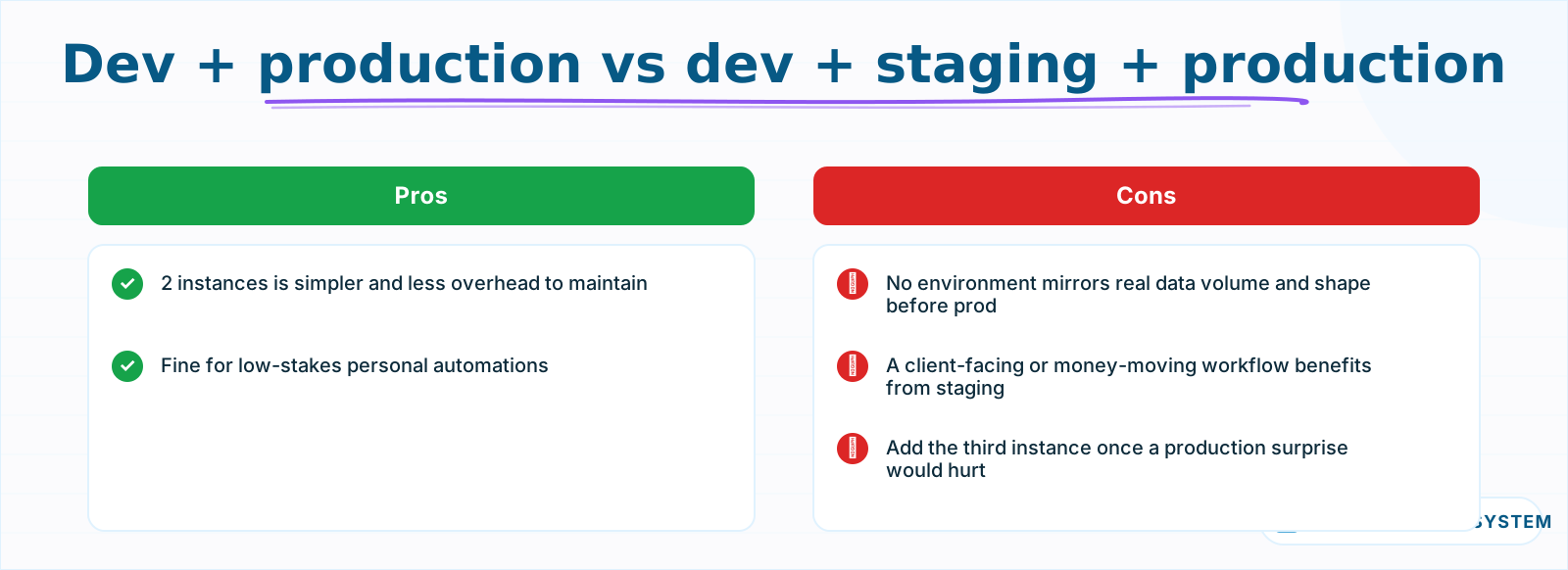 Add staging once a production-only surprise would genuinely hurt.
What breaks, and how do you debug it?#
The most common failure is an environment variable that exists in dev but was never set in production, so a workflow that ran perfectly in testing fails immediately on an undefined value once promoted. Keep a single source-of-truth list of every environment variable a workflow expects, and check it against each instance's actual .env before promoting, not after something breaks.
The second common issue is a credential ID mismatch: workflow JSON references credentials by ID, and those IDs are not guaranteed to match between separate n8n instances even for a credential with the same name. Re-map credentials explicitly after an import rather than assuming the reference carried over correctly, and test the specific node that uses it before trusting the rest of the workflow to behave the same way it did in the environment you promoted it from.
A third, quieter issue is a node version mismatch between instances that were updated on different schedules. A workflow built against a newer node version can reference a parameter that an older instance's version of that node does not have, which surfaces as a confusing error that looks unrelated to versioning at first glance.
Is this worth the setup for a solo builder?#
Set it up once you are running workflows that would actually hurt to break: anything customer-facing, anything that moves money, anything a client depends on. A single personal automation with low stakes if it breaks for a day does not need a 3-instance setup; a workflow a paying client relies on probably does.
The honest payoff is confidence to change something without holding your breath, not a guarantee nothing ever breaks. A mistake caught in staging costs you a few minutes; the same mistake reaching production untested can cost a client's trust, and that asymmetry is the whole case for the extra setup.
Start with just dev and production if the full 3-instance setup feels like too much up front, and add staging later once you notice production-only surprises happening often enough to justify the extra step. The practice matters more than having all 3 tiers running from day one.
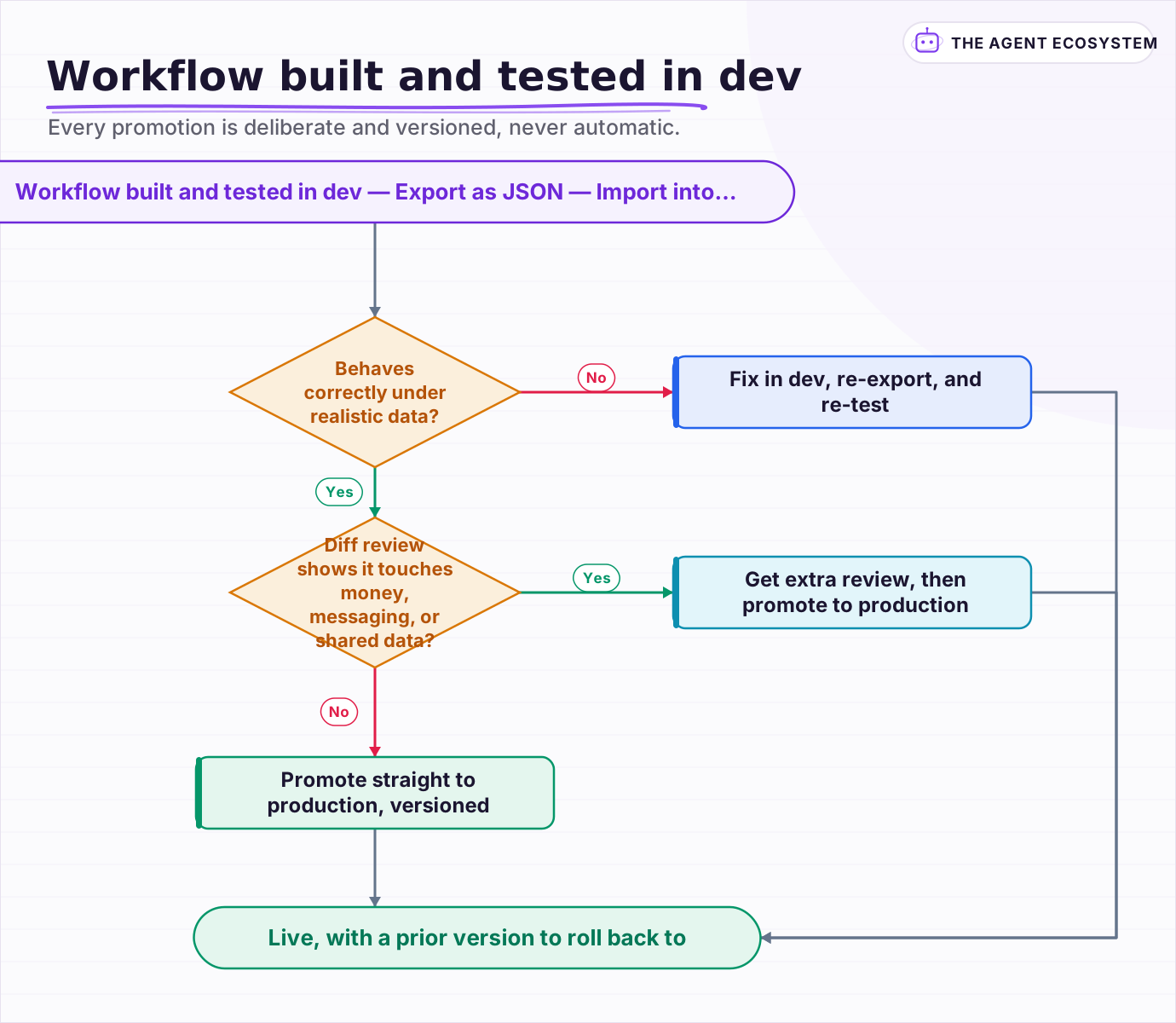 Every promotion is deliberate and versioned, never automatic.
Frequently asked questions
Does n8n Community edition support dev, staging, and production environments?
How do you make one n8n workflow work correctly in dev and production?
How do you move an n8n workflow from dev to production?
Should credentials be shared between n8n dev and production environments?
Why did my n8n workflow break after promoting it to production?
Sources
Primary references and vendor documentation used while drafting and reviewing this article.
Written by

Muhammad Qasim Hammad is an AI agent and automation expert and the founder of Cart Gaze LLC (cartgaze.com). He builds product for the love of it: when an idea lands, a working prototype is usually running within hours, built with the same AI agents and automations he sells. He puts his own output at roughly 20× what it was before agents, and the Agentic OS behind this site is the working proof, documented in public with the tools he actually ran and what they really cost.
AI & Automation Services
Want a pipeline like this running in your business?
I'm Qasim — I design and ship AI agents and n8n automations for solo operators and small teams. Tell me what's eating your team's week, and I'll scope a fix.
Related reading
How to Manage n8n Workflows Programmatically With the REST API
Once you are running more than a handful of n8n workflows, clicking through the editor stops being a reliable way to know what state everything is actually in. Here is how to use n8n's own REST API to monitor executions, catch a silently failing workflow, and deploy a change

How to Back Up and Version Your n8n Workflows With Git
Self-hosted n8n stores every workflow in one database file. This guide shows you the free CLI-to-Git backup method, the exact export commands, and the encryption key step most tutorials skip.
How to Make Your n8n Workflows Reliable: Error Handling, Retries, and Alerts
n8n does zero error handling by default. Learn to add three layers: node retries, inline error outputs, and one Error Workflow that alerts you whenever any workflow fails silently.
Prompt Versioning and Management: Treat Prompts Like the Code They Are
Someone improves a prompt on Tuesday and the pipeline mislabels documents by Thursday, with no diff, no test run, and no way to connect the 2 events. The fix is 3 disciplines applied to text: version the bundle (template, examples, tool descriptions, model ID, parameters), run
How to Self-Host n8n on a VPS in 2026 (Full Setup Guide)
Self-hosting n8n on a VPS gives solopreneurs unlimited workflows, full data ownership, and a monthly bill under $10. This guide walks you through the exact 7-step setup.
n8n Error Workflow Template: A Copy-Paste Error Handler
An n8n error workflow template is one reusable flow, built on the Error Trigger node, that you set as your Error workflow so every failure is captured, formatted, and alerted from one place. Here is how to build it, wire it, and set it as your handler.