How to Manage n8n Workflows Programmatically With the REST API
Use n8n's own REST API to monitor executions, catch silent failures, and deploy workflow changes from a script instead of clicking through the editor.
AI-drafted, reviewed by Muhammad Qasim Hammad on August 21, 2026. See our AI disclosure.
Table of contents
Once you are running more than a handful of n8n workflows, some questions stop being answerable by clicking through the editor: which workflows failed more than 3 times this week, which ones are still active that nobody has touched in months, which ones need to pause the moment an upstream API starts erroring. n8n's own REST API answers all of that, because n8n is not just a tool you build workflows in, it is a system you can query and control from outside itself.
What can you actually do with n8n's own API?#
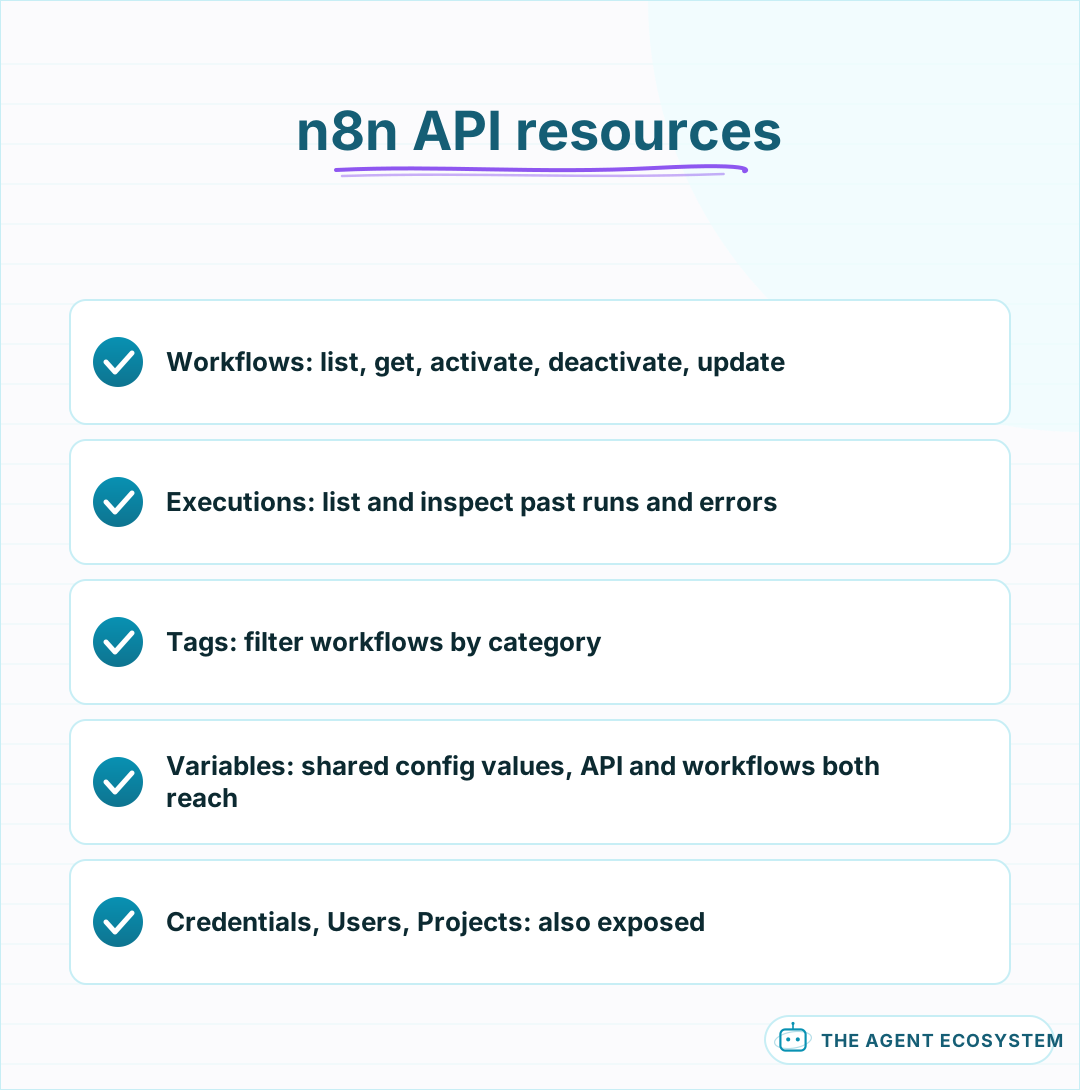
The API exposes resources for Workflows, Executions, Credentials, Users, Tags, Variables, and Projects, versioned under /api/v<version>/ on your instance. The 2 you will reach for most often outside the editor are Workflows, list, get, activate, deactivate, and update a workflow, and Executions, list and inspect past runs, including their status and error details.
Authenticate with an API key sent in the X-N8N-API-KEY header, generated from your instance's settings. On a non-Enterprise instance, that key has full access to everything in the account; Enterprise instances can scope a key to specific resources and actions, worth using if the key is going into a script or a service outside your own control.
The Tags and Variables resources are worth knowing about even if you reach for them less often. Tags let a script filter workflows by a category you have already set up in the editor, and Variables gives the API access to the same instance-level values a workflow can reference internally, useful when a script and your workflows need to agree on the same configuration value without duplicating it.
 A system you can query and control from outside itself.
What does a real monitoring script look like?#
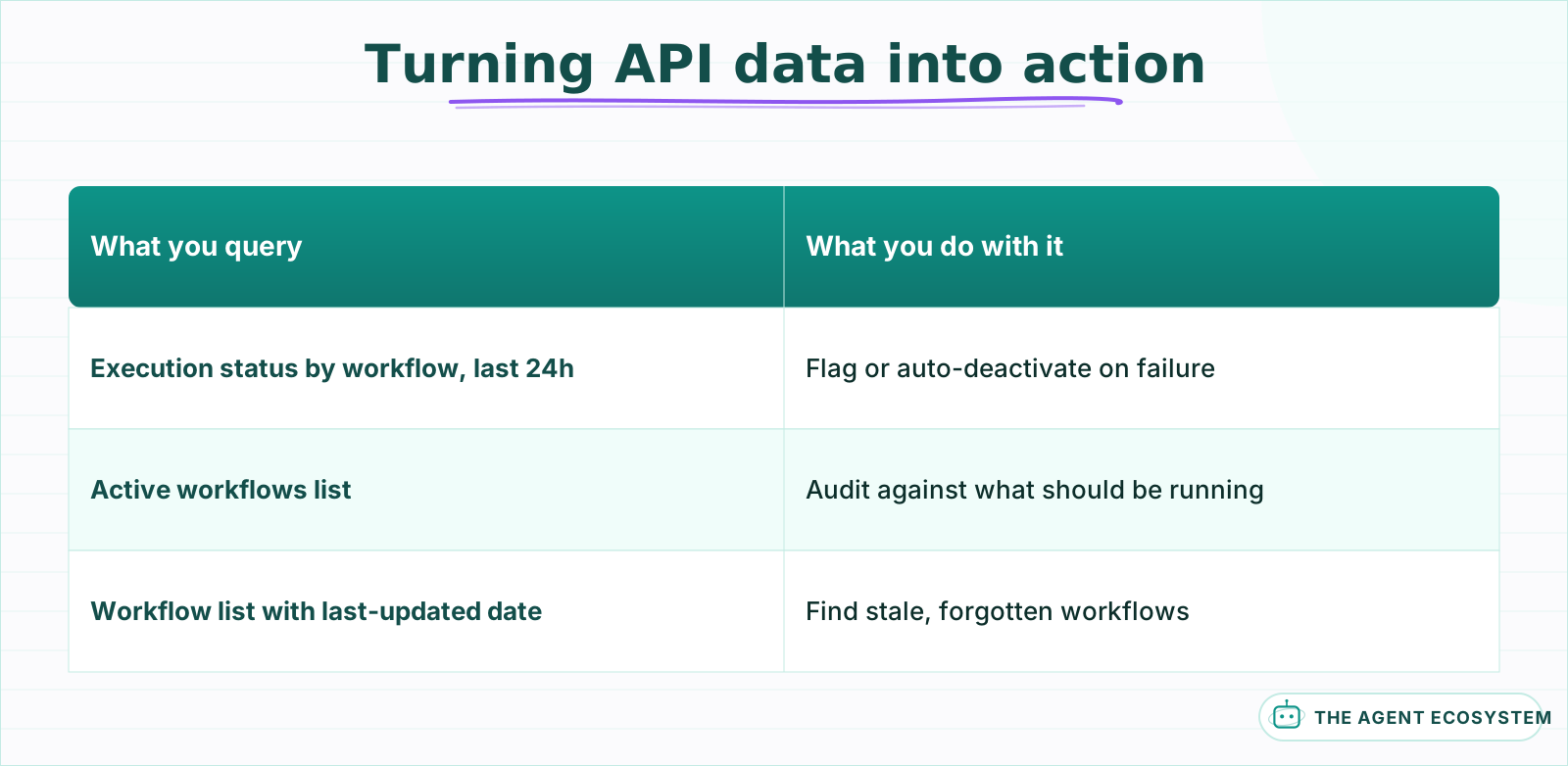
Query the Executions endpoint filtered by workflow and status, count the failures over a window, say the last 24 hours, and flag or auto-deactivate any workflow that crossed a failure threshold you defined ahead of time for exactly this situation.
A workflow silently failing on every run for 3 days because an API key expired is a common, avoidable waste; a scheduled check running every 5 minutes catches it almost immediately instead of whenever someone happens to notice something looks off.
| What you query | What you do with it |
|---|---|
| Execution status by workflow, last 24h | Flag or auto-deactivate on repeated failure |
| Active workflows list | Audit against what should actually be running |
| Workflow list with last-updated date | Find stale workflows nobody has touched in months |
Run this check from something outside n8n itself, a scheduled script or a lightweight external service, not a workflow inside n8n polling its own executions; if the instance itself is the thing failing, a workflow running on it cannot reliably report that.
Send the monitoring output somewhere a person actually checks, a Slack channel or a daily email digest, rather than a log file nobody opens. A monitoring script that runs perfectly but reports into a void catches nothing that a person did not already notice on their own.
 Each query answers a question the editor alone cannot show at a glance.
How do you deploy a workflow change through the API instead of the UI?#
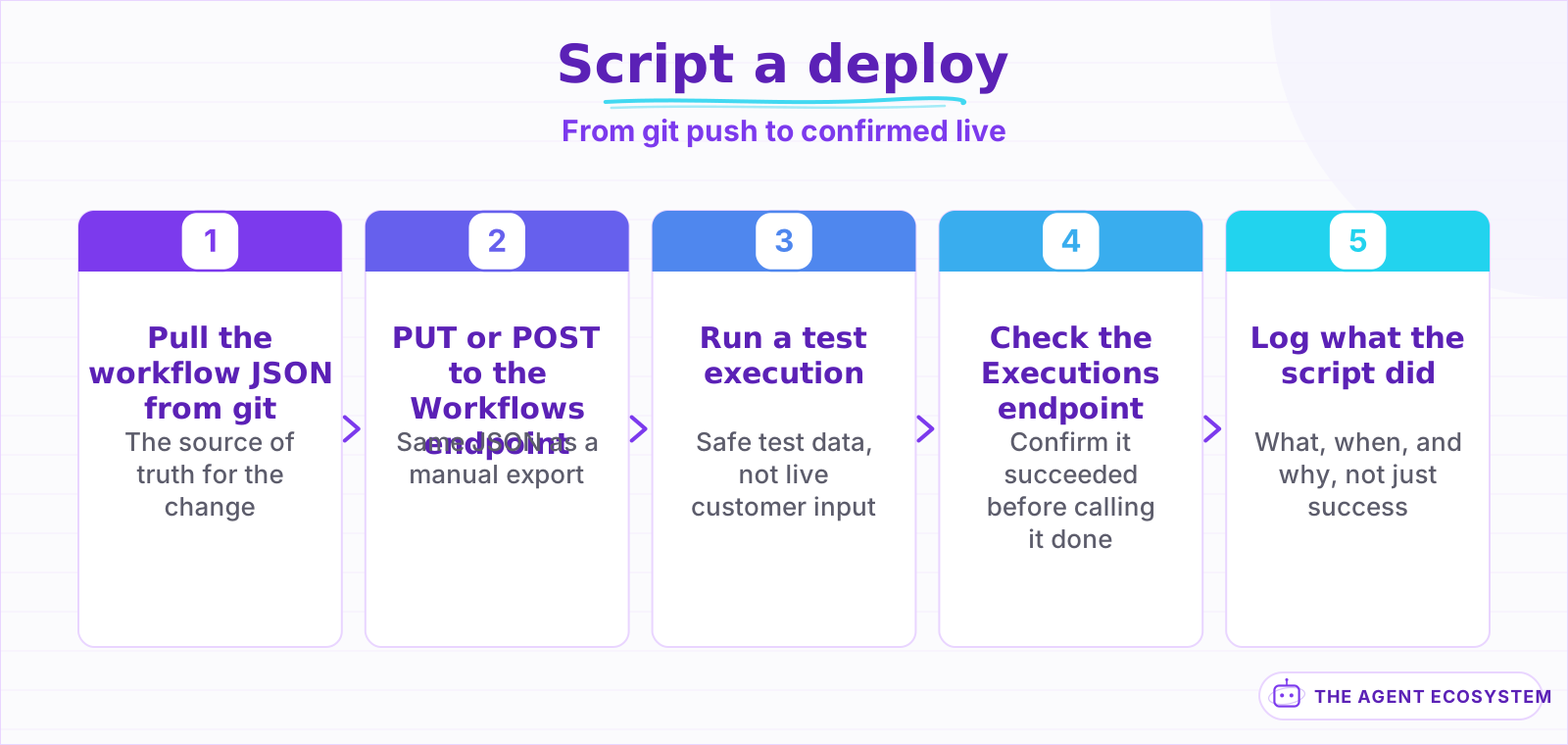
Update or create a workflow via a PUT or POST to the Workflows endpoint with the workflow's JSON as the body, the same JSON you would otherwise export and import by hand. This is what makes environment promotion scriptable rather than a manual click-through for every deploy.
Wrap it in a small script or a CI job that runs on a git push to a specific branch: pull the workflow JSON from your repo, call the API to update the target instance, then hit the Executions endpoint once to confirm a test run succeeds before calling the deploy done. That closes the loop from "the JSON is in git" to "the change is live and confirmed working" without a person doing either step by hand.
Keep the test run's data separate from anything real, the same discipline as any staging environment: confirm the deployed workflow executes without error using safe test input, not a live customer request pressed into service as an ad-hoc smoke test.
 Confirmed working, not just assumed working, before calling it done.
What should you never automate through the API?#
Never wire an external system to activate a workflow it does not have visibility into the content of; activating the wrong workflow, or one that was mid-edit, through a blind API call is a very fast way to put something broken into production. Confirm what you are activating, not just that the call succeeded.
Treat the API key itself with the same care as any other credential in this series: store it as a secret, not in a script committed to a repository, and scope it narrowly on Enterprise instances rather than handing a script full account access when it only needs to read execution status.
Log what a script did, not just that it ran successfully: which workflow it activated or deactivated, when, and why the threshold triggered. A silent auto-deactivation with no record of why is its own kind of confusing failure, one that looks like the workflow itself broke rather than a script making a decision you configured it to make.
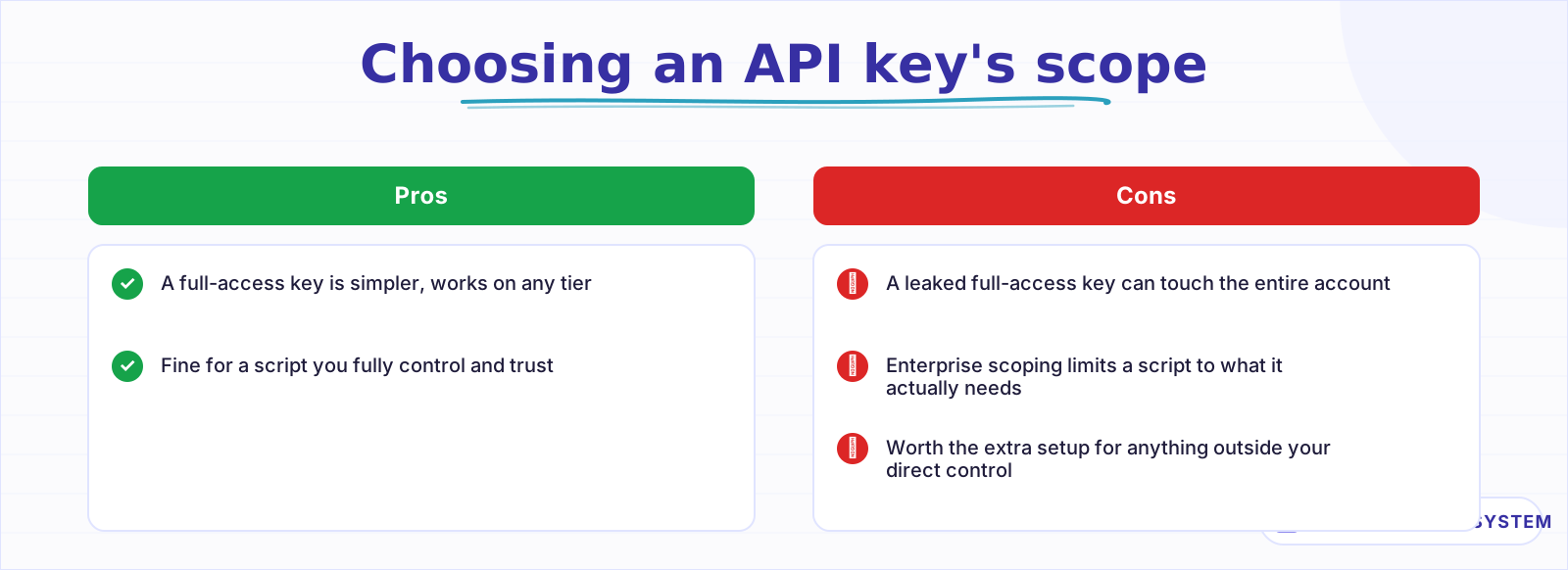 A key going into a script deserves narrower access than one you use yourself.
What breaks, and how do you debug it?#
The most common issue is a version mismatch between the API path and what your instance actually runs; the API is versioned, and a request built against a newer version's shape against an older instance, or the reverse, returns a confusing error that looks unrelated to versioning. Check your instance's actual API version before assuming a request body is malformed.
The second common issue is pagination silently truncating results. The Workflows and Executions endpoints paginate by default, so a script that reads the first page and assumes it has everything will quietly miss workflows or executions past that page. Follow the pagination cursor the response returns until it is exhausted, every time, not just when the count looks suspiciously round.
Is this worth building for a solo operation?#
Build it once you are running enough workflows that "click through the editor and check" stops being a reasonable way to know what state everything is actually in, several dozen active workflows across a few clients, or workflows a client relies on where a silent failure has real consequences.
A handful of workflows you check on personally most days does not need external tooling built on top of it yet.
The honest payoff is visibility you would not otherwise have and a deploy step that is confirmed working instead of assumed working, not a smarter system than clicking through the UI would give you. The API does exactly what the UI does, just from outside it, in a form a script can run on a schedule a person cannot.
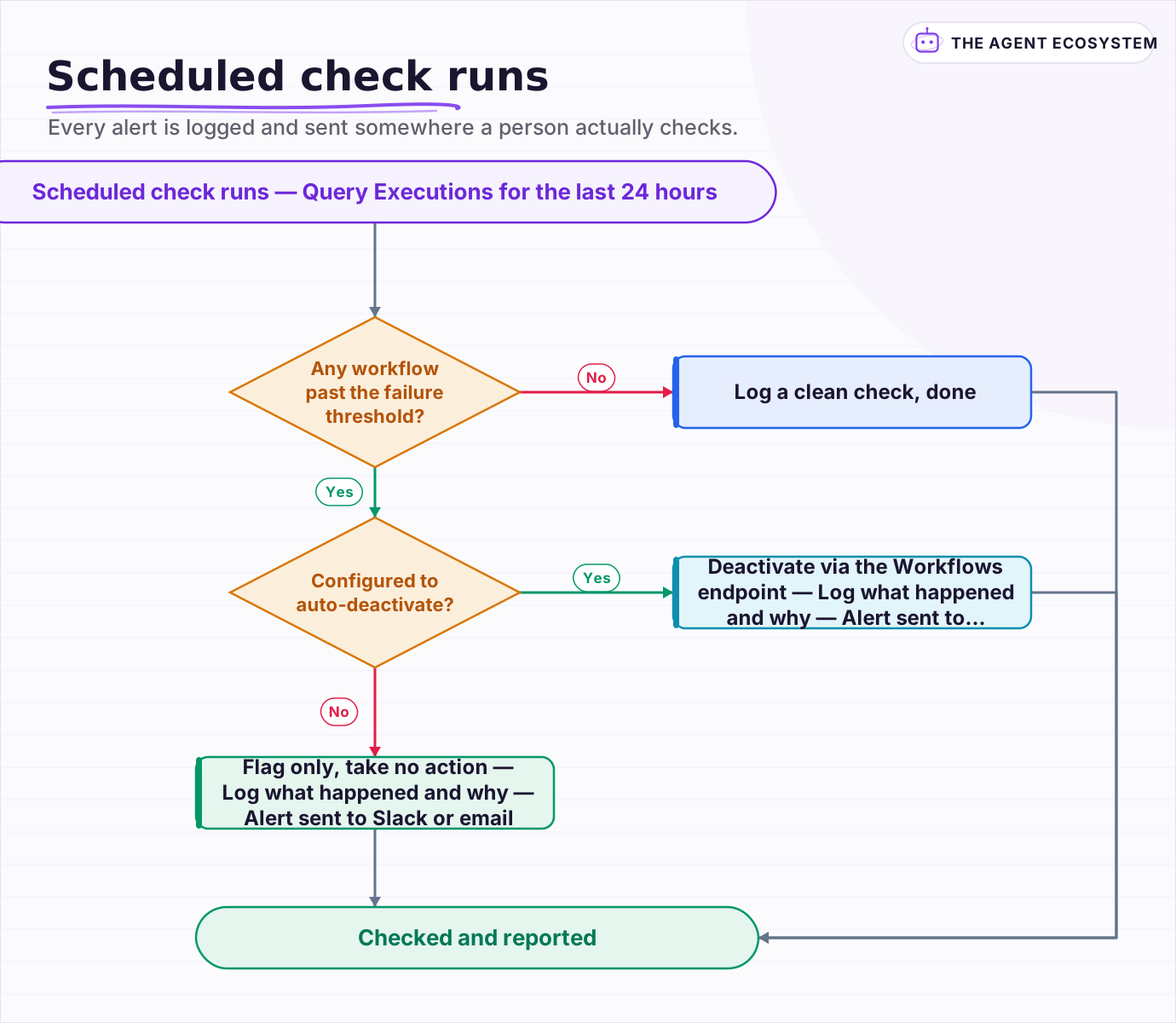 Every alert is logged and sent somewhere a person actually checks.
Frequently asked questions
Does n8n have a REST API for managing workflows programmatically?
How do you catch a silently failing n8n workflow?
Can you deploy n8n workflow changes without using the UI?
Why is my n8n API script missing some workflows or executions?
Is it safe to give a script full access to the n8n API?
Sources
Primary references and vendor documentation used while drafting and reviewing this article.
Written by

Muhammad Qasim Hammad is an AI agent and automation expert and the founder of Cart Gaze LLC (cartgaze.com). He builds product for the love of it: when an idea lands, a working prototype is usually running within hours, built with the same AI agents and automations he sells. He puts his own output at roughly 20× what it was before agents, and the Agentic OS behind this site is the working proof, documented in public with the tools he actually ran and what they really cost.
AI & Automation Services
Want a pipeline like this running in your business?
I'm Qasim — I design and ship AI agents and n8n automations for solo operators and small teams. Tell me what's eating your team's week, and I'll scope a fix.
Related reading
How to Back Up and Version Your n8n Workflows With Git
Self-hosted n8n stores every workflow in one database file. This guide shows you the free CLI-to-Git backup method, the exact export commands, and the encryption key step most tutorials skip.

How to Make Your n8n Workflows Reliable: Error Handling, Retries, and Alerts
n8n does zero error handling by default. Learn to add three layers: node retries, inline error outputs, and one Error Workflow that alerts you whenever any workflow fails silently.
n8n Environments: Dev, Staging, and Production Without Chaos
Testing a workflow change against the same instance that runs your live automations is one bad expression away from a broken production run. Here is how to set up separate dev, staging, and production n8n instances, parameterize what differs between them, and promote a change
n8n Error Workflow Template: A Copy-Paste Error Handler
An n8n error workflow template is one reusable flow, built on the Error Trigger node, that you set as your Error workflow so every failure is captured, formatted, and alerted from one place. Here is how to build it, wire it, and set it as your handler.
5 n8n Workflows That Can Save You ~12 Hours a Week
Five n8n workflows that replace source scanning, topic sorting, first-draft writing, pin prep, and changelog monitoring with a review-gated queue. Nothing autopublishes. You stay in control.
Turn n8n Into an MCP Server: Expose Your Workflows to Claude and Cursor (2026)
Stop leaving Claude Desktop to run n8n workflows by hand. The MCP Server Trigger node turns your existing workflows into callable tools so Claude and Cursor can invoke them directly.