Context Engineering Isn't a Bigger Window. It's What You Leave Out.
What actually goes into an AI agent's context window on any given turn, and the operations that keep it from rotting.
AI-drafted, reviewed by Muhammad Qasim Hammad on August 30, 2026. See our AI disclosure.
Table of contents
- What Is Context Engineering, and How Is It Different From Prompt Engineering?
- What Actually Competes for Space in an Agent's Context Window?
- Why Doesn't a Bigger Context Window Just Solve This?
- What Are the Four Operations of Context Engineering?
- How Do You Compact a Long-Running Agent Before It Blows Its Budget?
- When Should a Sub-Task Get Its Own Fresh-Context Sub-Agent?
- Compact, Trim, or Spin Up a Sub-Agent? How Do You Decide?
- What Should You Set Up This Week?
Ask an agent to do something in one shot and prompt engineering is still the whole job: write a clear instruction, add an example if needed, done. Ask it to run for an hour across dozens of tool calls, and by turn 30 it has re-read a file it already read, forgotten a decision it already made, or spent budget on a tool definition it never once called. Context engineering is the practice of deciding what actually goes into an agent's context window on any given turn, not writing a better prompt once and walking away.
What Is Context Engineering, and How Is It Different From Prompt Engineering?#
Prompt engineering is choosing the words in one instruction to get one good response. Context engineering is the broader, continuous job of curating everything a running agent sees on every turn: which tools it can call, which documents survive, and how much prior history still travels with it.
The name is recent. In June 2025, Shopify CEO Tobi Lutke argued that "context engineering" was the more honest term for what strong AI teams were actually doing, and Andrej Karpathy amplified it days later, describing it as the delicate art of filling the context window with exactly the right information for the next step. Source
Anthropic's own engineering team frames context as simply the set of tokens a model sees when it samples a response, and context engineering as the set of strategies for curating that set during inference. The shift in emphasis is real: prompt engineering optimizes one static instruction, while context engineering has to hold up across many turns of a run that needs different things at every step. Source
This matters for a one-person team more than it sounds like it should. A chatbot that answers one question per exchange can get away with a static system prompt and call it done. An agent that plans, calls tools, and keeps working across many turns cannot: the context window is the only thing standing between a coherent hour-long run and one that quietly drifts, and nobody is curating it for you by default.
What Actually Competes for Space in an Agent's Context Window?#
On any turn, 5 things compete for the same token budget: the system prompt, every tool definition the agent could call, the conversation and tool-call history so far, any documents or search results pulled in, and notes the agent wrote for itself. None of it is free.
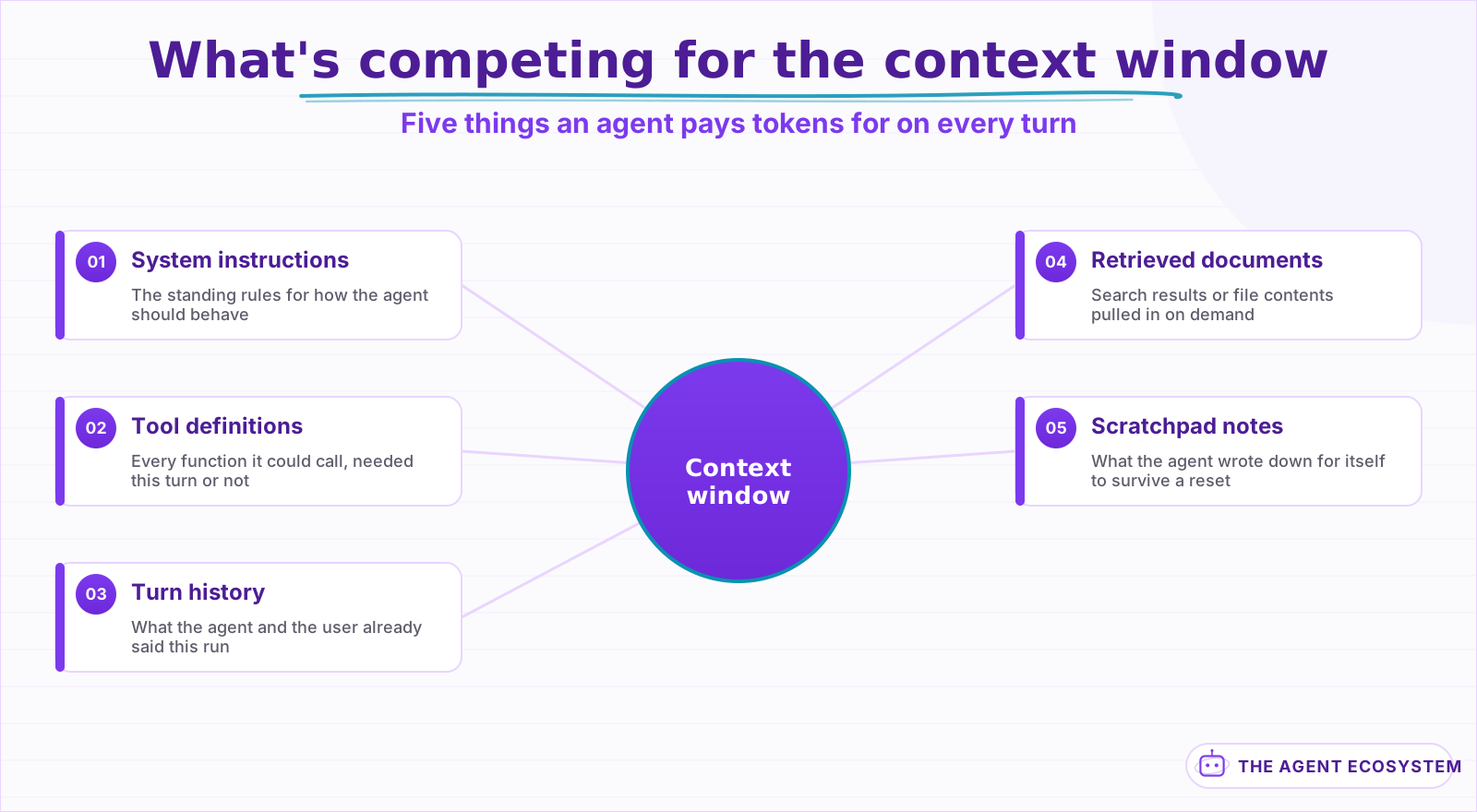 None of it is free, whether or not the agent actually uses it this turn.
Tool definitions are the easiest one to forget, because they sit in the window whether the agent uses them or not. An agent with 40 tools pays for the full description of all 40 on every single turn, even the 39 it never calls this run. Our guide to writing tool descriptions covers the model-facing side of that problem; the context-engineering side is simpler in principle, if not in practice: expose fewer tools, and expose only the ones this task actually needs.
Retrieved documents and turn history cost the same way, just less obviously. A RAG pipeline that pulls back 10 chunks when the answer only needed 2 is paying for 8 chunks of noise on every downstream turn, not just the one that fetched them. History is worse, because it compounds: turn 40 carries the full weight of turns 1 through 39 unless something actively prunes it.
Why Doesn't a Bigger Context Window Just Solve This?#
A bigger window looks like the obvious fix, and it is not one. Chroma tested 18 frontier models and found that performance degrades unevenly as input length grows, well before the window is anywhere near full. Researchers call this context rot, and every model in the study showed it to some degree.
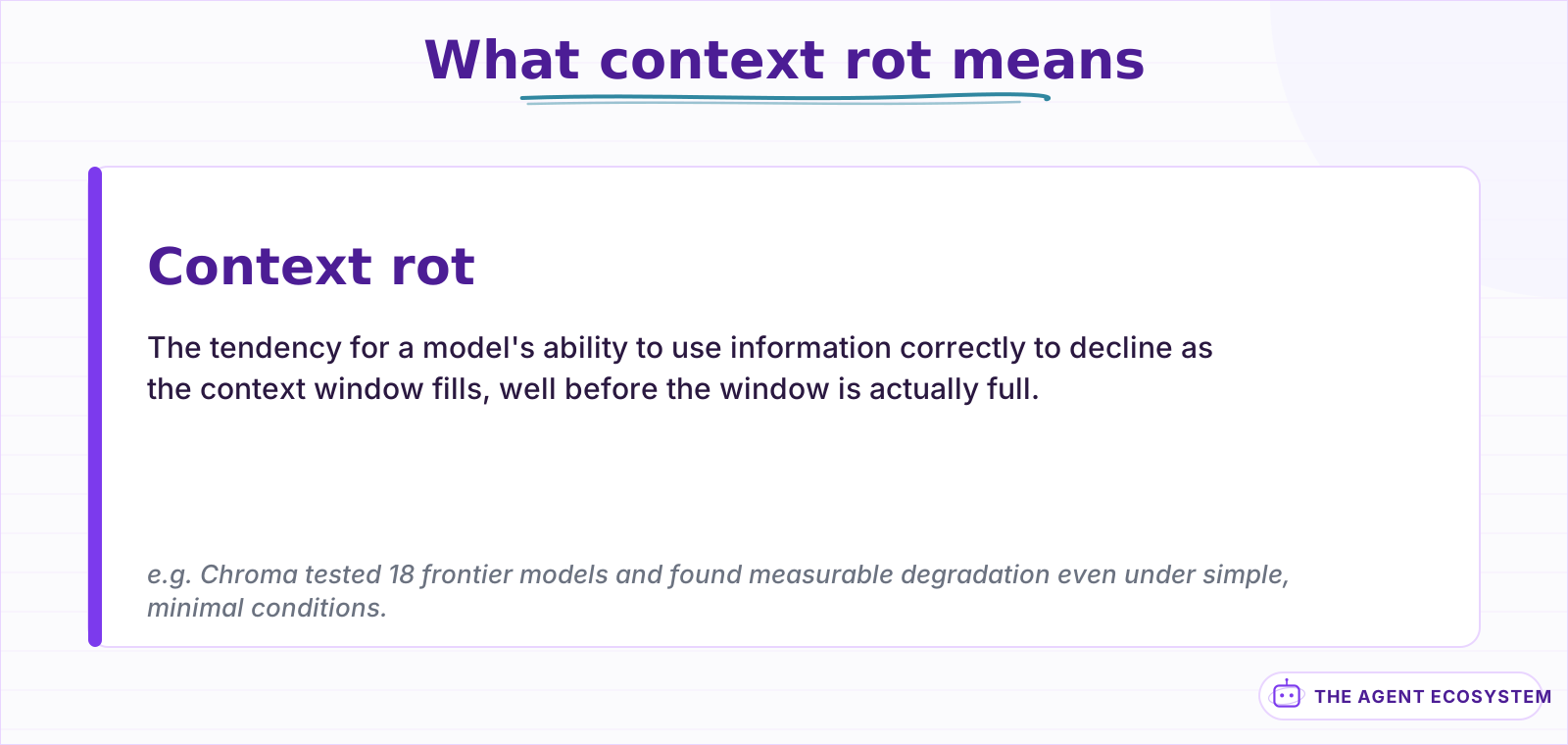 Every model in Chroma's 18-model study showed some degree of this.
The finding held even under simple conditions: a single distractor in the input was enough to measurably hurt accuracy, and adding more distractors made it worse. That is the opposite of how a context window gets sold, as a container you fill up until it runs out of room. In practice, every extra token you leave in has a small, real cost, whether or not the window itself has space left. Source
If you want the underlying mechanics behind that, tokens, positions, and why models lose track of the middle of a long input, our context window explainer covers that ground directly. What follows here is what to actually do about it.
What Are the Four Operations of Context Engineering?#
LangChain frames the practical work as 4 operations, and the framing holds up well once you start applying it. Write saves something outside the window instead of repeating it. Select pulls in only what a turn actually needs. Compress keeps the tokens that still carry weight. Isolate gives a sub-task its own clean context.
| Operation | What it means | A concrete example |
|---|---|---|
| Write | Save something outside the window instead of repeating it every turn | The agent keeps a running to-do file it updates instead of restating the plan in each message |
| Select | Pull only the relevant piece into the window, on demand | Fetch one file by its path instead of preloading an entire repository |
| Compress | Keep only the tokens that still carry weight | Summarize the last several dozen turns into one paragraph before continuing |
| Isolate | Give a sub-task its own clean context instead of sharing the main one | A research sub-agent explores one question, then returns a short summary |
Source: LangChain, Context Engineering for Agents. The next 2 sections go deeper on the 2 operations that tend to matter most once a run gets long: compress and isolate.
How Do You Compact a Long-Running Agent Before It Blows Its Budget?#
Compaction means summarizing a conversation as it nears its context limit, then starting a fresh window seeded with that summary instead of the full transcript. Anthropic's own agents keep the architectural decisions and unresolved threads and drop the redundant tool output, the part of a long run that grows fastest for the least value.
This is different from summarizing a chat for next week's session. Compaction happens mid-run, inside the same task, because a coding agent or a research agent that has been working for an hour has usually accumulated far more raw tool output than it needs to keep verbatim: file contents it already used, search results it already acted on, error messages from a fix that has already landed.
The judgment call is what to keep. Drop a file's full contents once the edit is made, but keep the fact that the edit happened and why. Drop a search result once you have extracted the answer, but keep the answer and its source. Get this wrong in either direction and you either blow the budget again in 10 more turns, or the agent quietly re-does or contradicts work it already finished.
Wait too long and the fix arrives too late: the run has already spent its budget rereading things it should have compacted 3 turns earlier. Compact too early and aggressively, and you throw away detail the agent needed 2 steps later, then watch it re-fetch the same file it just summarized away.
When Should a Sub-Task Get Its Own Fresh-Context Sub-Agent?#
Give a sub-task its own sub-agent when it needs deep, disposable exploration that would otherwise pollute the main run: reading 10 files to answer one question, or trying an approach that might fail outright. The sub-agent works in an empty context, then returns a short summary instead of its full transcript.
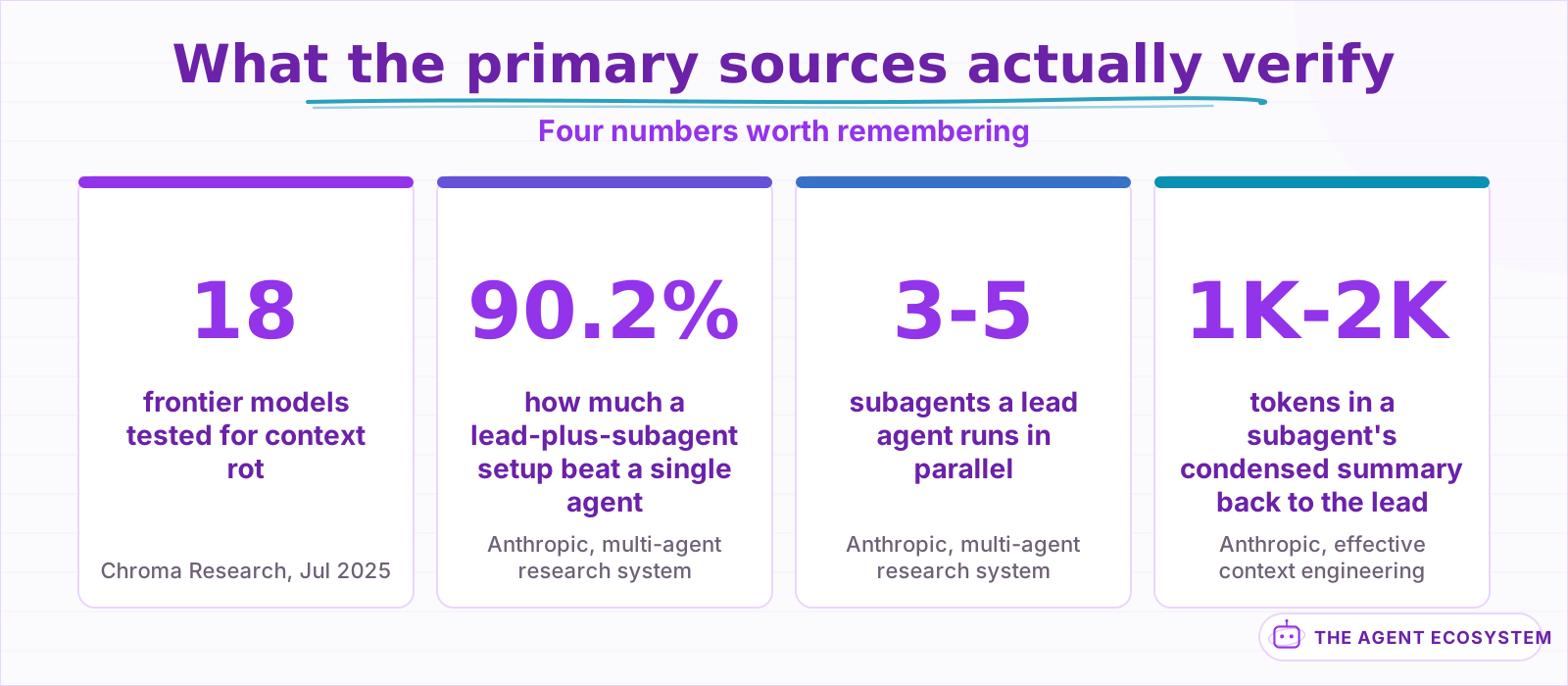 Every number here is read from the cited engineering post or paper, not a summary of a summary.
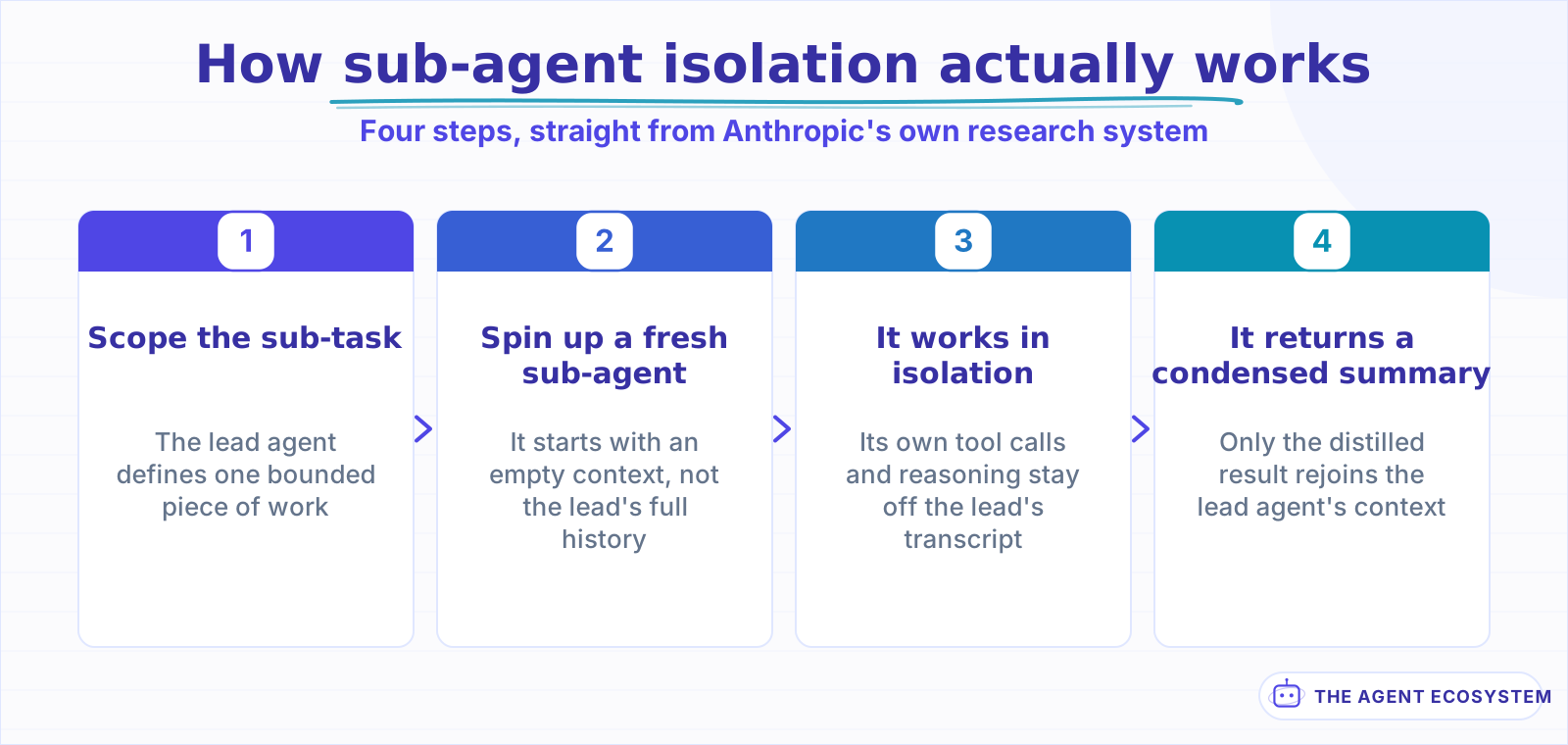 Modeled directly on Anthropic's own multi-agent research system architecture.
Anthropic's own multi-agent research system is the clearest documented example of this working in production. A lead agent breaks a research question into pieces and spins up 3 to 5 subagents in parallel, each exploring its own angle with its own tools and its own context. Every subagent condenses its findings into roughly 1,000 to 2,000 tokens before handing them back, so the lead agent's own context stays small no matter how much work happened underneath it. Tested against a single strong agent on the same research tasks, the multi-agent setup won by 90.2%. Source
The tradeoff is real, not free: that same system reported multi-agent runs using roughly 15 times the tokens of a single chat reply, because parallel exploration is expensive even when each individual piece is cheap. Reach for isolation when a sub-task's mess is the actual problem, not just because more agents sounds more capable. If the run you are trying to protect spans hours rather than minutes, task decomposition for long-horizon agents covers the planning side of the same problem: scoping the work itself, not just its context.
Compact, Trim, or Spin Up a Sub-Agent? How Do You Decide?#
Run through 3 checks in order: is this a scoped, self-contained sub-task, does the run still need its full history, and is one document or tool result eating the budget. Each answer points to a different fix, and the flowchart below walks the same 3 checks in the order that actually matters.
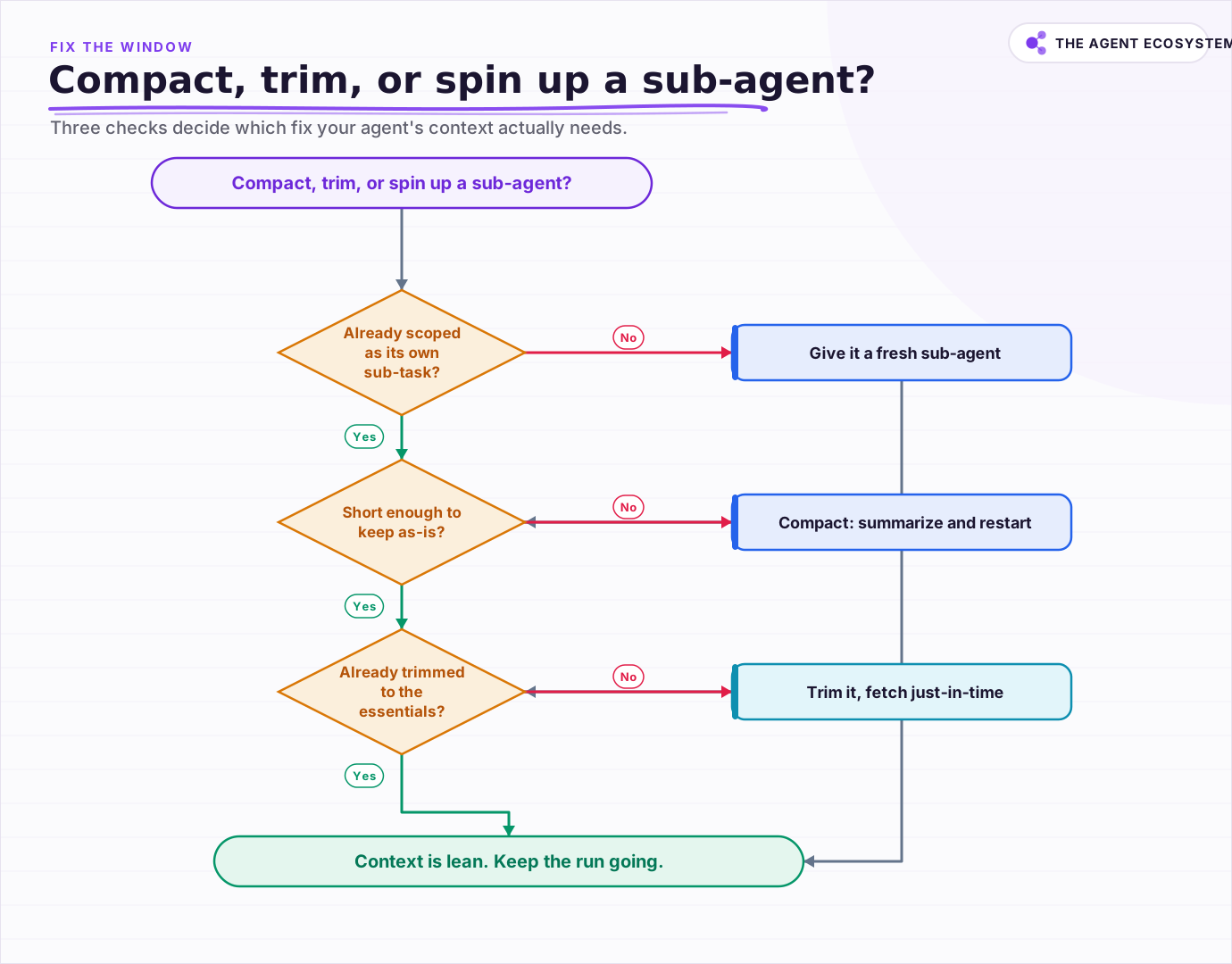 Three checks decide the fix: is it a scoped sub-task, does it still need full history, and is one document eating the budget.
None of these 3 are mutually exclusive over the life of a long run. A single agent might isolate a messy sub-task early, compact twice as the main thread grows, and trim a bloated search result near the end: 3 different fixes, applied at 3 different moments. The flowchart picks the right one for right now, not a permanent architecture.
What Should You Set Up This Week?#
Pick your longest-running agent and read its actual transcript from a real turn, not the prompt you think it is working from. Count how much of the window is tool definitions it never called, history it no longer needs, or a document it already extracted the answer from. That gap is where to start.
None of the 4 operations from earlier need to happen all at once, and most agents do not need all 4 in their first version. Start wherever the transcript shows the clearest waste, and revisit the rest once that fix earns its keep.
One disambiguation worth being explicit about: this is curation within a single run, not the same thing as an agent remembering you across separate conversations. If what you actually need is chat history that survives a restart, giving an n8n AI agent memory covers that persistence layer directly, and it solves a different problem than the one this piece just walked through.
Start with the read, not a rewrite. Most agents do not need a new architecture this week. They need someone to look at what is actually sitting in the window and cut the parts that stopped earning their place.
Frequently asked questions
What is context engineering?
What is the difference between context engineering and prompt engineering?
What is context rot?
Is context engineering the same as giving an agent memory?
When should an agent hand a task to a sub-agent instead of continuing in its own context?
Sources
Primary references and vendor documentation used while drafting and reviewing this article.
- Anthropic: Effective context engineering for AI agents
- Chroma Research: Context Rot, How Increasing Input Tokens Impacts LLM Performance (Jul 2025)
- Anthropic: How we built our multi-agent research system
- LangChain: Context Engineering for Agents
- Andrej Karpathy on X: "+1 for 'context engineering' over 'prompt engineering'"
Written by

Muhammad Qasim Hammad is an AI agent and automation expert and the founder of Cart Gaze LLC (cartgaze.com). He builds product for the love of it: when an idea lands, a working prototype is usually running within hours, built with the same AI agents and automations he sells. He puts his own output at roughly 20× what it was before agents, and the Agentic OS behind this site is the working proof, documented in public with the tools he actually ran and what they really cost.
AI & Automation Services
Want a pipeline like this running in your business?
I'm Qasim — I design and ship AI agents and n8n automations for solo operators and small teams. Tell me what's eating your team's week, and I'll scope a fix.
Related reading
Long AI Agent Runs Don't Fail on Context. They Fail on the Plan.
Long-horizon AI agents don't fail because they run out of context. Andon Labs' Vending-Bench found no correlation between failed runs and how full the context window was. Here is what the verified research says about why agents actually drift on long runs, and the

Agent Handoffs and Supervisor Patterns: Who Decides What Runs Next
Split 1 agent into several and you inherit a new question: who decides what runs next? Handoffs are tool calls underneath, supervisors and swarms differ only in whether control returns to a center, and the coordination overhead runs about 15 times a chat in tokens.
n8n AI Agent Too Slow? Latency and Cost Fixes
A slow n8n AI Agent is usually doing more work than the task needs: too many tool loops, too big a context, or too heavy a model. Latency and cost come from the same place, the model calls, so here is how to measure them and the levers that cut both at once.
LLM Context Windows: Tokens, Limits, and Lost in the Middle
A context window is the token budget for one request, and input plus output share it. Bigger windows hold more text but do not read it all equally: the lost-in-the-middle effect means facts buried mid-context get recalled worse. Here is how tokens, limits, and placement actually
Long-Context vs RAG: When a 200K-1M Token Window Beats Chunking
Now that 1M-token windows ship at flat pricing, should you stuff the whole corpus in one prompt or build a retrieval pipeline? This breaks long context vs RAG into reproducible per-query cost math, the recall limits of big windows, and four variables that decide it.
5 Claude API Changes That Cut Agent Workflow Cost
Five recent Claude API updates can reduce wasted tokens and lower your bill in n8n agents and custom pipelines. Here is exactly what changed, why it matters, and what to test before changing production workflows.