OCR Turns a Page Into Text. A VLM Just Reads It.
Why vision-language models beat the OCR-then-parse pipeline on real documents, and when OCR is still the cheaper, correct call.
AI-drafted, reviewed by Muhammad Qasim Hammad on August 28, 2026. See our AI disclosure.
Table of contents
- What does it actually mean for a model to read a document instead of OCR-ing it?
- Why does converting a page to text first throw information away?
- What can a vision-language model see that OCR-extracted text can't?
- Which models actually do document-native reading today?
- Is a VLM always the better call, or does it have real costs?
- When is OCR-then-parse still the right, cheaper choice?
- Should this specific document go through OCR or a VLM?
- What should you build first?
A vision-language model looks at a scanned invoice and can answer "what does the top-right box say" without ever converting the page to a string of characters first. Feed the same invoice through OCR-then-parse, and the software gets every character right and still cannot answer that question, because the layout that made "top-right box" meaningful was discarded in the first step. Multimodal document understanding is a model reading a document the way a person does, pixels, text, and position together, instead of flattening it into text and hoping the structure survives the trip.
What does it actually mean for a model to read a document instead of OCR-ing it?#
Reading a document natively means a vision-language model receives the page as an image alongside its text and answers by looking at both together. OCR-then-parse means a separate program first converts the page into a flat string of characters, then hands that string to a language model that never sees the original layout at all.
That single design choice is the whole story. A large language model only ever sees tokens, so a page has to become tokens somehow. OCR-then-parse does that conversion outside the model: software finds characters, guesses their reading order, and hands the model a wall of text with the visual structure gone. A document-native VLM does the conversion inside the model: the page is encoded as image tokens, the same way a photo would be, and the model's own attention mechanism decides which parts of the page relate to which, using position and appearance as evidence, not just word order.
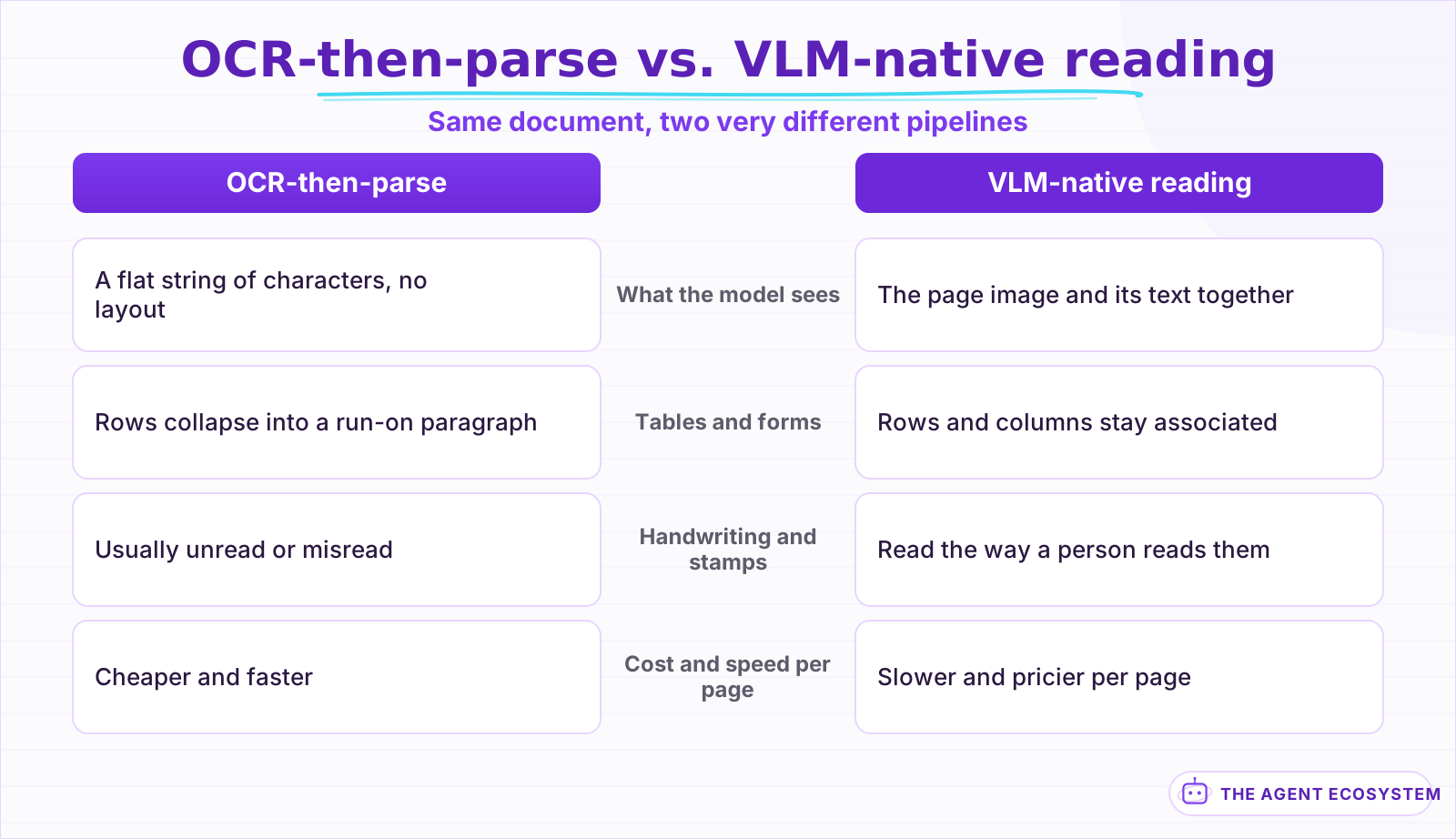 The pipeline shape decides what survives to the model that has to answer questions about the page.
The practical result is what the comparison above sketches. OCR-then-parse is a 2-stage pipeline where the second stage, the language model, only ever gets to work with what the first stage, the OCR engine, decided to keep. VLM-native reading is one stage where nothing gets thrown away before the model has a chance to use it.
Why does converting a page to text first throw information away?#
OCR-then-parse loses information at the reading-order step: software has to guess which text runs belong together before it ever reaches a language model, and multi-column layouts, nested tables, and form fields are exactly where that guess breaks. Once the page becomes one flat string, there is no way for a later step to recover which numbers belonged to which row.
A single-column typewritten letter survives OCR-then-parse just fine, because reading order is obvious: top to bottom, left to right. A 2-column financial statement, a form with checkboxes scattered across the page, or a table with merged header cells does not survive, because the OCR engine has to decide on one linear order for content that was never meant to be linear. Whatever order it picks, the language model downstream inherits that choice and has no way to question it, because the visual evidence that would let it push back was never passed along in the first place.
This is not a rare edge case. Invoices, medical intake forms, insurance claims, and financial statements are built almost entirely out of the layouts OCR-then-parse handles worst: side-by-side columns, boxed fields, and tables where a number's meaning depends on which row and column it sits in, not just what digits it contains.
What can a vision-language model see that OCR-extracted text can't?#
A VLM keeps the spatial relationships a flat text dump destroys: which number sits in which cell, which checkbox sits next to which label, whether a signature is actually present under a line. It can also read handwriting, interpret a chart's shape, and recognize a stamp as a stamp, all without ever converting the page to text.
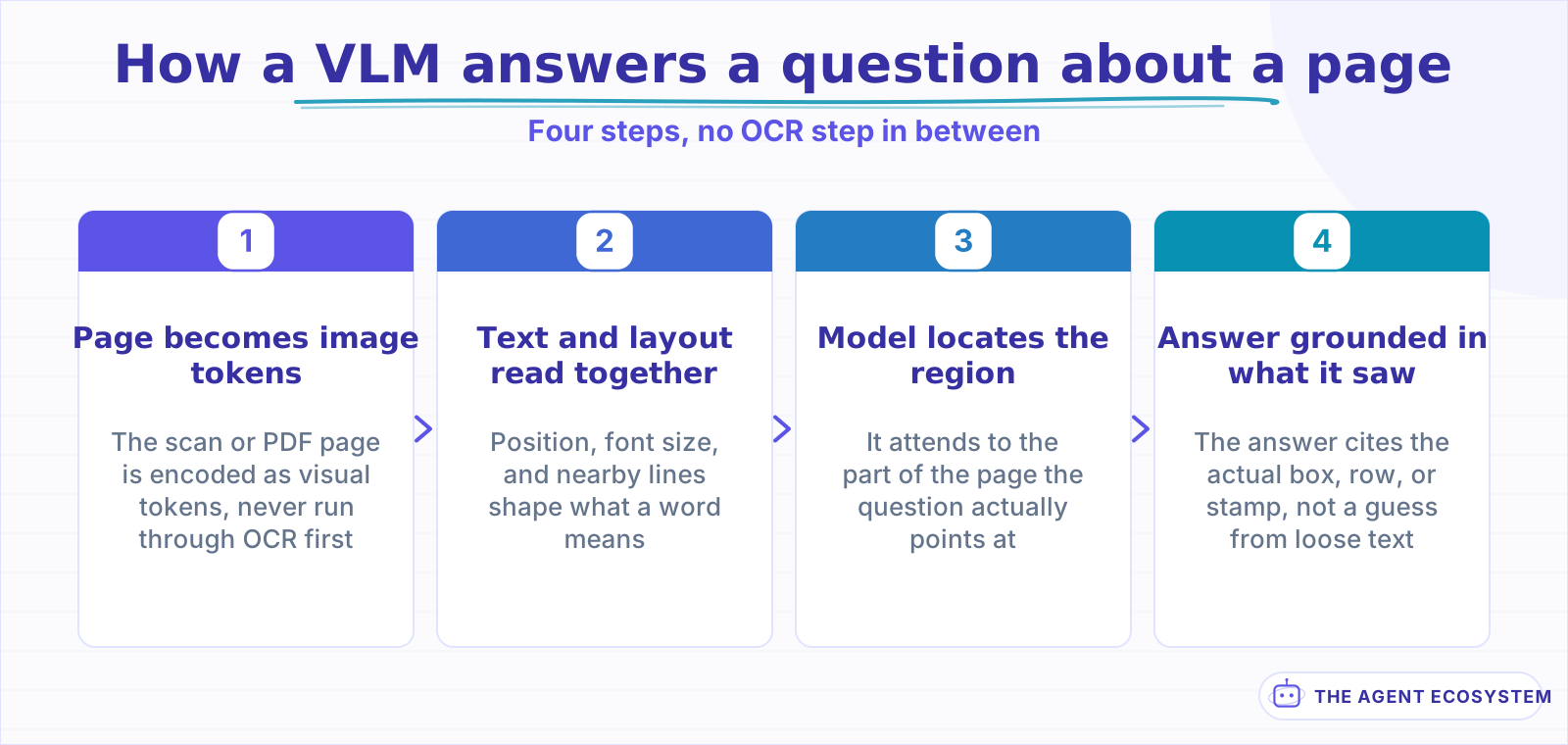 No text-conversion step sits between the page and the answer.
That "what does the top-right box say" question from the opening is the clearest example. Answering it requires knowing where the top-right box is on the page, which is a spatial fact, not a textual one. OCR-extracted text has no concept of "top-right" left in it by the time a language model sees it; a VLM still has the whole page in front of it, so the question resolves the same way it would for a person glancing at the same document.
Charts and tables get the same treatment. A VLM reading a bar chart is looking at the actual shape of the bars, not a caption someone typed; a VLM reading a table sees which cell a number sits in, so it can answer "what was Q3 revenue" correctly even when the column header is 2 rows away from the value. OCR-extracted text flattens both into loose strings that a language model has to re-guess the structure of, and re-guessing is exactly where wrong answers come from.
Which models actually do document-native reading today?#
Claude, GPT, and Gemini all accept PDFs and images directly and read the page itself, not a pre-extracted transcript. Mistral ships a dedicated, cheaper OCR model built for high-volume conversion rather than open-ended reading. Purpose-built products like Reducto, LlamaParse, and Google Document AI wrap one of those models in schema validation and human review, ready to plug into a pipeline.
The specifics shift monthly, so treat the table below as a snapshot rather than a permanent ranking. What does not shift as fast is the split it shows: general chat models added native document reading as one capability among many, while a smaller set of vendors built OCR or extraction as the entire product.
| Model or product | Reads PDFs and images natively | What stands out |
|---|---|---|
| Claude (Opus, Sonnet, Haiku) | Yes, PDF and image input built into the API | Sees the whole page in the same call as any other request |
| GPT (GPT-5.5 and newer) | Yes, sends both extracted text and page images | A hybrid: OCR text augments the visual read instead of replacing it |
| Gemini (2.5 Pro, Flash, Flash-Lite) | Yes, up to 1,000 pages per document | Does not bill extra for a PDF's own embedded text tokens |
| Mistral OCR 4 | OCR-first, not a general chat model | Bounding boxes, confidence scores, and 170 languages at a low per-page cost |
| Reducto, LlamaParse, Google Document AI | Yes, wrapped inside a finished product | Schema validation and review workflows layered on top of the raw model |
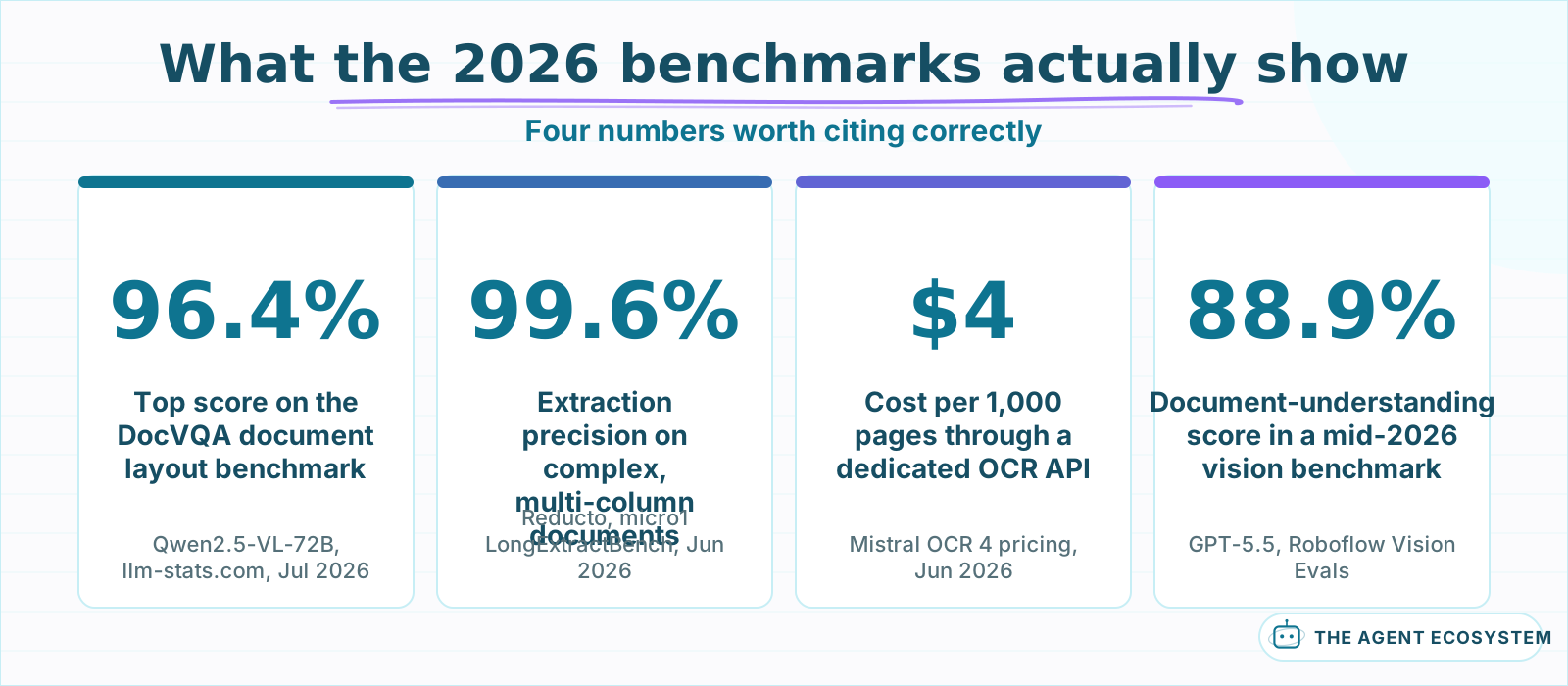 Every number here is read from the cited source, not a summary of a summary.
The benchmark numbers above move fast enough that any specific score will look dated within months. What is more durable is the direction: document-specific evals like DocVQA keep climbing, and dedicated extraction products are proving that a tuned pipeline can beat a general-purpose call to a big model on messy, real-world documents. Read the extraction number with one caveat attached: it comes from a benchmark that the winning vendor helped design, so treat it as one data point, not a settled ranking.
Is a VLM always the better call, or does it have real costs?#
A VLM is not a free upgrade. Processing an image costs more tokens than processing the same content as plain text, so a VLM call is typically slower and pricier per page than OCR-then-parse. It can also hallucinate on a dense or low-quality scan, inventing a plausible-looking number instead of admitting the page is too blurry to read.
That hallucination risk is not unique to documents, and it is not new. A VLM producing a schema-shaped, plausible-looking answer that happens to be wrong is the same underlying failure mode covered in our piece on structured outputs and tool calling reliability: constrained decoding can guarantee the output matches your schema, but nothing guarantees the values inside that schema are true. Extracted fields from a document need the same spot-checking a tool call's arguments need, especially on a scan that is faint, rotated, or partly obscured.
Cost adds up the same way. A VLM call over a scanned page runs meaningfully more image tokens than a text-only request of similar length, and running that over tens of thousands of pages a month is a different budget conversation than running it over a few hundred. Neither of these costs is a reason to avoid a VLM outright; they are reasons to know what you are paying for before a pipeline goes into production.
When is OCR-then-parse still the right, cheaper choice?#
OCR-then-parse is still the right default for documents that are clean, single-column, and entirely typed, because there is no layout signal to lose in the first place. It is also the right call at very high volume, where the per-page cost difference between OCR and a VLM compounds into a real budget line rather than a rounding error.
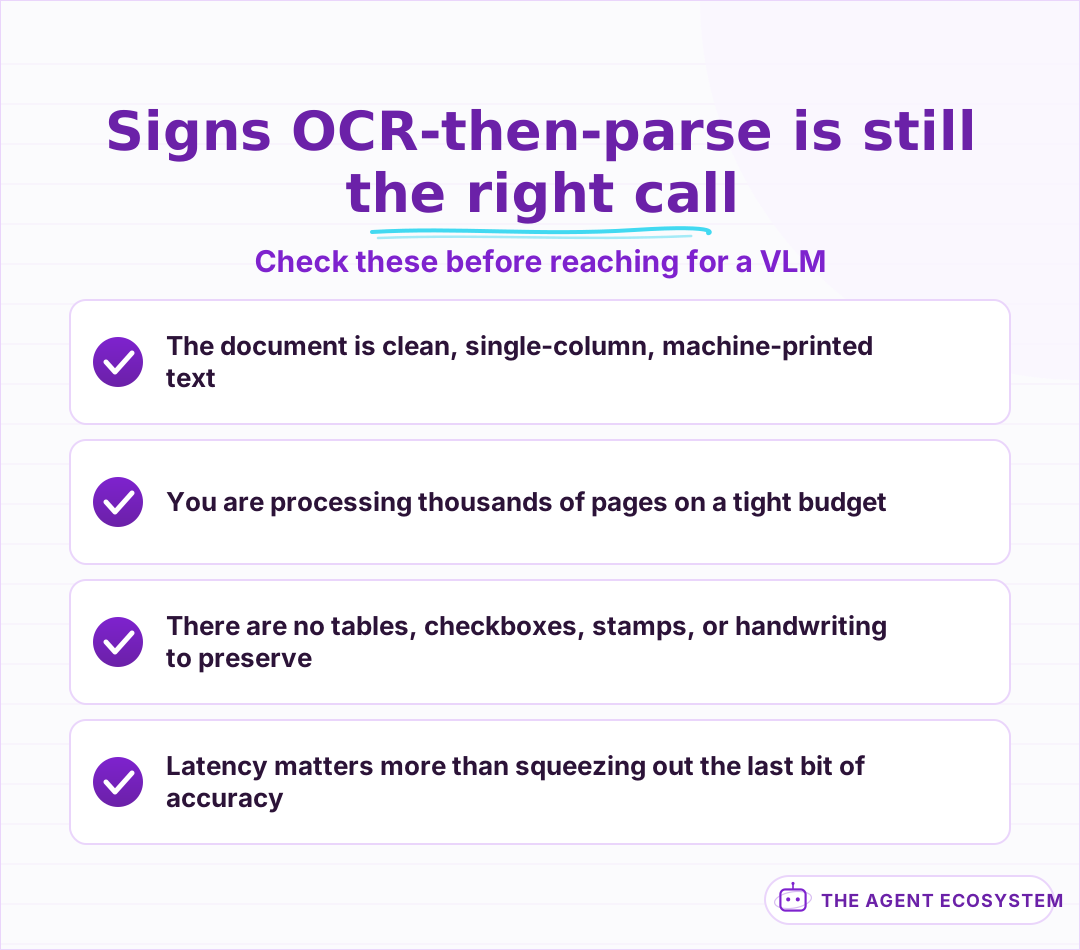 None of this means OCR is obsolete, it means the document doesn't need what a VLM adds.
None of this is an argument that OCR is obsolete. Modern OCR models like Mistral's OCR 4 have gotten sharply better and cheaper through 2026, and for a plain-text contract or a single-column report, a VLM buys almost nothing over a good OCR-then-parse pipeline at a fraction of the cost. The decision is not "OCR is old, VLMs are new." It is "does this specific document have layout worth preserving."
Should this specific document go through OCR or a VLM?#
The decision comes down to 2 questions in sequence: does the page's layout, handwriting, or visual structure carry meaning, and if not, is the document clean and high-volume enough that OCR-then-parse's lower cost matters. Answer both and the routing is usually obvious rather than a judgment call you have to make fresh for every batch.
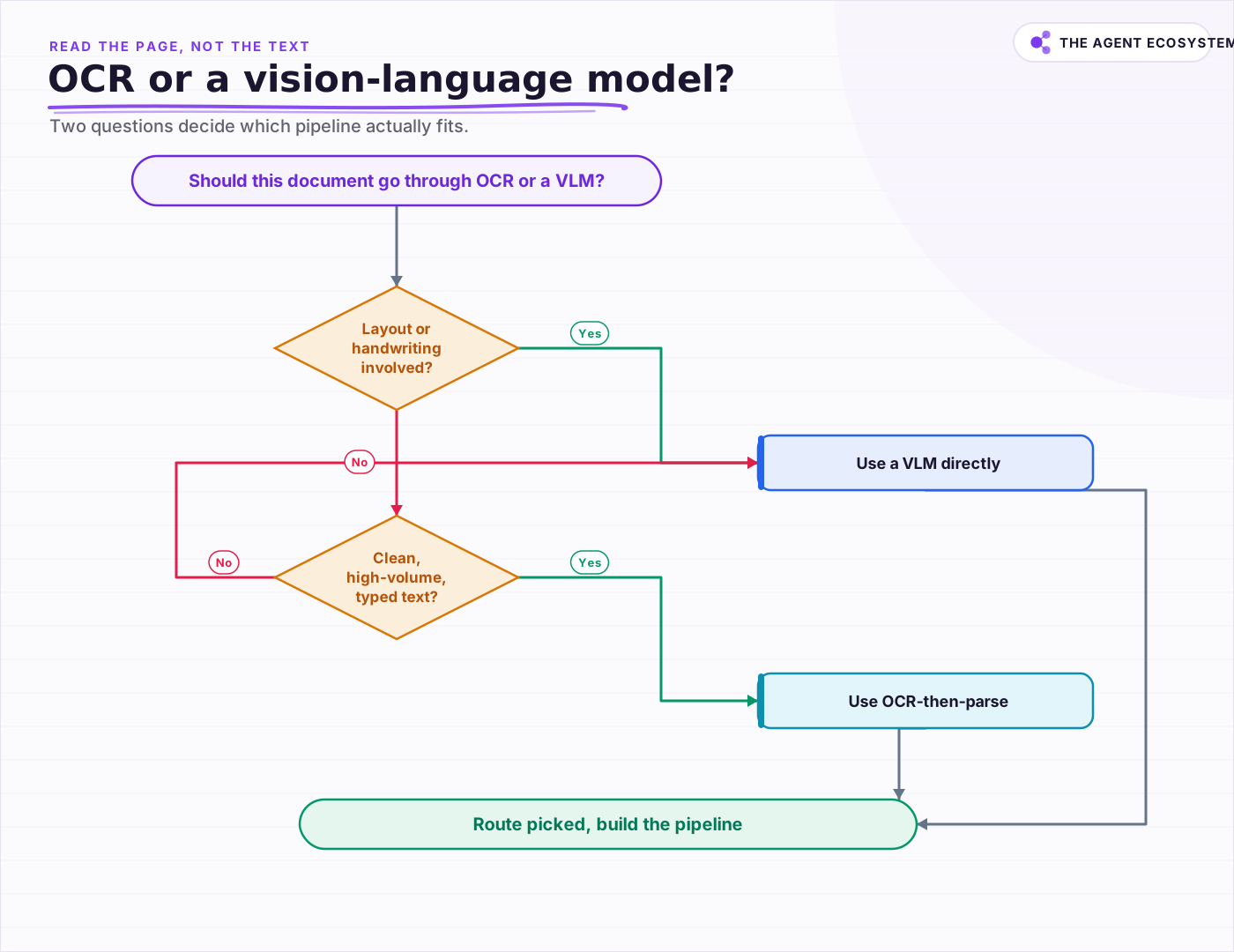 Two questions decide the route: does layout carry meaning, and is the document clean and high-volume.
Run a handful of representative pages through both routes before committing a whole batch to either one. A single VLM call on a small sample is cheap insurance against discovering, a thousand pages in, that the layout mattered more than it looked like it did from the first page you skimmed.
What should you build first?#
Start with the workflow you already have and the document type causing the most pain, not a platform-wide rebuild. If it is invoices, receipts, or emails, our n8n build walks through wiring a VLM into an automation end to end, from the incoming file to a written database row.
For a workflow build with exact node configuration, start with building an AI document-extraction agent in n8n, which covers invoices, receipts, and emails specifically. If the extracted structure is headed into a knowledge base rather than a database row, pair it with contextual retrieval for RAG so the structure a VLM pulled out of the page survives the chunking step too.
Whichever route you take, the honest starting point is the same: pick one document type, run it through both OCR-then-parse and a VLM on a small sample, and let what you actually see on those pages decide the pipeline, not a general rule about which one is supposed to win.
Frequently asked questions
What is multimodal document understanding?
What is the difference between OCR-then-parse and a vision-language model reading a document?
Which AI models can read documents natively as images?
Is a vision-language model always better than OCR for documents?
When should I still use OCR instead of a VLM for document processing?
Sources
Primary references and vendor documentation used while drafting and reviewing this article.
- Anthropic: PDF support (Claude Platform docs)
- OpenAI: File inputs (vision-capable models extract both text and page images for PDFs)
- Roboflow: GPT-5.5 Vision Benchmarks & Use Cases
- Google: Document understanding (Gemini API docs)
- Mistral AI: OCR 4, SOTA OCR for Document Intelligence
- llm-stats.com: DocVQA Leaderboard
- micro1: LongExtractBench (independent document-extraction benchmark)
Written by

Muhammad Qasim Hammad is an AI agent and automation expert and the founder of Cart Gaze LLC (cartgaze.com). He builds product for the love of it: when an idea lands, a working prototype is usually running within hours, built with the same AI agents and automations he sells. He puts his own output at roughly 20× what it was before agents, and the Agentic OS behind this site is the working proof, documented in public with the tools he actually ran and what they really cost.
AI & Automation Services
Want a pipeline like this running in your business?
I'm Qasim — I design and ship AI agents and n8n automations for solo operators and small teams. Tell me what's eating your team's week, and I'll scope a fix.
Related reading
Local RAG With Ollama: Chat With Your Business Docs Privately
Local RAG with Ollama lets you ask questions across hundreds of private documents without uploading a single file to the cloud. This guide covers three paths from 20-minute desktop setup to n8n pipelines, all at $0 running cost.

n8n Google Drive AI Document Processing: Summarize and Extract Data Automatically
A contract lands in a shared Drive folder and sits unread for three days. An n8n workflow detects the file, extracts the text, runs it through an AI agent, and posts a structured summary with key dates and parties before anyone opens it.
Build an AI Document-Extraction Agent in n8n (Invoices, Receipts & Emails)
Build an n8n AI document extraction agent that reads invoices, receipts, and emails, then writes clean structured data to a sheet. Uses Claude and the Information Extractor node. Costs $1.55 per 1,000 documents on Haiku 4.5.
How to Build a RAG System That Retrieves the Right Thing
Most RAG systems fail at retrieval, not at the model. Twelve lessons on chunking for the question, hybrid search for exact strings, re-ranking, making it refuse, and measuring retrieval separately from generation.
Build a Question and Answer Chain in n8n (Answer From Your Docs)
The n8n Question and Answer Chain retrieves passages from your own vector store and answers from them, not from the model's memory. Index once for about $0.01, then answer 1,000 questions for about $2.50 on Claude Haiku 4.5.
Read Images With AI in n8n: Claude Vision for Receipts and Screenshots
Set up n8n AI image analysis with Claude's Anthropic node to read receipts, screenshots, and forms. Get clean JSON fields back for $2.83 per 1,000 images on Haiku 4.5.