Build an AI Meeting-Notes Agent in n8n: Transcribe to Actions
Turn a recording into structured notes and routed action items, and the file-size, diarization, and cost gotchas nobody warns you about.
AI-drafted, reviewed by Muhammad Qasim Hammad on July 18, 2026. See our AI disclosure.
Table of contents
You record every call, and you still lose the decisions. The transcript sits in a folder nobody opens, and the one action item that mattered slips because it was buried at minute 34. An n8n workflow can fix that, but only if you build it around the parts that actually break on real audio instead of a clean demo clip.
How does AI meeting notes automation work in n8n?#
AI meeting notes automation runs as a four-stage pipeline in n8n: a trigger captures the recording, a speech-to-text call turns audio into a transcript, an LLM extracts a structured summary with decisions and action items, and a final node routes the result. Each stage hands clean data to the next, so a break in one is easy to isolate.
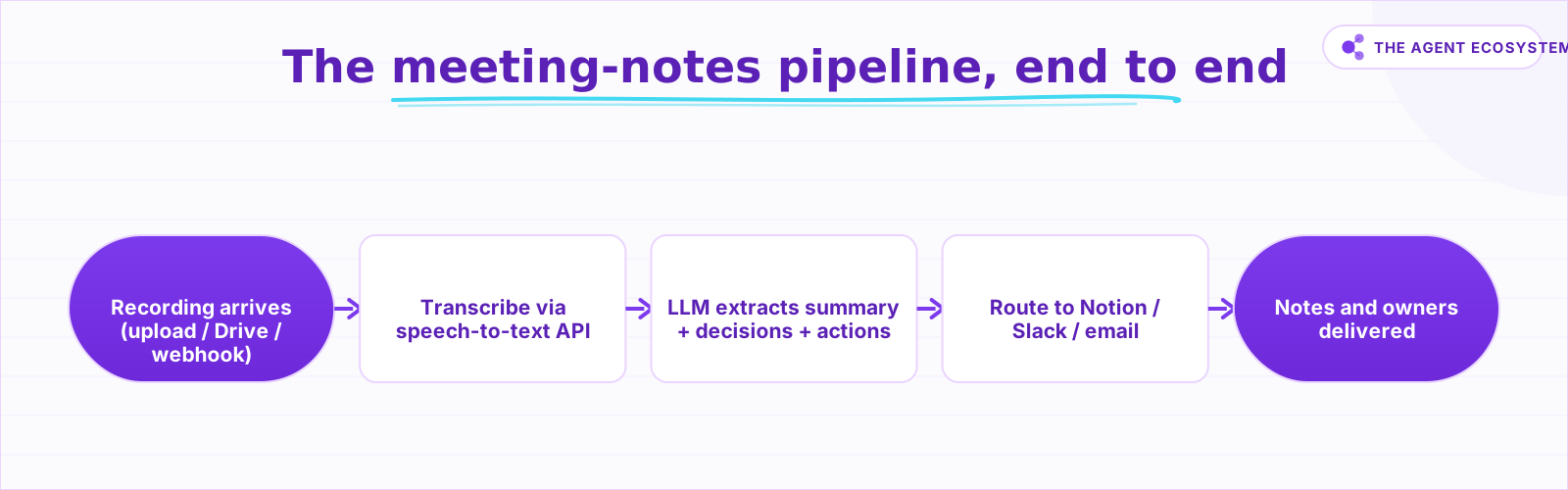 Audio in through the trigger, transcript from the speech-to-text call, typed notes from the LLM, then a fan-out to your tools.
The shape matters more than the specific nodes. Your trigger can be a Webhook that a meeting bot posts to, an n8n Form Trigger for manual uploads, or a Google Drive Trigger that fires when a new recording lands. The transcription step is a single HTTP Request node that posts the audio to a speech-to-text API. The extraction step is one LLM call. The routing step fans out to Notion, Slack, and email. Keep those 4 stages separate and you can test each one in isolation with pinned data.
How do you build the workflow step by step?#
Build it in four moves that mirror the pipeline: capture the audio as binary, transcribe it (splitting the file if it is large), extract structured notes with an LLM that returns JSON, and route the typed result to your tools. Get the data shape right at each boundary and the destinations stop needing fragile parsing.
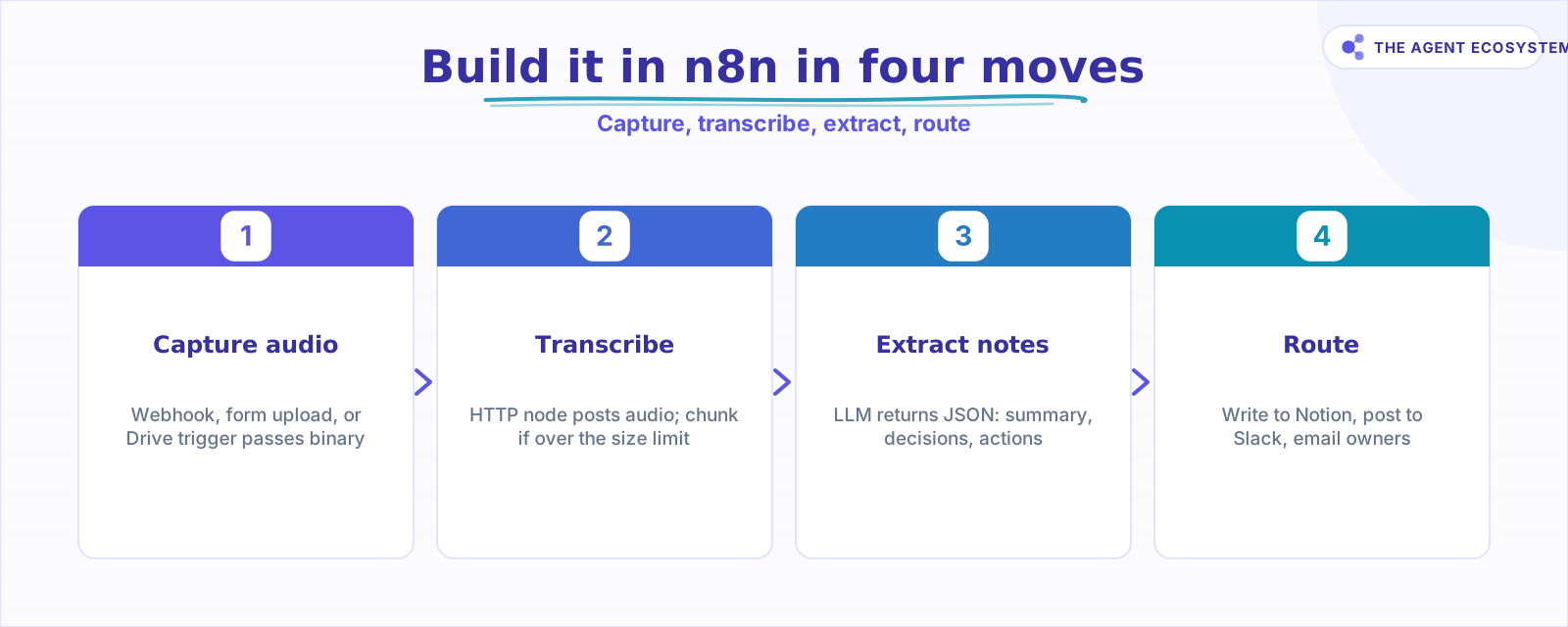 Each node hands clean data to the next: binary audio, then transcript text, then typed JSON, then routed records.
Start with capture. Your trigger passes the recording through as binary data so the next node can send it without a lossy round-trip. In the transcription node, an HTTP Request posts that binary to the API's audio endpoint. If the file is too big, split it before this node and loop the parts, then concatenate the returned text in original order. For extraction, prompt the LLM to emit JSON only: a summary string, a decisions array, and an action_items array where each item carries a task, an owner, and a due_date. Forcing a schema here is the whole game, and our walkthrough of structured output in n8n covers how to pin the model to a fixed shape so a Notion node reads action_items[0].owner every time instead of guessing at prose.
What are the gotchas nobody warns you about?#
Four things break naive builds on real recordings: the transcription file-size limit, the lack of speaker labels, per-minute cost that a demo clip hides, and the consent question that comes with sending audio off your machine. None of these is an edge case. Every one of them will surface the first time you feed the workflow a genuine 60-minute call.
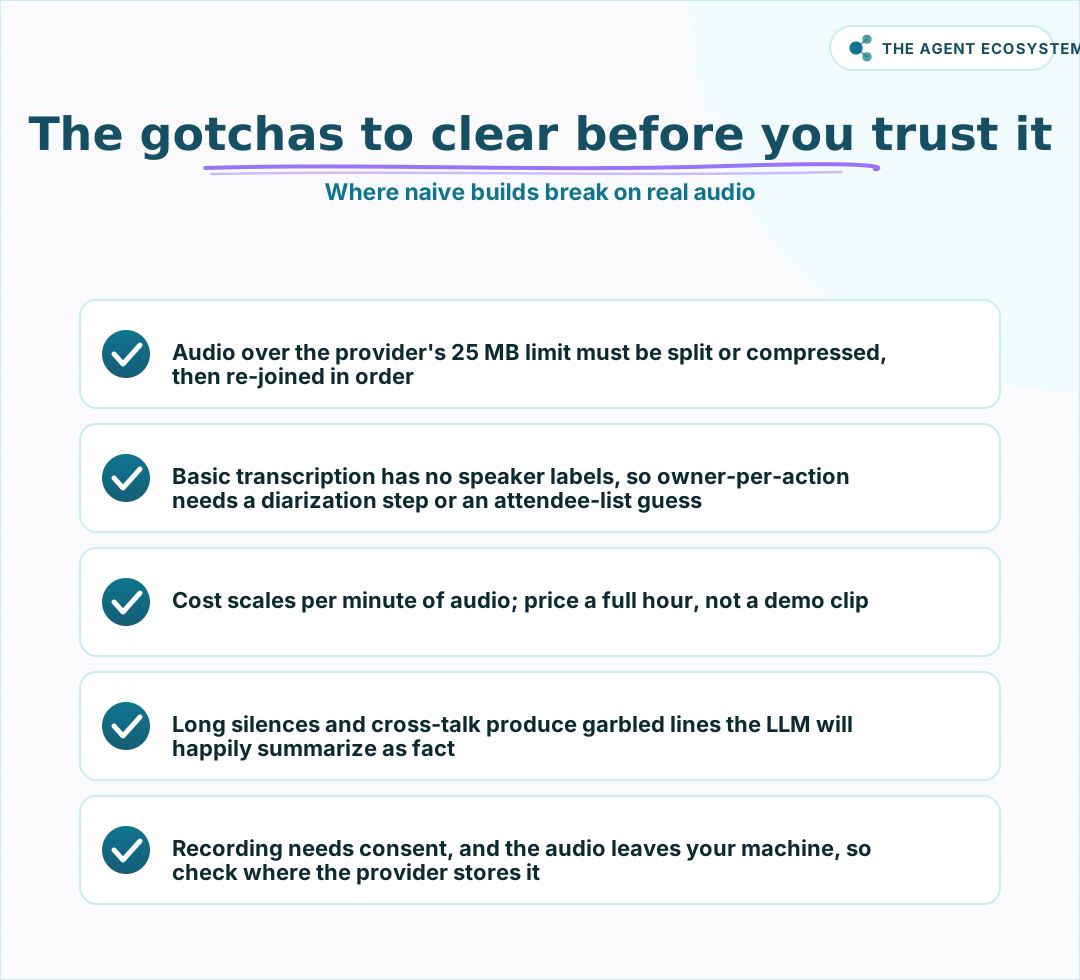 None of these are edge cases; every one of them will bite a real recording if you skip it.
Take them in order. OpenAI's transcription endpoint has historically rejected audio over 25 MB, so a long recording must be split into smaller clips or compressed to a lower bitrate before you send it, then stitched back in sequence (verify the current limit on the live docs before you build). Basic Whisper transcription returns one flat transcript with zero speaker labels, so it cannot tell you who owns an action item on its own. Cost scales per minute of audio, which a 30-second demo hides completely. And the recording is sensitive: it leaves your machine for a third-party API, so consent to record and to process externally is not optional. A good n8n summarization pattern helps on the extraction side, but it cannot rescue a transcript that was garbled by cross-talk in the first place.
What does it actually cost per meeting?#
Cost has two parts: transcription billed per minute of audio, and the LLM summary billed per token. Modeled at a published rate of $0.006 per audio minute, a 60-minute meeting costs about $0.36 to transcribe. The summary adds a few cents on top. Treat both numbers as reproducible math to redo against current pricing, not fixed truth.
Here is the modeled math laid out so you can swap in your own rates. The transcription figure is a straight multiplication: minutes of audio times the per-minute price. The LLM figure depends on transcript length, since a spoken hour is roughly 8,000 to 10,000 words, which lands near 12,000 tokens of input.
| Input | Modeled value | How it is derived |
|---|---|---|
| Audio length | 60 min | One typical meeting |
| Transcription rate | $0.006 / min | Published per-minute price (verify) |
| Transcription cost | $0.36 | 60 x $0.006, modeled |
| Transcript size | ~12,000 tokens | ~9,000 spoken words, modeled |
| LLM summary cost | a few cents | Input tokens x model rate (verify) |
The point of the table is not the exact figure, since prices in this space change often. The point is that the dominant cost is audio minutes, not the summary, so if you want to cut spend you compress or trim the recording before transcription rather than shrinking the prompt. Re-run the multiplication with this week's published rates before you promise anyone a monthly number.
Scale it and the shape holds. At 20 meetings a week of 60 minutes each, that is 1,200 audio minutes, or about $7.20 per week in transcription at the modeled $0.006 rate, plus a dollar or two of summary tokens. The recording length, not the number of meetings, is the lever, so a 30-minute cap on calls roughly halves the bill before you touch anything else in the workflow.
Should you build it in n8n or use an off-the-shelf notetaker?#
Build in n8n when you need custom routing into your own tools and want control over where the audio goes; reach for a hosted notetaker when default notes and auto-joining are enough and you accept a vendor seeing the audio. The deciding factors are routing control, data path, and whether owners on action items have to be reliable.
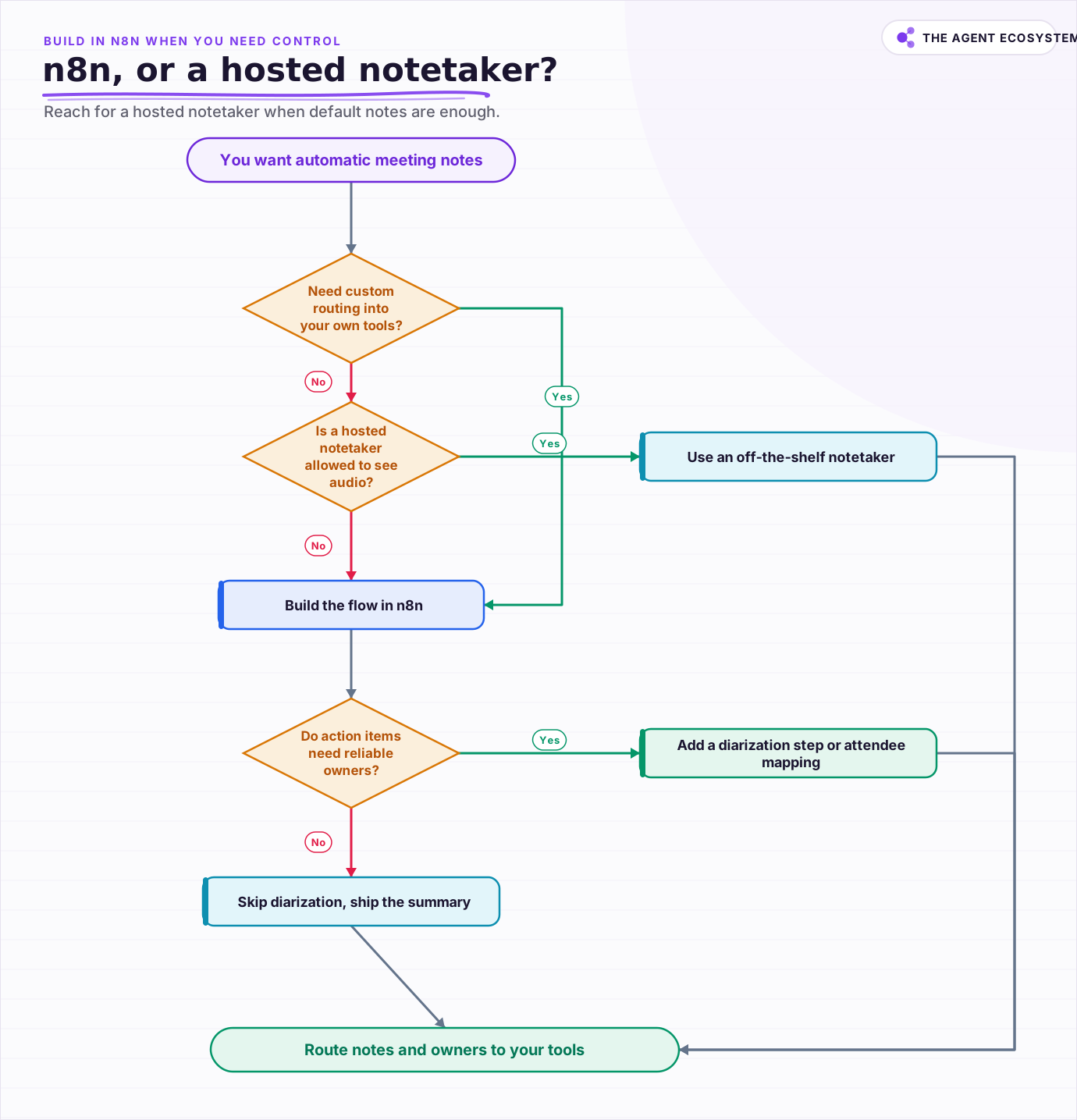 Build in n8n when you need custom routing and control the data path; reach for a hosted notetaker when default notes and joining are enough.
A hosted notetaker joins the call, records, and drops a summary in one product, which is genuinely less work if its defaults fit. The n8n route wins on two axes: you decide exactly which fields land in Notion versus Slack versus email, and you control the data path, so a self-hosted transcription model can keep audio inside your network. The honest trade is that you own the maintenance, including the chunking logic and the diarization gap.
There is a middle path worth naming. You can let a notetaker handle capture and transcription, then trigger your n8n flow on its finished transcript, so you skip the file-size and audio-handling work but still own the extraction schema and the routing. That splits the 4 stages between two systems, which is a reasonable compromise when the audio itself is not sensitive but the routing has to be exact. Pick the notetaker when convenience rules, build the flow when routing and the data path are the point, and split them when only one of those constraints is hard.
Frequently asked questions
How do I automate meeting notes in n8n?
What is the file size limit for Whisper transcription?
Does Whisper identify who said what?
How much does an AI meeting-notes workflow cost per meeting?
Is it legal to record and transcribe meetings with an AI tool?
Sources
Primary references and vendor documentation used while drafting and reviewing this article.
- OpenAI speech-to-text guide (transcription, 25 MB file limit, chunking guidance)
- OpenAI API pricing (audio transcription per-minute and model token rates)
- n8n HTTP Request node docs (posting binary data to an API)
- n8n Notion node docs (create pages and database items)
- n8n Slack node docs (post a message to a channel)
Written by

Muhammad Qasim Hammad is an AI agent and automation expert and the founder of Cart Gaze LLC (cartgaze.com). He builds product for the love of it: when an idea lands, a working prototype is usually running within hours, built with the same AI agents and automations he sells. He puts his own output at roughly 20× what it was before agents, and the Agentic OS behind this site is the working proof, documented in public with the tools he actually ran and what they really cost.
AI & Automation Services
Want a pipeline like this running in your business?
I'm Qasim — I design and ship AI agents and n8n automations for solo operators and small teams. Tell me what's eating your team's week, and I'll scope a fix.
Related reading
n8n AI Automation Ideas: 8 Agent Workflows Worth Building (2026)
Finished the n8n AI tutorial and wondering what to actually build? These 8 n8n AI automation ideas come with the exact nodes, the honest Chain-vs-Agent call, and the right Claude model for each job.

What Is an AI Agent? A Plain-English Guide for Builders
An AI agent is a language model running in a loop that decides its own next action, not a chatbot and not a chain. Here is how the perceive-decide-act-observe loop works, how an agent differs from a chatbot, chain, and workflow, and a checklist for when you actually need one.
How to Build a Voice AI Agent in n8n With Twilio Phone Calls
A phone call is not one webhook and one reply. Twilio asks n8n for TwiML instructions after every turn, and the AI Agent node's job is generating what to say next inside that loop. Here is how the turn-by-turn pattern works, the gotchas that drop calls, and when plain n8n stops
Summarize Long Documents in n8n with the AI Summarization Chain
Use the n8n Summarization Chain node to automatically condense transcripts, PDFs, and long articles into one-paragraph summaries. Costs $0.85 per 100 documents on Claude Haiku 4.5, with three method options for any document length.
How to Build an AI Agent: The 80% That Survives Week Two
Most tutorials get you a working agent in ten minutes and skip what breaks it in week two. Sixteen lessons covering the loop, tool descriptions, memory, fallbacks, guardrails, evaluation, and the cost levers that decide your bill.
n8n AI Agent Pricing: What It Really Costs to Run
An n8n AI agent has two bills that behave nothing alike: a flat n8n platform fee and a per-run LLM token cost. Here is what each one comes to, with modeled per-run math across Claude, GPT, and Gemini, and the levers that actually lower the total.