Which Customer Is Costing Me Tokens? Attribute AI Spend
Why provider dashboards cannot split the bill by customer, and the five-step ledger that can.
AI-drafted, reviewed by Muhammad Qasim Hammad on October 26, 2026. See our AI disclosure.
Table of contents
- Why can't your provider dashboard show cost per customer?
- What do the provider user fields actually do?
- How do you build the attribution ledger?
- Why does one agent run cost more than you think?
- What breaks the numbers once you have them?
- How do you turn the ledger into a budget cap?
- What should you set up this week?
Your provider bill arrived bigger than last month, and the question that decides what to do next is which customer is costing you tokens. You know the total. You do not know which of your eleven customers caused it, whether the two heaviest accounts are profitable, or what to quote the next one. AI agent cost attribution is the practice of tying every token an agent spends back to the customer it was spent on, and it is something you build rather than something you switch on.
Why can't your provider dashboard show cost per customer?#
Because the dashboard groups spend by API key, and your customers are not API keys. One key usually serves every tenant, so the provider sees one caller making many calls. Splitting that total by customer requires context only your application holds, which is why attribution starts in your code.
You could issue one API key per customer. It works, and it stops working quickly: keys become an operational burden, rate limits fragment across them, and prompt caching gets worse because your cached prefix is no longer shared. Most teams abandon this by the third or fourth customer.
The workable options come down to three, and they differ less in capability than in where the work lives.
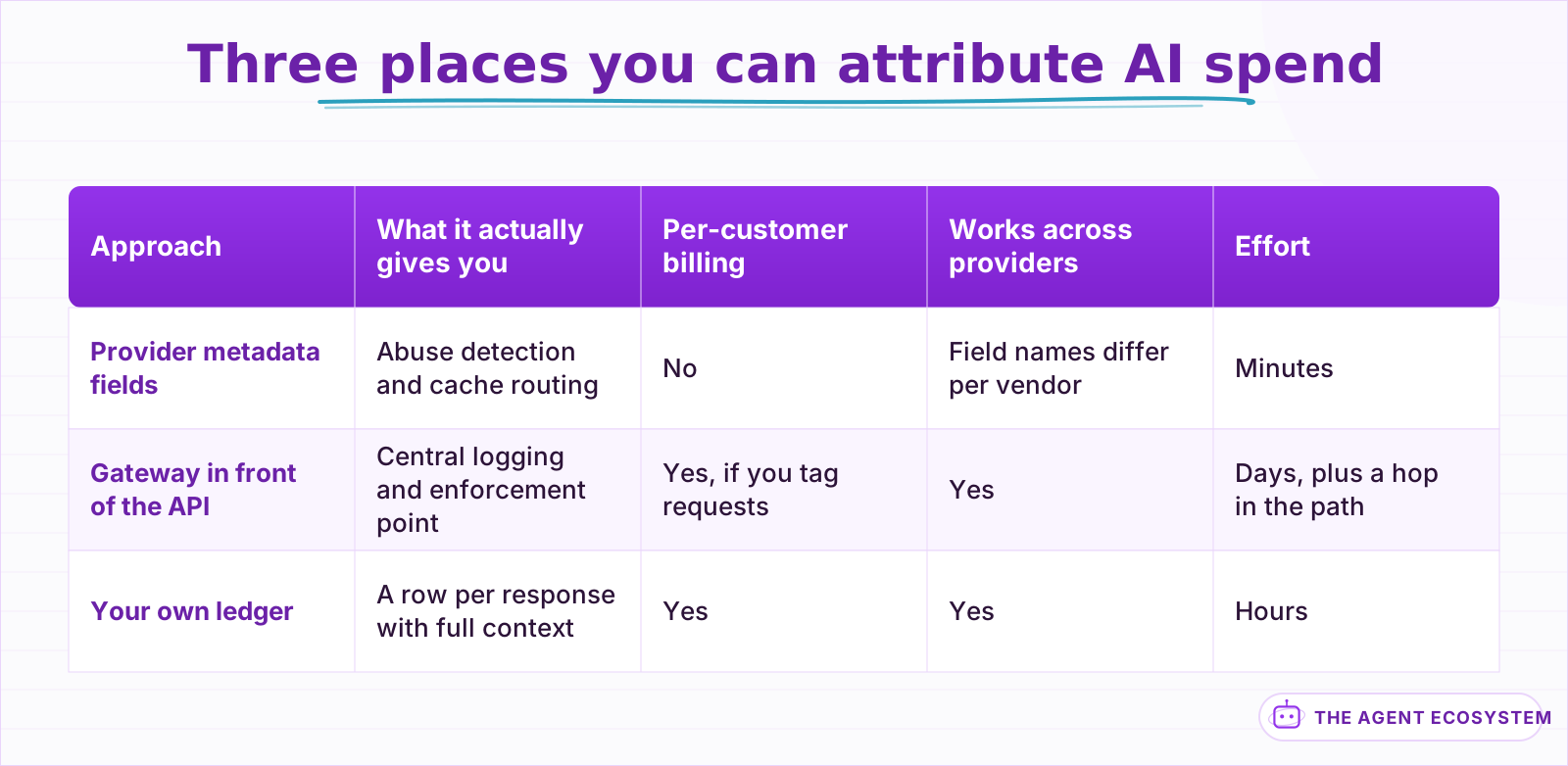 Only one of the three produces a per-customer number. The other two are worth having for different reasons.
What do the provider user fields actually do?#
They identify users for safety and caching, not for billing. Anthropic's metadata.user_id helps Anthropic detect abuse. OpenAI retired its user parameter and split it into safety_identifier for abuse detection and prompt_cache_key for cache routing. Set them for those reasons. Neither one produces a per-customer invoice line.
This is the assumption worth killing early, because the field names invite it. Anthropic's documentation describes user_id as "an external identifier for the user who is associated with the request" and says it "should be a uuid, hash value, or other opaque identifier" that "Anthropic may use to help detect abuse". The docs also tell you not to put a name, email, or phone number in it. Nothing there promises a report.
OpenAI's split makes the same point more explicitly. Once user became two fields with two stated jobs, neither of which is billing, the answer stopped being ambiguous.
So set them, for the reasons the vendors give. Then build the ledger anyway.
If you already route calls through a gateway, you have a shortcut worth taking. A gateway sits in the request path and can log every call centrally, which means attribution becomes a matter of tagging outbound requests with your customer id rather than instrumenting each call site. The tradeoff is a hop you now own: when the gateway is slow, your agent is slow, and when it is down, your agent is down. That is a reasonable trade for a team already running one, and a poor reason to introduce one.
How do you build the attribution ledger?#
Mint one run id when work starts, carry it through every model call, and write a row per response recording the customer, the run, the model, and the token counts the response returns. Aggregate rows into runs, then runs into customers. The ledger is five short steps, not a platform.
The response object is the primitive here, not the dashboard. Every call returns its own usage counts, which means the authoritative number is available in your process at the moment you have full context about who asked for it. That is the only moment where both facts exist together, so that is where the row gets written.
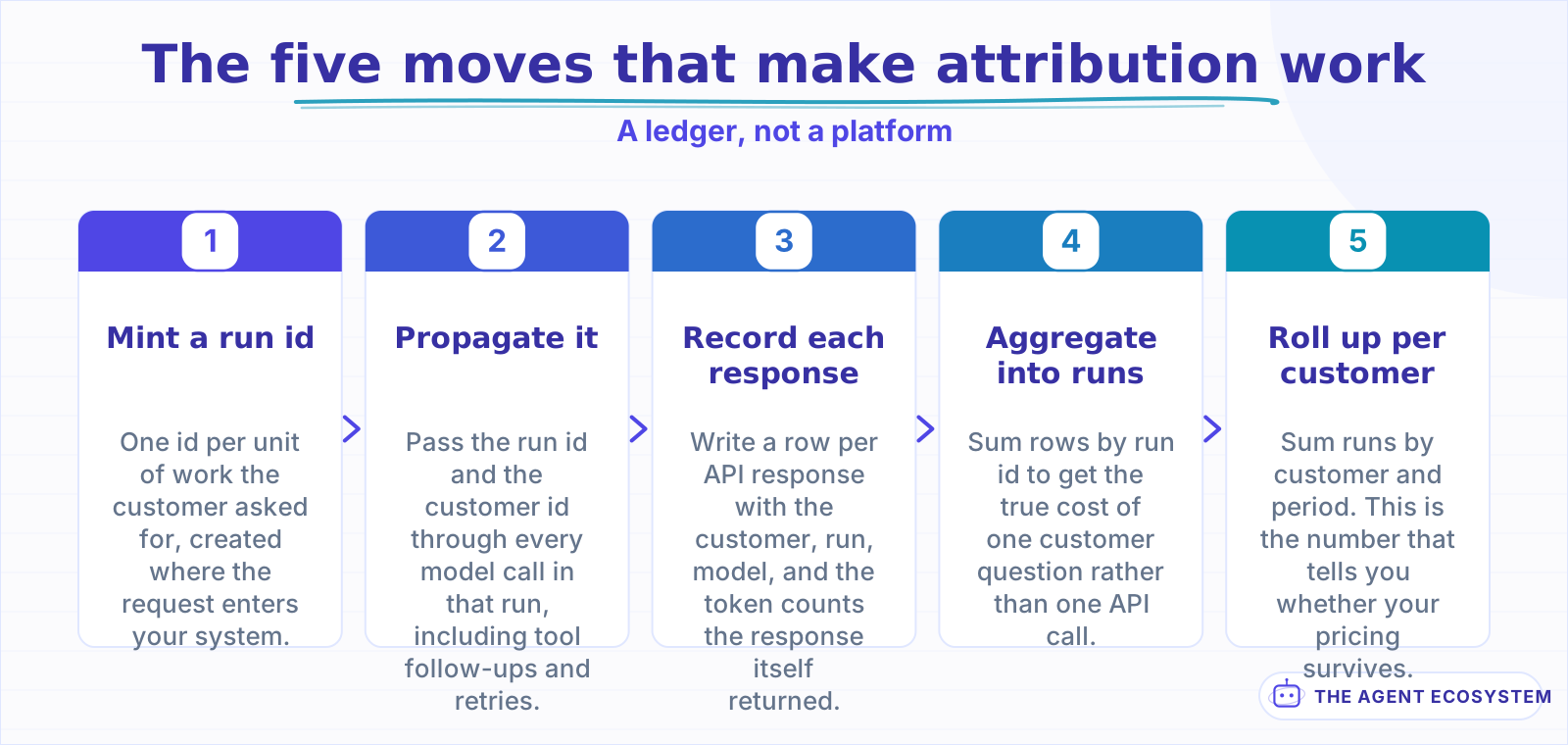 The run id is minted once at the top and threaded down. Regenerating it inside a helper turns one run into several.
The row itself stays small. Six columns cover almost every question you will ask of it later:
| Column | Why it earns its place |
|---|---|
customer_id | The thing you are actually attributing to |
run_id | Groups calls into the unit the customer perceives |
model | Fallbacks and downgrades change the price, so never assume it |
prompt_tokens / output_tokens | Straight from the response, not estimated |
cached_tokens | Priced differently, so it cannot live inside prompt tokens |
status | Distinguishes a completed call from one that failed after spending |
Resist adding a price column. Prices change, and a stored price freezes yesterday's rate into a row you will read next quarter. Store tokens, which are a fact, and apply rates at query time, which keeps history honest when a provider repricing lands.
Two details decide whether this survives contact with a real agent. The run id has to be minted once at the top and threaded down, not regenerated inside each helper, or one agent run becomes six unrelated runs. And the write has to happen on every response including failures, because a call that errored after consuming input tokens still cost money.
Where the write goes matters less than people expect. A table in the database you already run is enough for the first year. The mistake is making the write synchronous and blocking on the request path: buffer it, and accept that a crash may lose a few rows rather than letting the ledger take your product down.
Why does one agent run cost more than you think?#
Because a run is rarely one call. A planning call, a call per tool result, and a synthesis call are three round trips, and each one re-sends the system prompt and the conversation so far. Charging per user message while paying per call is how flat pricing quietly goes underwater.
Take a modeled example. A 1,200 token system prompt, a three call run, and a conversation that grows by roughly 400 tokens per turn:
| Call | What it does | Prompt tokens (modeled) | Output tokens (modeled) |
|---|---|---|---|
| 1 | Plan, choose a tool | 1,200 | 150 |
| 2 | Read tool result, decide | 1,750 | 200 |
| 3 | Synthesise the answer | 2,350 | 400 |
| Run total | one user question | 5,300 | 750 |
That is 5,300 prompt tokens for a question the user experienced as one message. The arithmetic is modeled rather than measured, and the ratio is the part that matters: prompt tokens dominate, and they scale with how chatty your agent is, not with how much the customer asked for.
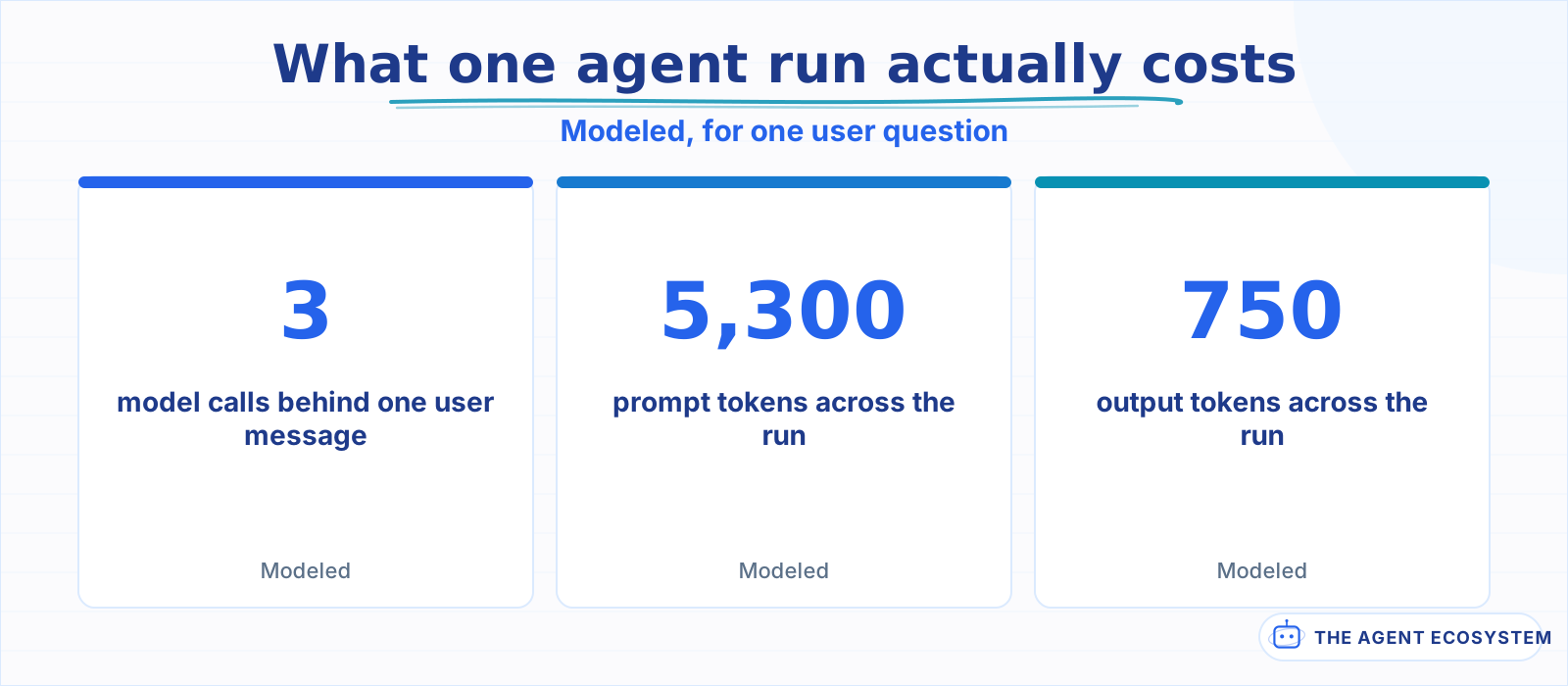 Modeled token arithmetic for a 1,200 token system prompt over a three call run, not a measurement. The ratio is the point: prompt tokens dominate.
Streaming does not change any of this, which surprises people. A streamed response still reports its usage counts when it completes, so the ledger row is written at the end of the stream rather than at the start. What does change is your error handling: if the connection drops mid-stream, you have consumed prompt tokens and produced partial output, and a naive implementation records neither. Write the row from whatever the stream did report, and mark the status.
Two customers sending the same number of messages can differ several times over in cost, because one triggers tools and the other does not. That gap is invisible until the ledger exists, and it is usually where the margin went. If you have not costed a single run yet, the token math walkthrough is the place to start, and the seven cost levers covers what to do once you can see the numbers.
What breaks the numbers once you have them?#
Four things, mostly by omission. Cached input is priced differently from fresh input. Retries cost money and often go unrecorded. A fallback model bills at its own rate, not the primary's. Failed runs still consumed tokens. A ledger that ignores these reports a number that is reliably too low.
The fallback case catches people out most often. If your agent drops to a second provider when the first one rate limits, as in the multi-model fallback pattern, those tokens are priced by whoever actually served the request. Recording the model name on every row, rather than assuming the primary, is what makes that correct later.
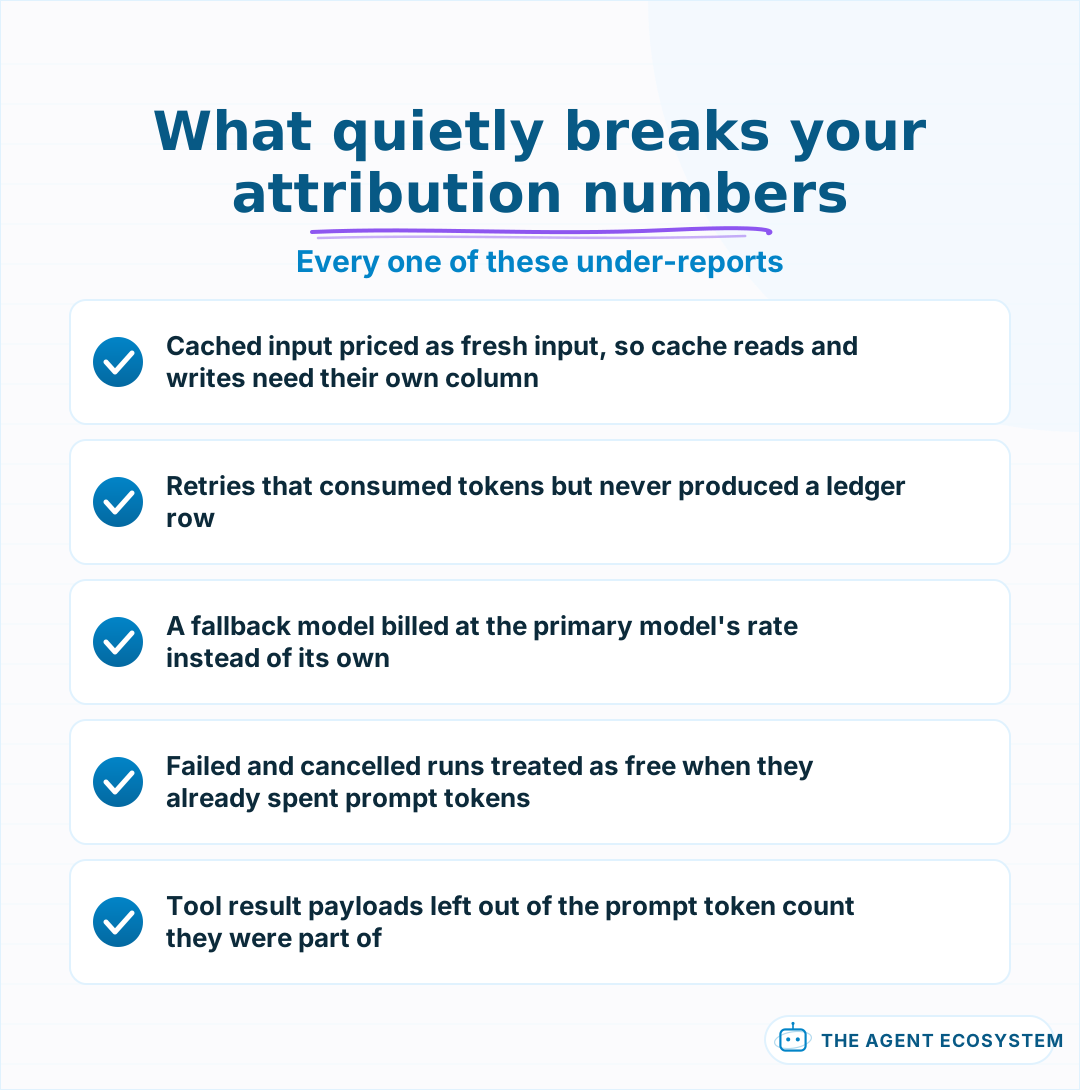 Each of these makes the ledger report less than the invoice, which is the direction that flatters you.
Cached tokens deserve their own column rather than being folded into input. Cache writes and cache reads carry different prices from uncached input, so summing input plus output across a cache heavy workload produces a number that is wrong in both directions at once.
How do you turn the ledger into a budget cap?#
Once every run has a cost, a per-customer cap becomes a lookup and a comparison before the next call. Sum the period to date, compare against the plan's ceiling, and refuse or downgrade past it. The cap has to fail closed, because a cap that errors open is not a cap.
Downgrading usually beats refusing. A customer who hits their ceiling and gets a smaller, cheaper model still gets an answer, and you still get paid. A customer who hits their ceiling and gets an error opens a support ticket. Both protect the margin; only one of them keeps the account.
Check the cap before the run, not after each call. Checking mid-run leaves you having paid for a plan step and a tool call before abandoning the work, which is the worst of both outcomes. Checking up front costs one cheap lookup and either commits to the whole run or declines it cleanly.
One caveat worth stating plainly: a cap built on a ledger that under-reports will let accounts through that should have been stopped. Get the omissions in the checklist above right first, then turn on enforcement. A cap you cannot trust is worse than no cap, because it invites you to stop watching.
What should you set up this week?#
Add the run id and the usage write before you add anything else. One table with customer, run, model, and token counts answers the margin question within a week of real traffic. Dashboards, alerts and per-customer budget caps are all easier once the rows exist.
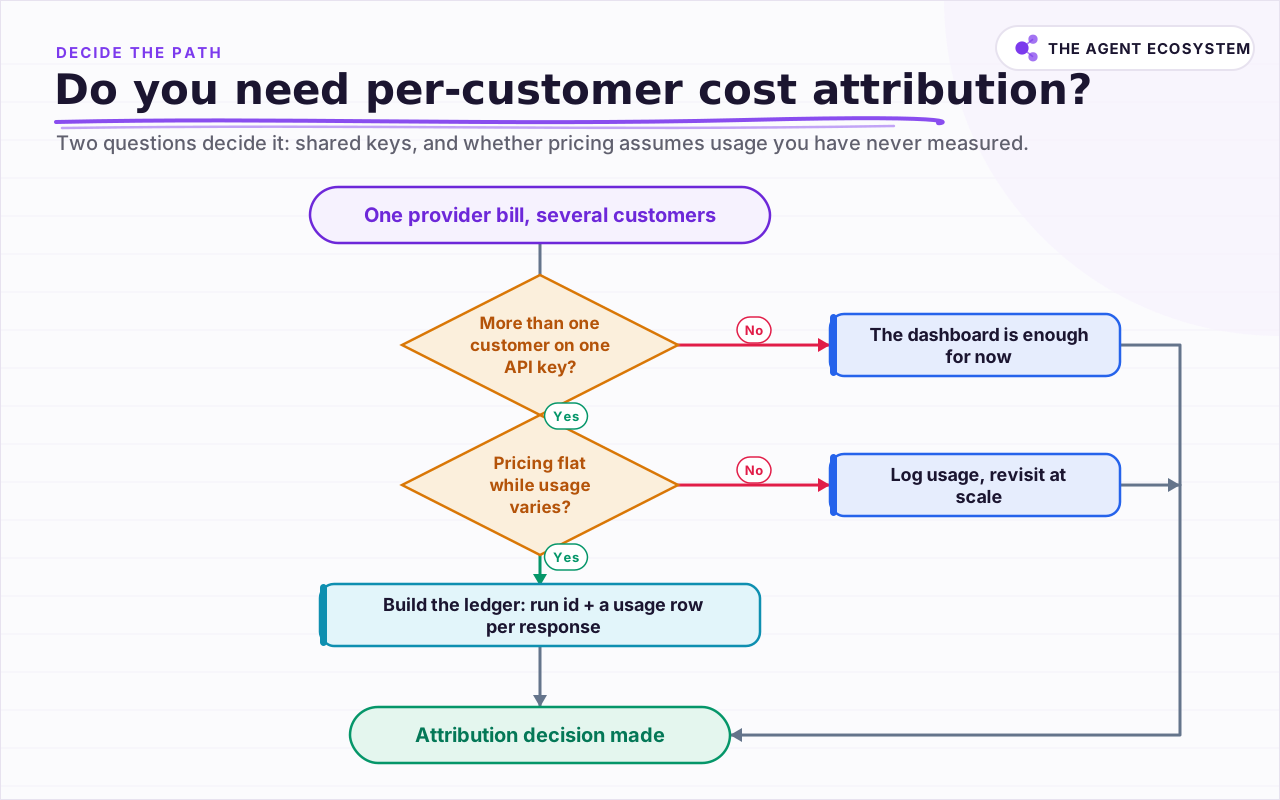 Two questions decide it: whether one key serves many customers, and whether your pricing assumes usage that your data has never confirmed.
Start by instrumenting the single most expensive workflow you run rather than all of them. One week of honest rows from one workflow will tell you more than a quarter of estimates. Once the rows exist, the same data answers the next three questions you will have: which customers to reprice, which workflows to optimise, and whether moving part of the load to a self hosted model would actually pay off. If you are still choosing a provider, the current price comparison and what agents really cost to run are the two numbers to have in hand. And once you are recording usage per call, you are most of the way to proper tracing, which is the same instrumentation viewed through a different lens.
Frequently asked questions
What is AI agent cost attribution?
Can I use Anthropic's metadata.user_id for billing?
What replaced OpenAI's user parameter?
Should I give every customer their own API key instead?
Why is my agent more expensive than my token estimate?
Sources
Primary references and vendor documentation used while drafting and reviewing this article.
Written by

Muhammad Qasim Hammad is an AI agent and automation expert and the founder of Cart Gaze LLC (cartgaze.com). He builds product for the love of it: when an idea lands, a working prototype is usually running within hours, built with the same AI agents and automations he sells. He puts his own output at roughly 20× what it was before agents, and the Agentic OS behind this site is the working proof, documented in public with the tools he actually ran and what they really cost.
AI & Automation Services
Want a pipeline like this running in your business?
I'm Qasim — I design and ship AI agents and n8n automations for solo operators and small teams. Tell me what's eating your team's week, and I'll scope a fix.
Related reading
AI Agent Observability: Tracing, Metrics, and Cost in Production
Your agent gave a wrong answer and you have no idea where it broke. Observability captures the run (every LLM call, tool call, prompt, and cost) so you can replay it and point at the exact failing step. Here are the three pillars, what to log per step, and when a dedicated tool

n8n AI Agent Pricing: What It Really Costs to Run
An n8n AI agent has two bills that behave nothing alike: a flat n8n platform fee and a per-run LLM token cost. Here is what each one comes to, with modeled per-run math across Claude, GPT, and Gemini, and the levers that actually lower the total.
LLM Cost Per User Per Month: The Number That Misleads
Your provider bill is one number and your pricing page charges per seat. The arithmetic connecting them is usually done once, with an average, and the average describes a user who does not exist.
Cut Your AI API Bill: 7 Levers That Actually Work
To reduce AI API costs you need levers that change the bill by a verifiable mechanism, not vague advice. This hub names all seven, right-size the model, prompt caching, the Batch API, routing and fallback, local versus API, token discipline, and RAG over long-context, with a
AI Agent Identity: Why a Shared API Key Doesn't Scale
When an agent calls a tool on a user's behalf, most systems today can only see the agent, not the person. Here is what RFC 8693 token exchange and the newly shipped ID-JAG pattern actually do about that, and why a single shared credential stops working the moment more than one
How to Build an AI Agent: The 80% That Survives Week Two
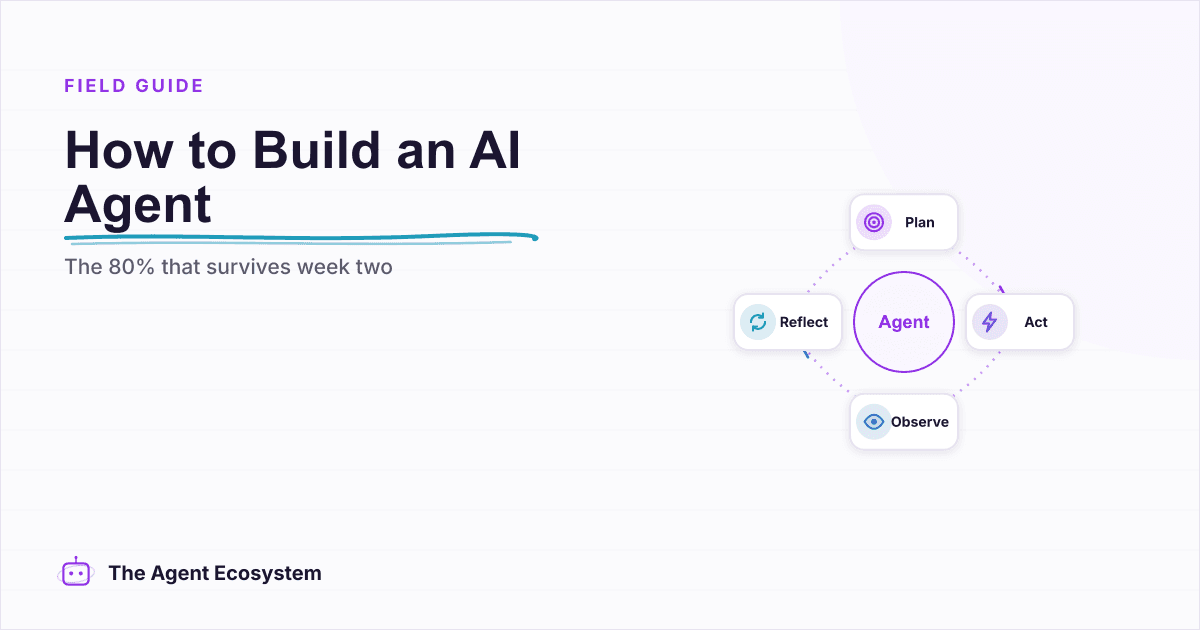
Most tutorials get you a working agent in ten minutes and skip what breaks it in week two. Sixteen lessons covering the loop, tool descriptions, memory, fallbacks, guardrails, evaluation, and the cost levers that decide your bill.