LLM Cost Per User Per Month: The Number That Misleads
Four terms multiplied, then read at the 90th percentile instead of the mean, because usage is long tailed and per seat plans are not.
AI-drafted, reviewed by Muhammad Qasim Hammad on September 11, 2026. See our AI disclosure.
Table of contents
Your provider bill is one number and your pricing page charges per seat. Working out LLM cost per user per month is the arithmetic that connects them, and most teams do it once, using an average, and get it wrong. The mistake is rarely in the rate card. It is in assuming users are interchangeable, when the top 5 percent of them routinely cost more than the bottom half combined.
What actually drives LLM cost per user per month?#
Four numbers multiplied together. Tokens per call, calls per active session, sessions per user per month, and the blended rate you pay per token. Every cost surprise traces back to one of the four being estimated from a demo rather than measured, and the middle two move the most.
Write it as a chain rather than a lump sum, because a lump sum cannot be debugged. When the bill doubles, a chain tells you which link moved. A single blended number tells you only that something did, which is how teams end up switching models to solve a problem that was actually 3 extra retrieval calls per turn.
The blended rate deserves its own note. Input and output tokens are priced differently by every provider, usually with output several times more expensive, so a workload's blend matters more than any single headline rate. A summarizer that reads 4,000 tokens and writes 200 behaves nothing like a drafting tool that reads 500 and writes 1,500, even on identical pricing.
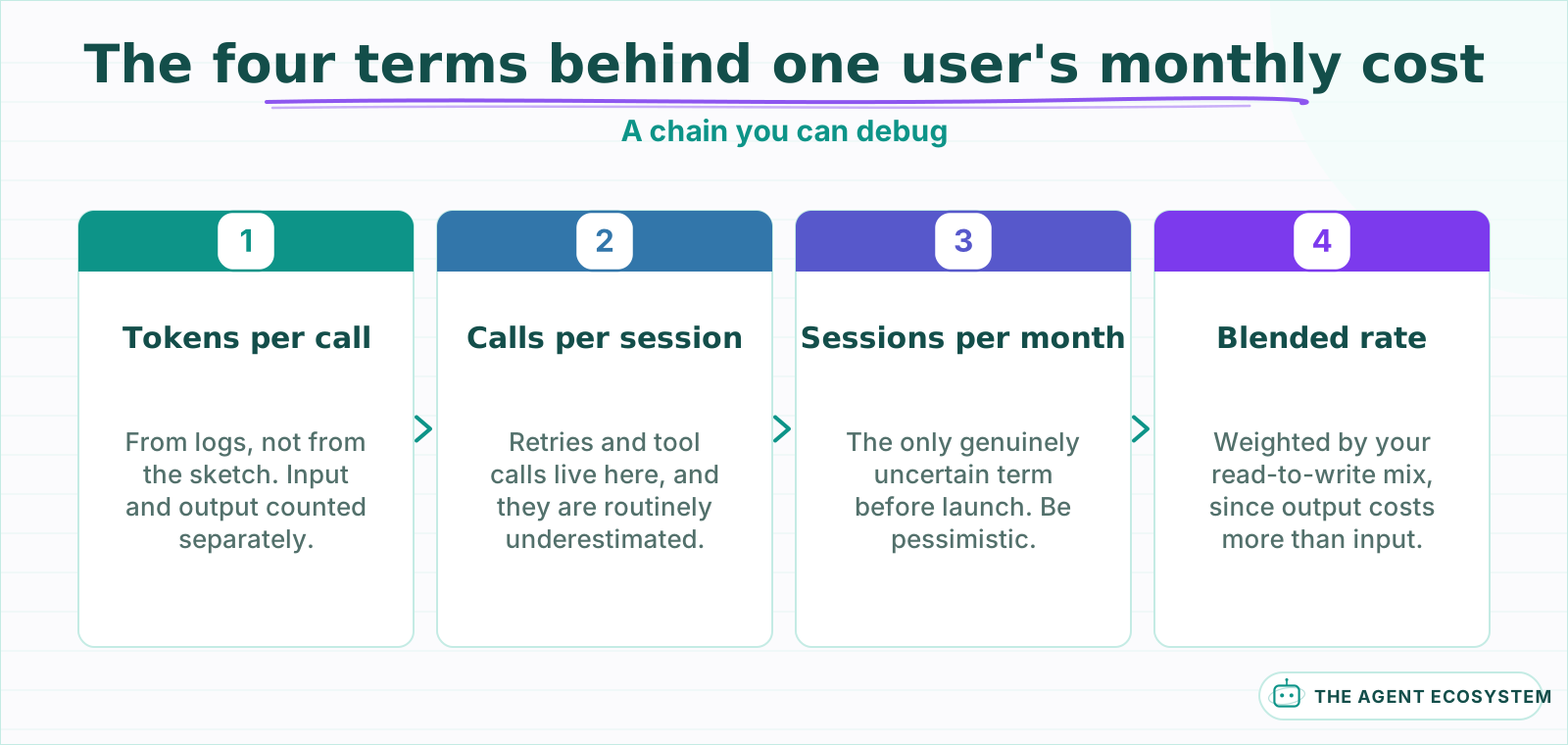 Keep them separate. A single blended figure tells you the bill moved but never which term moved it.
Keep the chain in the units you can actually measure. Tokens per call comes from your logs. Calls per session is a product decision you already made. Sessions per month is the only genuinely uncertain term before launch, and it is the one worth being pessimistic about.
Why does the average cost per user mislead you?#
Because usage is long tailed and an average assumes it is not. In most tools a small group of users generates a large share of activity, so the mean sits well above the median and well below the users who will actually hurt you. Pricing on the mean prices for a user who does not exist.
The shape is consistent enough to plan around. A median user does something modest, the 90th percentile does several times that, and the 99th percentile does something that looks like a mistake until you check and find it is a power user with a legitimate workflow. On a per seat price, that last group is subsidised by everyone else.
| Percentile | Typical read | What it tells you |
|---|---|---|
| Median | What most users cost | The number that should not scare you |
| 75th | Mild heavy use | Whether the plan has any headroom |
| 90th | Real heavy use | The number to price against |
| 99th | Power user or a loop | Whether one account can break the month |
Price against the 90th percentile and cap or meter above it. That single change converts a per seat plan from a bet on user mix into a bounded cost, and it is far less work than the model swap people usually reach for instead.
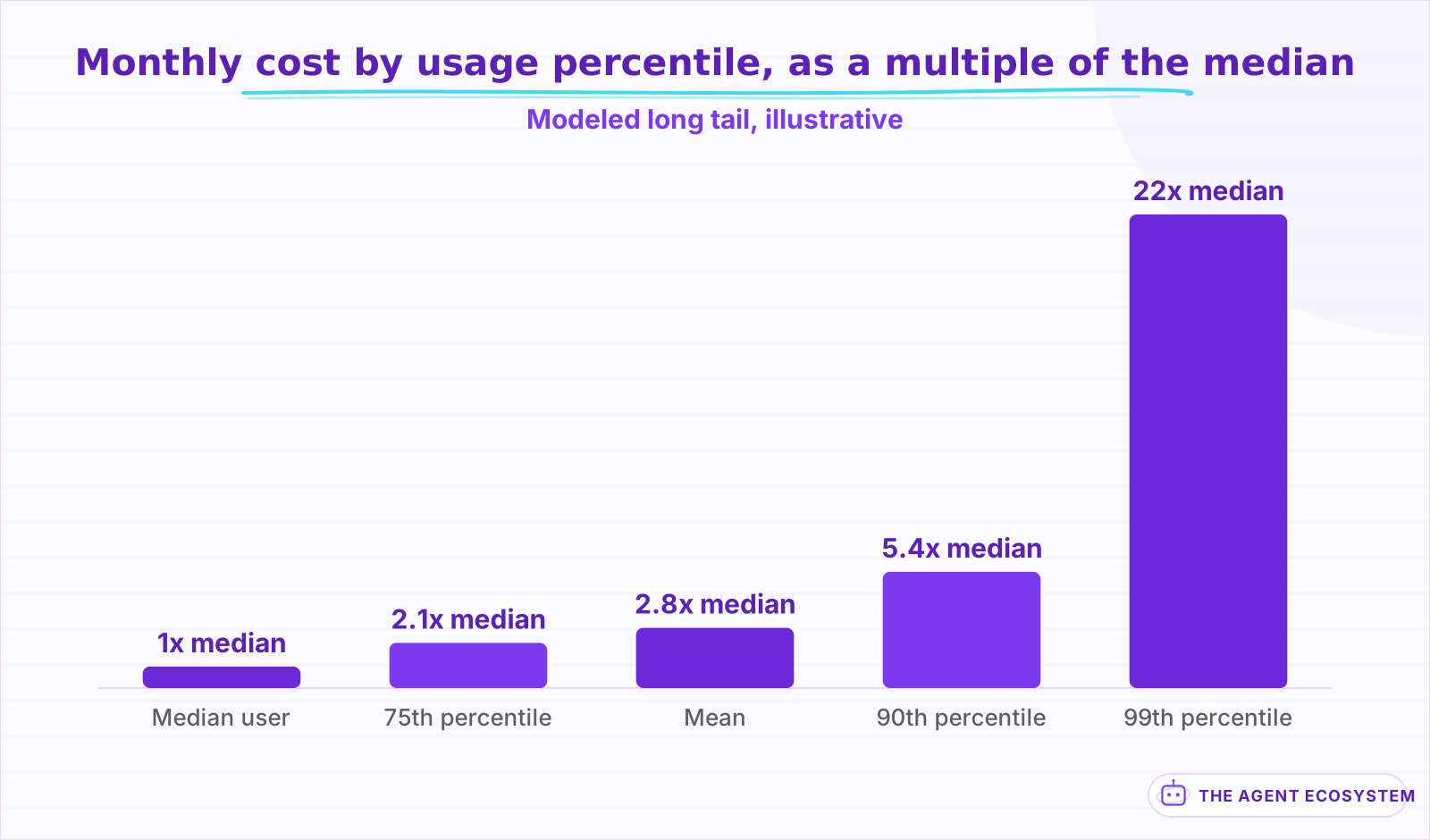 Modeled shape, not measured data. The point is the ratio between the bars, which is why a mean prices for nobody.
The 99th percentile is worth inspecting by hand rather than by formula. Roughly half the time it is a genuine power user you would like to keep and should probably move to a different plan. The other half it is a retry loop, a stuck agent, or an integration polling something, and it is a bug rather than a customer.
How do you estimate the number before you have any users?#
By measuring the one term you can and being deliberately pessimistic about the rest. Run 20 realistic sessions, take the actual tokens per call from the logs rather than from a guess, then multiply by the sessions per month you would consider a successful outcome, not the average you expect.
The instinct is to model the expected case, which produces a number that is right on average and useless for a decision. You are not trying to forecast the bill. You are trying to find out whether a plausible good outcome is affordable, so the input that matters is engaged usage, not average usage.
Two terms are commonly underestimated by a wide margin. Retries and tool calls multiply calls per session in ways nobody writes on the diagram, and an agent that makes 6 tool calls to answer one question costs 6 times what the sketch implied. Working through the token math before launch is a 20 minute exercise that regularly changes a pricing decision.
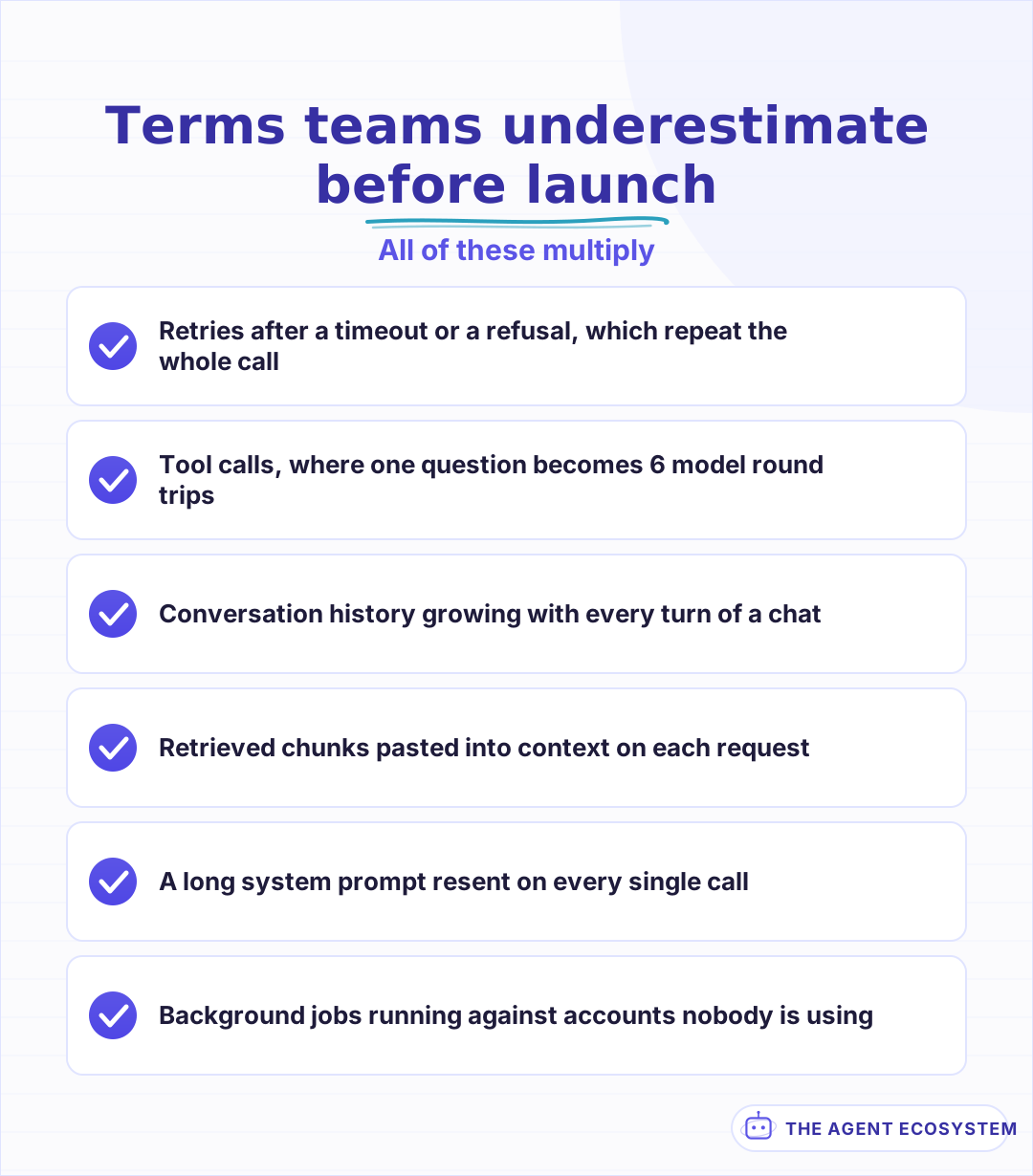 Each one multiplies a term in the chain rather than adding to it, which is why the miss is usually large.
What changes the number most once you are live?#
Caching and context length, in that order, and neither is a model choice. Repeated prefixes such as a long system prompt or a fixed document can be served from a provider cache at a reduced rate, and a workload that reuses context heavily changes shape once caching is on. Context bloat pushes the other way, quietly.
Context is the one that creeps. A conversation that carries its full history grows every turn, so the tenth turn costs several times the first even though the user did the same thing. Trimming or summarising history is the highest leverage cost change available in most chat products, and it is invisible on a per call view.
Model choice matters less than people expect once the chain is written down. Moving a workload to a cheaper model changes one term. Cutting retrieval from 8 chunks to 4, capping history at 10 turns, and turning on caching change three, and none of them alter answer quality in the way a model downgrade can. The other cost levers are worth working through before touching the model.
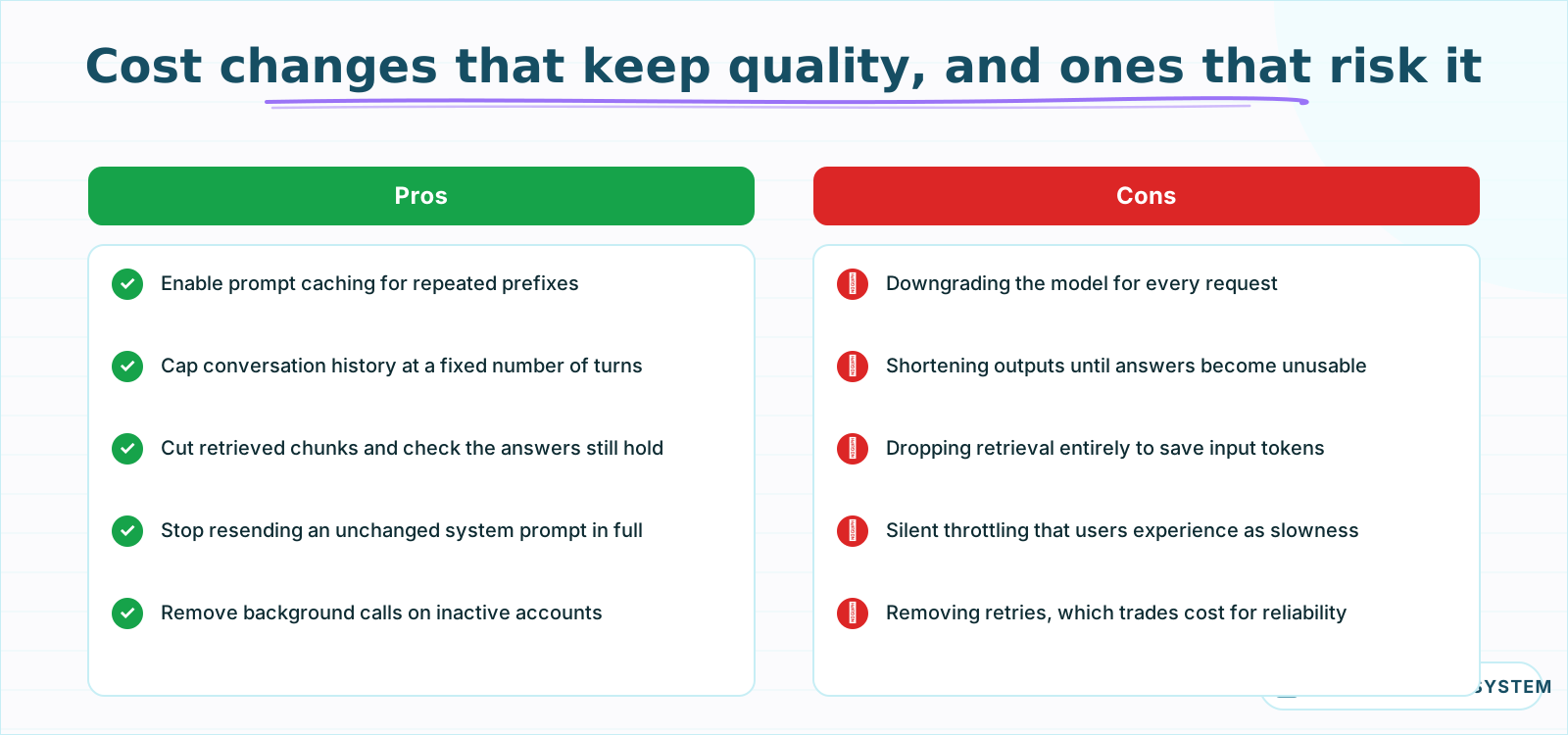 The left column changes three terms in the chain. The right column changes one, and it is the visible one.
When should you cap a user instead of repricing?#
When the expensive accounts are a small minority and the plan works for everyone else. A cap fixes the tail without touching the price that 95 percent of users are happy with, and it converts an unbounded liability into a known one. Repricing everybody to cover a few accounts loses the customers who were never the problem.
Caps are also honest in a way that silent throttling is not. A stated limit, visible in the product, lets a heavy user decide whether to upgrade. An unstated one produces a support ticket about the tool being slow today, and the person answering it has no idea the account hit a ceiling nobody documented.
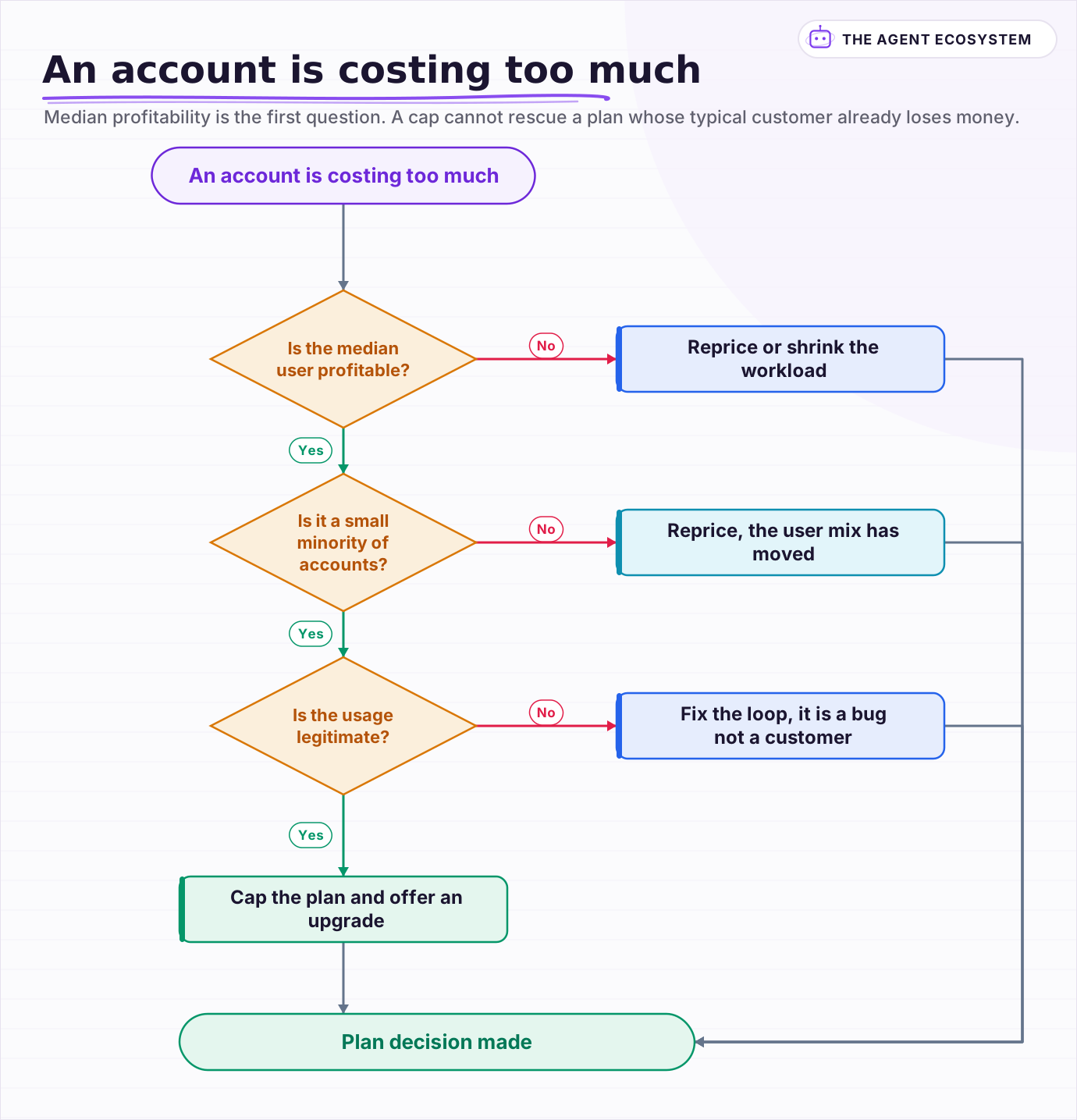 Median profitability is the first question. A cap cannot rescue a plan whose typical customer already loses money.
The case for repricing instead is when the median user is already unprofitable, which is a different problem wearing the same clothes. No cap saves a plan whose typical customer costs more than they pay. That situation calls for a smaller feature, a cheaper workload shape, or a higher price, and finding out which is what the chain above is for.
Frequently asked questions
How do I calculate LLM cost per user per month?
Should I price against the average user or a percentile?
Why is my cost per user higher than my per call estimate suggested?
Does switching to a cheaper model fix cost per user?
When should I cap a heavy user instead of raising prices?
Written by

Muhammad Qasim Hammad is an AI agent and automation expert and the founder of Cart Gaze LLC (cartgaze.com). He builds product for the love of it: when an idea lands, a working prototype is usually running within hours, built with the same AI agents and automations he sells. He puts his own output at roughly 20× what it was before agents, and the Agentic OS behind this site is the working proof, documented in public with the tools he actually ran and what they really cost.
AI & Automation Services
Want a pipeline like this running in your business?
I'm Qasim — I design and ship AI agents and n8n automations for solo operators and small teams. Tell me what's eating your team's week, and I'll scope a fix.
Related reading
Estimate Any LLM Bill Before You Build: Token Math for n8n Builders
A single LLM call costs a fraction of a cent, until you multiply by 10,000 runs a month. Here is the reproducible token math: chars over 4 for tokens, the input and output rates, and the per-run times volume multiply, with one support-reply run priced across five models.

n8n AI Agent Pricing: What It Really Costs to Run
An n8n AI agent has two bills that behave nothing alike: a flat n8n platform fee and a per-run LLM token cost. Here is what each one comes to, with modeled per-run math across Claude, GPT, and Gemini, and the levers that actually lower the total.
Cut Your AI API Bill: 7 Levers That Actually Work
To reduce AI API costs you need levers that change the bill by a verifiable mechanism, not vague advice. This hub names all seven, right-size the model, prompt caching, the Batch API, routing and fallback, local versus API, token discipline, and RAG over long-context, with a
Choosing an LLM for Production: The Decisions That Stick
Every model comparison you read was written against someone else's task. Twelve lessons on building the evaluation that produces your answer, pricing the choice properly, and making it reversible before the model changes underneath you.
Is a Local LLM Actually Cheaper Than the API? The Break-Even Math
A local LLM is not free; it trades a per-token API bill for a mostly fixed monthly cost. This reproducible break-even model loads both columns (hardware, electricity, and token volume) and shows exactly where local stops costing more than the API.
LLM Context Windows: Tokens, Limits, and Lost in the Middle
A context window is the token budget for one request, and input plus output share it. Bigger windows hold more text but do not read it all equally: the lost-in-the-middle effect means facts buried mid-context get recalled worse. Here is how tokens, limits, and placement actually