Agent Skills: The SKILL.md Format Every Coding Agent Now Reads
A folder, a Markdown file, and a loading model that keeps 50 skills cheaper than one bloated system prompt.
AI-drafted, reviewed by Muhammad Qasim Hammad on October 25, 2026. See our AI disclosure.
Table of contents
The most portable thing in the agent ecosystem right now is not a model, a framework, or a protocol. It is a folder with a Markdown file in it. Write one SKILL.md, and Cursor, GitHub Copilot, Codex, Gemini CLI, Goose, Letta and a couple of dozen others will all read it without modification.
What is an Agent Skill?#
A folder with a SKILL.md file in it. The file carries YAML frontmatter naming the skill and describing when to use it, followed by Markdown instructions. Everything else is optional: scripts the agent can run, reference documents it can read, and template assets it can copy.
The layout the specification recommends is deliberately boring:
pdf-processing/
├── SKILL.md # required: metadata + instructions
├── scripts/ # optional: executable code
├── references/ # optional: documentation
└── assets/ # optional: templates, resources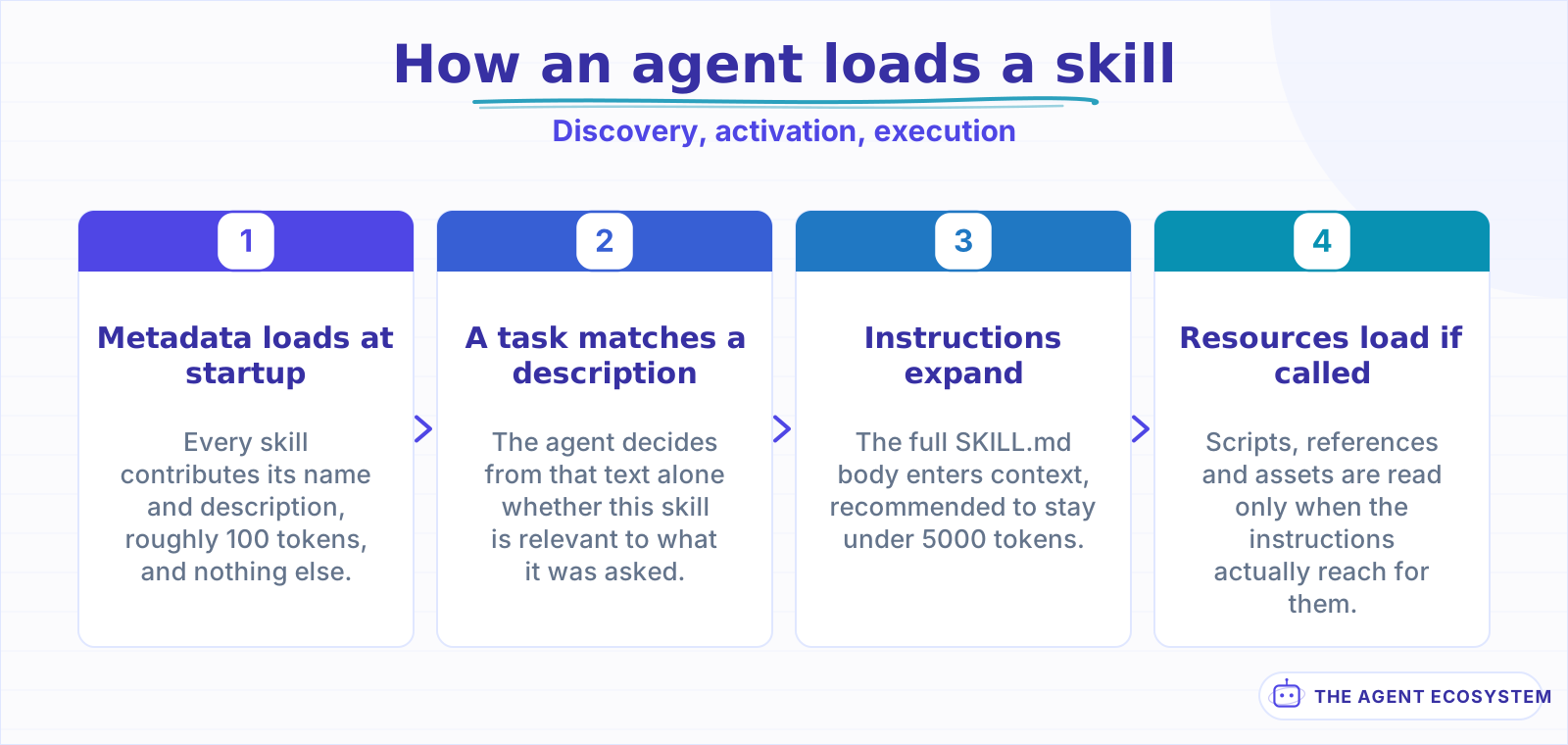 Only the first stage is paid for on every request. The rest is billed on demand.
What makes this interesting is not the file format, which is trivial, but what it replaces. Teams have been passing procedural knowledge to agents through system prompts, project instruction files, and copy-pasted snippets in chat. All 3 share a problem: they are per-tool, per-project, and invisible to version control review. A skill is a directory in your repo, so it diffs, it reviews, and it moves between agents intact.
What goes in SKILL.md?#
2 required fields and 4 optional ones. name and description are mandatory; license, compatibility, metadata and allowed-tools are not. The constraints are tighter than they first look, and the one that catches most people is that name has to match the parent directory name exactly.
| Field | Required | Constraint |
|---|---|---|
name | Yes | 1 to 64 chars, lowercase letters, numbers and hyphens; must match the directory |
description | Yes | 1 to 1024 chars, non-empty |
license | No | A license name, or a pointer to a bundled license file |
compatibility | No | 1 to 500 chars; environment requirements only |
metadata | No | A map of string keys to string values |
allowed-tools | No | Space-separated pre-approved tools; marked Experimental |
The name rules are stricter than a slug: no uppercase, no leading or trailing hyphen, and no consecutive hyphens, so pdf--processing is rejected outright. Since it also has to match the parent directory, renaming a skill means renaming 2 things or the loader will not pick it up.
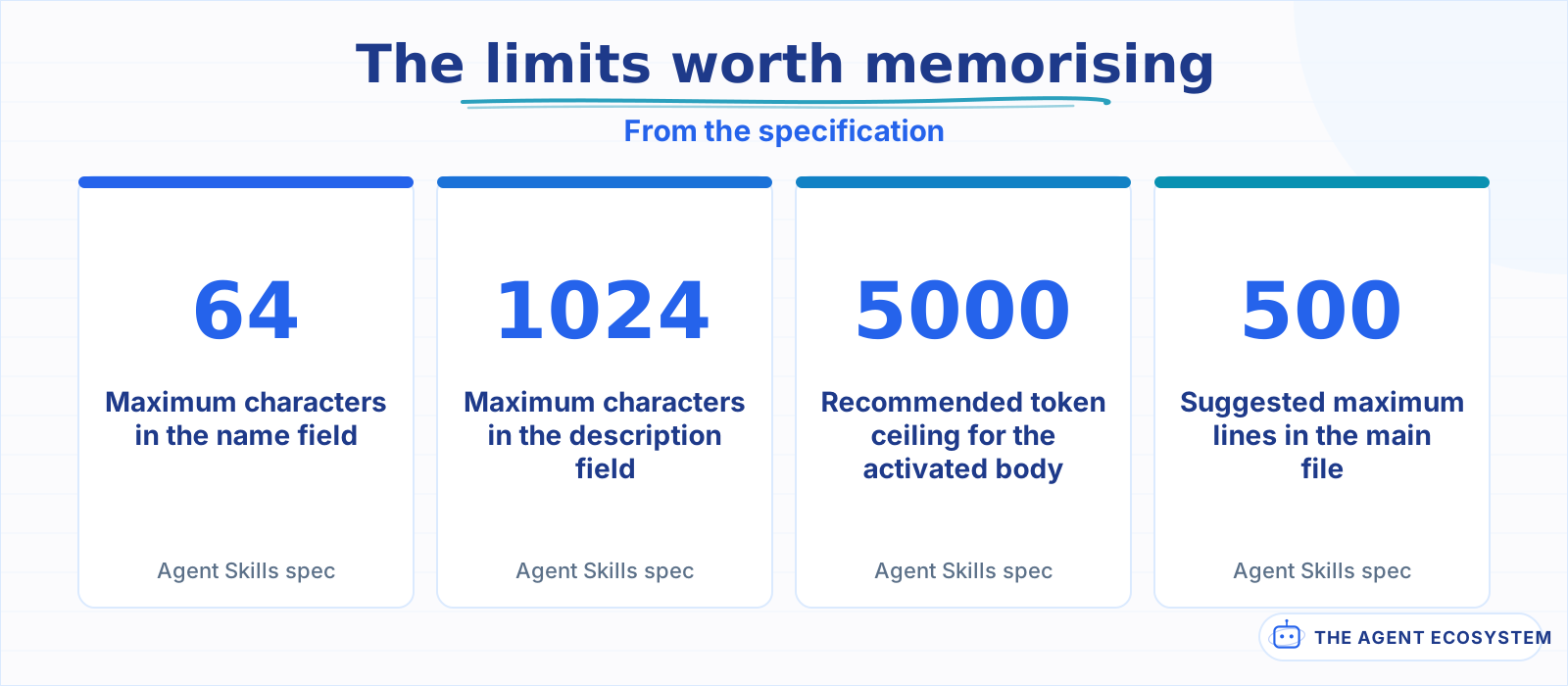 All 4 come from the specification. The line count is guidance; the character caps are enforced.
description is where the real work is, and its 1024-character ceiling is generous for a reason. This is the only text an agent sees before deciding whether to activate the skill, so it has to carry both halves of the job: what the skill does, and when it applies. The specification's own contrast is instructive. "Helps with PDFs" is the poor example. The good one names the operations and then names the triggers, including the words a user would actually say.
That is the same discipline as writing tool descriptions agents actually follow, and it fails the same way. A skill nobody activates is indistinguishable from a skill that does not exist.
The optional fields are worth a moment each, because 2 of them are quietly load-bearing. compatibility is capped at 500 characters and exists to state environment requirements, things like a required Python version or the fact that a script needs network access. Most skills should leave it out entirely; the specification says so directly. When a skill does need it, the alternative is an agent discovering the requirement by running a script and watching it fail.
allowed-tools is the one to treat with care. It takes a space-separated list of pre-approved tools, in a form like Bash(git:*) Read, and it is explicitly marked Experimental. That label is doing real work: support varies between implementations, so a skill that depends on pre-approval to function may simply behave differently somewhere else. Writing skills that degrade gracefully when the field is ignored keeps them portable.
How does progressive disclosure keep the cost down?#
By loading almost nothing until a skill is actually needed. At startup an agent reads only each skill's name and description, roughly 100 tokens apiece. The full instructions load when a task matches, and bundled scripts or reference files load only if the instructions call for them.
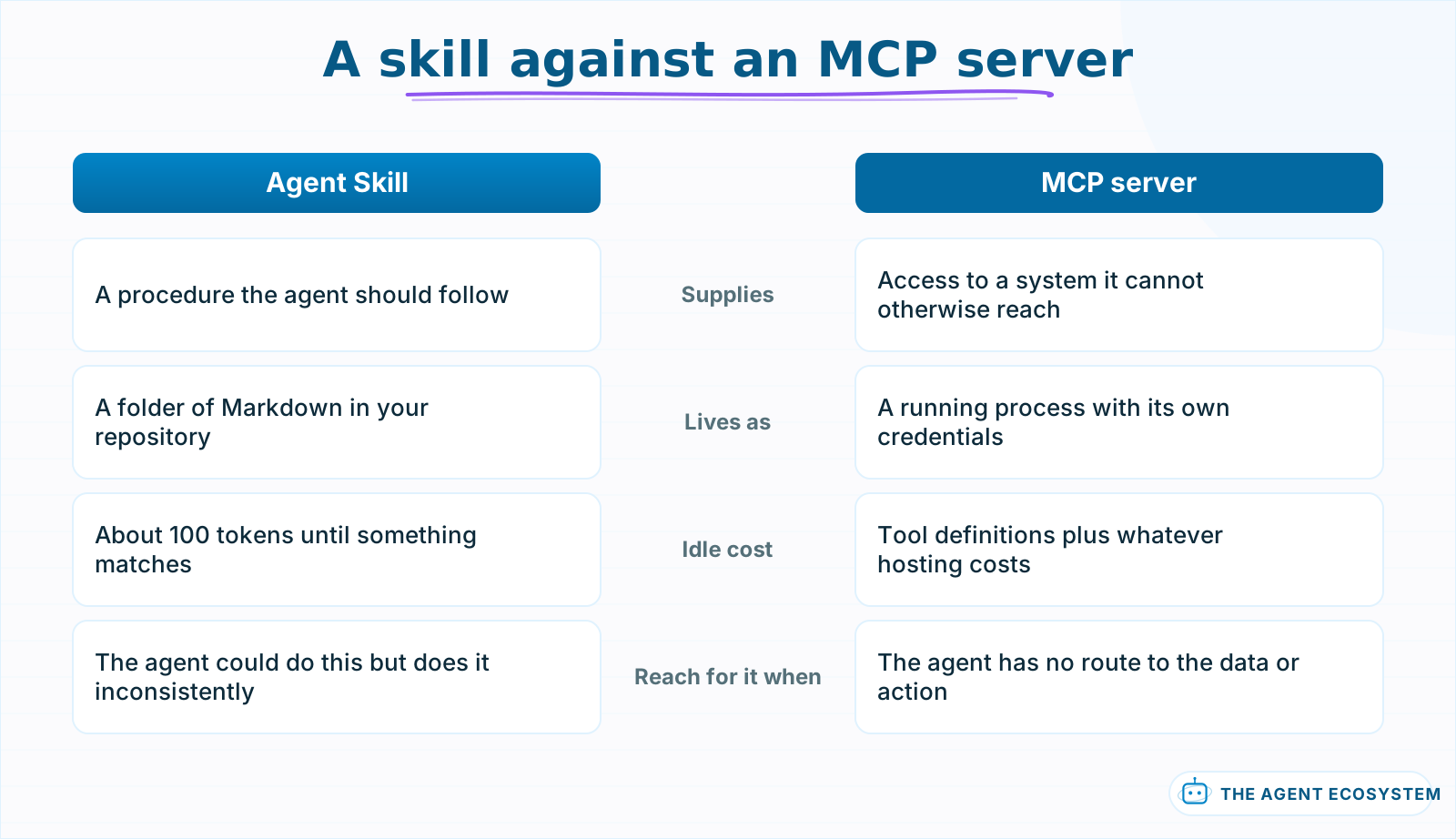 One supplies knowledge, the other supplies access. Most useful setups need both.
The 3 stages have names in the specification: Discovery, Activation, Execution. The budget guidance attached to them is what should shape how you write. Metadata sits at about 100 tokens, the activated body is recommended to stay under 5000 tokens, and the main SKILL.md should stay under 500 lines. Anything longer belongs in references/, loaded on demand.
This is the mechanism that makes a large skill library affordable. 50 skills cost roughly 5000 tokens of permanent context between them, which is a rounding error, and only the 1 that matches gets expanded. Compare that to stuffing the same procedures into a system prompt, where every instruction is paid for on every request whether relevant or not. The design is a direct answer to the pressure described in context engineering for agents, applied at the level of your own team's knowledge.
There is a discipline implied here that is easy to miss. Because references load on demand, splitting a long skill is not just tidiness, it is a cost decision. The specification also asks you to keep file references 1 level deep and avoid chains, which exists to stop an agent walking a tree of documents and quietly spending your context budget on navigation.
The practical consequence is a shape for the main file that reads oddly at first. SKILL.md should hold the decision-making, the steps, and the traps, while the exhaustive material lives one directory down. If your skill covers a form-filling workflow, the sequence goes in the body and the field-by-field schema goes in references/FORMS.md. An agent that only needs to know the order of operations never pays for the schema, and an agent that needs the schema knows exactly where it is.
Scripts get the same treatment for a different reason. Anything deterministic is cheaper and more reliable as code than as instructions, because a script either runs or it does not, whereas a prose instruction can be followed approximately. The specification's guidance for scripts/ is unglamorous and correct: be self-contained or document dependencies, write helpful error messages, handle edge cases. An agent reads a failing script's stderr and adapts, which only works if the script says something useful when it breaks.
Which agents actually read this format?#
Most of the ones you have heard of, which is the genuinely surprising part. Anthropic wrote the format and released it as an open standard, and it now has implementations across competing vendors: Cursor, GitHub Copilot, VS Code, Codex, Gemini CLI, OpenCode, Goose, Letta and a long tail beyond them.
The breadth matters more than the count. Editors, terminal agents, cloud platforms and framework-level runtimes have all implemented it, which means a skill written for a local coding agent is legible to a background agent running in CI. JetBrains ships it in Junie, Databricks and Snowflake read it inside their data agents, and Spring AI and Laravel Boost expose it at framework level.
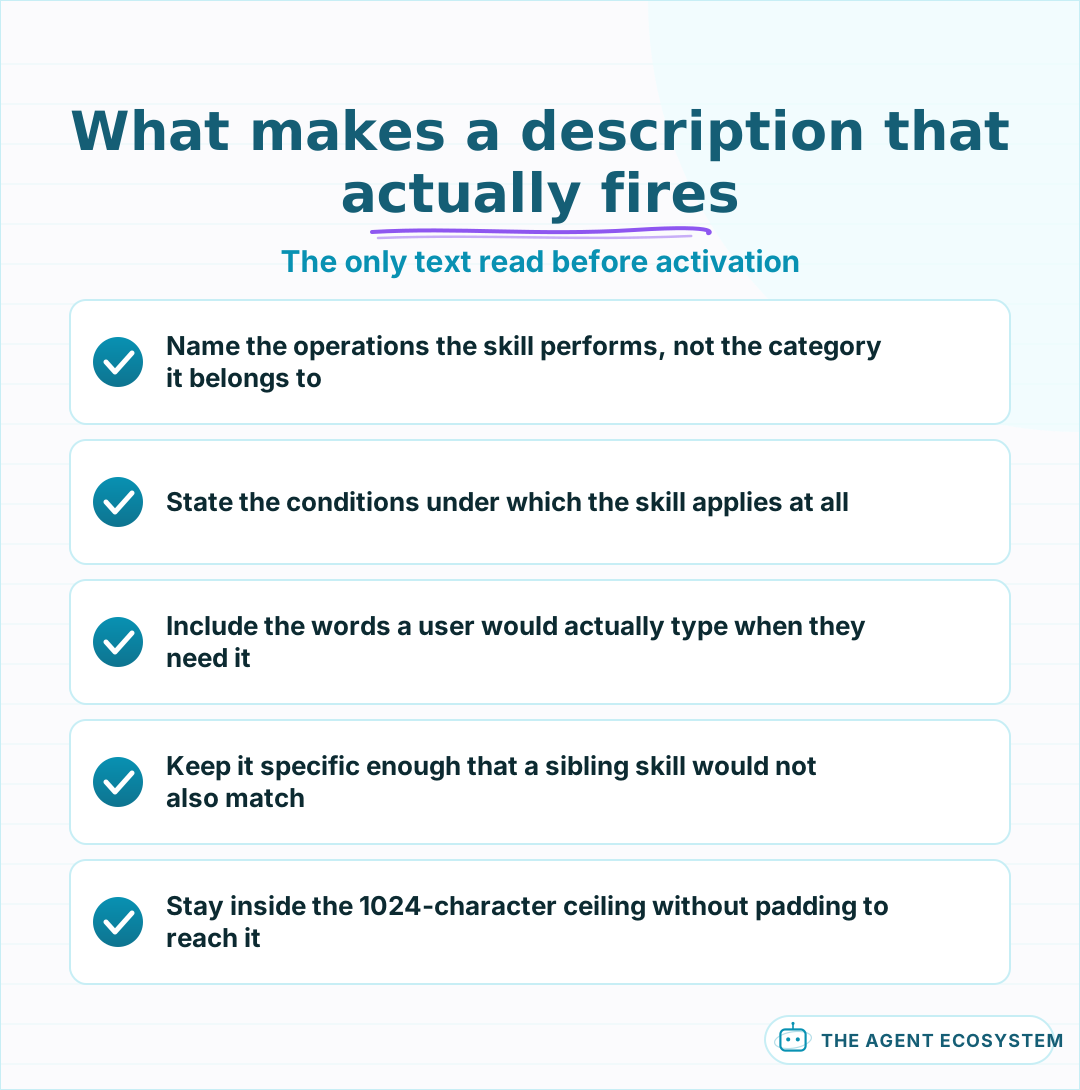 This text is the whole basis for activation. A skill nobody triggers may as well not exist.
The caveat worth holding onto is that adoption of a format is not adoption of identical behaviour. allowed-tools is flagged Experimental in the specification precisely because support varies between implementations, so a skill that leans on pre-approved tools may behave differently depending on where it runs. The portable core is the folder, the frontmatter, and the progressive loading. Treat anything beyond that as a per-client detail to verify rather than assume.
When is a skill the wrong tool?#
When the agent needs data or an action rather than a procedure. A skill teaches an agent how to do something it could already technically do. If the missing piece is access to a system, that is an MCP server or a tool call, and no amount of Markdown will substitute.
This boundary gets blurred constantly, and the symptom is a skill full of instructions like "query the production database and then summarise the result" written for an agent that cannot reach the database. The skill is not wrong, it is simply not the missing piece. Sorting the 2 apart is the same distinction drawn in function calling against MCP against tools: capability versus knowledge.
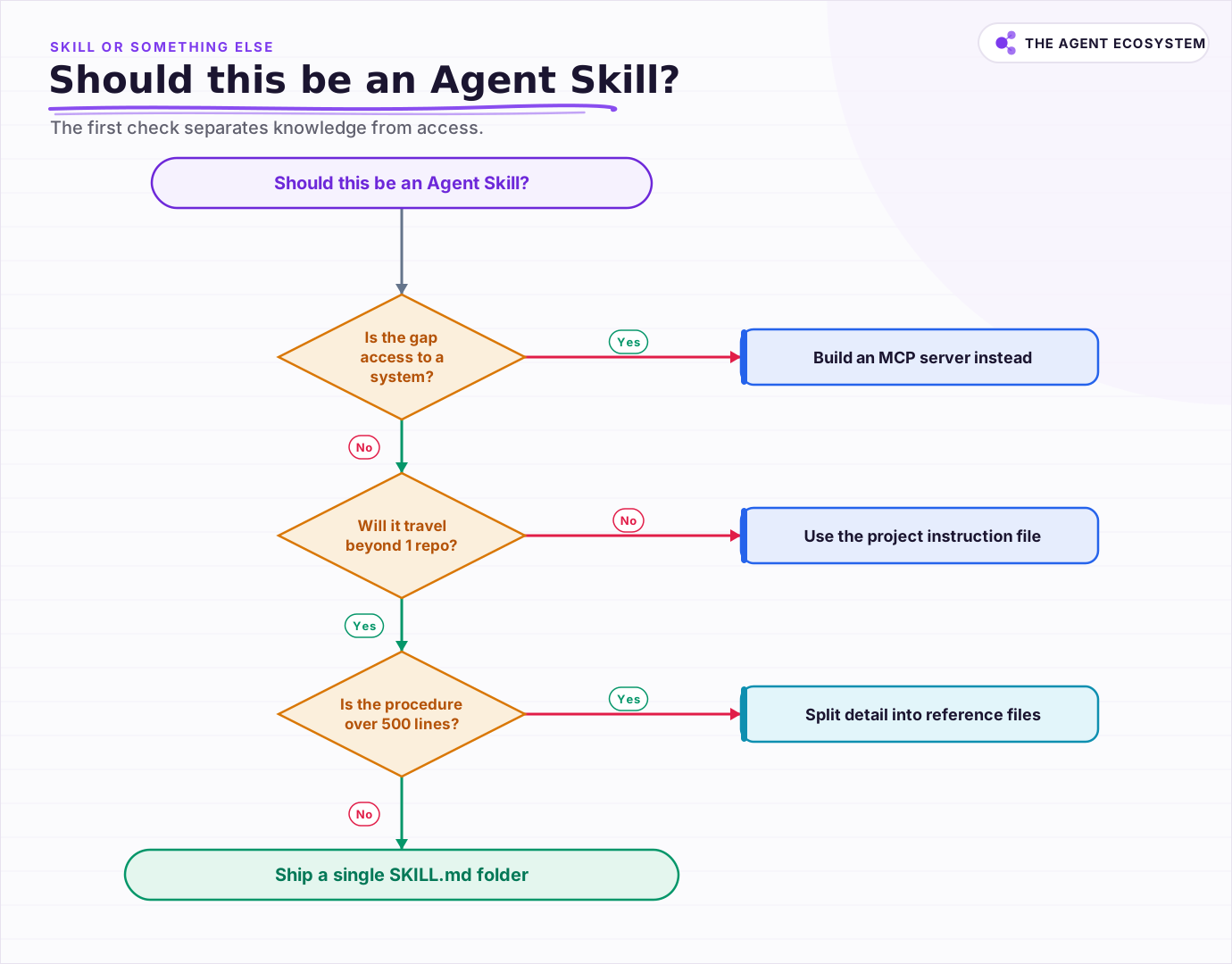 The first check separates knowledge from access. Most misfiled skills fail it.
There is a third case that looks like a skill and is really a missing test. Teams sometimes write a skill to stop an agent making a particular mistake, when the durable fix is a check that catches the mistake regardless of which agent, or which human, made it. A skill that says "never commit without running the linter" is weaker than a hook that refuses the commit. Instructions persuade; gates enforce. Reach for a skill when the work genuinely needs judgement, and for automation when it does not.
The second wrong-tool case is narrower and more common than it should be. If a procedure only ever applies to 1 repository, the repository's own instruction file is a better home for it, because a skill implies portability it will never use. Skills earn their structure when the same procedure has to travel: across projects, across agents, or across people who will not be in the room to explain it.
What makes the format worth learning now is not that it is new. It is that the alternative was 20 vendor-specific ways to say the same thing, and this is the first one that several competitors agreed to read. That agreement is the feature. The Markdown was never the hard part.
Frequently asked questions
What is an Agent Skill?
What fields does SKILL.md require?
How do agents avoid loading every skill into context?
Which tools support Agent Skills?
When should I build an MCP server instead of a skill?
Written by

Muhammad Qasim Hammad is an AI agent and automation expert and the founder of Cart Gaze LLC (cartgaze.com). He builds product for the love of it: when an idea lands, a working prototype is usually running within hours, built with the same AI agents and automations he sells. He puts his own output at roughly 20× what it was before agents, and the Agentic OS behind this site is the working proof, documented in public with the tools he actually ran and what they really cost.
AI & Automation Services
Want a pipeline like this running in your business?
I'm Qasim — I design and ship AI agents and n8n automations for solo operators and small teams. Tell me what's eating your team's week, and I'll scope a fix.
Related reading
Writing AI Agent Tool Descriptions the Model Actually Uses
Your agent keeps calling the wrong tool or passing bad arguments, and you blame the model. The real lever is the tool description and its JSON schema: the model picks and fills every tool from that alone. Here is how to write ai agent tool descriptions like onboarding docs for a

Function Calling vs MCP vs Tools: Give an Agent Capabilities
You keep seeing function calling, tool use, and MCP used as if they compete. They do not. Tools are the functions, function calling is the model mechanism that calls them, and MCP is the standard that shares them across clients. Here is how the three layers stack and which to
A2A: How AI Agents from Different Vendors Coordinate
A2A (Agent2Agent) is an open, Linux Foundation-governed protocol that lets AI agents from any vendor discover each other and hand off tasks. Here is how Agent Cards work, how A2A differs from MCP, and whether your small team needs it yet.
Claude Code vs Codex vs Gemini CLI: Terminal AI Agents Compared
Three terminal AI coding agents compete in 2026: Claude Code, OpenAI's Codex CLI, and Google's new Antigravity CLI after Gemini CLI retired on 18 June. This honest comparison covers the model behind each, MCP and sandbox support, and what the usable tier really costs.
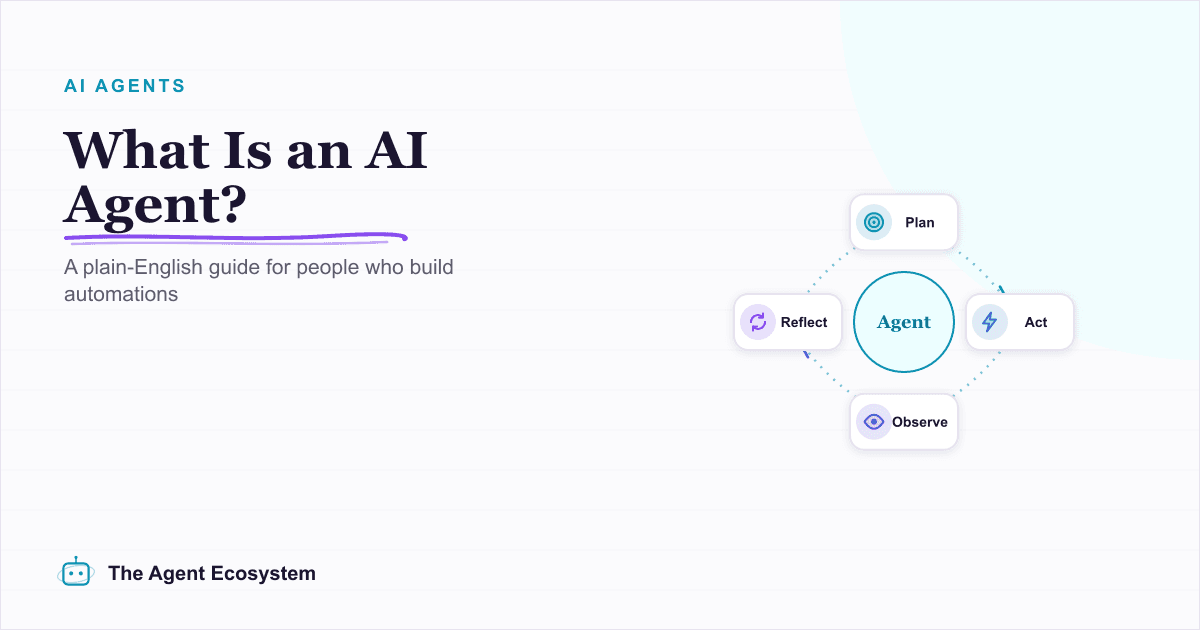
What Is an AI Agent? A Plain-English Guide for Builders
An AI agent is a language model running in a loop that decides its own next action, not a chatbot and not a chain. Here is how the perceive-decide-act-observe loop works, how an agent differs from a chatbot, chain, and workflow, and a checklist for when you actually need one.
Best AI Coding Tool 2026: Cursor vs Windsurf vs Copilot
Cursor, Windsurf, and GitHub Copilot are the three names most teams weigh in 2026, but two changes broke the old rankings: Windsurf is now Devin Desktop, and Copilot moved to usage-based billing. Here is the honest price-and-fit comparison.