Build an App With No Code: v0 vs Bolt vs Lovable
Three AI builders, three different outputs: what each generates, where it breaks, and what it costs in 2026.
AI-drafted, reviewed by Muhammad Qasim Hammad on July 15, 2026. See our AI disclosure.
Table of contents
You typed a paragraph into an AI builder, hit go, and got something on screen in minutes. Then you tried to add a login and a database, and the demos stopped matching. The reason is simple and it is the whole decision: when you build an app without code with v0, Bolt.new, or Lovable, each one generates a different slice of a real app, and most comparison lists bury that.
Can you really build an app without code in 2026?#
Yes, you can build app without code by describing it to an AI builder, and the result can be genuinely usable. The catch is that v0, Bolt.new, and Lovable produce very different things: v0 gives you a frontend only, Bolt runs a full project where the database is your job, and Lovable wires a full stack.
That distinction is the real decision, not "which is best." Decide first whether you need a frontend or a full working app, then compare price. According to a 2026 uibakery comparison, the three tools sit at different points on that spectrum, and picking the wrong point is what wastes a weekend and a pile of credits.
Set your expectations honestly. These builders are excellent for prototypes, internal tools, and MVPs. They are not a no-strings replacement for engineering a complex production app: lock-in, generated-code quality, and cost ceilings are all real, and we get to each below.
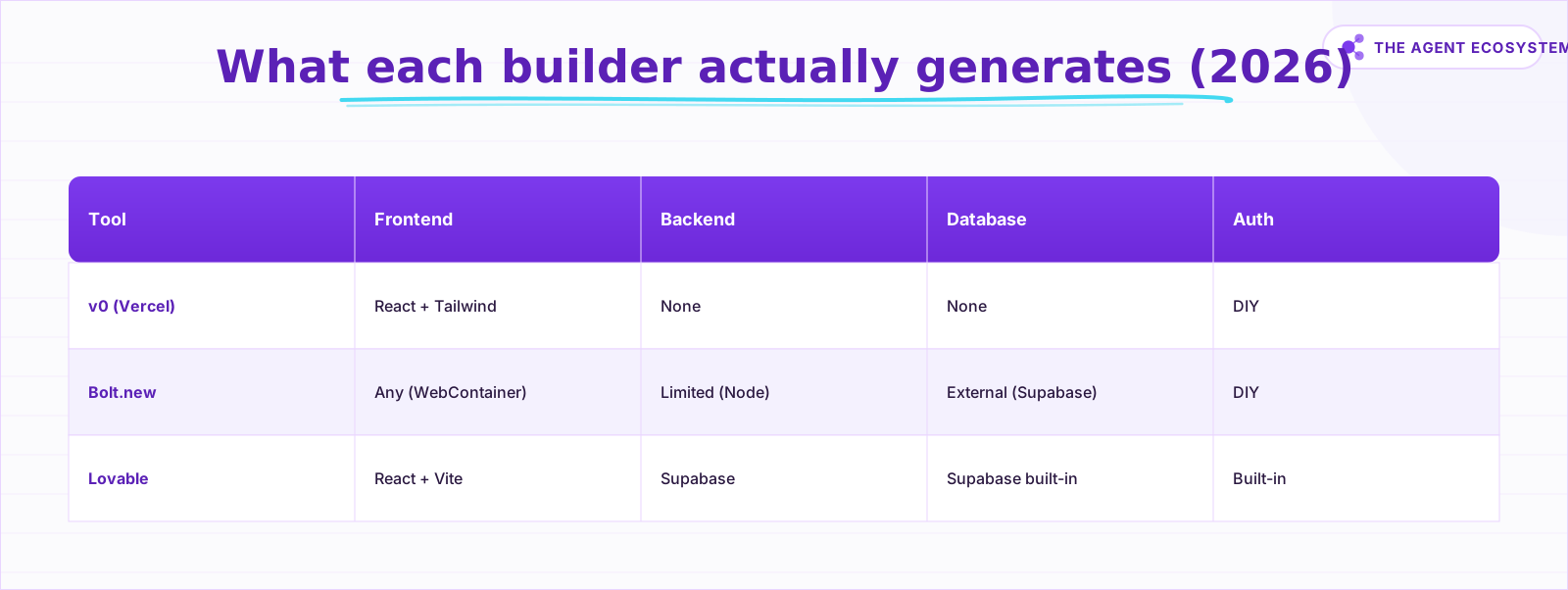 The decisive difference: v0 is frontend-only, Bolt runs full projects but leaves the database to you, Lovable wires a full stack. As of mid-2026.
v0 by Vercel: production-grade UI, no backend#
v0 generates React components and pages styled with Tailwind, tuned for Next.js and Vercel, and it supports Figma-to-code. It is frontend only: the screens look production-grade, but they do not do anything on their own. There is no backend, no database, and no auth until you build or wire those yourself.
That makes v0 the pick for frontend developers and designers who live in the Vercel ecosystem and are happy to own the backend. It is a weaker fit for a non-technical user who expects a full working app out of one prompt, because the app is only half-built by design. You get real, editable code, not a locked visual canvas, which is the point: v0 hands you a head start on the UI and then gets out of the way.
The practical workflow is prompt, refine, and export. You describe a screen, v0 renders it, you nudge the layout in more prompts, and then you pull the components into your own Next.js project. Figma-to-code helps designers move a mockup into real markup fast. What v0 will not do is stand up an API route, a Postgres table, or a session, so plan to write or wire those yourself.
On pricing, and dated to mid-2026, verify on the vendor page before you rely on it: nocode.mba lists Free at $0 with $5 in monthly credits and no rollover, Premium at $20/mo with $20 in credits, Team at $30/user/mo, and Business at $100/user/mo. Credits are token-based (v0 Mini, Pro, and Max each cost different amounts) and reset monthly without carrying over, so a heavy month of generation can exhaust your credits before the tier does.
Bolt.new: a full project in your browser#
Bolt.new runs a complete project inside a browser-based WebContainer, so it generates, executes, debugs, and deploys with zero local setup. It is multi-model and framework-flexible, and you see every file. The headline cost, per user reports, is token burn: it syncs the whole codebase per interaction, so spend scales with project size.
Here is the honest split, then the numbers.
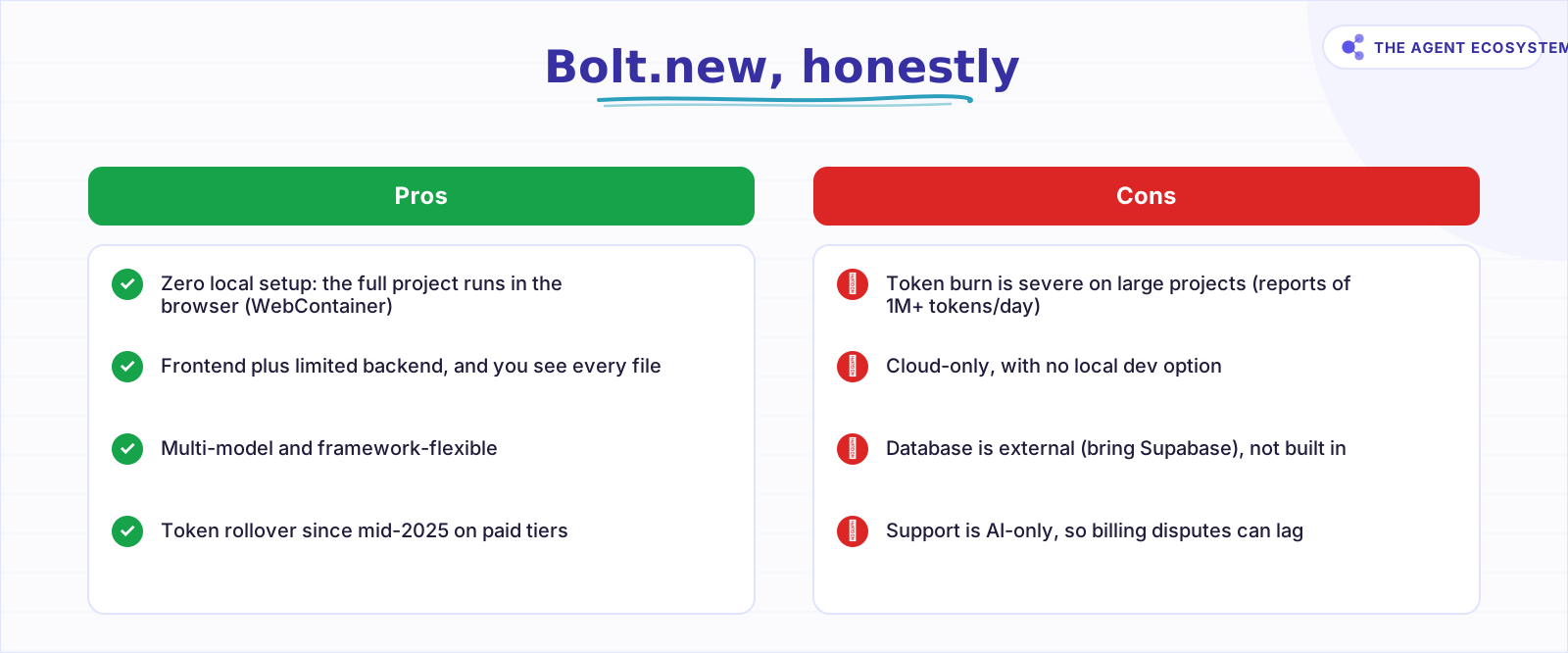 Bolt's WebContainer is genuinely zero-setup; the catch is token consumption that scales with codebase size, so complex builds get expensive.
Where it breaks: because the codebase is re-synced each turn, one 2026 Bolt review and other third-party reports describe consumption spiking to over a million tokens in a day and large bills fixing complex apps. It is cloud-only with no local dev, the database is external (you bring Supabase), and support is AI-only, so billing disputes can lag.
What it does well is the thing v0 skips: it runs. Because the WebContainer executes Node in the browser, Bolt installs dependencies, starts a dev server, and shows you a live app you can click through, all without touching your machine. It is multi-model, so you can lean on different underlying models, and it stays framework-flexible instead of pinning you to one stack. For a developer, that combination of full project plus zero setup is genuinely useful.
On pricing, dated to mid-2026 and worth re-confirming on bolt.new: an nxcode comparison lists Free at $0 (about 1M tokens/mo with a daily cap), Pro at $25/mo (10M+ tokens, with rollover since mid-2025), and Teams at $30/member/mo. Some earlier-2026 sources still show a $20 Starter tier, which is exactly why you check the live page rather than trusting a comparison post, this one included.
Bolt fits developers who think in code, want to control every file and dependency, and accept token cost for full-project flexibility and no setup. If your build is small and your prompts are tight, the meter stays manageable. If it is a sprawling app you keep re-editing, budget for the token bill before you commit.
Lovable: the fastest path to a full-stack MVP#
Lovable generates a complete React (Vite) app from natural language: the UI, a Supabase backend, a database schema with row-level security, authentication flows, a live preview, and then deploy or GitHub export. It is the shortest path from an idea to a running, deployable full-stack app, which is why non-technical founders reach for it first.
What sets Lovable apart is that the backend is not your homework. When you ask for a feature that needs data, it creates the Supabase tables, sets row-level security policies, configures auth, and writes the client code to talk to all of it. You get a live preview as you go, and when you are happy you deploy or push to GitHub. For someone who has never written a migration, that is the difference between a demo and a usable product.
The trade is control. You get less say over the generated code structure, and you are locked to React plus Vite plus Supabase. Per the nxcode 2026 comparison, credit consumption climbs on heavy use, with reports of roughly 150 messages spent just iterating on layout, and export beyond GitHub is limited. If your app grows past what those defaults assume, you can hit a ceiling the tool will not let you climb over cleanly.
On pricing, dated to mid-2026 and worth re-confirming on lovable.dev: Free at $0 (about 5 credits/day, near 30/mo), Pro at $25/mo (100 credits plus a small daily bonus), and Business at $50/mo (team features and SSO). Credits are message-based: one credit per prompt or generation regardless of project size, which rewards focused prompting.
Lovable fits non-technical founders who want the fastest route to a working full-stack app and are fine letting the tool make the infrastructure calls. If you are still assembling the wider toolset around a build, our solopreneur automation stack cost breakdown applies the same dated-pricing discipline to the rest of your subscriptions.
Token-based vs message-based: the cost model that decides your bill#
The under-discussed factor is how each tool meters you. v0 and Bolt bill by tokens, so consumption rises as your project and codebase grow. Lovable bills by message, a flat cost per prompt no matter the size. That single difference often predicts your real monthly bill better than the headline tier does.
| Tool | Meter | What raises your bill | Free tier |
|---|---|---|---|
| v0 | Tokens (credits) | Bigger prompts and outputs | $0, $5 credits/mo |
| Bolt.new | Tokens | Larger codebase re-synced each turn | $0, ~1M tokens/mo |
| Lovable | Messages (credits) | More prompts, not bigger ones | $0, ~30 credits/mo |
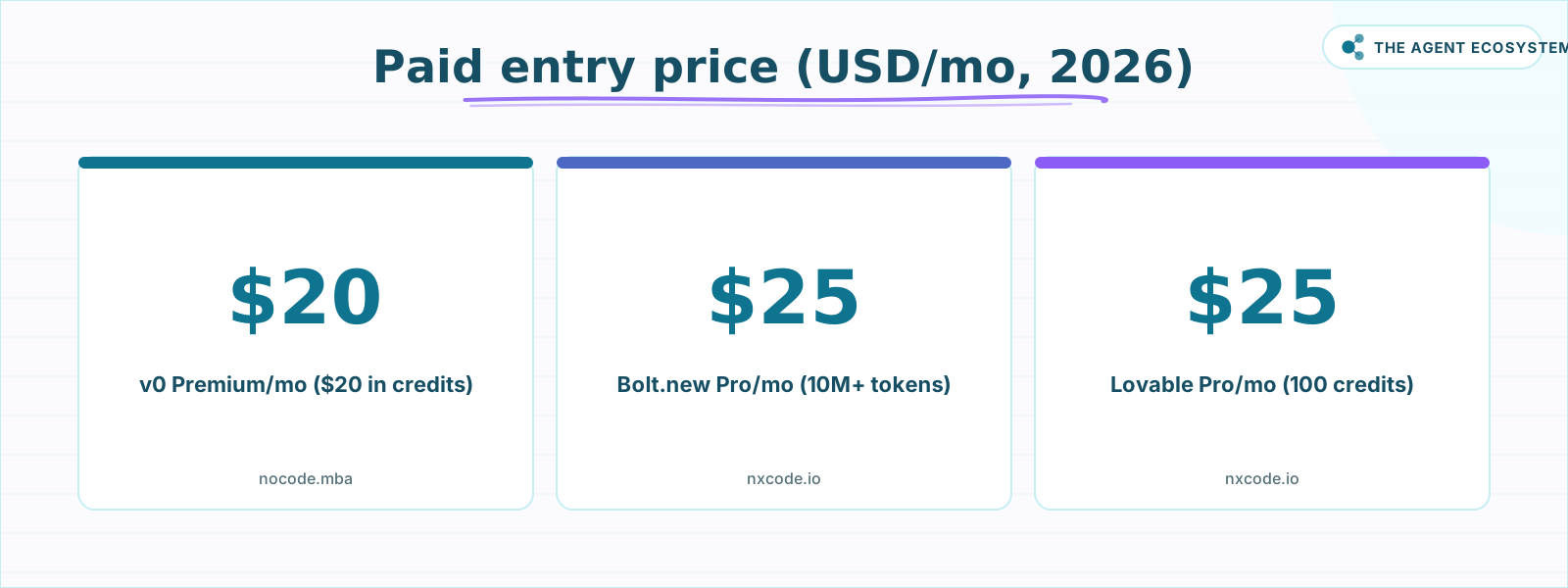 All three have a free tier worth trying first; the paid step sits at $20 to $25/mo, but the meter (tokens vs messages) matters more than the headline. Verify
The practical read: large or long-running projects tend to burn token-metered tools faster, while iterative, well-scoped prompting favors message-metered Lovable. Treat that as a reasoning tool, not a guarantee, because your actual spend depends on your prompts and your project. The paid step for all three sits close together, but the meter matters more than the number.
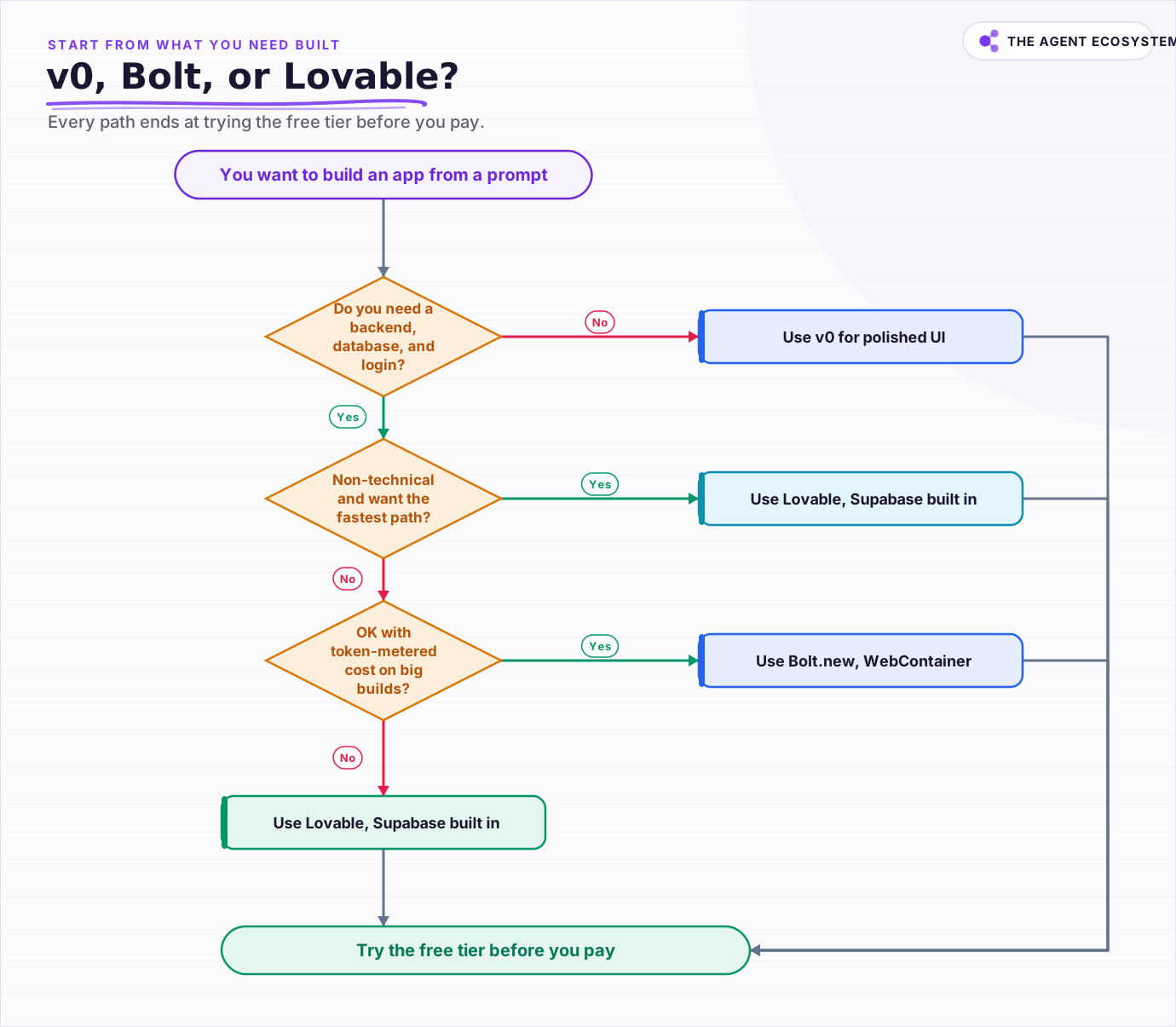 Start from what you need built; every path ends at trying the free tier before you pay.
Free tiers are real on all three and worth using to feel the meter before you pay. Run the same small build in two of them and watch how fast the credits or tokens move on your own workload.
Which no-code app builder should you pick?#
Pick by what you need generated, then check the live price. Choose v0 when you only need polished UI and will own the backend. Choose Lovable when you are non-technical and want the fastest path to a running full stack. Choose Bolt.new when you want to see and control every file and accept token cost.
Then a two-part reality check. First, try the free tier of your top pick before you pay, because feeling the meter on your own build beats any comparison table. Second, remember prices here shifted in 2026, so verify each tier on the vendor's own page this week. If you would rather stay in a code editor and add AI there instead, our best free AI IDE for 2026 guide is the honest baseline to measure these builders against.
Frequently asked questions
Can you really build an app without code with v0, Bolt.new, or Lovable?
What is the difference between v0, Bolt.new, and Lovable?
How much do v0, Bolt.new, and Lovable cost in 2026?
Why does Bolt.new burn so many tokens?
Which no-code AI app builder is best for a non-technical founder?
Sources
Primary references and vendor documentation used while drafting and reviewing this article.
- v0 vs Bolt vs Lovable AI app builder comparison (2025)
- Lovable vs Bolt.new 2026 AI app builder comparison (pricing, meters)
- Bolt vs Lovable vs v0 (what each generates, credit models)
- v0 pricing (Free, Premium, Team, Business; token-based credits)
- 2026 Bolt.new review (WebContainer, token burn on complex apps)
Written by

Muhammad Qasim Hammad is an AI agent and automation expert and the founder of Cart Gaze LLC (cartgaze.com). He builds product for the love of it: when an idea lands, a working prototype is usually running within hours, built with the same AI agents and automations he sells. He puts his own output at roughly 20× what it was before agents, and the Agentic OS behind this site is the working proof, documented in public with the tools he actually ran and what they really cost.
AI & Automation Services
Want a pipeline like this running in your business?
I'm Qasim — I design and ship AI agents and n8n automations for solo operators and small teams. Tell me what's eating your team's week, and I'll scope a fix.
Related reading
Best Free AI IDEs in 2026: Truly Free vs Free-Trial
Most "free AI IDE" lists mix up four completely different things. This guide splits 11 tools into truly free, BYOK, freemium, and trial-only, so you know exactly what you're getting before you build.

Best AI Coding Tool 2026: Cursor vs Windsurf vs Copilot
Cursor, Windsurf, and GitHub Copilot are the three names most teams weigh in 2026, but two changes broke the old rankings: Windsurf is now Devin Desktop, and Copilot moved to usage-based billing. Here is the honest price-and-fit comparison.
I Built the Same AI Agent in n8n, Make and LangChain: The Honest Difference
I built the exact same order-status AI agent in n8n, Make.com, and LangChain, then compared setup effort, cost model, portability, and who each platform actually suits.
n8n vs Make vs Zapier in 2026: The Real Cost Math for Solopreneurs
Zapier, Make, and n8n meter completely different units. The same 6-step workflow at 1,000 runs/month can cost 5x more on one platform than another. Here is the exact math for solopreneurs in 2026.
The Exact AI Automation Stack I Use as a Solopreneur in 2026 (With Real Monthly Costs)
Most "AI stack" posts hide the bill. Mine runs under $10/month. Here is every tool, the exact tier, the real cost, and the job each layer does for my one-person content business.
Ollama vs LM Studio vs Jan: Best Local LLM Tool for 2026
Running a local LLM cuts your AI API bill to $0 and keeps client data off third-party servers. This breakdown of Ollama, LM Studio, and Jan tells you exactly which tool fits a solo operator's workflow.