Browser Agents Explained: Faster Than Computer Use, Until the DOM Breaks
Why grounding actions in the accessibility tree beats screenshots for web-only tasks, and where that grounding still breaks.
AI-drafted, reviewed by Muhammad Qasim Hammad on August 23, 2026. See our AI disclosure.
Table of contents
- What is a browser agent, and how is it different from a computer-use agent?
- How does a browser agent actually see a web page?
- Why are browser agents faster and cheaper than computer-use for web tasks?
- Which tools actually take this approach?
- Where do browser agents still fail?
- Should you use a browser agent or a computer-use agent?
- What should you actually build first?
A browser agent that reads the accessibility tree can click a button by asking for its name and role. A computer-use agent has to look at a screenshot, guess where that button sits in pixels, and click there instead. Same task, two different mechanisms, and the gap between them is why one class of agent finishes a web task in a few cheap steps while the other burns tokens re-reading the screen after every click.
What is a browser agent, and how is it different from a computer-use agent?#
A browser agent is software that controls a real web browser by reading the page's structure, usually the accessibility tree or DOM, and acting on specific elements by reference rather than by pixel position. That is the opposite of a computer-use agent, which looks at a screenshot and clicks wherever the target visually appears to be.
Both are AI agents in the general sense described in what an AI agent is: something that perceives, decides, and acts in a loop. The difference is entirely in the perceiving. If you want the fuller picture of the pixel-based side, computer-use agents in 2026 covers that ground on its own; this post assumes the category exists and focuses on the browser-specific sibling.
One disambiguation worth stating plainly, since it trips up search results constantly: a browser agent is not an HTTP user agent, the string a browser sends to identify itself to a server, the kind you would see in a request header like Mozilla/5.0. The two share a word and nothing else.
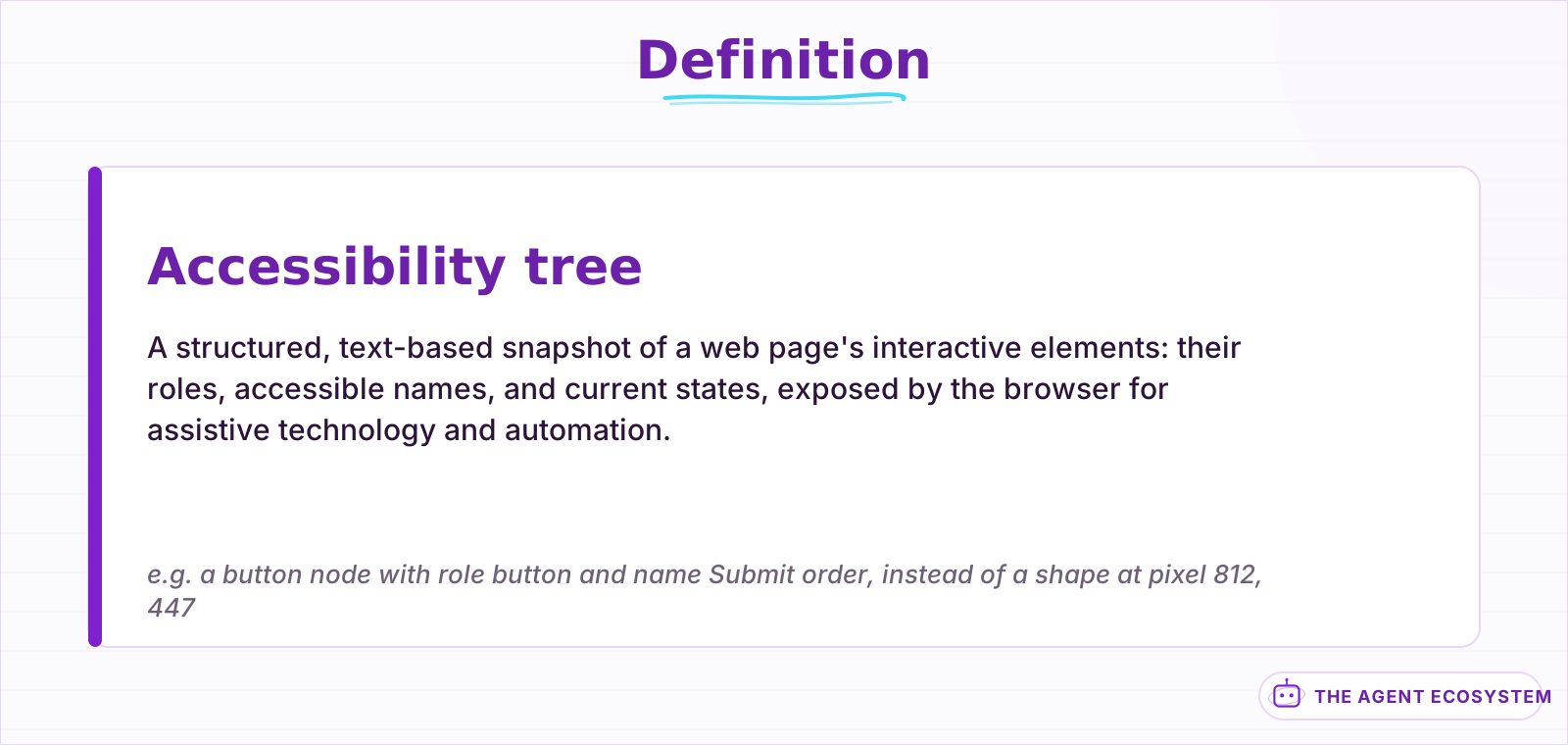 The same structured snapshot screen readers have used for two decades, now read by a model instead of a voice.
How does a browser agent actually see a web page?#
Instead of a picture, a browser agent asks the browser for a structured snapshot: every interactive element on the page, its role such as button or link, its accessible name, and its current state. That snapshot is text, usually a few kilobytes, and the model picks a target from it directly.
Most browser agents get this snapshot through the Chrome DevTools Protocol or Playwright's own accessibility APIs, the same plumbing screen readers have used for two decades to describe a page to someone who cannot see it. An agent asking what it can click is running the identical query a screen reader runs, just consumed by a model instead of a voice.
Microsoft's own Playwright MCP server makes the pattern explicit: its browser_snapshot tool returns the accessibility tree instead of a screenshot, handing the model roles, names, and states as structured text rather than pixels. The model never has to guess what a shape on screen might be. It reads that an element with role button and name "Submit order" exists, and it acts on that element directly.
Why are browser agents faster and cheaper than computer-use for web tasks?#
A page's accessibility tree usually runs a few kilobytes of text, while a full-resolution screenshot of the same page runs hundreds of kilobytes to a few megabytes as an image. Vision tokens cost more than text tokens on every major model API, so reading structure instead of pixels cuts both the token bill and the round-trip time per step.
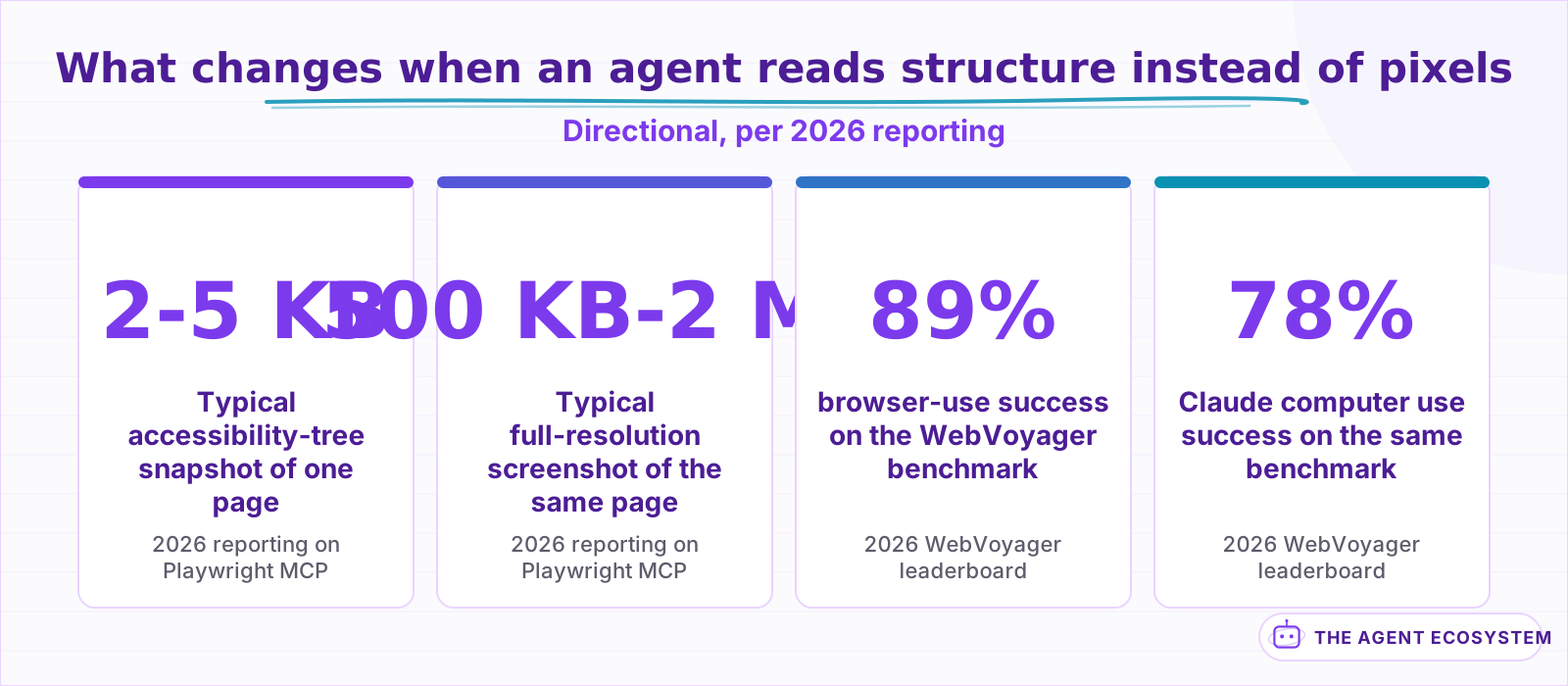 Directional numbers from 2026 vendor and leaderboard reporting, not a controlled study run on this site.
The cost gap compounds over a multi-step task. A 10-step form-filling job that re-sends a screenshot every step accumulates real money and real latency; the same job against an accessibility tree stays cheap enough to retry liberally. Coverage of Playwright MCP in 2026 put the difference at roughly 2 to 5 KB of structured data against 500 KB to 2 MB for an equivalent screenshot, one to two orders of magnitude smaller per step, though the exact ratio depends on page complexity and screenshot resolution.
The second advantage is precision, not just price. Clicking an element by role and name is exact. Clicking a pixel coordinate depends on the screenshot's resolution matching the real viewport, on nothing having scrolled between the screenshot and the click, and on the model's spatial estimate being right. Selector-based targeting removes an entire category of misclick. On one 2026 leaderboard tracking the WebVoyager benchmark, a DOM-grounded agent (browser-use) scored around 89%, against roughly 78% for Claude's pixel-based computer use on the same live-website task set. Leaderboard scores like these move fast and are mostly self-reported, so read the gap as directional, not a controlled study.
There is a second, quieter cost difference underneath the token math. A browser agent only needs a browser context, so a hosted provider can spin one up in under a second for a few cents. Full computer use needs an entire virtual desktop, which is heavier to provision and is often billed by the minute regardless of how few actions you actually take.
Which tools actually take this approach?#
Three names come up constantly: browser-use, an open-source Python library built on Playwright with more than 100,000 GitHub stars; Stagehand, Browserbase's framework built around act, extract, and observe primitives; and Playwright MCP, Microsoft's official server that exposes the accessibility tree to any MCP-connected agent. All three ground actions in structure, not pixels.
Stagehand originally sat on top of Playwright and has been moving toward deeper Chrome DevTools Protocol access in 2026, chasing lower latency than a testing-first framework was built to offer. Vercel Labs shipped a fourth option this year, Agent Browser, a Rust CLI that returns accessibility snapshots with short element references so an agent can act on a stable reference instead of a CSS selector that breaks the next time the page ships a redesign. Most of these frameworks are also model-agnostic: you point them at whichever LLM you already run, while Claude computer use and OpenAI's computer-using agent are each wired to one vendor's own model.
Not every browser-specific tool takes the DOM route, either. Skyvern uses computer vision inside the browser instead, identifying elements visually so it keeps working after a redesign that changes the underlying markup entirely. That is a useful reminder that the real axis is how an agent grounds its actions, by reference or by pixel, not simply whether it happens to run inside a browser.
| Tool | Grounding | Built on | Notable trait |
|---|---|---|---|
| browser-use | Accessibility tree / DOM | Playwright | Open source, 100K+ GitHub stars |
| Stagehand | Accessibility tree | Playwright, moving toward direct CDP | act, extract, observe, and agent primitives |
| Playwright MCP | Accessibility tree | Playwright | Official Microsoft MCP server |
| Claude computer use | Pixel screenshot | OS-level VM | Cross-platform, no DOM access needed |
| OpenAI computer-using agent | Pixel screenshot | Responses API | Powers ChatGPT Agent's browsing |
Notice what the last two rows share: neither needs the page to expose anything. That is the trade a computer-use agent makes on purpose, and it is also why the next section matters.
Where do browser agents still fail?#
Accessibility-tree grounding only works if the page actually exposes one worth reading, and most pages do not. The 2026 WebAIM Million audit of the top 1 million homepages found 95.9% with at least one detectable accessibility failure, including empty buttons, missing form labels, and elements marked up in ways that mislead an agent instead of merely leaving gaps.
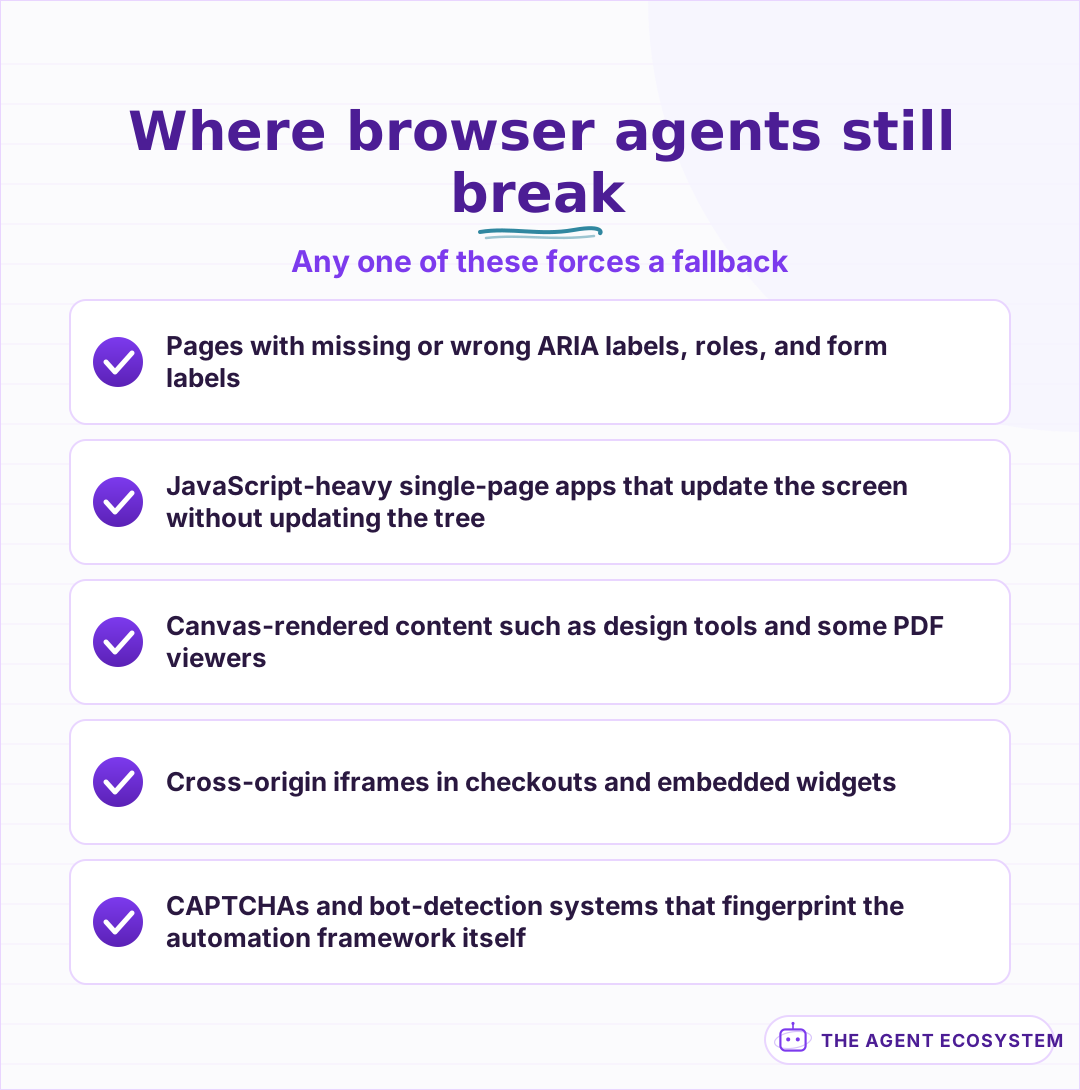 Any one of these can force a fallback to a slower, pixel-based approach.
The WebAIM data has a sharper edge than a simple gap count. Pages that used ARIA attributes at all averaged more errors than pages that used none, 59.1 against 42, because a wrong or empty label hands the agent confident, specific, wrong information instead of an honest absence. A missing label makes an agent guess. A wrong label makes it certain and mistaken, which is a worse failure mode than either format admits on its own.
Beyond markup quality, 4 categories break DOM grounding outright. JavaScript-heavy single-page apps that render content without updating the tree leave an agent staring at stale structure. Canvas-rendered surfaces, design tools, some dashboards, certain PDF viewers, have no DOM nodes to target at all, since the browser is just painting pixels inside a canvas element. Cross-origin iframes, common in payment checkouts and embedded widgets, restrict what a parent page's automation can see or touch. CAPTCHAs and bot-detection systems stop both mechanisms equally: Playwright's own Chromium build carries a network fingerprint that does not match a real Chrome release, and anti-bot vendors check for exactly that mismatch.
Detection generally works in layers: simple flags like a browser property a script can patch, rendering and GPU fingerprints that are harder to fake, network-level fingerprints from the TLS handshake, and behavioral timing that no automation library has fully replicated. Beating all four at once is most of what a managed browser service is actually selling.
Should you use a browser agent or a computer-use agent?#
Default to a DOM-aware browser agent for any task that lives entirely inside a browser tab: it is cheaper, faster, and easier to debug. Reach for full computer-use only when the task leaves the browser entirely, spanning desktop apps, or when the page itself defeats structural reading, then treat the extra cost as the price of that specific problem.
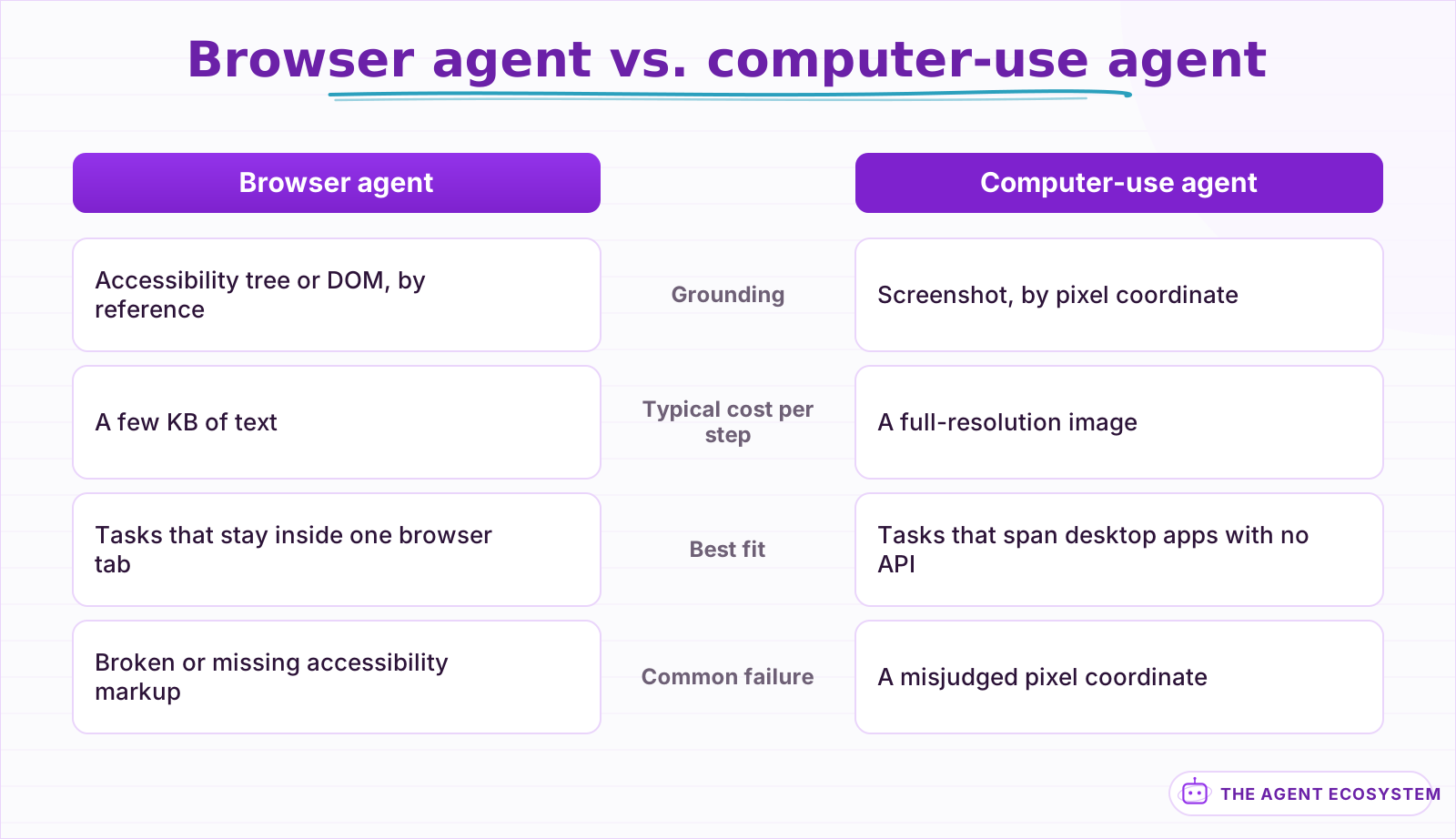 Different tools for different environments, not a strictly better-or-worse pair.
The comparison holds for a simple reason. A browser agent is optimized for one environment it can fully inspect, while a computer-use agent is built to work anywhere a human could, at the cost of never being fully sure what it is looking at until it renders the screen. Neither approach is more advanced than the other; they solve different problems, and picking the wrong one for the task is where most of the pain in production shows up.
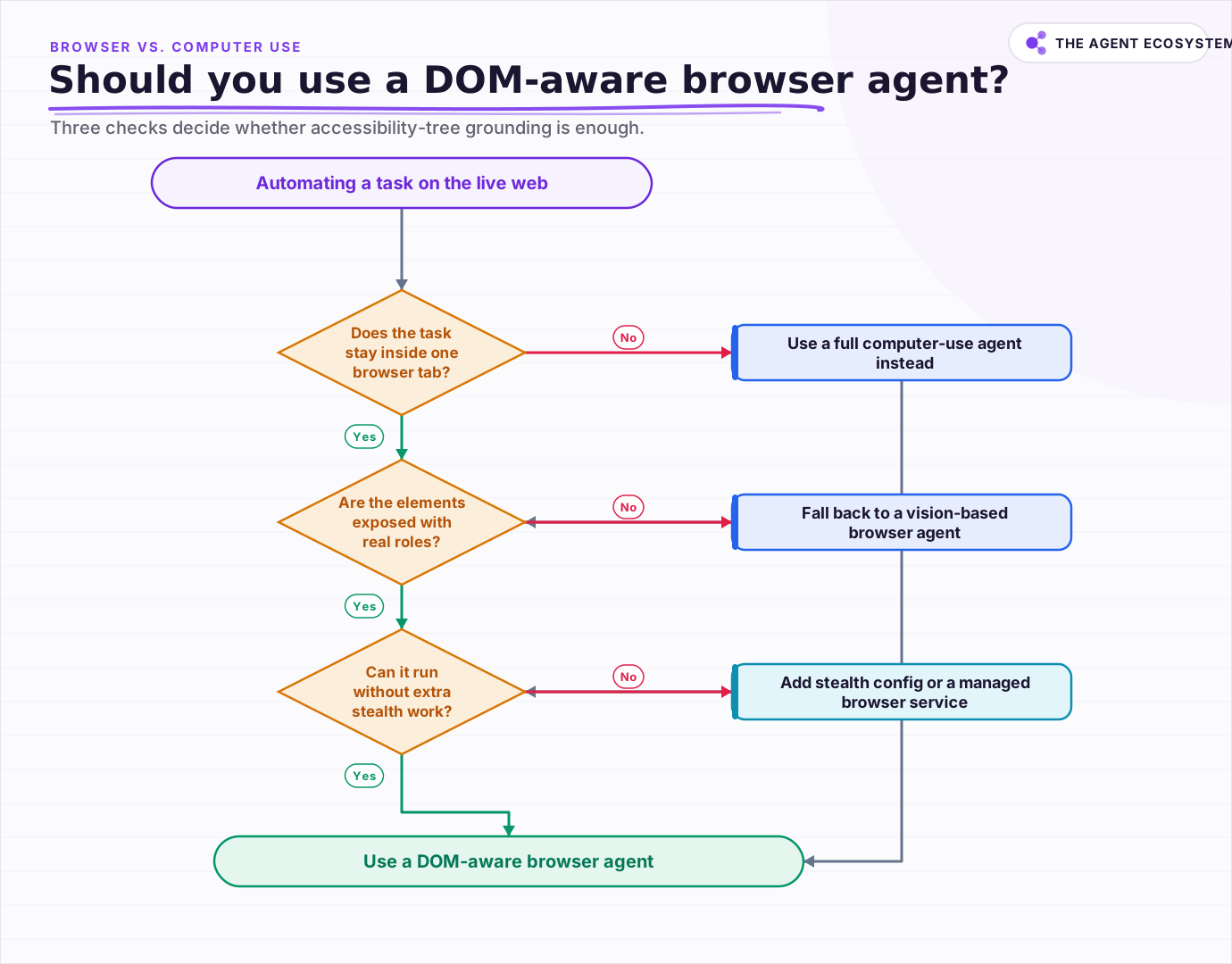 Three checks decide whether accessibility-tree grounding is enough for the task.
Run the three checks in order before committing to either path: does the task stay inside a single browser tab, does the target site expose real roles and labels instead of a wall of unlabeled elements, and can you automate the site at all without fighting its bot detection. Two or three yeses point to a DOM-aware browser agent. A no on the first question means you need full computer use instead, and a no on the last two means budgeting time for either a vision fallback or a managed browser service built to handle stealth for you.
What should you actually build first?#
Start with whichever DOM-aware framework matches your stack: browser-use for an open-source Python agent, Stagehand for act and extract as composable primitives, or Playwright MCP if your agent speaks MCP. Build one narrow task first, watch it fail on a real page, and only reach for computer use once you hit a wall this category cannot cross.
How you expose the browser's actions to the model at all, click, type, scroll, extract, is its own design decision with the same trade-offs as any other tool interface. If you have not settled on a pattern for that yet, function calling vs. MCP vs. tools walks through the options this category draws from.
The honest summary: read structure when structure exists, fall back to pixels when it does not, and never assume a demo video's success rate survives contact with a real production site.
Frequently asked questions
What is a browser agent?
Is a browser agent the same as an HTTP user agent?
Why are browser agents cheaper than computer-use agents for web tasks?
Can browser agents handle login-protected sites?
What is the difference between a browser agent and an RPA bot?
Sources
Primary references and vendor documentation used while drafting and reviewing this article.
- Firecrawl: 11 Best AI Browser Agents in 2026 (approaches and benchmarks)
- Browserbase: Why we're graduating Stagehand from Playwright
- Microsoft Playwright MCP server (GitHub)
- browser-use (GitHub)
- Stagehand documentation (Browserbase)
- Search Engine Journal: The Accessibility Tree Is How AI Agents Read Your Site & It's Breaking (2026 WebAIM Million data)
- Anthropic: Computer use tool docs
- OpenAI: Computer-Using Agent
Written by

Muhammad Qasim Hammad is an AI agent and automation expert and the founder of Cart Gaze LLC (cartgaze.com). He builds product for the love of it: when an idea lands, a working prototype is usually running within hours, built with the same AI agents and automations he sells. He puts his own output at roughly 20× what it was before agents, and the Agentic OS behind this site is the working proof, documented in public with the tools he actually ran and what they really cost.
AI & Automation Services
Want a pipeline like this running in your business?
I'm Qasim — I design and ship AI agents and n8n automations for solo operators and small teams. Tell me what's eating your team's week, and I'll scope a fix.
Related reading
Computer-Use Agents in 2026: What Works, What Breaks
Computer-use agents, which read the screen and drive mouse and keyboard, went from demo to shipping feature in 2026, and Meta's Muse Spark 1.1 made it a headline capability. Here is what they automate, where they break, and the guardrails that keep them safe.

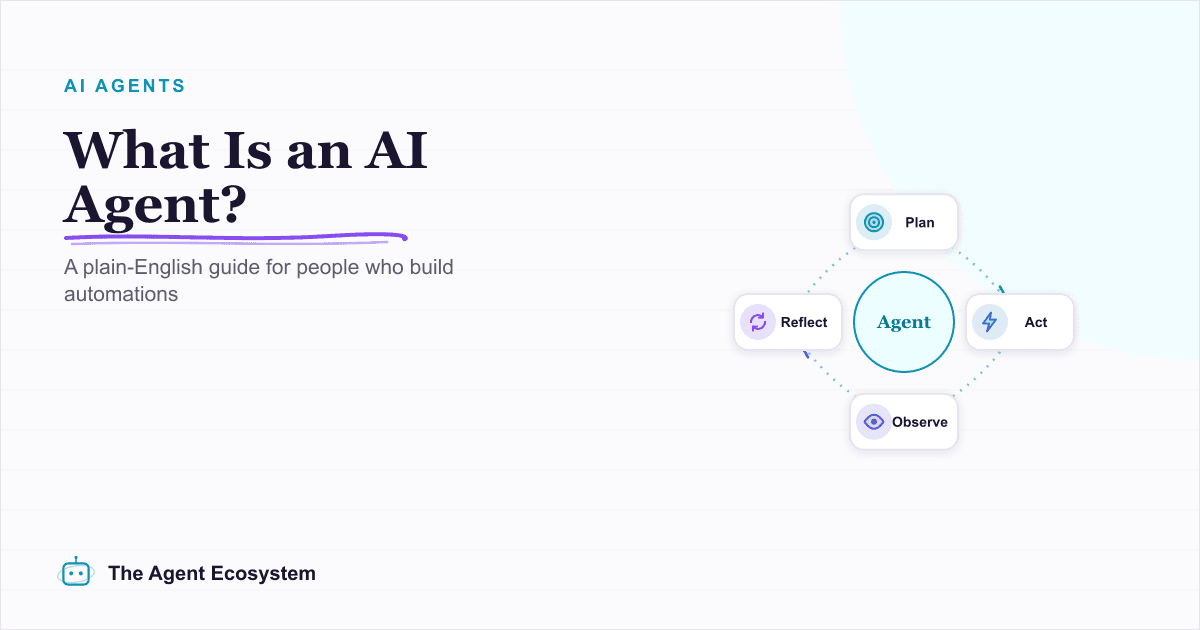
What Is an AI Agent? A Plain-English Guide for Builders
An AI agent is a language model running in a loop that decides its own next action, not a chatbot and not a chain. Here is how the perceive-decide-act-observe loop works, how an agent differs from a chatbot, chain, and workflow, and a checklist for when you actually need one.
Giving AI Agents Web Access: Search Tools, Grounding, and Cost
A search tool turns post-cutoff questions from hallucination bait into retrievable facts, and it brings 3 problems with it: choosing sources, paying for pages that become tokens, and reading text that may be aimed at the model rather than the user. This is the wiring guide: the
How to Build an AI Agent: The 80% That Survives Week Two
Most tutorials get you a working agent in ten minutes and skip what breaks it in week two. Sixteen lessons covering the loop, tool descriptions, memory, fallbacks, guardrails, evaluation, and the cost levers that decide your bill.
I Built the Same AI Agent in n8n, Make and LangChain: The Honest Difference
I built the exact same order-status AI agent in n8n, Make.com, and LangChain, then compared setup effort, cost model, portability, and who each platform actually suits.
Meta Muse Spark 1.1: A Low-Cost Computer-Use Agent Model
On July 9, 2026, Meta put a frontier-class model behind a paid, self-serve API for the first time. Muse Spark 1.1 is agentic, handles computer use and parallel subagents, and undercuts GPT-5.6 and Fable 5 on price. An honest, dated read for builders.