Vector Database Operations: Rebuilds, Backups and the Parts Nobody Benchmarks
Index builds that fit in memory, snapshots that actually restore, and what replication buys that sharding does not.
AI-drafted, reviewed by Muhammad Qasim Hammad on October 24, 2026. See our AI disclosure.
Table of contents
Choosing a vector database is a weekend of benchmarking. Operating one is everything after that: rebuilding an index without taking search down, backing it up in a way that actually restores, and finding out whether your replica count survives a node dying at 3am. Most vector database content stops at the comparison table, which is the part you do once. This is the part you do forever.
Why is a vector index harder to operate than a table?#
Because it is a derived structure that has to be built, not just written to. A B-tree updates incrementally and lives comfortably on disk. An approximate nearest neighbor graph is constructed from the whole dataset, wants to sit in memory to be fast, and takes real time to rebuild when you change it.
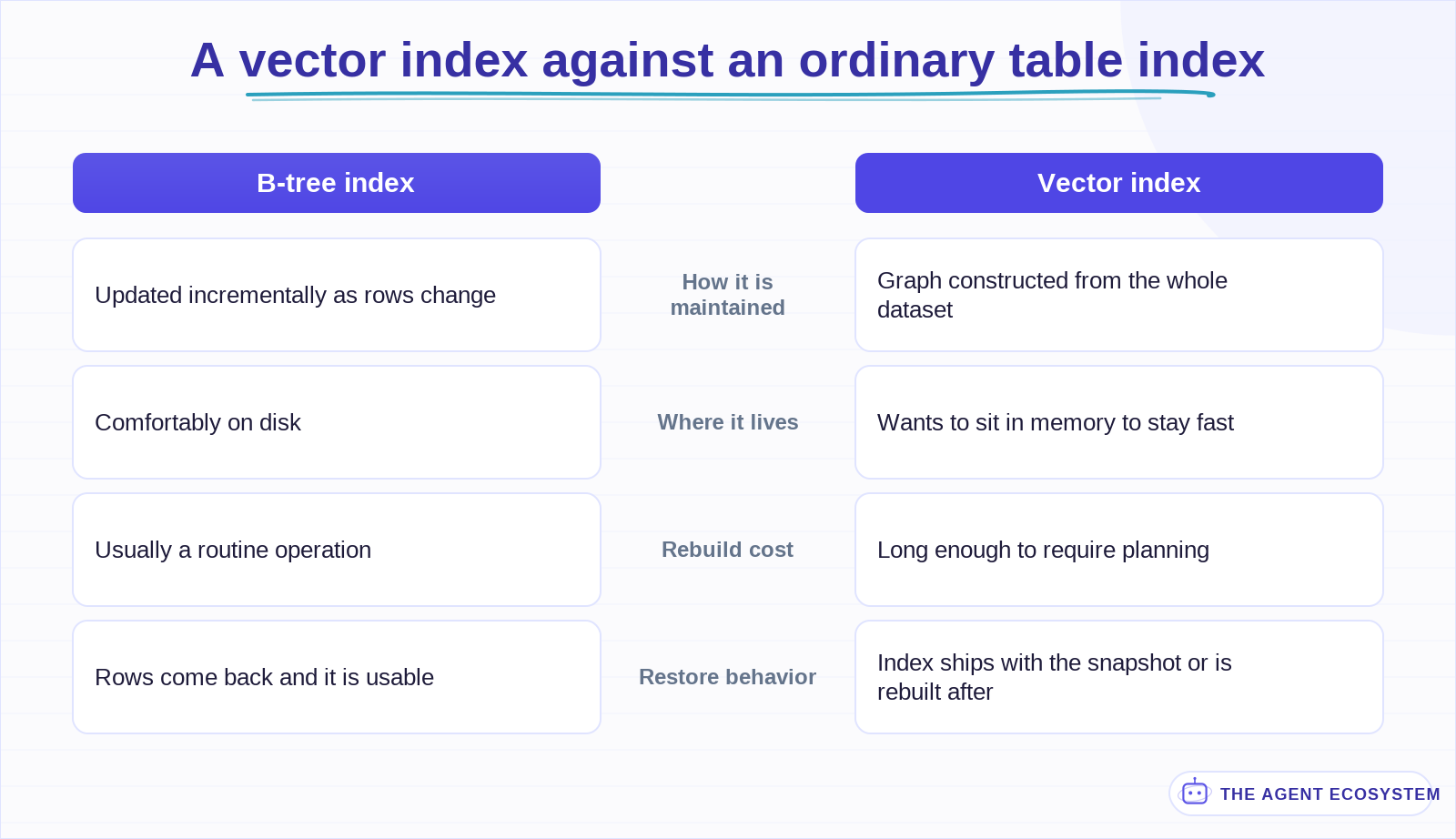 The operational differences all trace back to one property: the graph is built from the whole dataset.
That single difference generates most of the operational work. Rebuilds are long enough to need planning rather than a maintenance window you improvise. Memory is a first-order capacity constraint rather than something you tune later. And restoring from backup is not just restoring rows, because the index either comes with the snapshot or has to be rebuilt on the far side, which changes your recovery time objective dramatically.
It also means capacity planning starts from the index, not the data. The raw vectors are the smaller half of the problem: the graph structure that makes them searchable carries its own overhead per vector, and that is the number that decides how much memory a node needs. Working from the size of your source documents will underestimate what you actually have to provision.
What actually happens when you build an index?#
It gets built in memory if it fits, and on disk if it does not, and the difference is not subtle. pgvector states plainly that indexes build significantly faster when the graph fits into maintenance_work_mem, which makes that setting the single highest-leverage knob in the whole operation.
The practical guidance is concrete. pgvector suggests raising the setting substantially for index builds, while warning not to set it so high that it exhausts the server's memory, and notes that parallel workers default to 2 and can be raised to speed up creation. It also recommends loading your initial data first and creating the index afterwards, rather than building incrementally as rows arrive. Source
| Operation | Default behavior | The lever |
|---|---|---|
| Index build with a graph larger than memory | Spills to disk, much slower | Raise maintenance_work_mem to fit the graph |
| Index build on a large table | 2 parallel workers | Raise max_parallel_maintenance_workers |
| Building while writes continue | Blocks writes | CREATE INDEX CONCURRENTLY |
| Loading data with the index already present | Slower overall | Load first, index after |
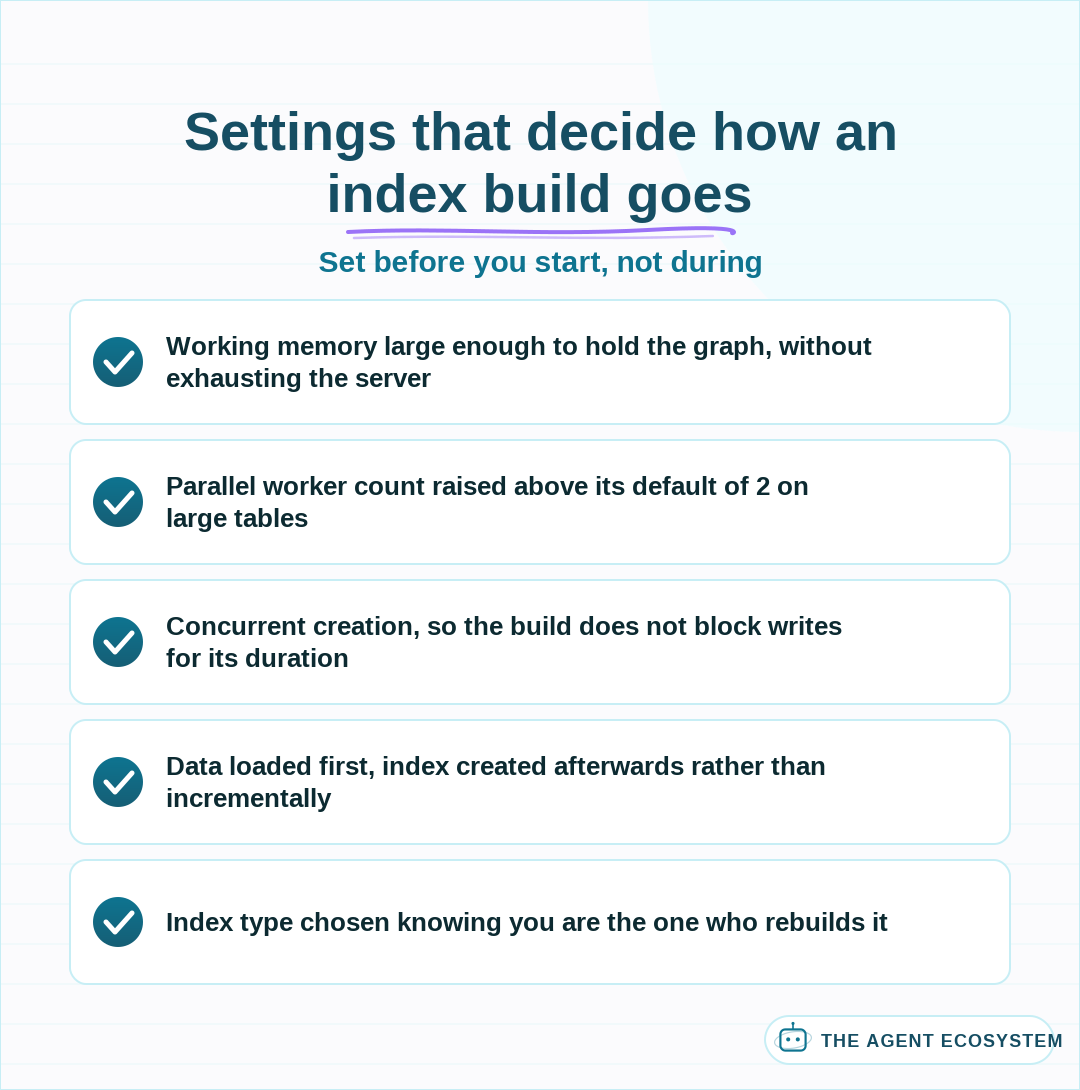 The first item is the difference between an in-memory build and a disk-bound one.
The concurrency point is the one that separates a staging habit from a production one. Building an index the ordinary way blocks writes for the duration, which on a large collection means an outage measured in however long the build takes. pgvector's own recommendation for production environments is to create indexes concurrently to avoid blocking writes. It is slower in wall-clock terms and it does not take your ingestion path down.
The index type choice compounds all of this. pgvector describes HNSW as having better query performance than IVFFlat on the speed-recall tradeoff, but slower build times and higher memory use, while IVFFlat builds faster and uses less memory at lower query performance. That tradeoff reads differently once you are the person rebuilding it, which is worth revisiting alongside how the 2 index types actually differ.
How do you back up a vector database correctly?#
By verifying a restore, not by confirming a backup ran. The failure mode specific to distributed vector databases is partial capture: a snapshot taken against one node of a multi-node cluster contains that node's shards and silently omits the rest.
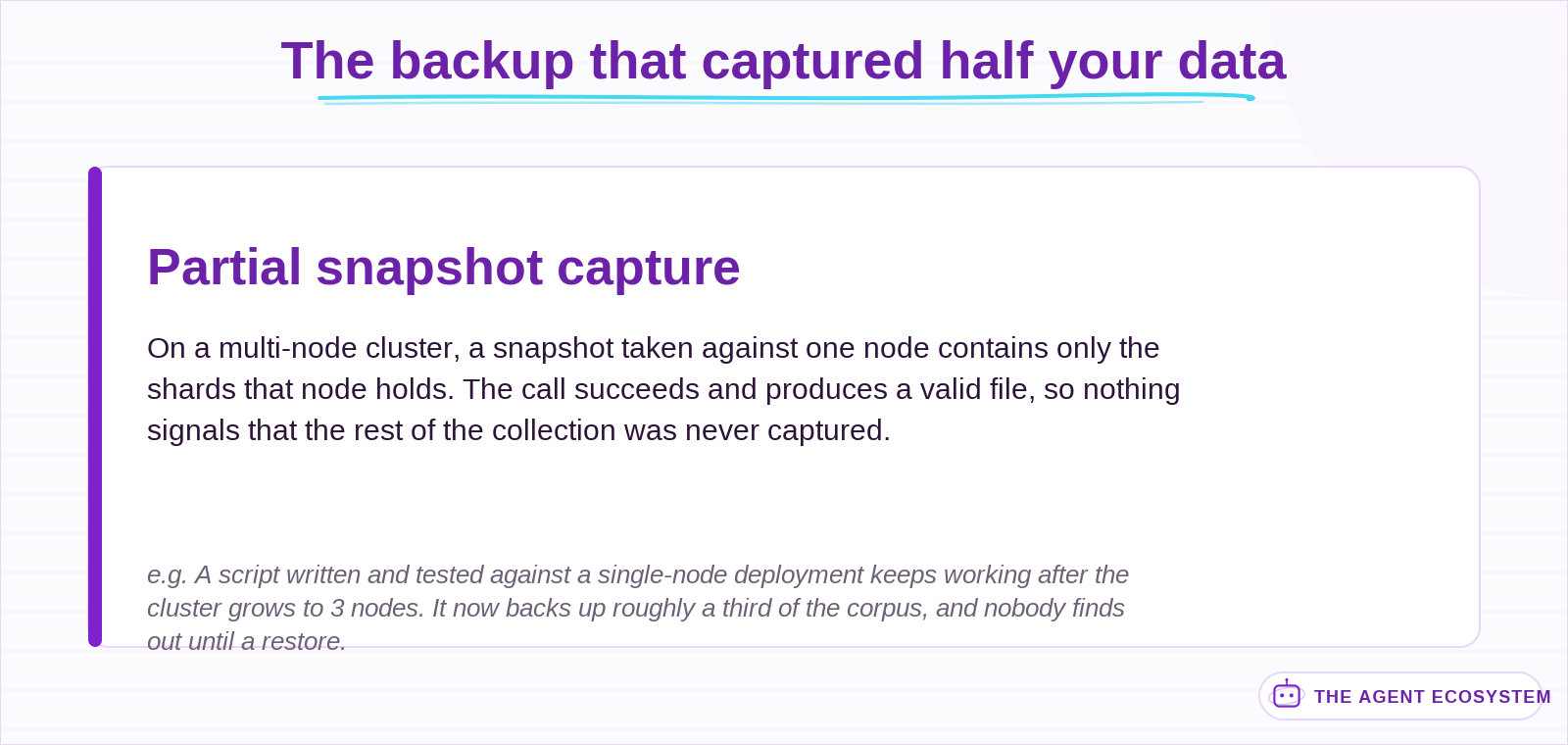 The job succeeds, the file exists, and the restore is missing every shard that lived elsewhere.
Qdrant's documentation draws the distinction directly. For a single-node cluster you call the snapshot endpoint on the exposed URL; for a multi-node cluster you call a snapshot on each node of the collection. It also notes that snapshot recovery in a distributed deployment differs from the single-node case, because consensus manages collection metadata and does not need snapshots to recover it, while snapshots are what you use to recover missing shards.
That second half is the more useful mental model. In a clustered deployment your snapshots are not a whole-system restore image. They are shard-level recovery material, and the cluster's own consensus layer handles the metadata. Treating them as a full backup, and discovering the difference during an incident, is the expensive version of learning this.
Two habits follow. Run an actual restore into a scratch environment on a schedule, because a backup you have never restored is a hypothesis. And know your recovery time, which includes any index rebuild the restore triggers, not just the time to copy data back.
What does resilience actually require?#
More than one copy of each shard, on more than one node. Qdrant's guidance is that if resilience matters most, you run a cluster with 3 or more nodes and 2 or more shard replicas. That configuration is what lets a node fail without taking a slice of your corpus offline with it.
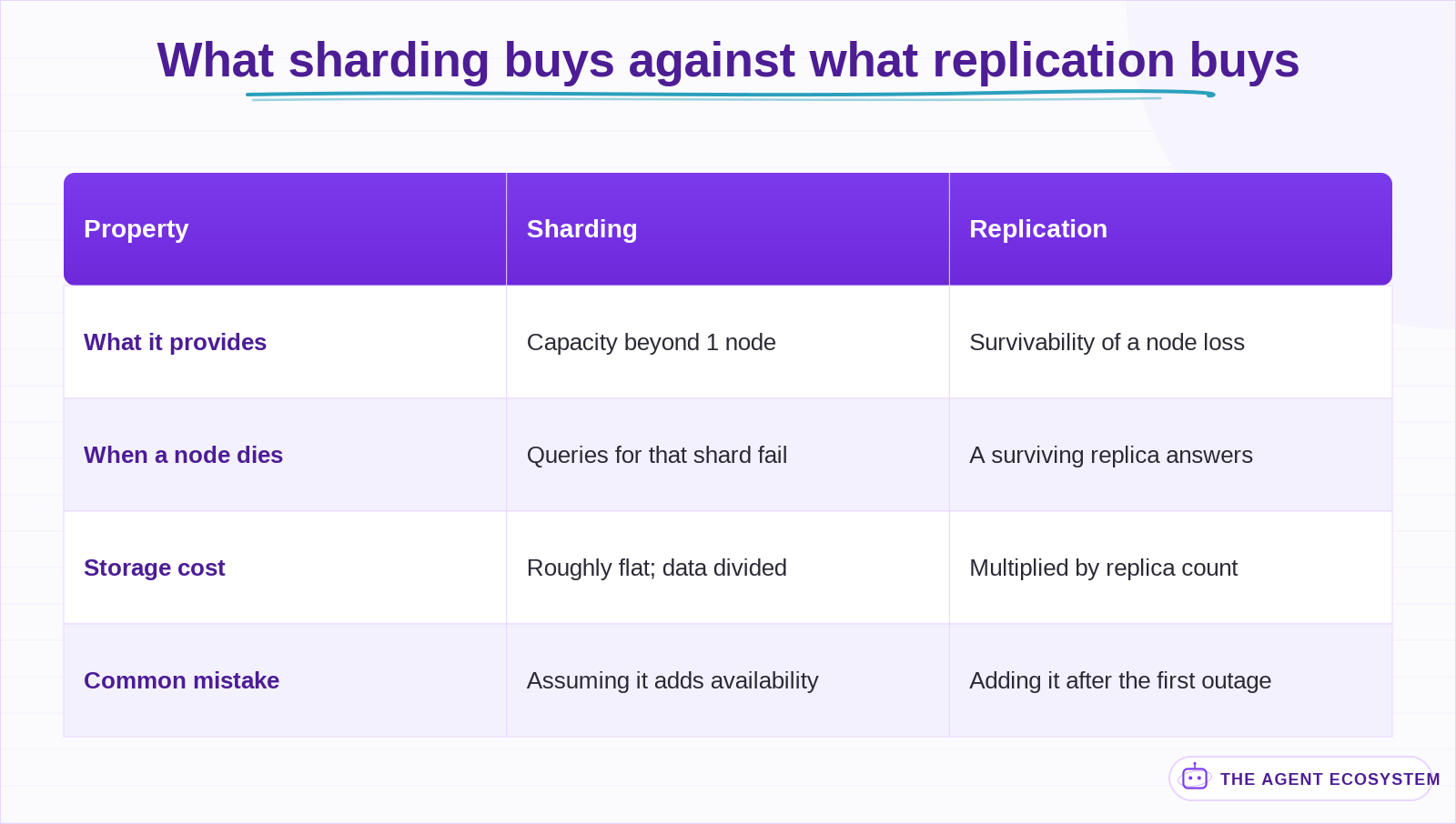 Teams usually add sharding when memory runs out, then learn the difference during the first outage.
The reasoning generalizes past any one engine. Sharding alone buys capacity, not availability: it spreads data across nodes so more of it fits, and if a node holding a shard dies, the queries that needed that shard fail. Replication is what converts capacity into survivability, because a second copy exists somewhere else to serve from. Teams often add sharding when they run out of memory, then discover during the first outage that they never added the second half.
Node count matters separately from replica count. A cluster needs enough nodes for the replicas to land somewhere genuinely independent, which is why the guidance pairs 3 or more nodes with 2 or more replicas rather than treating them as interchangeable dials.
When do you outgrow Postgres?#
When index rebuild time or memory pressure starts dictating your roadmap. Running vectors inside a database you already operate means 1 backup strategy, 1 monitoring stack, and 1 set of on-call knowledge. That consolidation is worth a great deal, and it stops being worth it at some point.
The honest version of this answer is that the threshold is workload-specific and the widely-quoted vector counts are not reliable. What is reliable is the shape of the signal: rebuilds long enough that you avoid doing them, memory pressure that forces a decision between the index and everything else on that instance, and sharding requirements your current setup cannot express. Those are observations about your system, not numbers you can inherit from someone else's blog post.
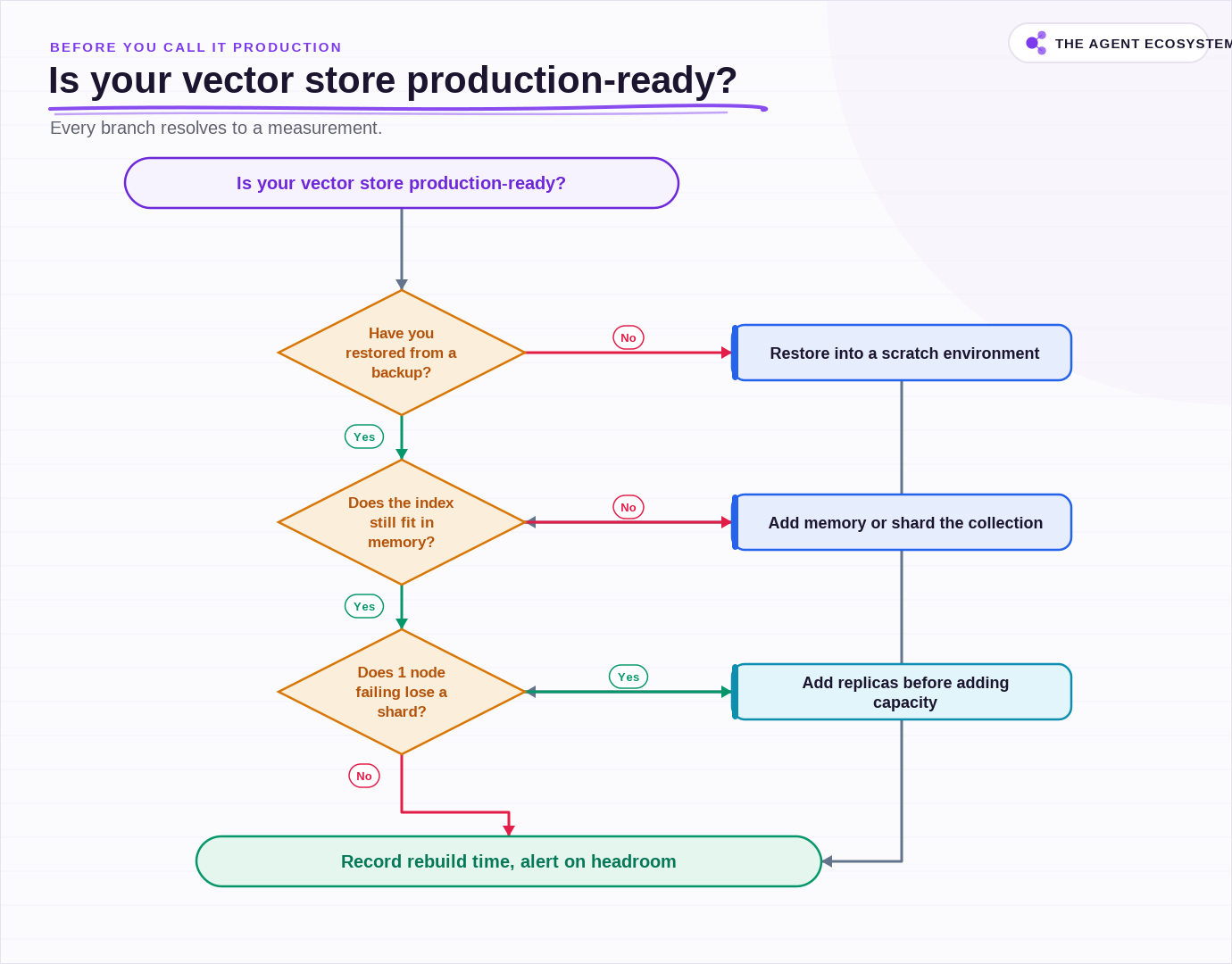 Every branch resolves to a measurement. None of them resolve to a vector count borrowed from someone else's deployment.
Measure rather than guess, because the cost of migrating between vector stores is high enough that a premature move is expensive and a late one is painful. Time your index rebuild at your current size, then again after the next significant growth, and extrapolate from those 2 points. That gives you a real curve, and it is the same instinct that makes choosing between vector stores a measurement exercise rather than a preference.
What should you set up on day 1?#
Three things, all of which are much cheaper to add early: a restore test that runs on a schedule, a recorded index rebuild time at your current corpus size, and alerting on memory headroom rather than on disk. None takes long, and each one is what you will wish existed during the first incident.
Memory alerting deserves the emphasis because it is the least conventional of the 3. Ordinary database monitoring watches disk, and a vector index that no longer fits in memory does not fill a disk. It gets slower, and slower, and eventually your latency graph explains itself when someone finally checks resident set size against index size. Alert on the gap between them.
The rest is ordinary discipline applied to an unusual workload. Version your index configuration alongside your application code, so a rebuild reproduces the parameters you actually tuned. Keep the migration paths you might need in mind before you need them, because changing an embedding model means re-embedding the whole corpus, which is why switching models is a rebuild rather than a config change. And write down your recovery time objective including rebuild, since the honest number is usually larger than anyone assumed and is much better discovered on a calm afternoon.
Frequently asked questions
Why do vector index rebuilds take so long?
How do I speed up a pgvector index build?
Can I build a vector index without downtime?
How do I back up a clustered vector database?
How many replicas does a vector database need?
Sources
Primary references and vendor documentation used while drafting and reviewing this article.
Written by

Muhammad Qasim Hammad is an AI agent and automation expert and the founder of Cart Gaze LLC (cartgaze.com). He builds product for the love of it: when an idea lands, a working prototype is usually running within hours, built with the same AI agents and automations he sells. He puts his own output at roughly 20× what it was before agents, and the Agentic OS behind this site is the working proof, documented in public with the tools he actually ran and what they really cost.
AI & Automation Services
Want a pipeline like this running in your business?
I'm Qasim — I design and ship AI agents and n8n automations for solo operators and small teams. Tell me what's eating your team's week, and I'll scope a fix.
Related reading
HNSW vs IVFFlat: Choosing and Tuning Your pgvector Index
In pgvector you choose an index type, and the two real options are HNSW and IVFFlat. With no index, queries do exact search on every row: accurate but slow at scale. Here is the trade-off between the two approximate indexes and how to tune each one.

Keeping RAG Indexes Fresh: Incremental Updates Without Full Re-Embeds
A RAG bot is only as current as its last ingest, and re-embedding the whole corpus nightly pays for thousands of unchanged documents to pick up a handful of edits. This is the incremental alternative: hash to detect changes, upsert by stable chunk IDs, tombstone deletes, and
pgvector vs Chroma vs Qdrant: Choosing a Vector Database for RAG
Compare pgvector, Chroma, and Qdrant for local RAG pipelines. Get the three-line decision: already on Postgres, use pgvector; prototyping locally, use Chroma; need scale or heavy filtering, use Qdrant.
Build a Vector Store in n8n (Embeddings for RAG)
Build an n8n vector store that retrieves your own documents by meaning, not keywords. Embedding 1,000 docs costs ~1.3 cents; Supabase free-tier storage costs $0. Full node wiring and step-by-step setup inside.
n8n Pinecone vs Supabase Vector Store: Which to Pick
The n8n Pinecone Vector Store and Supabase Vector Store nodes wire into an agent the same way, but one is a managed service and one is Postgres you run. Here is how their free tiers, cost at scale, latency, and node wiring compare, and when to pick each for RAG.
Embedding Dimensions and Cost: Bigger Vectors, Better RAG?
You assumed more embedding dimensions mean better retrieval, and you are about to over-pay on vector storage for a margin you will never notice. OpenAI's own numbers show text-embedding-3-large at 256 dims beating ada-002 at 1536. Here is what dimensions cost and how to pick a