Metadata Filtering in n8n RAG: Cut Wrong-Doc Retrieval
Why pure similarity search hands Company A a chunk from Company B, and the exact n8n wiring that stops it.
AI-drafted, reviewed by Muhammad Qasim Hammad on July 12, 2026. See our AI disclosure.
Table of contents
A client asks a scoped question and your n8n RAG bot answers with another client's file, or an old draft, or a project that has nothing to do with the ticket. That is not a hallucination and it is not a weak model. It is a missing WHERE clause, and rag metadata filtering is the two-step fix that stops your vector search from handing the wrong document to the wrong person.
Why does your RAG return the wrong document?#
Your RAG returns the wrong document because vector search ranks purely by semantic similarity, cosine or dot product, and similarity has no concept of ownership, recency, or document boundaries. A chunk from the wrong tenant that merely sounds on-topic can outrank the correct one. No better embedding model fixes a query that searches across everyone's data at once.
This is worth saying plainly because the internet will tell you to swap models or re-chunk. Neither helps here. If your retrieval step reads from one shared index and you never pass a filter, then every query races over every chunk, and the top result is whatever sits closest in vector space. Ownership is invisible to that math. The only thing that knows Company A's chunk from Company B's chunk is a metadata field you attached on purpose, and the filter that reads it back.
Picture a top_k of 5 against a shared index holding three clients. The closest five vectors can belong to any of them, so a scoped question from Company A can pull in two of Company B's passages simply because they discuss the same topic. Raise the embedding dimension, switch models, re-chunk at 512 tokens instead of 1,000: none of it changes the fact that the query never told the database whose data it was allowed to see.
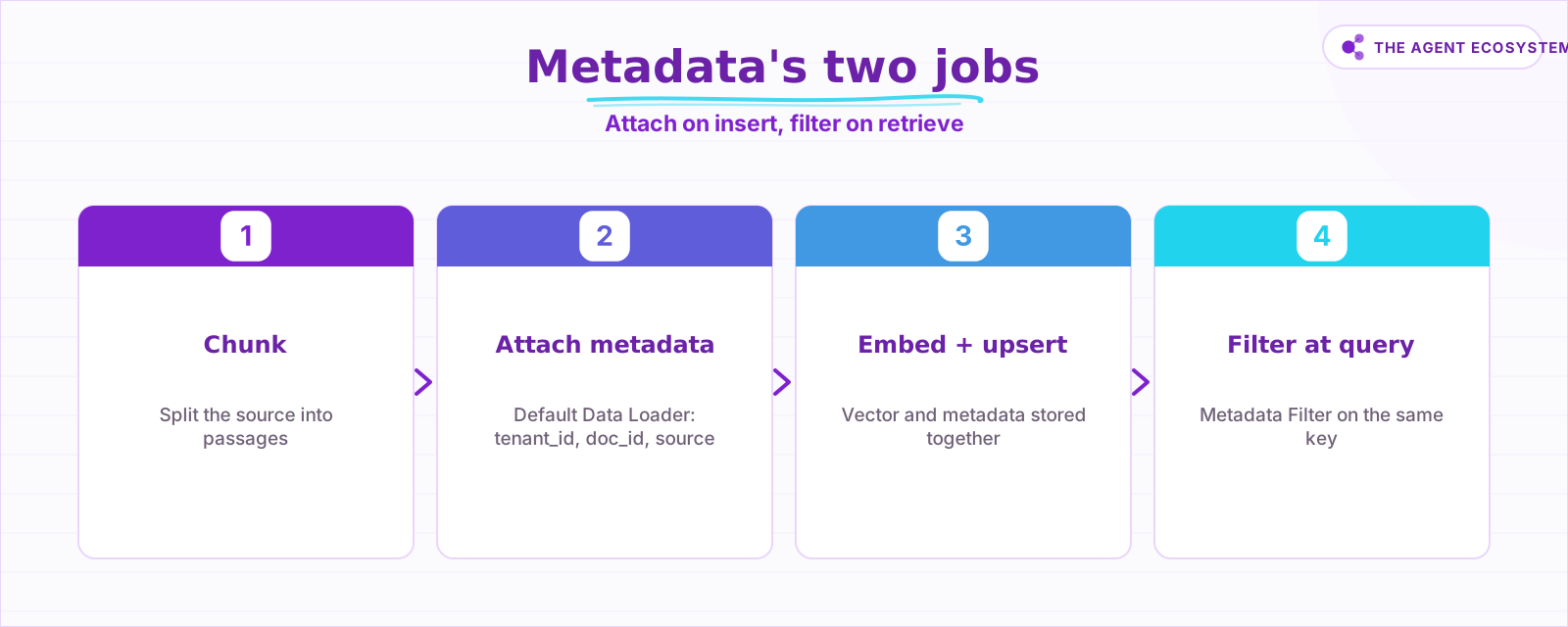 Metadata is useless at query time unless you wrote it at ingest time. Both halves live in different n8n nodes.
Metadata has two halves, and they live in separate nodes. At ingest, the Default Data Loader is where you write the keys. At retrieval, the vector store node is where you read them back. Skip the ingest half and there is nothing to filter on later. Skip the retrieval half and the keys just sit there while the search still returns wrong-tenant rows.
What is metadata, and why must you filter before ranking?#
Metadata is the structured fields stored alongside each vector and its text: tenant_id, doc_id, source, section, a date. In Qdrant this bundle is called the payload; in pgvector and Supabase it is a JSON or JSONB column. You filter before ranking so other tenants are never scored, which is both safer and usually cheaper than filtering after the search returns.
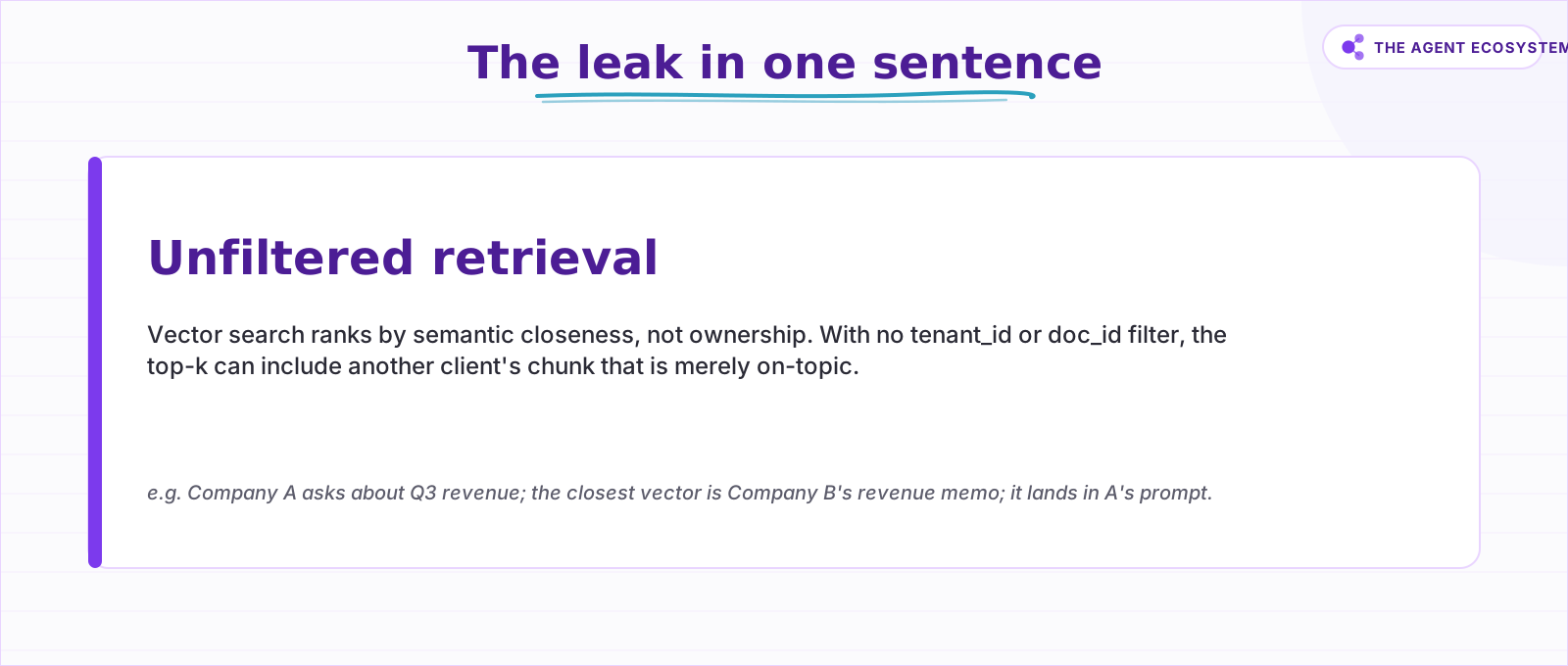 Similarity does not know who owns the chunk. The filter is the only thing that does.
Pre-filter versus post-filter is the decision that matters. Pre-filtering pushes the condition into the database so it narrows the candidate set first: other tenants are never even scored, so nothing can leak and you waste less compute. Post-filtering scores everything, then discards the wrong rows afterward. Qdrant's own docs note that post-filtering a low-cardinality filter "ends up discarding a large portion of the results" (Qdrant, filtering article). Worse, when the filter is selective, your top-k can fill up with wrong-tenant chunks and starve the valid ones. n8n's Metadata Filter pushes the condition down to the database, so using it is pre-filtering by default.
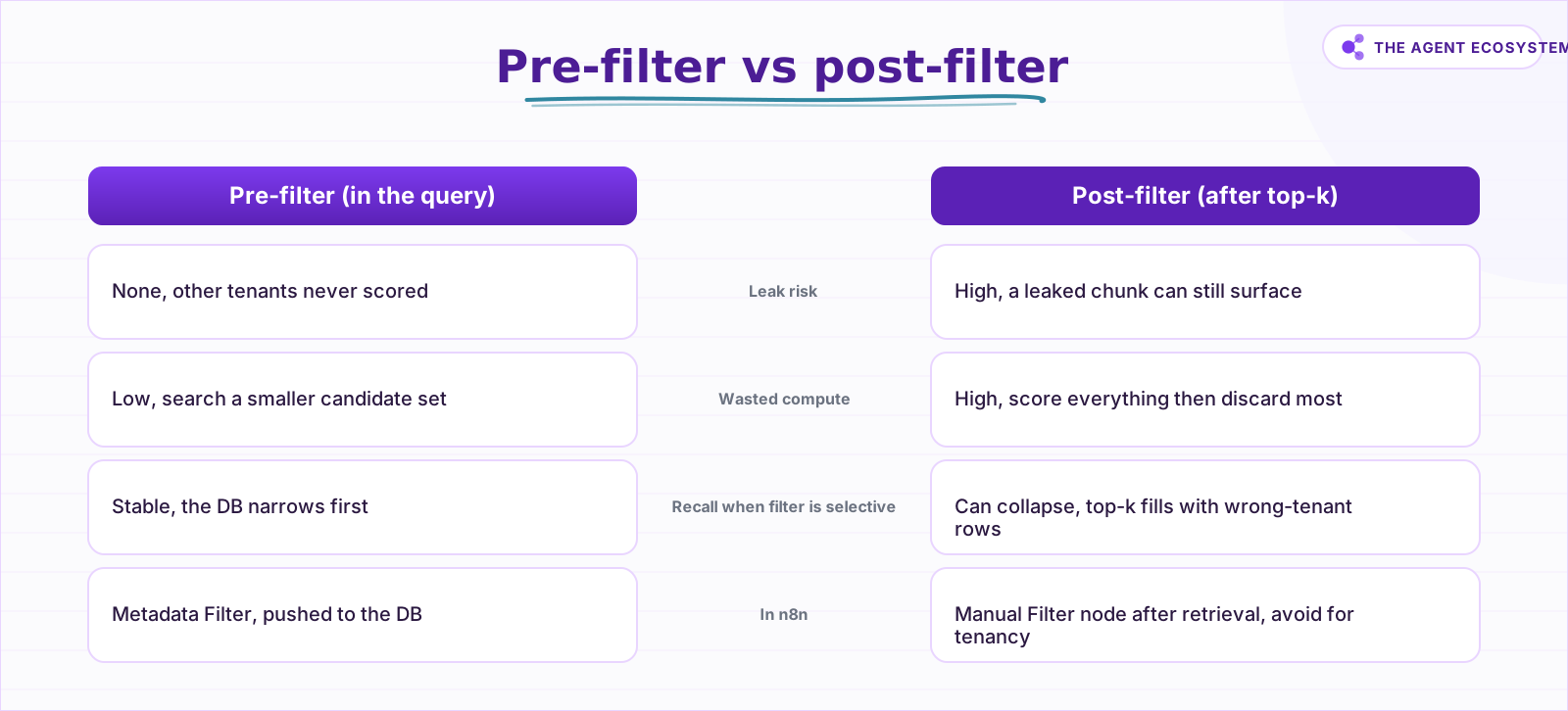 Pre-filtering is both safer and usually cheaper. n8n's Metadata Filter pushes the condition down to the database, not your workflow.
The multi-tenant leak is the sharp end of this. If vectors are not isolated by tenant, a similarity search can retrieve Company B's confidential content for Company A's user, purely because it is the closest match. One documented example is the Salesforce Einstein case reported in 2024, where reps from one company occasionally saw snippets belonging to another due to insufficient metadata filtering (Kiteworks, RAG data-leakage guide). Separately, one practitioner claims 95% of RAG apps leak data across users; treat that as their stated view, not a measured statistic. Either way the mechanism is the same, and it is the same class of problem behind a RAG chatbot giving wrong answers.
How do you wire metadata filtering in n8n?#
You wire it in two moves that mirror the two halves. At ingest, open the Default Data Loader sub-node and set its Metadata field to the key/value pairs you will match on later. At retrieval, open the vector store node and set its Metadata Filter to the same key. The backend only changes the retrieval field name, not the plan.
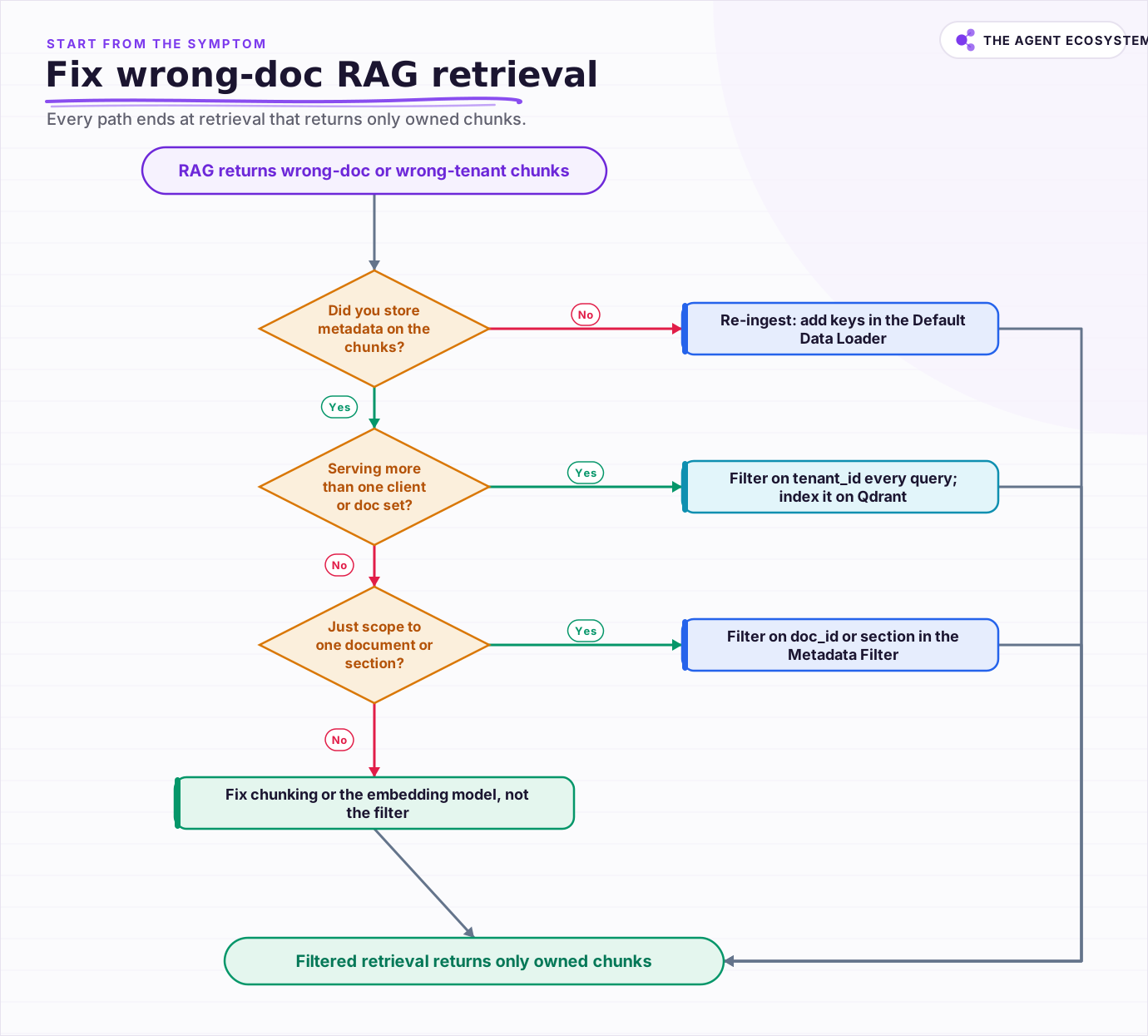 Start from the symptom; every path ends at a retrieval that returns only owned chunks.
Start with the ingest side, and it is identical across all three backends. In the Default Data Loader, the Metadata field holds values that, per n8n's docs, "should accompany the document in the vector store, which is what you match to using the Metadata Filter option" (n8n Default Data Loader docs). One gotcha bites here: inside a sub-node, an expression like {{ $json.tenant_id }} resolves to the first input item, so metadata that varies per chunk needs a loop, or you set the value before the loader, or you keep one static tenant per run.
The retrieval side differs by backend. For PGVector, the node's Metadata Filter is documented as an AND query and is exposed in Get Many mode, not identically on every mode, so design the retrieval around the mode that has it (n8n PGVector docs, June 2026). For Qdrant, the Metadata Filter option maps to Qdrant's payload filter, whose JSON uses must, should, and must_not clauses of the form { "key": "tenant_id", "match": { "value": "org-789" } } for AND, OR, and NOT (Qdrant filtering docs); for named or sparse vectors, call the API directly. For Supabase, store the keys in the table's JSONB column and filter via the node or a match_documents RPC.
| Backend | Set metadata on insert | Retrieve-time filter | Semantics or gotcha |
|---|---|---|---|
| PGVector | Default Data Loader Metadata | Metadata Filter (Get Many) | AND query; Get Many mode only, not every mode |
| Qdrant | Default Data Loader Metadata | Metadata Filter option | Maps to payload; index the field or pay a full scan |
| Supabase | Default Data Loader Metadata | Metadata Filter or RPC | JSONB column filter; RLS is a separate layer |
All three backends attach metadata the same way at ingest, so the only thing you tailor per store is the retrieval field and its semantics. Keep the key names consistent across environments, tenant_id not tenantId in one place and org in another, or a filter that works in staging will silently return nothing in production because the JSON keys do not match.
One honesty note on Supabase: Row-Level Security protects the table, but a service-role or owner connection typically bypasses RLS, so the tenant filter in your query is still doing the real isolation work. RLS is defense in depth, not a substitute for the filter.
Why is my Qdrant filter slow or missing matches?#
Your Qdrant filter is slow or misses matches because Qdrant does not index payload fields by default, so filtering on an unindexed field forces a full scan. Worse, combining several strict, high-cardinality filters can disconnect the HNSW graph and tank recall. The fix is a payload index on every field you filter by, plus a newer algorithm for hard cases.
Create a payload index per filtered field, and Qdrant's query planner will switch between an index-backed search and a filterable-HNSW traversal based on cardinality (Qdrant filtering article). When filterable-HNSW edges are not enough and strict multi-filters start disconnecting the graph, Qdrant 1.16 added the ACORN algorithm, which explores two-hop neighbors of filtered-out points to recover recall at a latency cost (Qdrant 1.16 release). Verify that version and tradeoff on the release page before you rely on it in production. If you are still choosing a store, our pgvector vs Chroma vs Qdrant comparison covers where each one lands.
How do you confirm the filter actually worked?#
You confirm the filter worked by testing the leak on purpose, then reading the metadata that comes back. Ingest two tenants sharing a near-identical document, query as tenant A without a filter to prove the leak exists, then add the tenant_id filter and check that tenant B's chunk vanishes from the top-k. That side-by-side is the only proof that counts.
After the leak test, make it a habit to inspect what retrieval returned. Every chunk in the n8n output should carry the expected tenant_id or doc_id; if one does not, the filter is wrong or was never applied. On Qdrant, slow or lossy filtered queries point at a missing payload index or too many strict filters stacked at once. And treat the query filter as your primary control, then pair it with physical isolation, a per-tenant collection or namespace, or row-level security where the stakes are high, so a single forgotten filter is never a full breach. The filter does the daily work; the extra layer is your seatbelt.
Frequently asked questions
Does n8n have built-in metadata filtering for RAG?
Why does my vector search return another client's document?
Should I filter before or after the similarity search?
My Qdrant filter is slow or misses matches, why?
Is metadata filtering enough for security?
Sources
Primary references and vendor documentation used while drafting and reviewing this article.
- n8n PGVector Vector Store node (modes; Metadata Filter as AND query in Get Many; metadata via Default Data Loader)
- n8n Qdrant Vector Store node (modes + Metadata Filter option; no native sparse/hybrid)
- n8n Default Data Loader (Metadata field; sub-node expression resolves to the first item)
- Qdrant filtering (must/should/must_not; key/match/value condition form)
- Qdrant vector search filtering (payload not indexed by default; filterable HNSW; post-filter discards large portions)
- Qdrant 1.16 release (ACORN for high-cardinality filters; tiered multitenancy)
- Kiteworks: prevent data leakage in RAG pipelines (cross-tenant leak; Salesforce Einstein 2024; filter on tenant_id before ranking)
Written by

Muhammad Qasim Hammad is an AI agent and automation expert and the founder of Cart Gaze LLC (cartgaze.com). He builds product for the love of it: when an idea lands, a working prototype is usually running within hours, built with the same AI agents and automations he sells. He puts his own output at roughly 20× what it was before agents, and the Agentic OS behind this site is the working proof, documented in public with the tools he actually ran and what they really cost.
AI & Automation Services
Want a pipeline like this running in your business?
I'm Qasim — I design and ship AI agents and n8n automations for solo operators and small teams. Tell me what's eating your team's week, and I'll scope a fix.
Related reading
How to Build a RAG System That Retrieves the Right Thing
Most RAG systems fail at retrieval, not at the model. Twelve lessons on chunking for the question, hybrid search for exact strings, re-ranking, making it refuse, and measuring retrieval separately from generation.

Why Your n8n RAG Chatbot Gives Wrong Answers (Fix Retrieval) (2026)
When your n8n RAG chatbot returns wrong answers, the fix is retrieval, not the model. This guide walks 6 fixable causes: chunking, overlap, top-k, embeddings, metadata filtering, and reranking.
pgvector vs Chroma vs Qdrant: Choosing a Vector Database for RAG
Compare pgvector, Chroma, and Qdrant for local RAG pipelines. Get the three-line decision: already on Postgres, use pgvector; prototyping locally, use Chroma; need scale or heavy filtering, use Qdrant.
Hybrid Search for RAG in n8n: BM25 + Vector, and When to Use Each
Vector search nails meaning but misses exact tokens like SKUs, error codes, and function names. Hybrid search adds a BM25 keyword leg and fuses both with Reciprocal Rank Fusion. Here is when each wins and how to wire it in n8n with Qdrant or pgvector.
Reranking for RAG: When a Reranker Is Worth It (and When It Isn't)
RAG reranking re-sorts the chunks you already retrieved so the best one rises to the top, but it cannot recover a chunk you never retrieved. Here is what a cross-encoder reranker actually does, when it is worth the latency and cost, the real 2026 options (Cohere, Voyage, BGE),
Build a Vector Store in n8n (Embeddings for RAG)
Build an n8n vector store that retrieves your own documents by meaning, not keywords. Embedding 1,000 docs costs ~1.3 cents; Supabase free-tier storage costs $0. Full node wiring and step-by-step setup inside.