PDF Parsing for RAG: The Step That Caps Your Retrieval Quality
Reading order, layout and table geometry are reconstructed, not stored. What the benchmarks say about how well that actually goes.
AI-drafted, reviewed by Muhammad Qasim Hammad on October 23, 2026. See our AI disclosure.
Table of contents
Every RAG pipeline built on documents has a step nobody wants to own: turning a PDF into text worth embedding. It gets treated as plumbing, given 3 lines of code and no evaluation, and then the retrieval quality it caps becomes someone else's debugging problem 2 months later. A PDF does not contain a document. It contains drawing instructions for glyphs at coordinates, and every parser is reconstructing structure that was thrown away when the file was made.
Why does the parser decide your RAG quality?#
Because everything downstream inherits its output. Chunking splits whatever text the parser produced, embeddings encode it, and retrieval ranks it. If a table arrived as a scrambled run of numbers with no row structure, no amount of reranking or query rewriting recovers the relationship those numbers had on the page.
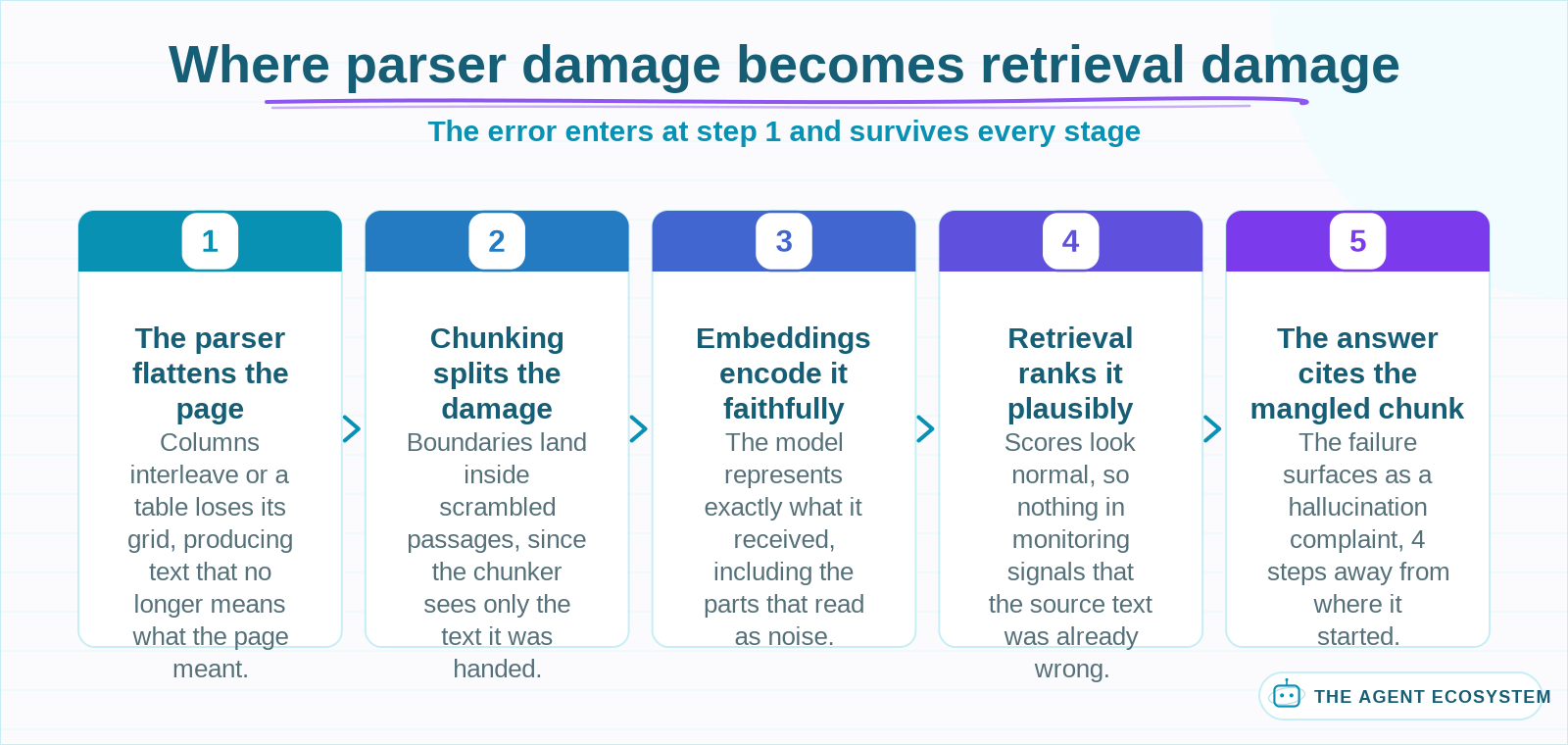 Nothing downstream can restore a relationship the parser destroyed. It only propagates it.
This is the least glamorous failure mode in retrieval and one of the most common. Teams debug embeddings, swap vector databases, and tune chunk sizes while the actual defect sits 1 step earlier, in a text file where the parser interleaved 2 columns into alternating half-sentences. The symptom looks like a retrieval problem, so that is where the effort goes.
The tell is worth learning: read the raw extracted text for the documents your users ask about most. Not the chunks, not the retrieval results, the parser output itself. If it does not read as coherent prose to you, it will not embed as coherent meaning either, and chunking strategy is being asked to fix something upstream of it.
What is the parser actually reconstructing?#
Three things the format never stored: reading order, semantic structure, and table geometry. A PDF places glyphs at coordinates. It usually does not record that these 2 blocks are columns to be read separately, that this line is a heading, or that these numbers form a grid with meaningful rows.
Reading order is the one that breaks silently. In a 2-column layout, the naive extraction is top-to-bottom by coordinate, which alternates between columns and produces text where every other sentence belongs to a different thought. It parses, it embeds, and it retrieves nonsense.
Semantic structure is the quieter loss. Visually a heading is obvious, because it is larger and bolder with space around it, and none of that is stored as "this is a heading." A parser has to infer it from font size and position, and when it guesses wrong your chunker loses the boundaries it was going to split on. Headings are also what most chunking strategies use to keep related text together, so a parser that flattens them turns structure-aware chunking back into fixed-size chunking without telling anyone.
Then there is the category that defeats extraction entirely: pages that contain no text at all. A scanned document is an image, and a text parser run over it returns empty output rather than an error. Pipelines that do not check for this quietly index thousands of blank chunks and report success, which is why detecting image-only pages belongs in the ingestion path rather than in a later investigation.
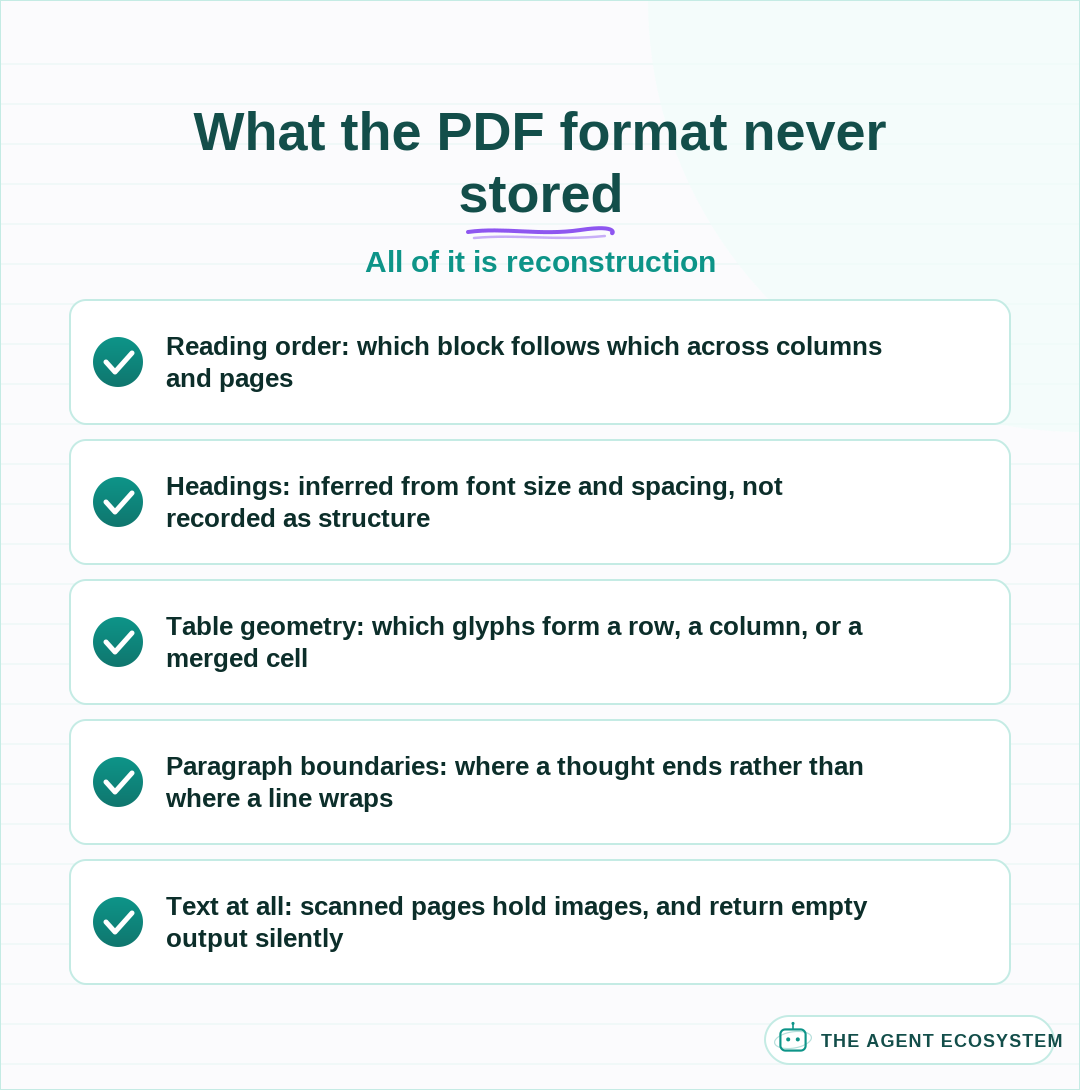 Each item is inferred from coordinates and font metrics, which is why results vary so much by document.
Modern tools attack this with models rather than heuristics. Docling, IBM's MIT-licensed converter, runs 2 specialized models: a layout analysis model built on DocLayNet to identify regions and reading order, and TableFormer for table structure recognition, and it is designed to run on commodity hardware within a small resource budget. Source That 2-model split reflects the real division of the problem: finding the boxes is a different task from understanding the grid inside 1 of them.
How good is text extraction, really?#
Good enough that it is rarely your bottleneck, on ordinary documents. The comparative study found PyMuPDF and pypdfium2 dominating across financial reports, manuals, tenders, patents, and legal documents, with PyMuPDF reaching a BLEU-4 of 0.9348 on financial documents and 0.9213 on manuals.
The exception is scientific writing, and the gap is large. Every rule-based tool showed a marked decrease in performance on scientific documents, with pypdfium scoring 0.8525 F1, because equations, multi-column layouts, and dense figure captions defeat coordinate-based heuristics. The learning-based Nougat outperformed all rule-based parsers by a huge margin in that category, handling mathematical expressions the others mangle.
| Category | Best text performance | What it tells you |
|---|---|---|
| Financial reports | PyMuPDF, BLEU-4 0.9348 | Conventional parsers handle business documents well |
| Manuals | PyMuPDF, BLEU-4 0.9213 | Structured layouts extract cleanly |
| Patents | PyMuPDF and pypdfium near 0.97 F1 | Widest spread; tool choice matters most here |
| Scientific | pypdfium only 0.8525 F1 | Rule-based approaches degrade; Nougat leads instead |
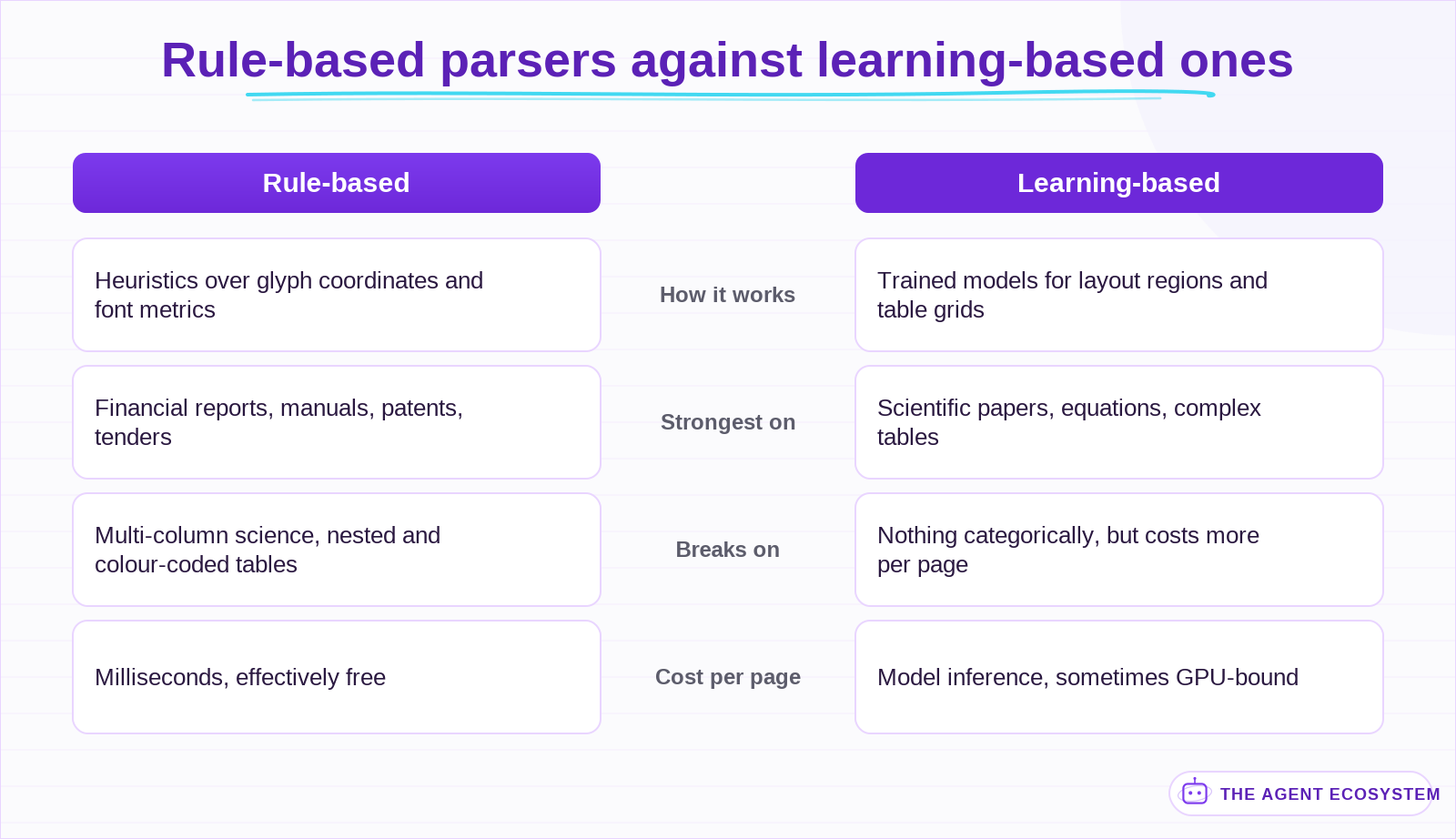 The split explains the category results: heuristics win on clean business layouts and lose on dense scientific pages.
The practical lesson is that a fast, free, rule-based parser is genuinely fine for a large share of business corpora, and reaching for a heavier tool by default wastes money and latency. What determines the answer is what your documents actually look like, not what a general ranking says.
How good is table extraction, really?#
Considerably worse, and this is the part most guides skip. The same study's table scores sit far below its text scores across every tool and category. Camelot led government tenders at 0.8279 F1 and PyMuPDF led manuals at 0.7463, numbers that would be alarming if they described text extraction.
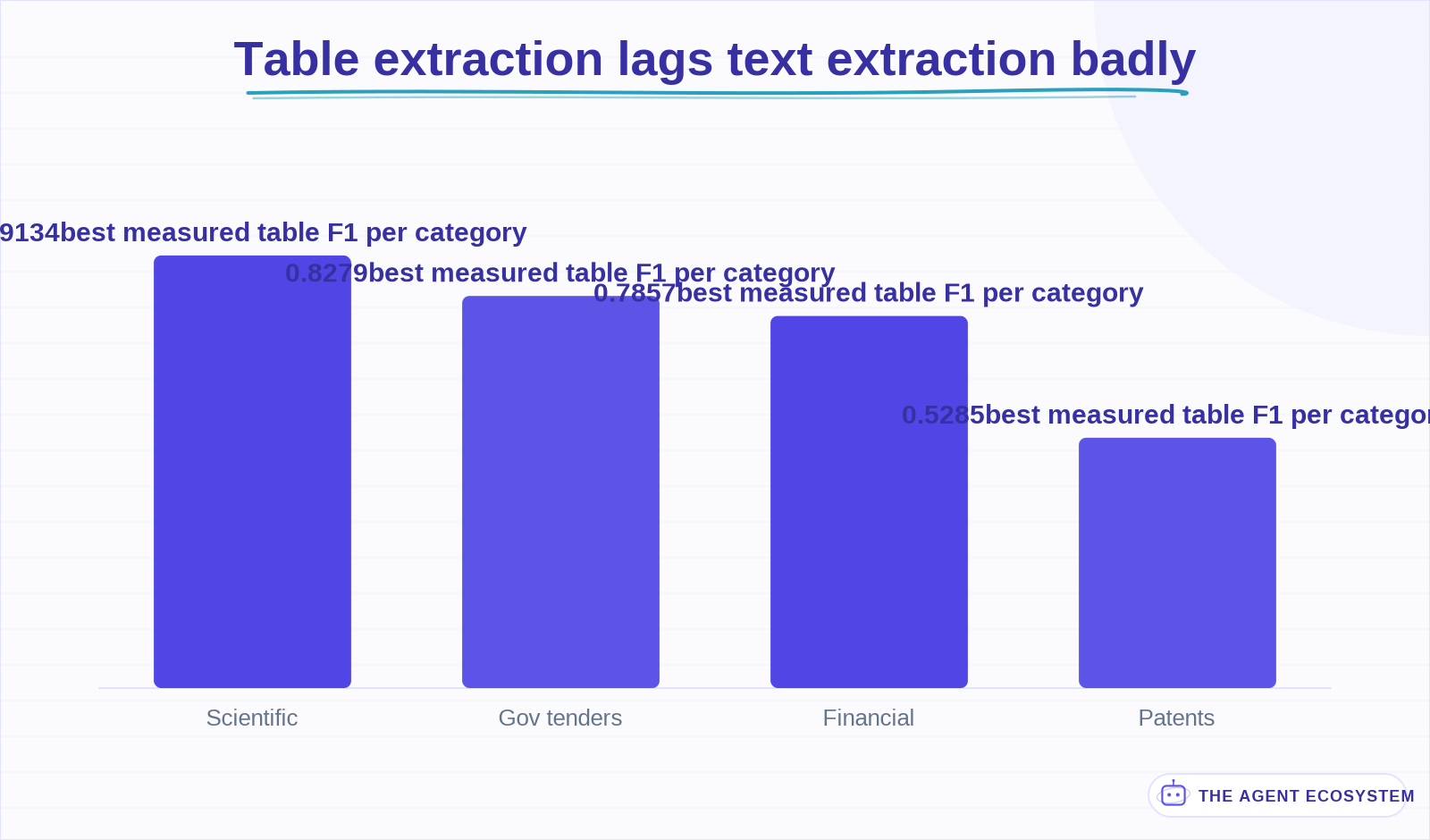 Best tool per category. Compare against the text chart above: this is the ceiling on table-heavy corpora.
The transformer-based Table Transformer showed what the study calls superior versatility and consistency across all categories, reaching 0.9134 F1 on scientific tables and 0.7857 on financial ones. Even it managed only 0.5285 on patent tables. Read that number honestly: on that category, the best-performing tool in an independent comparison reconstructed roughly half the table structure correctly.
The study also names the specific things rule-based tools fail on: nested tables, missing boundaries, and tables that distinguish sections by color rather than by ruling lines. Those are not edge cases in real corpora. Financial statements nest constantly, and plenty of enterprise reporting uses shading where a human sees structure and a coordinate parser sees nothing at all.
What follows for RAG is uncomfortable and worth saying plainly. If your users ask questions whose answers live in tables, your retrieval ceiling is set by a component scoring in the 0.5 to 0.9 range, not by your embedding model. That is a strong argument for treating table-heavy documents differently, whether by routing them to a specialized extractor, by storing tables as structured records alongside the prose, or by retrieving against the page image directly and skipping text extraction for those pages entirely.
Does one parser win?#
No, and expecting one is the mistake. The evidence points to category-dependent performance, where the tool that leads on financial reports is not the one that leads on scientific papers, and the best table extractor is often not the best text extractor for the same document.
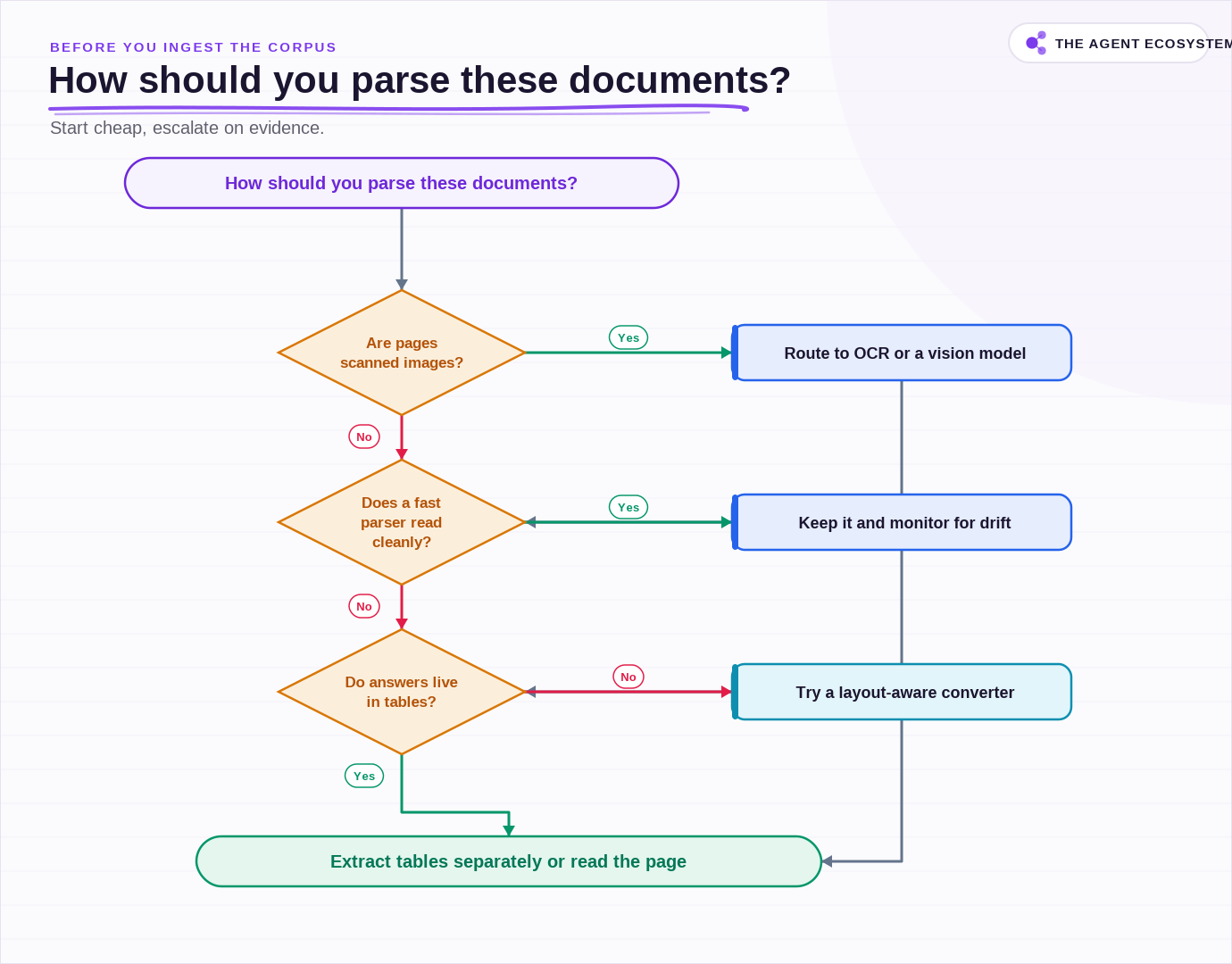 Start cheap, escalate on evidence. The exceptions are worth routing, not worth standardizing around.
That suggests routing rather than standardizing. A pipeline can detect document type cheaply, from source folder, filename convention, or a quick classifier, and send each class to the parser that handles it best. It is more moving parts than a single library call, and it is the honest response to a benchmark where no tool wins everywhere.
There is also a genuinely different approach worth weighing. Instead of extracting text and hoping structure survives, vision language models can read the rendered page and answer against layout, tables, and figures as they appear. That trades a parsing problem for an inference cost, and it removes a whole class of reading-order and table-geometry failures. It is not free, and for large archives the economics still favor extraction, but for the specific subset of documents that parse badly it is often the cheaper fix than fighting a parser.
How should you choose and verify?#
Benchmark on your own documents, because published rankings are measured on corpora that are probably not yours. Take 20 representative files, run the 2 or 3 candidate parsers, and read the output. The differences that matter are usually visible without a scoring script.
Start with the fastest free option and only escalate where it demonstrably fails. A rule-based parser costs milliseconds per page and handles ordinary business documents well, so making it the default and routing exceptions elsewhere beats putting every page through an expensive extractor. Escalate on evidence: a category where reading order breaks, tables that arrive shapeless, or scanned pages returning nothing.
Then keep measuring, because this is not a setup-time decision. Document formats drift, a supplier changes their invoice template, someone starts uploading scans, and a pipeline that was fine in March quietly degrades. Wire parser output into the same retrieval evaluation you already run, so a parsing regression shows up as a metric rather than as a support ticket. The step everyone treats as plumbing deserves the same monitoring as the model, because it sets the ceiling everything else operates under.
Frequently asked questions
Why does PDF parsing matter so much for RAG?
Which PDF parser is best for RAG?
How accurate is automated table extraction?
Should I use a vision language model instead of a parser?
What happens to scanned PDFs?
Sources
Primary references and vendor documentation used while drafting and reviewing this article.
Written by

Muhammad Qasim Hammad is an AI agent and automation expert and the founder of Cart Gaze LLC (cartgaze.com). He builds product for the love of it: when an idea lands, a working prototype is usually running within hours, built with the same AI agents and automations he sells. He puts his own output at roughly 20× what it was before agents, and the Agentic OS behind this site is the working proof, documented in public with the tools he actually ran and what they really cost.
AI & Automation Services
Want a pipeline like this running in your business?
I'm Qasim — I design and ship AI agents and n8n automations for solo operators and small teams. Tell me what's eating your team's week, and I'll scope a fix.
Related reading
How to Build a RAG System That Retrieves the Right Thing
Most RAG systems fail at retrieval, not at the model. Twelve lessons on chunking for the question, hybrid search for exact strings, re-ranking, making it refuse, and measuring retrieval separately from generation.

OCR Turns a Page Into Text. A VLM Just Reads It.
OCR-then-parse converts a page to text outside the model, so a language model only ever sees what the OCR engine decided to keep. A vision-language model reads the page itself, pixels and text together, which is why it can answer a question about a specific box on the page while
RAG Chunking Strategies: Fixed vs Recursive vs Semantic (and What to Pick)
RAG chunking strategies decide whether the right passage is whole, findable, and small enough to rank before your model sees it. Here is how fixed, recursive, and semantic splitting differ, what chunk size and overlap to start with, why the public benchmarks disagree, and a
Graph RAG Knowledge Graph Retrieval: Two Questions Vector Search Cannot Answer
Graph retrieval builds an entity-and-relationship graph out of your documents and walks it at query time instead of ranking chunks by similarity. On a published benchmark it beat reranked vector search by 10.5 points on complex reasoning and 13.1 on contextual summarization, and
Contextual Retrieval: Fix RAG Chunks That Lose Context
Plain RAG embeds chunks that have lost their document context, so 'revenue grew 3%' matches nothing useful. Contextual retrieval writes a short per-chunk context and prepends it before embedding and BM25. Here is the method, the build, and the honest ingest trade-off.
RAG vs Long-Context LLMs (2026): When a 200K-1M Token Window Beats Chunking
Now that 1M-token windows ship at flat pricing, should you stuff the whole corpus in one prompt or build a retrieval pipeline? This breaks long context vs RAG into reproducible per-query cost math, the recall limits of big windows, and four variables that decide it.