Automate Client Onboarding with AI: A Solo Consultant's Guide
Cut the admin, keep the human touch, without hiring anyone
AI assisted the draft; Qasim Hammad tested, edited, and fact-checked it. See our AI disclosure.

You signed a new client. Congratulations, now comes the part nobody talks about in the highlight reels: the three hours of back-and-forth emails, chasing signatures, re-explaining your process, and manually building out a project brief from notes scattered across your inbox.
For solo consultants, onboarding is the hidden tax on every win. It's also one of the most automatable parts of your entire business.
This guide walks you through exactly how to automate client onboarding with AI, step by step, tool by tool, so you reclaim those hours without sacrificing the relationship quality that keeps clients referring you to others.
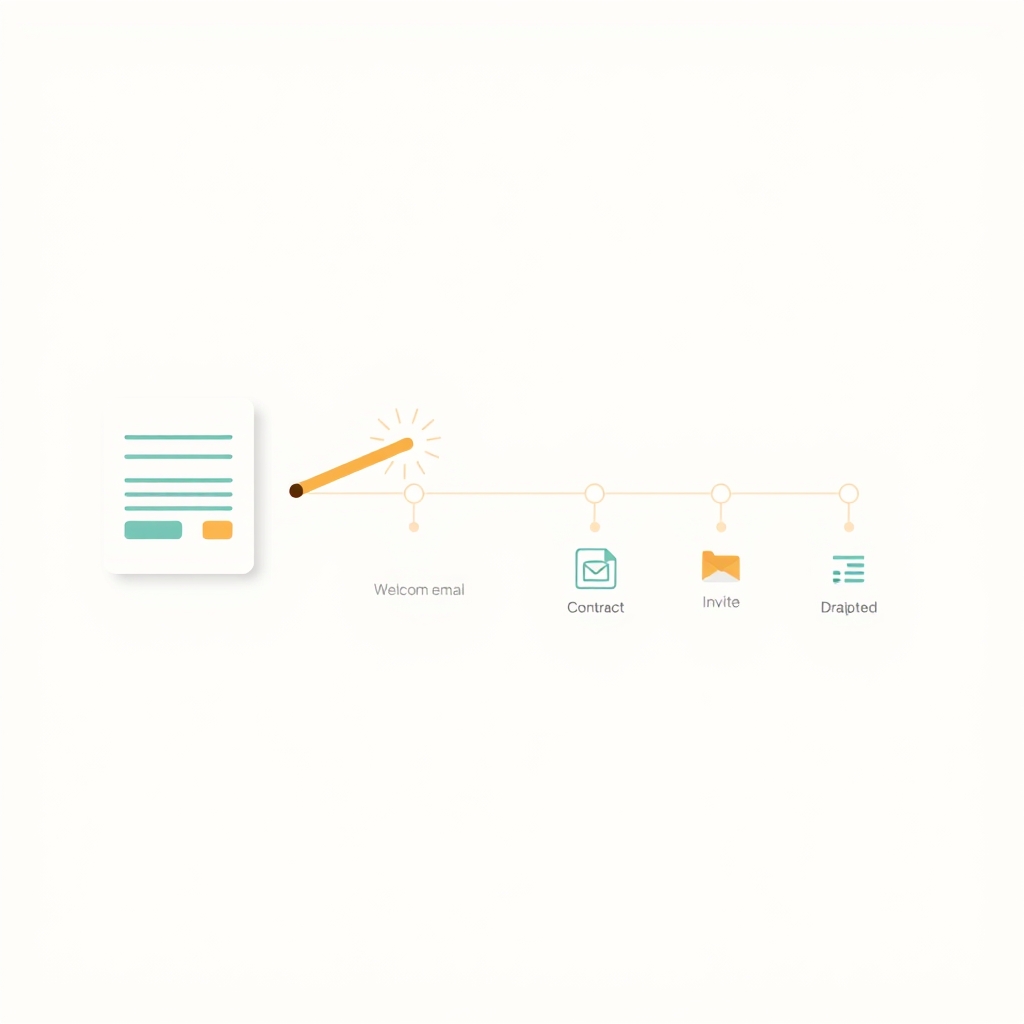 One client action hands the baton to every downstream onboarding step automatically.
What Does "Automating Onboarding" Actually Mean?
Automating your onboarding means building a system where the sequence of tasks that happen after a client says "yes" runs itself, without you manually triggering each step.
Think of it as a relay race. Your client fills out an intake form, and that single action hands the baton to a chain of automated steps: a welcome email lands in their inbox, a contract appears for signing, a kickoff call invitation hits their calendar, and a personalized project brief gets drafted, all before you've touched a single keyboard shortcut.
AI sits inside this chain in a specific way. It doesn't replace the whole flow; it makes individual steps smarter. An AI writing layer can pull the client's stated goals from your intake form and weave them into a personalized welcome email. An AI scheduling tool can find the optimal meeting time across time zones. A language model can turn raw intake answers into a structured project brief you only need to skim and approve.
The result is a process that feels bespoke to the client and effortless to you.
Why Solo Consultants Specifically Need This
Larger agencies have ops managers and account coordinators to absorb onboarding friction. You don't. Every admin hour you spend is an hour not spent on billable work, or rest.
Research from McKinsey suggests that generative AI can automate up to 60-70% of the time employees spend on certain administrative tasks today. Even if your reality is closer to 40%, that's still significant when you're a team of one.
There's also a consistency problem. When you onboard manually, the experience varies with your energy level, how busy you are, and whether you remembered to send the right template. Automation creates a floor, every client gets the full experience, every time.
How to Map Your Current Onboarding Before You Automate Anything
Before you touch a single tool, spend 20 minutes writing out every step you currently do when a client signs. Be granular.
A typical solo consultant's manual onboarding looks something like this:
- Send a "welcome aboard" email
- Share an intake questionnaire
- Wait for responses, follow up if needed
- Draft a project brief from their answers
- Send a contract via email attachment
- Follow up on the contract
- Schedule a kickoff call (usually 2-3 back-and-forth emails)
- Send a kickoff agenda
Circle every step that repeats identically for every client. That's your automation target list. Steps that require real judgment, like reviewing a contract clause specific to that client, stay manual for now.
 Circle the steps that repeat identically; those become your automation target list.
The Tools That Do the Heavy Lifting
You don't need an enterprise tech stack. Four categories of tools cover 90% of what solo consultants need:
| Category | Tool Options | What It Automates |
|---|---|---|
| Intake forms | Typeform, Tally, JotForm | Collects client info, triggers the flow |
| Automation backbone | Zapier, Make (Integromat) | Connects everything together |
| Contract & signing | HoneyBook, PandaDoc, DocuSign | Sends and tracks contracts automatically |
| AI writing layer | ChatGPT, Claude, Notion AI | Drafts emails, briefs, agendas from form data |
HoneyBook deserves a special mention for solo consultants. It bundles intake forms, contracts, invoices, and scheduling into one platform with its own native automations, so you can build an entire onboarding flow without juggling five separate tools. HoneyBook's automation features let you trigger sequences the moment a project is created.
If you prefer a more modular approach, Zapier connects almost any combination of tools. The free tier supports single-step automations, which is enough to get started.
Building the AI Writing Layer
This is where the real magic happens. Instead of sending the same generic welcome email to every client, you can create a template with dynamic fields that pull directly from your intake form.
For example, an intake question like "What's your single biggest goal for this project?" can feed directly into your welcome email: "I'm so glad we're working together, getting you to [goal they stated] is exactly what we're going to focus on."
Use ChatGPT or Claude to write your master template. Include placeholders for the fields you'll pull from the form. Then connect the form → email tool via Zapier, mapping each field to its placeholder. The AI drafts the skeleton; the automation personalizes it at scale.
The One Human Touchpoint You Should Never Remove
Here's the counterintuitive part: the best automated onboarding flows include one deliberate manual moment.
A 60-second personalized Loom video recorded the day a client signs, referencing their specific goals and what excites you about the project, does more for the relationship than any automated email sequence.
This single human touchpoint reframes everything around it. The automated emails feel curated rather than robotic because the client already knows you recorded something just for them. The contract felt fast and professional, not cold, because of the warmth that followed.
You don't need to automate your personality. You need to automate everything that doesn't require it.
 A single personal moment reframes every automated step around it as curated, not robotic.
Common Mistakes Solo Consultants Make When Automating Onboarding
Even well-intentioned automation setups go wrong. Here are the patterns to avoid:
Over-automating too fast. Trying to automate ten steps at once usually means none of them work reliably. Start with one bottleneck, usually the intake-to-welcome-email gap, and get it running perfectly before adding more.
Forgetting to test as a client. Most consultants build their flow and never experience it from the receiving end. Submit a test entry through your own form. You'll almost always catch a merge-field error or a weirdly timed email.
Generic templates that don't pull in client data. If your "personalized" email doesn't actually use any information the client gave you, it reads as a mail merge, not a message. Use at least two dynamic fields, name and goal, minimum.
No fallback for missing form fields. If a client skips a question, your email template might send with a blank where their answer should be. Add fallback text (e.g., "your key goal") so the email still reads naturally.
Automating the contract but not the follow-up. Contracts get forgotten. Set up a reminder automation: if the contract isn't signed within 48 hours, send a single friendly nudge, automatically.
Measuring Whether Your Automated Onboarding Is Working
Automation isn't "set and forget." After your first ten clients run through the flow, look at three signals:
- Time saved per client. Track how long onboarding takes you now versus before. Most consultants see the biggest gains in the first two weeks after setup.
- Client feedback during kickoff calls. Ask directly: "How did the onboarding experience feel?" You'll hear quickly if anything felt impersonal or confusing.
- Contract-to-kickoff speed. Measure the average days between a client signing and the kickoff call happening. A well-automated flow typically cuts this in half.
If any metric surprises you, trace it back to a specific step in the flow. Automation makes problems easier to diagnose because the process is consistent, the variable is usually a template or a timing setting, not human error.
Where to Go from Here
Pick the single most painful step in your current onboarding, the one you dread most or forget most often, and automate just that one thing this week. Get it working reliably, then add the next step. Within a month, you'll have a full flow that runs while you're doing the work clients actually hired you for.
If you want a deeper foundation, Zapier's automation guides and Make's scenario templates are genuinely useful starting points, no sales pitch, just working examples you can adapt to your consulting practice.
Frequently asked questions
Can a solo consultant really automate client onboarding without a tech background?
What parts of onboarding can AI actually handle?
Will automation make my onboarding feel impersonal?
What's the best free tool to start automating onboarding?
How long does it take to set up an automated onboarding flow?
Do I need a CRM to automate client onboarding?
Is AI-generated content safe to send to clients?
Related reading

Ollama vs LM Studio vs Jan: Best Local LLM Tool for 2026
Running a local LLM cuts your AI API bill to $0 and keeps client data off third-party servers. This breakdown of Ollama, LM Studio, and Jan tells you exactly which tool fits a solo operator's workflow.
Best Free AI IDEs in 2026: Truly Free vs Free-Trial
Most "free AI IDE" lists mix up four completely different things. This guide splits 11 tools into truly free, BYOK, freemium, and trial-only, so you know exactly what you're getting before you build.

How Solopreneurs Use AI to Automate Lead Follow-Up
Running solo doesn't mean slow. Discover how solopreneurs are using AI tools to automate lead follow-up, respond instantly, and grow revenue without extra headcount.